
Net worth is everything you own minus everything you owe, and tracking it shows whether you're actually building wealth rather than just earning. The first calculation takes about 30 minutes and monthly updates take 10. This 90-day guide runs from that first number to a habit you keep, with monthly as the tracking rhythm most beginners settle into.
Net worth tracking shows whether you’re actually building wealth, not just earning income. The first calculation takes about 30 minutes, and monthly updates take just 10.
Most people never do it - which is why they have no idea whether they’re making financial progress.
Ready to start? The Net Worth Tracker handles the calculations automatically. You add a column for each new month and enter your balances.
What Net Worth Tells You
The formula is simple: Net Worth equals Assets minus Liabilities. But the insight goes deeper. Monthly budgets show cash flow: money in, money out. Net worth shows your position, the cumulative result of all your financial decisions.
Someone earning $150,000 with a $200,000 net worth and someone earning $60,000 with the same net worth are in similar positions, despite very different incomes. The trend matters more than any single number. A rising net worth means you’re building wealth. A falling one means something needs attention.
Week 1: Your First Calculation
The first calculation takes longer than subsequent updates - expect 30-60 minutes to gather all the numbers. For assets, find your bank account balances, investment account values, retirement account balances, home value (Zillow estimate is fine), and vehicle values (Kelley Blue Book).
For liabilities, find your mortgage balance, auto loan balances, student loan balances, and credit card balances. Add all assets. Subtract all liabilities. That’s your net worth today. Write it down somewhere - spreadsheet, notebook, or the Net Worth Tracker. The number matters less than having it recorded.
If you’d rather add it up on screen first, the calculator below does the subtraction as you type:
First Reactions
Most people have a strong reaction to their first calculation. “It’s negative!” is common with student loans, new mortgages, or early careers. This is normal - track anyway. Negative to less negative is still progress.
“Lower than expected” happens frequently. Most people overestimate their position, mentally counting assets but minimizing debts. Now you know the real number. “Higher than expected” is less common but wonderful. More to work with than you thought.
Month 1: Understanding the Numbers
Net worth changes for four basic reasons. Assets grow through savings and investment appreciation. Assets shrink through spending or depreciation. Liabilities decrease when you pay down debt. Liabilities increase when you take on new debt. Every change falls into one of these categories.
Look at your numbers and identify what moves the needle most. Home equity? Retirement accounts? Student loans? Focus on understanding the big items first. Don’t check daily - market fluctuations and payment timing create meaningless noise. Monthly tracking provides enough resolution to see real trends.
Month 2: Establish Your System
Choosing a tracking method matters less than picking something sustainable. Spreadsheets work well for beginners - complete control, no data sharing, free. Templates like the Net Worth Tracker provide structure without requiring you to build from scratch.
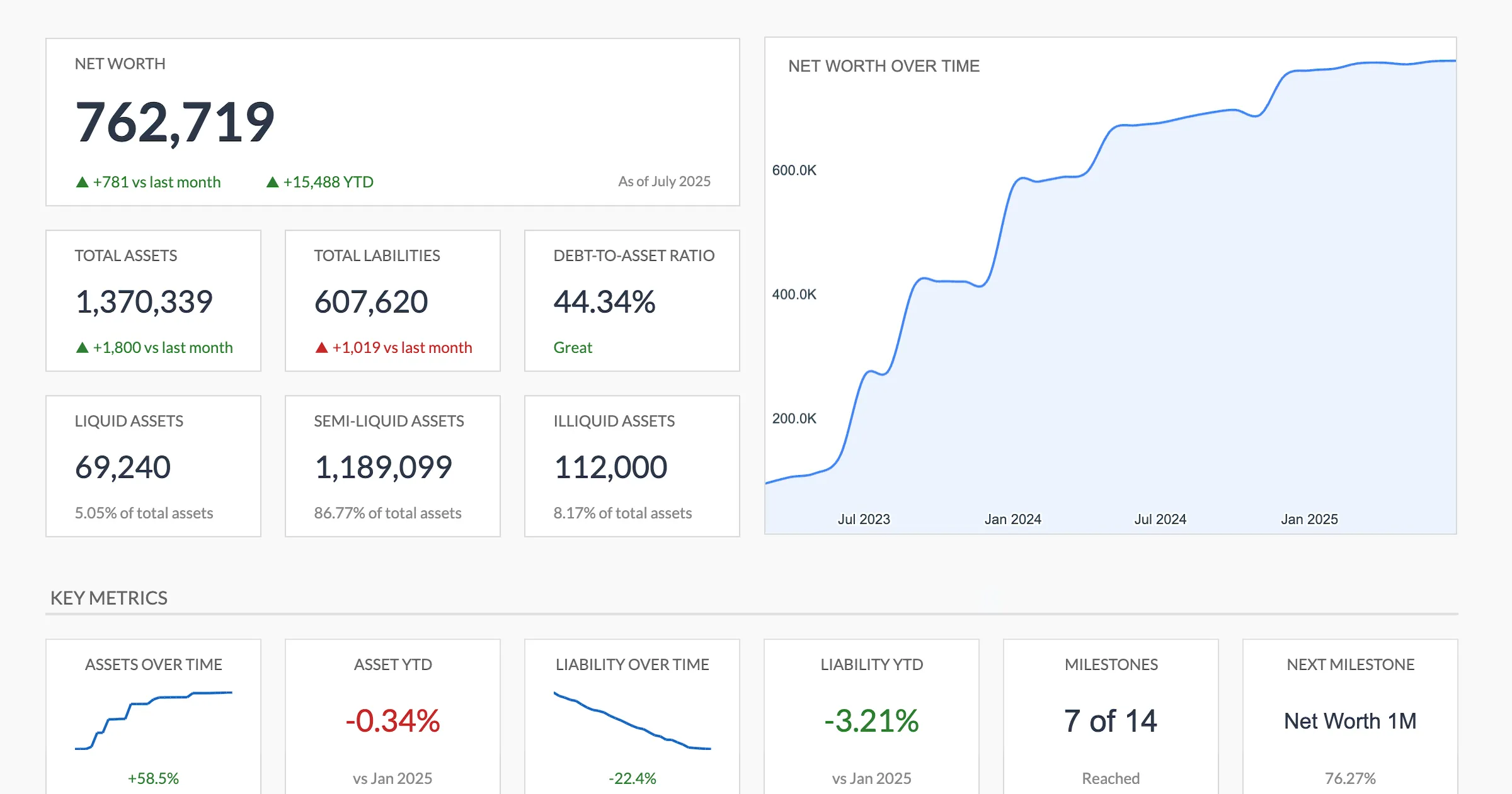 The FinancialAha Net Worth Tracker (Premium) dashboard. Updating your balances refreshes the totals, ratios, and trend chart automatically.
Apps with auto-sync offer convenience if you’re comfortable linking accounts. Empower is free, Monarch costs $99/year, and YNAB costs $109/year. Pick a consistent day for updates - first of month, last of month, payday. The specific day matters less than consistency.
Month 3: Develop Insights
After three months, you have enough data for meaningful comparison. Calculate change from last month, average monthly change, and percentage change. These numbers tell a story.
Identify patterns in your data. Does net worth spike on paydays? Drop after quarterly bills? Is the overall trend up, down, or flat? Use these insights to set a 12-month goal: Current Net Worth plus (Monthly Change times 12) equals Projected Year-End. If you don’t like the projection, that’s information about what might need to change.
Beyond 90 Days
Once the habit is established, shift to a sustainable rhythm. Quarterly reviews work well for most people: check each account, update valuations, and compare to the same quarter last year. Annual reviews zoom out further, covering net worth change for the year, percentage growth, and what contributed most.
Celebrating milestones keeps the process motivating. First $10,000, paying off a loan, hitting specific targets. Progress deserves acknowledgment. Small wins compound into significant changes over time.
The Complete Net Worth Guide
This is the starting point. Here’s every net worth topic covered on the site:
Getting started:
- How to Calculate Your Net Worth - The math and what to include
- How to Calculate Net Worth in Google Sheets - Step-by-step spreadsheet tutorial
- Net Worth Statement Checklist - Everything to gather before calculating
- Net Worth vs Liquid Net Worth - Why the distinction matters
- Net Worth Tracking Mistakes to Avoid - Common errors and how to fix them
Benchmarking:
- Net Worth by Age - Average and median data with trends
- Net Worth Milestones Before 40 - Age-specific targets and timelines
Advanced tracking:
- Automate Net Worth Updates in Google Sheets - GOOGLEFINANCE and automation
- Tracking Investments in a Net Worth Spreadsheet - Portfolio integration
- Net Worth Projections and Forecasting - Future modeling
- Net Worth Tracking for Couples - Joint vs separate approaches
Special situations:
- Negative Net Worth Recovery Plan - Getting back to zero and beyond
- Business Assets in Personal Net Worth - Valuation approaches
- Real Estate in Net Worth - Property valuation methods
- Crypto and Alternative Investments - Tracking volatile assets
Tools:
- Free Net Worth Tracker Spreadsheet - Free options and when a paid one earns its price
- Net Worth Tracker - Automated tracking template
- Net Worth Calculator - Quick calculation tool
- Net Worth Percentile Calculator - Check where you rank
- Financial Planning Template - Net worth plus projections
Frequently asked questions
What if I'm scared to look at the number?
The number exists whether you calculate it or not. Some people find that seeing it, even when it's negative, makes the next step clearer than guessing does.
Should I include my spouse's assets?
For joint planning, combining them gives the fuller picture. You can also track individual and combined figures side by side if that's more useful.
How accurate does it need to be?
Reasonably accurate is enough. Rounding to the nearest hundred or thousand keeps the trend readable, and exact cents rarely change the story.
Should I count my car and other things that lose value?
Depreciating items like vehicles can be included at a conservative resale value, such as a Kelley Blue Book figure. Using the same source each month keeps the change meaningful.
Where do I get a home value without an appraisal?
An online estimate from a source like Zillow works for tracking. Using one source month to month matters more than pinpoint accuracy.
Spreadsheet or app - which fits a beginner?
Both work. Spreadsheets keep everything offline and free with full control, while auto-sync apps save manual entry if you're comfortable linking accounts. The one you'll actually keep updating is the one that fits.
Sources
- YNAB Pricing - YNAB
- Monarch Pricing - Monarch
- Financial Tools - Empower
About this article
App pricing for Empower, Monarch, and YNAB checked against each provider's official pricing and tools pages. Net Worth Tracker features checked on 2026-09-10 against the shipped Net Worth Tracking Google Sheet (Summary, Assets, Liabilities, Milestones, Setup, Instructions tabs). Last reviewed September 2026.