
Net worth is total assets minus total liabilities, and any of these free spreadsheets will calculate it: the FinancialAha free net worth sheet (Excel or Google Sheets, no email), Vertex42's Excel template, Money Under 30's simple tracker, and community FIRE workbooks. Each gives you a single snapshot. The paid FinancialAha Net Worth Tracker ($29 once) adds what the free versions skip: a monthly column for every asset and debt, a net worth over time chart, liquid, semi-liquid and illiquid asset splits, and milestone tracking.
The math is the same across every net worth tracker: total assets minus total liabilities. What differs is the structure (single-month snapshot vs multi-month tracking), the dashboard (basic totals vs charts and milestone tracking), and the categories (generic vs specific to common asset types). This guide covers the four free options worth using and the three signs that you’ve outgrown free. For the full breakdown of the calculation itself, see how to calculate your net worth.
What every net worth tracker needs
Three things, regardless of price.
- An Assets sheet listing each account or item with a current value.
- A Liabilities sheet listing each debt with the outstanding balance.
- A summary that calculates
total assets - total liabilities = net worth.
That’s the minimum. Anything beyond that (charts, historical tracking, milestone progress, month-over-month changes) is value-add but not strictly necessary for the calculation.
Want your number before you pick a template? The calculator below adds up assets and liabilities for an instant snapshot, no spreadsheet required.
The four free options
1. FinancialAha Free Net Worth Sheet
We publish a free, stripped-down version of the Net Worth Tracker. It’s the minimum viable setup: one working tab where each row is an item tagged Asset or Liability, plus a How to Use sheet, and the total nets out to your net worth automatically.
Strengths
- Downloads as a spreadsheet file that opens in Excel, Google Sheets, and LibreOffice Calc.
- Pre-filled example rows for common accounts (checking, savings, brokerage, 401(k), IRA, home value, car value, mortgage, loans), each tagged Asset or Liability, so you can see the shape before you edit.
- Totals and net worth calculate automatically as you type.
- A currency dropdown on the main sheet that changes the label on the money column, without converting the figures.
- Free, no email required.
Limitations
- Single point in time. No history, no trend chart.
- No milestone tracking.
- No month-over-month or year-over-year change.
- The totals sum rows 11 to 25, so there is room for 15 item rows before you extend the formula range.
Use it if you’re starting and want a clean spreadsheet without setup. Open it, fill in your numbers, see your net worth in 5 minutes.
2. Vertex42 Net Worth Calculator (free, Excel-first)
Vertex42’s net worth template has been around for over a decade. Excel-first; works in Google Sheets after upload with some formula adjustments.
Strengths
- Detailed asset categories (separated investment account types, vehicle classes, property classes).
- Free, no signup.
- Long history of use; well-tested.
Limitations
- Excel-first means some formulas break in Sheets, especially conditional formatting.
- Single snapshot; no built-in history sheet.
- Page is ad-heavy and the download flow has friction.
- Layout is dated (mid-2010s table style).
Use it if you specifically want a more granular asset breakdown (separating taxable vs tax-deferred vs Roth, for example) and don’t mind a less polished UX.
3. Money Under 30’s simple net worth spreadsheet
A community-published Google Sheets template covered in Money Under 30’s article. Single-screen, very basic.
Strengths
- Single-screen layout. Hard to get lost.
- Short list of typical accounts; matches what most 20-something users have.
- Free; clear instructions in the article.
Limitations
- Designed for younger users; categories may not fit older or higher-net-worth households.
- No history, no chart.
- Not recently updated (the underlying logic is simple enough that it doesn’t need to be, but the article hasn’t been refreshed in years).
Use it if you’re early in your career, want the simplest possible tracker, and don’t want to overthink categories.
4. Mr. Money Mustache community spreadsheet
The forum at mrmoneymustache.com has a long-running thread of user-shared net worth and FIRE tracking templates. Quality varies; the most-cited one is a multi-tab workbook covering net worth, savings rate, and projection.
Strengths
- Built by people deeply engaged in personal finance.
- Often includes savings rate calculation alongside net worth.
- Free, with active community discussion of edge cases.
Limitations
- Quality varies wildly between user submissions.
- Often heavily personalized (US-specific, FIRE-focused, assumes particular account types).
- No central support; updates depend on the original creator.
Use it if you’re FIRE-focused and want a tracker that integrates with savings rate and projection in one workbook.
Comparison table
| Template | Format | History | Chart | Milestones | Setup time | Cost |
|---|---|---|---|---|---|---|
| FinancialAha Free | Excel/Sheets | No | No | No | 5 min | Free |
| Vertex42 Net Worth | Excel | No | No | No | 15 min (incl. download flow) | Free |
| Money Under 30 | Sheets | No | No | No | 5 min | Free |
| MMM community | Sheets/Excel | Sometimes | Sometimes | No | 30 min | Free |
| FinancialAha Net Worth Tracker | Sheets | Monthly columns | Yes | Yes | 10 min | $29 once |
When free is enough
Free works if all three of these are true.
- You only need a snapshot. Today’s number, calculated once, is what you came for.
- You’ll calculate manually each month if you want history (copy the file, save as “April 2026”, new file for May).
- You don’t need a trend chart or milestone tracking.
For a good share of people, that’s the whole job. The math is the math, and a snapshot answers the question they came with.
When you’ve outgrown free
Three signs.
You’re tired of copying the file every month. Single-snapshot templates make multi-month tracking awkward. After 4 to 6 months you’ll have a folder full of “Net Worth April”, “Net Worth May”, “Net Worth June” files and no easy way to chart the trend.
You want a chart. Net worth trends are most meaningful when visualized. A 12-point chart over a year tells you direction in a way a list of numbers doesn’t.
You want context. A single number in isolation says less than the same number next to where you were 12 months ago, or how close you are to your next milestone. A tracker keeps both in view. If you want to see how your figure compares by age instead, that lives in a separate breakdown, net worth by age, rather than the tracker itself.
If all three apply, a built-out version is a one-time $29 purchase, and the spreadsheet doesn’t expire the way a subscription would.
What our paid version adds
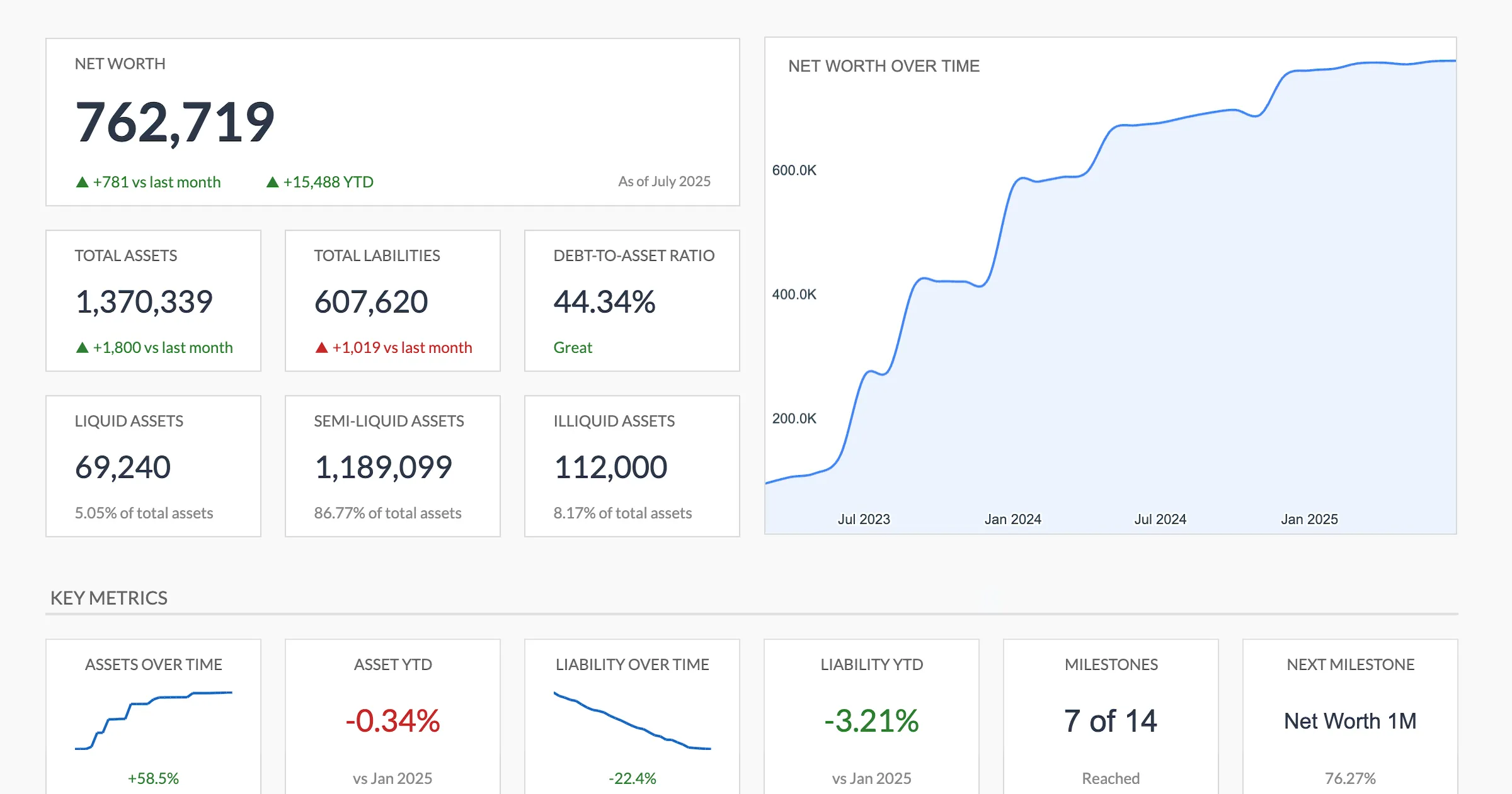
The Net Worth Tracker is $29 and includes:
- A monthly column on the Assets and Liabilities sheets, so history builds as you add each month
- A net worth over time area chart that redraws as you add months
- Liquid, semi-liquid, and illiquid asset breakdown
- Debt-to-asset ratio
- Asset allocation view
- Milestone tracking with progress toward your next net worth target
- Month-over-month and year-to-date change on assets, liabilities, and net worth
If none of those apply, the free version covers it, and there’s little reason to pay for features you won’t use.
How to migrate from free to paid (or back)
The schemas are similar enough that the move is painless either way.
Free to paid:
- Open the paid template.
- Copy your asset rows from the free version into the Assets sheet.
- Same for liabilities.
- Your current numbers become the first month’s column. Each new month is a column you insert on the Assets and Liabilities sheets, copying the totals formula across.
Paid to free (rare but happens):
- Open a free template.
- Copy the most recent month’s asset and liability rows.
- You lose the history but the current number is preserved.
A practical sequence
If you’ve never tracked net worth, one sequence that works for many people is:
- Use the FinancialAha free version (or any other free option) for two months.
- After two months, ask whether you actually checked it. If yes, a more capable tool has something to build on. If no, it’s worth finding out why before adding features.
- When you’re ready, the paid template is a one-time $29 purchase with no recurring cost.
A lot of personal finance is the discipline of actually doing the thing, and tools tend to matter less than habit. Free first is one way to let that habit prove itself before paying for more.
Get the template
- Net Worth Tracker ($29) - Monthly asset and liability log with a net worth over time chart and milestone tracking.
- Financial Planning Spreadsheet - Long-range projection to an end year you set, with net worth, cash flow, assets and debt in one file.
- Net Worth Tracker Ultimate ($29) - 30 asset and 20 liability rows, an asset allocation breakdown by category, 12-month snapshots, and year-over-year comparison.
Related
Frequently asked questions
Is the FinancialAha free net worth sheet really free?
Yes. No email signup and no credit card. The workbook does carry a short upgrade block at the bottom pointing to the Essentials and Ultimate versions, and that is the extent of it. We publish it because it gets people started, and some percentage of those people eventually upgrade. Most don't, and that's fine.
Can I use the free version forever?
Yes. It's a spreadsheet file you download and keep, and it opens in Excel, Google Sheets, or LibreOffice Calc. We don't run anything that could be turned off. The math is in the cells.
Can I connect my bank accounts to any of these?
No. Every spreadsheet on this list, free or paid, is manual entry: you type in each balance yourself. That is the trade-off for keeping the data in a file you own with no account linking, and it is why the monthly update takes a few minutes rather than happening in the background.
Does the paid tracker show how my net worth compares to others my age?
No. The Net Worth Tracker focuses on your own trend, your month-over-month change, and progress toward milestones rather than age-bracket comparisons. If you want to see where a figure lands by age, the free Net Worth Percentile Calculator on the site does that separately.
Do I need to update Vertex42's template for 2026?
The math doesn't change. Categories may need light adjustments for new account types (for example, HSAs are now common as an investment vehicle and weren't always included). Most users add or rename rows.
Is there a phone app version of any of these?
No dedicated apps. Google Sheets has a mobile app and most templates render. The paid Net Worth Tracker ships as a Google Sheet, so it opens wherever Google Sheets does.
Sources
- Net Worth Calculator (Excel Template) - Vertex42
- Net Worth Spreadsheet - Money Under 30
About this article
Competitor template details checked against the Vertex42 and Money Under 30 pages linked in the article. Free, Ultimate and Premium Net Worth Tracker sheets, inputs and outputs checked on 2026-09-10 against the shipped workbooks: the free net-worth-tracker.xlsx (Net Worth, How to Use), the Ultimate workbook (Dashboard, Assets, Liabilities, Monthly Snapshots, Asset Allocation, Year-over-Year, How to Use) and the Premium Google Sheet (Summary, Assets, Liabilities, Milestones, Setup, Instructions, Data Types, Helpers). Prices checked against the site's product catalog. Last reviewed September 2026.