Best Value Complete Financial Planning Bundle
✓ Financial Planning✓ Net Worth Tracker✓ Monthly Budgeting✓ Travel Budget Planner✓ Annual Budgeting Planner✓ Monthly Expense Tracker✓ Annual Tax Planner✓ Retirement Planning
View Bundle →
Ultimate Template - Excel & Google Sheets

Ultimate Net Worth Tracker Spreadsheet Template for Google Sheets & Excel

Thirty rows for holdings and twenty for debts, each named, each with a category, and each carrying last month's value beside this month's so the change works itself out and colours by direction - on the debt side a falling balance reads the sensible way round. The Ultimate Net Worth Tracker spreadsheet template rolls the detail into monthly snapshots, an allocation breakdown and a three-year comparison. Six working sheets and two charts, Google Sheets and Excel. No macros, no VBA.

See Preview
Net Worth Tracker Spreadsheet Template - Ultimate version for Google Sheets and Excel

What's Included

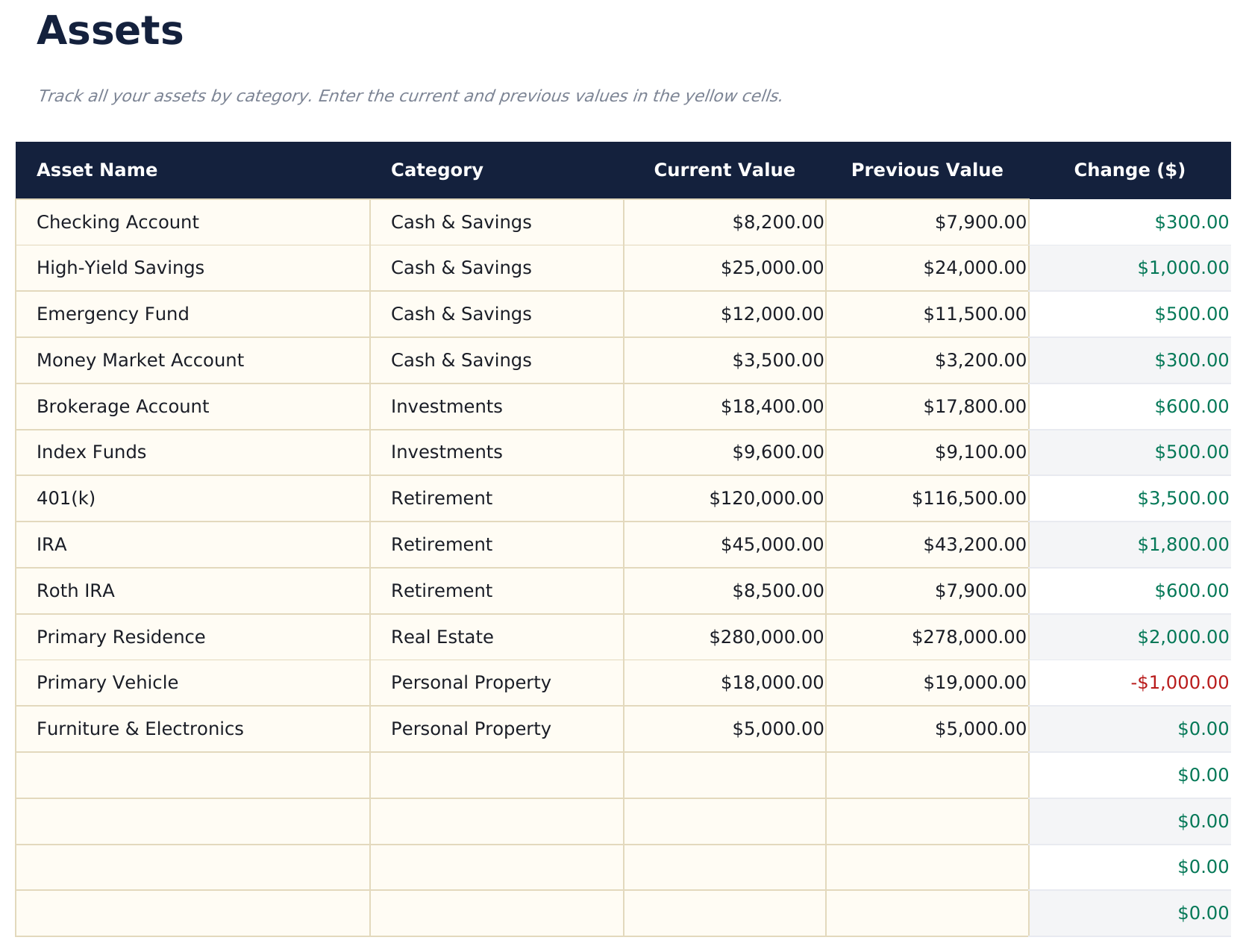
  • An Assets sheet naming every holding, each with a category chosen from a list
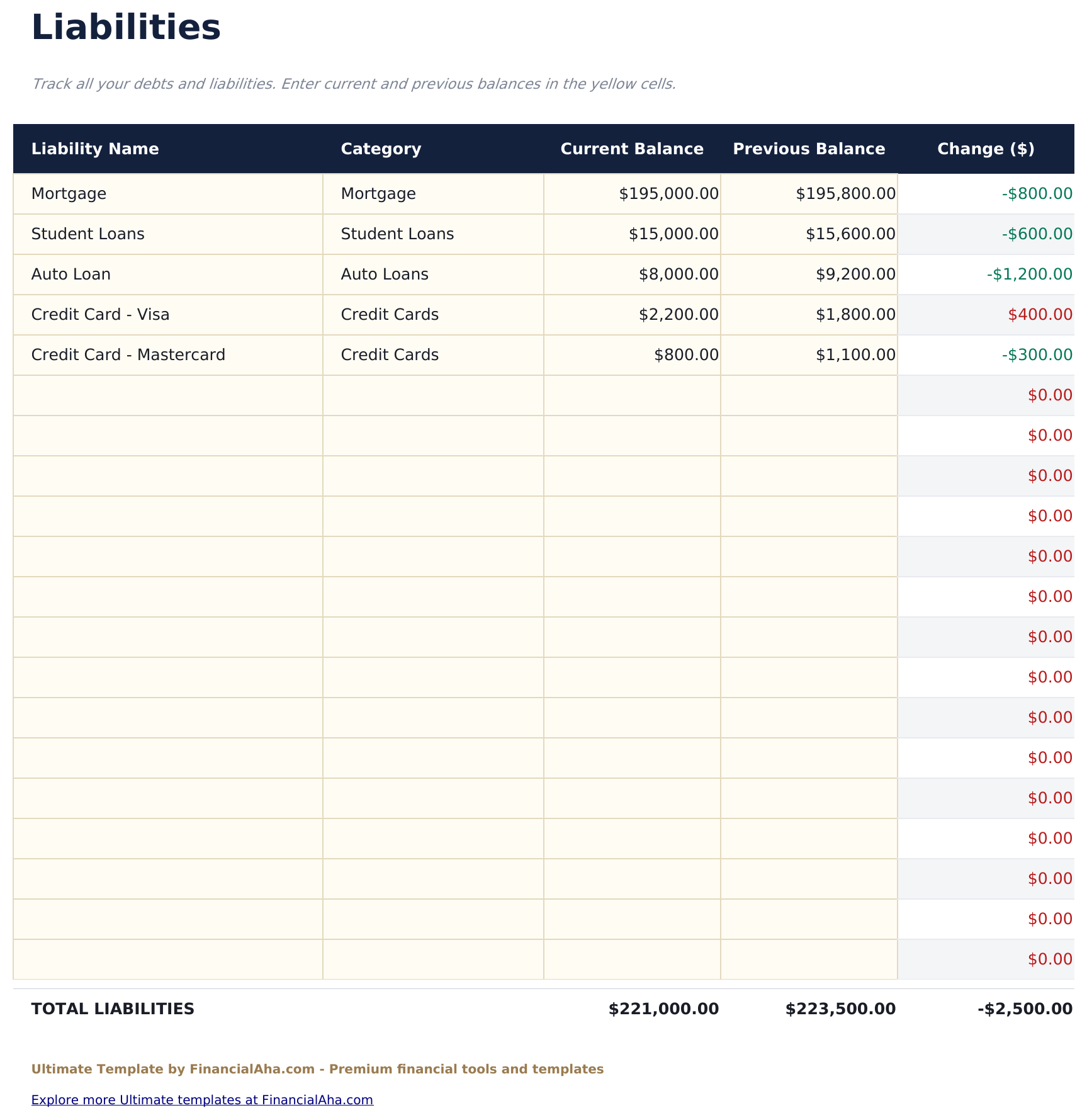
  • A Liabilities sheet naming every debt across five categories
  • Current and previous value on every line, with the change worked out and coloured by direction
  • Debt colouring that reads the sensible way round - a falling balance is the good direction
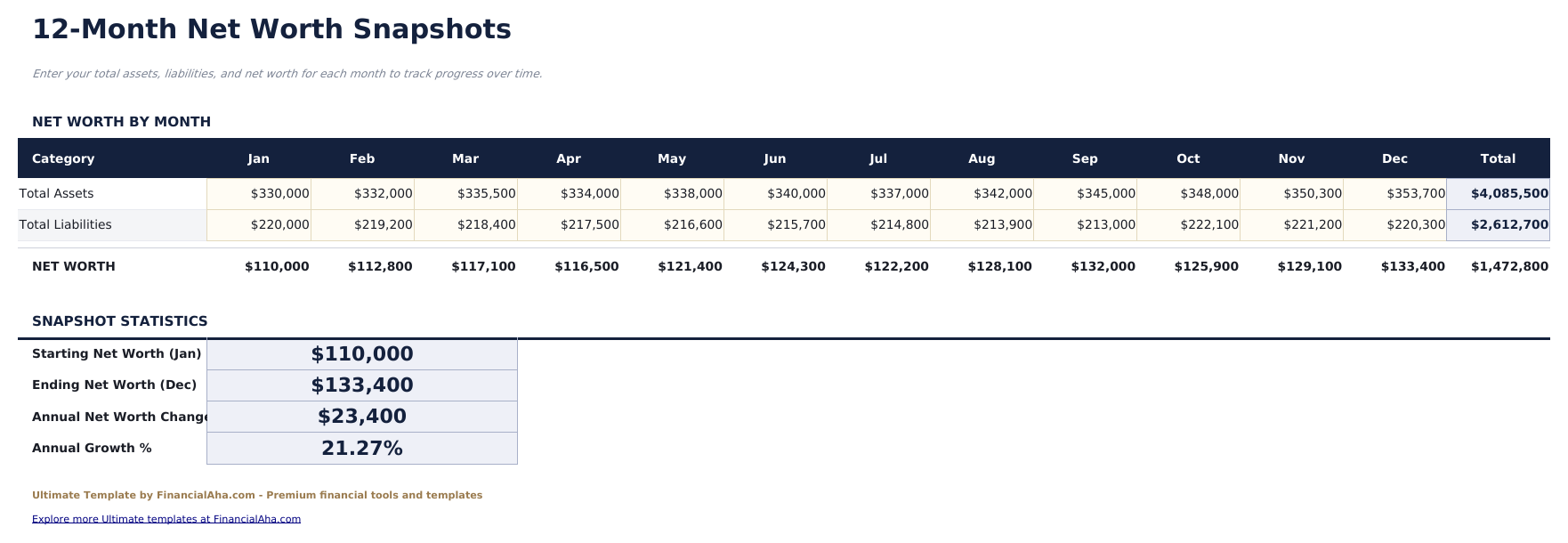
  • Monthly Snapshots turning the detail into a year-long trend without re-itemising each month
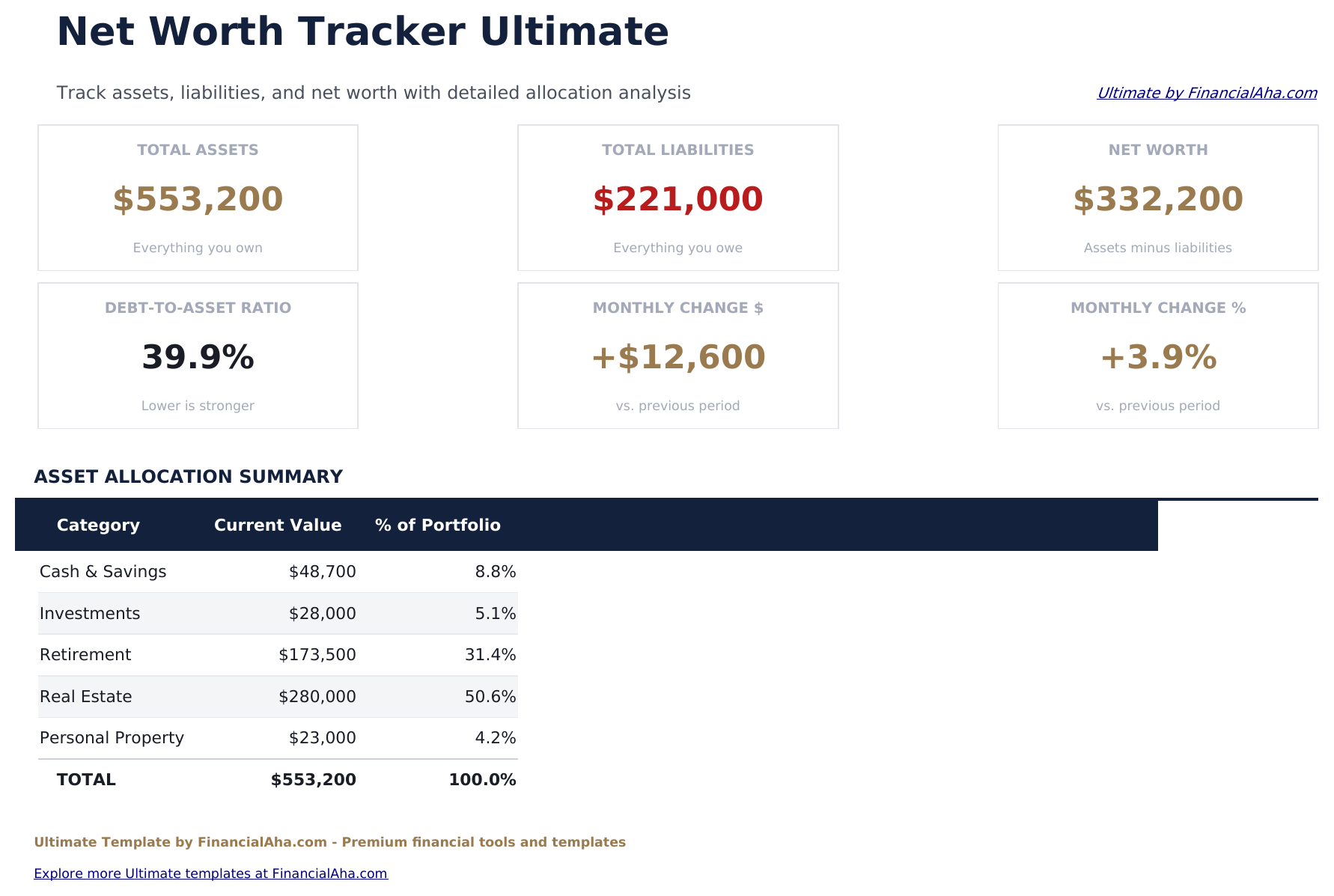
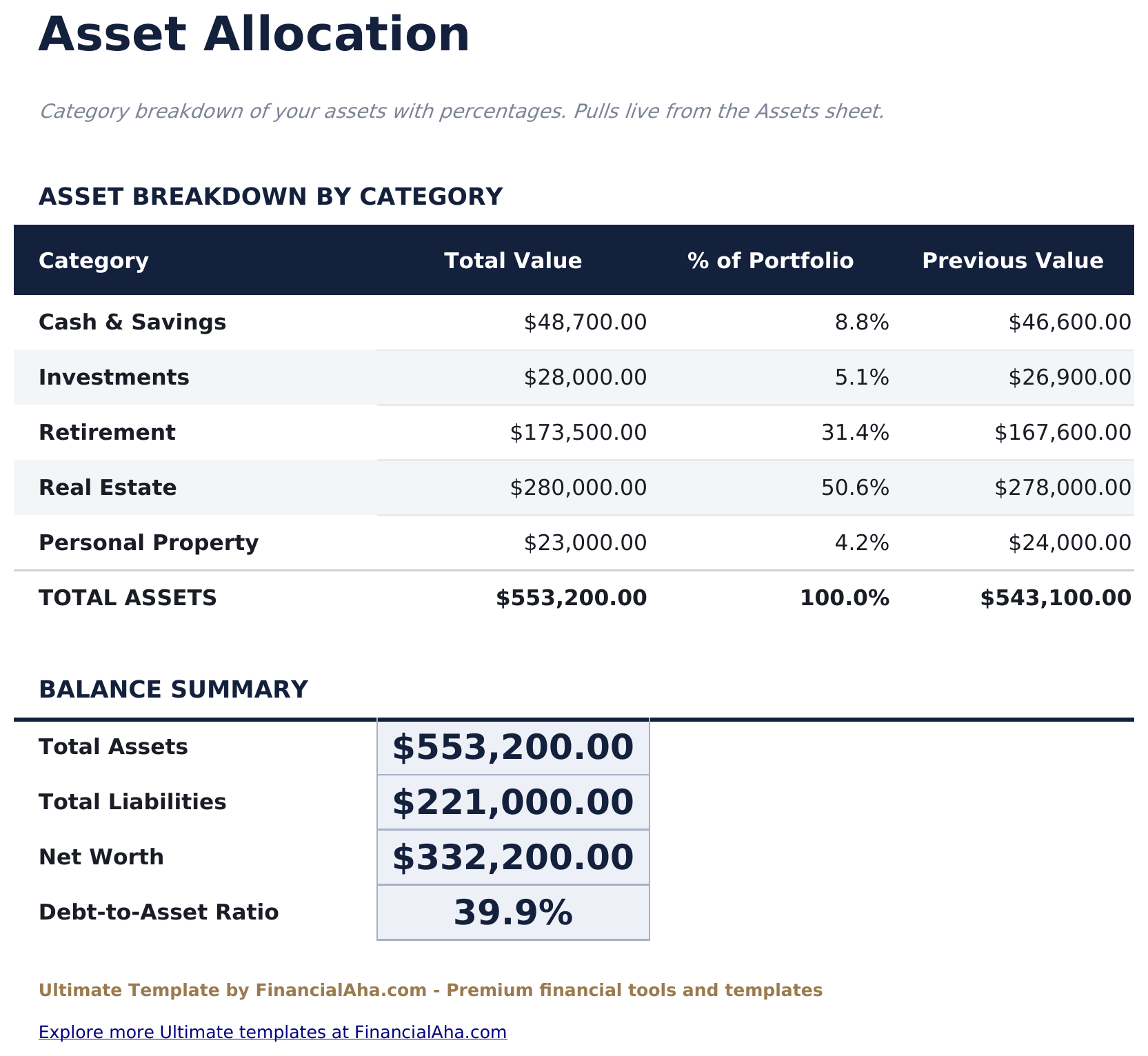
  • Asset Allocation totalling each category straight from the itemised list, with its share of the portfolio
  • A balance summary carrying both totals, the net figure and the debt-to-asset ratio
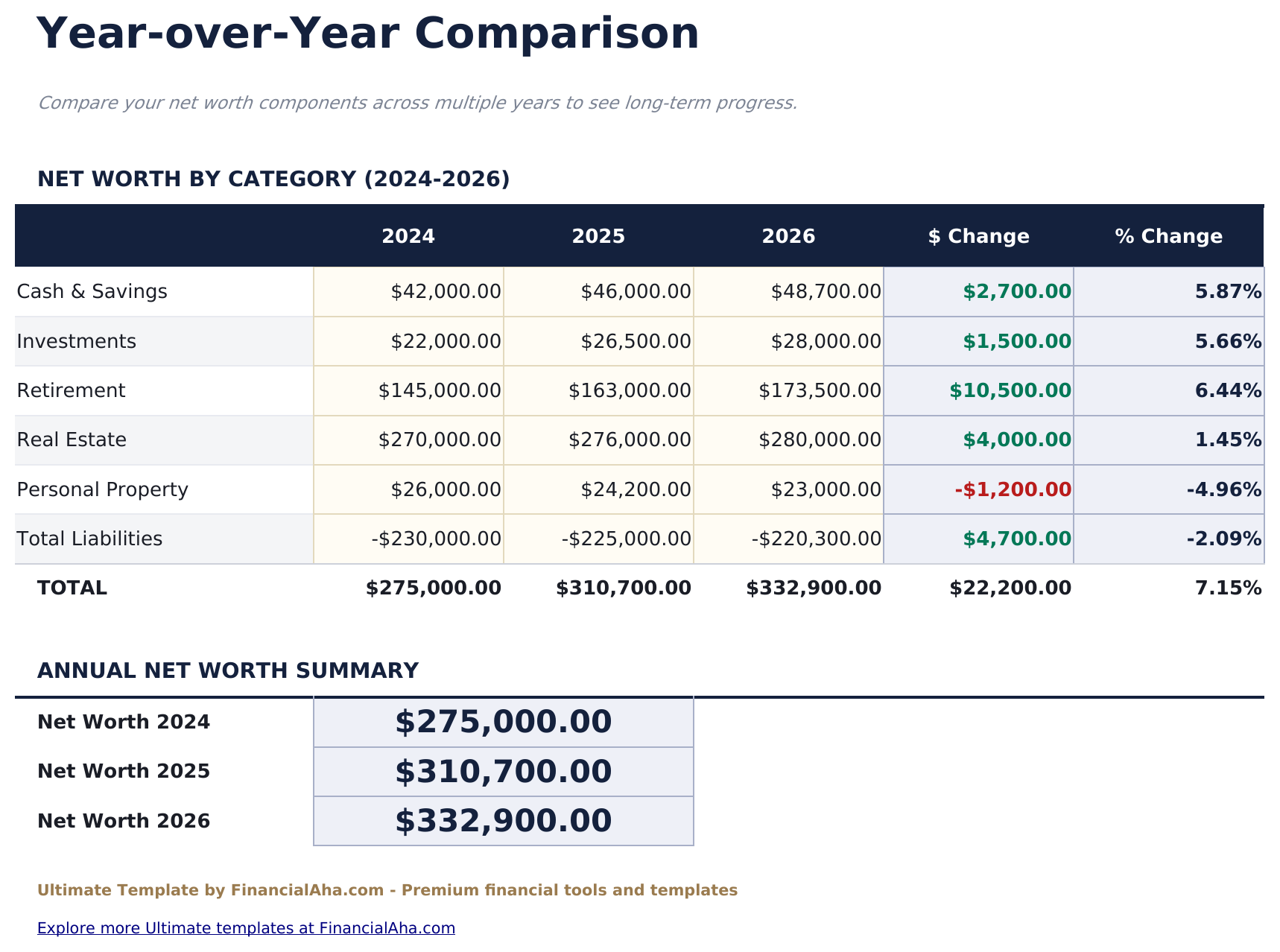
  • Year-over-Year comparing net worth by category across three years, in money and percentage terms
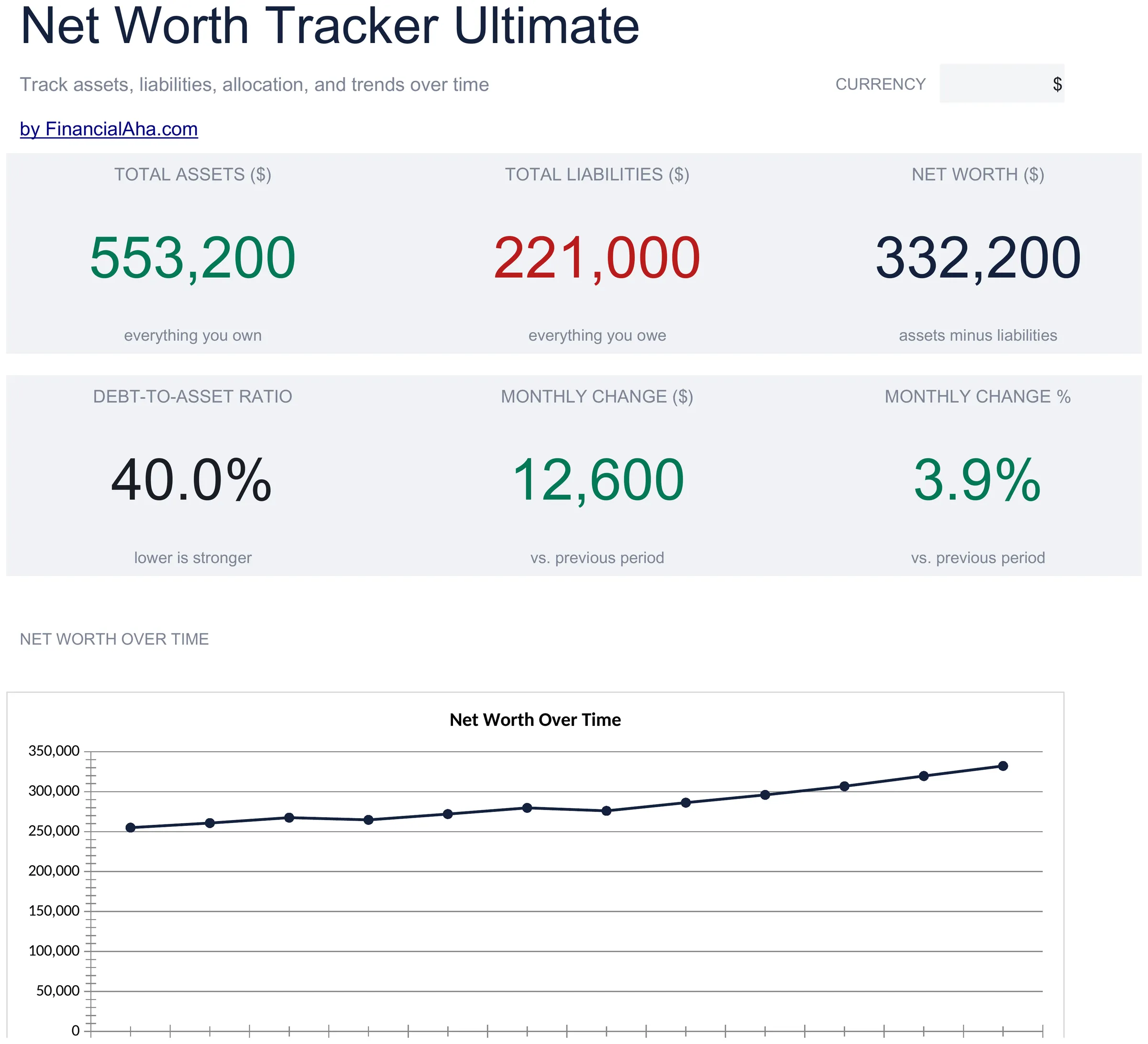
  • Dashboard with six KPIs, a line chart across the year and a pie chart by category
  • Works in Microsoft Excel and Google Sheets with no macros required

The FinancialAha Ultimate Net Worth Tracker Spreadsheet Template for Google Sheets and Excel is a six-sheet workbook that itemises a balance sheet rather than summarising it, with a How to Use guide on a seventh tab. It ships as an Ultimate Net Worth Tracker Excel template and an Ultimate Net Worth Tracker Google Sheets template in one file. This Ultimate Net Worth Tracker spreadsheet template names every asset and debt, each with a category and last month's figure beside this month's, then rolls them into a monthly view, an allocation breakdown and a comparison across three years. No macros, no VBA.

Inside the workbook

What's inside the FinancialAha Ultimate Net Worth Tracker spreadsheet template

The FinancialAha Ultimate Net Worth Tracker Spreadsheet Template runs on six working sheets - four you type into, two that report back - plus the guide. It works in both Microsoft Excel and Google Sheets and here is what the Ultimate Net Worth Tracker spreadsheet holds.

  1. 01 of 06

    Dashboard

    The balance sheet in six figures: what you own, what you owe, the net between them, the ratio of debt to assets, and the month's movement in both money and percentage terms. A line chart traces net worth across the year and a pie chart splits the assets by category, with an allocation table underneath putting numbers against the shares.

  2. 02 of 06

    Assets

    Everything you own, itemised rather than grouped, each line with a name, a category chosen from a list, what it is worth now and what it was worth last time. The change between those two is worked out and coloured, so a position that has moved stands out without hunting for it. Categorising each line by dropdown rather than by section is what lets the allocation sheet add them up on its own.

  3. 03 of 06

    Liabilities

    The other side, on the same pattern: every debt named, each with a category, the balance now and the balance before, and the change between them. The colouring runs the sensible way round here - a balance coming down is the good direction, and the sheet reads it that way.

  4. 04 of 06

    Monthly Snapshots

    The year at the top level. Rather than re-itemising every month, you record the totals for each of the twelve, and the net worth, the monthly movement and the annual change follow. It is the sheet that turns a detailed picture of today into a trend, and the closing column carries the averages and the full-year change.

  5. 05 of 06

    Asset Allocation

    Where the money actually sits, across the five categories. Totals pull straight from the itemised list, so nothing is entered twice, and each category carries its share of the portfolio alongside its previous value. A balance summary closes the sheet with the two totals, the net figure and the debt-to-asset ratio. It reports the split rather than setting a target for it.

  6. 06 of 06

    Year-over-Year

    The long view: net worth by category across three years side by side, with the change shown in both money and percentage terms. Annual figures are entered rather than derived, which keeps the sheet usable regardless of when you started, and it is where a category quietly growing or shrinking becomes visible.

  7. Included guide

    How to Use

    A step-by-step guide on its own tab, covering setup, what each sheet expects, how the colour coding reads, and how the allocation figures are pulled through. Because it ships inside the file, the instructions travel with the template wherever it is opened.

Works in both Google Sheets and Excel

Ultimate Net Worth Tracker Spreadsheet template for Google Sheets

Upload the Ultimate Net Worth Tracker Spreadsheet Template to Drive, right-click it, and choose "Open with Google Sheets". This Ultimate Net Worth Tracker Google Sheets template needs no conversion step and both charts survive the trip intact. The category dropdowns and the totals they feed rely on the existing tab names, so those are worth leaving alone.

Ultimate Net Worth Tracker Google Sheets template setup

A shared copy of the Ultimate Net Worth Tracker Google Sheets template suits a household where accounts sit in different names, since each line is itemised rather than pooled. Sheets version history covers a balance typed over, and the allocation sheet updates for both people as entries change.

Sharing the Ultimate Net Worth Tracker Google Sheet

The Ultimate Net Worth Tracker Google Sheet is a monthly job rather than a daily one: move each current value into the previous column, put this month's figures in, and every other sheet follows. The three-year view is the once-a-year addition.

Ultimate Net Worth Tracker Spreadsheet template for Excel

The Ultimate Net Worth Tracker spreadsheet Excel download is a plain .xlsx. Excel opens this Ultimate Net Worth Tracker Excel template directly, with no import step and no compatibility prompt, and both charts are native Excel charts that redraw as balances change. There are no macros and no VBA in the file, so it opens without a security warning.

Ultimate Net Worth Tracker Excel template setup

The same Ultimate Net Worth Tracker Excel template opens in Excel on Windows, Excel on Mac, and Excel for the web. It is also the identical file you would upload to Drive, so there is no separate Ultimate Net Worth Tracker spreadsheet download to choose between.

Ultimate Net Worth Tracker spreadsheet Excel notes

The Ultimate Net Worth Tracker spreadsheet Excel file carries no macros and no VBA, so Excel opens it without a trust prompt. The same Ultimate Net Worth Tracker spreadsheet Excel download also opens in Excel for the web, which matters when you move between a work machine and a personal one.

Opening the Ultimate Net Worth Tracker spreadsheet Excel file

Nothing in the Ultimate Net Worth Tracker Excel template is version-specific, so this Ultimate Net Worth Tracker spreadsheet Excel workbook behaves identically in Excel on Windows, Excel on Mac, and older builds.

Spreadsheet template highlights

What the Ultimate Net Worth Tracker spreadsheet template tracks

Assets and Liabilities share one layout, so the columns below cover both sides of the Ultimate Net Worth Tracker Spreadsheet Template:

Asset Name
what the line is, named however suits you
Category
picked from a list, which is what lets the allocation sheet total it
Current Value
what it is worth today
Previous Value
what it was worth last time you updated
Change auto
derived, the movement between the two, coloured by direction
Current Balance
the debt side's equivalent, entered as a positive balance
% of Portfolio auto
derived, each category's share of what you own

Compare builds

FinancialAha Net Worth Tracker spreadsheet template: Free, Essentials, and Ultimate compared

Feature Free View Spreadsheet Template Essentials View Spreadsheet Template Ultimate This page
Working sheets 1 2 6
Capacity 15 rows, assets and debts together 3-5 rows per section 30 assets, 20 debts
Shape One snapshot 12-month grid Itemised, with a monthly roll-up
Liabilities entered as Negative values Positive balances Positive balances
Categories 5 asset groups 5 asset, 5 debt, by dropdown
Change tracking Month on month Per item, current vs previous
Charts 2 2
Asset allocation Composition tables Dedicated sheet, % of portfolio
Debt-to-asset ratio Asset-to-debt ratio Yes
Year-over-year Three years by category

The FinancialAha Ultimate Net Worth Tracker Spreadsheet Template covers six working sheets and itemises rather than groups. The Free Net Worth Tracker Spreadsheet Template holds one snapshot. The Essentials Net Worth Tracker Spreadsheet Template for Google Sheets and Excel turns that into a twelve-month grid with five asset groups and a month-on-month change. This build names every holding individually, assets and liabilities on sheets of their own, each categorised and each carrying last month's figure beside this month's - which is what makes the allocation sheet possible: the split by category adds itself up rather than being maintained by hand. On top of that sit monthly snapshots for the year's trend and a three-year comparison by category.

Good to know

Notes on working in the Ultimate Net Worth Tracker spreadsheet template

  • The category on each line is what drives the allocation sheet. Picking from the list rather than typing over it is what keeps the totals adding up.
  • Previous Value is what makes the change column work - moving this month's figures across before entering new ones is the monthly rhythm.
  • The allocation sheet reports where money sits. It does not hold a target to measure that split against.
  • Monthly Snapshots takes totals rather than itemised figures, so a year of history does not mean maintaining twelve copies of the detail.
  • The currency dropdown sits on the Dashboard and relabels money figures across the whole Ultimate Net Worth Tracker spreadsheet. It changes the label only and does not convert the numbers.

How to Use This Template

1

Enter your assets

On the Assets sheet, name each holding, pick its category from the list, and enter the current and previous values.

2

Enter your debts

On the Liabilities sheet, do the same for each debt. The change column shows whether a balance moved the right way.

3

Record the month

Put the month's totals into Monthly Snapshots. Net worth, the movement and the annual change follow from them.

4

Read the breakdown

Asset Allocation totals each category and its share of the portfolio, and Year-over-Year holds the long view.

Customer Reviews

What Our Customers Say

"If I get half as good at handling my finances as you are at customer service, this'll be the best $26 I've spent lately."

J Jenny Verified Buyer

"Great tool! Simplifies financial planning without the hassle of complex spreadsheets."

F Fazia Search Marketing Manager

"I recently purchased your super convenient spreadsheet, it really helps me!"

J John Verified Buyer

"They're great and super intuitive. Thank you!"

M Mira Verified Buyer

Built by Claude AI. Perfected by us.

We use Claude AI to draft each template, after a deep research. Then our team steps in. We refine the layout, stress-test every formula, fix edge cases, and polish the design until it feels like something we would actually use ourselves. The AI gets us 80% there. The last 20% is all human judgment.

One-time purchase. No subscription. Works in Excel & Google Sheets.

Frequently Asked Questions

Is the FinancialAha Ultimate Net Worth Tracker Spreadsheet Template a Google Sheets template?

Yes. Upload the file to Drive and choose "Open with Google Sheets". The Ultimate Net Worth Tracker Google Sheets template needs no conversion step and both charts survive the trip intact. The category dropdowns and the totals they feed rely on the existing tab names, so those are worth leaving alone.

Is the FinancialAha Ultimate Net Worth Tracker Spreadsheet Template an Excel template?

Yes. The download is a plain .xlsx, so the Ultimate Net Worth Tracker Excel template opens directly in Excel with no import step. Both charts are native Excel charts, and there are no macros or VBA.

Will the FinancialAha Ultimate Net Worth Tracker spreadsheet Excel file open in older versions of Excel?

Yes. The Ultimate Net Worth Tracker spreadsheet Excel workbook ships as a plain .xlsx, so it opens identically in current Excel and in builds that predate dynamic arrays.

Does the Ultimate Net Worth Tracker spreadsheet template set allocation targets?

No. The Asset Allocation sheet reports where your money actually sits - each category's total and its share of the portfolio, pulled straight from the itemised list - but it does not hold a target to measure that split against.

Can I add assets or debts to the Ultimate Net Worth Tracker spreadsheet?

Assets and liabilities get sheets of their own, each across five categories, with everything named individually rather than grouped. Right-click inside either table and choose Insert when you need another row.

How do monthly snapshots work in the Ultimate Net Worth Tracker spreadsheet?

You record the totals for each of the twelve months rather than re-itemising the detail, and net worth, the monthly movement and the annual change follow from them. It is what turns a detailed picture of today into a trend.

What does the change column need in the Ultimate Net Worth Tracker spreadsheet?

A previous value alongside the current one. Moving this month's figures into the previous column before entering new ones is the monthly rhythm, and it is what makes the colouring meaningful.

What does the year-over-year sheet cover in the Ultimate Net Worth Tracker spreadsheet?

Net worth by category across three years side by side, with the change shown in money and percentage terms. The annual figures are entered rather than derived, so the sheet works regardless of when you started.

What do I get after buying the Ultimate Net Worth Tracker spreadsheet template?

You receive the Ultimate Net Worth Tracker spreadsheet template as an Excel file (.xlsx) that works in Microsoft Excel and Google Sheets. Download it immediately after purchase - no signup or account required.

Is there a free Ultimate Net Worth Tracker spreadsheet template?

Yes. A free version of the Ultimate Net Worth Tracker spreadsheet template is available with basic features. The Ultimate version adds advanced analysis, more capacity, and additional sheets.

What if the Ultimate Net Worth Tracker spreadsheet template does not work for me?

Contact us and we will help troubleshoot. The Ultimate Net Worth Tracker spreadsheet template works in Microsoft Excel and Google Sheets with no macros required.

Ultimate

Highlights:

Instant download after purchase
No macros or VBA required
All formulas auto-calculate
No subscription required
Works in
Excel Google Sheets

Looking for more Ultimate templates?

We offer Ultimate versions of our most popular spreadsheet templates with advanced features, more capacity, and deeper analysis.

Private & secure

Your financial data stays on your device. We never see it.

Learn more →

Need help?

Check our guides or reach out with questions.

View FAQ →