免费 投资组合跟踪器 电子表格模板
跟踪股票、债券和基金的投资持仓。在一个仪表板中监控投资组合价值、配置和表现。
Upgrade your spreadsheet
Here is how you unlock a better version.
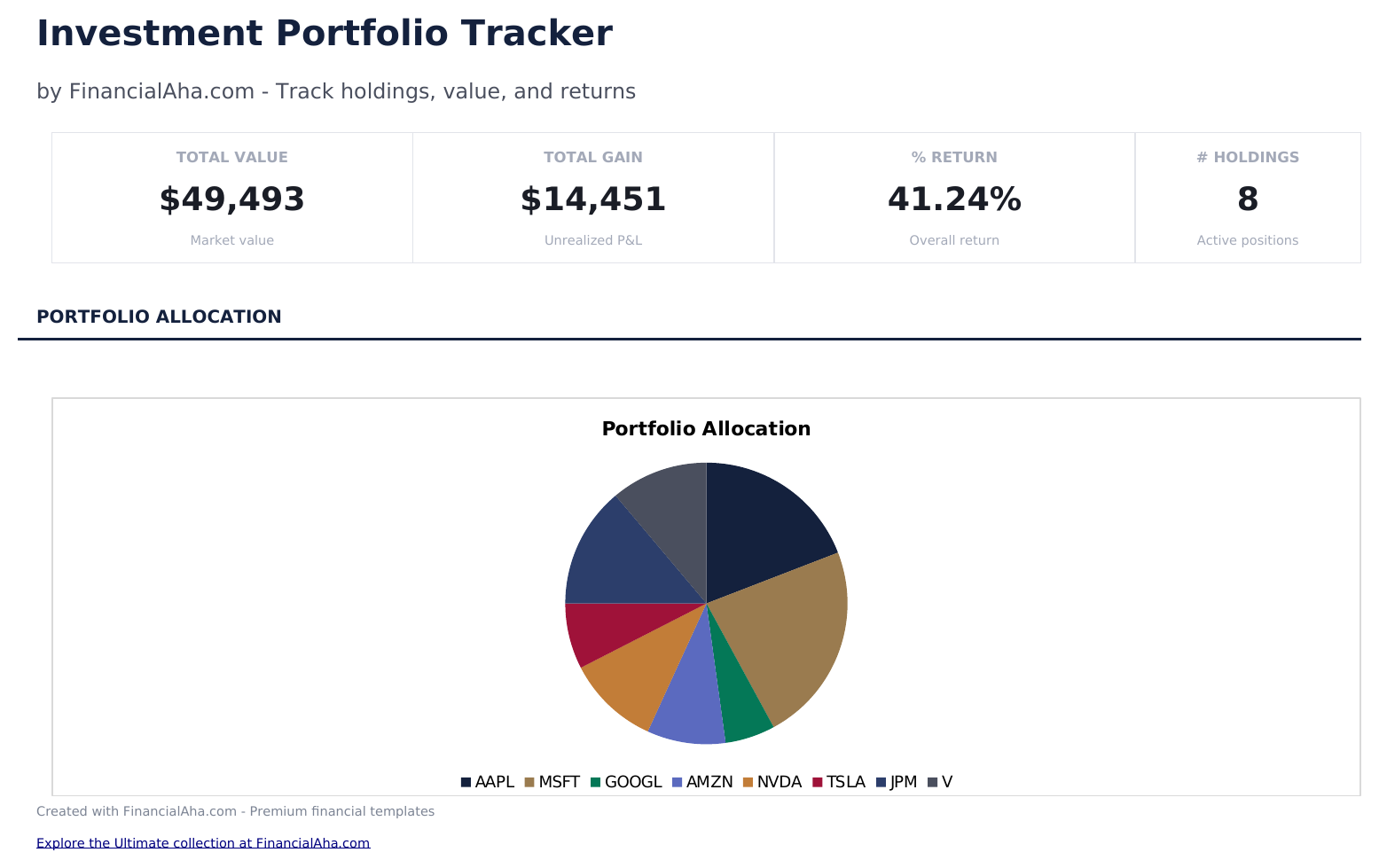
- Full-featured Investment Portfolio Tracker with dashboard and detailed analytics
- Pre-filled subcategories, sample scenarios, and helper calculations
- Larger data capacity for real-world usage
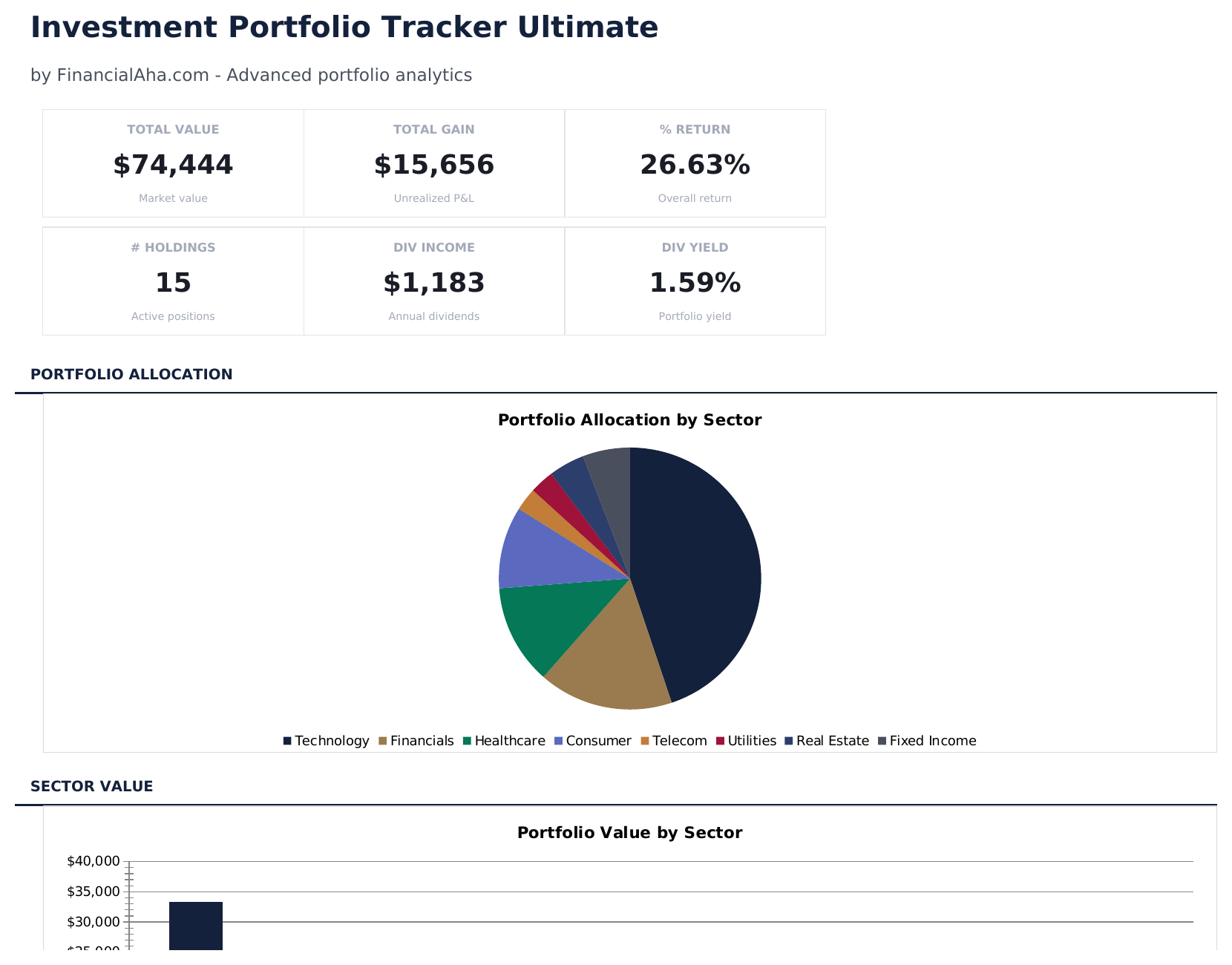
- Track up to 50 holdings with ticker, sector, shares, cost basis, current price, and annual dividend per share
- Dashboard with 6 KPI cards: total value, total gain, percent return, number of holdings, dividend income, and portfolio yield
- Dividend income tracker pulling automatically from Holdings - shows annual income, yield, and income weight per holding
包含内容
- 仪表板提供投资组合概览,显示总市值、总成本基础、总盈亏和回报率
- 持仓列表包含股票代码、持有股数、买入价、当前价和每个仓位的自动盈亏计算
- 资产配置细分,显示股票、债券、ETF 和现金在投资组合中的百分比权重
- 盈亏跟踪,包含未实现和已实现列,显示每个持仓的金额和百分比回报
- 按持仓的表现汇总,配有彩色标记的输入单元格(黄色)和自动计算的投资组合指标(蓝色)
- 适用于 Microsoft Excel、Google Sheets 和 LibreOffice Calc,无需任何设置
Free、Essentials 与 Ultimate - 有什么区别?
- "Portfolio" sheet with labeled columns and pre-filled sample rows you can overwrite
- Column totals update automatically as you log new entries
- Consistent layout - no setup, no pivot tables, no macros
- Step-by-step "How to Use" guide included in a second sheet
- Works in Microsoft Excel, Google Sheets, and LibreOffice Calc - no setup or sign-up
- 包含 Free 的全部
- Full-featured Investment Portfolio Tracker with dashboard and detailed analytics
- Pre-filled subcategories, sample scenarios, and helper calculations
- Larger data capacity for real-world usage
- $12 one-time purchase, lifetime access
- 包含 Essentials 的全部
- Track up to 50 holdings with ticker, sector, shares, cost basis, current price, and annual dividend per share
- Dashboard with 6 KPI cards: total value, total gain, percent return, number of holdings, dividend income, and portfolio yield
- Dividend income tracker pulling automatically from Holdings - shows annual income, yield, and income weight per holding
- Allocation analysis comparing target vs actual sector weights with variance and rebalancing recommendations (Add, Trim, Hold)
投资组合跟踪器 模板的工作原理
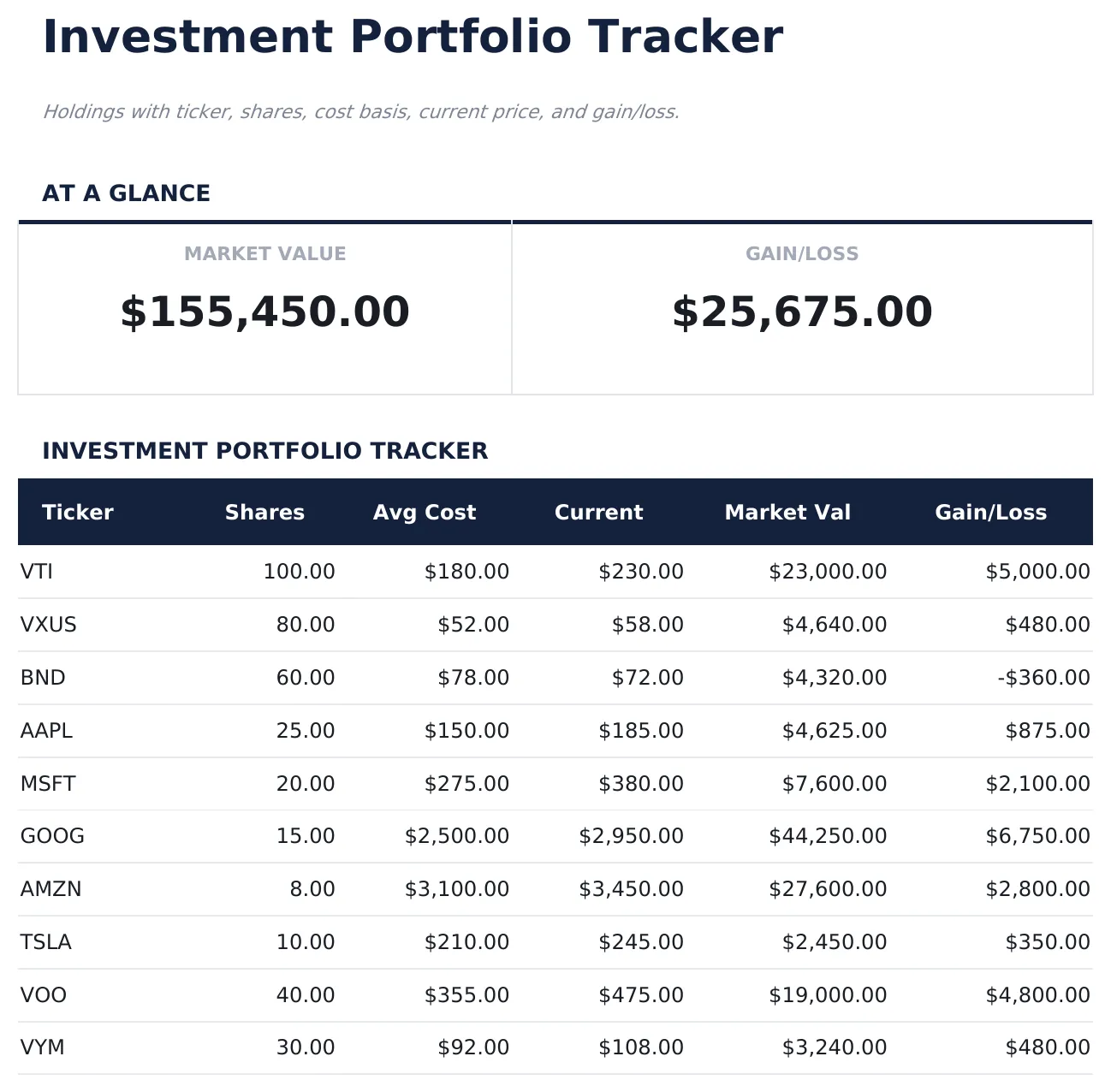
Holdings with ticker, shares, cost basis, current price, and gain/loss. Open the spreadsheet, enter your own numbers, and let the formulas do the math.
此模板何时有用
- You want a simple log of portfolio without connecting accounts or learning a new app.
- You need a record for taxes, reimbursement, or a quarterly review.
- You prefer one row per entry so you can sort, filter, and total later.
- You want something that opens in Excel, Google Sheets, or LibreOffice with no setup.
充分利用的小贴士
- Keep the column labels simple - the formulas work best when categories are consistent month to month.
- Update monthly regularly - once a week is a good rhythm for most people.
需要避免的常见错误
- Logging sporadically. A tracker only works if entries are consistent - weekly at minimum for most categories.
- Changing column labels after entering data. The formulas reference columns by position; renaming is fine, but moving columns breaks the totals.
- Letting the sheet balloon. When the row count gets unwieldy, archive older entries to a second file.
如何使用这个投资组合跟踪器模板
输入持仓
列出每项投资的股票代码、持有股数、买入价和当前价。
查看盈亏
模板以金额和百分比回报两种方式计算每个仓位的未实现盈亏。
检查配置
资产配置细分显示每个持仓和资产类别在总投资组合中的百分比权重。
在仪表板上监控
仪表板一目了然地显示投资组合总值、总成本基础、整体回报和主要持仓。
由 Claude AI 构建,经我们精心打磨。
我们使用 Claude AI 在深入研究后起草每个模板。然后由团队接手,优化布局、全面测试每个公式、修复边界情况,并打磨设计,直到达到我们自己愿意使用的标准。AI 完成了 80% 的工作,最后 20% 靠的是人工判断。
Upgrade your spreadsheet
Here is how you unlock a better version.
- Full-featured Investment Portfolio Tracker with dashboard and detailed analytics
- Pre-filled subcategories, sample scenarios, and helper calculations
- Larger data capacity for real-world usage
- Track up to 50 holdings with ticker, sector, shares, cost basis, current price, and annual dividend per share
- Dashboard with 6 KPI cards: total value, total gain, percent return, number of holdings, dividend income, and portfolio yield
- Dividend income tracker pulling automatically from Holdings - shows annual income, yield, and income weight per holding
常见问题
需要手动更新价格吗?
是的。在需要更新投资组合时,为每个持仓输入当前价格。Google Sheets 用户可以使用 GOOGLEFINANCE 自动更新价格。
能跟踪股息吗?
此模板专注于持仓和基于价格的回报。如需股息跟踪,请配合使用股息跟踪器模板。
可以跟踪多种账户类型吗?
可以。添加账户列(券商账户、IRA、401k)即可查看每个持仓所在的账户。总计适用于所有账户。
什么是成本基础?
成本基础是您购买股份的总金额(股数乘以买入价)。盈亏为当前价值减去成本基础。
如何在 Google Sheets 中打开?
将 .xlsx 文件上传到 Google Drive,然后使用 Google Sheets 打开。所有公式和格式都会保留。
此模板使用什么许可证?
所有免费模板均采用 CC BY 4.0(知识共享署名)许可证发布。您可以自由使用、修改和分享,包括用于商业用途,只需注明来源为 FinancialAha.com。模板按原样提供,不构成财务建议。