Best Value Complete Financial Planning Bundle
✓ Financial Planning✓ Net Worth Tracker✓ Monthly Budgeting✓ Travel Budget Planner✓ Annual Budgeting Planner✓ Monthly Expense Tracker✓ Annual Tax Planner✓ Retirement Planning
View Bundle →

Instant digital delivery · Terms & Conditions apply

Essentials Template - Excel & Google Sheets

Essentials Expense Report Spreadsheet Template for Google Sheets & Excel

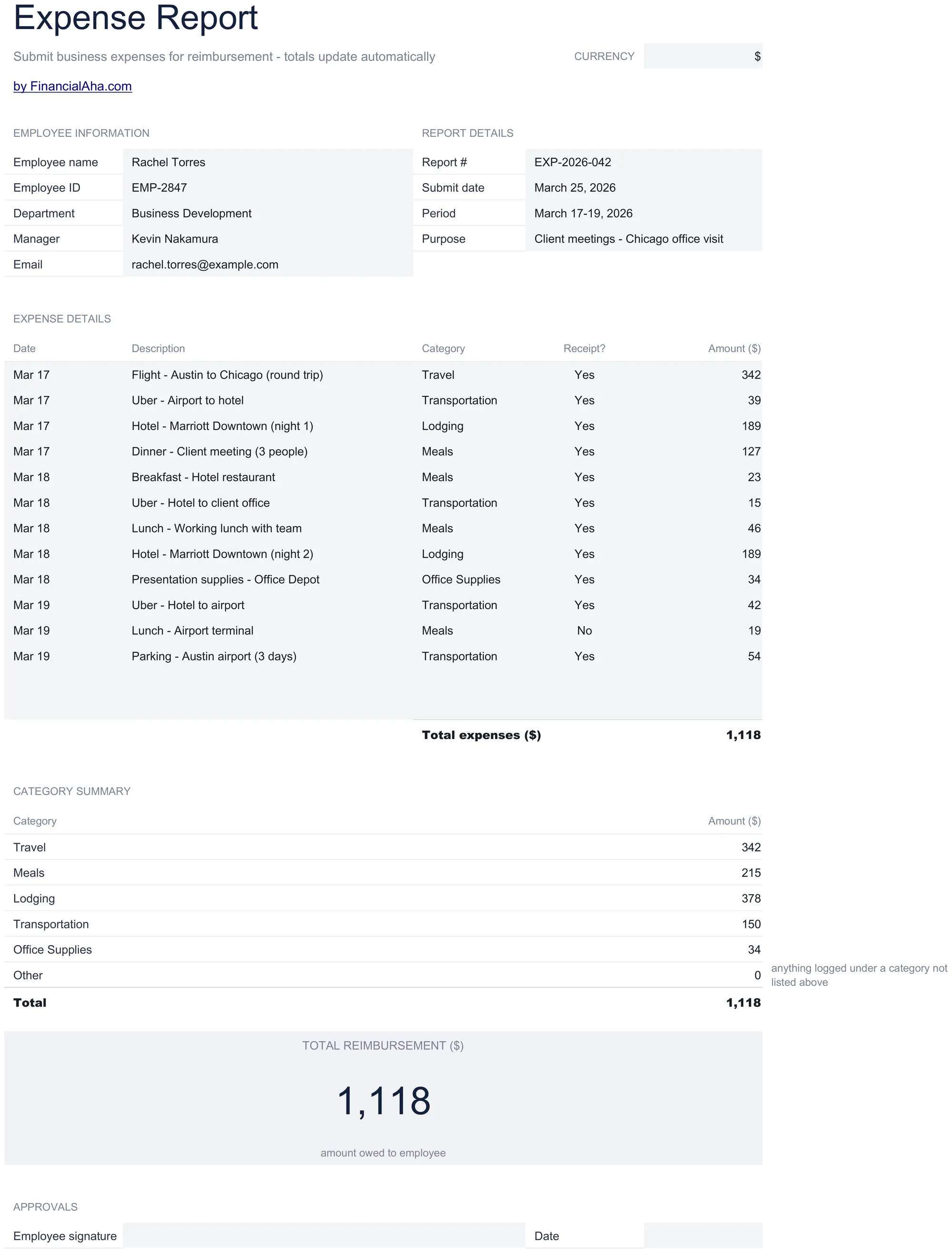
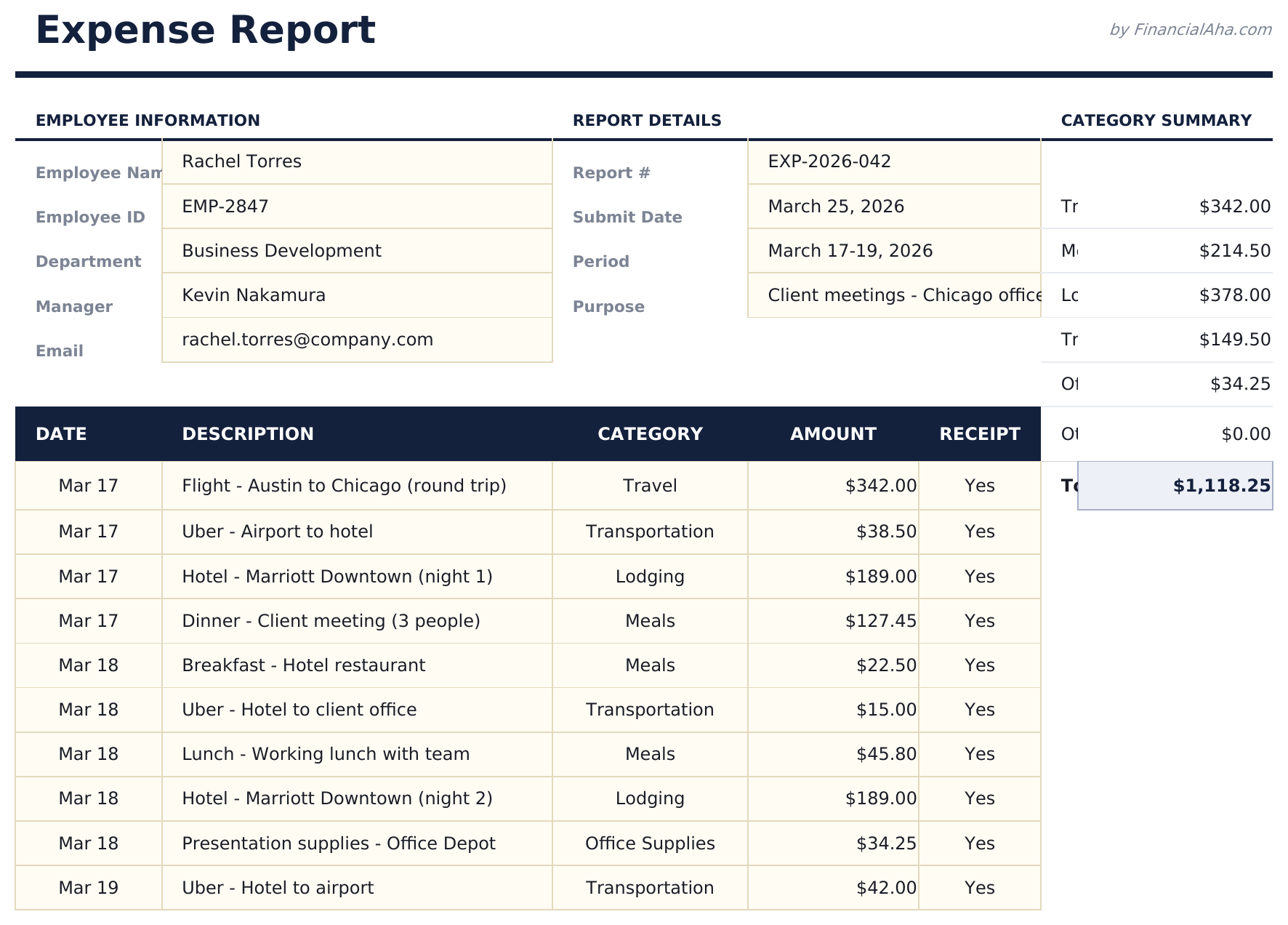
A report someone can actually submit: employee name, identifier, department, manager and email at the head, then the report number, submit date, period covered and the purpose of the trip. The Essentials Expense Report spreadsheet template takes fourteen expenses with a receipt-held marker on each and rolls them into a category summary a finance team can code from. Google Sheets and Excel, one file. No macros, no VBA.

Instant digital delivery · Terms & Conditions apply

Essentials Expense Report spreadsheet template - Google Sheets and Excel preview

What's Included

  • Employee name, identifier, department, manager and email
  • Report number, submit date, period covered and the purpose of the trip
  • Fourteen expenses with date, description, category and amount
  • A receipt-held marker on every line
  • A category summary a finance team can code from
  • The reimbursement owed to the employee
  • An approvals block for signatures
  • Laid out to print on a single page for signing
  • A currency dropdown beside the title that relabels the money columns
  • Works in Microsoft Excel and Google Sheets with no setup required

The FinancialAha Essentials Expense Report Spreadsheet Template for Google Sheets and Excel is a single-sheet workbook laid out as a submittable report, with a How to Use guide on a second tab. It works as an Essentials Expense Report Excel template and an Essentials Expense Report Google Sheets template from the same download. This Essentials Expense Report spreadsheet template records who is claiming, what the trip was for, whether each receipt is held, and what is owed - with a block for approval. No macros, no VBA.

Inside the workbook

What's inside the FinancialAha Essentials Expense Report spreadsheet template

The FinancialAha Essentials Expense Report Spreadsheet Template puts the whole report on one working sheet, with the instructions on a tab of their own. It works in both Microsoft Excel and Google Sheets and here is what the Essentials Expense Report spreadsheet holds.

  1. 01 of 01

    Expense Report

    The employee block identifies who is claiming - name, identifier, department, manager and email - and the report block gives the claim its context: a report number, the date submitted, the period it covers and what the trip was for. Stating the purpose is what stops an approver having to ask, and asking is what turns a two-day approval into a two-week one. Fourteen expenses follow, each with a date, a description, a category, a marker for whether a receipt is held, and the amount. The receipt column is the honest one: it records what you actually have rather than what you meant to keep, and a report that flags its own gap is treated very differently from one where the gap is found during review. Beneath the lines sits a category summary - travel, meals, lodging, transportation, supplies and anything else - which is what a finance team uses to code the spend rather than read it line by line. Then the reimbursement owed, and an approvals block for the signatures that make it a submitted claim rather than a list. Every line here is treated as employee-paid, which is why the reimbursement figure equals the total. If some of a trip goes on a corporate card, those lines do not belong on this report.

  2. Included guide

    How to Use

    A step-by-step guide on its own tab, covering what belongs in each block, what the receipt marker is for, and how the category summary is built. Because it ships inside the file, the instructions travel with the template wherever it is opened.

Works in both Google Sheets and Excel

Essentials Expense Report Spreadsheet template for Google Sheets

Upload the Essentials Expense Report Spreadsheet Template to Drive, right-click it, and choose "Open with Google Sheets". This Essentials Expense Report Google Sheets template needs no conversion step and every total recalculates exactly as it does in Excel. Sheets exports to PDF in a couple of clicks, which is what a finance team tends to want attached to the receipts.

Essentials Expense Report Google Sheets template setup

A shared copy of the Essentials Expense Report Google Sheets template lets a manager review a report in place rather than by email, and the receipt column tells them immediately which lines need chasing before it goes further.

Sharing the Essentials Expense Report spreadsheet template as a Google Sheet

The Essentials Expense Report Google Sheet is best filled in during a trip rather than after it, because the dates, the purpose of each expense and the receipt markers are all things that get vague within a week.

Essentials Expense Report Spreadsheet template for Excel

The Essentials Expense Report spreadsheet Excel download is a plain .xlsx. Excel opens this Essentials Expense Report Excel template directly, with no import step and no compatibility prompt, and it is laid out to print on a single page for signing. There are no macros and no VBA in the file.

Essentials Expense Report Excel template setup

The same Essentials Expense Report Excel template opens in Excel on Windows, Excel on Mac, and Excel for the web. It is also the identical file you would upload to Drive, so there is no separate Essentials Expense Report spreadsheet download to choose between.

Essentials Expense Report spreadsheet Excel notes

The Essentials Expense Report spreadsheet Excel file carries no macros and no VBA, so Excel opens it without a trust prompt - which matters when a report is emailed into a finance system that blocks macro-enabled attachments.

Opening the Essentials Expense Report spreadsheet Excel file

Nothing in the Essentials Expense Report Excel template is version-specific, so this Essentials Expense Report spreadsheet Excel workbook behaves identically in Excel on Windows, Excel on Mac, and older builds.

Spreadsheet template highlights

What the Essentials Expense Report spreadsheet template tracks

Fourteen expenses, five columns, under an employee and report block. This is what the Essentials Expense Report Spreadsheet Template holds:

Date
when the expense happened
Description
what it actually was, in enough detail to approve
Category
and what the category summary groups by
Receipt?
whether you hold evidence for that line
Amount
what was paid

Compare builds

FinancialAha Expense Report spreadsheet template: Free and Essentials compared

Feature Free View Spreadsheet Template Essentials This page
Working sheets 1 1
Expense lines 13 14
Employee and report details Yes
Trip period and purpose Yes
Receipt held marker Per line
Paid by corporate or personally Recorded, and the personal lines totalled as OWED BACK
Category summary Yes
Approvals block Yes
Charts

The FinancialAha Essentials Expense Report Spreadsheet Template turns a list of expenses into a submittable report. Against the Free Expense Report Spreadsheet Template, which logs each expense with a category and a payment method and totals them all together, this build records who is claiming and their manager, the period and purpose of the trip, marks whether a receipt is held on every line, summarises spending by category for coding, states the reimbursement owed, and carries an approvals block. It has no payment-method column, because every line on it is treated as employee-paid.

Good to know

Notes on working in the Essentials Expense Report spreadsheet template

  • Stating the purpose of the trip saves the approver asking, which is one of the things that slows a report down.
  • The receipt column records what you actually hold, and a report that flags its own gap is treated better than one where it turns up in review.
  • The category summary is what a finance team codes from, rather than reading the lines individually.
  • Every line is treated as employee-paid, so corporate-card charges do not belong on this report.
  • The currency dropdown beside the title relabels the money columns of the Essentials Expense Report spreadsheet. It changes the label only and does not convert the numbers.

How to Use the Essentials Expense Report Spreadsheet Template

1

Identify the claim

Employee details, manager, report number and submit date.

2

State the purpose

The period covered and what the trip was for.

3

List the expenses

Date, description, category and amount for each.

4

Mark the receipts

Which lines you hold evidence for, before it goes for approval.

Stress-tested with AI.

Every template starts with deep research into how people actually track the topic. We design the layout, build the formulas, and polish the design until it feels like something we would use ourselves. Along the way, we use AI to stress-test the calculations: unusual inputs, edge cases, and formula behavior, checked until the numbers hold.

Instant digital delivery · Terms & Conditions apply

Frequently Asked Questions

Is the FinancialAha Essentials Expense Report Spreadsheet Template a Google Sheets template?

Yes. Upload the file to Drive and choose "Open with Google Sheets". The Essentials Expense Report Google Sheets template needs no conversion step, and a manager can review the report in place rather than by email.

Is the FinancialAha Essentials Expense Report Spreadsheet Template an Excel template?

Yes. The download is a plain .xlsx, so the Essentials Expense Report Excel template opens directly in Excel with no import step. There are no macros and no VBA, which matters when a report is emailed into a finance system.

Will the FinancialAha Essentials Expense Report spreadsheet Excel file open in older versions of Excel?

Yes. The Essentials Expense Report spreadsheet Excel workbook ships as a plain .xlsx, so it opens identically in current Excel and in builds that predate dynamic arrays.

Does the Essentials Expense Report spreadsheet handle corporate card charges?

No. Every line is treated as employee-paid, which is why the reimbursement figure equals the total. Charges that went on a company card do not belong on this report.

What is the category summary for in the Essentials Expense Report spreadsheet?

Coding. A finance team groups spending by category rather than reading a report line by line, so summarising it saves them doing it themselves.

Why does the purpose field matter in the Essentials Expense Report spreadsheet?

Because it stops the approver having to ask, and it is the asking that turns a two-day approval into a two-week one.

What does the receipt column do in the Essentials Expense Report spreadsheet?

Records what you actually hold rather than what you meant to keep. A report that flags its own gap is treated very differently from one where the gap is found during review.

How many expenses does the Essentials Expense Report spreadsheet hold?

Fourteen. The Free build holds thirteen bare lines - what this one adds is the surrounding report: who is claiming, the receipts, the category summary and the approvals.

How do I open the Essentials Expense Report spreadsheet template in Google Sheets?

Upload the .xlsx file to Google Drive, then open it with Google Sheets. All formulas and formatting will be preserved.

More Essentials Business Finance Templates

Essentials

Highlights:

Instant download after purchase
No macros or VBA required
No sign-up, no subscription
Lifetime free updates
Works in
Excel Google Sheets

Looking for premium spreadsheet templates?

Our paid templates include advanced multi-sheet dashboards, native Excel charts, and ongoing updates.

Private & secure

Your financial data stays on your device. We never see it.

Learn more →

Need help?

Check our guides or reach out with questions.

View FAQ →