Best Value Complete Financial Planning Bundle
✓ Financial Planning✓ Net Worth Tracker✓ Monthly Budgeting✓ Travel Budget Planner✓ Annual Budgeting Planner✓ Monthly Expense Tracker✓ Annual Tax Planner✓ Retirement Planning
View Bundle →
Vacation / PTO Tracker

Instant digital delivery · Terms & Conditions apply

Essentials Template - Excel & Google Sheets

Essentials Vacation / PTO Tracker Spreadsheet Template for Google Sheets & Excel

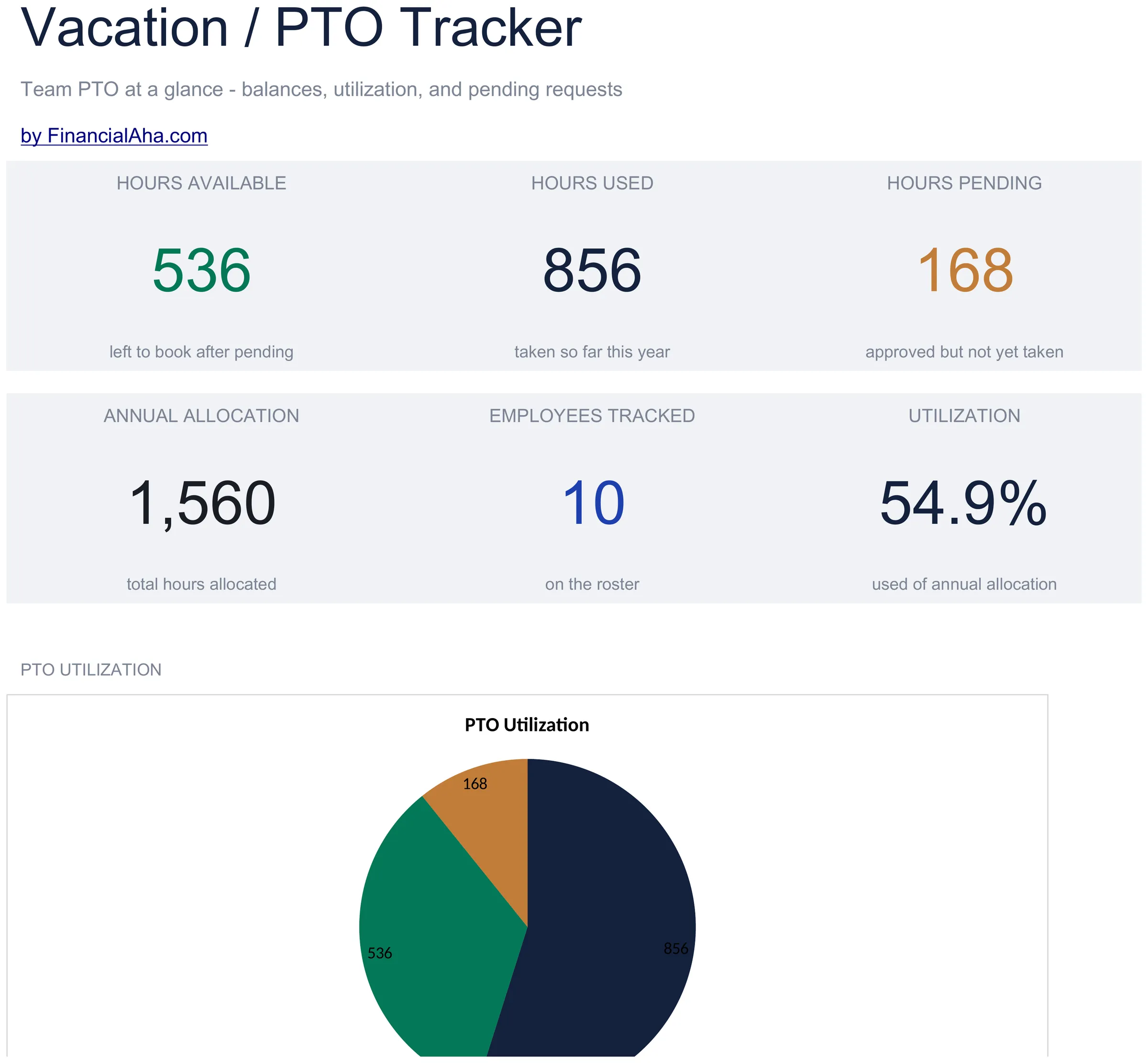
Counted in hours, explicitly: an annual allocation, the hours used, the balance between them, and a pending column for hours approved but not yet taken, on a row per person. The Essentials Vacation / PTO Tracker spreadsheet template reports utilization - what has been used as a share of what was allocated - on a dashboard of six team figures with two charts. Two working sheets, Google Sheets or Excel. No macros, no VBA.

See Ultimate Spreadsheet Template

Instant digital delivery · Terms & Conditions apply

View Ultimate Vacation / PTO Tracker Spreadsheet Template
$29
Essentials Vacation / PTO Tracker spreadsheet template - Google Sheets and Excel preview

What's Included

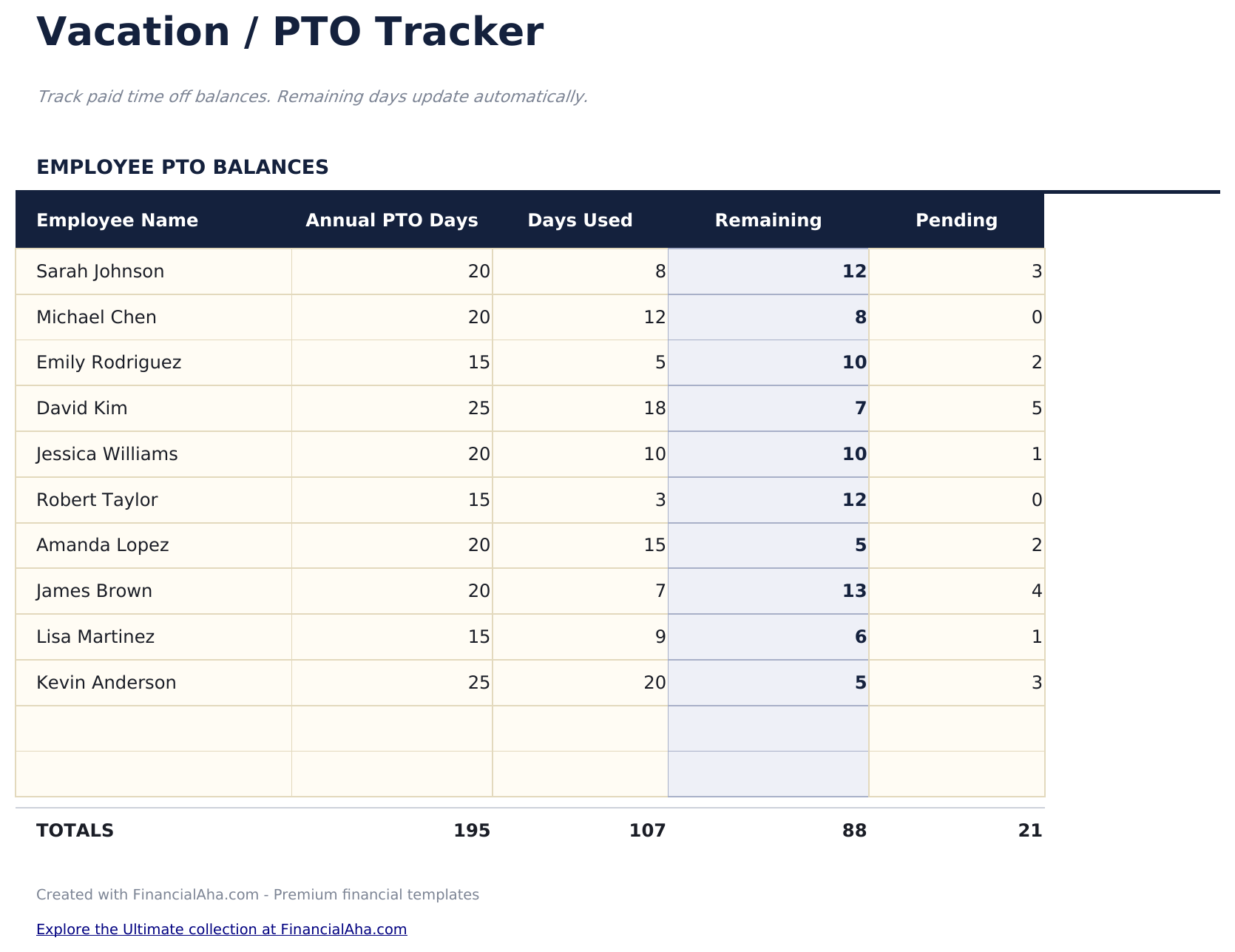
  • A row per person, counted in hours explicitly
  • Annual allocation, hours used and the balance between them
  • A pending column for hours approved but not yet taken
  • A dashboard carrying six team figures
  • Utilization - what has been used as a share of what was allocated
  • A headcount that counts filled names rather than rows
  • A chart of team utilization
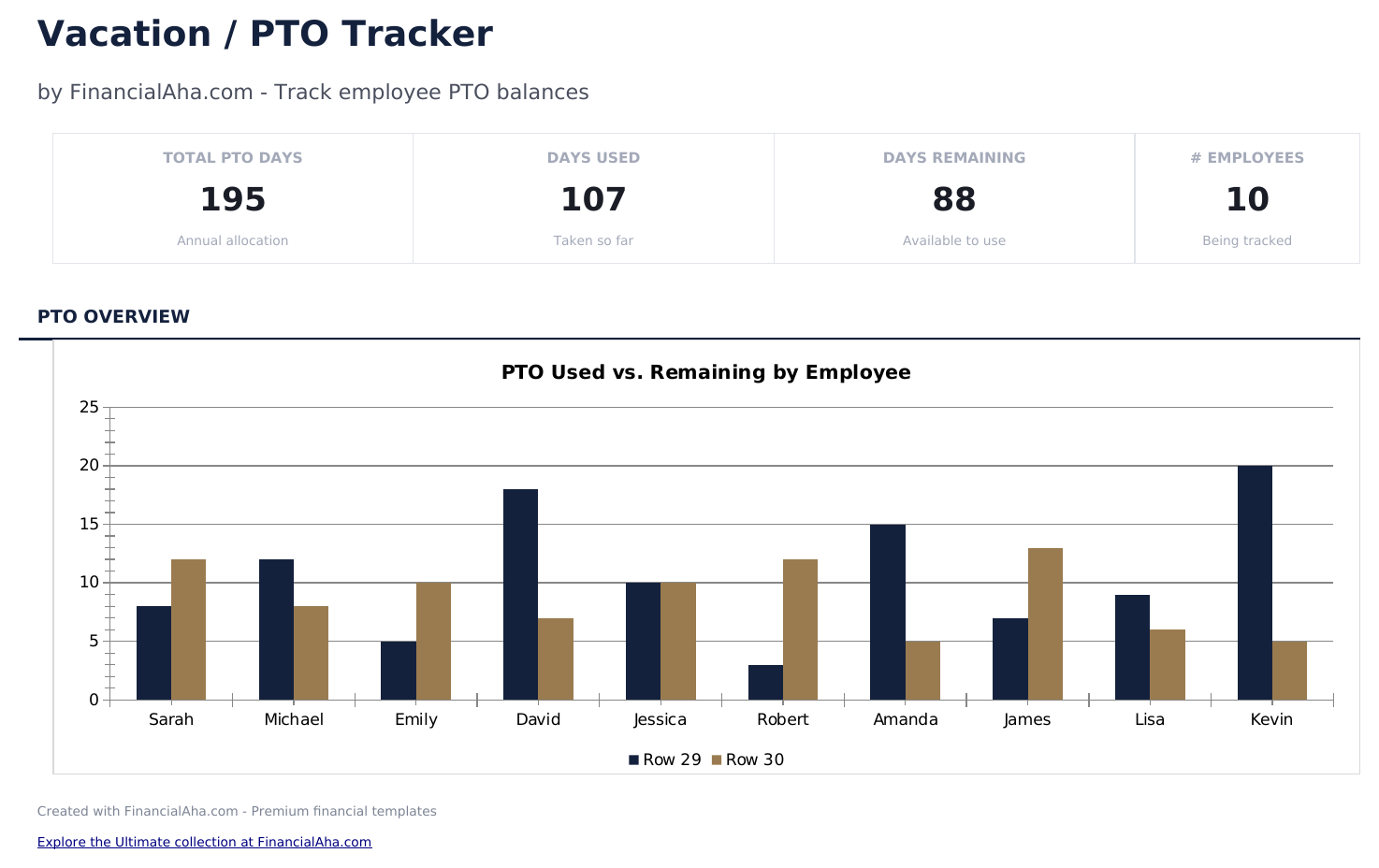
  • A chart of used against remaining for each person
  • No money columns and no currency picker - the whole workbook counts hours
  • Works in Microsoft Excel and Google Sheets with no setup required
Ultimate Version Available

Need more from this template?

The Essentials Spreadsheet Template covers everyday tracking. The Ultimate Spreadsheet Template gives each part of the template its own sheet, with more capacity and deeper reporting on top.

See what's in the Ultimate version One-time purchase. No subscription.

The FinancialAha Essentials Vacation PTO Tracker Spreadsheet Template is a two-sheet workbook for Google Sheets and Excel, with a How to Use guide on a third tab. It works as an Essentials Vacation PTO Tracker Excel template and an Essentials Vacation PTO Tracker Google Sheets template from the same download. A row per person counted in hours, each with an annual allocation, what has been used, what remains and what is approved but not yet taken, reported on a dashboard with utilization and two charts. No macros, no VBA.

Inside the workbook

What's inside the FinancialAha Essentials Vacation / PTO Tracker spreadsheet template

The FinancialAha Essentials Vacation PTO Tracker Spreadsheet Template runs on two working sheets, with the instructions on a tab of their own. It works in both Microsoft Excel and Google Sheets and here is what the Essentials Vacation PTO Tracker spreadsheet holds.

  1. 01 of 02

    PTO Tracker

    A row per person, counted in hours rather than left to interpretation. Each carries their annual allocation, the hours they have used, the balance that follows from those two, and the hours that are approved but not yet taken. That last column is the one worth having. A balance on its own describes the past: it tells you what someone has taken, not what is already booked. Two people with the same forty hours left are in different positions when one of them has thirty of it approved for next month, and a pending column is what makes that visible before the rota is set rather than after. The balance is the only derived figure here - allocation, used and pending are all yours to type. That keeps the sheet honest about what it is: a current picture of the team, maintained by whoever keeps it, rather than something that reconciles itself against a log of requests.

  2. 02 of 02

    Dashboard

    Six figures and two charts. The top row carries the hours remaining across the team, the hours taken so far this year and the hours approved but not yet taken. The row beneath carries the total annual allocation, how many people are on the roster, and utilization - what has been used as a share of what was allocated. The headcount figure counts the names that are actually filled in, so a team of six reads as six rather than as a list with gaps. The charts show utilization and then used against remaining for each person, which is the view that tends to prompt the real question: not whether the team is taking its time off, but which one person is not.

  3. Included guide

    How to Use

    A step-by-step guide on its own tab, covering what each column expects, how the dashboard reads. Because it ships inside the file, the instructions travel with the template wherever it is opened.

Works in both Google Sheets and Excel

Essentials Vacation / PTO Tracker Spreadsheet template for Google Sheets

Upload the Essentials Vacation PTO Tracker Spreadsheet Template to Drive, right-click it, and choose "Open with Google Sheets". This Essentials Vacation PTO Tracker Google Sheets template needs no conversion step, both charts come across, and the dashboard recalculates from the tracker exactly as it does in Excel.

Essentials Vacation / PTO Tracker Google Sheets template setup

A shared copy of the Essentials Vacation PTO Tracker Google Sheets template suits a team where more than one person books time off, and the pending column is the part that benefits most from being visible to everyone rather than to one inbox.

Running the Essentials Vacation PTO Tracker Google Sheet

The Essentials Vacation PTO Tracker Google Sheet is a weekly file rather than a daily one: hours move when time is approved and again when it is taken, and the dashboard follows both.

Essentials Vacation / PTO Tracker Spreadsheet template for Excel

The Essentials Vacation PTO Tracker spreadsheet Excel download is a plain .xlsx. Excel opens this Essentials Vacation PTO Tracker Excel template directly, with no import step, and both charts are native Excel charts rather than pictures. There are no macros and no VBA in the file.

Essentials Vacation / PTO Tracker Excel template setup

The same Essentials Vacation PTO Tracker Excel template opens in Excel on Windows, Excel on Mac, and Excel for the web. It is also the identical file you would upload to Drive, so there is no separate Essentials Vacation PTO Tracker spreadsheet download to choose between.

Essentials Vacation PTO Tracker spreadsheet Excel notes

The Essentials Vacation PTO Tracker spreadsheet Excel file carries no macros and no VBA, so Excel opens it without a trust prompt.

Opening the Essentials Vacation / PTO Tracker spreadsheet Excel file

Nothing in the Essentials Vacation PTO Tracker Excel template is version-specific, so this Essentials Vacation PTO Tracker spreadsheet Excel workbook behaves identically in Excel on Windows, Excel on Mac, and older builds.

Spreadsheet template highlights

What the Essentials Vacation / PTO Tracker spreadsheet template tracks

A row per person, counted in hours. This is what the Essentials Vacation PTO Tracker Spreadsheet Template carries for each person:

Employee Name
one row per person, and the count of filled names drives the headcount figure
Annual Hours
the allocation for the year
Hours Used
what has been taken so far
Remaining auto
derived from those two
Pending
hours approved but not yet taken, which is what a balance alone cannot show

Compare builds

FinancialAha Vacation / PTO Tracker spreadsheet template: Free, Essentials, and Ultimate compared

Feature Free View Spreadsheet Template Essentials This page Ultimate View Spreadsheet Template
Working sheets 1 2 6
Unit Whatever you use consistently Hours Days
Employee rows 12 12 20 on the setup sheet
Balance per employee Yes Yes Yes
Pending time off Yes Approved and unapproved in the log
Request log One upcoming date each 100 requests with type and approver
Leave types Vacation, sick, personal and more
Carry-over from last year Yes
Monthly accrual Yes, per employee
Absence by month Automatic, from the log
Utilization Team-wide Per employee and team-wide
Balance status flags Healthy, monitor, low
Value of unused time Yes, from a daily rate
Charts 2 2

The Free Vacation PTO Tracker Spreadsheet Template gives twelve people a balance and a next date. The FinancialAha Essentials Vacation PTO Tracker Spreadsheet Template counts in hours explicitly, adds the hours that are approved but not yet taken, and reports the team on a dashboard with utilization and two charts. The Ultimate Vacation PTO Tracker Spreadsheet Template goes further again: a request log with leave types, approvers and notes, balances that pull from the approved entries rather than being typed, carry-over, monthly accrual per person, status flags on low balances, and what the unused balance is worth in money.

Good to know

Notes on working in the Essentials Vacation / PTO Tracker spreadsheet template

  • Hours are explicit on this build, so there is no question of whether a 15 means days or hours.
  • The pending column is the difference between what someone has left and what they have left uncommitted.
  • The headcount figure counts filled names, so unused rows do not inflate it.
  • Allocation, used and pending are all typed. The balance is the only figure that works itself out.
  • A request log with leave types, approvers and notes is on the Ultimate build.
  • Everything on this workbook is counted in hours, including the utilisation figure, which reads hours used against the annual allocation.

How to Use the Essentials Vacation / PTO Tracker Spreadsheet Template

1

List the team

One row per person, up to twelve.

2

Set the allocations

Annual hours for each person on the roster.

3

Record used and pending

Hours taken, and hours approved but not yet taken.

4

Read the dashboard

Remaining, pending and utilization across the team.

Stress-tested with AI.

Every template starts with deep research into how people actually track the topic. We design the layout, build the formulas, and polish the design until it feels like something we would use ourselves. Along the way, we use AI to stress-test the calculations: unusual inputs, edge cases, and formula behavior, checked until the numbers hold.

See Ultimate Spreadsheet Template

Instant digital delivery · Terms & Conditions apply

Frequently Asked Questions

Is the FinancialAha Essentials Vacation / PTO Tracker Spreadsheet Template a Google Sheets template?

Yes. Upload the file to Drive and choose "Open with Google Sheets". Both charts come across in the Essentials Vacation / PTO Tracker Google Sheets template, and the dashboard recalculates from the tracker exactly as it does in Excel.

Is the FinancialAha Essentials Vacation / PTO Tracker Spreadsheet Template an Excel template?

Yes. The download is a plain .xlsx, so the Essentials Vacation / PTO Tracker Excel template opens directly in Excel with no import step. Both charts are native Excel charts rather than pictures, and there are no macros or VBA.

Will the FinancialAha Essentials Vacation / PTO Tracker spreadsheet Excel file open in older versions of Excel?

Yes. The Essentials Vacation / PTO Tracker spreadsheet Excel workbook ships as a plain .xlsx, so it opens identically in current Excel and in builds that predate dynamic arrays.

What does the pending column in the Essentials Vacation / PTO Tracker spreadsheet do?

It records hours approved but not yet taken. Two people with the same forty hours left are in different positions when one of them has thirty of it booked for next month, and a balance alone does not show that.

Does the Essentials Vacation / PTO Tracker spreadsheet count in hours or days?

Hours, explicitly - the columns say so. That removes the question of whether a 15 means days or hours, which the Free build leaves to whoever fills it in.

Does the Essentials Vacation / PTO Tracker spreadsheet log individual requests?

No. This build is a current picture of the team maintained by whoever keeps it. A request log with leave types, approvers and notes, and balances that derive from the approved entries, is on the Ultimate build.

Can I add people to the Essentials Vacation / PTO Tracker spreadsheet?

A row per person, and you can right-click inside the table and choose Insert when the team grows - the totals expand to include it. The headcount figure on the dashboard counts the names actually filled in, so a team of six reads as six rather than as a list with gaps.

How do I open the Essentials Vacation / PTO Tracker spreadsheet template in Google Sheets?

Upload the .xlsx file to Google Drive, then open it with Google Sheets. All formulas and formatting will be preserved.

More Essentials Payroll & HR Templates

Essentials

Highlights:

Dashboard with charts and KPIs
Pre-filled categories and sample data
No sign-up, no subscription
Lifetime free updates
Works in
Excel Google Sheets

Looking for premium spreadsheet templates?

Our paid templates include advanced multi-sheet dashboards, native Excel charts, and ongoing updates.

Private & secure

Your financial data stays on your device. We never see it.

Learn more →

Need help?

Check our guides or reach out with questions.

View FAQ →