Best Value Complete Financial Planning Bundle
✓ Financial Planning✓ Net Worth Tracker✓ Monthly Budgeting✓ Travel Budget Planner✓ Annual Budgeting Planner✓ Monthly Expense Tracker✓ Annual Tax Planner✓ Retirement Planning
View Bundle →

Instant digital delivery · Terms & Conditions apply

Essentials Template - Excel & Google Sheets

Essentials Debt-to-Income Calculator Spreadsheet Template for Google Sheets & Excel

Both ratios land against the limits two common mortgage programmes publish, and the sheet works back to the maximum housing payment each threshold would allow on your income. The Essentials Debt-to-Income Calculator spreadsheet template puts gross monthly income and each debt on a line of its own, personal loans and support payments included, across a dashboard and a seven-line calculator. Google Sheets and Excel, one file. No macros, no VBA.

Instant digital delivery · Terms & Conditions apply

Essentials Debt-to-Income Calculator spreadsheet template - Google Sheets and Excel preview

What's Included

  • Gross monthly income and each debt on a line of its own
  • Personal loans on their own line, and a line for alimony or support
  • A total of every monthly debt payment
  • Front-end and back-end ratios, both guarded against zero income
  • Comparison against FHA and conventional programme limits
  • The limits written out beside each comparison, and editable rather than fixed
  • The maximum housing payment each of four thresholds allows
  • A dashboard with both ratios, the debt total, the standing against each programme and the gross income behind them
  • Two charts
  • Works in Microsoft Excel and Google Sheets with no setup required

The FinancialAha Essentials Debt-to-Income Calculator Spreadsheet Template is a two-sheet workbook for Google Sheets and Excel, with a How to Use guide on a third tab. It works as an Essentials Debt-to-Income Calculator Excel template and an Essentials Debt-to-Income Calculator Google Sheets template from the same download. Both ratios set against the limits two common mortgage programmes publish, and the maximum housing payment each of those thresholds would allow on your income. No macros, no VBA.

Inside the workbook

What's inside the FinancialAha Essentials Debt-to-Income Calculator spreadsheet template

The FinancialAha Essentials Debt-to-Income Calculator Spreadsheet Template runs on two working sheets, with the instructions on a tab of their own. It works in both Microsoft Excel and Google Sheets and here is what the Essentials Debt-to-Income Calculator spreadsheet holds.

  1. 01 of 02

    Calculator

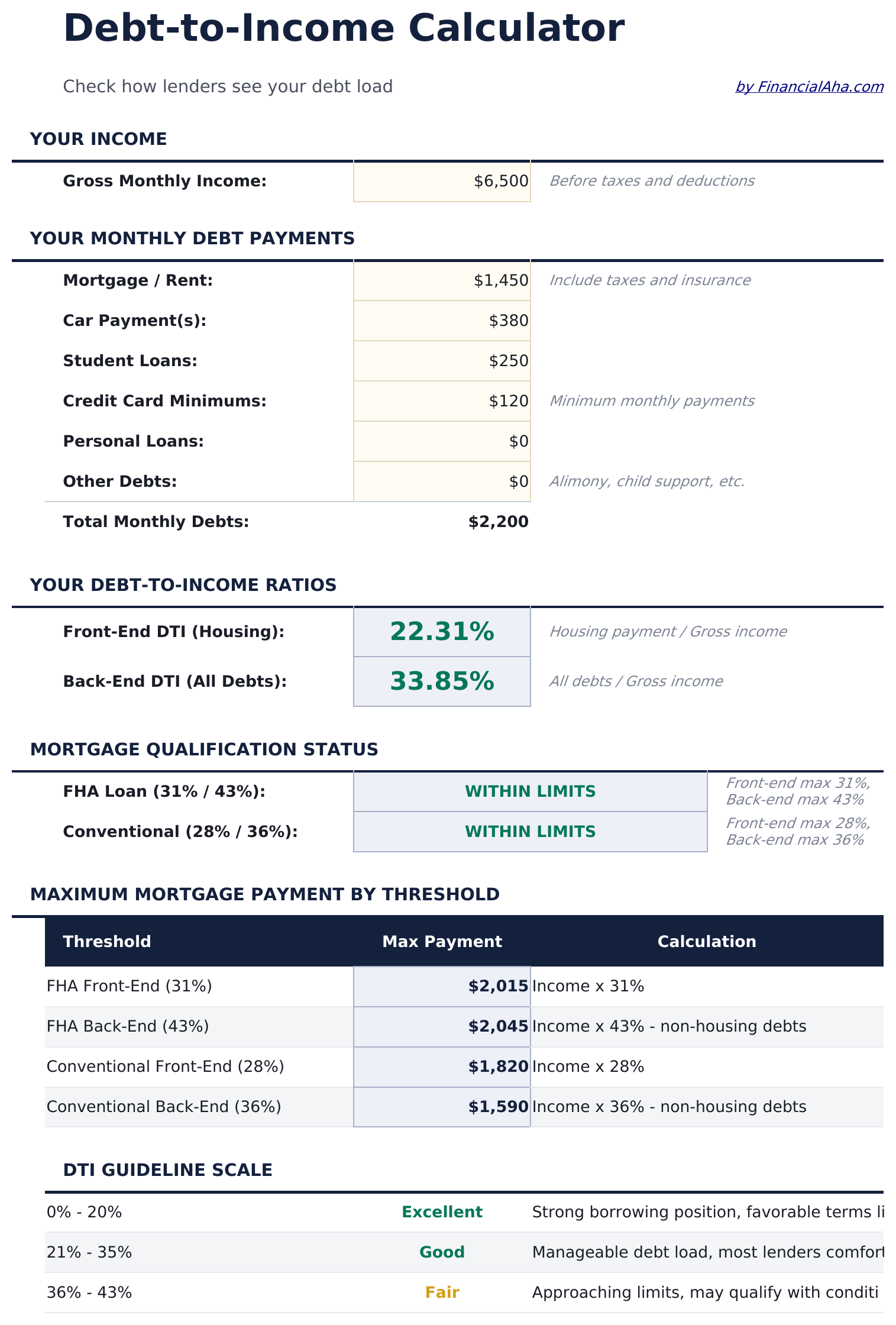
    Gross monthly income at the top, then a line per debt - the mortgage or rent, car payments, student loans, card minimums, personal loans and a line for anything else, with alimony and child support named as examples since lenders count them. They total themselves. Both ratios follow: housing against income, and every debt against income. Beneath them the two ratios are set against the limits published by two common mortgage programmes, with each pair of figures written out beside it rather than left implicit - so the comparison is legible even if you have never seen the numbers before. Those limits are cells you can change, which matters because lenders vary and published figures move. The conventional comparison has three outcomes rather than two. There is a stretch limit beneath the standard pair, and a back-end ratio that clears the stretch figure but not the standard one reports as borderline rather than simply failing. The last block turns the ratios round. Instead of asking what your ratio is, it asks what housing payment each threshold would allow given your income and your other debts - four figures, one per threshold. That is the more actionable form, because it is a number you can take to a listing rather than a percentage you have to interpret. Worth being plain about what this is not: a ratio inside a programme limit is not an approval. Credit history, reserves, the loan-to-value and the property itself all sit outside this sheet.

  2. 02 of 02

    Dashboard

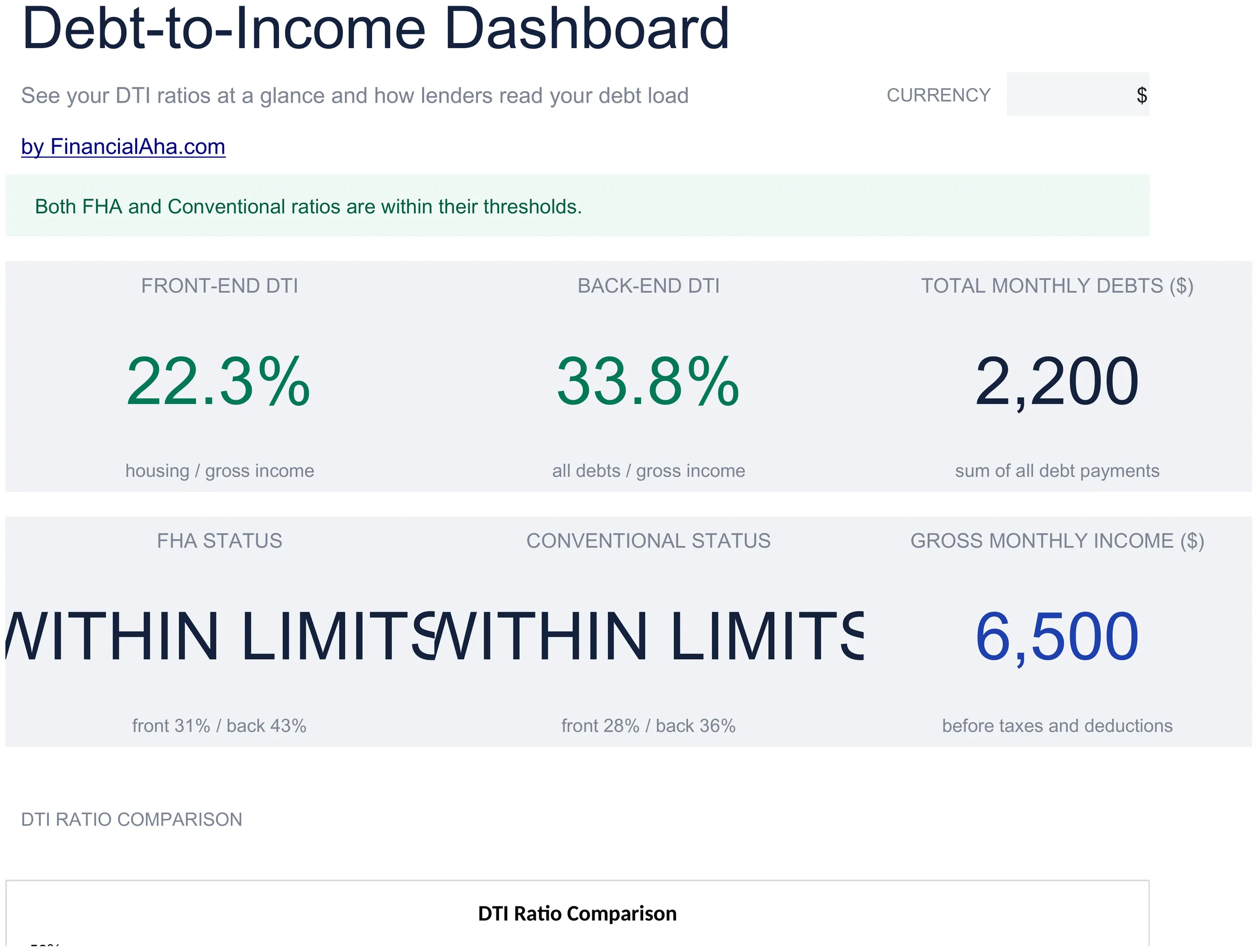
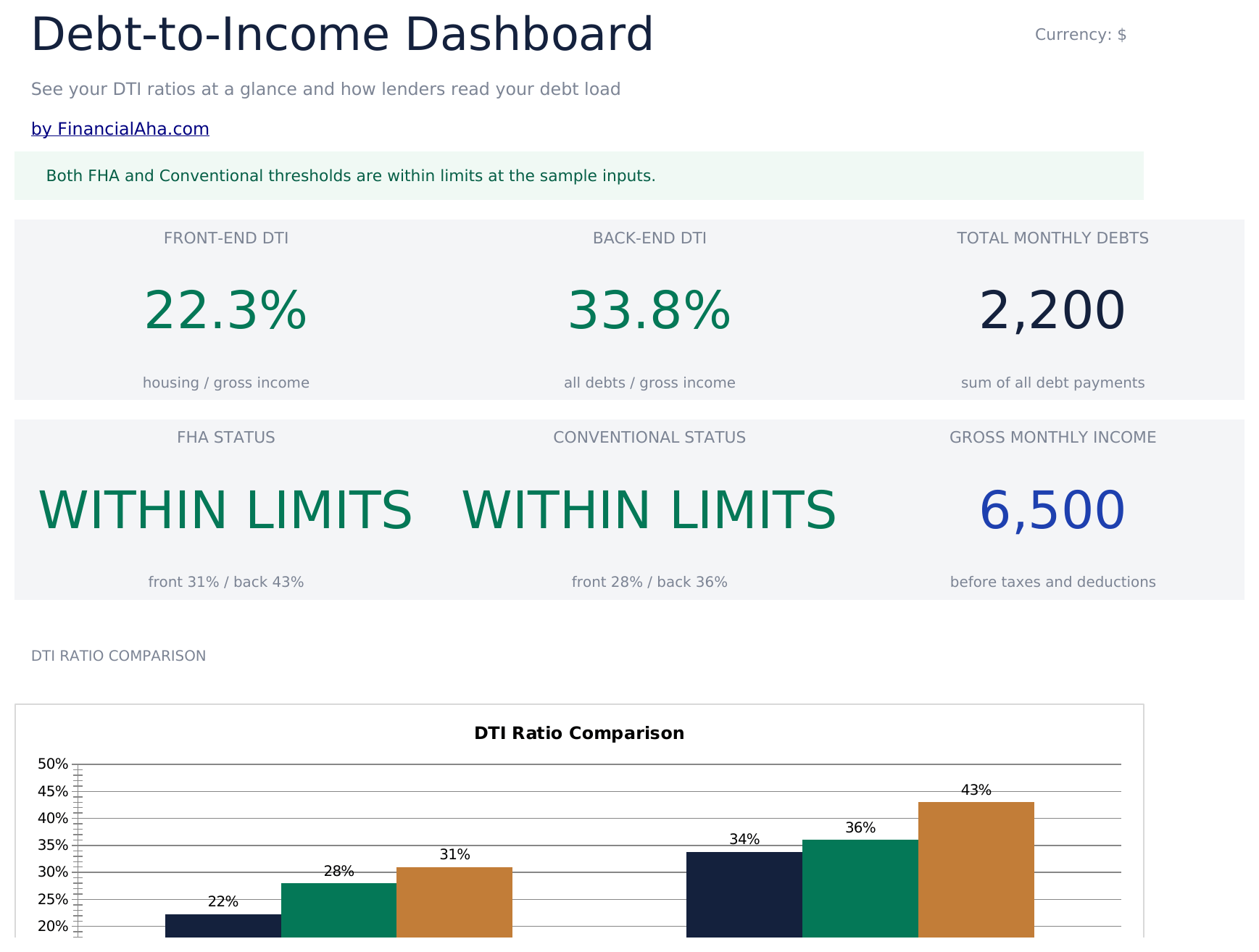
    Six figures. The front-end ratio, the back-end ratio and the total of your monthly debt payments on the top row; the standing against each of the two programmes, and the gross income everything is measured against, on the second. Seeing the two ratios side by side is what tells you where any pressure is coming from. A high back-end ratio with a modest front-end one is a debt problem rather than a housing one, and the two have entirely different remedies - which is a distinction a single combined figure hides. Two charts sit alongside: the ratios against each threshold, and the maximum payment each threshold allows.

  3. Included guide

    How to Use

    A step-by-step guide on its own tab, covering what each input expects, how the two ratios differ, what the threshold comparison does and does not tell you, and how to change the currency. Because it ships inside the file, the instructions travel with the template wherever it is opened.

Works in both Google Sheets and Excel

Essentials Debt-to-Income Calculator Spreadsheet template for Google Sheets

Upload the Essentials Debt-to-Income Calculator Spreadsheet Template to Drive, right-click it, and choose "Open with Google Sheets". This Essentials Debt-to-Income Calculator Google Sheets template needs no conversion step, both charts come across, and every figure recalculates exactly as it does in Excel.

Essentials Debt-to-Income Calculator Google Sheets template setup

A shared copy of the Essentials Debt-to-Income Calculator Google Sheets template suits two people applying together, since both incomes and every commitment either of them carries go into the same ratios.

Running the Essentials Debt-to-Income Calculator Google Sheet

The Essentials Debt-to-Income Calculator Google Sheet is a before-you-apply file rather than a weekly one. Clearing a debt or taking one on moves the ratios immediately.

Essentials Debt-to-Income Calculator Spreadsheet template for Excel

The Essentials Debt-to-Income Calculator spreadsheet Excel download is a plain .xlsx. Excel opens this Essentials Debt-to-Income Calculator Excel template directly, with no import step, and both charts are native Excel charts rather than pictures. There are no macros and no VBA in the file.

Essentials Debt-to-Income Calculator Excel template setup

The same Essentials Debt-to-Income Calculator Excel template opens in Excel on Windows, Excel on Mac, and Excel for the web. It is also the identical file you would upload to Drive, so there is no separate Essentials Debt-to-Income Calculator spreadsheet download to choose between.

Essentials Debt-to-Income Calculator spreadsheet Excel notes

The Essentials Debt-to-Income Calculator spreadsheet Excel file carries no macros and no VBA, so Excel opens it without a trust prompt.

Opening the Essentials Debt-to-Income Calculator spreadsheet Excel file

Nothing in the Essentials Debt-to-Income Calculator Excel template is version-specific, so this Essentials Debt-to-Income Calculator spreadsheet Excel workbook behaves identically in Excel on Windows, Excel on Mac, and older builds.

Spreadsheet template highlights

What the Essentials Debt-to-Income Calculator spreadsheet template tracks

One income figure, a line per debt, and the figures they produce. This is what the Essentials Debt-to-Income Calculator Spreadsheet Template works from:

FHA Loan (31% / 43%)
the front-end and back-end limits that programme publishes, with your ratios compared against both
WITHIN LIMITS
what the comparison returns when both of your ratios sit inside a programme's pair
Front-end max 31%, back-end max 43%
the figures written out beside each comparison rather than left implicit

Compare builds

FinancialAha Debt-to-Income Calculator spreadsheet template: Free and Essentials compared

Feature Free View Spreadsheet Template Essentials This page
Working sheets 1 2
Front-end and back-end ratios Both Both
Debt payment lines 5 7
Limit compared against One you enter Five named programme limits
Comparison result Within or above your limit Within or exceeds (FHA); within, borderline or exceeds (conventional)
Maximum payment by threshold Four thresholds
Handles zero income Says so Returns zero
Charts 2

The Free Debt-to-Income Calculator Spreadsheet Template reports both ratios and compares them against a limit you enter. The FinancialAha Essentials Debt-to-Income Calculator Spreadsheet Template sets them against the limits two common mortgage programmes publish, with both figures written beside each comparison. The conventional check carries a third outcome as well as within and over - a borderline reading, against the stretch figure some lenders allow. It then turns the arithmetic round - working out the maximum housing payment each threshold would allow given your income and your other debts. It splits personal loans onto their own line and adds a dashboard with two charts.

Good to know

Notes on working in the Essentials Debt-to-Income Calculator spreadsheet template

  • A ratio inside a programme limit is not an approval - credit, reserves and loan-to-value all sit outside this sheet.
  • The maximum-payment block is the more actionable form: a figure you can take to a listing rather than a percentage to interpret.
  • A high back-end ratio with a modest front-end one is a debt problem rather than a housing one, and they have different remedies.
  • Card minimums count rather than what you actually pay, which is how a lender reads them.
  • The programme limits are written beside each comparison so the numbers are legible without looking them up.
  • The currency dropdown relabels the money columns across the workbook. It changes the label only and does not convert the numbers.
  • The programme limits are input cells rather than constants. Lenders vary and published figures move, so they are yours to set.
  • The conventional status has three states - within, borderline and exceeds - with borderline coming from a stretch limit some lenders allow against compensating factors.

How to Use the Essentials Debt-to-Income Calculator Spreadsheet Template

1

Enter gross income

Monthly, before tax and deductions.

2

List the debts

List each debt on a line of its own, including support payments.

3

Read both ratios

Housing alone, and every debt together.

4

Check the thresholds

What payment each limit would allow.

Stress-tested with AI.

Every template starts with deep research into how people actually track the topic. We design the layout, build the formulas, and polish the design until it feels like something we would use ourselves. Along the way, we use AI to stress-test the calculations: unusual inputs, edge cases, and formula behavior, checked until the numbers hold.

Instant digital delivery · Terms & Conditions apply

Frequently Asked Questions

Is the FinancialAha Essentials Debt-to-Income Calculator Spreadsheet Template a Google Sheets template?

Yes. Upload the file to Drive and choose "Open with Google Sheets". Both charts come across in the Essentials Debt-to-Income Calculator Google Sheets template, and every figure recalculates exactly as it does in Excel.

Is the FinancialAha Essentials Debt-to-Income Calculator Spreadsheet Template an Excel template?

Yes. The download is a plain .xlsx, so the Essentials Debt-to-Income Calculator Excel template opens directly in Excel with no import step. Both charts are native Excel charts rather than pictures, and there are no macros or VBA.

Will the FinancialAha Essentials Debt-to-Income Calculator spreadsheet Excel file open in older versions of Excel?

Yes. The Essentials Debt-to-Income Calculator spreadsheet Excel workbook ships as a plain .xlsx, so it opens identically in current Excel and in builds that predate dynamic arrays.

Does being within a programme limit in the Essentials Debt-to-Income Calculator spreadsheet mean I am approved?

No. A ratio inside a published limit is one input among several - credit history, reserves, the loan-to-value and the property itself all sit outside this sheet. The comparison reports where your ratios fall, nothing more.

What does the maximum payment block show in the Essentials Debt-to-Income Calculator spreadsheet?

What housing payment each threshold would allow given your income and your other debts. It is the more actionable form of the same arithmetic - a figure you can take to a listing rather than a percentage to interpret.

Why does the Essentials Debt-to-Income Calculator spreadsheet report both ratios separately?

Because a high back-end ratio with a modest front-end one is a debt problem rather than a housing one, and the two have entirely different remedies. A single combined figure hides that.

Which payments count as debt in the Essentials Debt-to-Income Calculator spreadsheet template?

The ones a lender counts: housing, car, student loans, card minimums, personal loans, and obligations like alimony or child support. Card minimums count rather than what you actually pay.

How do I open the Essentials Debt-to-Income Calculator spreadsheet template in Google Sheets?

Upload the .xlsx file to Google Drive, then open it with Google Sheets. All formulas and formatting will be preserved.

More Essentials Debt Management Templates

Essentials

Highlights:

Dashboard with charts and KPIs
Pre-filled categories and sample data
No sign-up, no subscription
Lifetime free updates
Works in
Excel Google Sheets

Looking for premium spreadsheet templates?

Our paid templates include advanced multi-sheet dashboards, native Excel charts, and ongoing updates.

Private & secure

Your financial data stays on your device. We never see it.

Learn more →

Need help?

Check our guides or reach out with questions.

View FAQ →