Best Value Complete Financial Planning Bundle
✓ Financial Planning✓ Net Worth Tracker✓ Monthly Budgeting✓ Travel Budget Planner✓ Annual Budgeting Planner✓ Monthly Expense Tracker✓ Annual Tax Planner✓ Retirement Planning
View Bundle →
Debt Snowball Ultimate

Instant digital delivery · Terms & Conditions apply

Essentials Template - Excel & Google Sheets

Essentials Debt Snowball Spreadsheet Template for Google Sheets & Excel

Enter up to eight debts once, name a single extra monthly payment, and the Essentials Debt Snowball spreadsheet template builds the rest: a month-by-month schedule that names the debt the extra is aimed at, and a dashboard holding the total owed, the months to clear, the interest, and what each of those comes to if you only ever pay the minimum. Three working sheets and a chart tracing the balance down. Google Sheets and Excel, one download.

See Ultimate Spreadsheet Template

Instant digital delivery · Terms & Conditions apply

View Ultimate Debt Snowball Spreadsheet Template
$29
Essentials Debt Snowball spreadsheet template - Google Sheets and Excel preview

What's Included

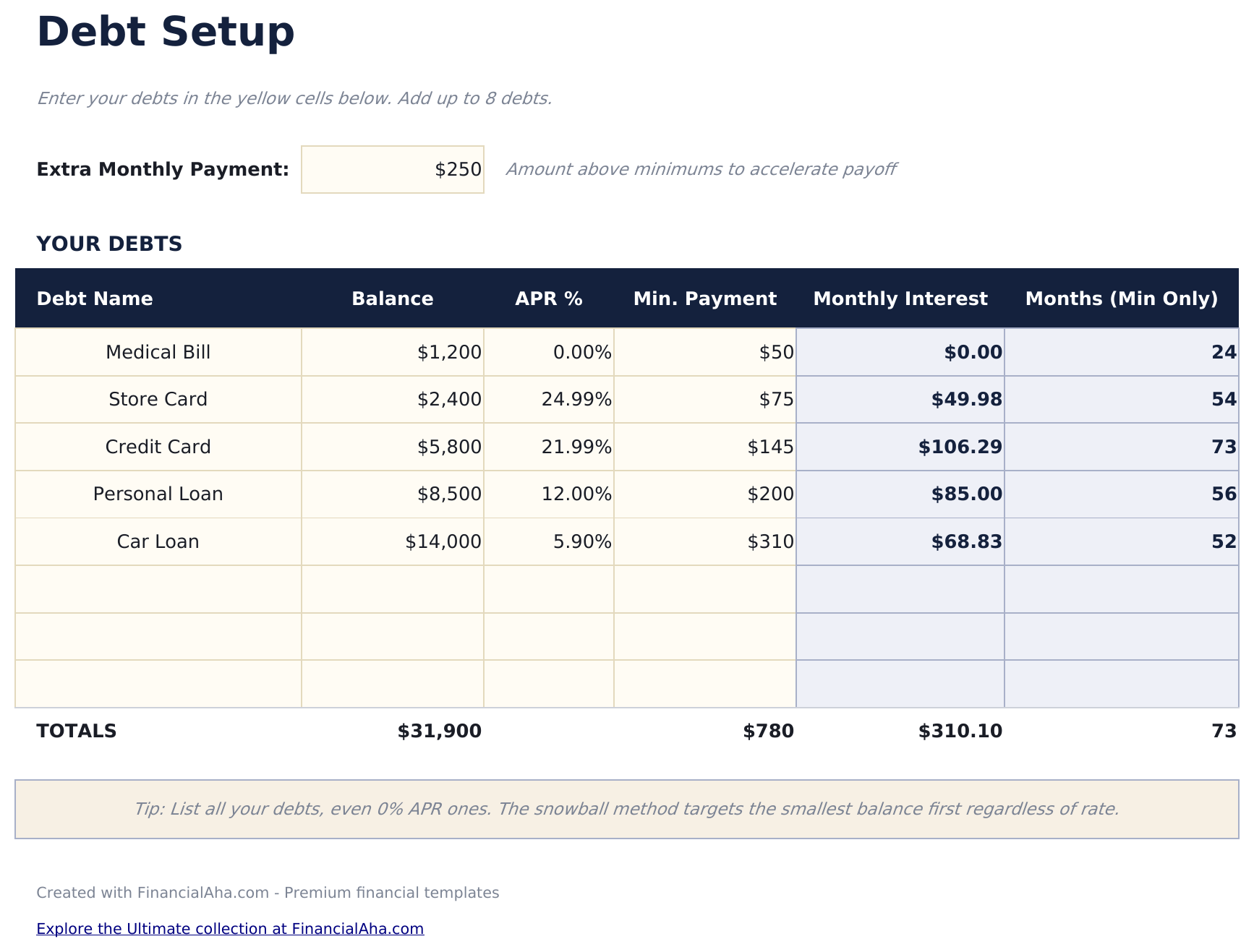
  • A row per debt with balance, rate and minimum payment, up to eight
  • Monthly interest and a minimum-only timeline derived on every debt
  • One extra monthly payment field driving the whole plan
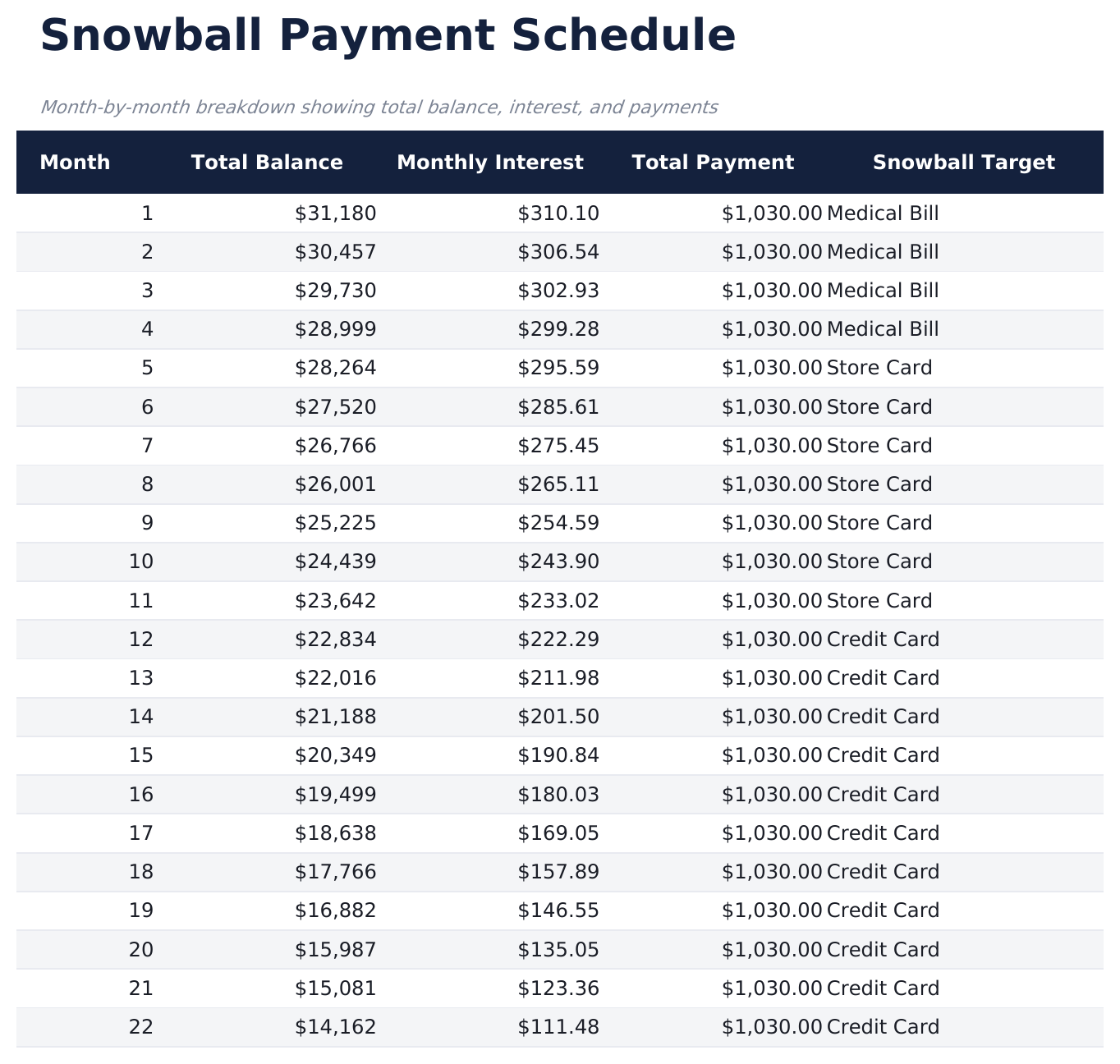
  • A month-by-month schedule naming which debt the extra is aimed at
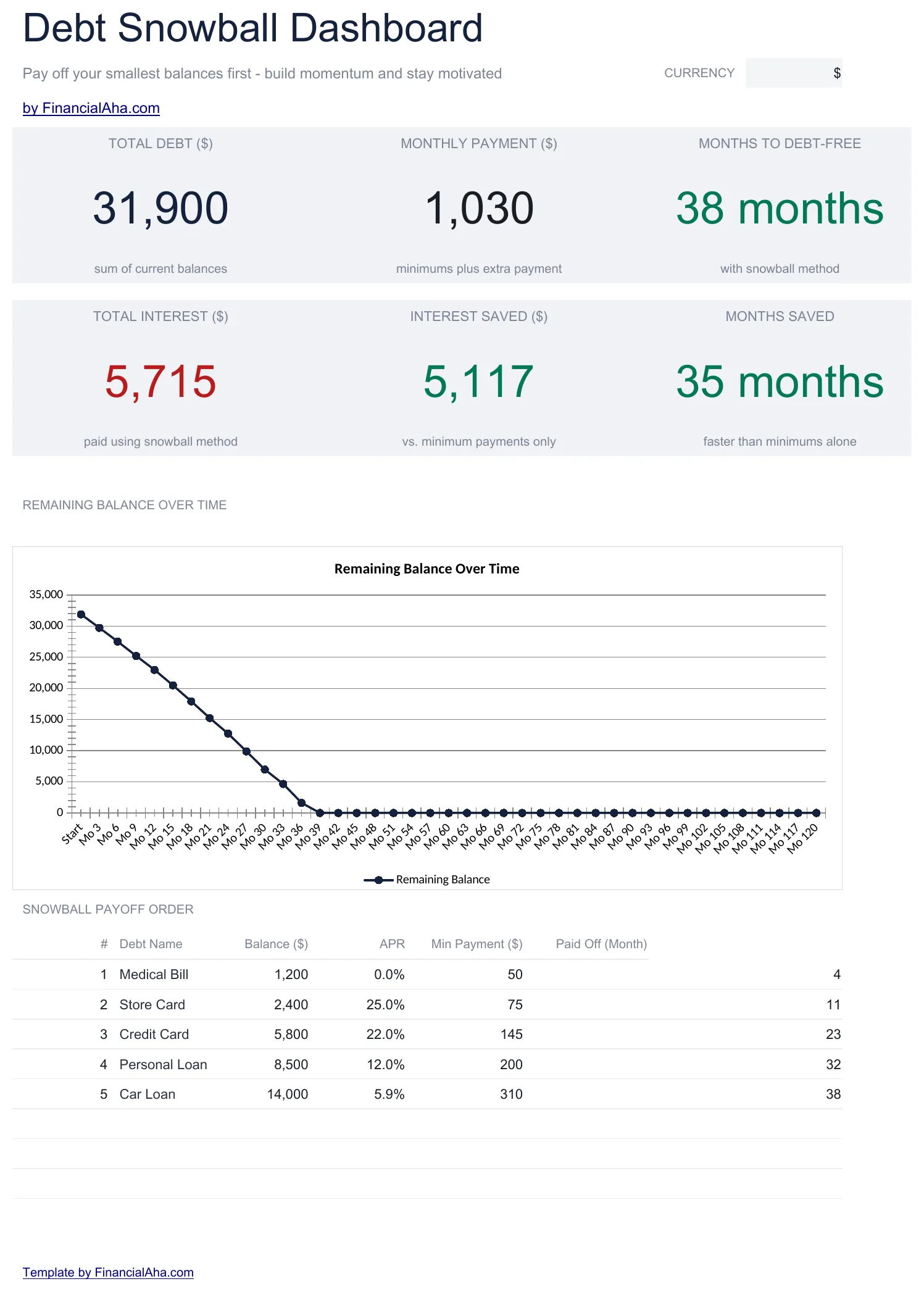
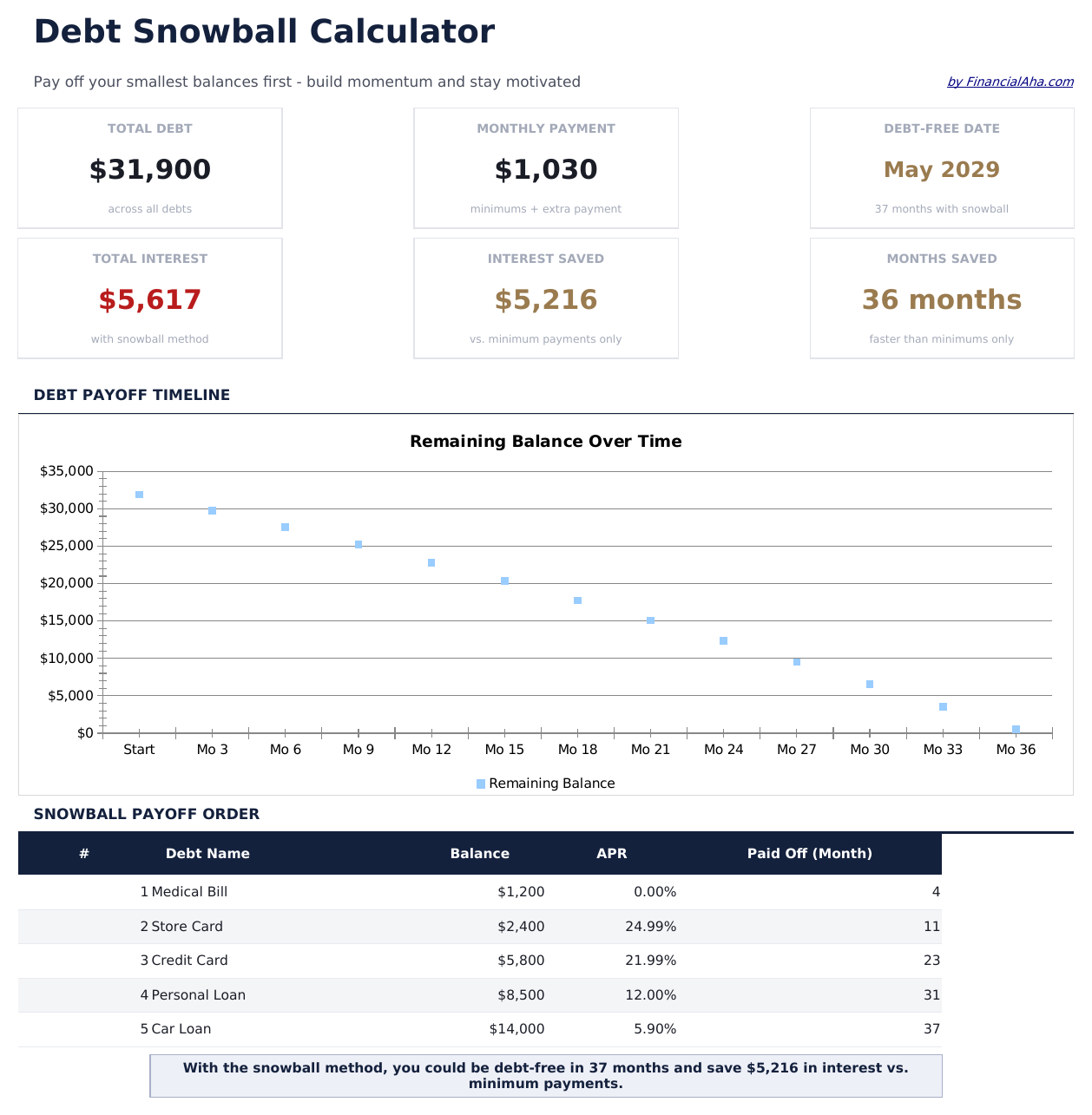
  • A dashboard with the total owed, the monthly commitment, the months to clear, the interest, and both figures saved against minimums
  • A line chart tracing the remaining balance down
  • A currency dropdown on the Dashboard that relabels money columns across all three sheets
  • Works in Microsoft Excel and Google Sheets with no setup required
Ultimate Version Available

Need more from this template?

The Essentials Spreadsheet Template covers everyday tracking. The Ultimate Spreadsheet Template gives each part of the template its own sheet, with more capacity and deeper reporting on top.

See what's in the Ultimate version One-time purchase. No subscription.

The FinancialAha Essentials Debt Snowball Spreadsheet Template for Google Sheets and Excel is a three-sheet workbook that turns a list of debts into a projection, with a How to Use guide on a fourth tab. It works as an Essentials Debt Snowball Excel template and an Essentials Debt Snowball Google Sheets template from the same download. Where the free build totals what you type, this Essentials Debt Snowball spreadsheet template estimates when the last balance clears, what the interest costs along the way, and how both compare against paying minimums alone. It gives each debt a row, with no macros or VBA.

Inside the workbook

What's inside the FinancialAha Essentials Debt Snowball spreadsheet template

The FinancialAha Essentials Debt Snowball Spreadsheet Template runs on three working sheets - one you type into, two that report back - plus the guide. It works in both Microsoft Excel and Google Sheets and here is what the Essentials Debt Snowball spreadsheet holds.

  1. 01 of 03

    Dashboard

    Where the plan stands, in one view: what you owe, what goes out each month, how long the payoff runs, and what the interest costs - each set against the minimum-only equivalent, so the gap between the two is visible without working it out. A chart underneath traces the remaining balance month by month, which is the shape of the payoff rather than a number for it. Nothing here is typed; it all reads from your inputs.

  2. 02 of 03

    Debt Setup

    The one sheet you type into. A row per debt, each taking a name, balance, rate and minimum payment, with the monthly interest and the minimum-only timeline derived for you - a debt whose minimum does not cover its own interest reports 999 months, because on that payment it never clears. A single Extra Monthly Payment field drives the whole plan, and a minimum-only baseline is kept alongside it as the comparison point.

  3. 03 of 03

    Snowball Schedule

    The payoff month by month across ten years: what remains outstanding, what the interest costs, what goes out, and which debt the extra is aimed at. Following that last column is the clearest way to watch the rollover take effect as each balance clears.

  4. Included guide

    How to Use

    A guide on its own tab covering setup, how the method works, and how to read the dashboard and the schedule. It ships inside the file, so the instructions are there whenever the template is open.

Works in both Google Sheets and Excel

Essentials Debt Snowball Spreadsheet template for Google Sheets

Upload the Essentials Debt Snowball Spreadsheet Template to Drive and choose "Open with Google Sheets". This Essentials Debt Snowball Google Sheets template needs no conversion step and nothing gets rewritten on the way in - every figure behaves exactly as it does in Excel. The currency dropdown on the Dashboard relabels every money header across all four tabs at once.

Essentials Debt Snowball Google Sheets template setup

The dashboard updates the moment a balance changes on Debt Setup, so the Essentials Debt Snowball Google Sheets template stays current without a refresh step. A shared copy works for two people, and version history covers an overwritten figure. The 120-month schedule reads more comfortably on a wide screen, though it scrolls without trouble on a phone.

Keeping the Essentials Debt Snowball Google Sheet current

Day to day the Essentials Debt Snowball Google Sheet updates itself: change a balance on Debt Setup and the six dashboard figures and the 120-month schedule both follow. Version history covers an overwritten figure, and a shared copy works for two people tracking the same debts.

Essentials Debt Snowball Spreadsheet template for Excel

The Essentials Debt Snowball spreadsheet Excel download is a plain .xlsx, so Excel opens this Essentials Debt Snowball Excel template with no import step and no compatibility prompt. Charts, number formats, and the protected cells all behave natively. The cells you type into carry a light gray tint and the reporting cells do not, which makes Debt Setup safe to tab straight through.

Essentials Debt Snowball Excel template setup

The Essentials Debt Snowball Excel template ships as a standard .xlsx rather than a macro-enabled .xlsm, so it opens without a trust prompt in Excel on Windows, Excel on Mac, and Excel for the web. It is the same single Essentials Debt Snowball spreadsheet you would upload to Drive.

Essentials Debt Snowball spreadsheet Excel compatibility

The Essentials Debt Snowball spreadsheet Excel file carries no macros and no VBA, so Excel opens it without a trust prompt. The same Essentials Debt Snowball spreadsheet Excel download opens in Excel for the web too, and the protected cells stay protected in both.

Opening the Essentials Debt Snowball spreadsheet Excel file

The 120-month schedule is built to stay fast rather than to recalculate on every keystroke, so the Essentials Debt Snowball spreadsheet Excel workbook opens at the same speed in older Excel builds as in current ones.

Spreadsheet template highlights

What the Essentials Debt Snowball spreadsheet template tracks

Four columns in the Essentials Debt Snowball Spreadsheet Template are yours to fill on Debt Setup. The workbook works out the rest:

Debt Name
a free-text label for each balance you are tracking
Balance
the current amount outstanding
APR
the annual rate, where 0% is valid for interest-free balances
Min Payment
the minimum the lender requires each month
Monthly Interest
worked out for you from balance and rate
Months (Min Only)
worked out for you: how long that debt alone would run on minimum payments
Extra Monthly Payment
one cell at the top, the amount going in above every minimum

Compare builds

FinancialAha Debt Snowball spreadsheet template: Free, Essentials, and Ultimate compared

Feature Free View Spreadsheet Template Essentials This page Ultimate View Spreadsheet Template
Working sheets 1 3 6
Debt rows 7 8 12
Live totals Yes Yes Yes
Payoff estimate Yes Yes
Payoff schedule 120 months, aggregate 180 months, per debt
Dashboard Totals strip 6 figures + 1 chart 6 figures + 2 charts
Snowball vs minimum Dedicated sheet
What-if analysis Live scenario
Payoff milestones 5 milestones

The FinancialAha Essentials Debt Snowball Spreadsheet Template for Google Sheets and Excel covers three working sheets with a row per debt. It is the build where the file starts projecting rather than only totalling, and the 120-month schedule is what makes that possible - months to debt-free, total interest, and interest saved all read from it. The Free Debt Snowball Spreadsheet Template has one working sheet and tracks debts without estimating a payoff date. The Ultimate Debt Snowball Spreadsheet Template keeps this dashboard and adds three analysis sheets on top: a per-debt 180-month schedule, a Snowball vs Minimum comparison, what-if grids across a range of extra-payment levels, and payoff milestones.

Good to know

Notes on working in the Essentials Debt Snowball spreadsheet template

  • A light gray tint marks every cell you are meant to type into, so Debt Setup is safe to tab through without overwriting a calculation.
  • Leave unused debt rows blank rather than deleting them - the totals read the whole range.
  • The Snowball Target column on the schedule names the debt the extra payment is aimed at that month, which is where the rollover is easiest to follow.
  • Zero-percent balances belong in the list too. The snowball method orders by balance rather than by rate.
  • The currency dropdown changes labels across all four sheets of the Essentials Debt Snowball spreadsheet template. It does not convert the underlying numbers.

How to Use the Essentials Debt Snowball Spreadsheet Template

1

List debts by balance

Enter each debt from smallest to largest balance. Include the interest rate and minimum payment for each account.

2

Set your extra payment

Enter the additional monthly amount beyond minimums. This extra goes to the smallest debt first in the snowball method.

3

Watch the rollover

As each debt is paid off, its payment rolls into the next debt. The snowball schedule shows these cascading payments automatically.

4

Read the comparison

The dashboard sets the plan against paying minimums only, in months and in interest.

Stress-tested with AI.

Every template starts with deep research into how people actually track the topic. We design the layout, build the formulas, and polish the design until it feels like something we would use ourselves. Along the way, we use AI to stress-test the calculations: unusual inputs, edge cases, and formula behavior, checked until the numbers hold.

See Ultimate Spreadsheet Template

Instant digital delivery · Terms & Conditions apply

Frequently Asked Questions

Is the FinancialAha Essentials Debt Snowball Spreadsheet Template a Google Sheets template?

Yes. Upload the file to Drive and choose "Open with Google Sheets". Every formula in the Essentials Debt Snowball Google Sheets template is standard spreadsheet syntax, so nothing needs rewriting, and the dashboard recalculates as soon as an input changes.

Is the FinancialAha Essentials Debt Snowball Spreadsheet Template an Excel template?

Yes. The Essentials Debt Snowball spreadsheet Excel download is a plain .xlsx that opens directly in Excel with no import step. It ships without macros or VBA, so there is no trust prompt.

Will the FinancialAha Essentials Debt Snowball spreadsheet Excel file open in older versions of Excel?

Yes. The 120-month schedule is built to open quickly, so the Essentials Debt Snowball spreadsheet Excel workbook performs the same in older Excel builds as in current ones.

Can I add debts to the Essentials Debt Snowball Spreadsheet Template spreadsheet?

The Debt Setup sheet gives each debt a row, eight in total with several already spare. Leave unused rows blank rather than deleting them, since the totals read the full range.

How does the snowball rollover work in the Essentials Debt Snowball spreadsheet?

When the smallest debt is paid off, its payment amount (minimum plus extra) is added to the next smallest debt. This creates a growing "snowball" of payments.

What if two debts have the same balance in the Essentials Debt Snowball spreadsheet?

List either one first - the snowball method does not have a strict rule for ties. Some people put the higher interest rate debt first when balances match.

Can I pause extra payments temporarily in the Essentials Debt Snowball spreadsheet?

Yes. Set the extra payment to zero for those months. The schedule recalculates showing only minimum payments until you increase it again.

Does the Essentials Debt Snowball spreadsheet template track actual payments?

The template is a projection tool showing the planned schedule. Update balances periodically to keep the projections aligned with reality.

How do I open the Essentials Debt Snowball spreadsheet template in Google Sheets?

Upload the .xlsx file to Google Drive, then open it with Google Sheets. All formulas and formatting will be preserved.

More Essentials Debt Management Templates

Essentials

Highlights:

Dashboard with charts and KPIs
Pre-filled categories and sample data
No sign-up, no subscription
Lifetime free updates
Works in
Excel Google Sheets

Looking for premium spreadsheet templates?

Our paid templates include advanced multi-sheet dashboards, native Excel charts, and ongoing updates.

Private & secure

Your financial data stays on your device. We never see it.

Learn more →

Need help?

Check our guides or reach out with questions.

View FAQ →