Melhor valor Pacote Completo de Planejamento Financeiro
✓ Planejamento Financeiro✓ Rastreador de Patrimonio Liquido✓ Orcamento Mensal✓ Planejador de Orcamento de Viagem✓ Planejador de Orcamento Anual✓ Rastreador de Despesas Mensais✓ Planejador Anual de Impostos✓ Planejamento de Aposentadoria
Ver pacote →
Ultimate Versão Ultimate disponível - Bola de Neve de Dívidas Ultimate
Planilha Essentials - Excel e Google Sheets

Debt Snowball Modelo Essentials

Plan debt payoff using the snowball method - pay off smallest balances first. Track progress as each debt is eliminated and payments roll into the next.

Ver versão Ultimate →
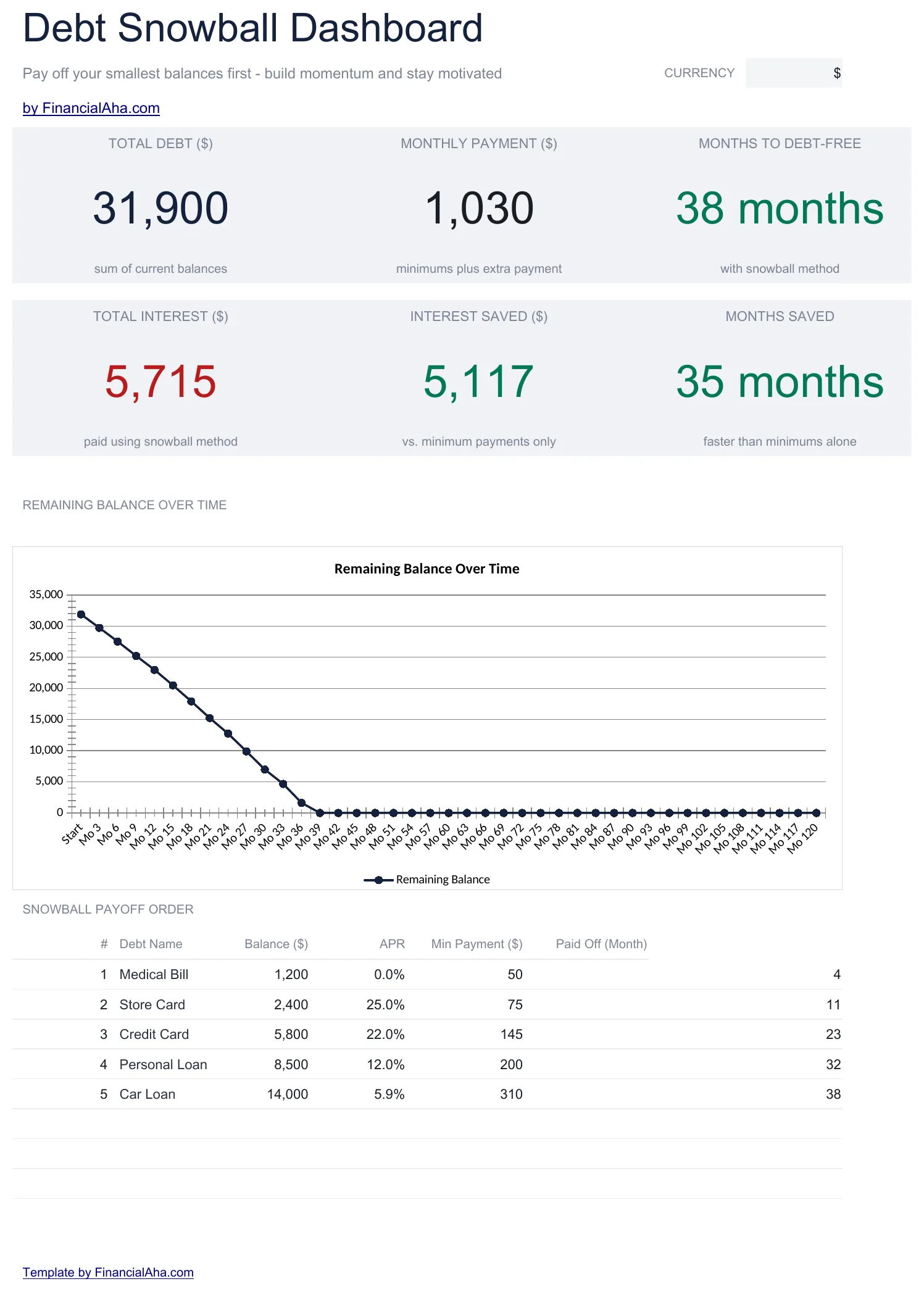
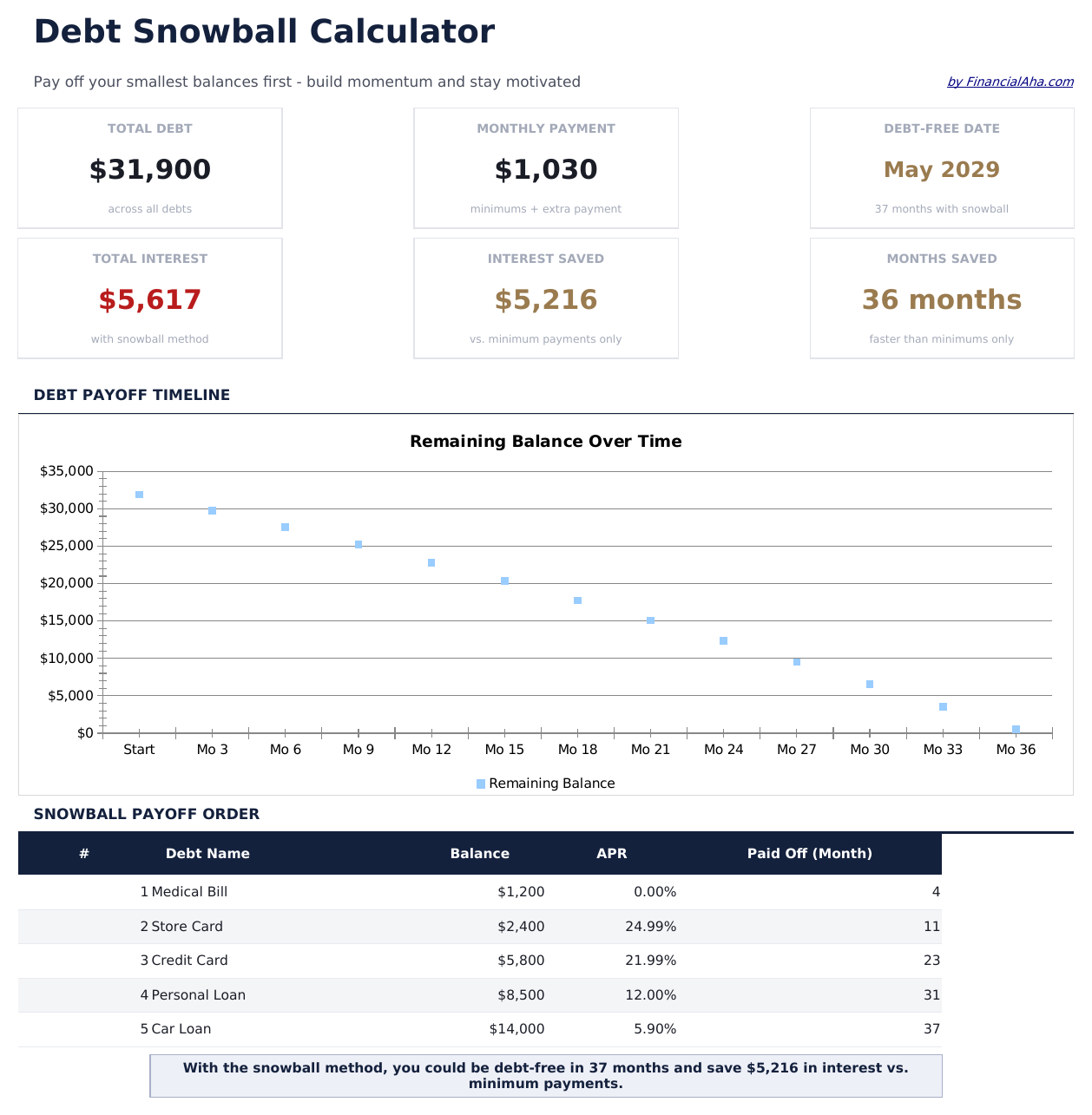
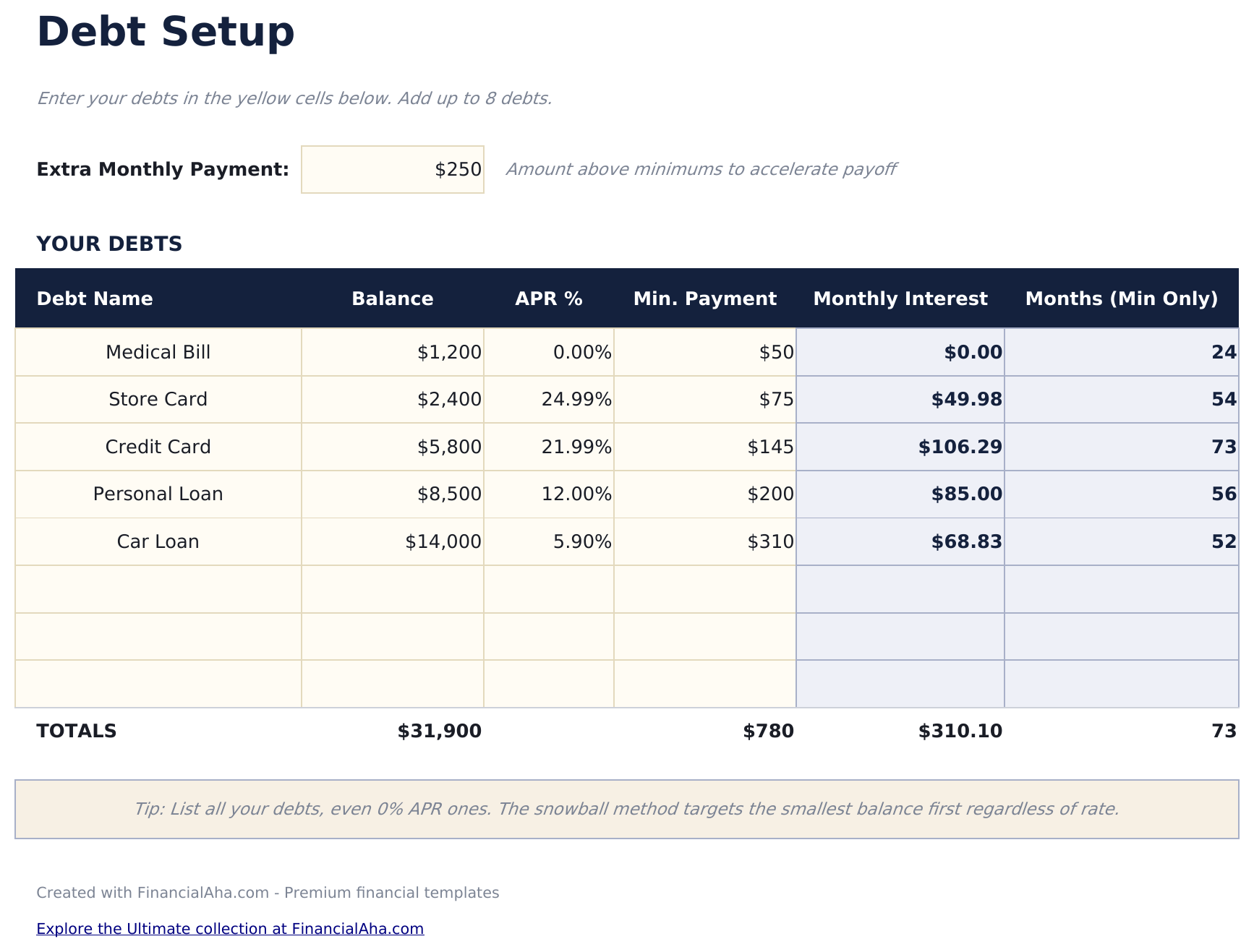
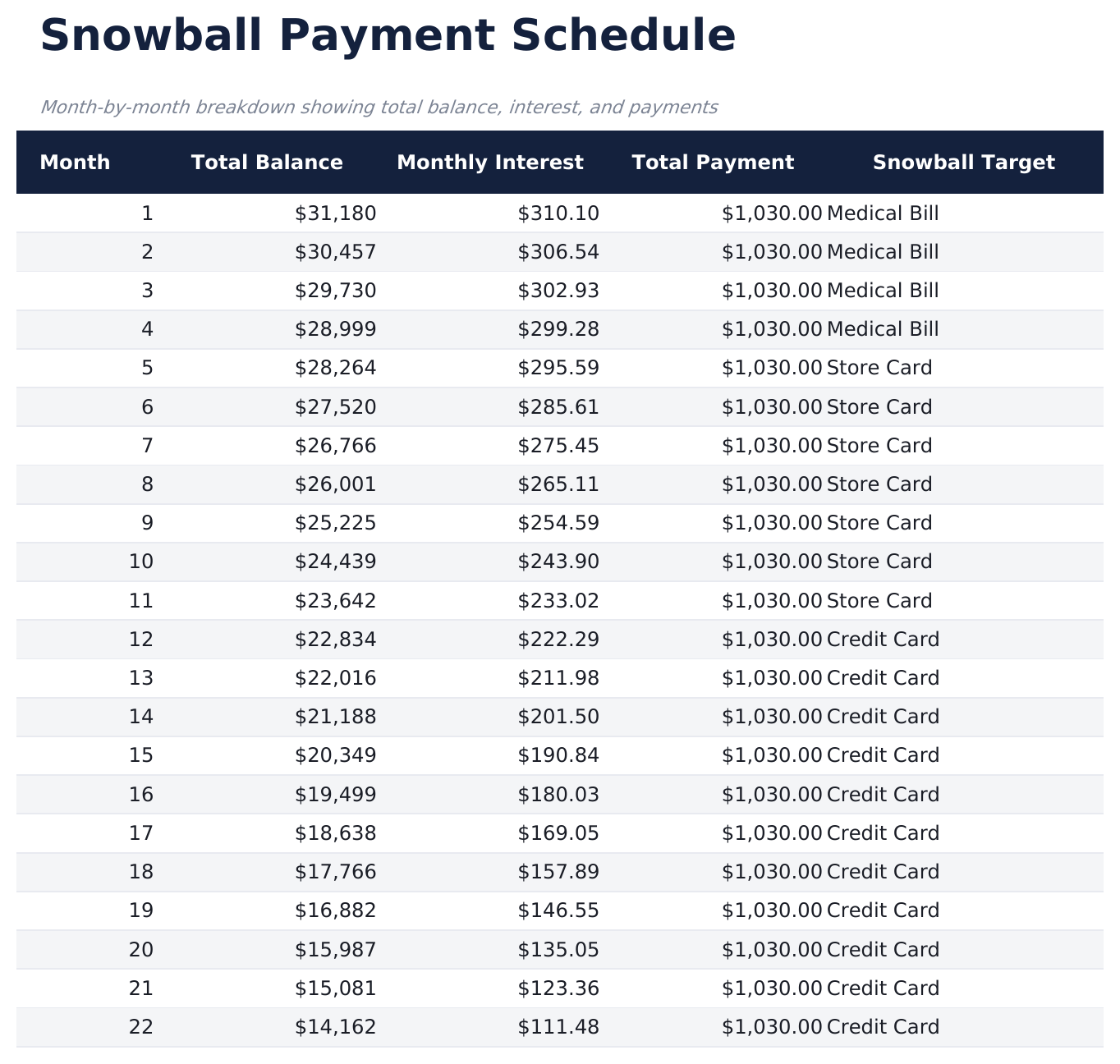
Debt Snowball preview

O Que Está Incluído

  • Dashboard with snowball progress showing debts eliminated, current target, and projected freedom date
  • Debt setup sheet sorted by balance from smallest to largest with rate and minimum payment fields
  • Snowball schedule with rollover payments that automatically redirect freed-up funds to the next debt
  • Payoff date projections per debt showing exactly when each individual account reaches a zero balance
  • Color-coded input cells and formatted schedule with total interest and timeline summary at the top
  • Works in Microsoft Excel, Google Sheets, and LibreOffice Calc with no setup required
Ultimate Version Available

Need more from this template?

The Essentials version covers everyday tracking. Ultimate goes further with multi-entity support, scenario analysis, and ultimate-grade reporting.

Essentials - $12
  • Dashboard with snowball progress showing debts eliminated, current target, and projected freedom date
  • Debt setup sheet sorted by balance from smallest to largest with rate and minimum payment fields
  • Snowball schedule with rollover payments that automatically redirect freed-up funds to the next debt
  • Payoff date projections per debt showing exactly when each individual account reaches a zero balance
Ultimate - $19
  • Acompanhe até 15 dívidas sorted by saldo de menor to maior com taxa, pagamento mínimo, e credor detalhes
  • Painel com 6 KPIs: dívida total, dívidas restante, dívidas eliminated, próximo meta dívida, projetado freedom data, e snowball valor do pagamento
  • Rollover pagamento acompanhamento mostrando como freed-up pagamentos de pago-off dívidas cascade em the próximo meta
  • Mês a mês elimination schedule com individual dívida timelines e running snowball pagamento totals
  • Marco rastreador marking cada dívida elimination com data, acumulativo freed valor do pagamento, e progresso percentage
See what's in the Ultimate version One-time purchase. No subscription.

Como Usar Esta Planilha de Debt Snowball

1

List debts by balance

Enter each debt from smallest to largest balance. Include the interest rate and minimum payment for each account.

2

Set your extra payment

Enter the additional monthly amount beyond minimums. This extra goes to the smallest debt first in the snowball method.

3

Watch the rollover

As each debt is paid off, its payment rolls into the next debt. The snowball schedule shows these cascading payments automatically.

4

Track elimination dates

The dashboard shows when each debt reaches zero and the projected date when all debts are fully paid off.

Criadas com Claude AI. Aperfeiçoadas por nós.

Usamos Claude AI para criar cada planilha, após uma pesquisa aprofundada. Depois, nossa equipe entra em ação. Refinamos o layout, testamos exaustivamente cada fórmula, corrigimos casos extremos e polimos o design até que pareça algo que nós mesmos usaríamos. A IA nos leva 80% do caminho. Os últimos 20% são puro julgamento humano.

Ver versão Ultimate →

Perguntas Frequentes

How does the snowball rollover work?

When the smallest debt is paid off, its payment amount (minimum plus extra) is added to the next smallest debt. This creates a growing "snowball" of payments.

What if two debts have the same balance?

List either one first - the snowball method does not have a strict rule for ties. Some people put the higher interest rate debt first when balances match.

Can I pause extra payments temporarily?

Yes. Set the extra payment to zero for those months. The schedule recalculates showing only minimum payments until you increase it again.

Does this track actual payments?

The template is a projection tool showing the planned schedule. Update balances periodically to keep the projections aligned with reality.

Como abrir no Google Sheets?

Envie o arquivo .xlsx para o Google Drive e abra com o Google Sheets. Todas as fórmulas e formatações serão preservadas.

Mais modelos Essentials de Debt Management

Procurando planilhas premium?

Nossas planilhas pagas incluem painéis avançados com várias abas, gráficos nativos do Excel e atualizações contínuas.

Privado e seguro

Seus dados financeiros ficam no seu dispositivo. Nos nunca os vemos.

Saiba mais →

Precisa de ajuda?

Consulte nossos guias ou entre em contato com perguntas.

Ver FAQ →