Best Value Complete Financial Planning Bundle
✓ Financial Planning✓ Net Worth Tracker✓ Monthly Budgeting✓ Travel Budget Planner✓ Annual Budgeting Planner✓ Monthly Expense Tracker✓ Annual Tax Planner✓ Retirement Planning
View Bundle →

Instant digital delivery · Terms & Conditions apply

Essentials Template - Excel & Google Sheets

Essentials Accounts Receivable Tracker Spreadsheet Template for Google Sheets & Excel

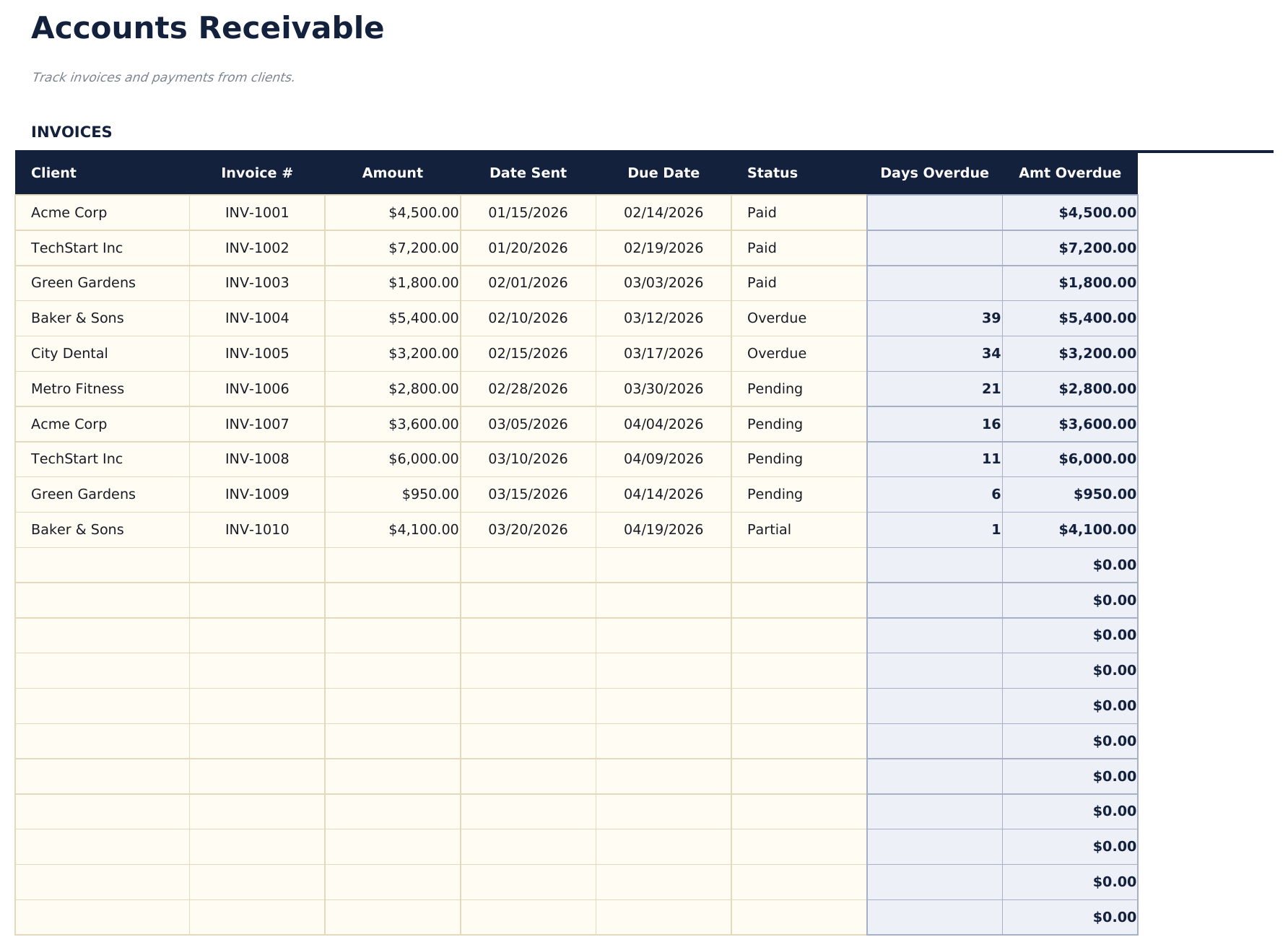
Thirty invoices, each with the client, both dates, the amount and a status: paid, pending, partial, overdue or written off. The Essentials Accounts Receivable Tracker spreadsheet template works out the days overdue rather than asking you to, calculates what is genuinely past due per invoice, and leaves written-off invoices out of the overdue figures where they would otherwise flatter or distort them. A dashboard reports the outstanding total. Google Sheets and Excel. No macros, no VBA.

Instant digital delivery · Terms & Conditions apply

Essentials Accounts Receivable Tracker spreadsheet template - Google Sheets and Excel preview

What's Included

  • A row per invoice with the client, both dates and the amount
  • A status on every invoice: paid, pending, partial, overdue or written off
  • Days overdue worked out rather than typed
  • The amount genuinely past due, calculated per invoice
  • Written-off invoices excluded from the overdue figures
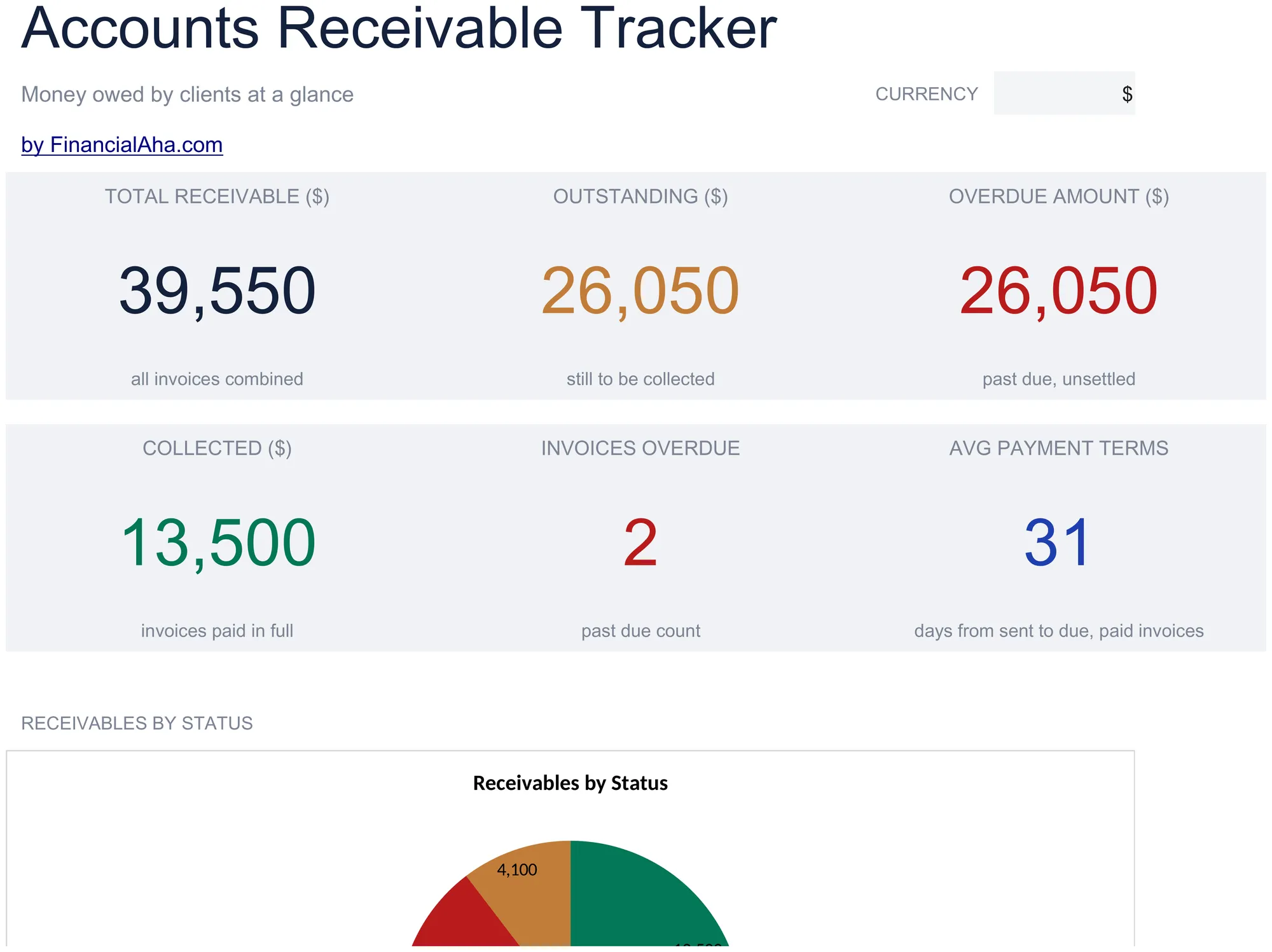
  • Total invoiced, outstanding, overdue, collected, overdue count and average payment terms on the dashboard
  • A chart on the dashboard
  • A currency dropdown that relabels money columns on both sheets
  • Works in Microsoft Excel and Google Sheets with no setup required

The FinancialAha Essentials Accounts Receivable Tracker Spreadsheet Template for Google Sheets and Excel is a two-sheet workbook logging invoices a row each, with a How to Use guide on a third tab. It works as an Essentials Accounts Receivable Tracker Excel template and an Essentials Accounts Receivable Tracker Google Sheets template from the same download. This Essentials Accounts Receivable Tracker spreadsheet template works out how long each overdue invoice has run and reports what is still outstanding apart from what has been invoiced. No macros, no VBA.

Inside the workbook

What's inside the FinancialAha Essentials Accounts Receivable Tracker spreadsheet template

The FinancialAha Essentials Accounts Receivable Tracker Spreadsheet Template runs on two working sheets - one you fill in, one that reports back - plus the guide. It works in both Microsoft Excel and Google Sheets and here is what the Essentials Accounts Receivable Tracker spreadsheet holds.

  1. 01 of 02

    Receivables

    A row per invoice, each with the client, the invoice number, the amount, the date it was sent, the date it is due, and a status. From those the sheet works out how many days past due each unpaid invoice has run, and how much of the balance that represents. The status column carries more than paid and pending - an invoice can be partial too. An invoice can also be written off, and the two derived columns exclude it once it is - which matters because a debt you have already given up on should stop ageing rather than sitting in an overdue figure forever, inflating a number you are meant to act on. Most simple trackers miss that and end up with an overdue total nobody trusts. Having both dates rather than one shows the credit period you actually extend, which is the thing to change if collection is a recurring problem.

  2. 02 of 02

    Dashboard

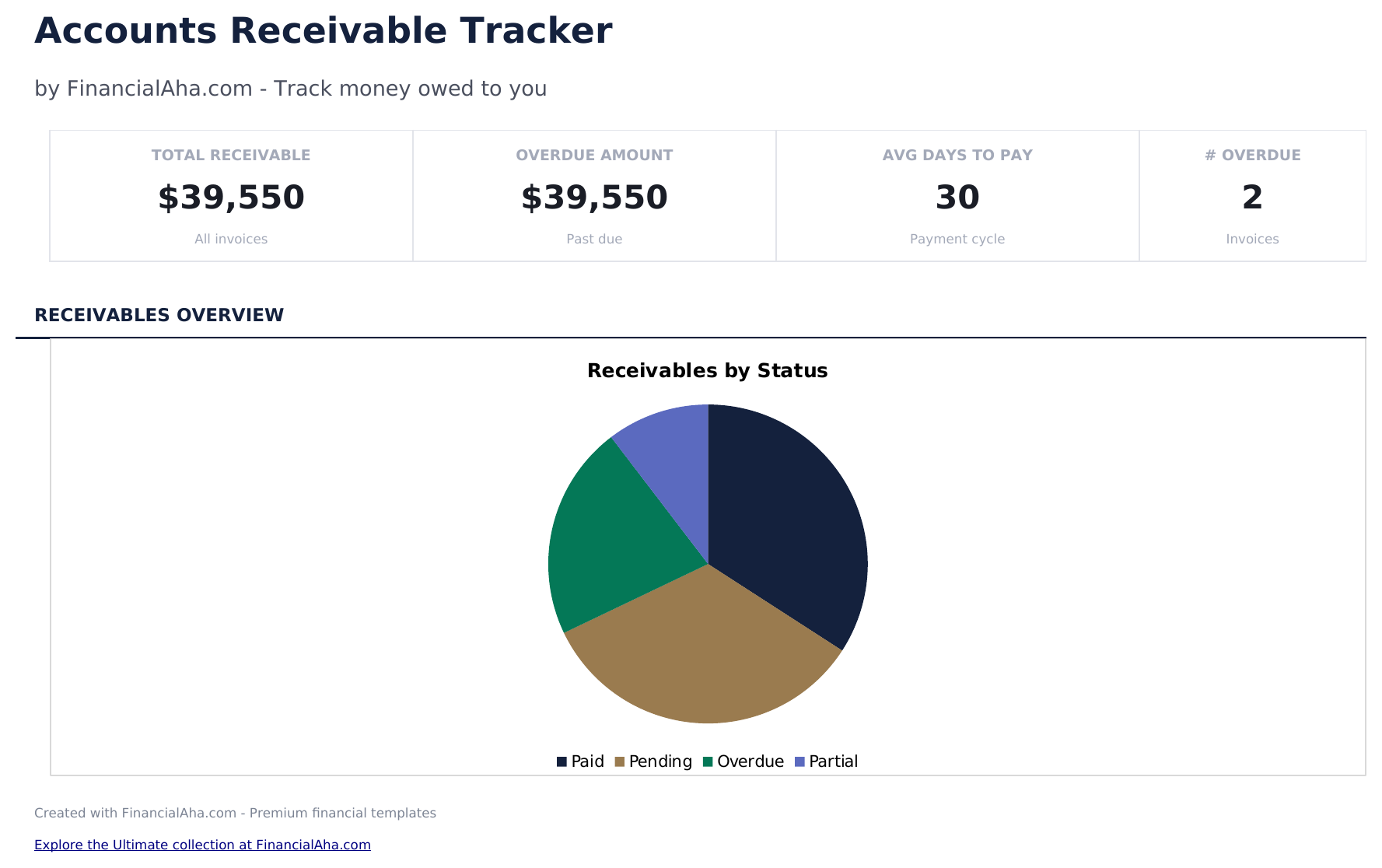
    Six figures: everything invoiced, what is still to be collected, how much of that is genuinely past due, what has been collected, how many invoices are overdue, and the average payment terms you extend. The first three being separate is the point - a large receivable balance made of invoices not yet due is ordinary trading, while the same figure made of late payments is a collection problem, and only splitting them tells you which you have. A chart sits alongside.

  3. Included guide

    How to Use

    A step-by-step guide on its own tab, covering what each column expects, what the statuses mean, and how the overdue figures are built. Because it ships inside the file, the instructions travel with the template wherever it is opened.

Works in both Google Sheets and Excel

Essentials Accounts Receivable Tracker Spreadsheet template for Google Sheets

Upload the Essentials Accounts Receivable Tracker Spreadsheet Template to Drive, right-click it, and choose "Open with Google Sheets". This Essentials Accounts Receivable Tracker Google Sheets template needs no conversion step and the chart survives the trip intact - the overdue figures recalculate exactly as they do in Excel.

Essentials Accounts Receivable Tracker Google Sheets template setup

A shared copy of the Essentials Accounts Receivable Tracker Google Sheets template suits a business where one person raises invoices and another chases them, since the overdue columns tell the second person exactly where to start. Sheets version history covers a status flipped by mistake.

Sharing the Essentials Accounts Receivable Tracker Google Sheet

The Essentials Accounts Receivable Tracker Google Sheet suits a short weekly pass: mark what has landed, and read the overdue figure. Because the days-overdue column is worked out rather than typed, it stays current without anyone updating it.

Essentials Accounts Receivable Tracker Spreadsheet template for Excel

The Essentials Accounts Receivable Tracker spreadsheet Excel download is a plain .xlsx. Excel opens this Essentials Accounts Receivable Tracker Excel template directly, with no import step and no compatibility prompt, and the chart is a native Excel chart that redraws as invoices settle. There are no macros and no VBA in the file.

Essentials Accounts Receivable Tracker Excel template setup

The same Essentials Accounts Receivable Tracker Excel template opens in Excel on Windows, Excel on Mac, and Excel for the web. It is also the identical file you would upload to Drive, so there is no separate Essentials Accounts Receivable Tracker spreadsheet download to choose between.

Essentials Accounts Receivable Tracker spreadsheet Excel notes

The Essentials Accounts Receivable Tracker spreadsheet Excel file carries no macros and no VBA, so Excel opens it without a trust prompt - which matters when a receivables list goes to a bookkeeper or a lender.

Opening the Essentials Accounts Receivable Tracker spreadsheet Excel file

Nothing in the Essentials Accounts Receivable Tracker Excel template is version-specific, so this Essentials Accounts Receivable Tracker spreadsheet Excel workbook behaves identically in Excel on Windows, Excel on Mac, and older builds.

Spreadsheet template highlights

What the Essentials Accounts Receivable Tracker spreadsheet template tracks

A row per invoice. This is what the Essentials Accounts Receivable Tracker Spreadsheet Template holds against each one:

Client
who owes it
Invoice #
your own reference
Amount
the value of the invoice
Date Sent
when it was raised
Due Date
when payment is expected
Status
paid, pending, partial, overdue or written off
Days Overdue auto
derived, and not counted once an invoice is paid or written off
Amt Overdue auto
derived, the part of the balance genuinely past due

Compare builds

FinancialAha Accounts Receivable Tracker spreadsheet template: Free and Essentials compared

Feature Free View Spreadsheet Template Essentials This page
Working sheets 1 2
Invoices 16 30
Due date recorded Yes Yes
Payment status A Paid column Per invoice
Days overdue Worked out
Amount overdue Yes
Written-off invoices handled Yes
Outstanding apart from total Yes Yes
Charts 1

The FinancialAha Essentials Accounts Receivable Tracker Spreadsheet Template covers two working sheets. The Free Accounts Receivable Tracker Spreadsheet Template carries a Paid column, so it already keeps what is outstanding apart from what has been invoiced; what it cannot do is read a due date against today. This build turns that column into a status - paid, pending, partial, overdue or written off - works out the days each unpaid invoice has run and the amount that represents, and reports outstanding and overdue apart from the total invoiced, with a chart alongside.

Good to know

Notes on working in the Essentials Accounts Receivable Tracker spreadsheet template

  • The three dashboard figures are separate on purpose: invoiced, outstanding and overdue are different situations.
  • Written off is a status in its own right, and a written-off invoice stops ageing rather than inflating the overdue figure forever.
  • Days overdue is worked out rather than typed, so it stays current without anyone maintaining it.
  • Both dates together show the credit period you extend, which is the thing to change if collection is a recurring problem.
  • The currency dropdown relabels money columns across the whole Essentials Accounts Receivable Tracker spreadsheet. It changes the label only and does not convert the numbers.

How to Use the Essentials Accounts Receivable Tracker Spreadsheet Template

1

Log the invoice

Client, number, amount and the date it was sent.

2

Set the due date

When payment is expected. Days overdue follows from it.

3

Update the status

Paid, pending, partial, overdue or written off as things change.

4

Read the dashboard

Invoiced, outstanding and overdue, kept apart.

Stress-tested with AI.

Every template starts with deep research into how people actually track the topic. We design the layout, build the formulas, and polish the design until it feels like something we would use ourselves. Along the way, we use AI to stress-test the calculations: unusual inputs, edge cases, and formula behavior, checked until the numbers hold.

Instant digital delivery · Terms & Conditions apply

Frequently Asked Questions

Is the FinancialAha Essentials Accounts Receivable Tracker Spreadsheet Template a Google Sheets template?

Yes. Upload the file to Drive and choose "Open with Google Sheets". The Essentials Accounts Receivable Tracker Google Sheets template needs no conversion step and the chart survives the trip intact.

Is the FinancialAha Essentials Accounts Receivable Tracker Spreadsheet Template an Excel template?

Yes. The download is a plain .xlsx, so the Essentials Accounts Receivable Tracker Excel template opens directly in Excel with no import step. The chart is a native Excel chart, and there are no macros or VBA.

Will the FinancialAha Essentials Accounts Receivable Tracker spreadsheet Excel file open in older versions of Excel?

Yes. The Essentials Accounts Receivable Tracker spreadsheet Excel workbook ships as a plain .xlsx, so it opens identically in current Excel and in builds that predate dynamic arrays.

What happens to an invoice marked written off?

It stops counting toward days overdue and the overdue amount. A debt you have given up on should not keep ageing inside a figure you are meant to act on, and most simple trackers get that wrong.

Why are invoiced, outstanding and overdue three separate figures?

Because they describe different situations. A large balance made of invoices not yet due is ordinary trading; the same figure made of late payments is a collection problem, and only splitting them shows which you have.

Is days overdue calculated?

Yes, from the due date, and it excludes anything paid or written off. Nothing has to be maintained by hand.

How many invoices does it hold?

Thirty. A row per invoice, with blanks beneath to carry on into. The Free build carries a Paid column but no due-date comparison, so it can separate outstanding from invoiced without being able to tell you what is late.

Does it record part payments?

It marks them rather than splitting them. The status list carries Partial alongside pending, paid, overdue and written off, and a partial invoice counts toward outstanding in full. What the sheet does not hold is the amount already received against it, so the split between paid and remaining stays outside the file.

How do I open the Essentials Accounts Receivable Tracker spreadsheet template in Google Sheets?

Upload the .xlsx file to Google Drive, then open it with Google Sheets. All formulas and formatting will be preserved.

More Essentials Business Finance Templates

Essentials

Instant digital delivery · Terms & Conditions apply

Highlights:

Dashboard with charts and KPIs
Pre-filled categories and sample data
No sign-up, no subscription
Lifetime free updates
Works in
Excel Google Sheets

Looking for premium spreadsheet templates?

Our paid templates include advanced multi-sheet dashboards, native Excel charts, and ongoing updates.

Private & secure

Your financial data stays on your device. We never see it.

Learn more →

Need help?

Check our guides or reach out with questions.

View FAQ →