Lifetime Deal Complete Personal Financial Planning Bundle →
✓ Financial Planning✓ Net Worth Tracker✓ Monthly Budgeting✓ Travel Budget Planner✓ Annual Budgeting Planner✓ Monthly Expense Tracker✓ Annual Tax Planner✓ Retirement Planning
View Bundle →

Instant digital delivery · Terms & Conditions apply

Ultimate Template - Excel & Google Sheets

Ultimate Financial Goal Planner Spreadsheet Template for Google Sheets & Excel

A category, a priority, a target date and a status on each of twelve goals, then an action plan breaking every goal into milestones with due dates, a completion flag and a note. The Ultimate Financial Goal Planner spreadsheet template records contributions month by month across a year with a total per goal, arranges the goals on a priority matrix by the ranking you set, and keeps a year-over-year sheet. Seven sheets. Google Sheets and Excel, one file.

See Preview

Instant digital delivery · Terms & Conditions apply

Financial Goal Planner Spreadsheet Template - Ultimate version for Google Sheets and Excel

What's Included

  • A category, a priority, a target date and a status on every goal
  • An action plan breaking each goal into milestones with due dates
  • A completion flag and a note on every action
  • Month-by-month contributions across a year, with a total per goal
  • A priority matrix arranging the goals by the ranking you set
  • Year-over-year change in money and as a percentage
  • A dashboard with two charts
  • A currency dropdown that relabels the money columns across every sheet
  • Works in Microsoft Excel and Google Sheets with no setup required

The FinancialAha Ultimate Financial Goal Planner Spreadsheet Template is a six-sheet workbook for Google Sheets and Excel, with a How to Use guide on a seventh tab. It works as an Ultimate Financial Goal Planner Excel template and an Ultimate Financial Goal Planner Google Sheets template from the same download. A row per goal, the milestones each one breaks into, a year of contributions month by month, and what changed against last year. No macros, no VBA.

Inside the workbook

What's inside the FinancialAha Ultimate Financial Goal Planner spreadsheet template

The FinancialAha Ultimate Financial Goal Planner Spreadsheet Template runs on six working sheets, with the instructions on a tab of their own. It works in both Microsoft Excel and Google Sheets and here is what the Ultimate Financial Goal Planner spreadsheet holds.

  1. 01 of 06

    Goals

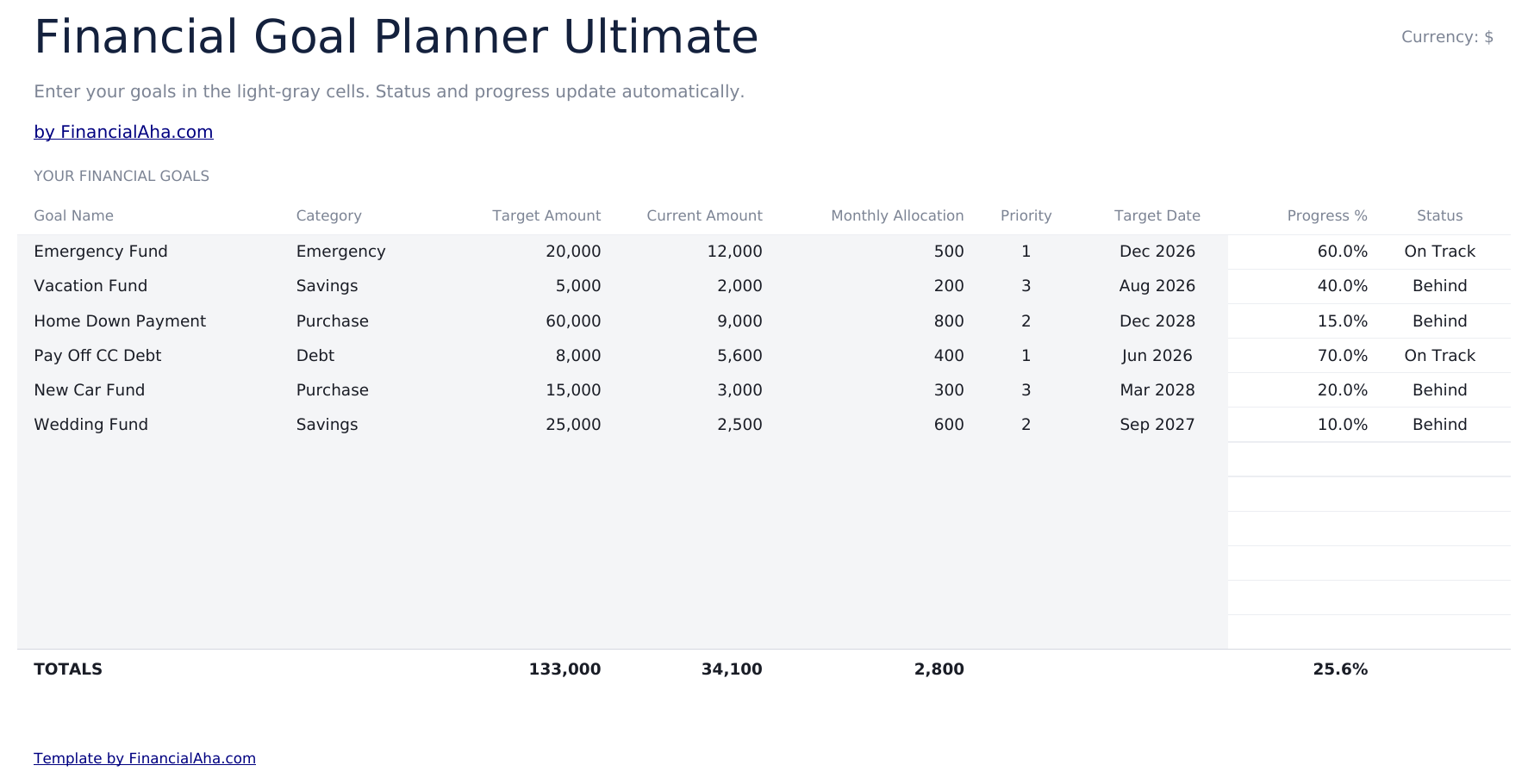
    A row per goal with a category, a target, what is there now, a monthly allocation, a priority, a target date, the progress and a status. The category column is the addition worth noticing. Goals with the same shape behave alike - the short ones compete with each other for the same money, and the long ones do not compete with anything for years. Grouping them is what makes the list something you can reason about rather than a list.

  2. 02 of 06

    Action Plan

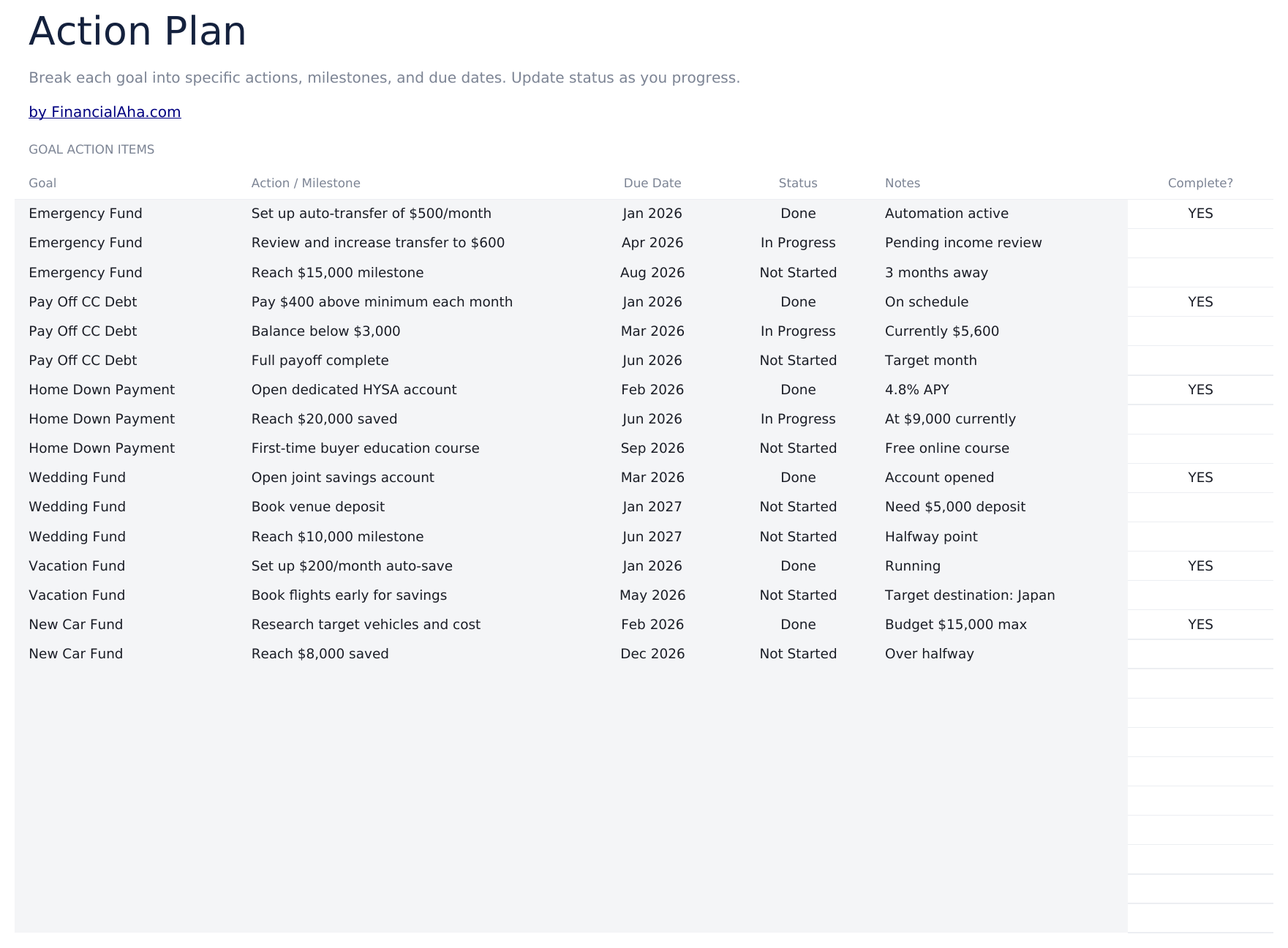
    The part most goal planners leave out. Each goal breaks into actions and milestones with a due date, a status, a note and a completion flag. A goal is a number and a date; what moves it is a set of things somebody has to do - open the account, set the transfer up, cancel the thing that was funding nothing. Those live here rather than in somebody's head, and they are the reason a plan survives past the week it was written.

  3. 03 of 06

    Monthly Progress

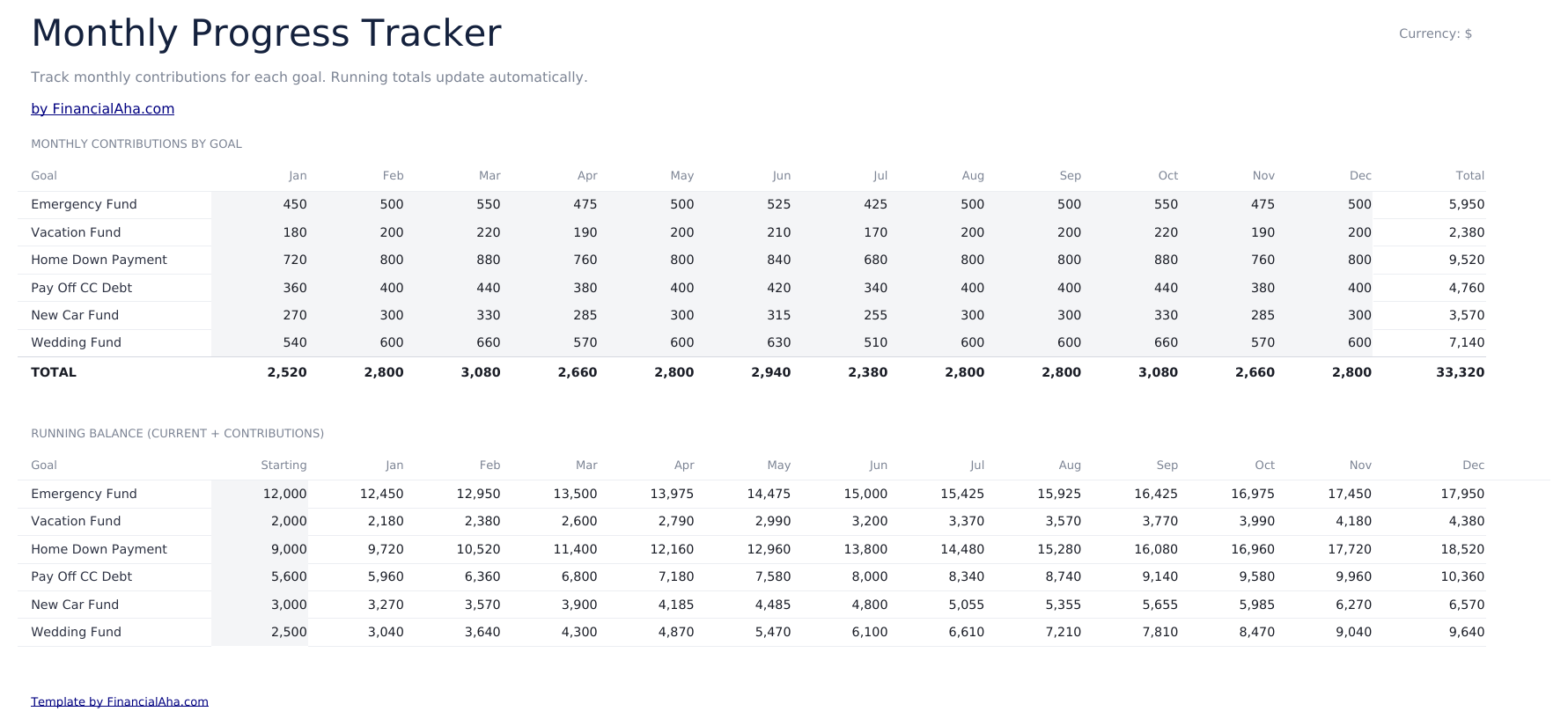
    Every goal across twelve months, with a total per goal. It is the record of what actually went in rather than what was allocated, which is the comparison that says whether the plan was real.

  4. 04 of 06

    Priority Matrix

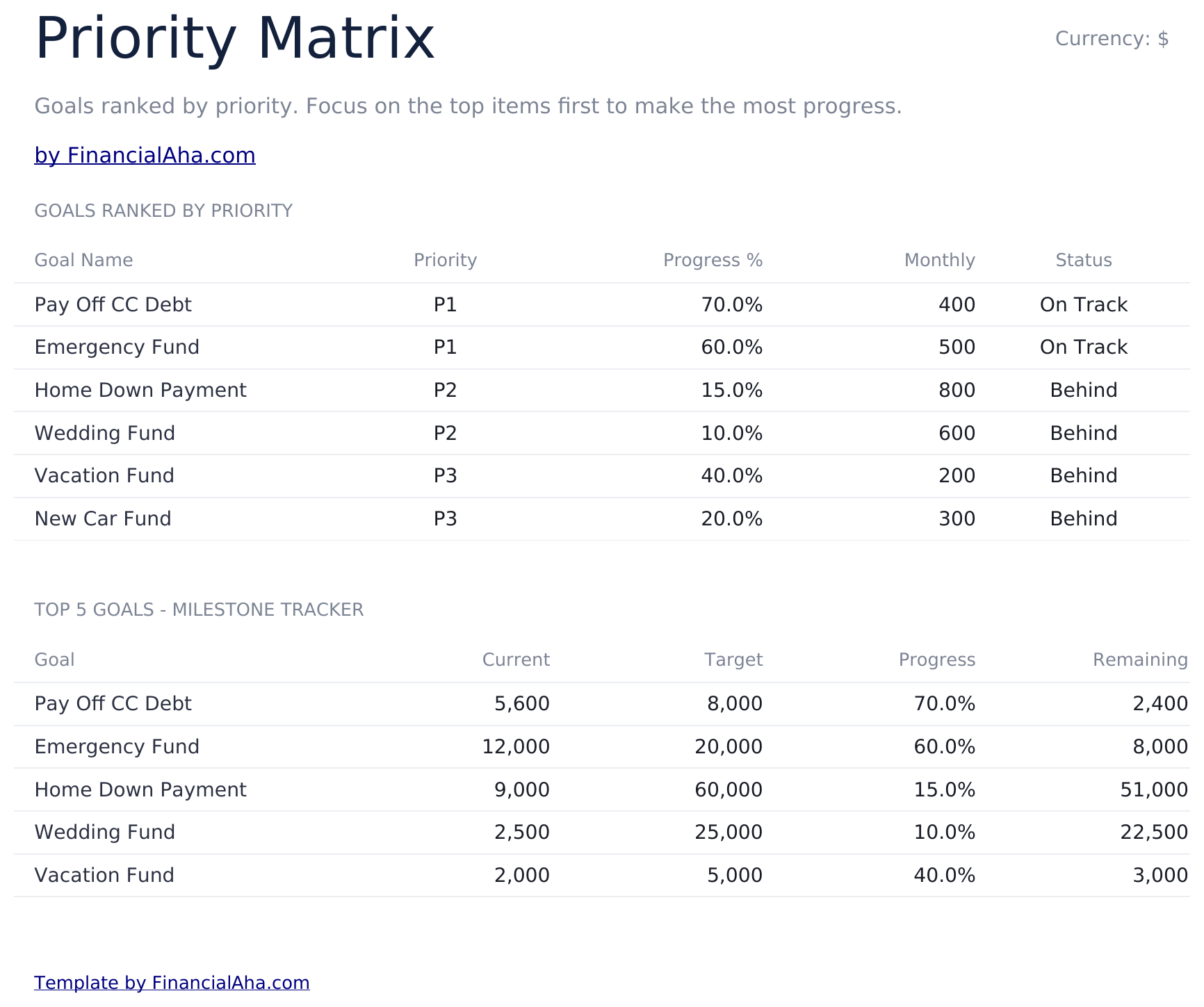
    The goals ranked by the priority you set, with progress, the monthly figure and a status beside each. The matrix does not decide anything - it arranges what you decided so you can see it. A high-priority goal at low progress and a low-priority one nearly finished is the pattern worth catching, and a flat list hides it.

  5. 05 of 06

    Year-over-Year

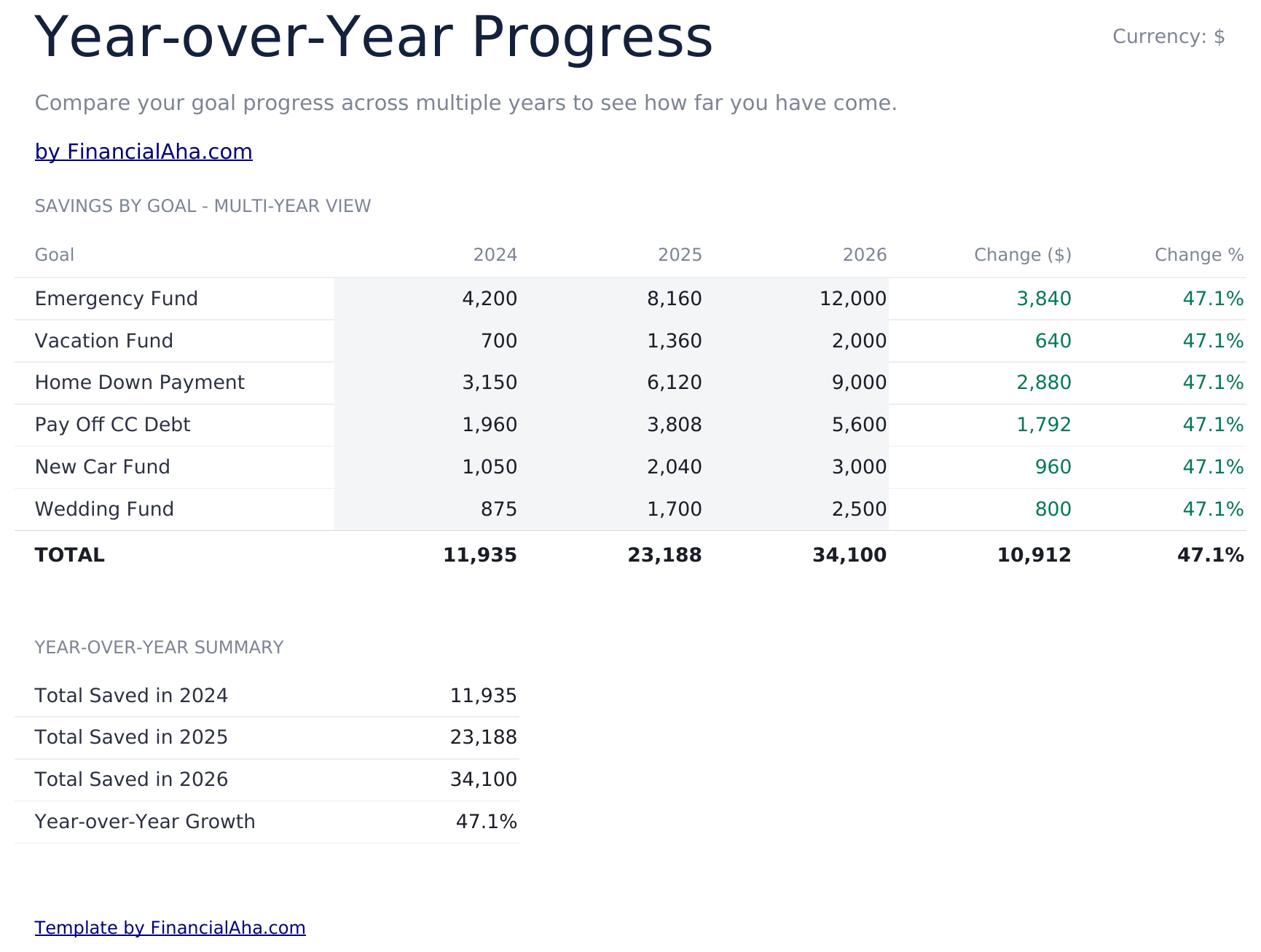
    Each goal with what changed over the year, in money and as a percentage. Over a long goal this is the only view that tells you whether the pace is holding, because a balance alone always looks like progress.

  6. 06 of 06

    Dashboard

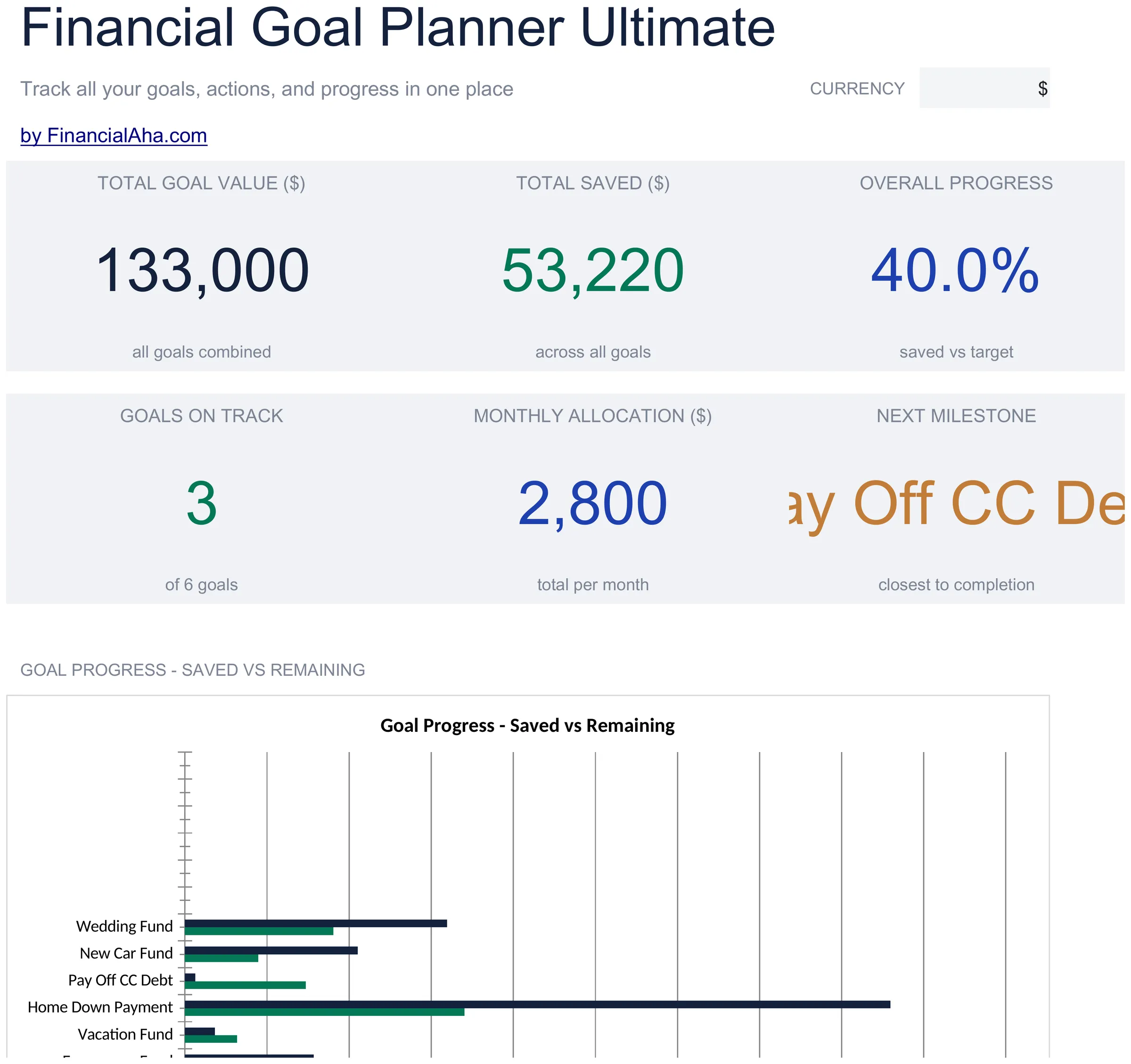
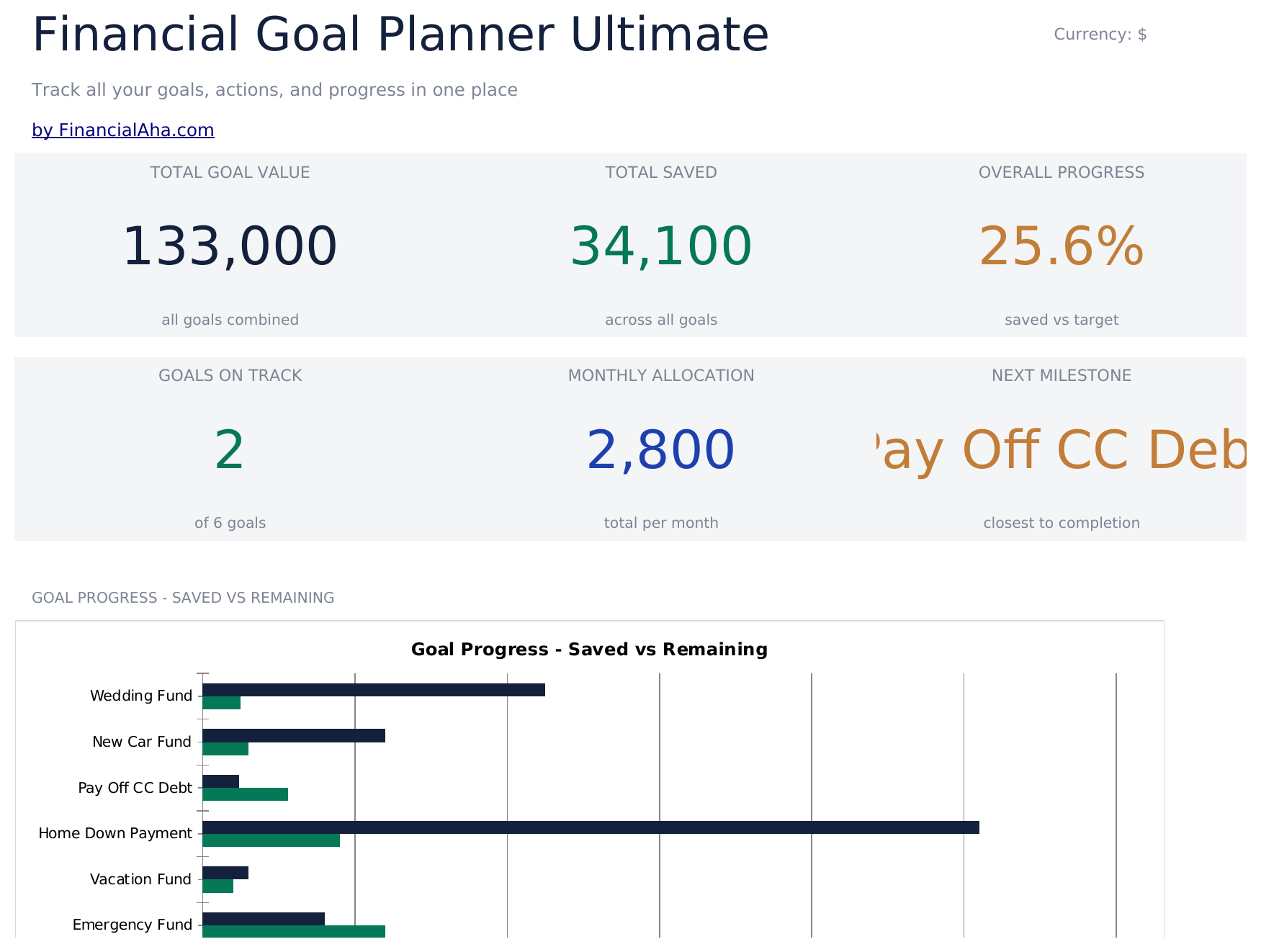
    Six figures. The combined target, what is saved across all goals and how the two compare on the top row; how many goals are on track or complete, what you are putting in each month, and which goal is closest to finishing on the second. The next-milestone tile is the one that changes behaviour - it names the goal nearest the line rather than leaving you to scan the list, and a goal about to complete is worth knowing about. Two charts read the sheets beneath. The on-track caption names the sample's goal count rather than yours.

  7. Included guide

    How to Use

    A step-by-step guide on its own tab, covering which sheet takes input, how the matrix and the dashboard read the goals, and how to change the currency. Because it ships inside the file, the instructions travel with the template wherever it is opened.

Works in both Google Sheets and Excel

Ultimate Financial Goal Planner Spreadsheet template for Google Sheets

Upload the Ultimate Financial Goal Planner Spreadsheet Template to Drive, right-click it, and choose "Open with Google Sheets". This Ultimate Financial Goal Planner Google Sheets template needs no conversion step, the cross-sheet references resolve, and both charts come across intact.

Ultimate Financial Goal Planner Google Sheets template setup

A shared copy of the Ultimate Financial Goal Planner Google Sheets template suits a household, since the action plan is the sheet that only works if both people can see what is outstanding.

Running the Ultimate Financial Goal Planner Google Sheets template

The Ultimate Financial Goal Planner Google Sheet is updated as contributions land and milestones close. The action plan is the part worth opening most often.

Ultimate Financial Goal Planner Spreadsheet template for Excel

The Ultimate Financial Goal Planner spreadsheet Excel download is a plain .xlsx. Excel opens this Ultimate Financial Goal Planner Excel template directly, with no import step, and both charts are native Excel charts. There are no macros and no VBA in the file.

Ultimate Financial Goal Planner Excel template setup

The same Ultimate Financial Goal Planner Excel template opens in Excel on Windows, Excel on Mac, and Excel for the web. It is also the identical file you would upload to Drive, so there is no separate Ultimate Financial Goal Planner spreadsheet download to choose between.

Ultimate Financial Goal Planner spreadsheet template notes for Excel

The Ultimate Financial Goal Planner spreadsheet Excel file carries no macros and no VBA, so Excel opens it without a trust prompt.

Opening the Ultimate Financial Goal Planner spreadsheet Excel file

Nothing in the Ultimate Financial Goal Planner Excel template is version-specific, so this Ultimate Financial Goal Planner spreadsheet Excel workbook behaves identically in Excel on Windows, Excel on Mac, and older builds.

Spreadsheet template highlights

What the Ultimate Financial Goal Planner spreadsheet template tracks

A row per goal. This is what the Ultimate Financial Goal Planner Spreadsheet Template records for each:

Goal Name
what it is, in your own words
Category
how you group it, which is what makes the list something you can reason about
Target Amount ($)
what it costs
Current Amount ($)
what is there now
Monthly Allocation ($)
what is meant to go toward it
Priority
a field you set; nothing in the sheet ranks goals for you
Target Date
when you would like it
Progress % auto
derived from the amount against the target
Status
where the goal stands

Compare builds

FinancialAha Financial Goal Planner spreadsheet template: Free, Essentials, and Ultimate compared

Feature Free View Spreadsheet Template Essentials View Spreadsheet Template Ultimate This page
Working sheets 1 2 6
Goals 9 10 12
The question it answers What must I save each month When does it land at what I save Both, plus what to do next
Priority on each goal – Yes Yes, with a matrix
Milestones and due dates – – Yes
Month-by-month contributions – – Yes
Year-over-year change – – Yes
Charts – 2 2

The Free Financial Goal Planner Spreadsheet Template takes a deadline and returns the monthly figure. The Essentials Financial Goal Planner Spreadsheet Template inverts it and adds a priority and a progress figure to every goal. The FinancialAha Ultimate Financial Goal Planner Spreadsheet Template takes twelve, breaks each into milestones with due dates, records what actually went in month by month, arranges the goals by the priority you set, and reports what changed over the year.

Good to know

Notes on working in the Ultimate Financial Goal Planner spreadsheet template

  • The action plan is the part most goal planners leave out, and the reason a plan survives past the week it was written.
  • Categories group goals that behave alike - short ones compete for the same money, long ones do not.
  • The monthly sheet records what went in rather than what was allocated, which is the comparison that matters.
  • The matrix arranges what you decided rather than deciding anything.
  • Year-over-year is the only view that shows whether the pace is holding, because a balance alone always looks like progress.
  • The currency dropdown on the dashboard relabels the money columns across every sheet. It changes the label only and does not convert the numbers.

How to Use This Template

1

List the goals

Twelve, with a category and a target date.

2

Break them into actions

Milestones with due dates on the action plan.

3

Record what goes in

Month by month, per goal.

4

Check the pace

Year-over-year change rather than the balance.

Stress-tested with AI.

Every template starts with deep research into how people actually track the topic. We design the layout, build the formulas, and polish the design until it feels like something we would use ourselves. Along the way, we use AI to stress-test the calculations: unusual inputs, edge cases, and formula behavior, checked until the numbers hold.

One-time purchase. No subscription. Works in Excel & Google Sheets.

Frequently Asked Questions

Is the FinancialAha Ultimate Financial Goal Planner Spreadsheet Template a Google Sheets template?

Yes. Upload the file to Drive and choose "Open with Google Sheets". The cross-sheet references in the Ultimate Financial Goal Planner Google Sheets template resolve on import and both charts come across intact.

Is the FinancialAha Ultimate Financial Goal Planner Spreadsheet Template an Excel template?

Yes. The download is a plain .xlsx, so the Ultimate Financial Goal Planner Excel template opens directly in Excel with no import step, and both charts are native Excel charts.

Will the FinancialAha Ultimate Financial Goal Planner spreadsheet Excel file open in older versions of Excel?

Yes. The Ultimate Financial Goal Planner spreadsheet Excel workbook ships as a plain .xlsx, so it opens identically in current Excel and in builds that predate dynamic arrays.

What is the action plan for in the Ultimate Financial Goal Planner spreadsheet?

The things somebody has to do - open the account, set the transfer up, cancel what was funding nothing. A goal is a number and a date; the actions are what move it, and keeping them in the file rather than in someone's head is why a plan survives past the week it was written.

What does the category column add in the Ultimate Financial Goal Planner spreadsheet?

Grouping goals that behave alike. Short goals compete with each other for the same money and long ones do not compete with anything for years, and seeing them grouped is what makes the list something you can reason about.

Does the priority matrix in the Ultimate Financial Goal Planner spreadsheet decide anything?

No. It arranges what you decided, so a high-priority goal at low progress sitting beside a low-priority one nearly finished is visible rather than buried in a flat list.

Why does the Ultimate Financial Goal Planner spreadsheet track year-over-year change?

Because on a long goal a balance always looks like progress. The change figure is the only view that says whether the pace is holding.

How many goals does the FinancialAha Ultimate Financial Goal Planner spreadsheet hold?

Twelve, the same count as the Free build - what this build adds is the milestones, the monthly contributions and the priority matrix. The Essentials build takes ten.

What do I get after buying the Ultimate Financial Goal Planner spreadsheet template?

You receive the Ultimate Financial Goal Planner spreadsheet template as an Excel file (.xlsx) that works in Microsoft Excel and Google Sheets. Download it immediately after purchase - no signup or account required.

Is there a free Ultimate Financial Goal Planner spreadsheet template?

Yes. A free version of the Ultimate Financial Goal Planner spreadsheet template is available with basic features. The Ultimate version adds advanced analysis, more capacity, and additional sheets.

What if the Ultimate Financial Goal Planner spreadsheet template does not work for me?

Contact us and we will help troubleshoot. The Ultimate Financial Goal Planner spreadsheet template works in Microsoft Excel and Google Sheets with no macros required.

Ultimate

Highlights:

Instant download after purchase
No macros or VBA required
All formulas auto-calculate
No subscription required
Works in
Excel Google Sheets

Looking for more Ultimate templates?

We offer Ultimate versions of our most popular spreadsheet templates with advanced features, more capacity, and deeper analysis.

Private & secure

Your financial data stays on your device. We never see it.

Learn more →

Need help?

Check our guides or reach out with questions.

View FAQ →