Best Value Complete Financial Planning Bundle
✓ Financial Planning✓ Net Worth Tracker✓ Monthly Budgeting✓ Travel Budget Planner✓ Annual Budgeting Planner✓ Monthly Expense Tracker✓ Annual Tax Planner✓ Retirement Planning
View Bundle →

Instant digital delivery · Terms & Conditions apply

Ultimate Template - Excel & Google Sheets

Ultimate Invoice Tracker Spreadsheet Template for Google Sheets & Excel

Days to pay is worked out per invoice rather than typed, and the outstanding balance splits across current, 31-60, 61-90 and 90+ on an Aging Report. The Ultimate Invoice Tracker spreadsheet template puts a description, payment method and notes on every line, summarises nine clients with total invoiced, paid, outstanding and average days to pay, and leaves voided invoices out of the invoiced total. Six working sheets. Google Sheets and Excel. No macros, no VBA.

See Preview

Instant digital delivery · Terms & Conditions apply

Invoice Tracker Spreadsheet Template - Ultimate version for Google Sheets and Excel

What's Included

  • A description, payment method and notes on every invoice
  • Days to pay worked out per invoice, not typed
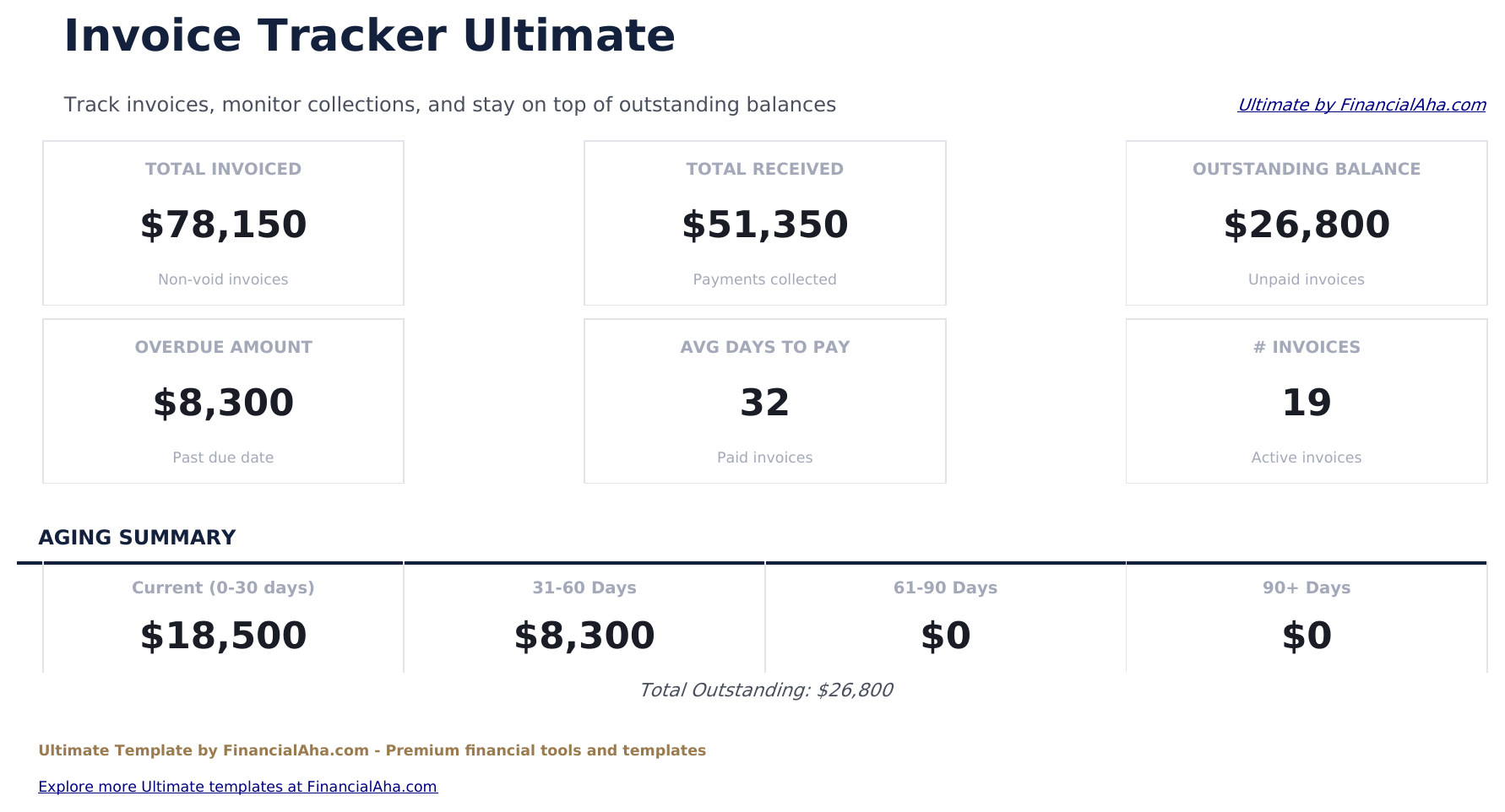
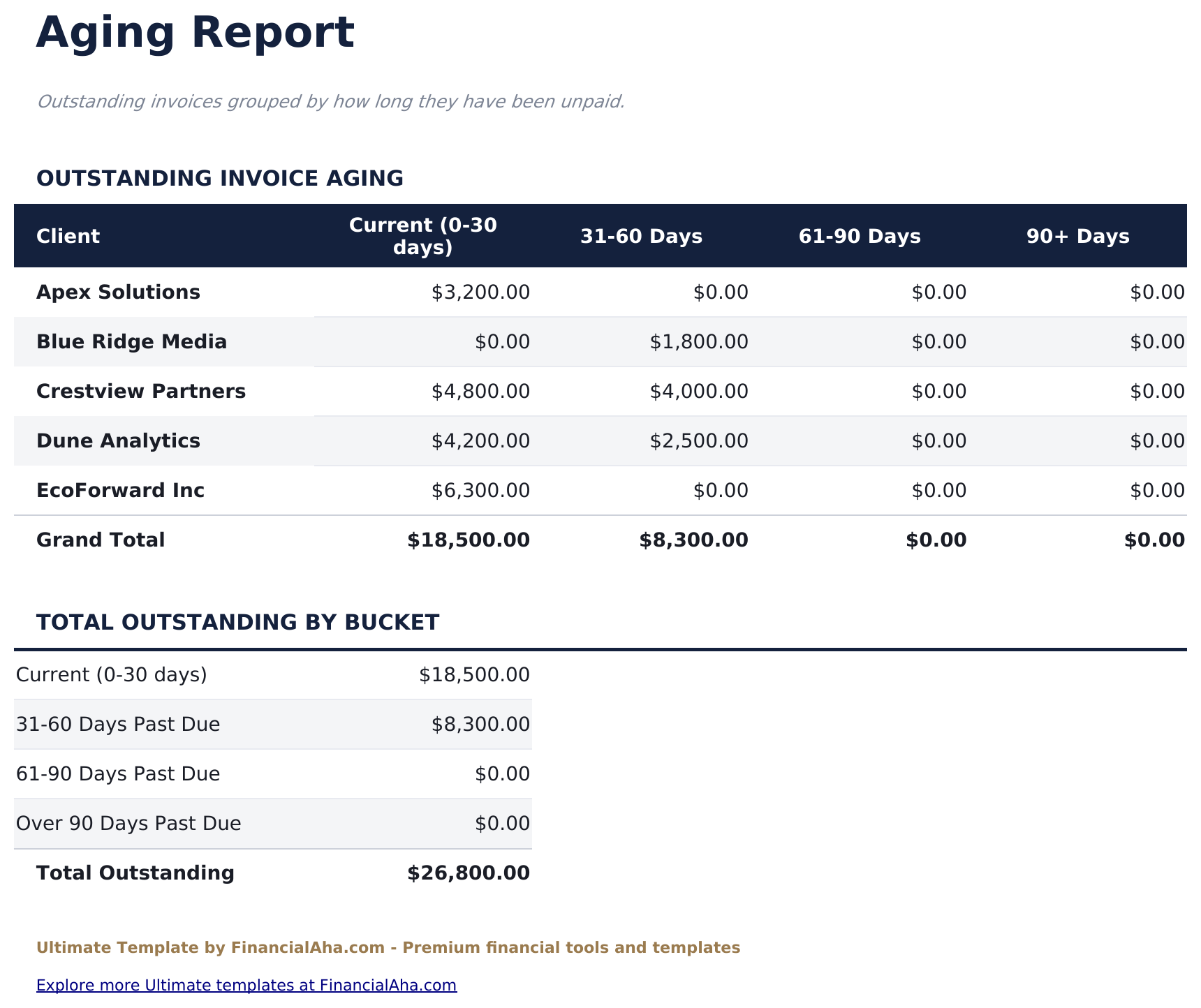
  • An aging report splitting the outstanding balance into current, 31-60, 61-90 and 90+
  • A per-client summary with total invoiced, paid, outstanding and average days to pay
  • Voided invoices excluded from the invoiced total
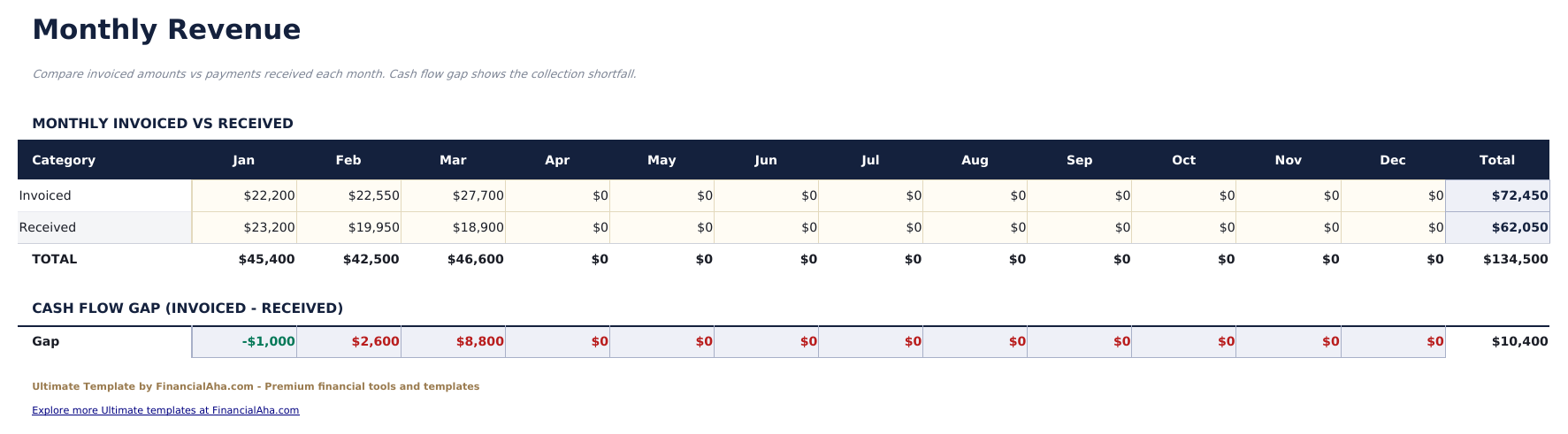
  • Invoiced against received across the twelve months
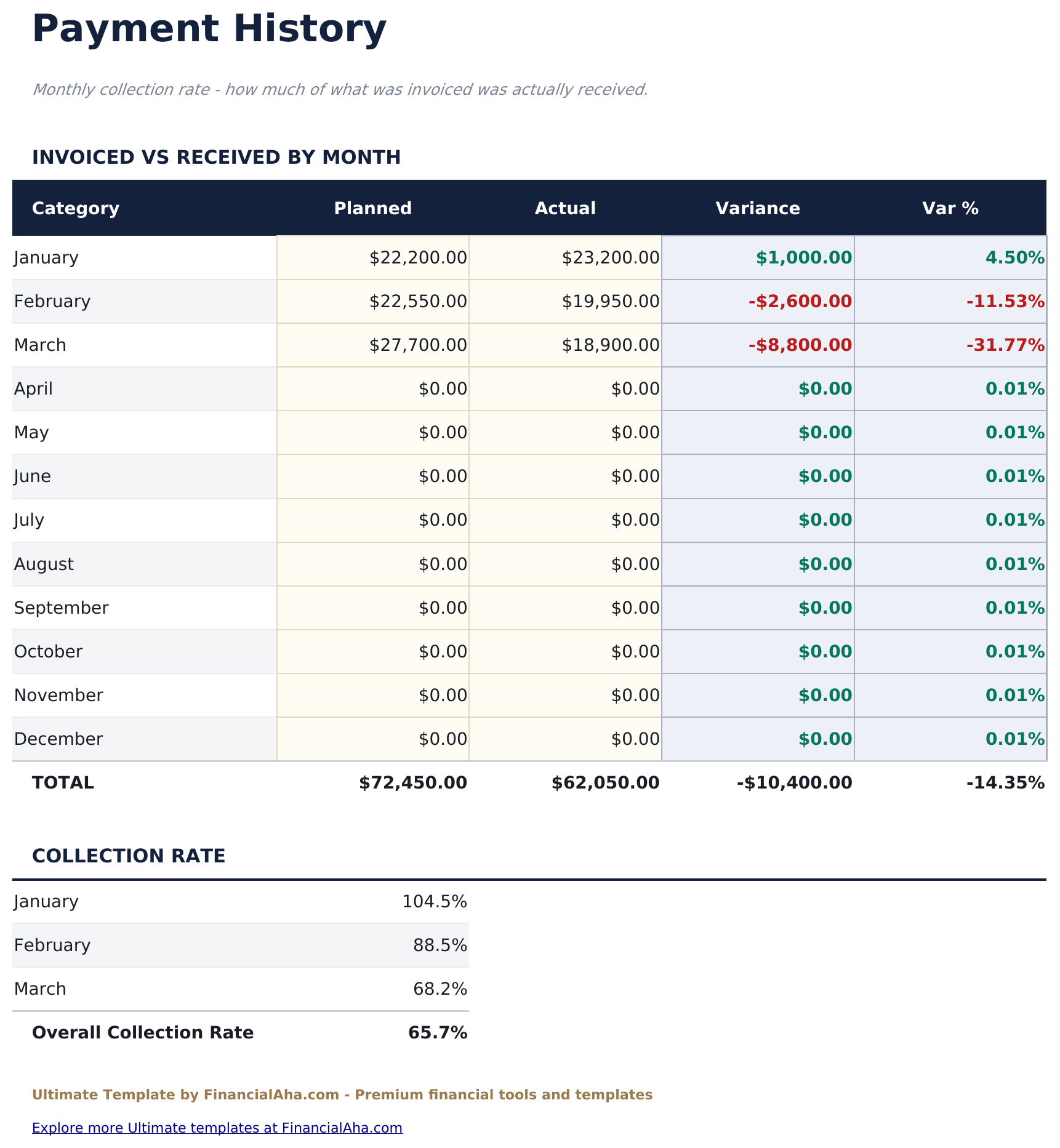
  • A collection rate per month, with the variance beside it
  • Overdue amount and average days to pay on the dashboard
  • Works in Microsoft Excel and Google Sheets with no macros required

The FinancialAha Ultimate Invoice Tracker Spreadsheet Template for Google Sheets and Excel is a six-sheet workbook built around getting paid, with a How to Use guide on a seventh tab. It ships as an Ultimate Invoice Tracker Excel template and an Ultimate Invoice Tracker Google Sheets template in one file. This Ultimate Invoice Tracker spreadsheet template logs every invoice, works out how many days each one took to settle, ages what is still outstanding, and sets what was invoiced against what was actually received month by month. No macros, no VBA.

Inside the workbook

What's inside the FinancialAha Ultimate Invoice Tracker spreadsheet template

The FinancialAha Ultimate Invoice Tracker Spreadsheet Template runs on six working sheets - one you fill in, five that report back - plus the guide. It works in both Microsoft Excel and Google Sheets and here is what the Ultimate Invoice Tracker spreadsheet holds.

  1. 01 of 06

    Dashboard

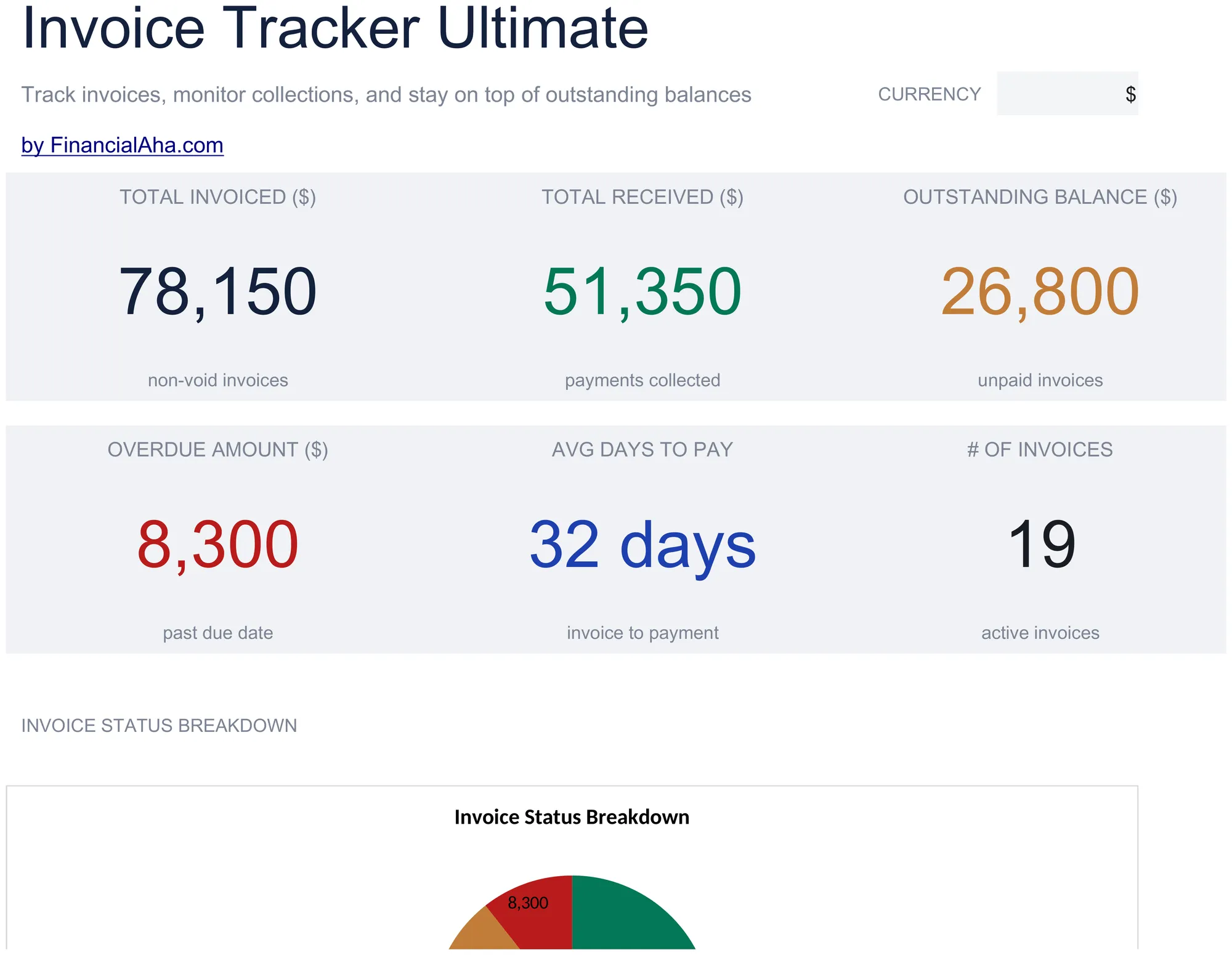
    Where the business stands in six figures: what has been invoiced, what has been received, the outstanding balance, how much of that is past due, the average number of days between sending an invoice and being paid, and the invoice count. Voided invoices are excluded from the invoiced total, which matters more than it sounds - a cancelled invoice left in the total quietly overstates the year.

  2. 02 of 06

    Invoice Log

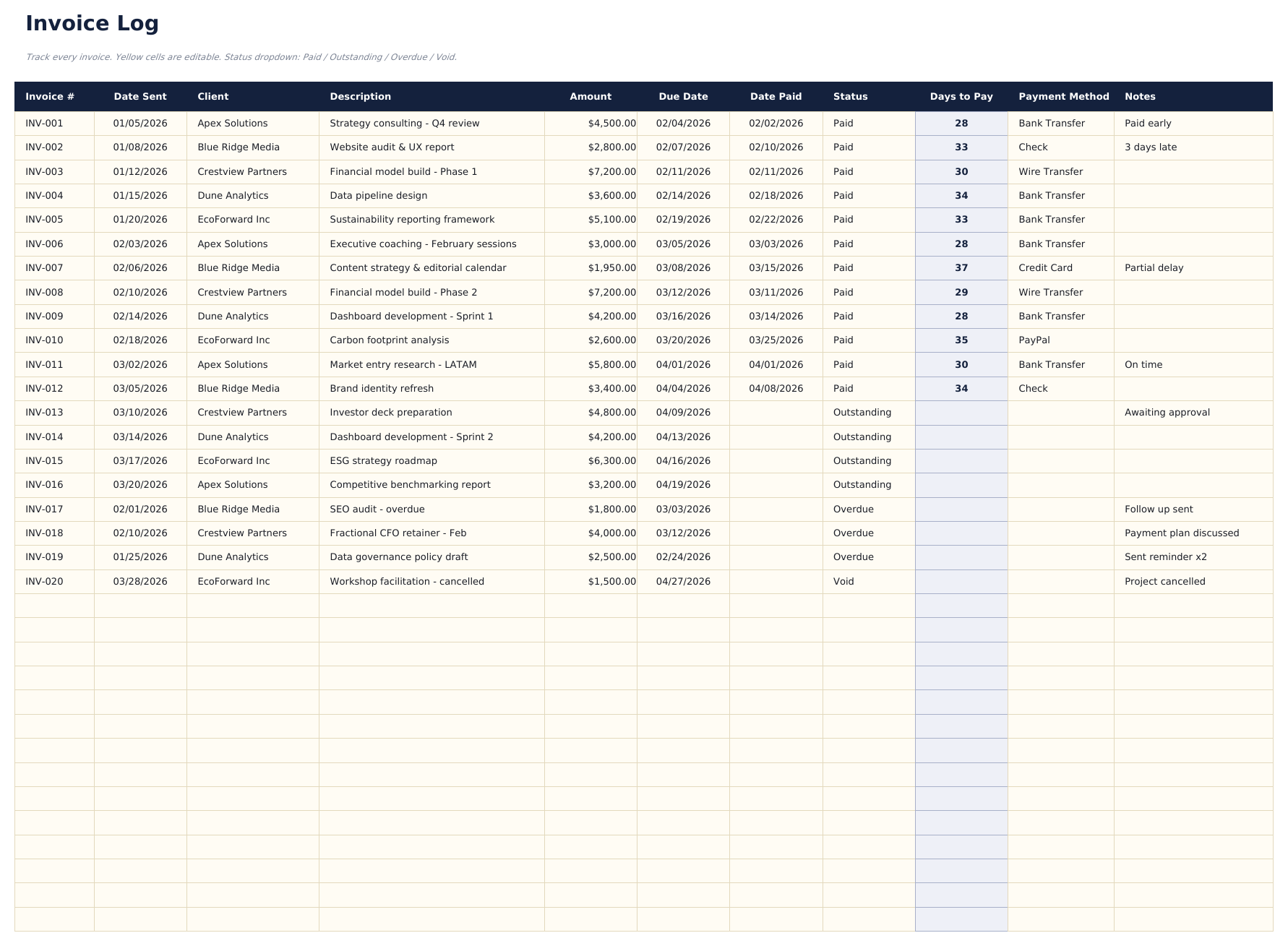
    A row per invoice, each with a number, the client, a description of the work, the amount, the date sent and the date due, the date it was actually paid, the status, the payment method, a note, and the number of days it took to settle. That days-to-pay figure is worked out rather than typed, which means the answer to who is slow arrives without anyone having to count.

  3. 03 of 06

    Client Summary

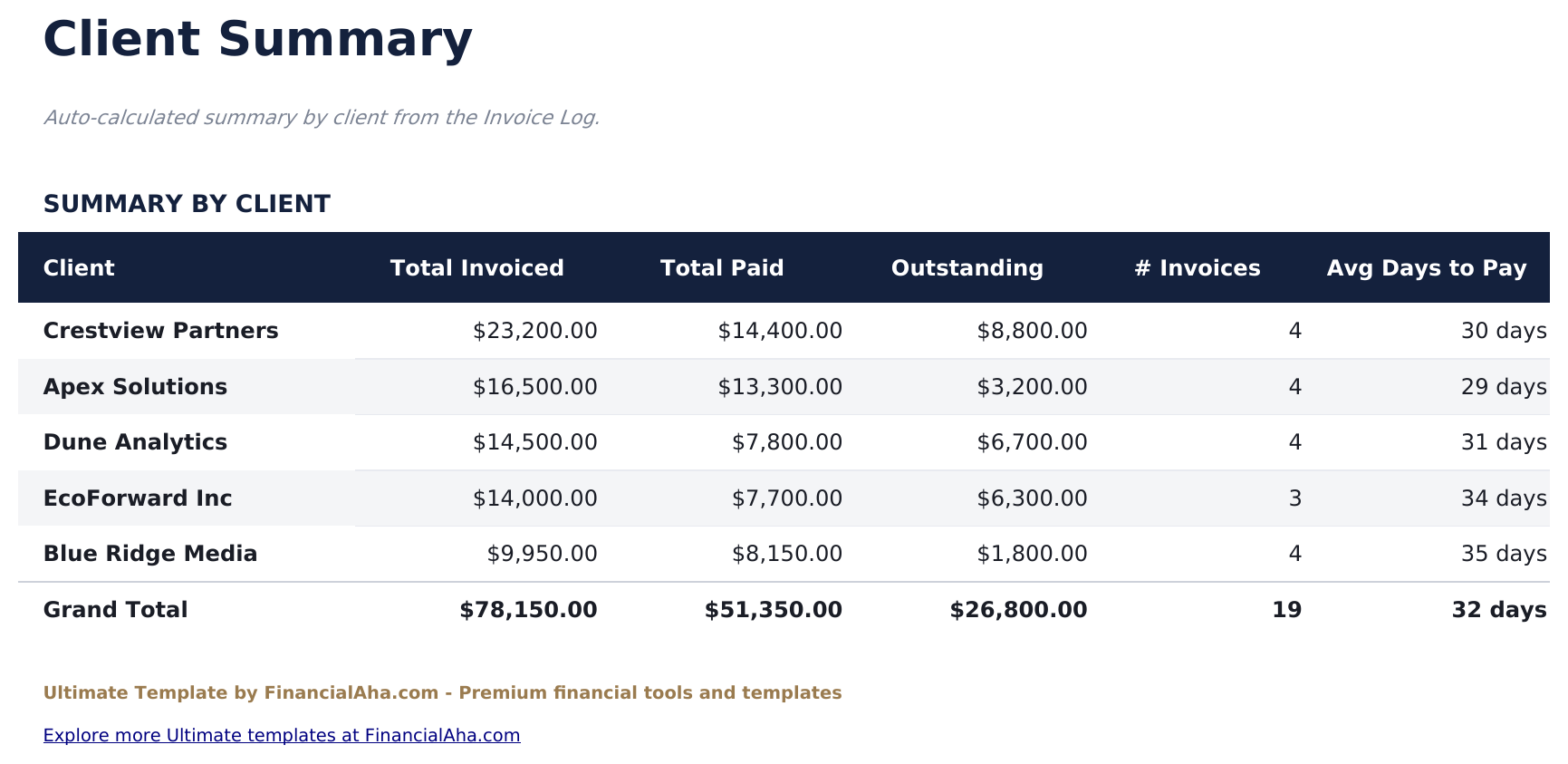
    Five clients, each with what they have been invoiced, what they have paid, what is still outstanding, how many invoices they account for, and their own average days to pay. A client can be the largest by revenue and the slowest by payment at the same time, and this is the sheet where both facts sit side by side.

  4. 04 of 06

    Aging Report

    The outstanding balance split by client across the standard brackets: current, thirty to sixty days, sixty to ninety, and beyond ninety. Aging is how the collectability of a receivable is read - the same amount of money sitting in the last bracket rather than the first is not the same asset - and this puts it in the shape a lender or an accountant expects.

  5. 05 of 06

    Monthly Revenue

    What was invoiced and what was received laid out across the twelve months. Invoicing and collecting rarely happen in the same month, and seeing the two lines apart is what makes the gap between a good month on paper and a good month in the bank visible.

  6. 06 of 06

    Payment History

    Each month with what was invoiced, what came in, the variance and the collection rate as a percentage. A collection rate that drifts down over several months is the kind of thing that is obvious in a column and invisible one invoice at a time.

  7. Included guide

    How to Use

    A step-by-step guide on its own tab, covering setup, how days to pay and the aging brackets are worked out, and how the client and monthly sheets read. Because it ships inside the file, the instructions travel with the template wherever it is opened.

Works in both Google Sheets and Excel

Ultimate Invoice Tracker Spreadsheet template for Google Sheets

Upload the Ultimate Invoice Tracker Spreadsheet Template to Drive, right-click it, and choose "Open with Google Sheets". This Ultimate Invoice Tracker Google Sheets template needs no conversion step and the chart survives the trip intact. The cross-sheet references that build the client summary and the aging report rely on the existing tab names, so those are worth leaving alone.

Ultimate Invoice Tracker Google Sheets template setup

A shared copy of the Ultimate Invoice Tracker Google Sheets template suits a business where one person raises invoices and another chases them, since the aging report tells the second person exactly which client to start with. Sheets version history covers an entry typed over.

Sharing the Ultimate Invoice Tracker Google Sheet

The Ultimate Invoice Tracker Google Sheet is built around two rhythms: a quick pass to log invoices and payments as they happen, and a longer monthly sitting with the aging report, the client summary and the collection rate.

Ultimate Invoice Tracker Spreadsheet template for Excel

The Ultimate Invoice Tracker spreadsheet Excel download is a plain .xlsx. Excel opens this Ultimate Invoice Tracker Excel template directly, with no import step and no compatibility prompt, and the chart is a native Excel chart that redraws as invoices settle. There are no macros and no VBA in the file, so it opens without a security warning.

Ultimate Invoice Tracker Excel template setup

The same Ultimate Invoice Tracker Excel template opens in Excel on Windows, Excel on Mac, and Excel for the web. It is also the identical file you would upload to Drive, so there is no separate Ultimate Invoice Tracker spreadsheet download to choose between.

Ultimate Invoice Tracker spreadsheet Excel notes

The Ultimate Invoice Tracker spreadsheet Excel file carries no macros and no VBA, so Excel opens it without a trust prompt. The same Ultimate Invoice Tracker spreadsheet Excel download also opens in Excel for the web, which matters when a payment needs logging away from a desk.

Opening the Ultimate Invoice Tracker spreadsheet Excel file

Nothing in the Ultimate Invoice Tracker Excel template is version-specific, so this Ultimate Invoice Tracker spreadsheet Excel workbook behaves identically in Excel on Windows, Excel on Mac, and older builds.

Spreadsheet template highlights

What the Ultimate Invoice Tracker spreadsheet template tracks

The invoice log feeds five reporting sheets. These are the columns the Ultimate Invoice Tracker Spreadsheet Template works from:

Invoice #
your own reference for it
Date Sent
the day it was issued
Client
who it went to, and what the client summary groups by
Description
what the invoice was for
Amount
what it is for
Due Date
the day payment is expected
Date Paid
when it actually landed
Status
where the invoice stands, including voided
Days to Pay auto
derived, from sent to paid, and averaged per client
Payment Method
how the money arrived
Notes
anything worth recording against the invoice
Collection % auto
derived, what came in against what was invoiced that month

Compare builds

FinancialAha Invoice Tracker spreadsheet template: Free, Essentials, and Ultimate compared

Feature Free View Spreadsheet Template Essentials View Spreadsheet Template Ultimate This page
Working sheets 1 2 6
Invoices held 16 30 100
Due date Yes Yes
Payment date Yes Yes
Days to pay Per invoice, and averaged
Outstanding balance Yes Yes
Aging by bracket 0-30, 31-60, 61-90, 90+
Per-client totals Yes, with average days to pay
Invoiced against received By month, with a collection rate
Charts 1 1

The FinancialAha Ultimate Invoice Tracker Spreadsheet Template covers six working sheets. The Free Invoice Tracker Spreadsheet Template has neither a due date nor a payment date. The Essentials Invoice Tracker Spreadsheet Template for Google Sheets and Excel takes thirty, adds both dates and separates the overdue balance from the outstanding one. This build is the one built for collection: days to pay worked out on every invoice and averaged per client, the outstanding balance aged across the standard brackets, a per-client summary that shows the largest client and the slowest payer at once, and invoiced against received month by month with a collection rate.

Good to know

Notes on working in the Ultimate Invoice Tracker spreadsheet template

  • Days to pay is worked out rather than typed, so the answer to who is slow arrives without anyone counting.
  • Aging is how a receivable's collectability is read - the same amount in the last bracket is not the same asset as in the first.
  • Voided invoices are excluded from the invoiced total, which stops a cancelled invoice quietly overstating the year.
  • Invoiced and received are shown apart because they rarely happen in the same month, and that gap is the difference between a good month on paper and a good month in the bank.
  • The currency dropdown sits on the Dashboard and relabels money columns across the whole Ultimate Invoice Tracker spreadsheet. It changes the label only and does not convert the numbers.

How to Use This Template

1

Log each invoice

Number, client, description, amount, date sent and due date go on the invoice log.

2

Record the payment

Enter the date paid and the method. Days to pay is worked out from it.

3

Read the aging report

It splits what is outstanding by client across the standard brackets.

4

Review the month

Invoiced against received, with the variance and the collection rate.

Stress-tested with AI.

Every template starts with deep research into how people actually track the topic. We design the layout, build the formulas, and polish the design until it feels like something we would use ourselves. Along the way, we use AI to stress-test the calculations: unusual inputs, edge cases, and formula behavior, checked until the numbers hold.

One-time purchase. No subscription. Works in Excel & Google Sheets.

Frequently Asked Questions

Is the FinancialAha Ultimate Invoice Tracker Spreadsheet Template a Google Sheets template?

Yes. Upload the file to Drive and choose "Open with Google Sheets". The Ultimate Invoice Tracker Google Sheets template needs no conversion step and the chart survives the trip intact. The cross-sheet references rely on the existing tab names, so those are worth leaving alone.

Is the FinancialAha Ultimate Invoice Tracker Spreadsheet Template an Excel template?

Yes. The download is a plain .xlsx, so the Ultimate Invoice Tracker Excel template opens directly in Excel with no import step. The chart is a native Excel chart, and there are no macros or VBA.

Will the FinancialAha Ultimate Invoice Tracker spreadsheet Excel file open in older versions of Excel?

Yes. The Ultimate Invoice Tracker spreadsheet Excel workbook ships as a plain .xlsx, so it opens identically in current Excel and in builds that predate dynamic arrays.

What is the aging report for in the Ultimate Invoice Tracker spreadsheet?

Reading how collectable the outstanding balance is. The same amount sitting beyond ninety days is not the same asset as one that is under thirty, and the report puts that split in the shape an accountant or a lender expects.

How is days to pay worked out in the Ultimate Invoice Tracker spreadsheet?

From the date sent to the date paid, on every invoice, and averaged per client on the summary sheet. Nobody has to count - the answer to who is slow is already there.

What happens to voided invoices in the Ultimate Invoice Tracker spreadsheet?

They are excluded from the invoiced total. A cancelled invoice left in the total quietly overstates the year, which is easy to miss and hard to unpick later.

Why does the Ultimate Invoice Tracker spreadsheet show invoiced and received separately by month?

Because they rarely happen in the same month. The gap between them is the difference between a good month on paper and a good month in the bank.

Can I add invoices to the Ultimate Invoice Tracker spreadsheet?

A row per invoice on the log, feeding five reporting sheets, and you can right-click inside the table and choose Insert when you need another. The Free and Essentials builds hold shorter logs.

What do I get after buying the Ultimate Invoice Tracker spreadsheet template?

You receive the Ultimate Invoice Tracker spreadsheet template as an Excel file (.xlsx) that works in Microsoft Excel and Google Sheets. Download it immediately after purchase - no signup or account required.

Is there a free Ultimate Invoice Tracker spreadsheet template?

Yes. A free version of the Ultimate Invoice Tracker spreadsheet template is available with basic features. The Ultimate version adds advanced analysis, more capacity, and additional sheets.

What if the Ultimate Invoice Tracker spreadsheet template does not work for me?

Contact us and we will help troubleshoot. The Ultimate Invoice Tracker spreadsheet template works in Microsoft Excel and Google Sheets with no macros required.

Ultimate

Highlights:

Instant download after purchase
No macros or VBA required
All formulas auto-calculate
No subscription required
Works in
Excel Google Sheets

Looking for more Ultimate templates?

We offer Ultimate versions of our most popular spreadsheet templates with advanced features, more capacity, and deeper analysis.

Private & secure

Your financial data stays on your device. We never see it.

Learn more →

Need help?

Check our guides or reach out with questions.

View FAQ →