Best Value Complete Financial Planning Bundle
✓ Financial Planning✓ Net Worth Tracker✓ Monthly Budgeting✓ Travel Budget Planner✓ Annual Budgeting Planner✓ Monthly Expense Tracker✓ Annual Tax Planner✓ Retirement Planning
View Bundle →
Ultimate Template - Excel & Google Sheets

Ultimate Small Business Bookkeeping Spreadsheet Template for Google Sheets & Excel

Two hundred log lines carrying debit and credit in their own columns, a reference number and a note on every entry, and a running balance down the sheet. The Ultimate Small Business Bookkeeping spreadsheet template adds a chart of accounts to keep the vocabulary consistent, a twelve-month profit and loss you complete with totals both ways, a balance sheet, and a twenty-line bank reconciliation. Six working sheets plus How to Use. Google Sheets and Excel, one file. No macros, no VBA.

See Preview
Small Business Bookkeeping Spreadsheet Template - Ultimate version for Google Sheets and Excel

What's Included

  • Debit and credit in their own columns on every entry
  • A reference number and a note on every entry
  • A running balance down the log
  • A chart of accounts to keep the vocabulary consistent
  • A twelve-month profit and loss you complete, with totals both ways
  • A balance sheet with a check that says whether it balances
  • A bank reconciliation against the statement balance
  • Receivables and payables carried onto the dashboard
  • Profit margin, and two charts driven by the workbook
  • Works in Microsoft Excel and Google Sheets with no setup required

The FinancialAha Ultimate Small Business Bookkeeping Spreadsheet Template is a six-sheet workbook for Google Sheets and Excel, with a How to Use guide on a seventh tab. It works as an Ultimate Small Business Bookkeeping Excel template and an Ultimate Small Business Bookkeeping Google Sheets template from the same download. Debit and credit columns on every entry, a reference chart of accounts, a twelve-month profit and loss, a balance sheet that checks itself and a bank reconciliation. No macros, no VBA.

Inside the workbook

What's inside the FinancialAha Ultimate Small Business Bookkeeping spreadsheet template

The FinancialAha Ultimate Small Business Bookkeeping Spreadsheet Template runs on six working sheets, with the instructions on a tab of their own. It works in both Microsoft Excel and Google Sheets and here is what the Ultimate Small Business Bookkeeping spreadsheet holds.

  1. 01 of 05

    Transaction Log

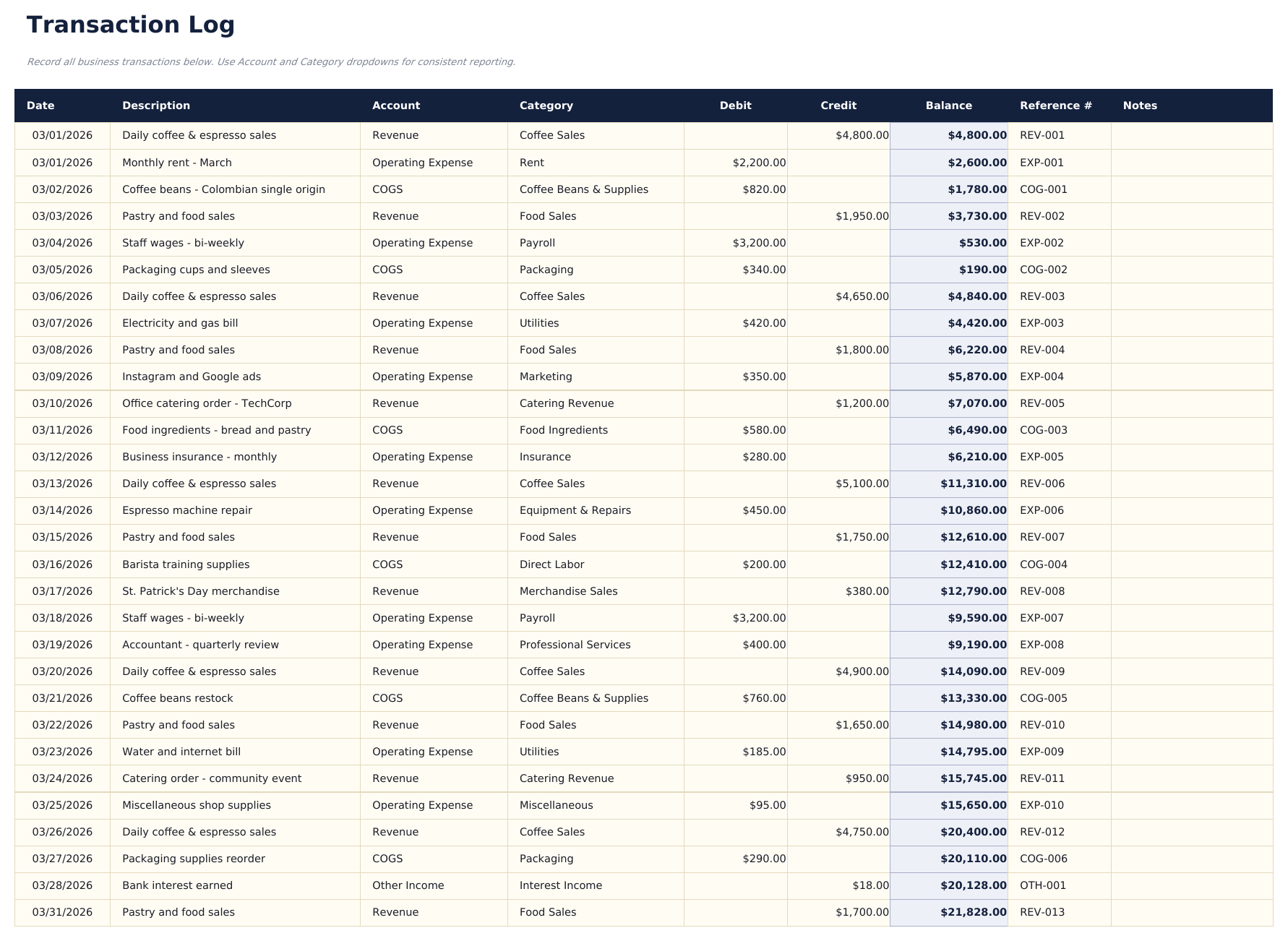
    One row per transaction: date, description, the account picked from the Chart, the reporting line resolved from it, debit, credit, a running balance, a reference and notes. The reporting line is not something you type. Picking the account sets it, and an account that is not in the Chart says so rather than quietly dropping out of every figure above it.

  2. 02 of 05

    Chart of Accounts

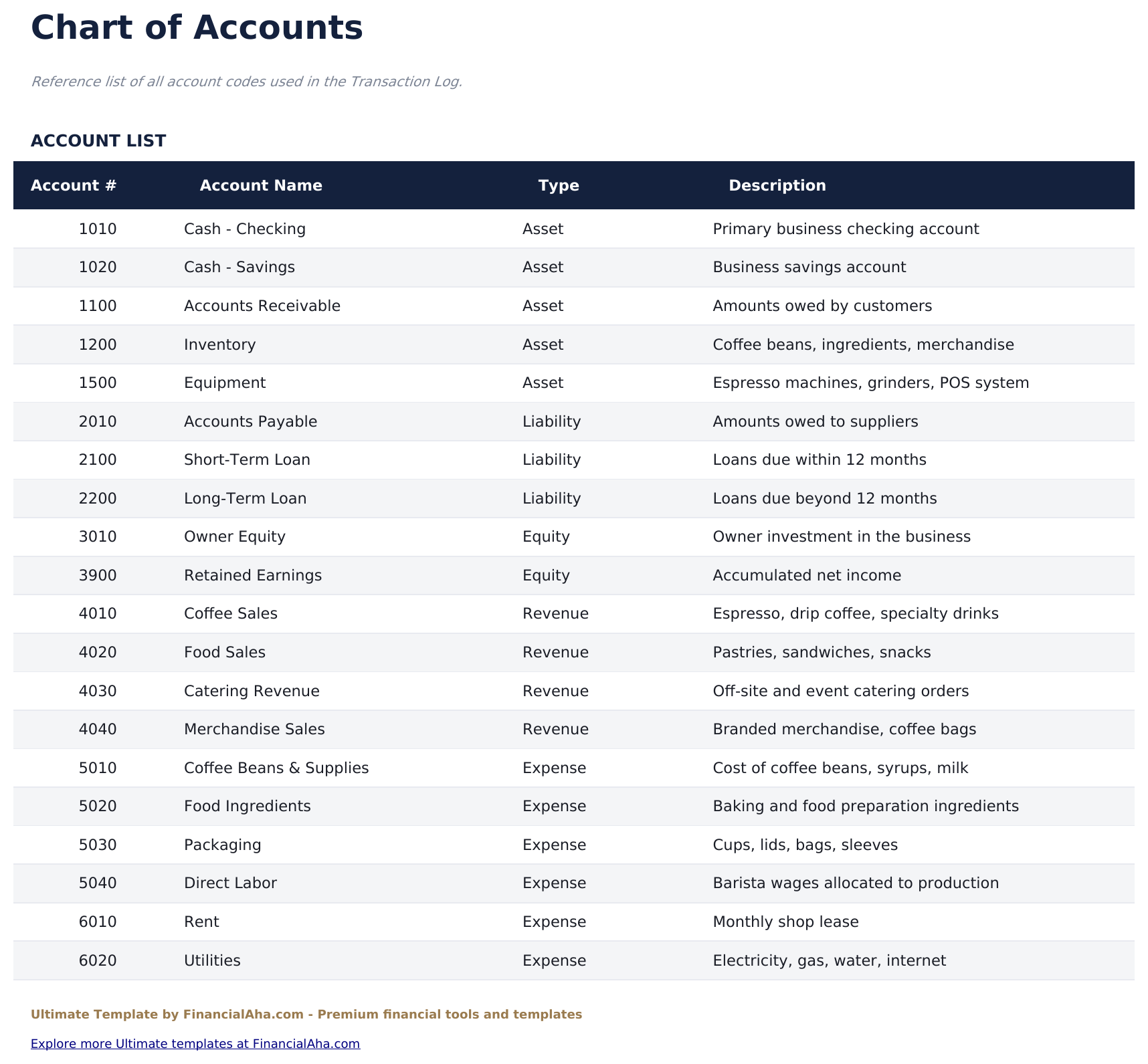
    The accounts the Transaction Log picks from, each with a number, a description and the reporting line it rolls into. It is the list the log's dropdown reads, so adding a row here makes the account available to code against, and the reporting type you give it decides which figure on the dashboard it lands in. The two cannot drift, because the log resolves the type by looking it up rather than being told it separately.

  3. Included guide

    Monthly P&L

    Twelve months across, revenue and expense categories down, with totals worked out along each row and down each column. It is a statement you complete rather than one that reads the log, which is what lets it carry accrual entries, adjustments and anything else that does not appear as a single cash transaction. Read across a row rather than down a column: a category that grows every month is a different problem from one that spikes once, and the twelve-month view is the only place that distinction is visible.

  4. 03 of 05

    Balance Sheet

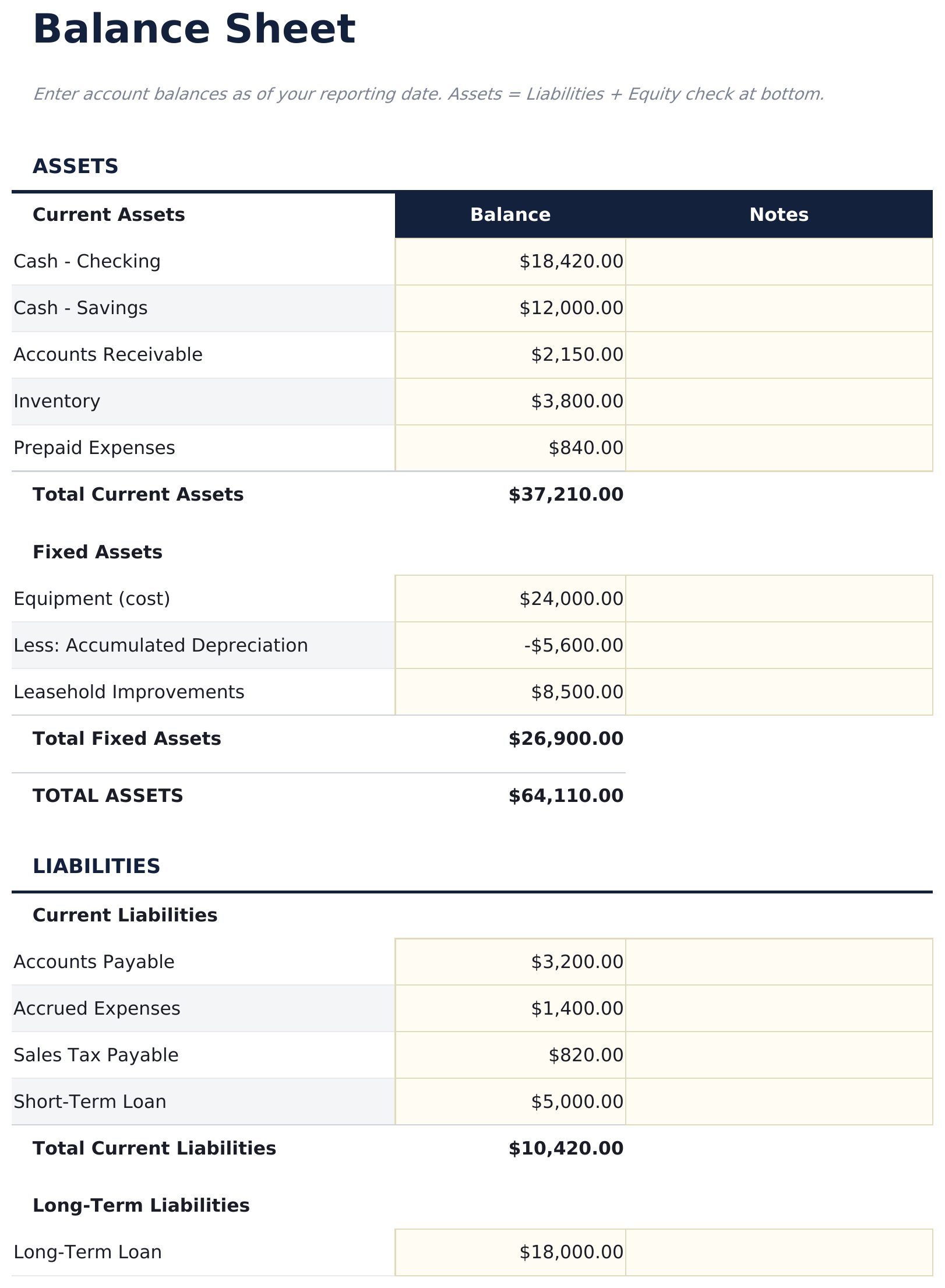
    Assets, liabilities and equity as of a date you set - current assets, fixed assets net of depreciation, current and long-term liabilities, and the equity that follows. A check at the foot compares total assets against liabilities plus equity and says whether the two sides agree. That check is the point of the sheet. A balance sheet that does not balance is not a formatting problem; it means something is missing, and knowing that immediately is worth more than a tidier layout.

  5. 04 of 05

    Bank Reconciliation

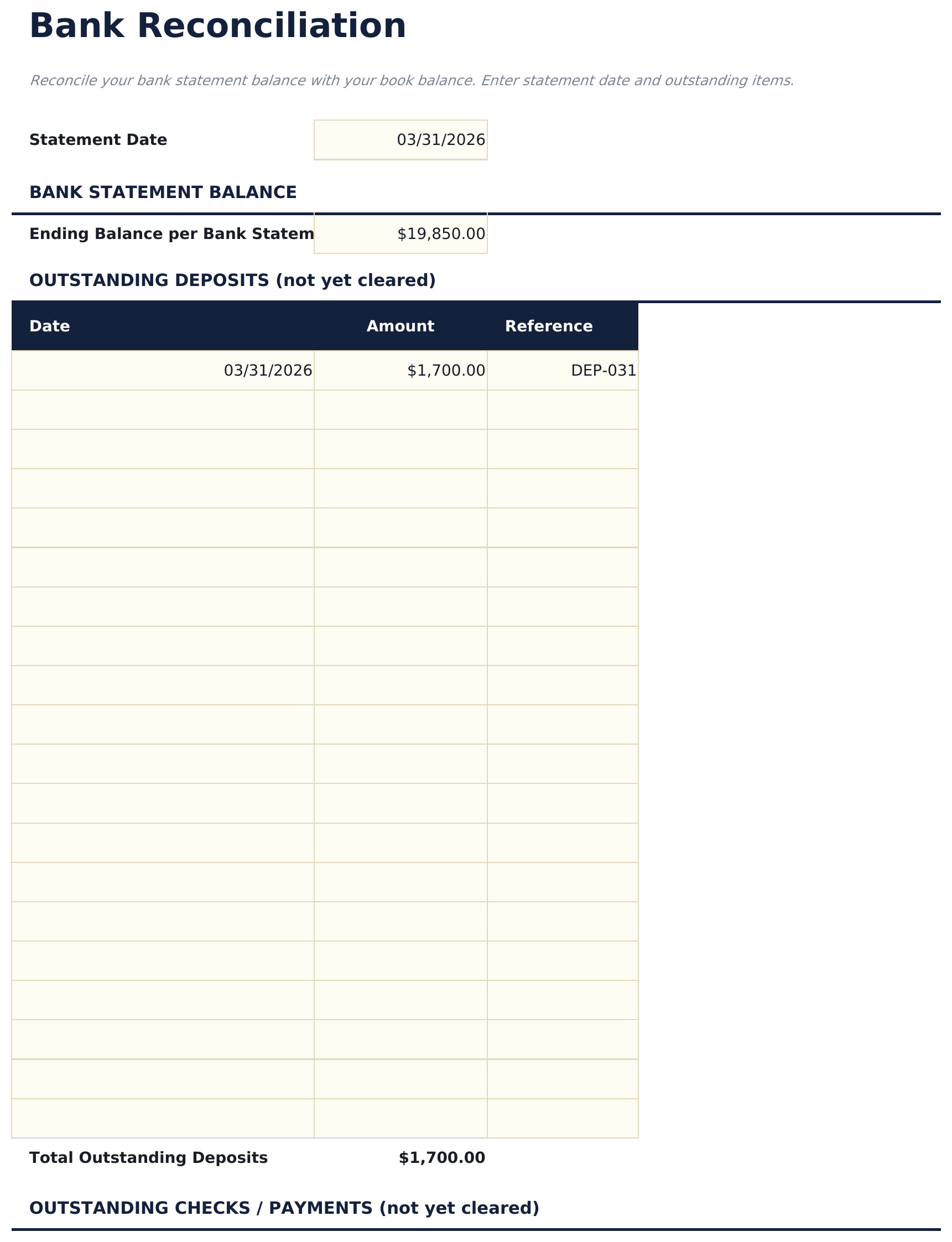
    The statement balance, the deposits that have not cleared yet, the cheques that have not been presented, and the book balance set against them, with the difference reported at the foot. Reconciliation is the step that catches what a ledger cannot see on its own: a payment taken twice, a cheque that never landed, a fee nobody logged. A difference of zero is a small piece of evidence that the books describe reality.

  6. 05 of 05

    Dashboard

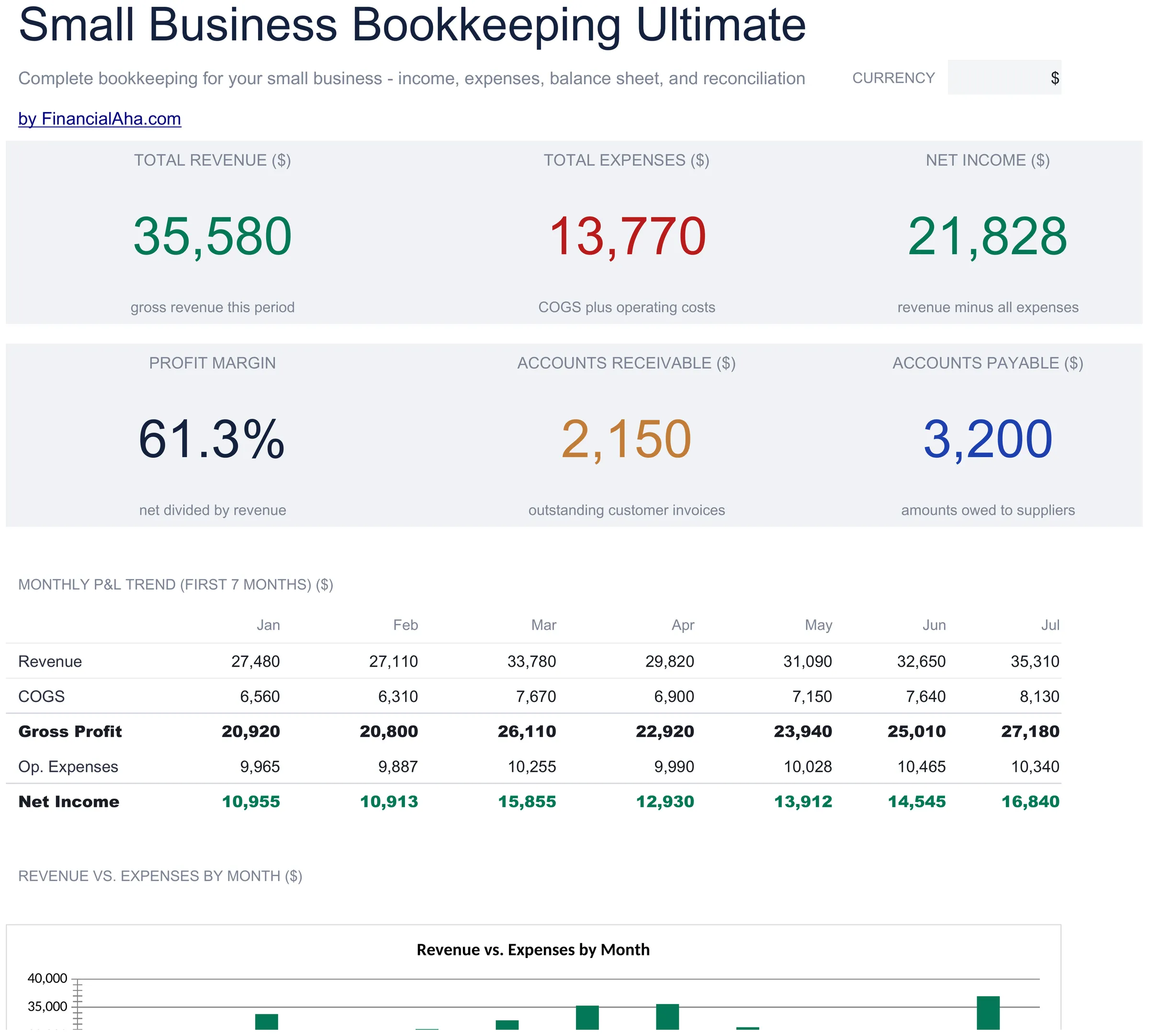
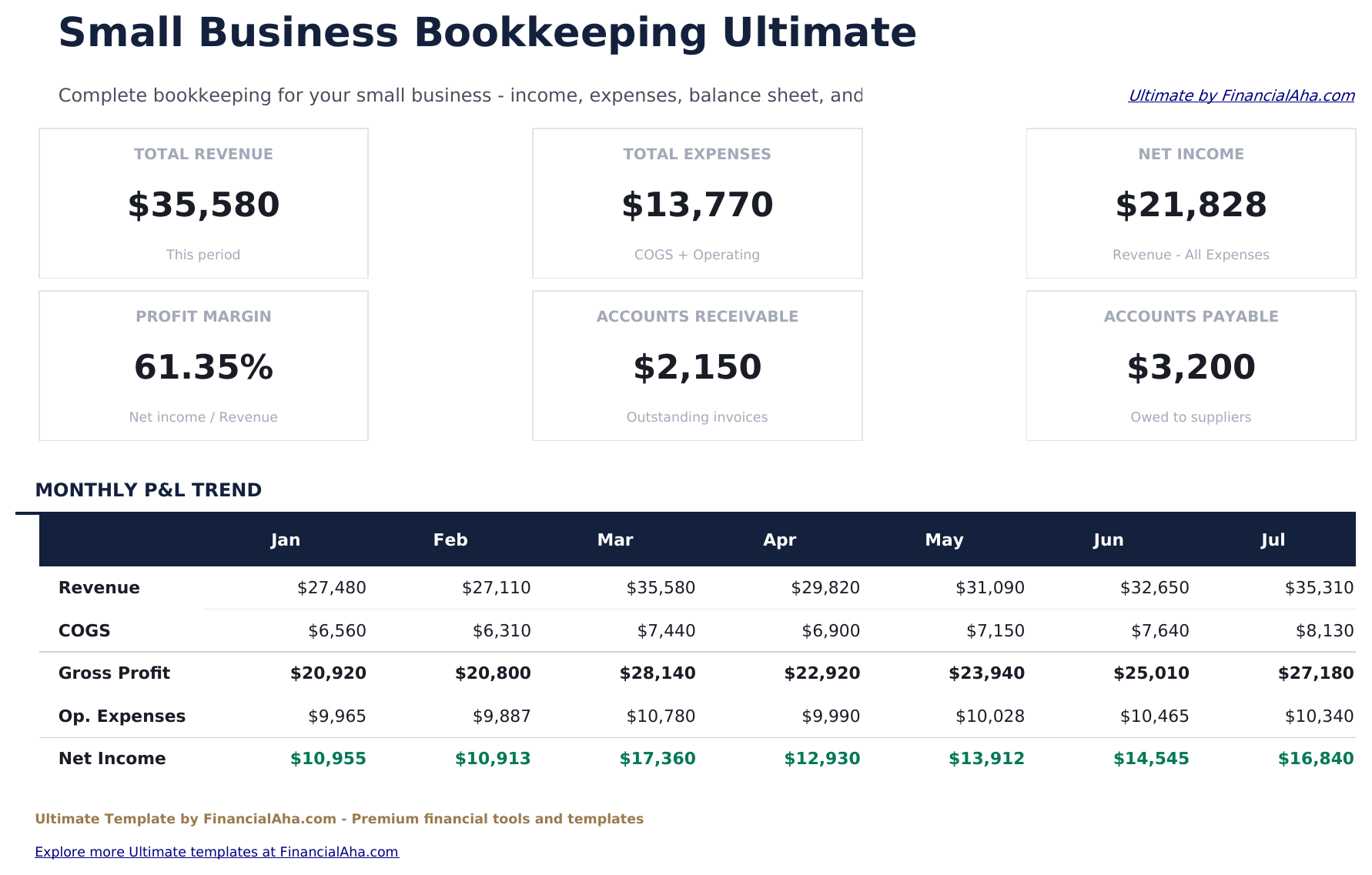
    Six figures and two charts. The top row carries total revenue, total expenses and the net income between them, read from the log. The row beneath carries the profit margin, and the receivable and payable balances taken from the balance sheet - what customers owe you, and what you owe suppliers. Those last two are the working-capital pair, and they explain most of the gap between a profitable month and a comfortable one. The charts show the profit and loss trend across the months and the split of spending.

  7. Included guide

    How to Use

    A step-by-step guide on its own tab, covering the order the sheets are meant to be filled in, what each column expects, how the reconciliation works, and how to change the currency. Because it ships inside the file, the instructions travel with the template wherever it is opened.

Works in both Google Sheets and Excel

Ultimate Small Business Bookkeeping Spreadsheet template for Google Sheets

Upload the Ultimate Small Business Bookkeeping Spreadsheet Template to Drive, right-click it, and choose "Open with Google Sheets". This Ultimate Small Business Bookkeeping Google Sheets template needs no conversion step, both charts come across, and the dashboard figures recalculate from the Transaction Log exactly as they do in Excel.

Ultimate Small Business Bookkeeping Google Sheets template setup

A shared copy of the Ultimate Small Business Bookkeeping Google Sheets template is the version a bookkeeper can work in directly, and the reference numbers are what make a question answerable without a phone call.

Running the Ultimate Small Business Bookkeeping Google Sheet

The Ultimate Small Business Bookkeeping Google Sheet takes entries as they happen and a reconciliation when the statement arrives. The profit and loss and the balance sheet are month-end work rather than daily.

Ultimate Small Business Bookkeeping Spreadsheet template for Excel

The Ultimate Small Business Bookkeeping spreadsheet Excel download is a plain .xlsx. Excel opens this Ultimate Small Business Bookkeeping Excel template directly, with no import step, and both charts are native Excel charts rather than pictures. There are no macros and no VBA in the file.

Ultimate Small Business Bookkeeping Excel template setup

The same Ultimate Small Business Bookkeeping Excel template opens in Excel on Windows, Excel on Mac, and Excel for the web. It is also the identical file you would upload to Drive, so there is no separate Ultimate Small Business Bookkeeping spreadsheet download to choose between.

Ultimate Small Business Bookkeeping spreadsheet Excel notes

The Ultimate Small Business Bookkeeping spreadsheet Excel file carries no macros and no VBA, so Excel opens it without a trust prompt.

Opening the Ultimate Small Business Bookkeeping spreadsheet Excel file

Nothing in the Ultimate Small Business Bookkeeping Excel template is version-specific, so this Ultimate Small Business Bookkeeping spreadsheet Excel workbook behaves identically in Excel on Windows, Excel on Mac, and older builds.

Spreadsheet template highlights

What the Ultimate Small Business Bookkeeping spreadsheet template tracks

A row per entry. This is what the Ultimate Small Business Bookkeeping Spreadsheet Template records for each one:

Date
when it happened
Description
what it actually was
Account
the heading the dashboard totals read
Category
the finer grouping underneath it
Debit
money out, in its own column
Credit
money in, in its own column
Balance auto
derived, running down the sheet
Reference #
the invoice or cheque number that makes an entry traceable
Notes
anything the description cannot carry

Compare builds

FinancialAha Small Business Bookkeeping spreadsheet template: Free, Essentials, and Ultimate compared

Feature Free View Spreadsheet Template Essentials View Spreadsheet Template Ultimate This page
Working sheets 1 3 6
Transaction rows 16 50 200
Net figure Under the totals On the dashboard On the dashboard
Running balance Yes Yes
Totals by category Its own sheet Its own sheet
Profit margin Yes Yes
Debit and credit columns Yes
Chart of accounts 28 accounts
Monthly profit and loss Twelve months
Balance sheet With a balance check
Bank reconciliation Yes
Reference and notes on each entry Yes
Charts 2 2

The Free Small Business Bookkeeping Spreadsheet Template is a dated ledger; the Essentials build adds a running balance, category totals and a dashboard. The FinancialAha Ultimate Small Business Bookkeeping Spreadsheet Template is the set of books: debit and credit columns and a reference number on every entry, a chart of accounts to keep the vocabulary steady, a twelve-month profit and loss you complete, a balance sheet that tells you whether it balances, and a bank reconciliation that checks the books against the statement.

Good to know

Notes on working in the Ultimate Small Business Bookkeeping spreadsheet template

  • The reference column is what makes an entry traceable to a document rather than to memory.
  • Agreeing the account list first is what stops three names for one thing appearing across a year.
  • The profit and loss is a statement you complete rather than one that reads the log, so it can carry adjustments a cash entry cannot.
  • A balance sheet that does not balance is missing something - the check at the foot says so immediately.
  • Reconciliation catches what a ledger cannot see on its own: a double payment, an uncleared cheque, a fee nobody logged.
  • Receivables and payables explain most of the gap between a profitable month and a comfortable one.
  • The currency dropdown relabels the money columns across every sheet. It changes the label only and does not convert the numbers.
  • The account list on the log comes from the Chart of Accounts, so adding an account there is what makes it available to code against.
  • The reporting line beside each entry is resolved from the Chart rather than typed, so the two cannot disagree.

How to Use This Template

1

Agree the accounts

The reference list that keeps the wording steady.

2

Log the entries

Debit or credit, with a reference number attached.

3

Complete the statements

The monthly profit and loss, and the balance sheet.

4

Reconcile the bank

Statement against books, with the difference reported.

Customer Reviews

What Our Customers Say

"If I get half as good at handling my finances as you are at customer service, this'll be the best $26 I've spent lately."

J Jenny Verified Buyer

"Great tool! Simplifies financial planning without the hassle of complex spreadsheets."

F Fazia Search Marketing Manager

"I recently purchased your super convenient spreadsheet, it really helps me!"

J John Verified Buyer

"They're great and super intuitive. Thank you!"

M Mira Verified Buyer

Built by Claude AI. Perfected by us.

We use Claude AI to draft each template, after a deep research. Then our team steps in. We refine the layout, stress-test every formula, fix edge cases, and polish the design until it feels like something we would actually use ourselves. The AI gets us 80% there. The last 20% is all human judgment.

One-time purchase. No subscription. Works in Excel & Google Sheets.

Frequently Asked Questions

Is the FinancialAha Ultimate Small Business Bookkeeping Spreadsheet Template a Google Sheets template?

Yes. Upload the file to Drive and choose "Open with Google Sheets". Both charts come across in the Ultimate Small Business Bookkeeping Google Sheets template, and the dashboard figures recalculate from the Transaction Log exactly as they do in Excel.

Is the FinancialAha Ultimate Small Business Bookkeeping Spreadsheet Template an Excel template?

Yes. The download is a plain .xlsx, so the Ultimate Small Business Bookkeeping Excel template opens directly in Excel with no import step. Both charts are native Excel charts rather than pictures, and there are no macros or VBA.

Will the FinancialAha Ultimate Small Business Bookkeeping spreadsheet Excel file open in older versions of Excel?

Yes. The Ultimate Small Business Bookkeeping spreadsheet Excel workbook ships as a plain .xlsx, so it opens identically in current Excel and in builds that predate dynamic arrays.

Does the Ultimate Small Business Bookkeeping profit and loss fill itself in from the log?

No. It is a statement you complete, with the totals worked out along each row and down each column. That is what lets it carry adjustments and accrual entries that never appear as a single cash transaction.

What does the balance check in the Ultimate Small Business Bookkeeping spreadsheet do?

Compares total assets against liabilities plus equity and says whether the two sides agree. A balance sheet that does not balance is missing something, and knowing that immediately is the point.

What is the bank reconciliation in the Ultimate Small Business Bookkeeping spreadsheet for?

Catching what a ledger cannot see on its own - a payment taken twice, a cheque that never landed, a fee nobody logged. It sets the statement balance against the books with outstanding deposits and cheques between them.

Is the Ultimate Small Business Bookkeeping spreadsheet double-entry accounting software?

No. It is a spreadsheet with debit and credit columns, a chart of accounts kept beside the ledger as a reference list, and statements you complete. It gives an accountant the shape they expect to receive, but it does not enforce double entry or replace accounting software.

How many entries does the Ultimate Small Business Bookkeeping spreadsheet hold?

Two hundred, against fifty on Essentials and sixteen on the Free build.

What do I get after buying the Ultimate Small Business Bookkeeping spreadsheet template?

You receive the Ultimate Small Business Bookkeeping spreadsheet template as an Excel file (.xlsx) that works in Microsoft Excel and Google Sheets. Download it immediately after purchase - no signup or account required.

Is there a free Ultimate Small Business Bookkeeping spreadsheet template?

Yes. A free version of the Ultimate Small Business Bookkeeping spreadsheet template is available with basic features. The Ultimate version adds advanced analysis, more capacity, and additional sheets.

What if the Ultimate Small Business Bookkeeping spreadsheet template does not work for me?

Contact us and we will help troubleshoot. The Ultimate Small Business Bookkeeping spreadsheet template works in Microsoft Excel and Google Sheets with no macros required.

Ultimate

Highlights:

Instant download after purchase
No macros or VBA required
All formulas auto-calculate
No subscription required
Works in
Excel Google Sheets

Looking for more Ultimate templates?

We offer Ultimate versions of our most popular spreadsheet templates with advanced features, more capacity, and deeper analysis.

Private & secure

Your financial data stays on your device. We never see it.

Learn more →

Need help?

Check our guides or reach out with questions.

View FAQ →