Best Value Complete Financial Planning Bundle
✓ Financial Planning✓ Net Worth Tracker✓ Monthly Budgeting✓ Travel Budget Planner✓ Annual Budgeting Planner✓ Monthly Expense Tracker✓ Annual Tax Planner✓ Retirement Planning
View Bundle →
Small Business Bookkeeping
Essentials Template - Excel & Google Sheets

Essentials Small Business Bookkeeping Spreadsheet Template for Google Sheets & Excel

Fifty numbered entries with date, description and category, income and expense in their own columns, and a running balance carrying down the sheet - blank rows leave it blank rather than repeating the last figure. The Essentials Small Business Bookkeeping spreadsheet template totals income, expense and net under each of ten category headings, with a dashboard in front of the ledger. Google Sheets and Excel, one file. No macros, no VBA.

See Ultimate Spreadsheet Template
View Ultimate Small Business Bookkeeping Spreadsheet Template
$29
Essentials Small Business Bookkeeping spreadsheet template - Google Sheets and Excel preview

What's Included

  • Numbered entries with date, description and category
  • Separate income and expense columns
  • A running balance that carries down the sheet
  • Blank rows leave the balance blank rather than repeating it
  • A category sheet totalling income, expense and net under each heading
  • Totals that match on the heading you type, so renaming re-points them
  • A dashboard with six figures including profit margin
  • A chart of income against expenses month by month
  • A chart breaking spending down by category
  • Works in Microsoft Excel and Google Sheets with no setup required
Ultimate Version Available

Need more from this template?

The Essentials Spreadsheet Template covers everyday tracking. The Ultimate Spreadsheet Template gives each part of the template its own sheet, with more capacity and deeper reporting on top.

Essentials - $19
  • Numbered entries with date, description and category
  • Separate income and expense columns
  • A running balance that carries down the sheet
  • Blank rows leave the balance blank rather than repeating it
Ultimate - $29
  • Debit and credit in their own columns on every entry
  • A reference number and a note on every entry
  • A running balance down the log
  • A chart of accounts to keep the vocabulary consistent
  • A twelve-month profit and loss you complete, with totals both ways
See what's in the Ultimate version One-time purchase. No subscription.

The FinancialAha Essentials Small Business Bookkeeping Spreadsheet Template is a three-sheet workbook for Google Sheets and Excel, with a How to Use guide on a fourth tab. It works as an Essentials Small Business Bookkeeping Excel template and an Essentials Small Business Bookkeeping Google Sheets template from the same download. A running balance on every entry, a category sheet that totals each heading and reports the net, and a dashboard carrying net profit, profit margin and a month-by-month chart. No macros, no VBA.

Inside the workbook

What's inside the FinancialAha Essentials Small Business Bookkeeping spreadsheet template

The FinancialAha Essentials Small Business Bookkeeping Spreadsheet Template runs on three working sheets, with the instructions on a tab of their own. It works in both Microsoft Excel and Google Sheets and here is what the Essentials Small Business Bookkeeping spreadsheet holds.

  1. 01 of 03

    Transaction Ledger

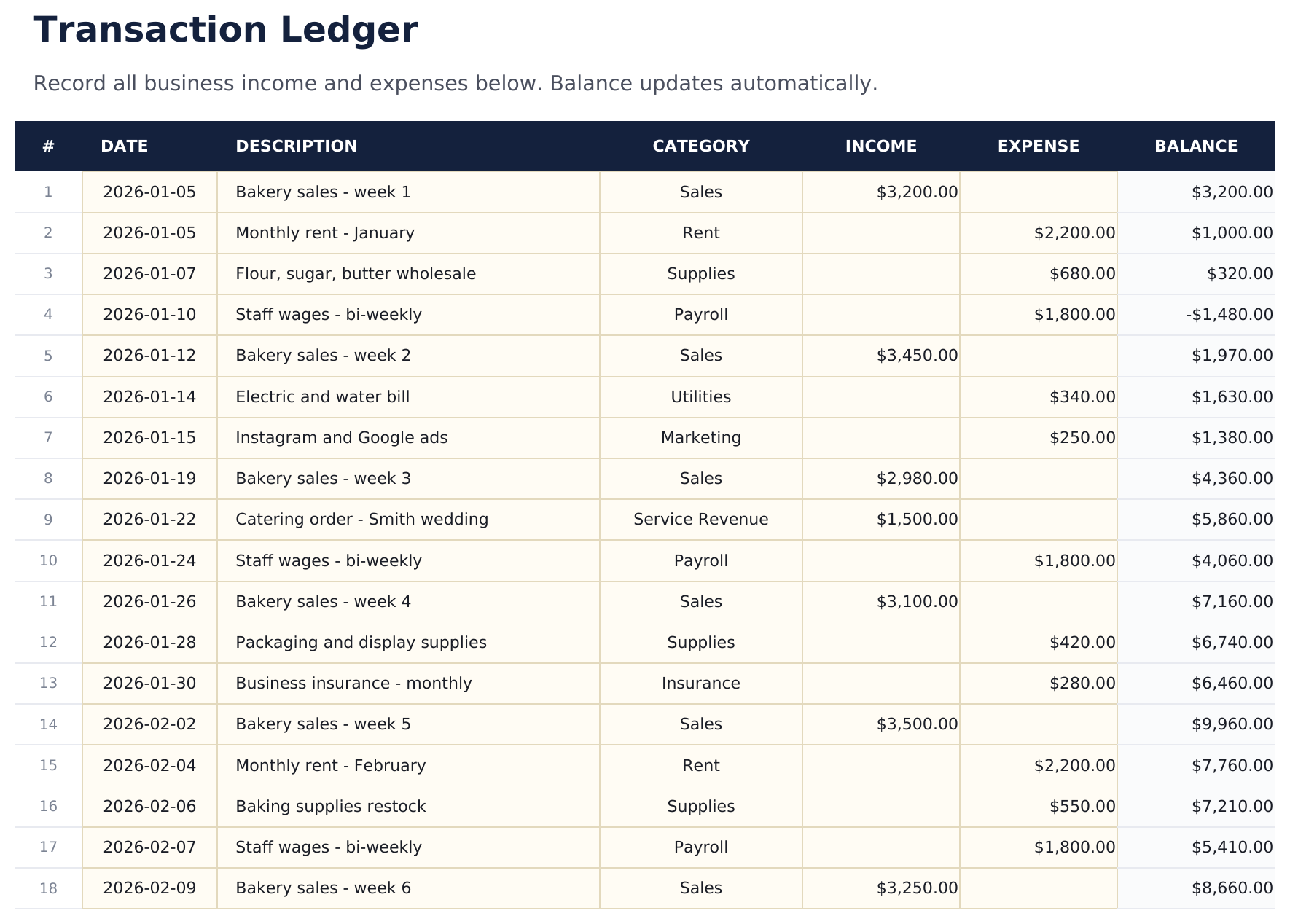
    Numbered entries, each with a date, a description, a category, and either an amount in or an amount out. Beside them a balance runs down the sheet, carrying forward from row to row. The running balance is what turns a list into a ledger. A total tells you where the period ended; a balance tells you where you were in the middle of March, which is the question that actually comes up - as "could we have afforded that then". Rows you have not filled in stay blank rather than repeating the last figure, so the column stops where your entries do.

  2. 02 of 03

    Category Summary

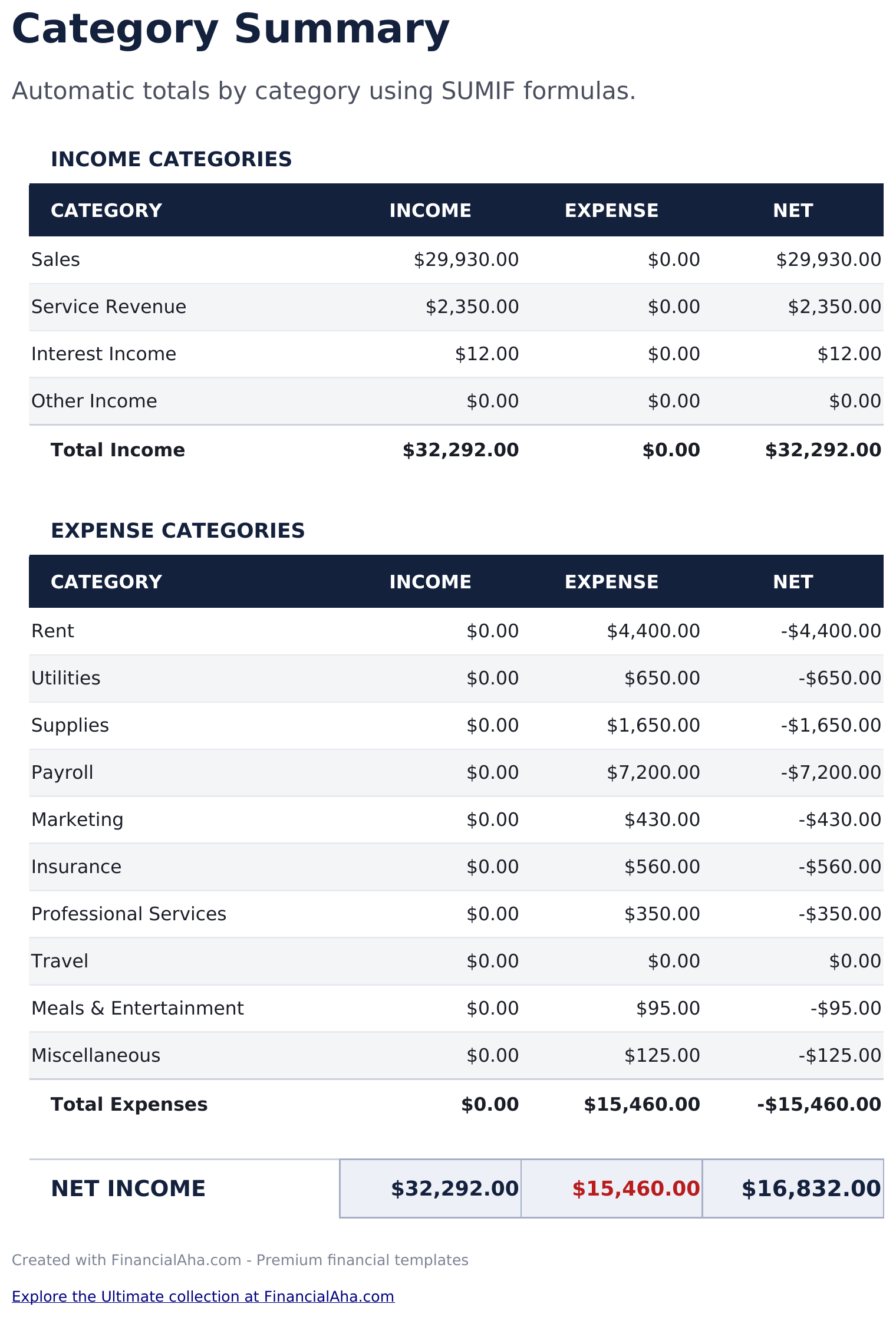
    Every heading you use, with the income under it, the expense under it and the net between them, split into income categories and expense categories with totals for each block. The totals match on the heading written in the first column, so renaming a category here re-points its total rather than quietly reporting zero. That is worth knowing before you start editing: the sheet ships with a set of headings, and changing one is a single edit rather than a hunt through formulas. What it answers is where a business is actually leaking. A ledger read line by line tends to make every entry look reasonable; the same entries grouped by heading are where a category nobody chose deliberately turns out to be the third largest.

  3. 03 of 03

    Dashboard

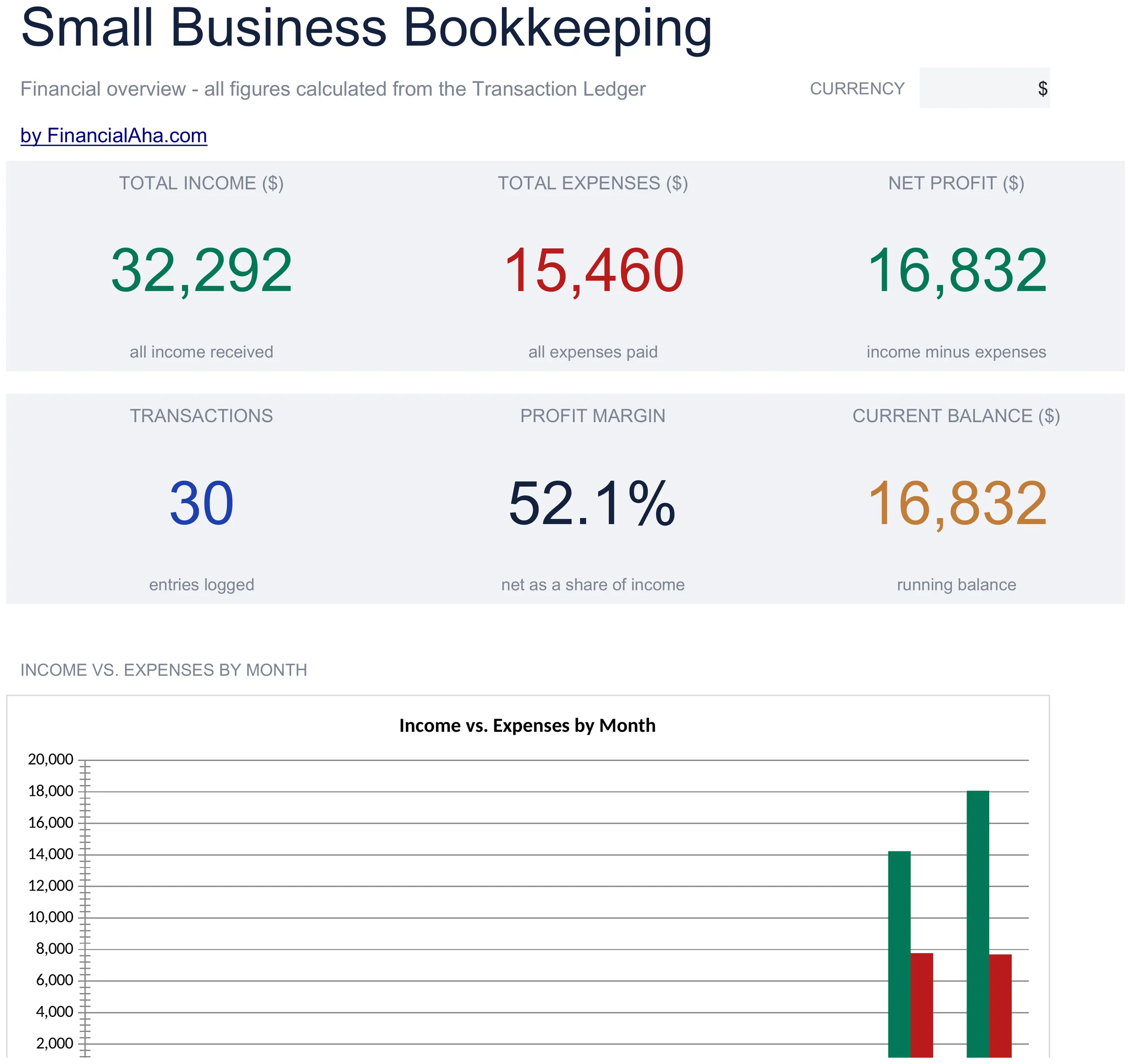
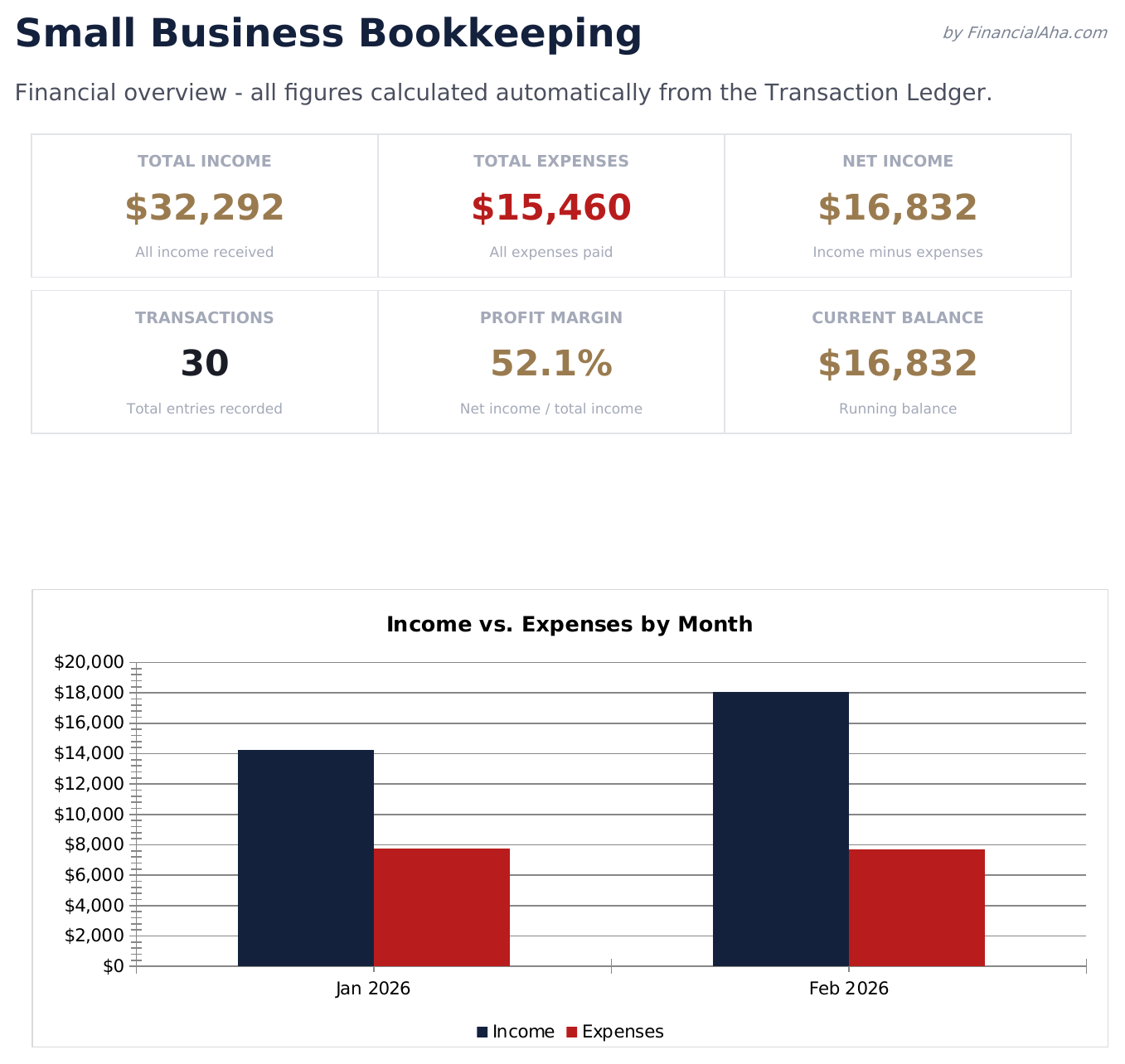
    Six figures and two charts. The top row carries total income, total expenses and the net profit between them. The row beneath carries how many entries have been logged, the profit margin - net as a share of income - and the current balance. Profit margin is the figure that travels. A net profit number means little without the revenue it came from, and a business that improved its profit while its margin fell got busier rather than better. The charts set income against expenses month by month and break the spending down by category.

  4. Included guide

    How to Use

    A step-by-step guide on its own tab, covering what each column expects, how the category totals match, and how to change the currency. Because it ships inside the file, the instructions travel with the template wherever it is opened.

Works in both Google Sheets and Excel

Essentials Small Business Bookkeeping Spreadsheet template for Google Sheets

Upload the Essentials Small Business Bookkeeping Spreadsheet Template to Drive, right-click it, and choose "Open with Google Sheets". This Essentials Small Business Bookkeeping Google Sheets template needs no conversion step, both charts come across, and the category totals and running balance recalculate exactly as they do in Excel.

Essentials Small Business Bookkeeping Google Sheets template setup

A shared copy of the Essentials Small Business Bookkeeping Google Sheets template is what lets a bookkeeper and an owner work in the same file rather than emailing versions, and the category sheet is where the questions get asked.

Running the Essentials Small Business Bookkeeping Google Sheet

The Essentials Small Business Bookkeeping Google Sheet is a weekly habit rather than a quarterly reconstruction. Everything else in the workbook follows from the ledger being current.

Essentials Small Business Bookkeeping Spreadsheet template for Excel

The Essentials Small Business Bookkeeping spreadsheet Excel download is a plain .xlsx. Excel opens this Essentials Small Business Bookkeeping Excel template directly, with no import step, and both charts are native Excel charts rather than pictures. There are no macros and no VBA in the file.

Essentials Small Business Bookkeeping Excel template setup

The same Essentials Small Business Bookkeeping Excel template opens in Excel on Windows, Excel on Mac, and Excel for the web. It is also the identical file you would upload to Drive, so there is no separate Essentials Small Business Bookkeeping spreadsheet download to choose between.

Essentials Small Business Bookkeeping spreadsheet Excel notes

The Essentials Small Business Bookkeeping spreadsheet Excel file carries no macros and no VBA, so Excel opens it without a trust prompt.

Opening the Essentials Small Business Bookkeeping spreadsheet Excel file

Nothing in the Essentials Small Business Bookkeeping Excel template is version-specific, so this Essentials Small Business Bookkeeping spreadsheet Excel workbook behaves identically in Excel on Windows, Excel on Mac, and older builds.

Spreadsheet template highlights

What the Essentials Small Business Bookkeeping spreadsheet template tracks

A row per entry. This is what the Essentials Small Business Bookkeeping Spreadsheet Template records for each one:

Date
when it happened
Description
what it actually was
Category
the heading it files under, which the summary sheet totals
Income
money in
Expense
money out
Balance auto
derived, running down the sheet and stopping where your entries do

Compare builds

FinancialAha Small Business Bookkeeping spreadsheet template: Free, Essentials, and Ultimate compared

Feature Free View Spreadsheet Template Essentials This page Ultimate View Spreadsheet Template
Working sheets 1 3 6
Transaction rows 16 50 200
Net figure Under the totals On the dashboard On the dashboard
Running balance Yes Yes
Totals by category Its own sheet Its own sheet
Profit margin Yes Yes
Debit and credit columns Yes
Chart of accounts 28 accounts
Monthly profit and loss Twelve months
Balance sheet With a balance check
Bank reconciliation Yes
Reference and notes on each entry Yes
Charts 2 2

The Free Small Business Bookkeeping Spreadsheet Template is a dated ledger with two totals and the net between them. The FinancialAha Essentials Small Business Bookkeeping Spreadsheet Template adds the running balance, a category sheet that totals each heading and nets it, and a dashboard with profit margin and a month-by-month chart. The Ultimate Small Business Bookkeeping Spreadsheet Template goes further: debit and credit columns, a reference chart of accounts, a twelve-month profit and loss, a balance sheet that checks itself and a bank reconciliation.

Good to know

Notes on working in the Essentials Small Business Bookkeeping spreadsheet template

  • The running balance answers where you stood mid-period, which a closing total cannot.
  • Category totals match on the heading in the first column, so renaming one re-points its total.
  • Profit margin is the figure that travels - a bigger net profit on a falling margin means busier rather than better.
  • Rows you have not filled in leave the balance column blank rather than repeating the last figure.
  • Grouping by category is where a heading nobody chose deliberately turns out to be the third largest.
  • The currency dropdown relabels the money columns across the workbook. It changes the label only and does not convert the numbers.
  • The running balance and the net profit are the same figure on this build. A ledger that starts from nothing arrives at both by the same route.

How to Use the Essentials Small Business Bookkeeping Spreadsheet Template

1

Log each entry

Date, description, category, and one amount.

2

Watch the balance

It carries down the sheet as you go.

3

Check the categories

Income, expense and net under each heading.

4

Read the dashboard

Net profit, margin and the monthly picture.

Customer Reviews

What Our Customers Say

"If I get half as good at handling my finances as you are at customer service, this'll be the best $26 I've spent lately."

J Jenny Verified Buyer

"Great tool! Simplifies financial planning without the hassle of complex spreadsheets."

F Fazia Search Marketing Manager

"I recently purchased your super convenient spreadsheet, it really helps me!"

J John Verified Buyer

"They're great and super intuitive. Thank you!"

M Mira Verified Buyer

Built by Claude AI. Perfected by us.

We use Claude AI to draft each template, after a deep research. Then our team steps in. We refine the layout, stress-test every formula, fix edge cases, and polish the design until it feels like something we would actually use ourselves. The AI gets us 80% there. The last 20% is all human judgment.

See Ultimate Spreadsheet Template

Frequently Asked Questions

Is the FinancialAha Essentials Small Business Bookkeeping Spreadsheet Template a Google Sheets template?

Yes. Upload the file to Drive and choose "Open with Google Sheets". Both charts come across in the Essentials Small Business Bookkeeping Google Sheets template, and the category totals and running balance recalculate exactly as they do in Excel.

Is the FinancialAha Essentials Small Business Bookkeeping Spreadsheet Template an Excel template?

Yes. The download is a plain .xlsx, so the Essentials Small Business Bookkeeping Excel template opens directly in Excel with no import step. Both charts are native Excel charts rather than pictures, and there are no macros or VBA.

Will the FinancialAha Essentials Small Business Bookkeeping spreadsheet Excel file open in older versions of Excel?

Yes. The Essentials Small Business Bookkeeping spreadsheet Excel workbook ships as a plain .xlsx, so it opens identically in current Excel and in builds that predate dynamic arrays.

Can I rename the categories in the Essentials Small Business Bookkeeping spreadsheet?

Yes. The totals match on the heading written in the first column of the summary sheet, so renaming one re-points its total rather than reporting zero under a heading that no longer matches.

What does the running balance add to the Essentials Small Business Bookkeeping spreadsheet?

Where you stood mid-period, which a closing total cannot tell you. Rows you have not filled in stay blank rather than repeating the last figure.

What is profit margin for in the Essentials Small Business Bookkeeping spreadsheet?

Putting the net profit in proportion. A business that improved its profit while its margin fell got busier rather than better.

How many entries does the Essentials Small Business Bookkeeping spreadsheet hold?

Fifty, against sixteen on the Free build. The Ultimate build holds two hundred and adds debit and credit columns, a profit and loss, a balance sheet and a bank reconciliation.

How do I open the Essentials Small Business Bookkeeping spreadsheet template in Google Sheets?

Upload the .xlsx file to Google Drive, then open it with Google Sheets. All formulas and formatting will be preserved.

More Essentials Business Finance Templates

Essentials

Highlights:

Dashboard with charts and KPIs
Pre-filled categories and sample data
No sign-up, no subscription
Lifetime free updates
Works in
Excel Google Sheets

Looking for premium spreadsheet templates?

Our paid templates include advanced multi-sheet dashboards, native Excel charts, and ongoing updates.

Private & secure

Your financial data stays on your device. We never see it.

Learn more →

Need help?

Check our guides or reach out with questions.

View FAQ →