Best Value Complete Financial Planning Bundle
✓ Financial Planning✓ Net Worth Tracker✓ Monthly Budgeting✓ Travel Budget Planner✓ Annual Budgeting Planner✓ Monthly Expense Tracker✓ Annual Tax Planner✓ Retirement Planning
View Bundle →

Instant digital delivery · Terms & Conditions apply

Essentials Template - Excel & Google Sheets

Essentials Expense Reimbursement Form Spreadsheet Template for Google Sheets & Excel

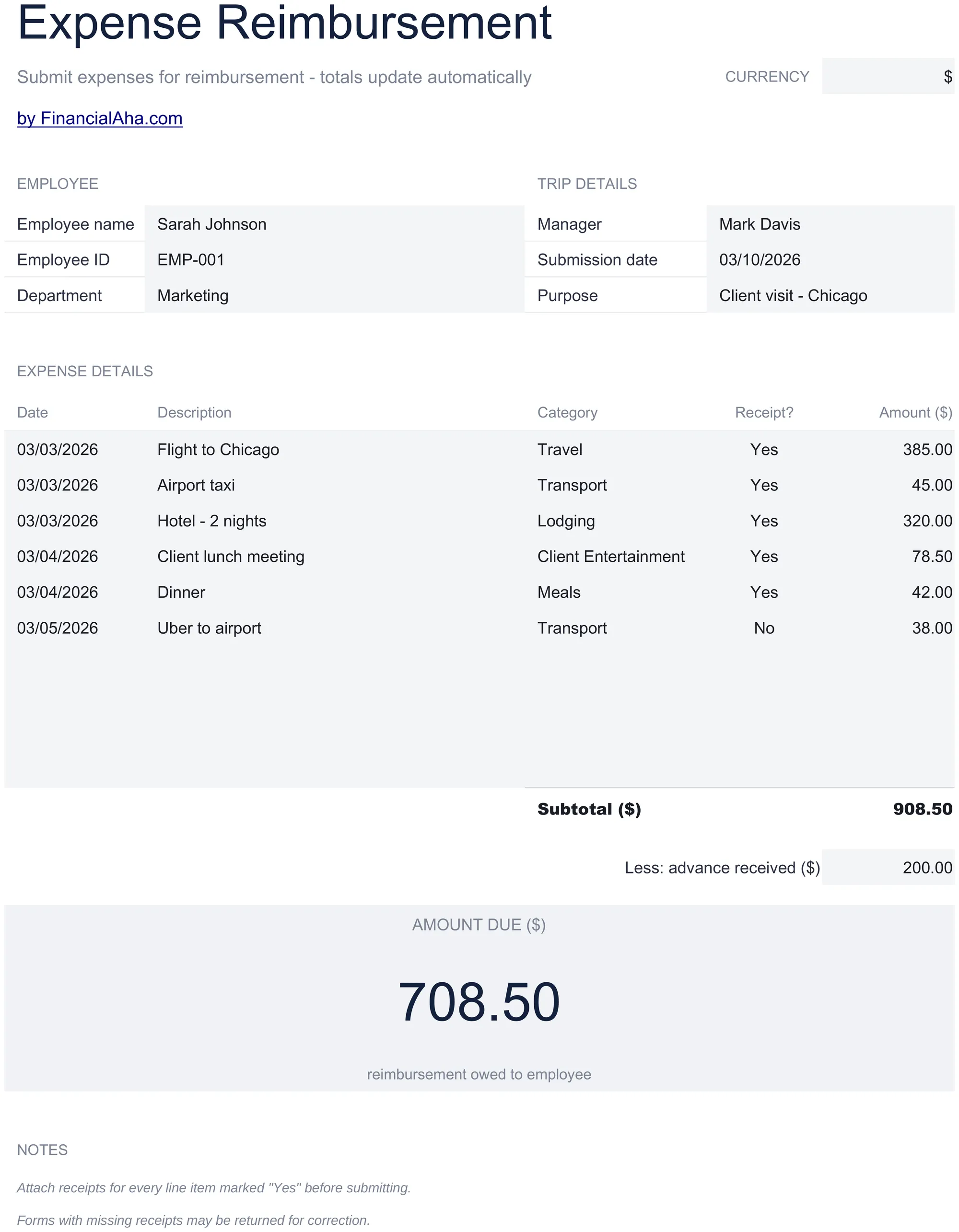
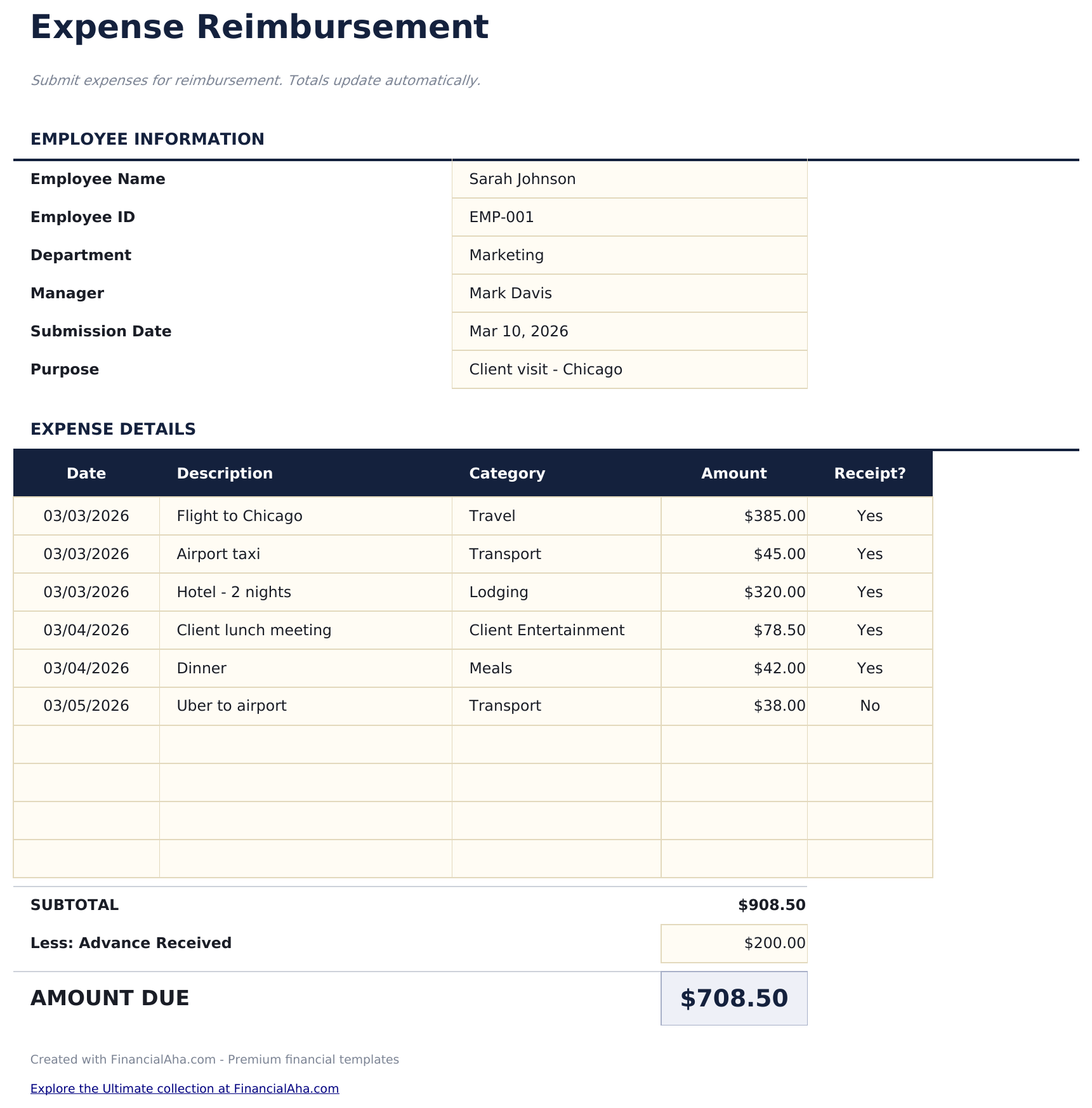
Every one of the ten expense lines carries its own date and a receipt-held marker, so a claim can be checked line by line. The Essentials Expense Reimbursement Form spreadsheet template records the employee by name, identifier and department, notes the manager, the submission date and the purpose of the trip, and subtracts any advance already received before the amount owed. One working sheet in Google Sheets or Excel. No macros, no VBA.

Instant digital delivery · Terms & Conditions apply

Essentials Expense Reimbursement Form spreadsheet template - Google Sheets and Excel preview

What's Included

  • Ten expenses, each with its own date
  • A receipt-held marker on every line
  • An advance-received deduction before the amount owed
  • Employee name, identifier and department
  • The manager, the submission date and the purpose of the trip
  • A category on every expense
  • A notes block covering receipts
  • Laid out to print on a single page for signing
  • A currency dropdown beside the title that relabels the money columns
  • Works in Microsoft Excel and Google Sheets with no setup required

The FinancialAha Essentials Expense Reimbursement Form Spreadsheet Template for Google Sheets and Excel is a single-sheet workbook holding ten expenses, with a How to Use guide on a second tab. It works as an Essentials Expense Reimbursement Form Excel template and an Essentials Expense Reimbursement Form Google Sheets template from the same download. This Essentials Expense Reimbursement Form spreadsheet template dates every expense, records whether a receipt is held, and subtracts any advance already given. No macros, no VBA.

Inside the workbook

What's inside the FinancialAha Essentials Expense Reimbursement Form spreadsheet template

The FinancialAha Essentials Expense Reimbursement Form Spreadsheet Template puts the whole form on one working sheet, with the instructions on a tab of their own. It works in both Microsoft Excel and Google Sheets and here is what the Essentials Expense Reimbursement Form spreadsheet holds.

  1. 01 of 01

    Expense Form

    The employee block identifies who is claiming - name, identifier and department - and the trip block records the manager, the submission date and what the trip was for. Stating the purpose matters more than it looks: an approver reading a list of costs with no context has to ask, and asking is what turns a two-day approval into a two-week one. Ten expenses follow, each with its own date, a description, a category chosen from a dropdown, a yes-or-no marker for whether a receipt is held, and the amount. Dating each expense individually rather than the claim as a whole is what makes a claim checkable against a calendar - a dinner on a day nobody was travelling is the kind of thing that gets noticed. The receipt marker is the honest column: it records what you actually have rather than what you intended to keep, and a claim that flags its own missing receipt is treated very differently from one where the gap is discovered later. The totals block subtracts any advance already received before arriving at what is still owed. That line matters on any trip where money was paid up front, because the amount spent and the amount still owed are different numbers and conflating them is how someone ends up claiming twice.

  2. Included guide

    How to Use

    A step-by-step guide on its own tab, covering what belongs in each block, how the advance deduction works, and what the receipt marker is for. Because it ships inside the file, the instructions travel with the template wherever it is opened.

Works in both Google Sheets and Excel

Essentials Expense Reimbursement Form Spreadsheet template for Google Sheets

Upload the Essentials Expense Reimbursement Form Spreadsheet Template to Drive, right-click it, and choose "Open with Google Sheets". This Essentials Expense Reimbursement Form Google Sheets template needs no conversion step and every total recalculates exactly as it does in Excel. Sheets exports to PDF in a couple of clicks, which is what a finance team tends to want attached to the receipts.

Essentials Expense Reimbursement Form Google Sheets template setup

A shared copy of the Essentials Expense Reimbursement Form Google Sheets template lets a manager review a claim in place rather than by email, and the receipt column tells them immediately which lines need chasing.

Sharing the Essentials Expense Reimbursement Form spreadsheet template as a Google Sheet

The Essentials Expense Reimbursement Form Google Sheet is best filled in during a trip rather than after it, because the per-expense dates and the receipt markers are both things that get vague within a week. Keeping the Essentials Expense Reimbursement Form spreadsheet open on a phone is what makes that realistic.

Essentials Expense Reimbursement Form Spreadsheet template for Excel

The Essentials Expense Reimbursement Form spreadsheet Excel download is a plain .xlsx. Excel opens this Essentials Expense Reimbursement Form Excel template directly, with no import step and no compatibility prompt, and it is laid out to print on a single page for signing. There are no macros and no VBA in the file.

Essentials Expense Reimbursement Form Excel template setup

The same Essentials Expense Reimbursement Form Excel template opens in Excel on Windows, Excel on Mac, and Excel for the web. It is also the identical file you would upload to Drive, so there is no separate Essentials Expense Reimbursement Form spreadsheet download to choose between, and no Essentials Expense Reimbursement Form Excel template variant to keep in step.

Essentials Expense Reimbursement Form Excel template notes

The Essentials Expense Reimbursement Form spreadsheet Excel file carries no macros and no VBA, so Excel opens it without a trust prompt - which matters when a claim is emailed into a finance system that blocks macro-enabled attachments. The Essentials Expense Reimbursement Form Excel template needs no add-in either.

Opening the Essentials Expense Reimbursement Form spreadsheet Excel file

Nothing in the Essentials Expense Reimbursement Form Excel template is version-specific, so this Essentials Expense Reimbursement Form spreadsheet Excel workbook behaves identically in Excel on Windows, Excel on Mac, and older builds.

Spreadsheet template highlights

What the Essentials Expense Reimbursement Form spreadsheet template tracks

Ten expenses, five columns. This is what the Essentials Expense Reimbursement Form Spreadsheet Template holds against each one:

Date
when the expense was actually incurred, not when the claim was filed
Description
what it was
Category
travel, lodging, meals or your employer's own headings
Receipt?
whether you hold evidence for that line
Amount
what was paid

Compare builds

FinancialAha Expense Reimbursement Form spreadsheet template: Free and Essentials compared

Feature Free View Spreadsheet Template Essentials This page
Working sheets 1 1
Expense lines 10 10
Date per expense Yes
Receipt held marker Per line
Category per line Yes Yes
Quantity and rate Yes
Advance already received Deducted
Approver recorded Yes Yes
Charts

The FinancialAha Essentials Expense Reimbursement Form Spreadsheet Template holds ten expenses on one form. Against the Free Expense Reimbursement Form Spreadsheet Template, which takes ten with a quantity and rate on each under a single submission date, this build dates every expense individually, marks whether a receipt is held on each line, records the manager and the purpose of the trip, and subtracts any advance already received before arriving at what is still owed. What it does not carry is the free build's quantity and rate columns.

Good to know

Notes on working in the Essentials Expense Reimbursement Form spreadsheet template

  • The advance line matters on any trip where money was paid up front - what was spent and what is still owed are different numbers.
  • Dating each expense individually is what makes a claim checkable against a calendar.
  • The receipt marker records what you actually hold rather than what you meant to keep, and a claim that flags its own gap is treated better than one where it is found later.
  • Stating the purpose of the trip saves the approver asking, which is one of the things that slows a claim down.
  • There are no quantity and rate columns here. Repeated costs at a fixed amount are what the free build handles with those.

How to Use the Essentials Expense Reimbursement Form Spreadsheet Template

1

Identify yourself

Name, employee identifier and department.

2

State the trip

Manager, submission date and what the trip was for.

3

Date each expense

When it was incurred, not when the claim was filed.

4

Deduct any advance

Money paid up front comes off before the amount owed.

Stress-tested with AI.

Every template starts with deep research into how people actually track the topic. We design the layout, build the formulas, and polish the design until it feels like something we would use ourselves. Along the way, we use AI to stress-test the calculations: unusual inputs, edge cases, and formula behavior, checked until the numbers hold.

Instant digital delivery · Terms & Conditions apply

Frequently Asked Questions

Is the FinancialAha Essentials Expense Reimbursement Form Spreadsheet Template a Google Sheets template?

Yes. Upload the file to Drive and choose "Open with Google Sheets". The Essentials Expense Reimbursement Form Google Sheets template needs no conversion step, and a manager can review the claim in place rather than by email.

Is the FinancialAha Essentials Expense Reimbursement Form Spreadsheet Template an Excel template?

Yes. The download is a plain .xlsx, so the Essentials Expense Reimbursement Form Excel template opens directly in Excel with no import step. There are no macros and no VBA, which matters when a claim is emailed into a finance system.

Will the FinancialAha Essentials Expense Reimbursement Form spreadsheet Excel file open in older versions of Excel?

Yes. The Essentials Expense Reimbursement Form spreadsheet Excel workbook ships as a plain .xlsx, so it opens identically in current Excel and in builds that predate dynamic arrays.

What does the advance-received line in the Essentials Expense Reimbursement Form spreadsheet do?

Subtracts money you were already given before arriving at what is still owed. On any trip with money paid up front, the amount spent and the amount outstanding are different numbers, and conflating them is how someone ends up claiming twice.

Why does the Essentials Expense Reimbursement Form spreadsheet date each expense separately?

Because it makes a claim checkable against a calendar. A cost on a day nobody was travelling is the kind of thing that gets noticed, and dating the claim as a whole hides it.

What is the receipt column in the Essentials Expense Reimbursement Form spreadsheet for?

Recording what you actually hold rather than what you meant to keep. A claim that flags its own missing receipt is treated very differently from one where the gap turns up later.

Does the Essentials Expense Reimbursement Form spreadsheet carry quantity and rate per line?

No, just an amount. Repeated costs at a fixed rate are what the free build handles with its quantity and rate columns.

How many expenses does the Essentials Expense Reimbursement Form spreadsheet hold?

Ten. The Free build takes ten as well, under a single submission date and with no receipt marker - what this build adds is the per-line dates, the receipt column and the advance deduction.

Can I use the Essentials Expense Reimbursement Form Google Sheets template on a phone during a trip?

Yes, and it is the practical way to use it. The per-expense dates and the receipt markers both get vague within a week, so filling it in as you go beats reconstructing it afterwards.

Does the Essentials Expense Reimbursement Form Excel template print for signing?

Yes. The Essentials Expense Reimbursement Form spreadsheet Excel layout fits a single page, which is what a finance team wants attached to the receipts.

How do I open the Essentials Expense Reimbursement Form spreadsheet template in Google Sheets?

Upload the .xlsx file to Google Drive, then open it with Google Sheets. All formulas and formatting will be preserved.

More Essentials Payroll & HR Templates

Essentials

Highlights:

Instant download after purchase
No macros or VBA required
No sign-up, no subscription
Lifetime free updates
Works in
Excel Google Sheets

Looking for premium spreadsheet templates?

Our paid templates include advanced multi-sheet dashboards, native Excel charts, and ongoing updates.

Private & secure

Your financial data stays on your device. We never see it.

Learn more →

Need help?

Check our guides or reach out with questions.

View FAQ →