Best Value Complete Financial Planning Bundle
✓ Financial Planning✓ Net Worth Tracker✓ Monthly Budgeting✓ Travel Budget Planner✓ Annual Budgeting Planner✓ Monthly Expense Tracker✓ Annual Tax Planner✓ Retirement Planning
View Bundle →
Ultimate Template - Excel & Google Sheets

Ultimate Freelancer Finance Tracker Spreadsheet Template for Google Sheets & Excel

Income and expenses keep separate logs of 150 rows each - date, client, project, method, status and invoice number on one side, categories and a deductible marker on the other. The Ultimate Freelancer Finance Tracker spreadsheet template totals paid, pending and overdue apart from each other, ranks clients by revenue with profit, margin and average per project, and carries a quarterly self-employment tax calculation. Six working sheets. Google Sheets and Excel, one file.

See Preview
Freelancer Finance Tracker Spreadsheet Template - Ultimate version for Google Sheets and Excel

What's Included

  • An income log with date, client, project, method, status and invoice number
  • Paid, pending and overdue totalled separately
  • An expense log with categories and a deductible marker
  • Clients ranked by revenue, with profit, margin and average per project
  • A quarterly sheet with a self-employment tax calculation
  • An income tax estimate that moves with your figures
  • A twelve-month profit and loss grid
  • Profit margin and top client on the dashboard
  • Two charts, and a currency dropdown across every sheet
  • Works in Microsoft Excel and Google Sheets with no setup required

The FinancialAha Ultimate Freelancer Finance Tracker Spreadsheet Template is a six-sheet workbook for Google Sheets and Excel, with a How to Use guide on a seventh tab. It works as an Ultimate Freelancer Finance Tracker Excel template and an Ultimate Freelancer Finance Tracker Google Sheets template from the same download. Separate income and expense logs, profit ranked by client, a quarterly tax estimate and an annual profit and loss. No macros, no VBA.

Inside the workbook

What's inside the FinancialAha Ultimate Freelancer Finance Tracker spreadsheet template

The FinancialAha Ultimate Freelancer Finance Tracker Spreadsheet Template runs on six working sheets, with the instructions on a tab of their own. It works in both Microsoft Excel and Google Sheets and here is what the Ultimate Freelancer Finance Tracker spreadsheet holds.

  1. 01 of 05

    Income Log

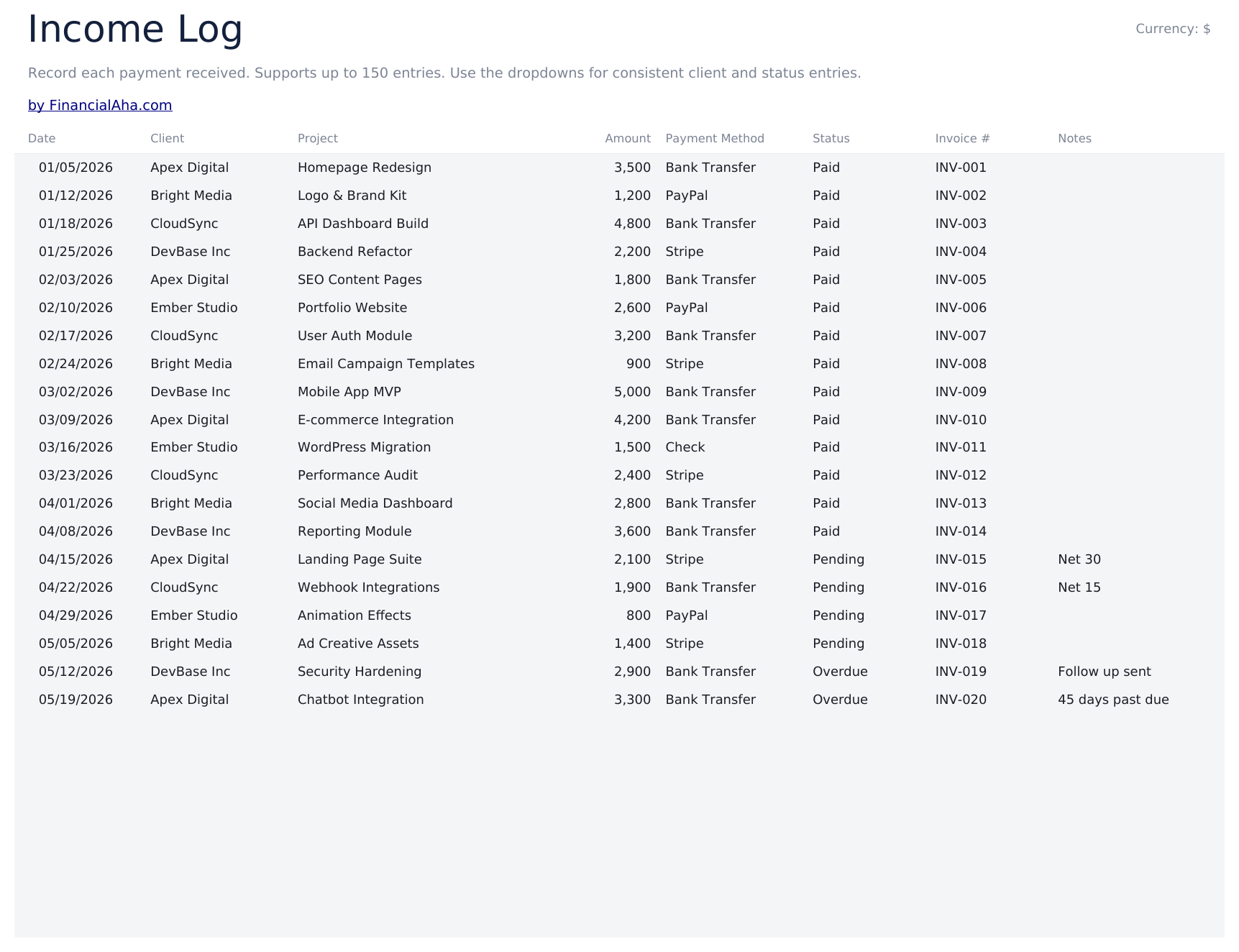
    A log of money coming in, each row with the date, the client, the project, the amount, how it was paid, whether it has landed, an invoice number and a note. Beneath, the total and three figures split by status - paid, pending and overdue. Splitting pending from overdue is the part worth having. Both are money you are owed, but one is a normal wait and the other is a conversation, and a single outstanding figure hides which is which. The invoice number is what makes a row traceable back to the document a client will ask about.

  2. 02 of 05

    Expense Log

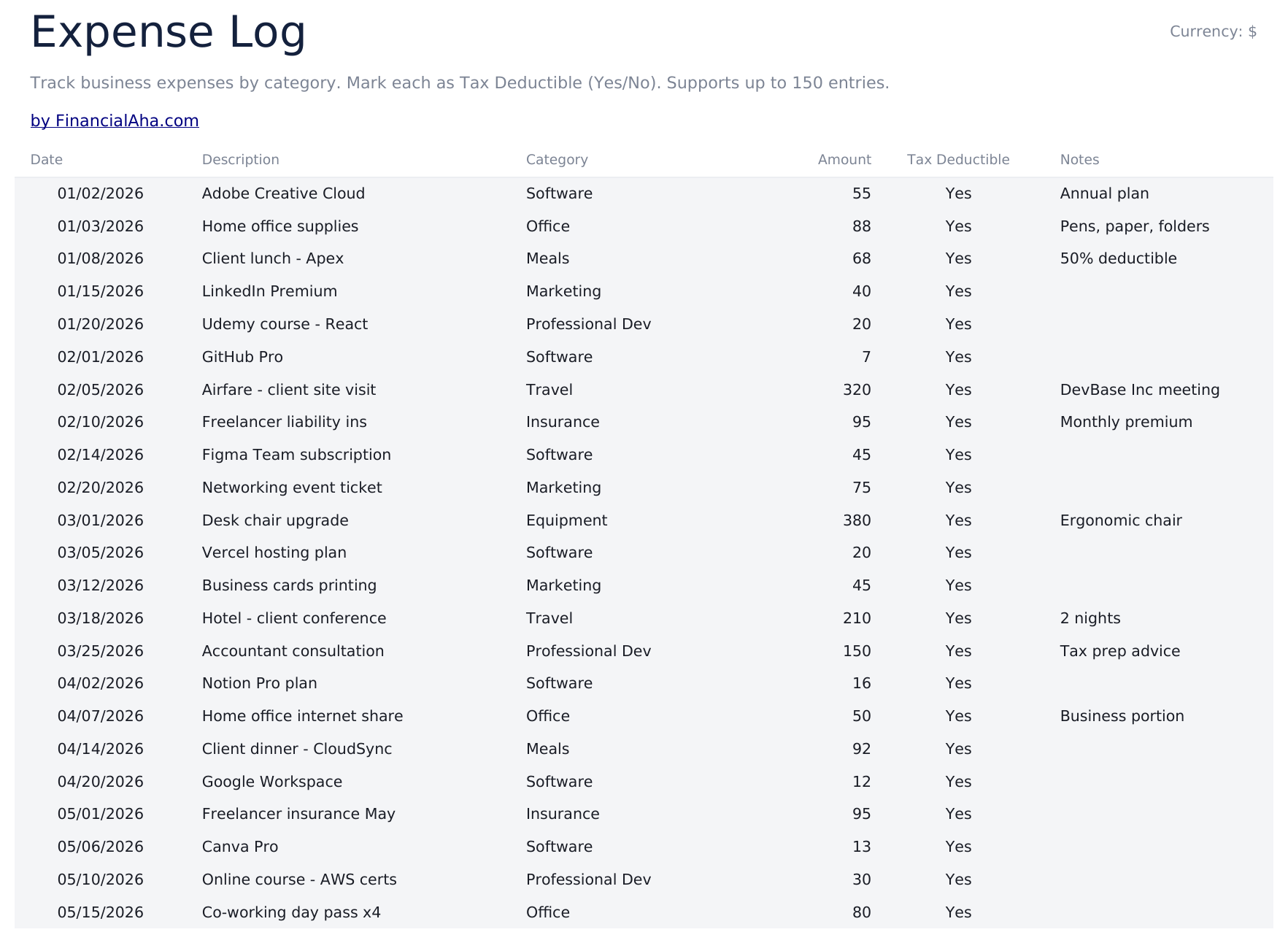
    A log of money going out, each row with a date, a description, a category, the amount, a note - and a marker for whether you are treating it as deductible. That marker is a record of your own judgement rather than a ruling. What qualifies depends on your circumstances and where you file, and the column exists so the decision is written down beside the expense while you still remember the context - which is a better position to be in at year end than reconstructing it from a bank statement.

  3. 03 of 05

    Client Profitability

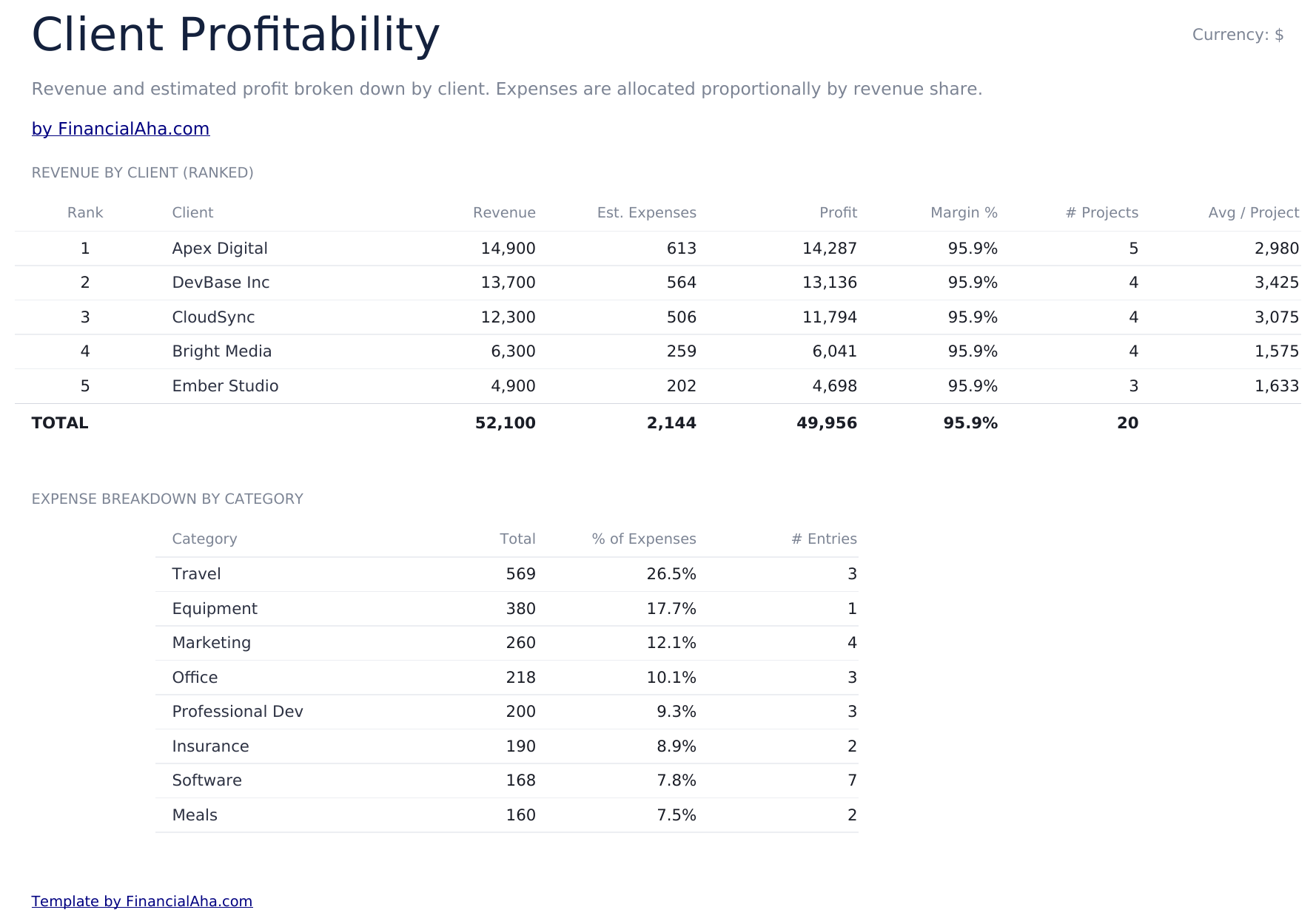
    Eight client rows ranked by revenue (five filled in the sample), each with an expense share, the profit that leaves, the margin, how many projects each represents and the average per project. Revenue reads from the Income Log, so the ranking follows the work rather than an impression of it. The average per project is the column that changes minds. A client at the top of the revenue list who got there across nine small jobs is a different proposition from one who got there with two, and the ranking alone will not tell you which you are looking at.

  4. 04 of 05

    Quarterly Tax

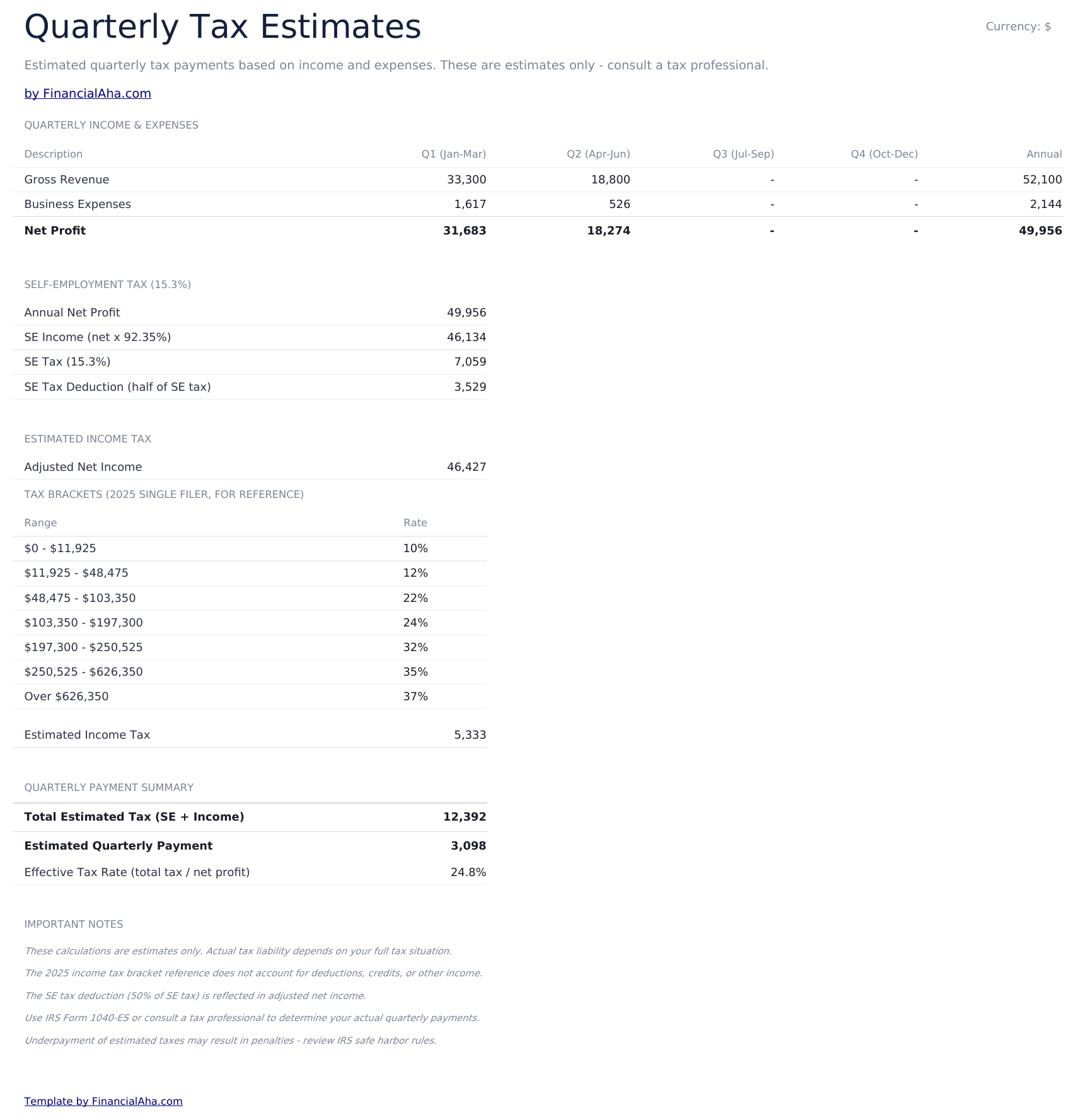
    Revenue, expenses and net profit set out by quarter, then a self-employment tax calculation, a reference table of income tax brackets, and the quarterly payment the two together imply. The quarterly figures read the Annual P&L grid, which reads the two logs - so a payment entered on the Income Log moves the quarter it falls in and everything below it. Above the tax lines sits a block of assumption cells holding the rates and the earnings ceiling the estimate uses, so a new tax year is a typing job rather than a formula edit. The self-employment figure splits into two lines, one of which stops once earnings pass that ceiling. The brackets shown are single-filer figures for reference, so the income tax line is an estimate for planning rather than a filing figure. What it is genuinely useful for is the size of the figure. Self-employment tax plus income tax on the same money is not a number most payslips prepare anyone for, and having it at the foot of a sheet is a different experience from meeting it at a deadline.

  5. Included guide

    Annual P&L

    Revenue and expense categories across twelve months, with totals along the rows and down the columns. Every cell in the grid is a formula: it reads the Income Log and the Expense Log for the month and category it sits at, so nothing here is a second copy of numbers you already entered. A plan-year cell above the grid sets which year it reads, which is what rolls the file forward. Read across rather than down: a software line that creeps up every month is a different problem from one that spikes once, and twelve columns is the only place that difference is visible.

  6. 05 of 05

    Dashboard

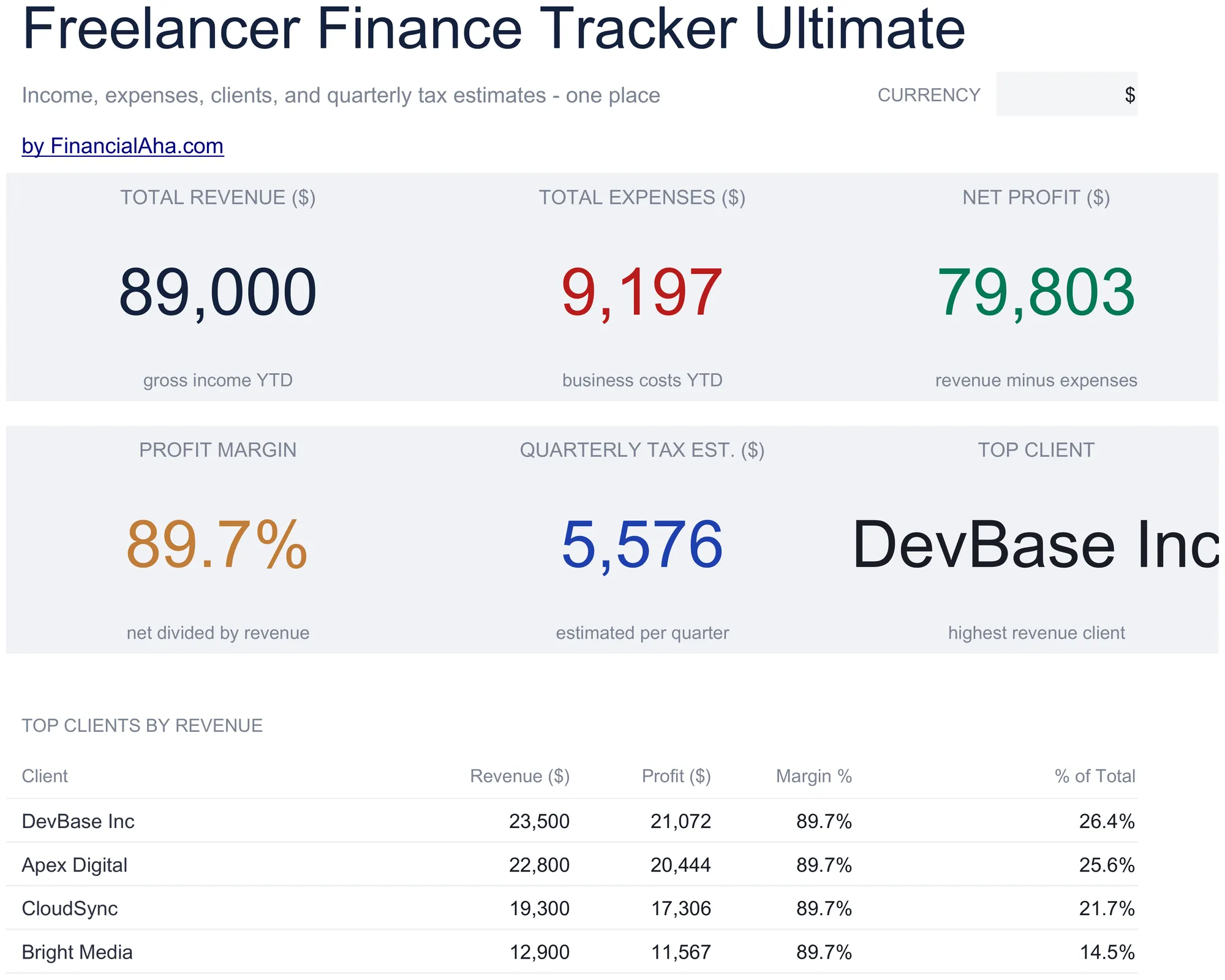
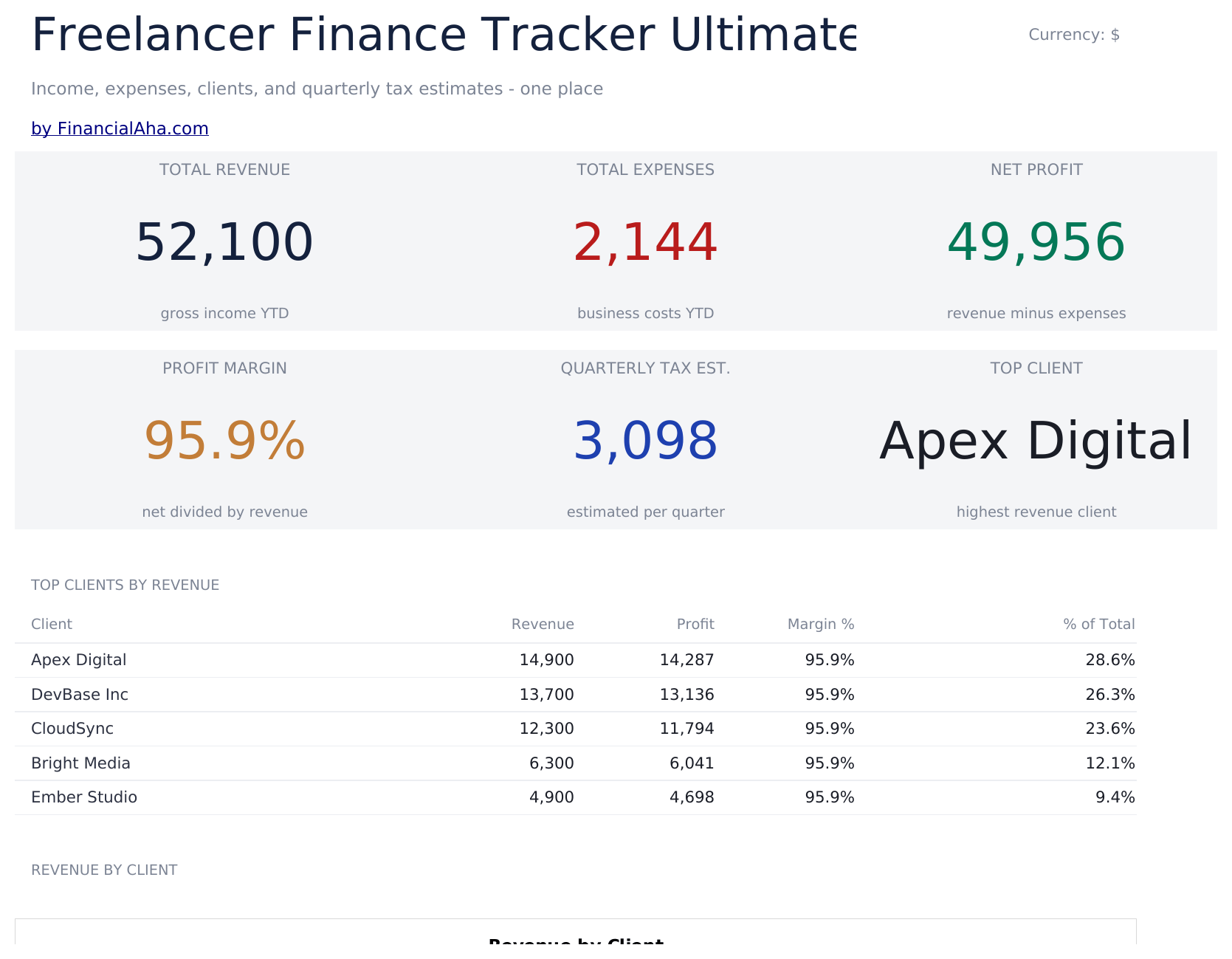
    Six figures and two charts. Total revenue, total expenses and the net profit between them; then the profit margin, the quarterly tax estimate and your largest client by revenue. The top-client figure is a concentration check as much as a compliment. A freelancer earning most of their revenue from one source has a different risk profile from one spread across six, and it is the kind of thing that is obvious in hindsight and invisible day to day. Beneath, a table ranks clients by revenue, profit, margin and share of the total.

  7. Included guide

    How to Use

    A step-by-step guide on its own tab, covering which sheets read from the logs and which are yours to fill in, what each column expects, how the tax estimate is built, and how to change the currency. Because it ships inside the file, the instructions travel with the template wherever it is opened.

Works in both Google Sheets and Excel

Ultimate Freelancer Finance Tracker Spreadsheet template for Google Sheets

Upload the Ultimate Freelancer Finance Tracker Spreadsheet Template to Drive, right-click it, and choose "Open with Google Sheets". This Ultimate Freelancer Finance Tracker Google Sheets template needs no conversion step, both charts come across, and the client and dashboard figures recalculate from the Income Log exactly as they do in Excel.

Ultimate Freelancer Finance Tracker Google Sheets template setup

A shared copy of the Ultimate Freelancer Finance Tracker Google Sheets template is the version an accountant can work in directly, and the invoice numbers are what make a question answerable without a phone call.

Running the Ultimate Freelancer Finance Tracker Google Sheet

The Ultimate Freelancer Finance Tracker Google Sheet takes a row when money moves either way. The quarterly and annual sheets are the ones you sit down with rather than update daily.

Ultimate Freelancer Finance Tracker Spreadsheet template for Excel

The Ultimate Freelancer Finance Tracker spreadsheet Excel download is a plain .xlsx. Excel opens this Ultimate Freelancer Finance Tracker Excel template directly, with no import step, and both charts are native Excel charts rather than pictures. There are no macros and no VBA in the file.

Ultimate Freelancer Finance Tracker Excel template setup

The same Ultimate Freelancer Finance Tracker Excel template opens in Excel on Windows, Excel on Mac, and Excel for the web. It is also the identical file you would upload to Drive, so there is no separate Ultimate Freelancer Finance Tracker spreadsheet download to choose between.

Ultimate Freelancer Finance Tracker spreadsheet Excel notes

The Ultimate Freelancer Finance Tracker spreadsheet Excel file carries no macros and no VBA, so Excel opens it without a trust prompt.

Opening the Ultimate Freelancer Finance Tracker spreadsheet Excel file

Nothing in the Ultimate Freelancer Finance Tracker Excel template is version-specific, so this Ultimate Freelancer Finance Tracker spreadsheet Excel workbook behaves identically in Excel on Windows, Excel on Mac, and older builds.

Spreadsheet template highlights

What the Ultimate Freelancer Finance Tracker spreadsheet template tracks

A row per income line. This is what the Ultimate Freelancer Finance Tracker Spreadsheet Template records for each one:

Date
when the money moved, or was due to
Client
who paid it, and what the profitability sheet groups by
Project
what it was for
Amount
what came in
Payment Method
how it arrived
Status
paid, pending or overdue, each totalled separately
Invoice #
what makes the row traceable to a document
Notes
anything the other columns cannot carry

Compare builds

FinancialAha Freelancer Finance Tracker spreadsheet template: Free, Essentials, and Ultimate compared

Feature Free View Spreadsheet Template Essentials View Spreadsheet Template Ultimate This page
Working sheets 1 2 6
Project rows 16 30 150 income lines
Hours and hourly rate Yes
Paid or unpaid status Yes Yes
Outstanding total Yes Yes
Expenses Per project Their own log, with a deductible marker
Net income Per project Across the business
Profit by client Ranked, with margin
Quarterly tax estimate Yes, figures you enter
Annual profit and loss Automatic, from the two logs
Charts 1 2

The Free Freelancer Finance Tracker Spreadsheet Template lists projects and their value; the Essentials build adds hours, a paid marker, expenses and net income. The FinancialAha Ultimate Freelancer Finance Tracker Spreadsheet Template is the business rather than the work: separate income and expense logs with a deductible marker and invoice numbers, pending and overdue split apart, profit ranked by client with margin and average per project, a quarterly tax estimate you can plan against, and an annual profit and loss.

Good to know

Notes on working in the Ultimate Freelancer Finance Tracker spreadsheet template

  • Pending and overdue are totalled separately, because one is a normal wait and the other is a conversation.
  • The deductible marker records your own judgement while you still remember the context - it is not a ruling on what qualifies.
  • Average per project separates a client who reached the top of the list across nine small jobs from one who did it with two.
  • The annual grid and the quarterly tax figures both read the two logs, so entering a payment once is enough.
  • The plan-year cell above the annual grid sets which year the grid reads, so rolling the file into a new year is one edit.
  • The assumption cells on the tax sheet hold the rates and the earnings ceiling the estimate uses. They are cells rather than numbers inside formulas.
  • The self-employment figure sits on two lines. One stops once earnings pass the ceiling in the assumption block, the other does not.
  • The tax brackets are single-filer figures shown for reference, so the estimate is for planning rather than filing.
  • The top-client figure is a concentration check as much as a compliment.
  • The currency dropdown relabels the money columns across every sheet. It changes the label only and does not convert the numbers.

How to Use This Template

1

Log the income

Date, client, amount, status and invoice number.

2

Log the expenses

With a category and your deductible judgement.

3

Check the clients

Revenue, profit and margin, ranked.

4

Fill the tax sheet

Quarterly figures, and read the estimate.

Customer Reviews

What Our Customers Say

"If I get half as good at handling my finances as you are at customer service, this'll be the best $26 I've spent lately."

J Jenny Verified Buyer

"Great tool! Simplifies financial planning without the hassle of complex spreadsheets."

F Fazia Search Marketing Manager

"I recently purchased your super convenient spreadsheet, it really helps me!"

J John Verified Buyer

"They're great and super intuitive. Thank you!"

M Mira Verified Buyer

Built by Claude AI. Perfected by us.

We use Claude AI to draft each template, after a deep research. Then our team steps in. We refine the layout, stress-test every formula, fix edge cases, and polish the design until it feels like something we would actually use ourselves. The AI gets us 80% there. The last 20% is all human judgment.

One-time purchase. No subscription. Works in Excel & Google Sheets.

Frequently Asked Questions

Is the FinancialAha Ultimate Freelancer Finance Tracker Spreadsheet Template a Google Sheets template?

Yes. Upload the file to Drive and choose "Open with Google Sheets". Both charts come across in the Ultimate Freelancer Finance Tracker Google Sheets template, and the client and dashboard figures recalculate from the Income Log exactly as they do in Excel.

Is the FinancialAha Ultimate Freelancer Finance Tracker Spreadsheet Template an Excel template?

Yes. The download is a plain .xlsx, so the Ultimate Freelancer Finance Tracker Excel template opens directly in Excel with no import step. Both charts are native Excel charts rather than pictures, and there are no macros or VBA.

Will the FinancialAha Ultimate Freelancer Finance Tracker spreadsheet Excel file open in older versions of Excel?

Yes. The Ultimate Freelancer Finance Tracker spreadsheet Excel workbook ships as a plain .xlsx, so it opens identically in current Excel and in builds that predate dynamic arrays.

Does the quarterly tax sheet in the Ultimate Freelancer Finance Tracker spreadsheet read the logs?

Yes. Revenue, expenses and net profit by quarter are formulas that read the Annual P&L grid, which itself reads the Income Log and Expense Log - so a payment logged once moves the quarter it falls in and the estimate beneath it. The tax rates, the earnings ceiling and the bracket table are the parts left for you to set.

Is the tax estimate in the Ultimate Freelancer Finance Tracker spreadsheet a filing figure?

No. It applies a self-employment calculation and single-filer bracket figures shown on the sheet for reference, so it is a planning number rather than a return. What you owe depends on your circumstances and where you file.

What does the deductible marker do in the Ultimate Freelancer Finance Tracker spreadsheet?

Records your own judgement beside the expense while you still remember the context. It is not a ruling on what qualifies - that depends on your circumstances.

Why are pending and overdue separate in the Ultimate Freelancer Finance Tracker spreadsheet?

Because one is a normal wait and the other is a conversation. A single outstanding figure hides which of the two you are looking at.

What does average per project tell me in the Ultimate Freelancer Finance Tracker spreadsheet?

Whether a client reached the top of the revenue ranking across many small jobs or a few large ones. The ranking alone will not tell you which.

What do I get after buying the Ultimate Freelancer Finance Tracker spreadsheet template?

You receive the Ultimate Freelancer Finance Tracker spreadsheet template as an Excel file (.xlsx) that works in Microsoft Excel and Google Sheets. Download it immediately after purchase - no signup or account required.

Is there a free Ultimate Freelancer Finance Tracker spreadsheet template?

Yes. A free version of the Ultimate Freelancer Finance Tracker spreadsheet template is available with basic features. The Ultimate version adds advanced analysis, more capacity, and additional sheets.

What if the Ultimate Freelancer Finance Tracker spreadsheet template does not work for me?

Contact us and we will help troubleshoot. The Ultimate Freelancer Finance Tracker spreadsheet template works in Microsoft Excel and Google Sheets with no macros required.

Ultimate

Highlights:

Instant download after purchase
No macros or VBA required
All formulas auto-calculate
No subscription required
Works in
Excel Google Sheets

Looking for more Ultimate templates?

We offer Ultimate versions of our most popular spreadsheet templates with advanced features, more capacity, and deeper analysis.

Private & secure

Your financial data stays on your device. We never see it.

Learn more →

Need help?

Check our guides or reach out with questions.

View FAQ →