Commercial Property Analysis Spreadsheet Template for Excel & Google Sheets
Underwrite a small multi-tenant commercial property end to end. Tenant rent roll with leased square feet and rent per square foot, pro-rata NNN reimbursements, operating expenses, NOI, cap rate, and exit value. Built for Microsoft Excel and Google Sheets.
The set · 3 templates
Commercial Real Estate Bundle
This template + 2 more: Mortgage Analysis, Business Valuation
This template only
Commercial Property Analysis
Instant digital delivery · Terms & Conditions apply
One-time purchase
Commercial Property Analysis Spreadsheet
Everything in This Commercial Analysis
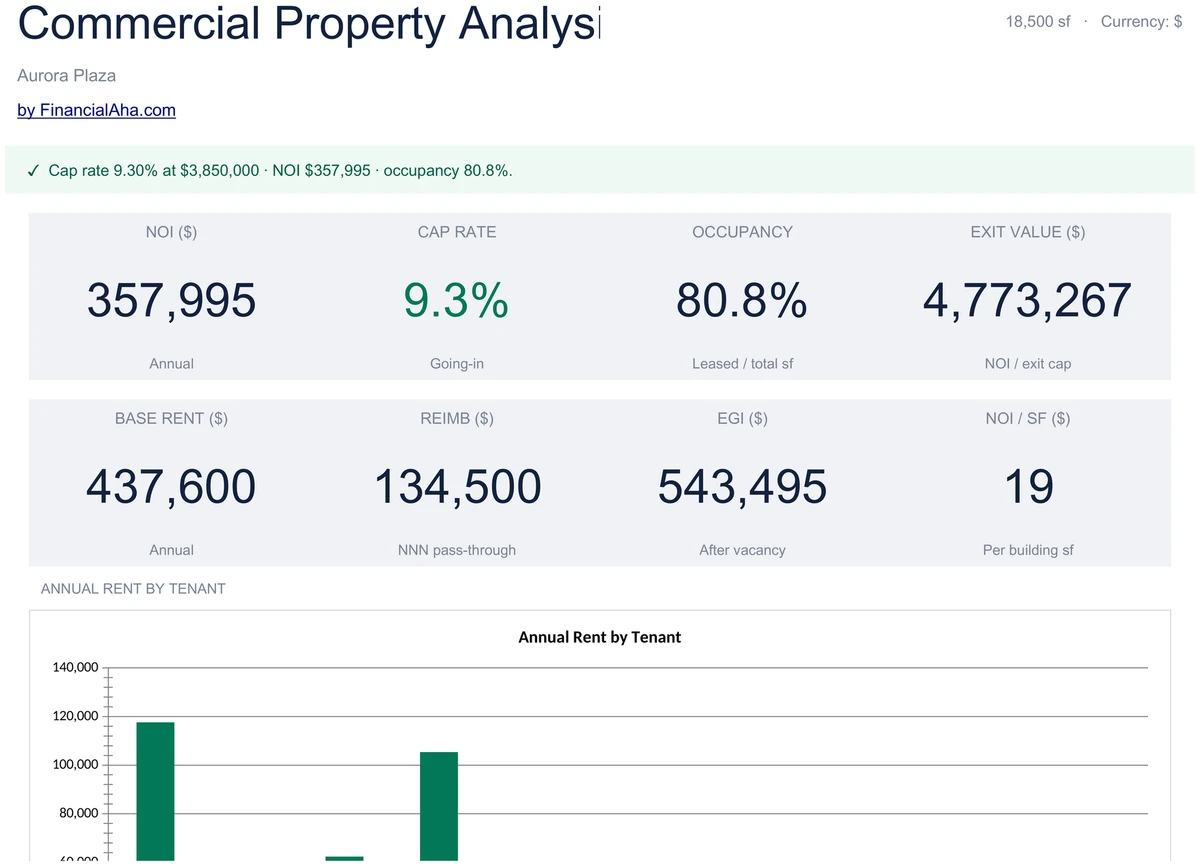
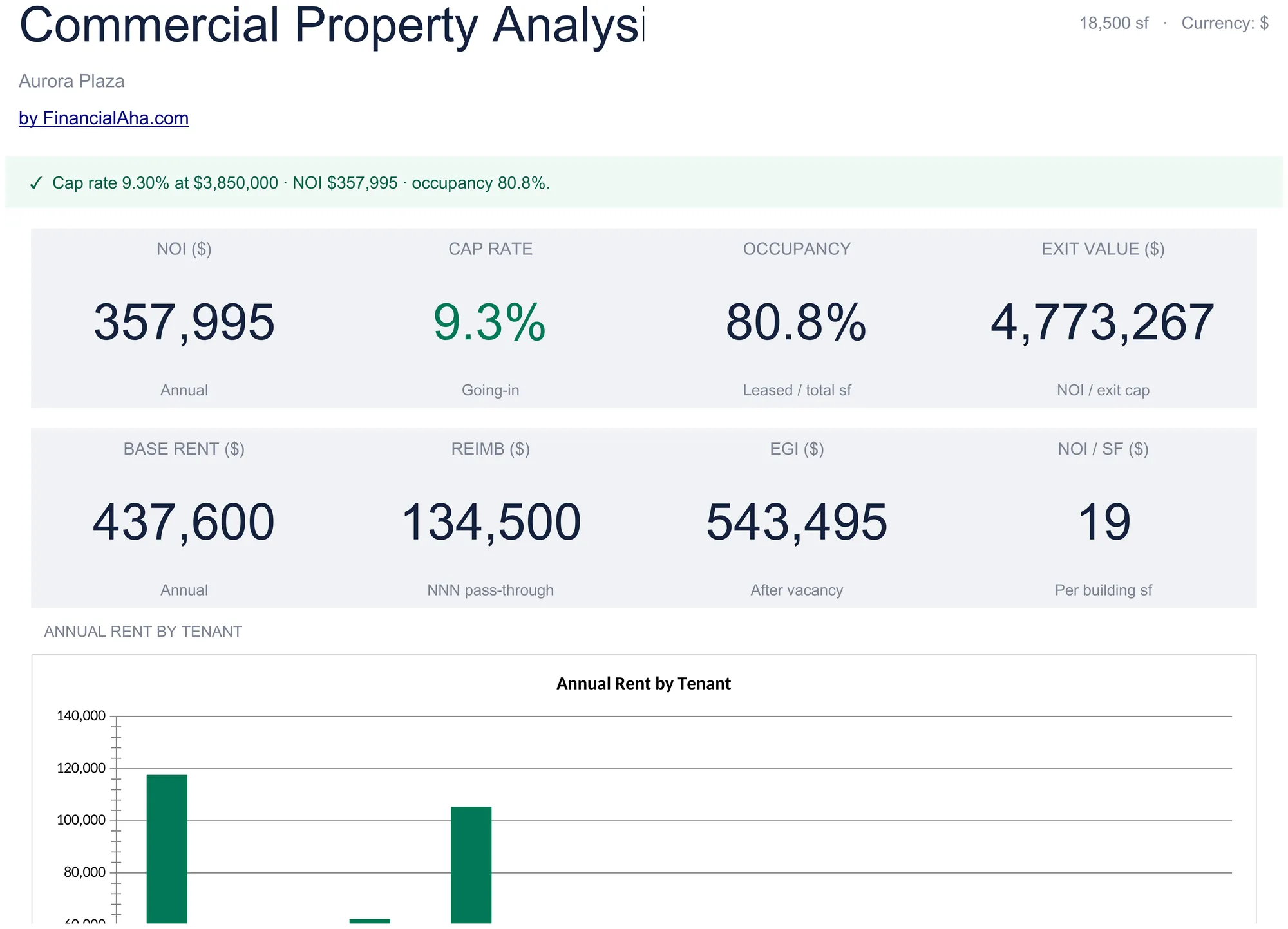
Underwriting at a Glance
KPIs cover the deal end to end - occupancy by leased square footage, NOI, going-in cap rate, exit value at your chosen exit cap, effective gross income, and total operating expenses. A status banner flags whether the deal pencils.
- Occupancy, NOI, going-in cap, exit value
- EGI and total opex on the same view
- Status banner on the deal economics
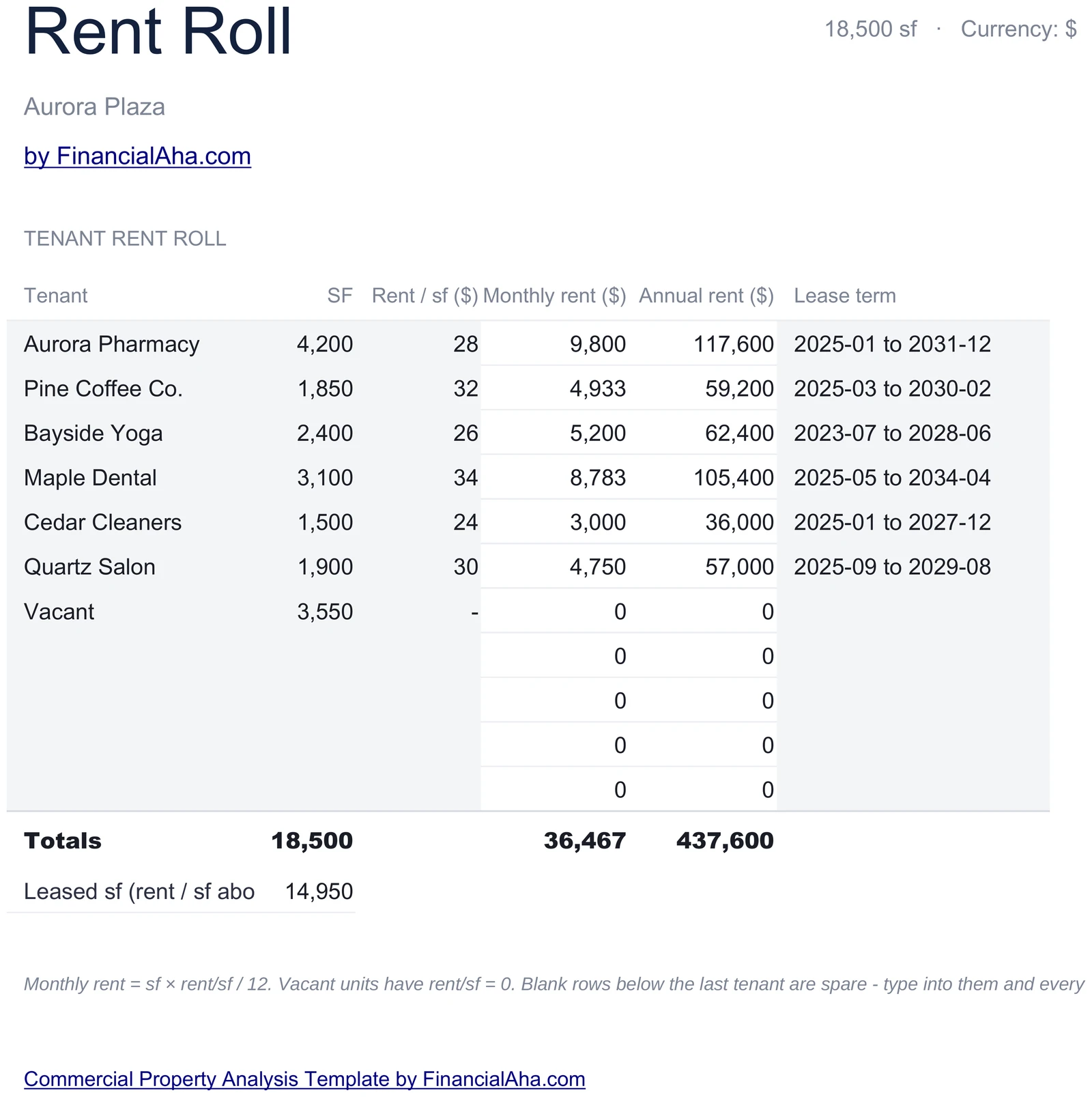
Tenant-Level Rent Roll
One row per tenant - name, square feet, rent per square foot, lease term, and annual rent. Vacant suites stay on the roll with zero rent. The total row shows leased square footage and total base rent across all tenants.
- Tenant, sf, rent psf, lease term per row
- Vacant suites stay on the roll
- Auto leased-sf and total-base-rent totals
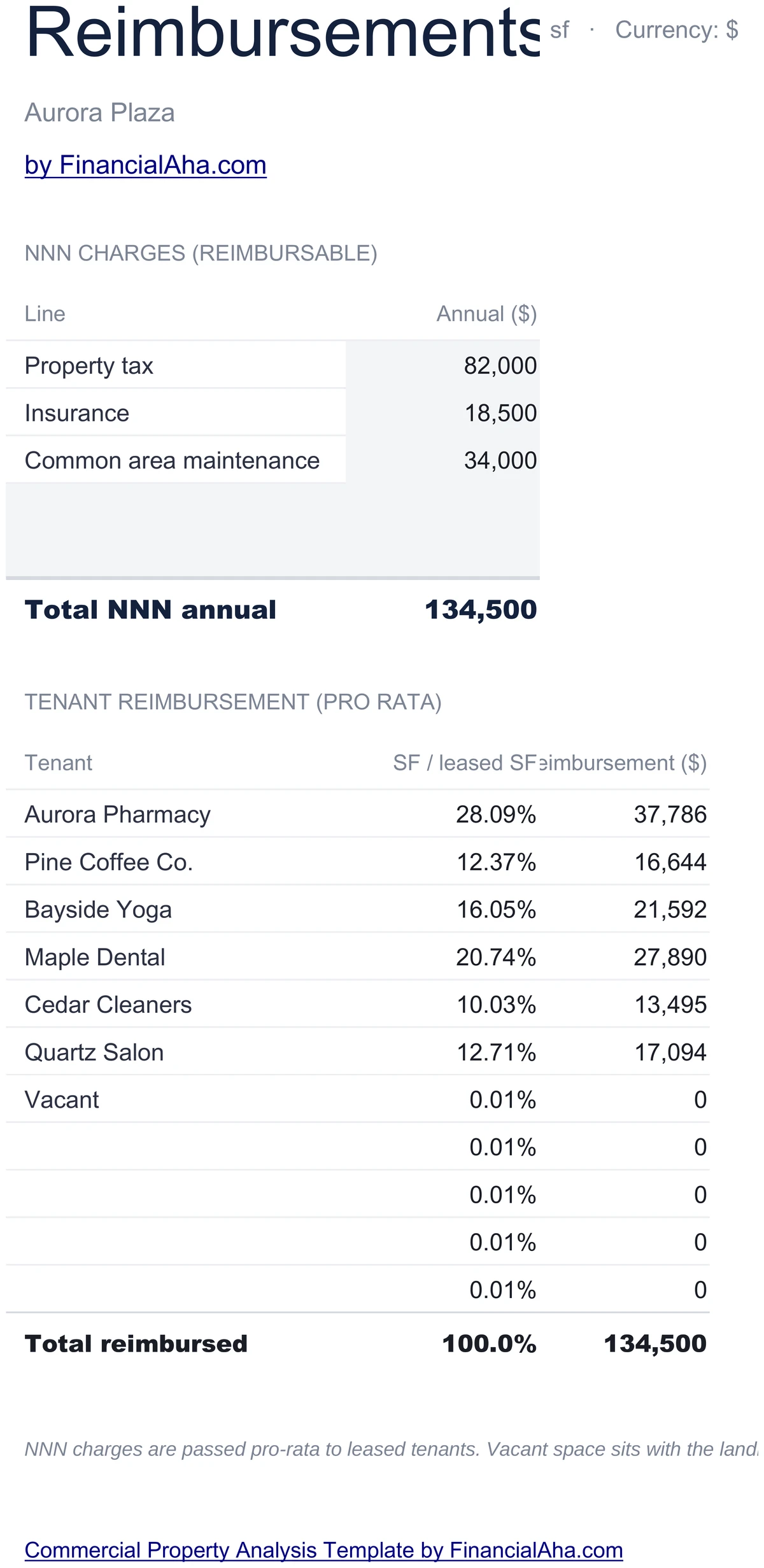
NNN Charges Split Pro-Rata
Property tax, insurance, and CAM are entered as annual totals. Each leased tenant's share equals their square feet divided by total leased square feet times the total NNN charge. Vacant suites carry no share.
- Three NNN charges - tax, insurance, CAM
- Pro-rata by leased square footage
- Per-tenant reimbursement column
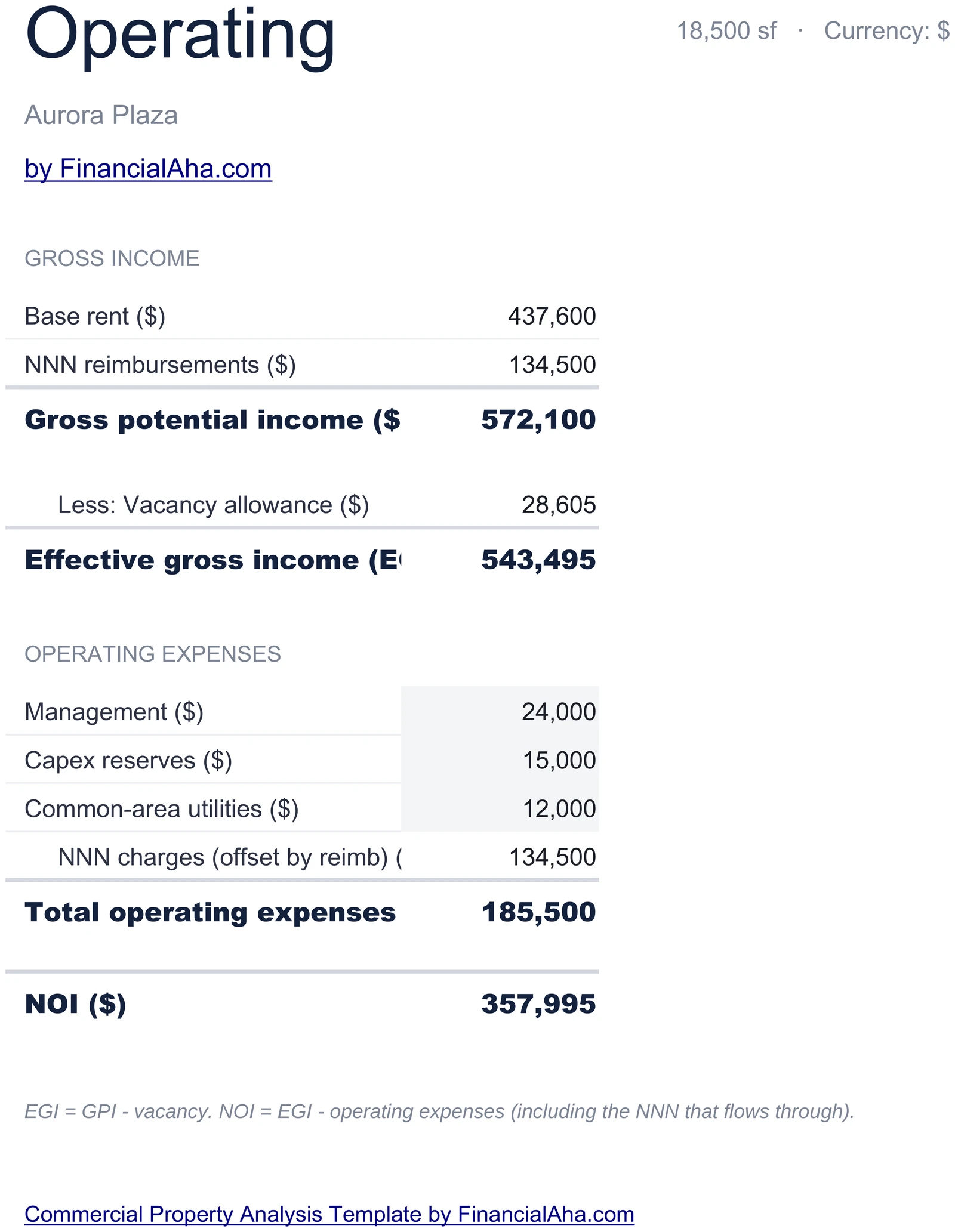
From Gross Income to NOI
Total gross income equals base rent plus reimbursements. Subtract vacancy loss at your set percent to get effective gross income. Subtract operating expenses - management, reserves, common-area utilities, and the NNN pool - to get NOI.
- Gross income = base rent plus reimbursements
- Vacancy loss as percent of gross income
- NOI = EGI minus operating expenses
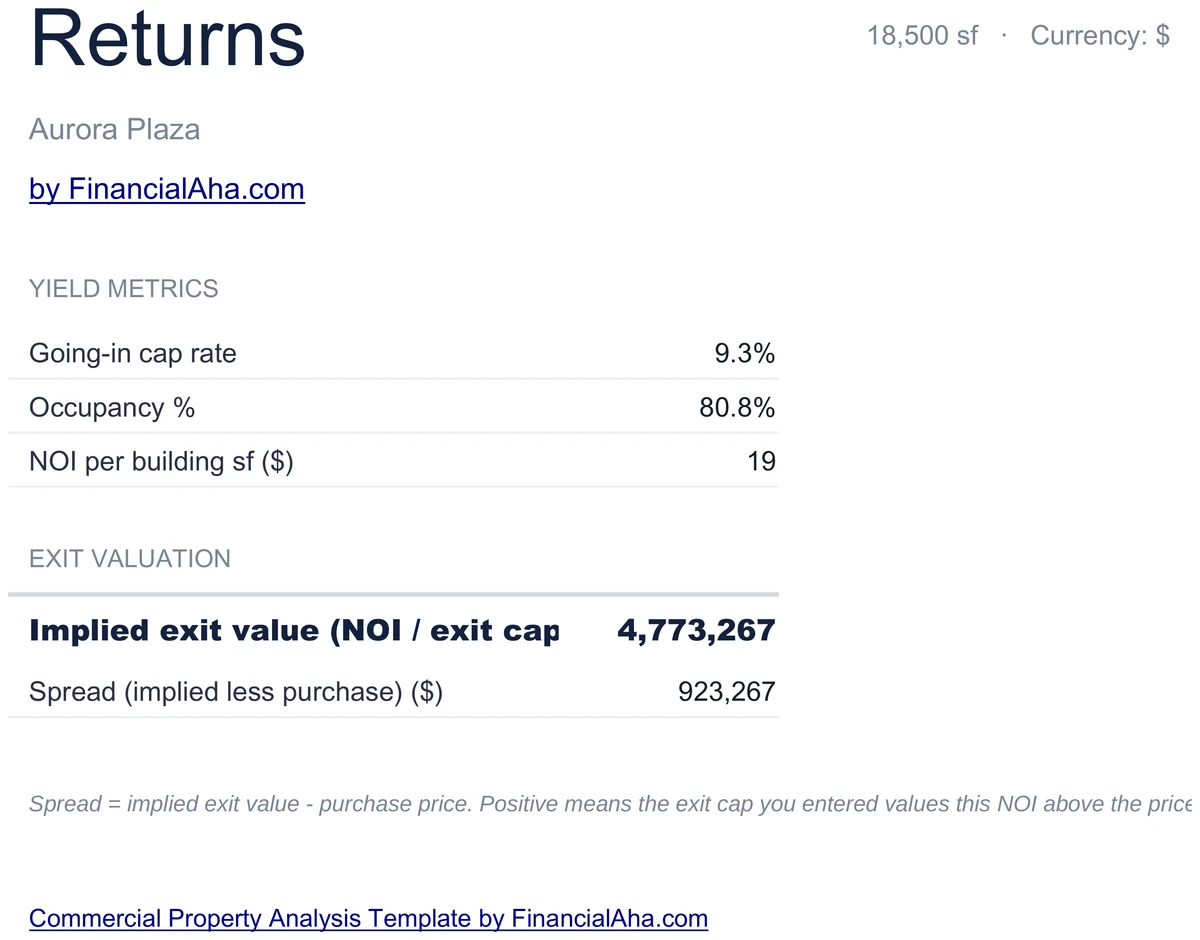
Cap Rate and Exit Value
NOI divided by purchase price gives the going-in cap rate. NOI divided by your exit cap gives the implied exit value. Sensitivity at the bottom shows what shifts to occupancy or rent do to NOI and value.
- Going-in cap = NOI / price
- Exit value = NOI / exit cap
- Sensitivity to occupancy and rent
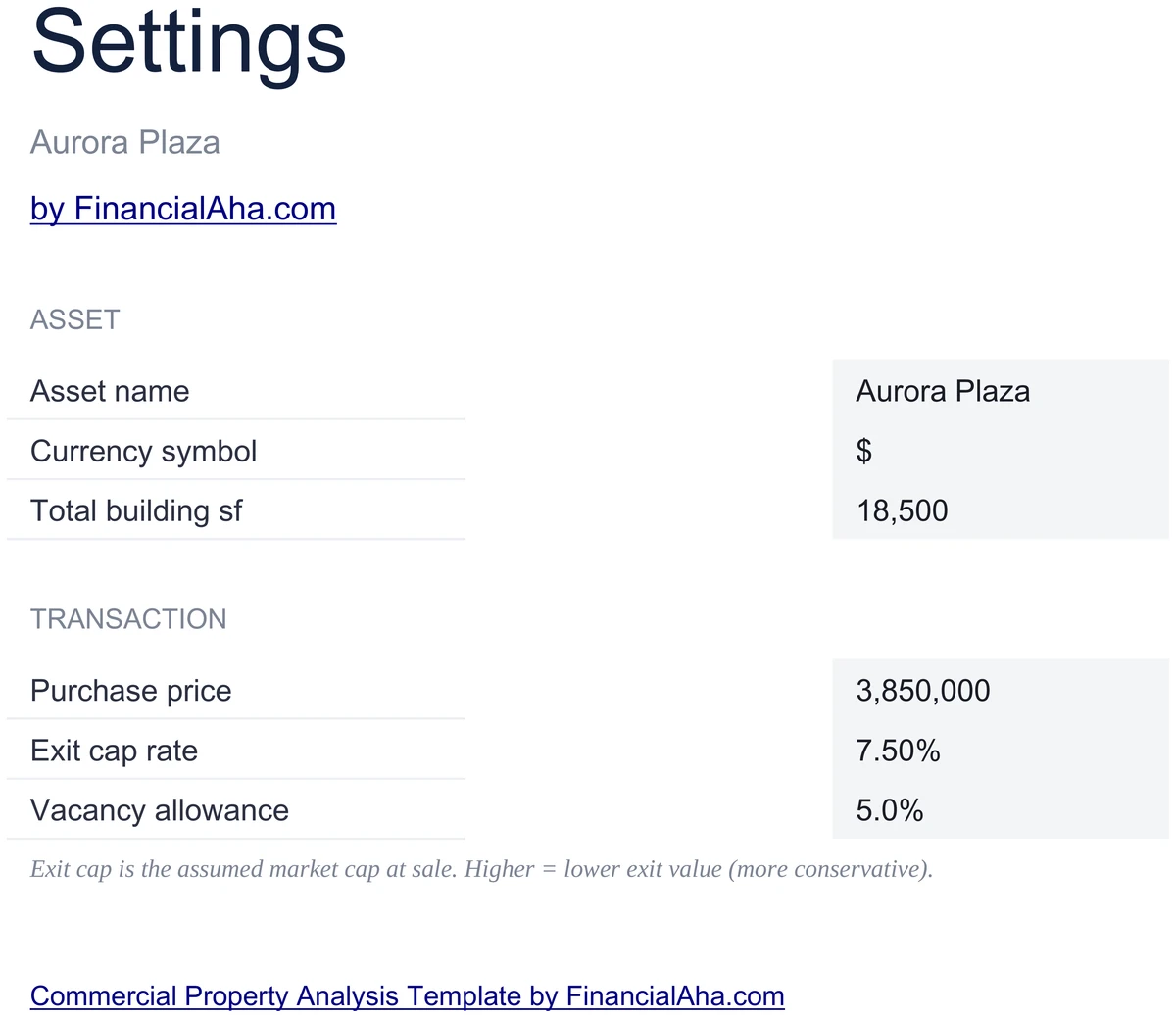
Set Your Asset and Caps
Settings holds the asset name, currency, total building square footage, purchase price, exit cap rate, and vacancy assumption. Update once and the rent roll, reimbursements, operating, returns, and dashboard all follow.
- Asset name, currency, building sf
- Purchase price and exit cap
- Vacancy assumption
Customizable & Flexible
Stress-test the deal. Drop occupancy, add a tenant, raise CAM, or change the exit cap - the dashboard, NOI, and exit value update automatically. Works identically in Excel and Google Sheets.
- Add or remove tenants on the rent roll
- Adjust NNN, vacancy, or exit cap
- Excel and Google Sheets compatible
Ready to take control of your finances?
Set Up in 25 Minutes
How the Commercial Analysis Works
Open in Excel or Google Sheets
Get instant access after purchase. Open in Microsoft Excel directly, or import into Google Sheets - no software to install, no add-ons.
Set Asset Basics
On Settings, set asset name, currency, building square footage, purchase price, exit cap, and vacancy assumption.
Populate Rent Roll and NNN
Add one row per tenant with square feet, rent per square foot, and lease term. Enter the three NNN charge totals - tax, insurance, CAM.
Read NOI and Cap Rate
The dashboard and Returns sheet show NOI, going-in cap, exit value, and occupancy - all derived from your inputs.
Built for Multi-Tenant NNN
Why Investors Use This Commercial Template
Multi-Tenant NNN Underwriting
Rent roll, pro-rata reimbursements, EGI minus opex equals NOI, and NOI over cap gives value - the bones of commercial underwriting.
No Formulas to Write
Enter values in highlighted input cells. Rent roll totals, pro-rata reimbursements, NOI, cap rate, and exit value are pre-built.
Excel and Google Sheets
Works identically in Microsoft Excel and Google Sheets. No macros, no add-ons, no proprietary functions.
Free Lifetime Updates
Any updates we release to the commercial analysis template included at no extra cost.
Your Deal Data Stays Private
Runs entirely in your spreadsheet. Tenant lists, rents, and pricing stay in your file - we never see or store them.
One-Time Purchase
Pay once, use forever. No subscriptions, no monthly fees, no recurring charges.
Got Questions?
Frequently Asked Questions
Is this template free to use?
This template is not free, but it is available for a one-time purchase. This purchase gives you lifetime access to the template and to any updates we release.
What do you mean by lifetime access?
Lifetime access means that you will have access to this template for as long as you need it. You will not be required to pay any additional fees for continued access to the template or to any updates we release.
Do I need to sign up to use this template?
You don't need to create an account with us. The template is delivered as an Excel file: open it directly in Microsoft Excel, or import it into Google Sheets from your own Google account if you prefer working there.
What are the benefits of using this template?
This template offers a range of benefits, including: Easy-to-use interface, Customizable to suit your needs, Secure and private, Free access to any updates we release, One-time purchase for lifetime access.
Can I get future updates?
Yes. Whenever we release an update to this template, you get it at no additional cost - lifetime access covers every version we publish. We do not commit to a fixed update schedule; improvements ship when they are ready.
Do you offer any discounts?
There are no discount codes for individual templates, but many templates are also part of a bundle that costs less than buying the same templates separately. Either way it is a one-time purchase with lifetime access and free updates.
Do you have any access to my financial data?
No, we do not have access to your financial data when you use this template. The template is a file you keep yourself, on your computer or in your own Google Drive, so your financial information never reaches us.
Is this template financial advice?
Our templates are not financial advice. They are tools designed to help you manage your personal finances more effectively. If you need personalized financial advice, consider consulting with a financial advisor or accountant.
Can I make my own changes and customize this template?
Yes, you can make your own changes and customize this template to suit your needs. The template is designed to be flexible and adaptable, allowing you to add or remove sections, change formulas, and adjust formatting as needed.
Do you offer technical support?
This is a self-service product, and we do not offer technical support. However, if you encounter any issues or have any questions about the template, please contact our team for assistance. Because everyone's financial situation is unique, consider consulting with a financial advisor or accountant if you need personalized financial advice.
Do you offer refunds?
Because these digital products are delivered instantly, purchases are generally final once you consent to immediate delivery at checkout. If the file we delivered has a genuine error, such as a formula that miscalculates or a feature its page describes but the file lacks, tell us what does not match: we will fix or replace it, or refund you if we cannot. Reporting within 30 days speeds resolution but never limits your statutory consumer rights; the full policy is in our Terms & Conditions.
Can't find the answer you're looking for? Contact our team
The set · 3 templates
Commercial Real Estate Bundle
This template + 2 more: Mortgage Analysis, Business Valuation
This template only
Commercial Property Analysis
Instant digital delivery · Terms & Conditions apply
Highlights:
Underwrite Your Next Commercial Deal
Get the Commercial Property Analysis template and start running rent rolls, reimbursements, NOI, and cap rates in Excel or Google Sheets.