Beste waarde All-in-One Financieel Planningspakket
✓ Financiële Planning✓ Vermogenstracker✓ Maandelijks Budgetteren✓ Reisbudget Planner✓ Jaarlijkse Budgetplanner✓ Maandelijkse Uitgaventracker✓ Jaarlijkse Belastingplanner✓ Pensioenplanning
Bekijk bundel →
Ultimate Ultimate-versie beschikbaar - Salarisadministratie Ultimate
Essentials-sjabloon - Excel & Google Sheets

Employee Payroll Essentials-sjabloon

Calculate employee pay with deductions, taxes, and net pay. Process payroll for multiple employees with automatic calculations.

Bekijk de Ultimate-versie →
Employee Payroll preview

Wat zit erin

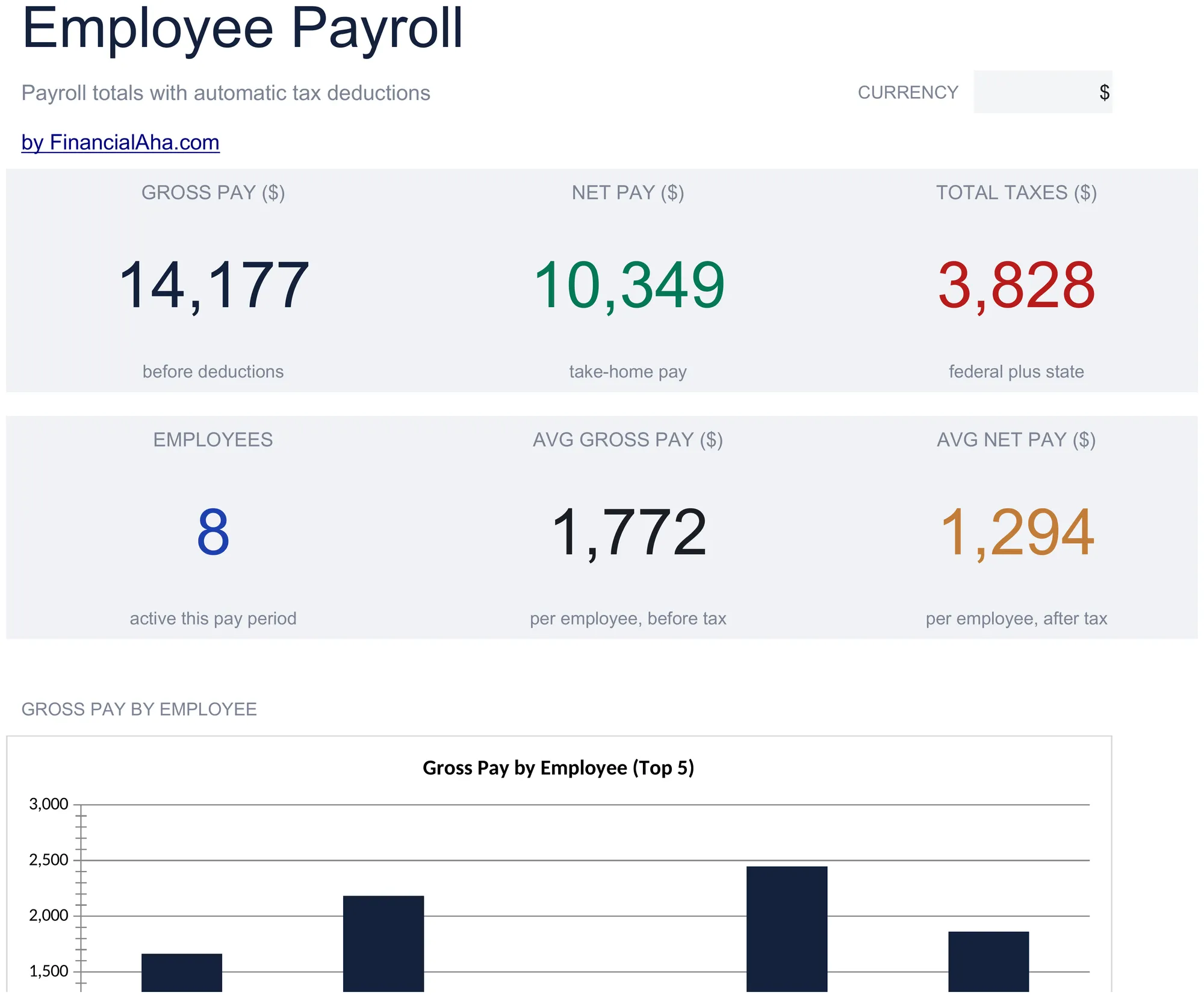
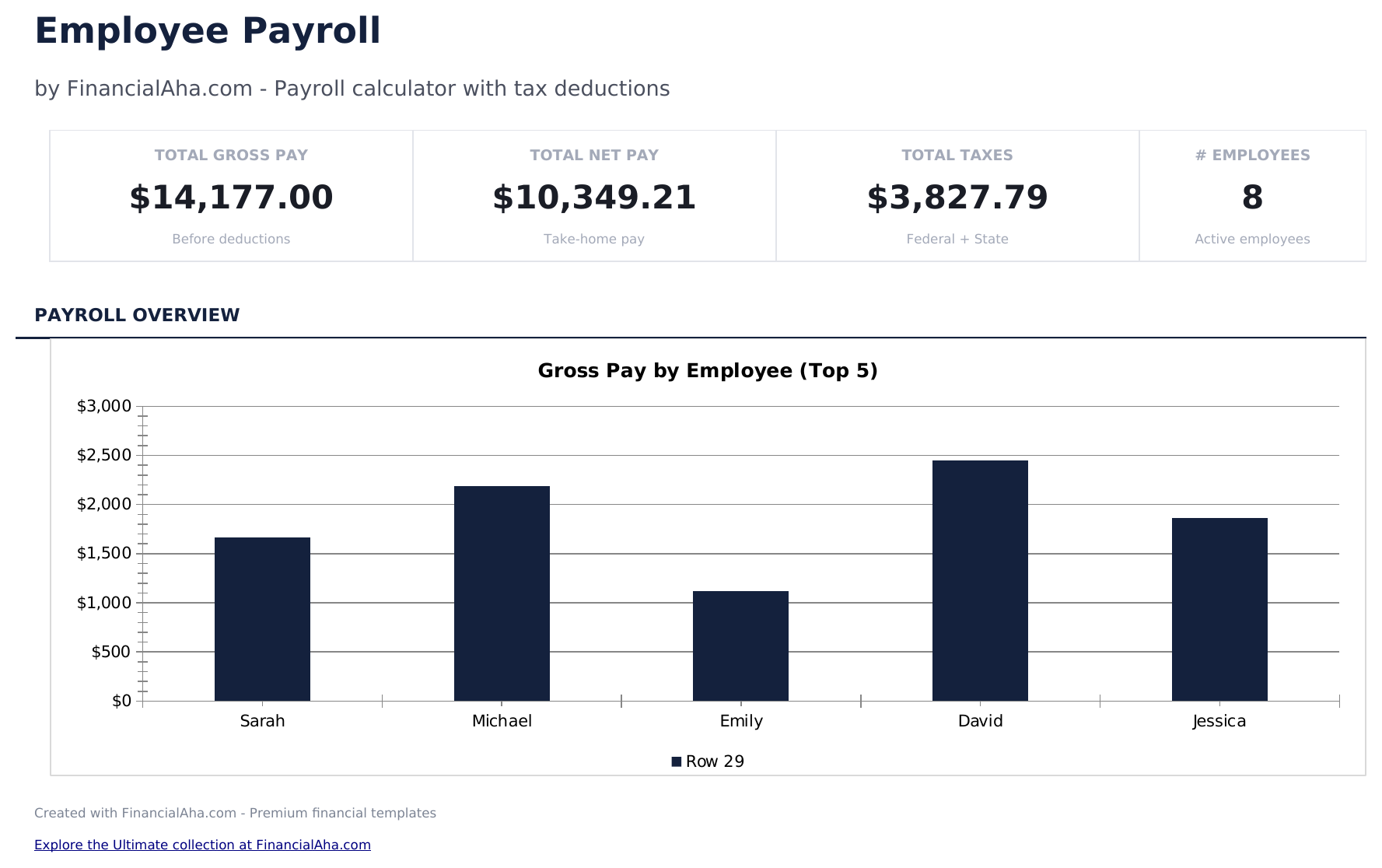
  • Dashboard with payroll summary showing total gross pay, total deductions, total taxes, and total net pay
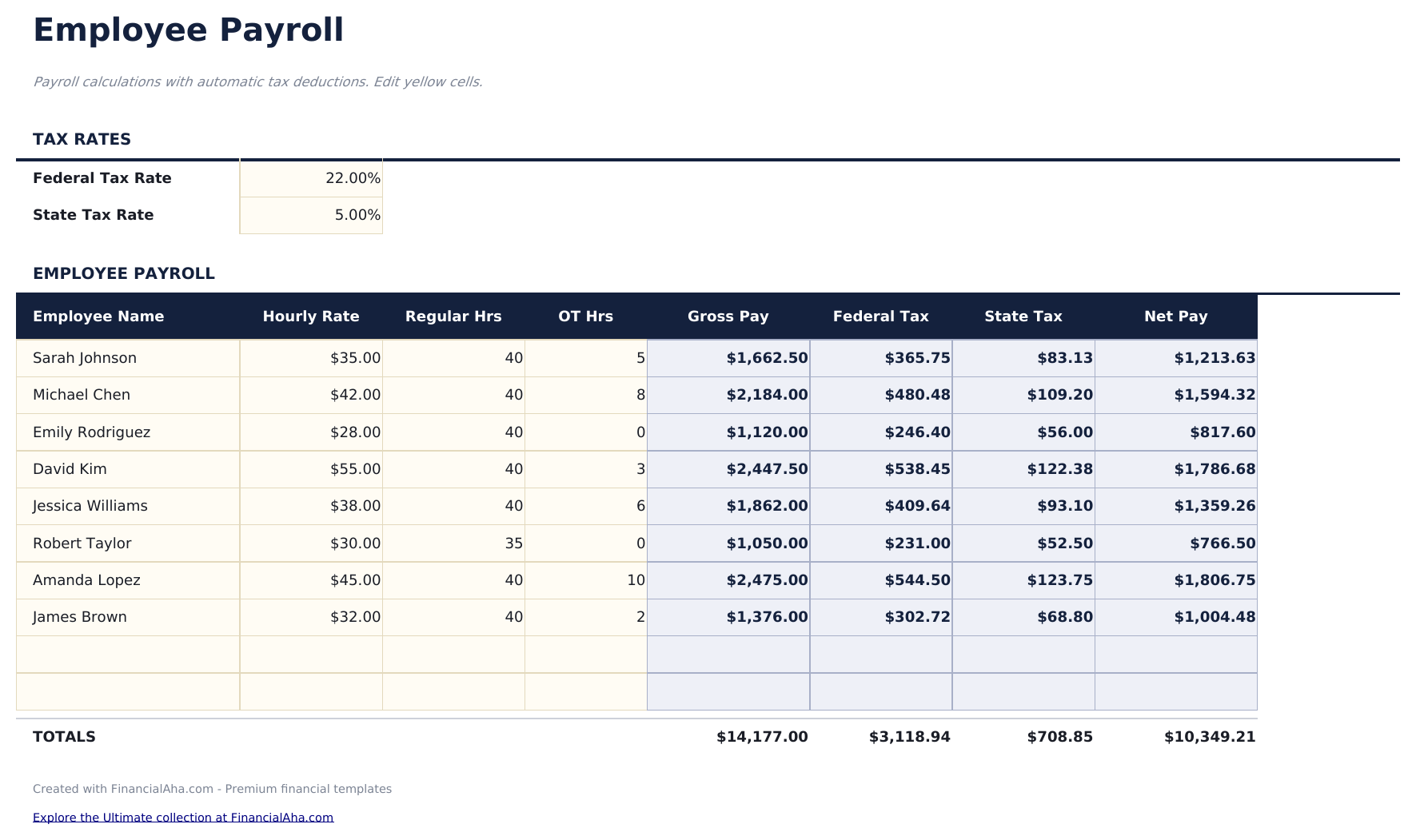
  • Payroll worksheet with employee name, pay rate, hours worked, overtime hours, and pay period columns
  • Gross pay and deduction calculations including health insurance, retirement contributions, and other withholdings
  • Tax withholding fields for federal income tax, state income tax, Social Security, and Medicare deductions
  • Net pay calculation per employee with color-coded input cells (yellow) and auto-calculated payroll totals (blue)
  • Works in Microsoft Excel, Google Sheets, and LibreOffice Calc with no setup required
Ultimate Version Available

Need more from this template?

The Essentials version covers everyday tracking. Ultimate goes further with multi-entity support, scenario analysis, and ultimate-grade reporting.

Essentials - $12
  • Dashboard with payroll summary showing total gross pay, total deductions, total taxes, and total net pay
  • Payroll worksheet with employee name, pay rate, hours worked, overtime hours, and pay period columns
  • Gross pay and deduction calculations including health insurance, retirement contributions, and other withholdings
  • Tax withholding fields for federal income tax, state income tax, Social Security, and Medicare deductions
Ultimate - $19
  • Werknemersbestand voor tot 20 werknemers met naam, afdeling, loontype, loontarief, belastingstatus, toeslagen en secundaire arbeidsvoorwaarden-keuzes
  • Werkblad Maandelijkse Salarisadministratie dat brutoloon, federale en staatsbelastinginhouding, Social Security, Medicare en nettoloon per werknemer berekent
  • Dashboard met 6 KPI-kaarten: totaal brutoloon, totaal nettoloon, totale belastinginhouding, totale kosten secundaire arbeidsvoorwaarden, aantal werknemers en gemiddeld salaris
  • Werkblad Belastinginhouding met bewerkbare federale en staatsbelastingtarieven, Social Security- en Medicare-tarieven en werkgeversbijdragepercentages
  • Werkblad Overzicht Secundaire Arbeidsvoorwaarden dat zorg-, tandarts-, oogheelkunde- en pensioenbijdragen per werknemer bijhoudt met werkgevers- en werknemerssplitsing
See what's in the Ultimate version One-time purchase. No subscription.

Hoe gebruik je dit Employee Payroll sjabloon

1

Enter employee details

Add each employee name, pay rate, and pay type (hourly or salary) on the payroll worksheet.

2

Record hours worked

Enter regular hours and overtime hours for each employee in the current pay period.

3

Review deductions

Check the calculated deductions - federal tax, state tax, Social Security, Medicare, and benefit withholdings.

4

Verify net pay

The template calculates gross pay minus all deductions to show net pay for each employee and the total payroll amount.

Gebouwd door Claude AI. Verfijnd door ons.

We gebruiken Claude AI om elk sjabloon te ontwerpen, na uitgebreid onderzoek. Daarna neemt ons team het over. We verfijnen de indeling, testen elke formule grondig, lossen randgevallen op en polijsten het ontwerp totdat het iets is dat we zelf ook echt zouden gebruiken. De AI brengt ons 80% van de weg. De laatste 20% is puur menselijk oordeel.

Bekijk de Ultimate-versie →

Veelgestelde vragen

Does it calculate overtime?

Yes. Enter overtime hours separately and the template applies the overtime rate (typically 1.5x the regular rate) to calculate overtime pay.

What deductions are included?

Pre-built deductions include federal income tax, state income tax, Social Security, Medicare, health insurance, and retirement contributions.

Can I add more employees?

Yes. Add rows for additional employees. The dashboard totals update to include all employees in the payroll.

Does it generate pay stubs?

This template calculates payroll totals. For individual pay stubs, use the Payslip Template alongside this payroll calculator.

Hoe open ik dit in Google Sheets?

Upload het .xlsx-bestand naar Google Drive en open het vervolgens met Google Sheets. Alle formules en opmaak blijven behouden.

Meer Essentials-sjablonen voor Payroll & HR

Op zoek naar premium spreadsheet-sjablonen?

Onze betaalde sjablonen bevatten geavanceerde dashboards met meerdere werkbladen, ingebouwde Excel-grafieken en doorlopende updates.

Privé & veilig

Uw financiële gegevens blijven op uw apparaat. Wij zien ze nooit.

Meer informatie →

Hulp nodig?

Bekijk onze handleidingen of neem contact op met vragen.

Bekijk FAQ →