Best Value Complete Financial Planning Bundle
✓ Financial Planning✓ Net Worth Tracker✓ Monthly Budgeting✓ Travel Budget Planner✓ Annual Budgeting Planner✓ Monthly Expense Tracker✓ Annual Tax Planner✓ Retirement Planning
View Bundle →
Event Budget Ultimate

Instant digital delivery · Terms & Conditions apply

Essentials Template - Excel & Google Sheets

Essentials Event Budget Spreadsheet Template for Google Sheets & Excel

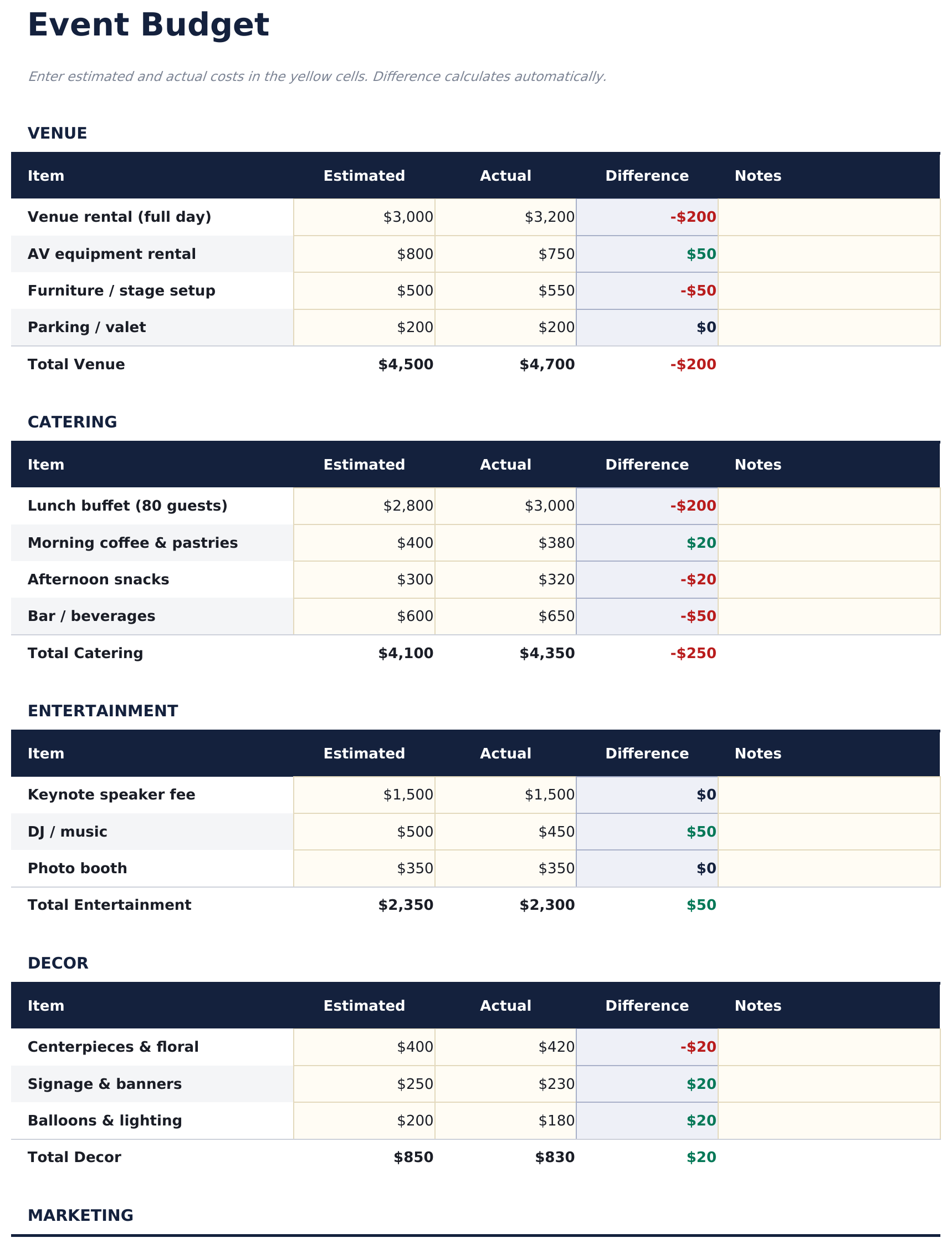
Venue, catering, entertainment, decor and marketing each get their own line items with a subtotal at the foot, and a notes column takes vendor names and due dates. The Essentials Event Budget spreadsheet template derives the difference on every line and reports total budget, total spent, over or under, and the share used on a dashboard, so a category that is drifting shows up early. Two working sheets and two charts, Google Sheets and Excel. No macros, no VBA.

See Ultimate Spreadsheet Template

Instant digital delivery · Terms & Conditions apply

View Ultimate Event Budget Spreadsheet Template
$29
Essentials Event Budget spreadsheet template - Google Sheets and Excel preview

What's Included

  • Named categories covering venue, catering, entertainment, decor, marketing and more
  • Line items under each category with a subtotal at the foot
  • Estimated against actual on every line, with the difference derived
  • A notes column for vendor names, due dates and follow-ups
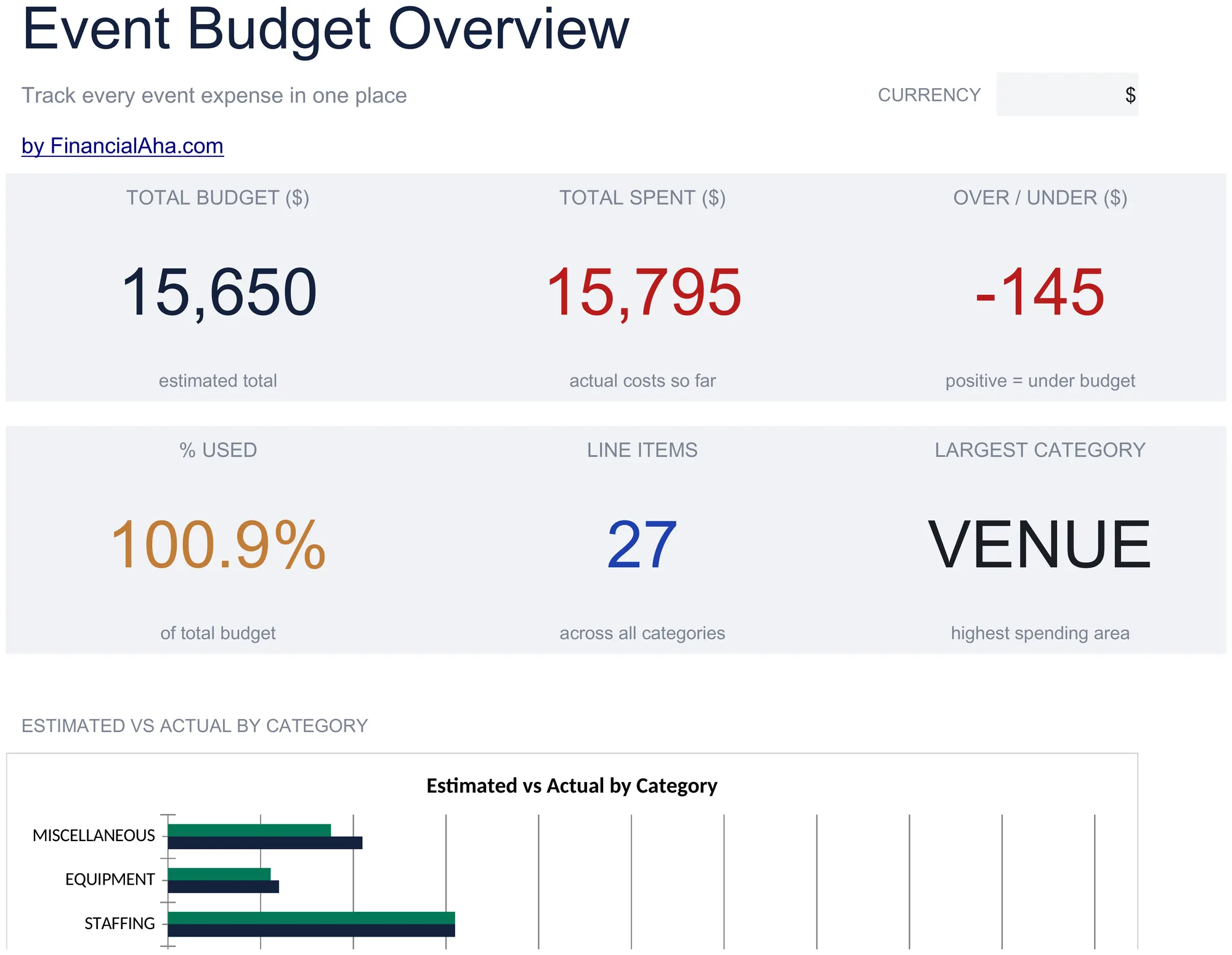
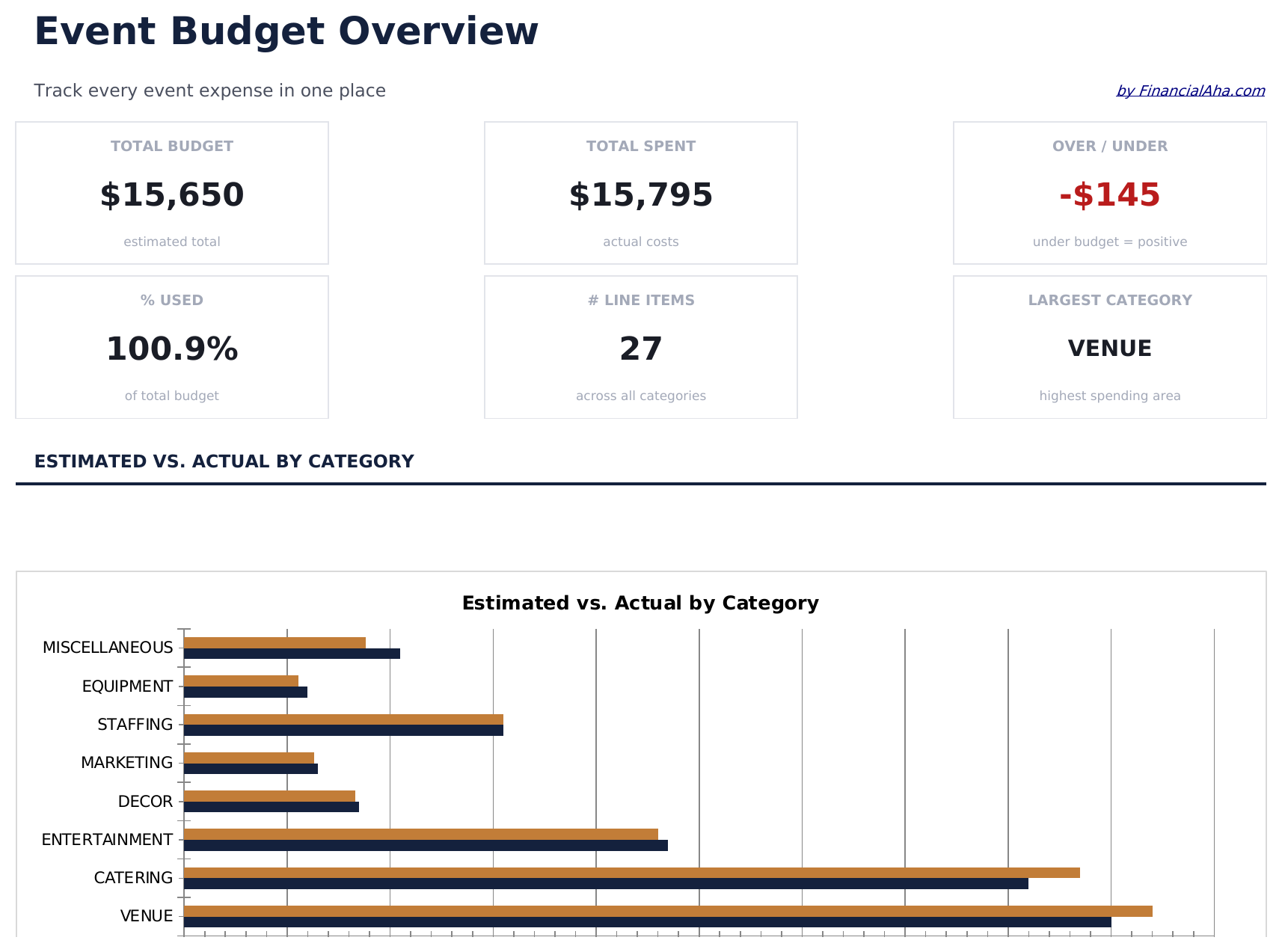
  • Dashboard with total budget, total spent, over or under, and share used
  • Line item count and the largest category picked out
  • A chart setting estimate against actual by category
  • A chart showing where the spending has actually landed
  • A currency dropdown on the Dashboard that relabels money columns across both sheets
  • Works in Microsoft Excel and Google Sheets with no setup required
Ultimate Version Available

Need more from this template?

The Essentials Spreadsheet Template covers everyday tracking. The Ultimate Spreadsheet Template gives each part of the template its own sheet, with more capacity and deeper reporting on top.

Essentials - $19
  • Named categories covering venue, catering, entertainment, decor, marketing and more
  • Line items under each category with a subtotal at the foot
  • Estimated against actual on every line, with the difference derived
  • A notes column for vendor names, due dates and follow-ups
Ultimate - $29
  • Event Setup recording the event's own details, so the file documents a specific occasion
  • A Budget Breakdown with variance, share used and a status on every category
  • Vendor Management for thirty suppliers with quote, deposit and balance
  • A due date on every vendor balance, so a final payment does not slip
  • Attendee Analysis connecting the size of the event to the size of the budget
See what's in the Ultimate version One-time purchase. No subscription.

The FinancialAha Essentials Event Budget Spreadsheet Template for Google Sheets and Excel is a two-sheet workbook that groups an event's costs the way they are actually quoted, with a How to Use guide on a third tab. It works as an Essentials Event Budget Excel template and an Essentials Event Budget Google Sheets template from the same download. Where the Free build keeps a flat list, this Essentials Event Budget spreadsheet template sorts the spending into named categories with their own line items and subtotals. No macros, no VBA.

Inside the workbook

What's inside the FinancialAha Essentials Event Budget spreadsheet template

The FinancialAha Essentials Event Budget Spreadsheet Template runs on two working sheets - one you type into, one that reports back - plus the guide. It works in both Microsoft Excel and Google Sheets and here is what the Essentials Event Budget spreadsheet holds.

  1. 01 of 02

    Event Budget

    The sheet you type into, arranged as an event actually breaks down - venue, catering, entertainment, decor, marketing and the rest, each a section with its own line items and a subtotal at the foot. Every line carries the estimate, what it actually came to, the difference, and a note. The grouping is what makes this useful once quotes start arriving: a category that has drifted is visible without adding up its parts, and the notes column takes the vendor, the due date or the follow-up that a number alone loses.

  2. 02 of 02

    Dashboard

    The event as a whole: what has been budgeted, what has gone out, whether that is over or under, how much of the budget has been used, and how many line items are in play. Two charts sit alongside - one setting estimate against actual by category, the other showing where the spending has actually landed. The over-or-under figure and the percentage used answer different questions and are worth reading together. A large event can be comfortably under in money terms while most of the budget is already committed.

  3. Included guide

    How to Use

    A step-by-step guide on its own tab, covering setup, what each category covers, how the subtotals work, and how to adapt the sheet to different kinds of event. Because it ships inside the file, the instructions travel with the template wherever it is opened.

Works in both Google Sheets and Excel

Essentials Event Budget Spreadsheet template for Google Sheets

Upload the Essentials Event Budget Spreadsheet Template to Drive, right-click it, and choose "Open with Google Sheets". This Essentials Event Budget Google Sheets template needs no conversion step and both charts survive the trip intact - the subtotals keep working exactly as they do in Excel. The currency dropdown on the Dashboard relabels every money column across both sheets at once.

Essentials Event Budget Google Sheets template setup

A shared copy of the Essentials Event Budget Google Sheets template suits a committee or a couple of organisers working the same event, and Sheets version history covers a figure typed over. Because the reporting sits on its own tab, the budget stays a working sheet.

Sharing the Essentials Event Budget Google Sheet

Day to day the Essentials Event Budget Google Sheet is a line update as quotes firm up and invoices land, with the notes column carrying whatever needs chasing. The Dashboard is the read before a planning meeting rather than a daily one.

Essentials Event Budget Spreadsheet template for Excel

The Essentials Event Budget spreadsheet Excel download is a plain .xlsx. Excel opens this Essentials Event Budget Excel template directly, with no import step and no compatibility prompt, and both charts are native Excel charts that redraw as the numbers change. There are no macros and no VBA in the file, so it opens without a security warning.

Essentials Event Budget Excel template setup

The same Essentials Event Budget Excel template opens in Excel on Windows, Excel on Mac, and Excel for the web. It is also the identical file you would upload to Drive, so there is no separate Essentials Event Budget spreadsheet download to choose between.

Essentials Event Budget spreadsheet Excel notes

The Essentials Event Budget spreadsheet Excel file carries no macros and no VBA, so Excel opens it without a trust prompt. The same Essentials Event Budget spreadsheet Excel download also opens in Excel for the web, which matters when you move between a work machine and a personal one.

Opening the Essentials Event Budget spreadsheet Excel file

Nothing in the Essentials Event Budget Excel template is version-specific, so this Essentials Event Budget spreadsheet Excel workbook behaves identically in Excel on Windows, Excel on Mac, and older builds.

Spreadsheet template highlights

What the Essentials Event Budget spreadsheet template tracks

Every category uses the same columns, so the Essentials Event Budget Spreadsheet Template reads the same wherever you are working in it:

Item
the specific cost within its category
Estimated
what you expect it to come to
Actual
what it actually cost
Difference auto
derived, estimate against actual
Notes
the vendor, the due date, or whatever needs chasing

Compare builds

FinancialAha Event Budget spreadsheet template: Free, Essentials, and Ultimate compared

Feature Free View Spreadsheet Template Essentials This page Ultimate View Spreadsheet Template
Working sheets 1 2 6
Structure Flat list, 14 lines 8 categories with line items 30 categories, itemised
Estimated vs actual Yes Yes, per line and per category Yes, with share used
Notes per line Yes Yes
Charts 2 2
Vendor tracking In notes 30 vendors with quote, deposit and balance
Payment due dates Per vendor
Cost per attendee Yes
Revenue side Set against cost
Event details recorded Dedicated sheet

The FinancialAha Essentials Event Budget Spreadsheet Template covers two working sheets and groups the event into named categories with line items and subtotals. Against the Free Event Budget Spreadsheet Template, which holds one ungrouped list and no notes, the grouping is what makes a drifting category visible without adding up its parts, and the notes column is where the vendor and the due date live. The dashboard adds how much of the budget is used and which category is largest, across two charts. The Ultimate Event Budget Spreadsheet Template records the event's own details, itemises further, gives vendors a sheet of their own with quotes, deposits, balances and due dates, works out the cost per attendee, and sets ticket or sponsor revenue against the cost.

Good to know

Notes on working in the Essentials Event Budget spreadsheet template

  • Category subtotals are the useful layer - they show a section drifting before the overall total moves enough to notice.
  • The notes column is where a vendor name or a payment date belongs in this build; the Ultimate build gives vendors their own sheet.
  • Adding a line inside a category means extending that section's total to cover it, which the workbook explains.
  • The same layout suits very different events - the category names are yours to rename.
  • The currency dropdown sits on the Dashboard and relabels money columns across the whole Essentials Event Budget spreadsheet. It changes the label only and does not convert the numbers.

How to Use the Essentials Event Budget Spreadsheet Template

1

Review the categories

Work through the eight sections and rename anything that does not match your event.

2

Estimate each line

Enter what you expect each item to cost. Subtotals build per category.

3

Record the actuals

Fill in real costs as they land, with the notes column carrying vendors and dates.

4

Read the dashboard

Total budget, spent, over or under, share used and the largest category, with two charts.

Stress-tested with AI.

Every template starts with deep research into how people actually track the topic. We design the layout, build the formulas, and polish the design until it feels like something we would use ourselves. Along the way, we use AI to stress-test the calculations: unusual inputs, edge cases, and formula behavior, checked until the numbers hold.

See Ultimate Spreadsheet Template

Instant digital delivery · Terms & Conditions apply

Frequently Asked Questions

Is the FinancialAha Essentials Event Budget Spreadsheet Template a Google Sheets template?

Yes. Upload the file to Drive and choose "Open with Google Sheets". The Essentials Event Budget Google Sheets template needs no conversion step and both charts survive the trip intact.

Is the FinancialAha Essentials Event Budget Spreadsheet Template an Excel template?

Yes. The download is a plain .xlsx, so the Essentials Event Budget Excel template opens directly in Excel with no import step. Both charts are native Excel charts, and there are no macros or VBA.

Will the FinancialAha Essentials Event Budget spreadsheet Excel file open in older versions of Excel?

Yes. The Essentials Event Budget spreadsheet Excel workbook ships as a plain .xlsx, so it opens identically in current Excel and in builds that predate dynamic arrays.

Does the Essentials Event Budget spreadsheet track vendors and deposits?

Only in the notes column. The Ultimate build gives vendors a sheet of their own with what was quoted, what deposit has gone out, the balance left and when it falls due.

What categories does the Essentials Event Budget spreadsheet come with?

Eight, covering the usual shape of an event - venue, catering, entertainment, decor, marketing and the rest. Every name is yours to change.

Why do category subtotals matter in the Essentials Event Budget spreadsheet?

Because they show a section drifting before the overall total moves enough to notice. A flat list only tells you the whole thing is over.

Can I add more line items to the Essentials Event Budget spreadsheet?

Yes, inside any category. The section's total needs extending to cover the new row, which the workbook explains.

Does the Essentials Event Budget spreadsheet work for weddings and fundraisers as well as conferences?

Yes. The structure is the same whatever the occasion, and the category and item names are all editable.

How do I open the Essentials Event Budget spreadsheet template in Google Sheets?

Upload the .xlsx file to Google Drive, then open it with Google Sheets. All formulas and formatting will be preserved.

More Essentials Special Purpose Templates

Essentials

Highlights:

Dashboard with charts and KPIs
Pre-filled categories and sample data
No sign-up, no subscription
Lifetime free updates
Works in
Excel Google Sheets

Looking for premium spreadsheet templates?

Our paid templates include advanced multi-sheet dashboards, native Excel charts, and ongoing updates.

Private & secure

Your financial data stays on your device. We never see it.

Learn more →

Need help?

Check our guides or reach out with questions.

View FAQ →