Best Value All-in-One Financial Planning Bundle
✓ Financial Planning✓ Net Worth Tracker✓ Monthly Budgeting✓ Travel Budget Planner✓ Annual Budgeting Planner✓ Monthly Expense Tracker✓ Annual Tax Planner✓ Retirement Planning
View Bundle →
Ultimate Ultimate version available - Home Renovation Budget Ultimate
Essentials Template - Excel & Google Sheets

Home Renovation Budget Essentials Template

Plan and track renovation project costs by room or project phase. Compare estimated vs. actual costs across materials, labor, and permits.

See Ultimate version →
Home Renovation Budget preview

What's Included

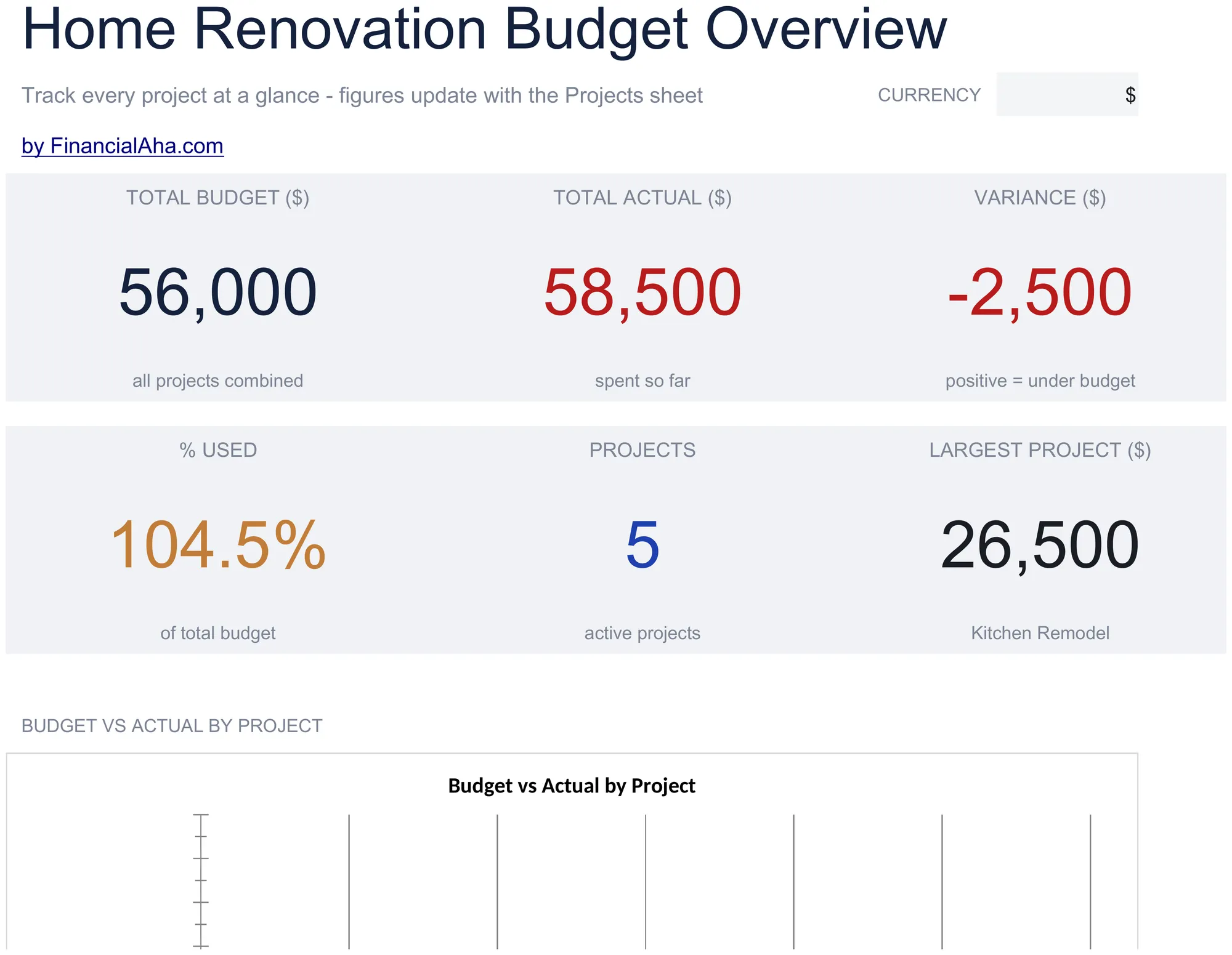
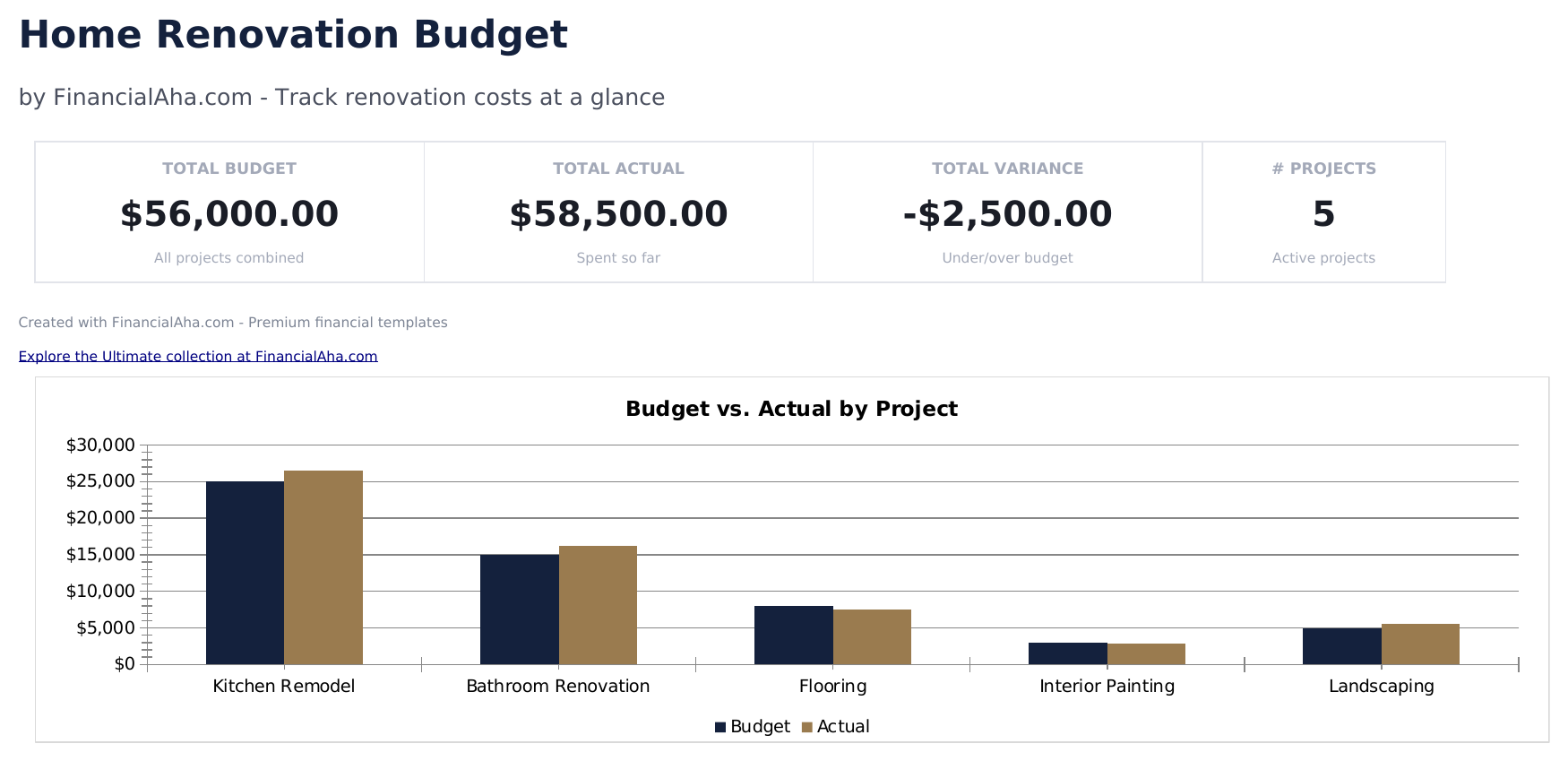
  • Dashboard with renovation budget summary showing total estimated cost, total actual cost, and overall variance
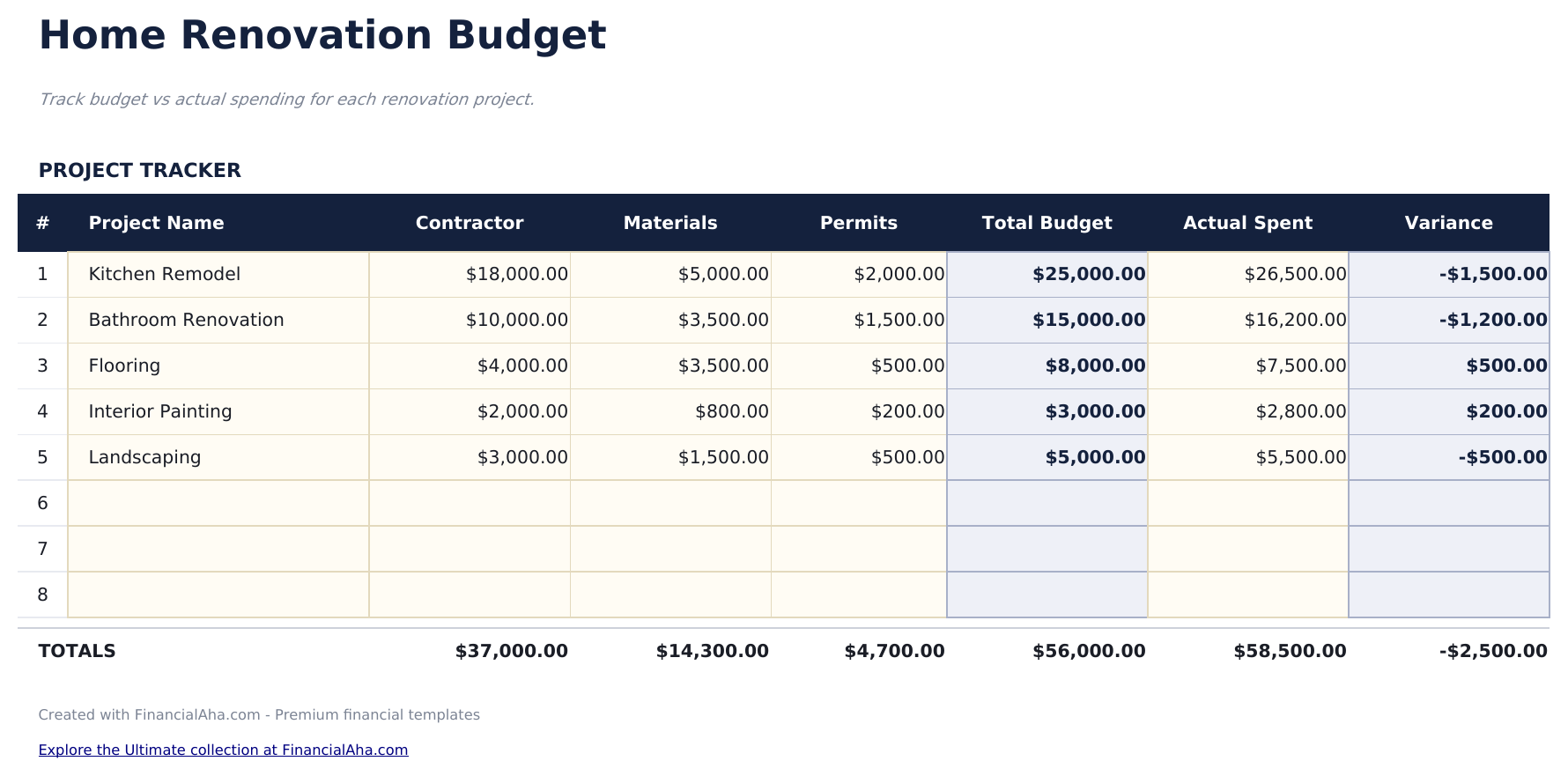
  • Project-level budget breakdown organized by room or phase with line items for each renovation task
  • Materials and labor cost tracking with separate columns for material costs, labor costs, and permit fees per task
  • Estimated vs. actual comparisons per line item with automatic variance calculations flagging cost overruns
  • Contractor and vendor logging with color-coded input cells (yellow) and formula-driven cost summaries (blue)
  • Works in Microsoft Excel, Google Sheets, and LibreOffice Calc with no setup required
Ultimate Version Available

Need more from this template?

The Essentials version covers everyday tracking. Ultimate goes further with multi-entity support, scenario analysis, and ultimate-grade reporting.

Essentials - $12
  • Dashboard with renovation budget summary showing total estimated cost, total actual cost, and overall variance
  • Project-level budget breakdown organized by room or phase with line items for each renovation task
  • Materials and labor cost tracking with separate columns for material costs, labor costs, and permit fees per task
  • Estimated vs. actual comparisons per line item with automatic variance calculations flagging cost overruns
Ultimate - $19
  • Project Overview sheet with total renovation budget, timeline, contingency percentage, and overall project status
  • Room Budgets sheet with cost line items for up to 8 rooms: materials, labor, permits, and miscellaneous per room
  • Dashboard with 6 KPI cards: total budget, total spent, remaining budget, percent complete, contingency remaining, and days to completion
  • Contractor Tracker listing each contractor with contact details, trade, contracted amount, work description, start date, and status
  • Payment Schedule tracking every payment made or scheduled: contractor, amount, due date, paid date, payment method, and status
See what's in the Ultimate version One-time purchase. No subscription.

How to Use This Home Renovation Budget Template

1

Define renovation projects

List each room or project phase as a separate section - kitchen, bathroom, flooring, or other renovation tasks.

2

Enter cost estimates

For each task, add estimated costs for materials, labor, and permits. The template totals each project section.

3

Track actual costs

As work progresses, enter actual costs alongside estimates. The variance column highlights overruns automatically.

4

Review the dashboard

The dashboard shows total estimated, total actual, and overall variance across all renovation projects.

Built by Claude AI. Perfected by us.

We use Claude AI to draft each template, after a deep research. Then our team steps in. We refine the layout, stress-test every formula, fix edge cases, and polish the design until it feels like something we would actually use ourselves. The AI gets us 80% there. The last 20% is all human judgment.

See Ultimate version →

Frequently Asked Questions

Can I track by room?

Yes. Organize line items by room or project area. Each section can have its own subtotal for materials, labor, and permits.

How do I handle change orders?

Update the estimated cost for the affected line items when a change order is issued. The variance recalculates to reflect the updated scope.

Does it track contractor payments?

Add contractor name and payment columns to track which contractor handles each task and how much has been paid vs the total contract amount.

Should I include a contingency?

It is common to add a 10% to 20% contingency line item. This covers unexpected costs that arise during renovation work.

How do I open this in Google Sheets?

Upload the .xlsx file to Google Drive, then open it with Google Sheets. All formulas and formatting will be preserved.

More Essentials Special Purpose Templates

Looking for premium spreadsheet templates?

Our paid templates include advanced multi-sheet dashboards, native Excel charts, and ongoing updates.

Private & secure

Your financial data stays on your device. We never see it.

Learn more →

Need help?

Check our guides or reach out with questions.

View FAQ →