Best Value All-in-One Financial Planning Bundle
✓ Financial Planning✓ Net Worth Tracker✓ Monthly Budgeting✓ Travel Budget Planner✓ Annual Budgeting Planner✓ Monthly Expense Tracker✓ Annual Tax Planner✓ Retirement Planning
View Bundle →
Ultimate Ultimate version available - Personal Financial Statement Ultimate
Essentials Template - Excel & Google Sheets

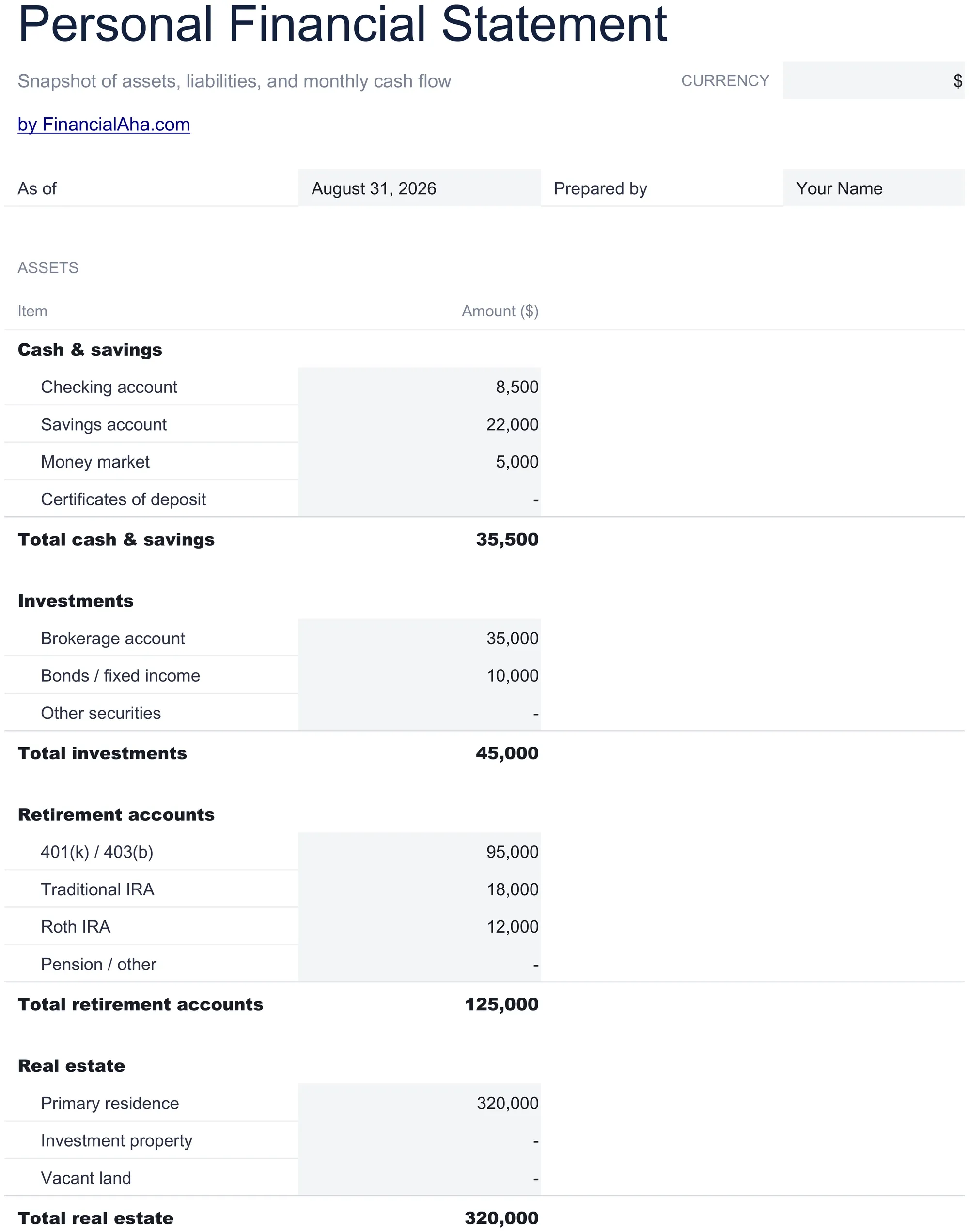
Personal Financial Statement Essentials Template

Prepare a formal personal financial statement with assets, liabilities, income, and expenses. Often used for bank loan applications or financial reviews.

See Ultimate version →
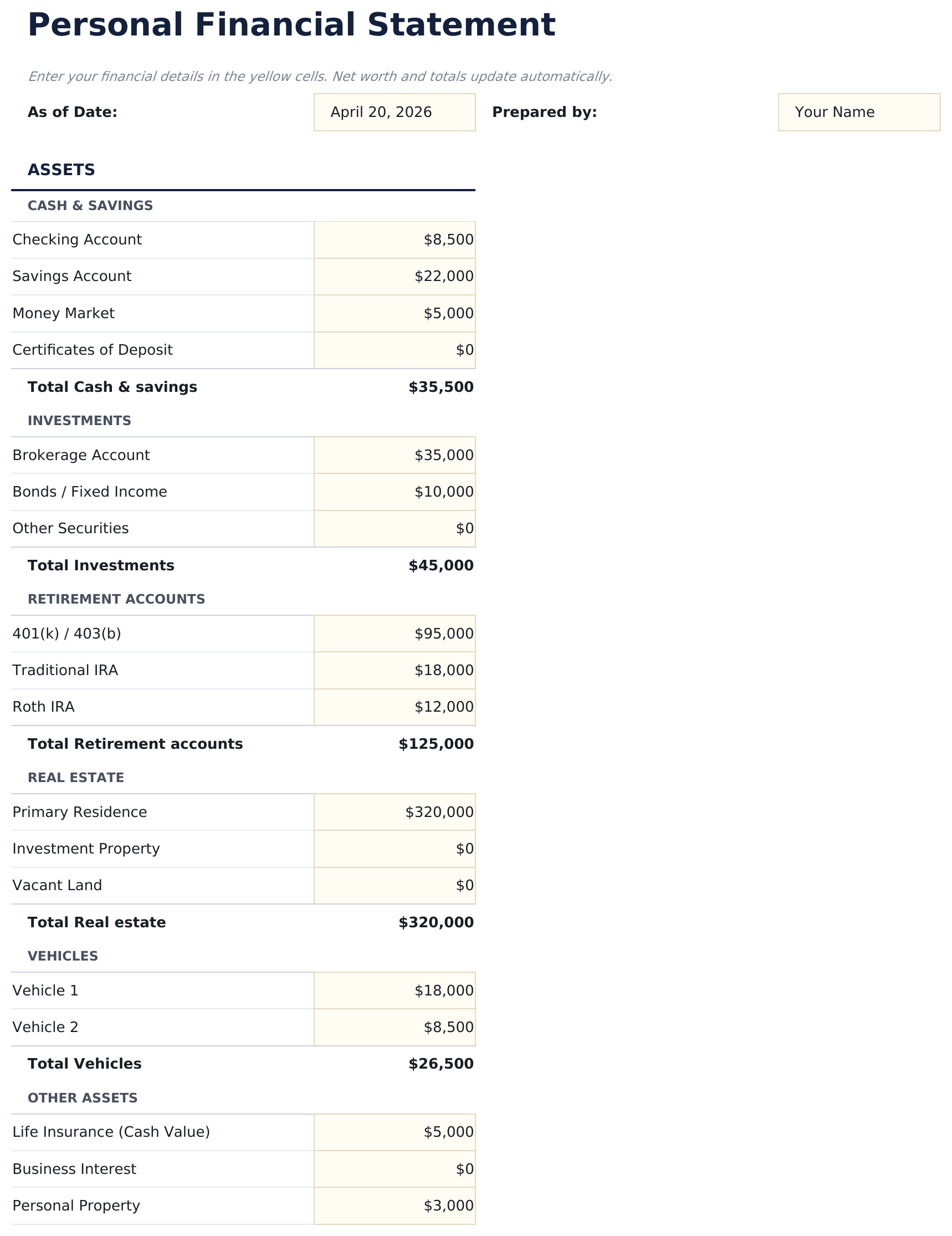
Personal Financial Statement preview

What's Included

  • Financial statement in standard bank-accepted format with assets, liabilities, income, and expenses sections
  • Asset section covering cash accounts, investments, real estate, retirement accounts, and personal property
  • Liability section for mortgages, auto loans, student loans, credit cards, and other outstanding debts
  • Income and expense summary with automatic net income calculation and net worth at the bottom
  • Print-ready layout with professional formatting designed for loan applications and financial reviews
  • Works in Microsoft Excel, Google Sheets, and LibreOffice Calc with no setup required
Ultimate Version Available

Need more from this template?

The Essentials version covers everyday tracking. Ultimate goes further with multi-entity support, scenario analysis, and ultimate-grade reporting.

Essentials - $12
  • Financial statement in standard bank-accepted format with assets, liabilities, income, and expenses sections
  • Asset section covering cash accounts, investments, real estate, retirement accounts, and personal property
  • Liability section for mortgages, auto loans, student loans, credit cards, and other outstanding debts
  • Income and expense summary with automatic net income calculation and net worth at the bottom
Ultimate - $19
  • Assets and liabilities sheet structured to match standard lender and SBA financial statement formats
  • Income and expenses sheet capturing all income sources and monthly expenses with net income calculation
  • Financial ratios sheet with debt-to-income ratio, current ratio, liquidity ratio, solvency ratio, and savings rate
  • Multi-period comparison showing up to 3 periods side by side - track how your financial position changes over time
  • Lender summary sheet formatted for clean printing with key figures, ratios, and a signature block
See what's in the Ultimate version One-time purchase. No subscription.

How to Use This Personal Financial Statement Template

1

Enter assets

List all assets - cash accounts, investments, real estate, retirement funds, and personal property - with their current values.

2

Enter liabilities

List all debts - mortgages, loans, credit cards, and other obligations - with their outstanding balances.

3

Add income and expenses

Complete the income and expense summary section. Net income and net worth calculate automatically at the bottom.

4

Print or submit

The statement is formatted in standard bank-accepted layout. Print it for loan applications or financial reviews.

Built by Claude AI. Perfected by us.

We use Claude AI to draft each template, after a deep research. Then our team steps in. We refine the layout, stress-test every formula, fix edge cases, and polish the design until it feels like something we would actually use ourselves. The AI gets us 80% there. The last 20% is all human judgment.

See Ultimate version →

Frequently Asked Questions

When is a personal financial statement needed?

Banks and lenders often require one for loan applications - mortgages, business loans, or lines of credit. It provides a snapshot of your financial position.

Does the format match bank requirements?

Yes. The layout follows standard personal financial statement formatting that banks and lenders commonly accept.

How do I value personal property?

Use current fair market value - what the item would sell for today. For vehicles, check current market pricing. For real estate, use a recent appraisal or estimate.

Should I include retirement accounts?

Yes. Include 401k, IRA, and other retirement account balances as assets. They are part of your total financial picture even if not easily accessible.

How do I open this in Google Sheets?

Upload the .xlsx file to Google Drive, then open it with Google Sheets. All formulas and formatting will be preserved.

More Essentials Net Worth & Financial Planning Templates

Looking for premium spreadsheet templates?

Our paid templates include advanced multi-sheet dashboards, native Excel charts, and ongoing updates.

Private & secure

Your financial data stays on your device. We never see it.

Learn more →

Need help?

Check our guides or reach out with questions.

View FAQ →