Best Value Complete Financial Planning Bundle
✓ Financial Planning✓ Net Worth Tracker✓ Monthly Budgeting✓ Travel Budget Planner✓ Annual Budgeting Planner✓ Monthly Expense Tracker✓ Annual Tax Planner✓ Retirement Planning
View Bundle →

Instant digital delivery · Terms & Conditions apply

Essentials Template - Excel & Google Sheets

Essentials Balloon Loan Calculator Spreadsheet Template for Google Sheets & Excel

The balloon term and the amortization period are separate inputs, because that is what makes this kind of loan what it is: the payment is sized on the longer schedule, and the balloon is simply whatever balance remains when the shorter term runs out. The Essentials Balloon Loan Calculator spreadsheet template works that figure out for you and lays the months out with principal and interest split on each. Three working sheets. Google Sheets and Excel. No macros, no VBA.

Instant digital delivery · Terms & Conditions apply

Essentials Balloon Loan Calculator spreadsheet template - Google Sheets and Excel preview

What's Included

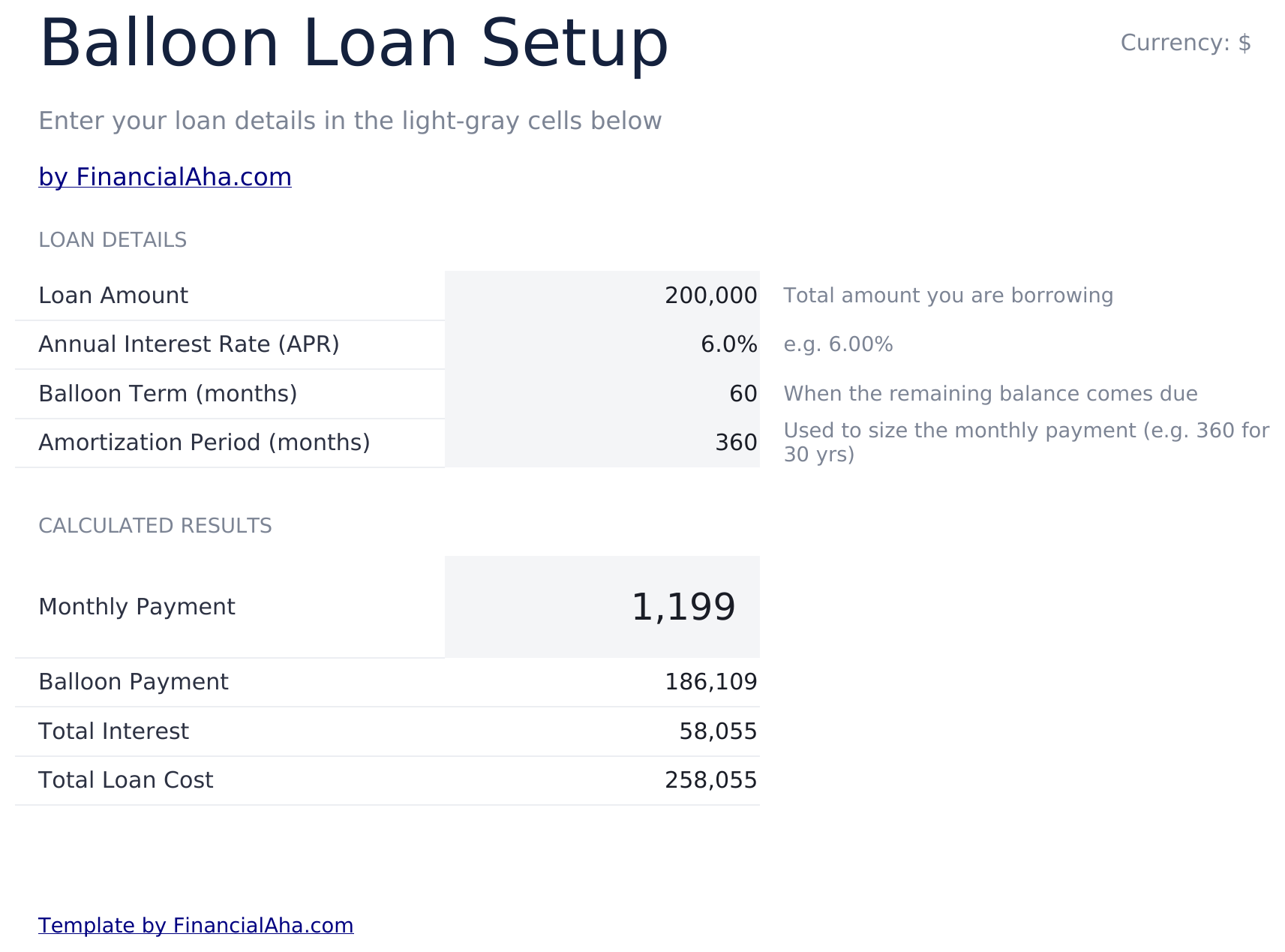
  • A balloon term and an amortization period as separate inputs
  • The monthly payment sized on the amortization period
  • The balloon calculated as the balance remaining when the term ends
  • Total interest and total loan cost
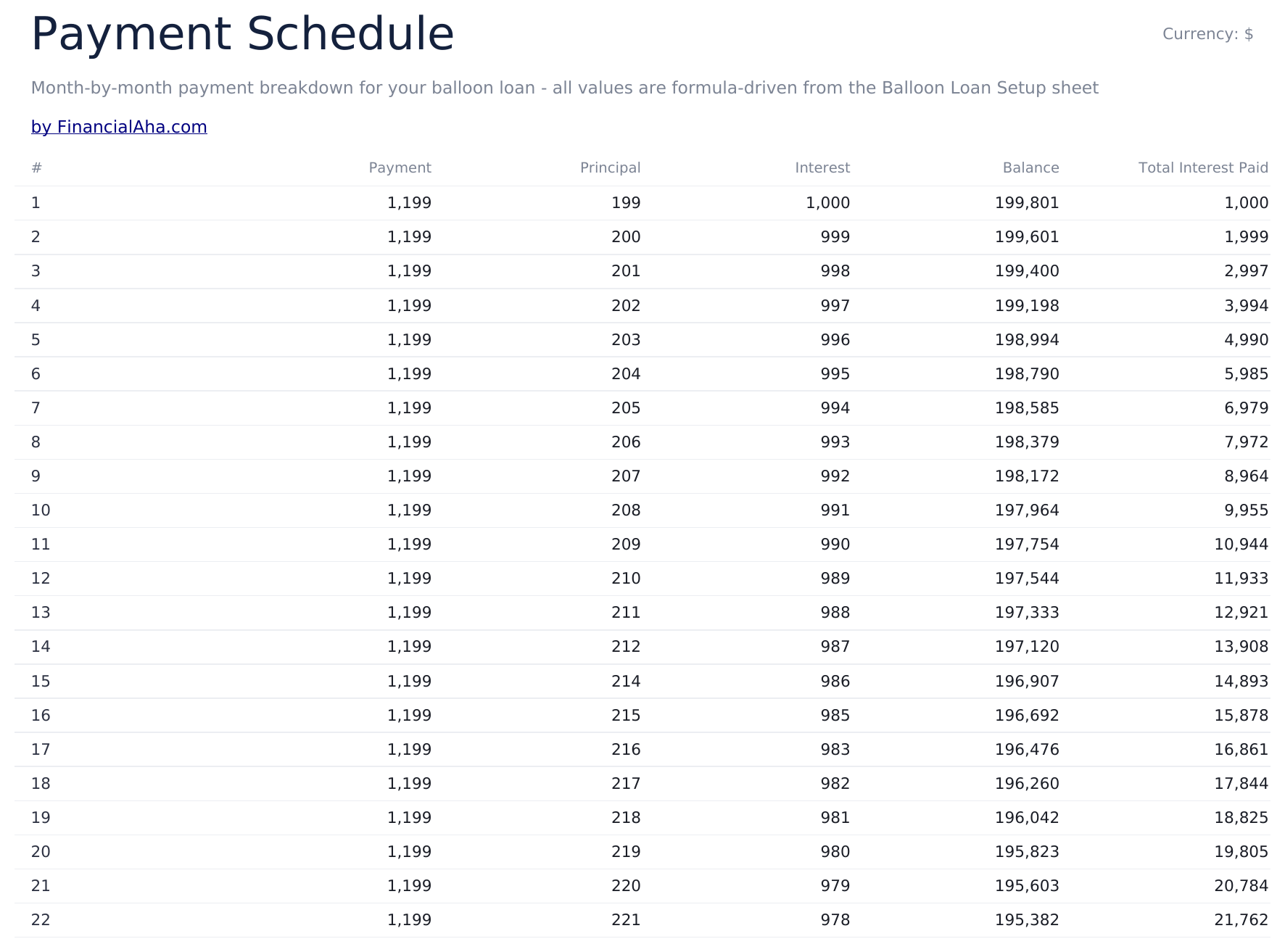
  • A month-by-month schedule with principal and interest split
  • A running total of interest paid
  • Rows past the end of the term hold zero
  • A dashboard with six figures
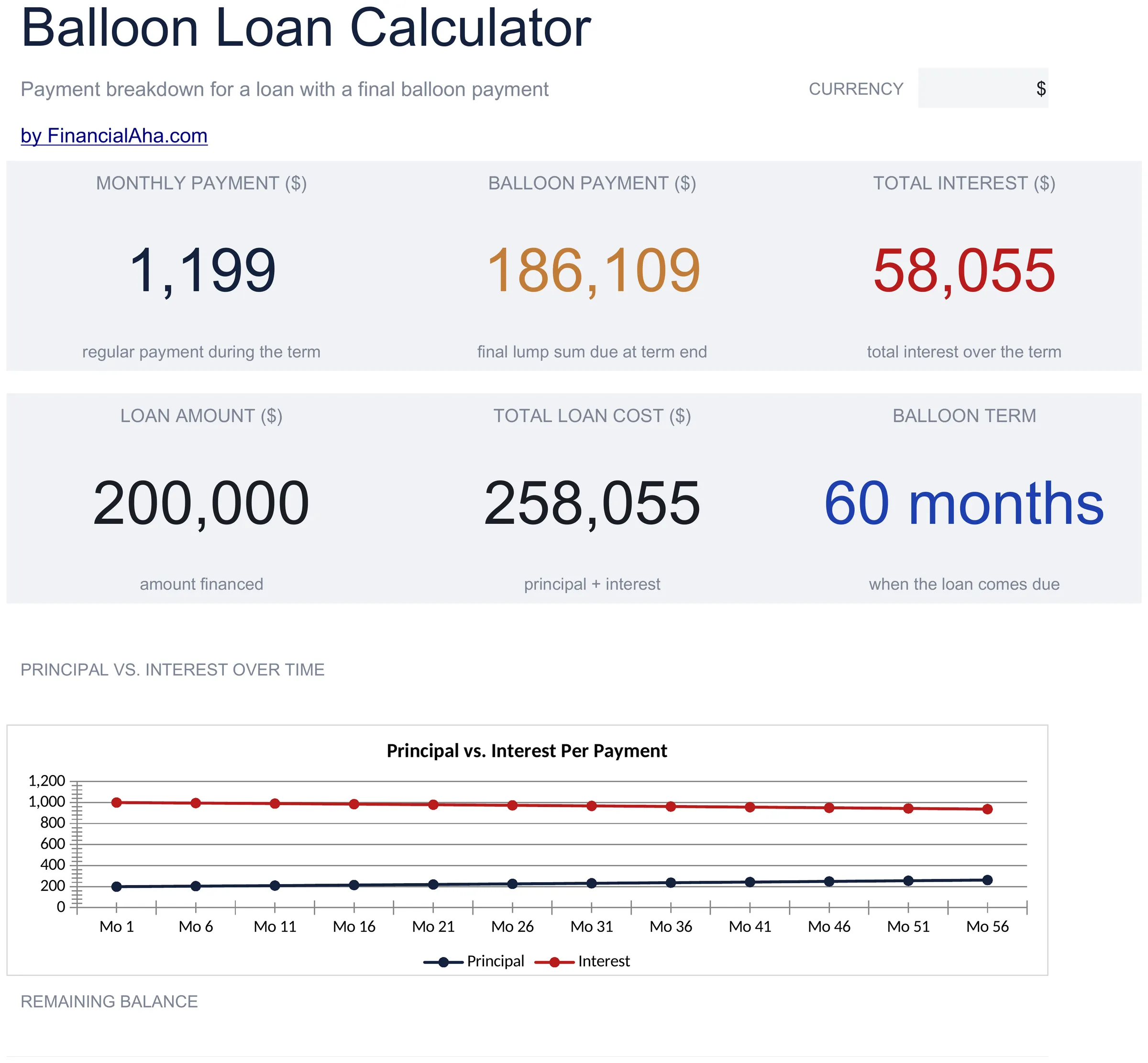
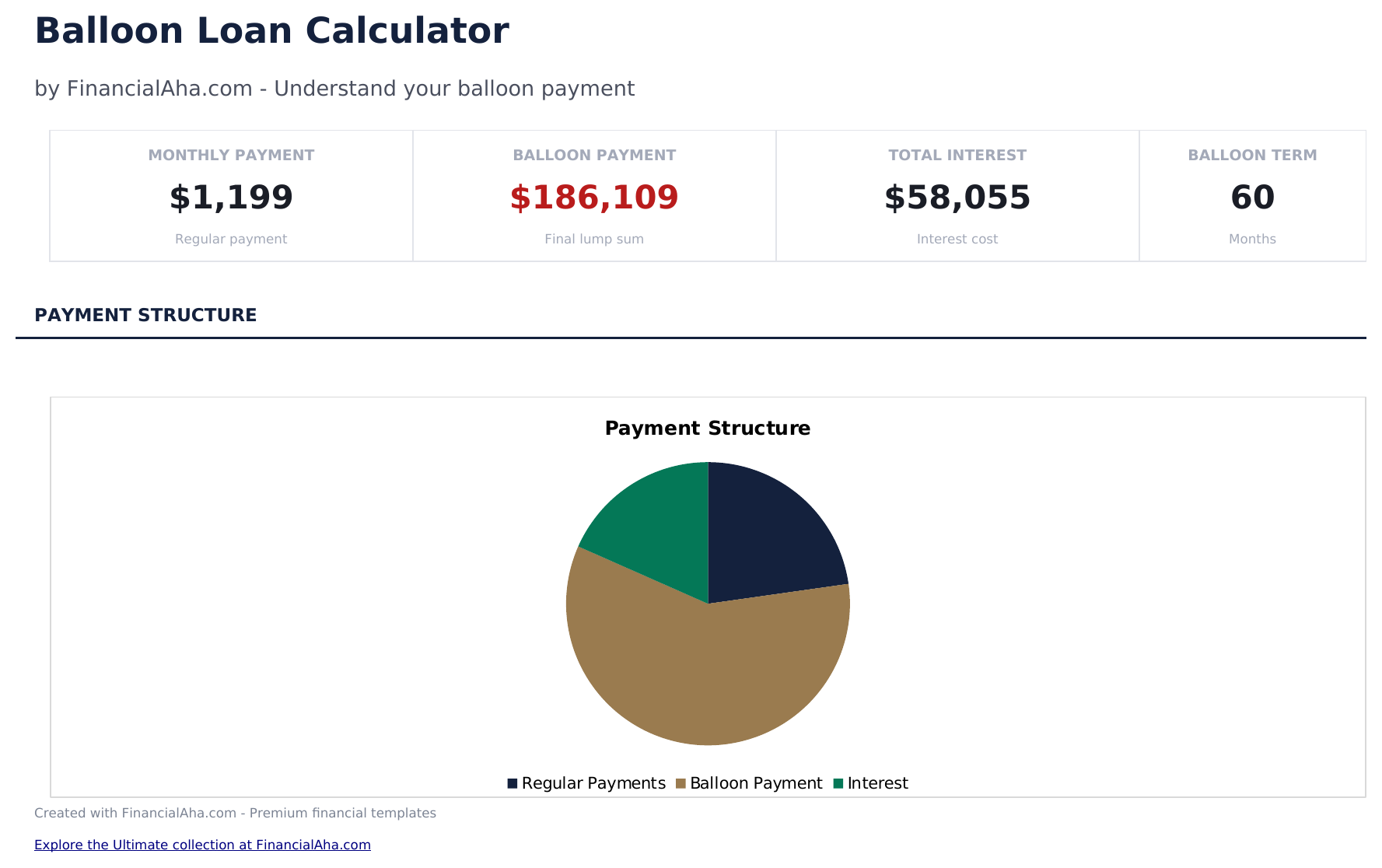
  • Two charts driven by the schedule
  • Works in Microsoft Excel and Google Sheets with no setup required

The FinancialAha Essentials Balloon Loan Calculator Spreadsheet Template is a three-sheet workbook for Google Sheets and Excel, with a How to Use guide on a fourth tab. It works as an Essentials Balloon Loan Calculator Excel template and an Essentials Balloon Loan Calculator Google Sheets template from the same download. It models the loan the way lenders write it - a payment sized on a long amortization period, a shorter term, and whatever is left over falling due at the end - with a month-by-month schedule, a dashboard and two charts. No macros, no VBA.

Inside the workbook

What's inside the FinancialAha Essentials Balloon Loan Calculator spreadsheet template

The FinancialAha Essentials Balloon Loan Calculator Spreadsheet Template runs on three working sheets, with the instructions on a tab of their own. It works in both Microsoft Excel and Google Sheets and here is what the Essentials Balloon Loan Calculator spreadsheet holds.

  1. 01 of 03

    Balloon Loan Setup

    Four inputs and the figures that follow. The loan amount and the rate are the obvious two; the other two are what make this a balloon loan at all - the balloon term, meaning how many months you actually pay before the balance comes due, and the amortization period, meaning the schedule the monthly payment is sized against. That pair is the whole mechanism. A payment worked out as though the loan ran thirty years, on an agreement that ends in five, is small relative to the debt - which is the appeal - and leaves most of the principal outstanding when the term ends, which is the balloon. Set the two periods equal and there is no balloon at all. The balloon is calculated rather than entered here: it is the balance the schedule still shows at the end of the term. Total interest and total loan cost follow from it, so the lump sum is a consequence of the terms rather than a number you nominate.

  2. 02 of 03

    Payment Schedule

    A month-by-month breakdown: the payment, how much of it goes to principal, how much to interest, the balance left afterwards and the interest paid to date. The principal column is the one that explains a balloon loan faster than any summary figure. Early payments are almost entirely interest, so the balance barely moves for years - and on a loan that ends before amortization does, it never gets to the part where principal takes over. Rows past the end of your term hold zero rather than continuing, so the schedule stops where the agreement does.

  3. 03 of 03

    Dashboard

    Six figures. The top row carries the regular monthly payment, the balloon due at the end and the total interest across the term. The row beneath carries the amount financed, the total cost of the loan and the balloon term itself. Setting the balloon against the amount financed is the comparison worth making. On a short term against a long amortization, the lump sum can be most of what you originally borrowed - and knowing that figure before signing is different from discovering it in year five. Two charts plot the balance and the payment split across the schedule.

  4. Included guide

    How to Use

    A step-by-step guide on its own tab, covering what each input expects, the difference between the balloon term and the amortization period, how the schedule reads and how to change the currency. Because it ships inside the file, the instructions travel with the template wherever it is opened.

Works in both Google Sheets and Excel

Essentials Balloon Loan Calculator Spreadsheet template for Google Sheets

Upload the Essentials Balloon Loan Calculator Spreadsheet Template to Drive, right-click it, and choose "Open with Google Sheets". This Essentials Balloon Loan Calculator Google Sheets template needs no conversion step, both charts come across, and the schedule recalculates from the setup sheet exactly as it does in Excel.

Essentials Balloon Loan Calculator Google Sheets template setup

A shared copy of the Essentials Balloon Loan Calculator Google Sheets template suits a decision more than one person is making, and the schedule is easier to point at than to describe.

Running the Essentials Balloon Loan Calculator Google Sheet

The Essentials Balloon Loan Calculator Google Sheet takes four inputs per scenario, and the schedule, the dashboard and both charts follow from them.

Essentials Balloon Loan Calculator Spreadsheet template for Excel

The Essentials Balloon Loan Calculator spreadsheet Excel download is a plain .xlsx. Excel opens this Essentials Balloon Loan Calculator Excel template directly, with no import step, and both charts are native Excel charts rather than pictures. There are no macros and no VBA in the file.

Essentials Balloon Loan Calculator Excel template setup

The same Essentials Balloon Loan Calculator Excel template opens in Excel on Windows, Excel on Mac, and Excel for the web. It is also the identical file you would upload to Drive, so there is no separate Essentials Balloon Loan Calculator spreadsheet download to choose between.

Essentials Balloon Loan Calculator spreadsheet Excel notes

The Essentials Balloon Loan Calculator spreadsheet Excel file carries no macros and no VBA, so Excel opens it without a trust prompt.

Opening the Essentials Balloon Loan Calculator spreadsheet Excel file

Nothing in the Essentials Balloon Loan Calculator Excel template is version-specific, so this Essentials Balloon Loan Calculator spreadsheet Excel workbook behaves identically in Excel on Windows, Excel on Mac, and older builds.

Spreadsheet template highlights

What the Essentials Balloon Loan Calculator spreadsheet template tracks

Four inputs and a month-by-month schedule. This is what the Essentials Balloon Loan Calculator Spreadsheet Template carries across the schedule:

Payment
the regular monthly amount, sized on the amortization period
Principal
how much of that payment reduces the debt, which is very little early on
Interest
the rest of it
Balance
what is still owed after that month, and the source of the balloon figure
Total Interest Paid
the running total to that point

Compare builds

FinancialAha Balloon Loan Calculator spreadsheet template: Free and Essentials compared

Feature Free View Spreadsheet Template Essentials This page
Working sheets 1 3
Balloon amount You set it Calculated for you
Payment sized on The term you enter A separate amortization period
Monthly payment Yes Yes
Total paid over the term Yes Yes
Total interest Yes Yes
Month-by-month schedule 120 months
Principal and interest split per month Yes
Running total of interest Yes
Handles a 0% rate Yes Yes
Charts 2

The two builds model a balloon loan from opposite ends. In the Free Balloon Loan Calculator Spreadsheet Template the balloon is an input - you choose the lump sum and the payment is sized around it. The FinancialAha Essentials Balloon Loan Calculator Spreadsheet Template works the way lenders write these: the payment is sized on an amortization period, the agreement ends earlier, and the balloon is whatever balance remains at that point. It adds a month-by-month schedule splitting each payment into principal and interest with a running interest total, a dashboard carrying six figures and two charts.

Good to know

Notes on working in the Essentials Balloon Loan Calculator spreadsheet template

  • The balloon term and the amortization period are the pair that create the balloon. Set them equal and there is no balloon at all.
  • The lump sum is calculated here rather than entered - it is the balance the schedule still shows when the term ends.
  • Early payments are almost entirely interest, which is why the balance barely moves in the first years.
  • Setting the balloon against the amount financed is the comparison worth making before signing rather than in year five.
  • Rows past the end of your term hold zero, so the schedule stops where the agreement does.
  • The schedule holds ten years of months, and the balloon is read from it at the month your term ends. A balloon term beyond that has no row to read, which is the one limit worth knowing before setting the term.
  • The currency dropdown relabels the money columns across every sheet. It changes the label only and does not convert the numbers.

How to Use the Essentials Balloon Loan Calculator Spreadsheet Template

1

Enter the loan

The amount financed and the annual rate.

2

Set the balloon term

How many months you actually pay.

3

Set the amortization

The schedule the payment is sized against.

4

Read the balloon

The balance still owing when the term ends.

Stress-tested with AI.

Every template starts with deep research into how people actually track the topic. We design the layout, build the formulas, and polish the design until it feels like something we would use ourselves. Along the way, we use AI to stress-test the calculations: unusual inputs, edge cases, and formula behavior, checked until the numbers hold.

Instant digital delivery · Terms & Conditions apply

Frequently Asked Questions

Is the FinancialAha Essentials Balloon Loan Calculator Spreadsheet Template a Google Sheets template?

Yes. Upload the file to Drive and choose "Open with Google Sheets". Both charts come across in the Essentials Balloon Loan Calculator Google Sheets template, and the schedule recalculates from the setup sheet exactly as it does in Excel.

Is the FinancialAha Essentials Balloon Loan Calculator Spreadsheet Template an Excel template?

Yes. The download is a plain .xlsx, so the Essentials Balloon Loan Calculator Excel template opens directly in Excel with no import step. Both charts are native Excel charts rather than pictures, and there are no macros or VBA.

Will the FinancialAha Essentials Balloon Loan Calculator spreadsheet Excel file open in older versions of Excel?

Yes. The Essentials Balloon Loan Calculator spreadsheet Excel workbook ships as a plain .xlsx, so it opens identically in current Excel and in builds that predate dynamic arrays.

What is the difference between the balloon term and the amortization period?

The balloon term is how many months you actually pay before the balance comes due. The amortization period is the schedule the payment is sized against. A payment worked out as though the loan ran thirty years, on an agreement that ends in five, is what creates the balloon - set the two equal and there is no balloon at all.

Does it calculate the balloon or do I enter it?

It calculates it. The balloon is the balance the schedule still shows when the term ends. The Free build works the other way round, letting you name the lump sum and sizing the payment around it.

Why does the balance barely move in the early years?

Because early payments are almost entirely interest. On a loan that ends before amortization does, it never reaches the part of the schedule where principal takes over - which is what the schedule's principal column shows plainly.

How long is the schedule?

A hundred and twenty month rows. Rows past the end of your term hold zero rather than continuing, so the schedule stops where the agreement does. That also sets the outside edge of the template: the balloon is read out of the schedule at the month your term ends, so a term longer than ten years falls off the end of it.

How do I open the Essentials Balloon Loan Calculator spreadsheet template in Google Sheets?

Upload the .xlsx file to Google Drive, then open it with Google Sheets. All formulas and formatting will be preserved.

More Essentials Auto & Loans Templates

Essentials

Highlights:

Dashboard with charts and KPIs
Pre-filled categories and sample data
No sign-up, no subscription
Lifetime free updates
Works in
Excel Google Sheets

Looking for premium spreadsheet templates?

Our paid templates include advanced multi-sheet dashboards, native Excel charts, and ongoing updates.

Private & secure

Your financial data stays on your device. We never see it.

Learn more →

Need help?

Check our guides or reach out with questions.

View FAQ →