Best Value Complete Financial Planning Bundle
✓ Financial Planning✓ Net Worth Tracker✓ Monthly Budgeting✓ Travel Budget Planner✓ Annual Budgeting Planner✓ Monthly Expense Tracker✓ Annual Tax Planner✓ Retirement Planning
View Bundle →
Lease vs Buy Calculator Ultimate

Instant digital delivery · Terms & Conditions apply

Essentials Template - Excel & Google Sheets

Essentials Lease vs Buy Calculator Spreadsheet Template for Google Sheets & Excel

Resale value credited back against gross ownership cost, net of any loan still outstanding, across a comparison period you set in months to match the lease term. The Essentials Lease vs Buy Calculator spreadsheet template adds sales tax to the price before financing it, works the buy-side payment from the taxed price, deposit, rate and term, and carries insurance on both sides from one shared input with maintenance on the buy side. Google Sheets and Excel, one file. No macros, no VBA.

See Ultimate Spreadsheet Template

Instant digital delivery · Terms & Conditions apply

View Ultimate Lease vs Buy Calculator Spreadsheet Template
$29
Essentials Lease vs Buy Calculator spreadsheet template - Google Sheets and Excel preview

What's Included

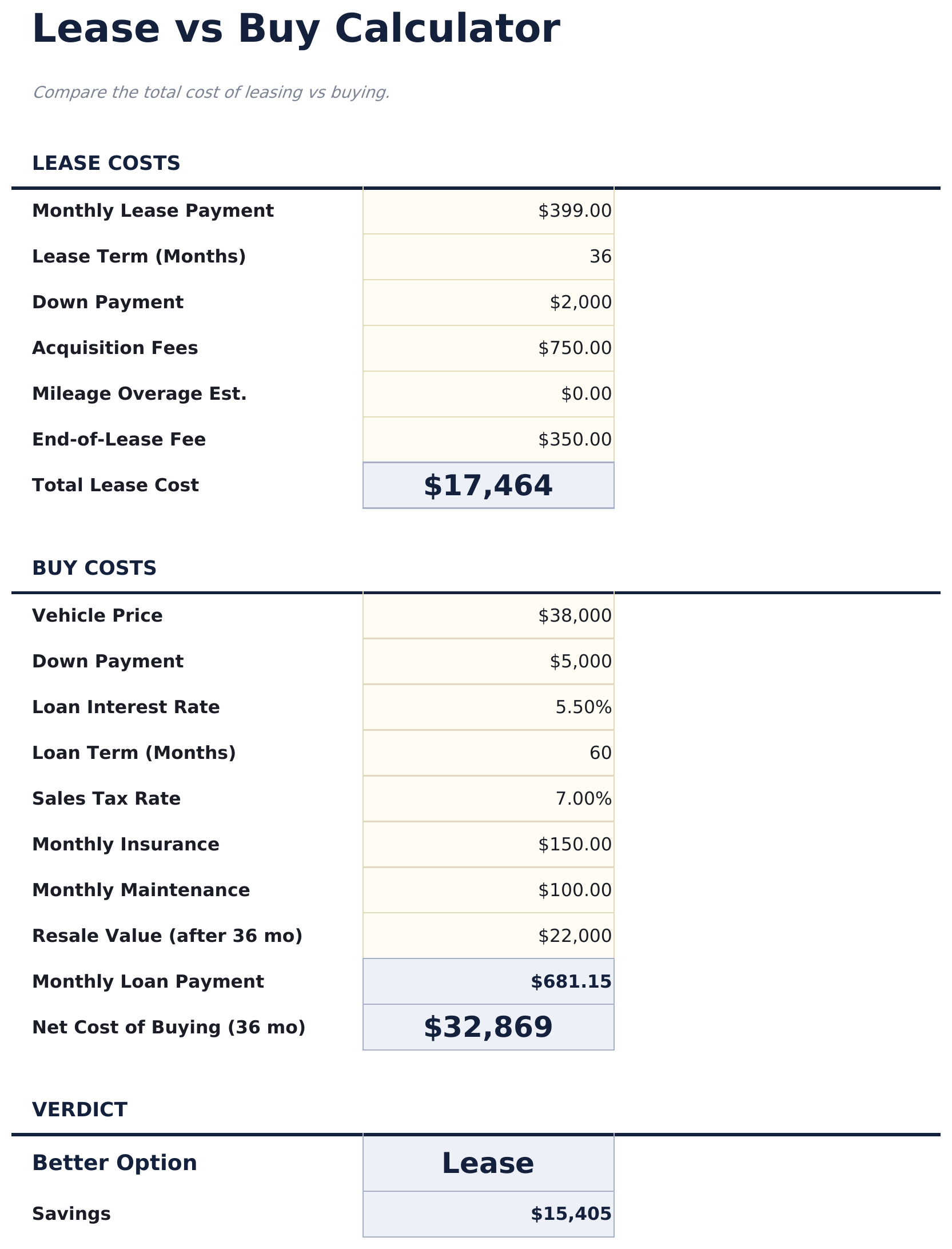
  • A comparison period you set in months, matched to the lease term
  • Resale value credited back against gross ownership cost, net of any loan still outstanding
  • Sales tax added to the price before the purchase is financed
  • The buy-side monthly loan payment worked out from the taxed price, deposit, rate and term
  • Insurance carried on both sides from one shared input, maintenance added on the buy side
  • Lease-side costs that are easy to forget: acquisition fees, mileage overage, end-of-term charges
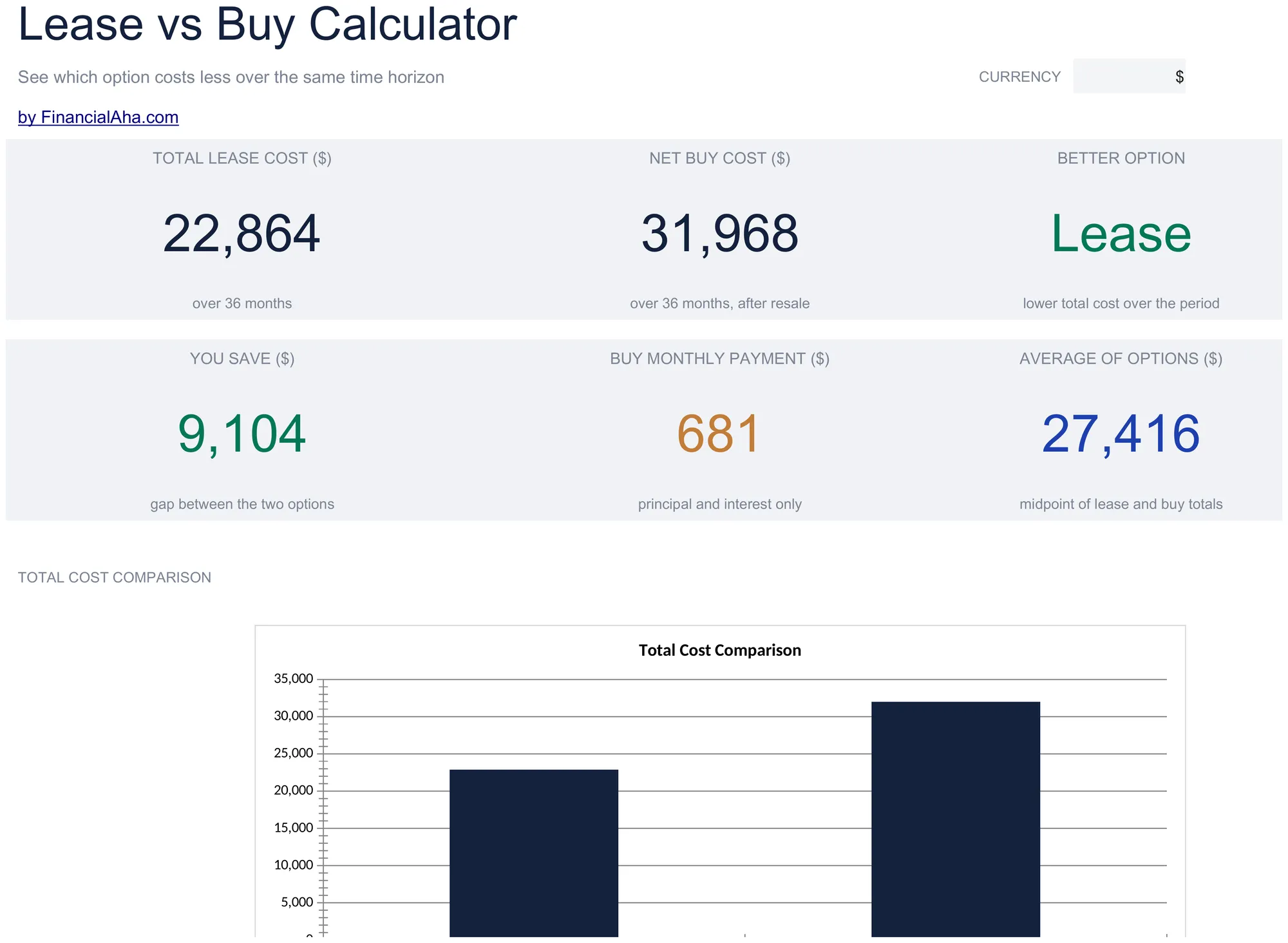
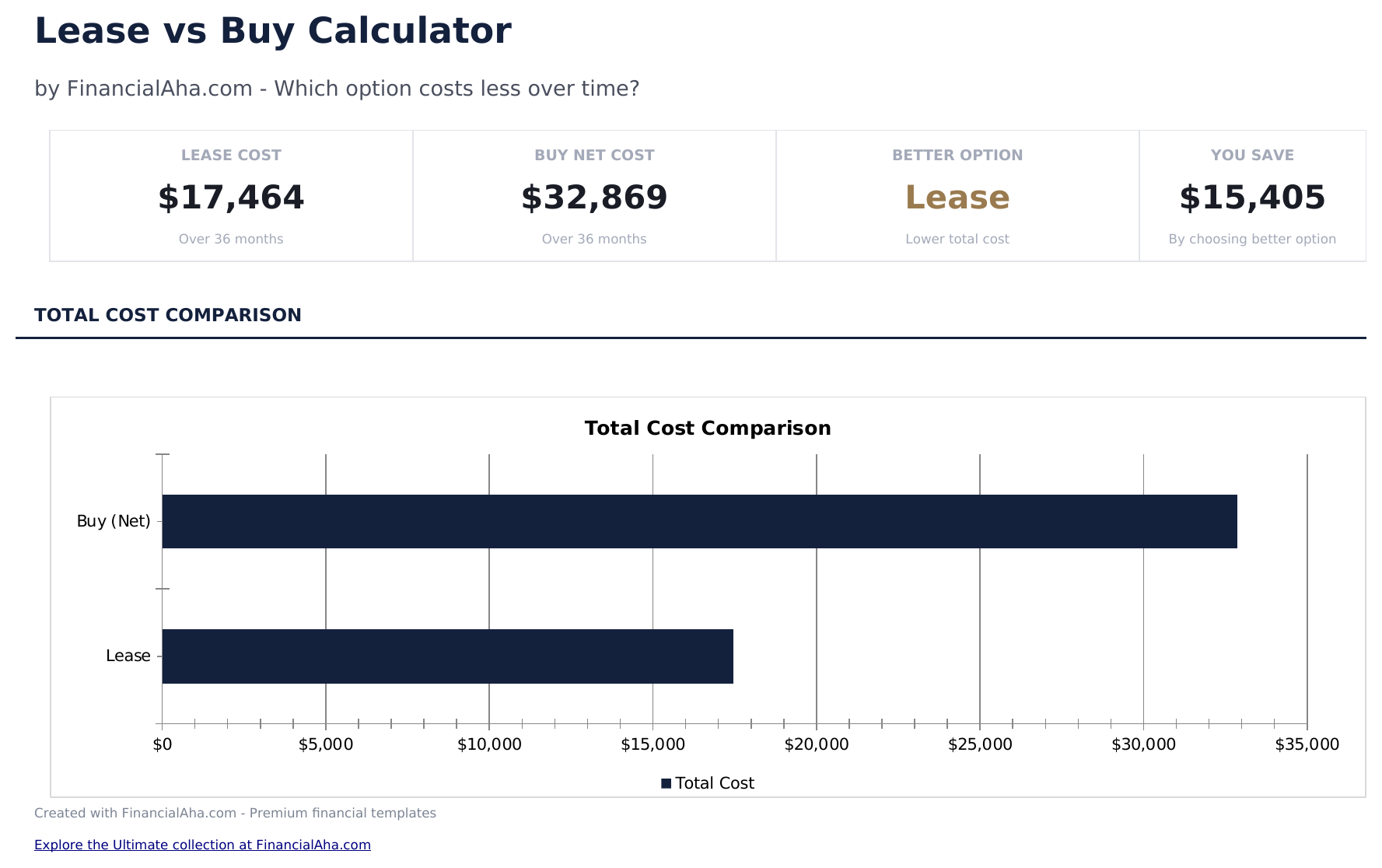
  • Dashboard naming the lower total and the size of the gap
  • A detail block splitting both sides into up-front, payments, running costs and resale credit, adding to the net
  • Works for equipment or any depreciating asset, not only vehicles
  • A currency dropdown on the Dashboard that relabels money columns across both sheets
  • Works in Microsoft Excel and Google Sheets with no setup required
Ultimate Version Available

Need more from this template?

The Essentials Spreadsheet Template covers everyday tracking. The Ultimate Spreadsheet Template gives each part of the template its own sheet, with more capacity and deeper reporting on top.

Essentials - $19
  • A comparison period you set in months, matched to the lease term
  • Resale value credited back against gross ownership cost, net of any loan still outstanding
  • Sales tax added to the price before the purchase is financed
  • The buy-side monthly loan payment worked out from the taxed price, deposit, rate and term
Ultimate - $29
  • Buy Inputs with a per-year depreciation schedule and editable loss rates
  • Lease Inputs in the terms a lease is actually quoted in - list price, capitalized cost, residual, money factor
  • A lease payment built as a depreciation charge plus a finance charge, so a quote can be checked
  • Five-year comparison accumulating outflow, resale value, loan still owed and net cost on both sides
  • The better option marked for every year held from one to seven, not just one period
See what's in the Ultimate version One-time purchase. No subscription.

The FinancialAha Essentials Lease vs Buy Calculator Spreadsheet Template for Google Sheets and Excel is a two-sheet workbook that makes the two sides genuinely comparable, with a How to Use guide on a third tab. It works as an Essentials Lease vs Buy Calculator Excel template and an Essentials Lease vs Buy Calculator Google Sheets template from the same download. Where the Free build sizes each option separately, this Essentials Lease vs Buy Calculator spreadsheet template credits the resale value back against ownership, carries running costs on both sides, and reports which total comes out lower over the period you set. No macros, no VBA.

Inside the workbook

What's inside the FinancialAha Essentials Lease vs Buy Calculator spreadsheet template

The FinancialAha Essentials Lease vs Buy Calculator Spreadsheet Template runs on two working sheets - one you type into, one that reports back - plus the guide. It works in both Microsoft Excel and Google Sheets and here is what the Essentials Lease vs Buy Calculator spreadsheet holds.

  1. 01 of 02

    Calculator

    The sheet you type into, with the comparison period at the top and the two options set out in their own columns beneath it. The lease side takes the monthly payment, what goes down, the fees, and the end-of-term costs that are easy to forget - mileage overage and the disposition charge. The buy side takes the price with sales tax added before financing, the loan terms, the running costs, and what you expect the thing to be worth when you are done with it. Leaving a field blank where it does not apply simply keeps it out of the totals.

  2. 02 of 02

    Dashboard

    The comparison reduced to what you actually want to know: what each side costs over the period, which of the two is lower, the size of the gap, what financing the purchase works out at a month, and the midpoint between the two totals. A detail block underneath breaks both sides into up-front cost, total payments, running costs and the resale credit, and those four add up to the net figure on the row beneath them - so a surprising result can be traced to the line causing it rather than taken on faith.

  3. Included guide

    How to Use

    A step-by-step guide on its own tab, covering setup, how each total is arrived at, what to watch on the lease side, and how to use the same sheet for equipment rather than a vehicle. Because it ships inside the file, the instructions travel with the template wherever it is opened.

Works in both Google Sheets and Excel

Essentials Lease vs Buy Calculator Spreadsheet template for Google Sheets

Upload the Essentials Lease vs Buy Calculator Spreadsheet Template to Drive, right-click it, and choose "Open with Google Sheets". This Essentials Lease vs Buy Calculator Google Sheets template needs no conversion step and the chart survives the trip intact - the totals recalculate exactly as they do in Excel. The currency dropdown on the Dashboard relabels every money column across both sheets at once.

Essentials Lease vs Buy Calculator Google Sheets template setup

A shared copy of the Essentials Lease vs Buy Calculator Google Sheets template suits two people weighing the same decision, or a business where the person negotiating is not the one signing. Sheets version history covers a quote figure typed over.

Sharing the Essentials Lease vs Buy Calculator Google Sheet

The Essentials Lease vs Buy Calculator Google Sheet is built for a sitting rather than a routine: enter a quote, read the dashboard, then change the resale assumption or the period and watch the gap move. Duplicating the tab keeps a second offer alongside the first.

Essentials Lease vs Buy Calculator Spreadsheet template for Excel

The Essentials Lease vs Buy Calculator spreadsheet Excel download is a plain .xlsx. Excel opens this Essentials Lease vs Buy Calculator Excel template directly, with no import step and no compatibility prompt, and the chart is a native Excel chart that redraws as the assumptions change. There are no macros and no VBA in the file, so it opens without a security warning.

Essentials Lease vs Buy Calculator Excel template setup

The same Essentials Lease vs Buy Calculator Excel template opens in Excel on Windows, Excel on Mac, and Excel for the web. It is also the identical file you would upload to Drive, so there is no separate Essentials Lease vs Buy Calculator spreadsheet download to choose between.

Essentials Lease vs Buy Calculator spreadsheet Excel notes

The Essentials Lease vs Buy Calculator spreadsheet Excel file carries no macros and no VBA, so Excel opens it without a trust prompt. The same Essentials Lease vs Buy Calculator spreadsheet Excel download also opens in Excel for the web, which matters when you move between a work machine and a personal one.

Opening the Essentials Lease vs Buy Calculator spreadsheet Excel file

Nothing in the Essentials Lease vs Buy Calculator Excel template is version-specific, so this Essentials Lease vs Buy Calculator spreadsheet Excel workbook behaves identically in Excel on Windows, Excel on Mac, and older builds.

Spreadsheet template highlights

What the Essentials Lease vs Buy Calculator spreadsheet template tracks

You fill in the assumptions and the two columns of the offer. The Essentials Lease vs Buy Calculator Spreadsheet Template derives both totals from them:

Comparison period
the months both sides are measured across, matched to the lease term
Sales tax rate
added to the price before the purchase is financed
Lease monthly payment
the quoted payment, and what goes down alongside it
Acquisition and end-of-term fees
the lease costs that fall outside the monthly figure
Mileage overage
the lease charge that depends on how far you actually drive
Vehicle price
what the purchase side starts from
Loan rate and term
what financing the purchase costs
Insurance and maintenance
insurance shared across both sides, maintenance entered on the buy side
Resale value
what the purchase is worth at the end, credited back net of anything still owed on the loan

Compare builds

FinancialAha Lease vs Buy Calculator spreadsheet template: Free, Essentials, and Ultimate compared

Feature Free View Spreadsheet Template Essentials This page Ultimate View Spreadsheet Template
Working sheets 1 2 6
Both monthly payments Yes Yes Yes
Total cost each side Yes Yes Yes
Names the lower-cost option Yes Yes, per year held
Resale value counted back Yes Yes, on a depreciation schedule
Running costs Insurance and maintenance Insurance, maintenance and fuel
Sales tax Yes, on the purchase Yes, on the purchase and each lease payment
Charts 1 1
Year-by-year comparison Five years, cumulative
Break-even Dedicated sheet, plus a grid
Strategy scenarios 3, including lease-then-buy

The FinancialAha Essentials Lease vs Buy Calculator Spreadsheet Template covers two working sheets and is where the two options become genuinely comparable. Against the Free Lease vs Buy Calculator Spreadsheet Template, which sizes each side but leaves the buy total without a resale credit and neither side carrying running costs, this build subtracts what the vehicle is still worth net of the loan outstanding against it, adds insurance across both sides and maintenance on the buy side, puts sales tax on the financed amount, and names the lower total with the gap between them. The Ultimate Lease vs Buy Calculator Spreadsheet Template carries the same question across five years, puts a depreciation schedule behind the resale figure, adds a break-even sheet running from one year held to seven, and compares three strategies including leasing and then buying.

Good to know

Notes on working in the Essentials Lease vs Buy Calculator spreadsheet template

  • Net buy cost is the figure the comparison turns on - gross ownership cost with the resale value taken off, less whatever the loan still owes at the end of the period - rather than what leaves the account each month.
  • Mileage overage and end-of-term fees are inputs rather than estimates the sheet makes, and they move the lease total by as much as several months of payments.
  • If a lease quote already includes maintenance, setting the buy-side equivalent to match avoids counting it on one side only.
  • The same sheet works for equipment or any other depreciating asset, not only vehicles.
  • The currency dropdown sits on the Dashboard and relabels money columns across the whole Essentials Lease vs Buy Calculator spreadsheet. It changes the label only and does not convert the numbers.
  • The comparison period is an input at the top of the calculator, and the dashboard's summary tiles update to match it. Two column headers inside the Lease vs Buy Detail table keep the sample figure of 36 months, so read the period itself from the calculator or the tiles above rather than those two headers.

How to Use the Essentials Lease vs Buy Calculator Spreadsheet Template

1

Set the period

Enter the comparison period in months - the lease term - and your sales tax rate.

2

Enter the lease

Add the monthly payment, what goes down, the fees, and any expected end-of-term costs.

3

Enter the purchase

Add the price, loan terms, insurance and maintenance, and what you expect it to resell for.

4

Read the comparison

The Dashboard names the lower total and the gap, with a detail block behind each side.

Stress-tested with AI.

Every template starts with deep research into how people actually track the topic. We design the layout, build the formulas, and polish the design until it feels like something we would use ourselves. Along the way, we use AI to stress-test the calculations: unusual inputs, edge cases, and formula behavior, checked until the numbers hold.

See Ultimate Spreadsheet Template

Instant digital delivery · Terms & Conditions apply

Frequently Asked Questions

Is the FinancialAha Essentials Lease vs Buy Calculator Spreadsheet Template a Google Sheets template?

Yes. Upload the file to Drive and choose "Open with Google Sheets". The Essentials Lease vs Buy Calculator Google Sheets template needs no conversion step and the chart survives the trip intact.

Is the FinancialAha Essentials Lease vs Buy Calculator Spreadsheet Template an Excel template?

Yes. The download is a plain .xlsx, so the Essentials Lease vs Buy Calculator Excel template opens directly in Excel with no import step. The chart is a native Excel chart, and there are no macros or VBA.

Will the FinancialAha Essentials Lease vs Buy Calculator spreadsheet Excel file open in older versions of Excel?

Yes. The Essentials Lease vs Buy Calculator spreadsheet Excel workbook ships as a plain .xlsx, so it opens identically in current Excel and in builds that predate dynamic arrays.

Does the Essentials Lease vs Buy Calculator spreadsheet account for resale value?

Yes, and it is what makes the comparison fair. Net buy cost is everything ownership costs with the resale value credited back, less anything still owed on the loan at the end of the period - that is the figure set against the lease total rather than gross outlay.

How does the Essentials Lease vs Buy Calculator spreadsheet handle differences in maintenance?

Insurance is one shared input added to both totals. Maintenance is entered on the buy side only, so a lease quote that already bundles servicing is a difference worth weighing on its own rather than something the buy-side maintenance figure can offset.

Does the Essentials Lease vs Buy Calculator Spreadsheet Template handle equipment leases?

Yes. Nothing in the arithmetic is vehicle-specific - the workbook notes it works for equipment or any other depreciating asset offered on both a purchase and a lease.

Which option does the Essentials Lease vs Buy Calculator spreadsheet say is cheaper?

Whichever has the lower total for the numbers you entered, over the period you set. It reports the comparison rather than making a recommendation, and the detail block shows which lines drove the result.

How do I open the Essentials Lease vs Buy Calculator spreadsheet template in Google Sheets?

Upload the .xlsx file to Google Drive, then open it with Google Sheets. All formulas and formatting will be preserved.

More Essentials Auto & Loans Templates

Essentials

Highlights:

Dashboard with charts and KPIs
Pre-filled categories and sample data
No sign-up, no subscription
Lifetime free updates
Works in
Excel Google Sheets

Looking for premium spreadsheet templates?

Our paid templates include advanced multi-sheet dashboards, native Excel charts, and ongoing updates.

Private & secure

Your financial data stays on your device. We never see it.

Learn more →

Need help?

Check our guides or reach out with questions.

View FAQ →