Lifetime Deal Complete Personal Financial Planning Bundle
✓ Financial Planning✓ Net Worth Tracker✓ Monthly Budgeting✓ Travel Budget Planner✓ Annual Budgeting Planner✓ Monthly Expense Tracker✓ Annual Tax Planner✓ Retirement Planning
View Bundle →

Instant digital delivery · Terms & Conditions apply

Ultimate Template - Excel & Google Sheets

Ultimate Lease vs Buy Calculator Spreadsheet Template for Google Sheets & Excel

Lease Inputs takes the terms a lease is actually quoted in - list price, capitalized cost, residual, money factor - and builds the payment as a depreciation charge plus a finance charge, so a quote can be checked. The Ultimate Lease vs Buy Calculator spreadsheet template accumulates outflow, resale value, loan still owed and net cost on both sides over five years, and marks the better option for every year held from one to seven. Six working sheets. Google Sheets and Excel, one file.

See Preview

Instant digital delivery · Terms & Conditions apply

Lease vs Buy Calculator Spreadsheet Template - Ultimate version for Google Sheets and Excel

What's Included

  • Buy Inputs with a per-year depreciation schedule and editable loss rates
  • Lease Inputs in the terms a lease is actually quoted in - list price, capitalized cost, residual, money factor
  • A lease payment built as a depreciation charge plus a finance charge, so a quote can be checked
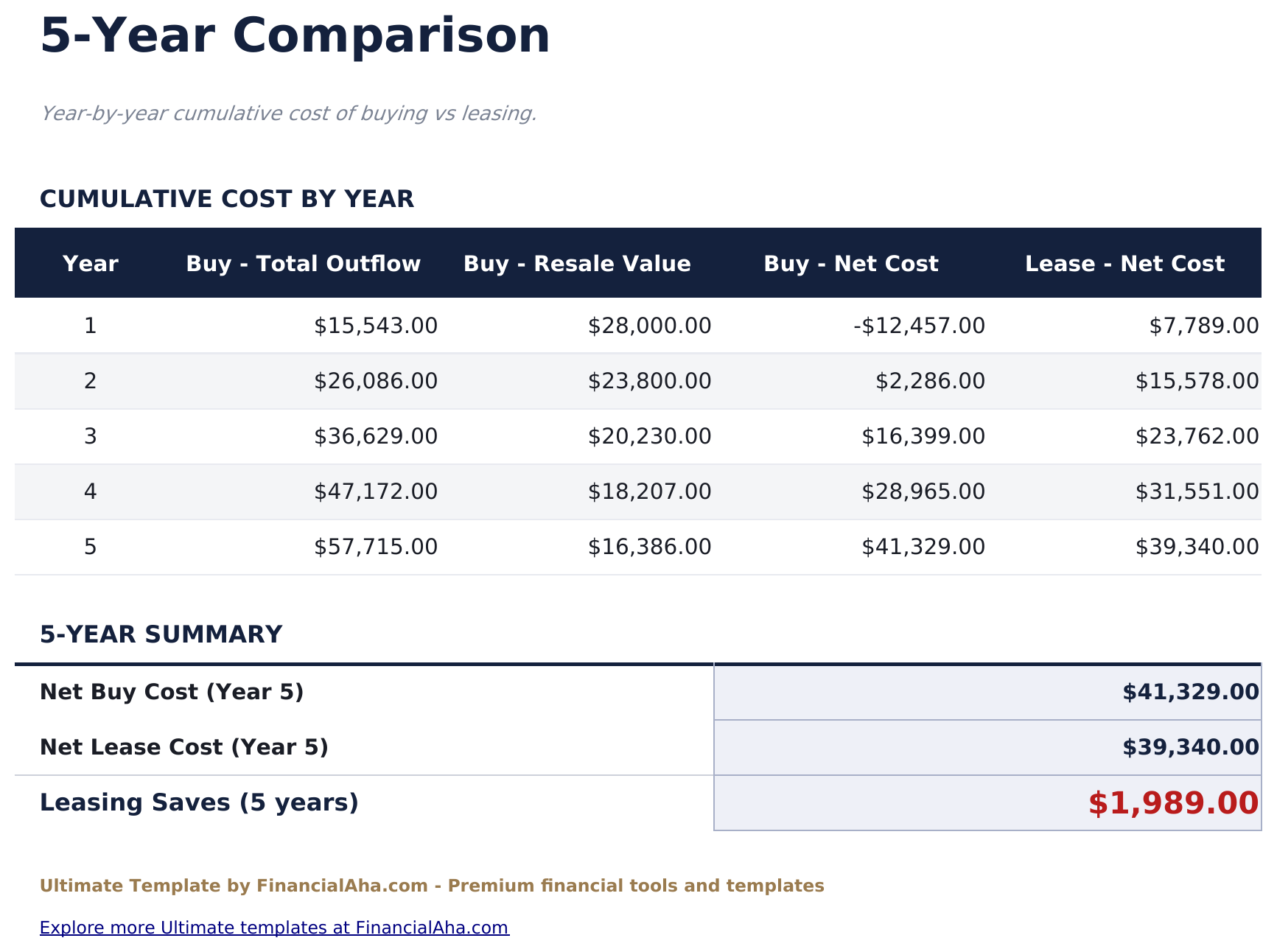
  • Five-year comparison accumulating outflow, resale value, loan still owed and net cost on both sides
  • The better option marked for every year held from one to seven, not just one period
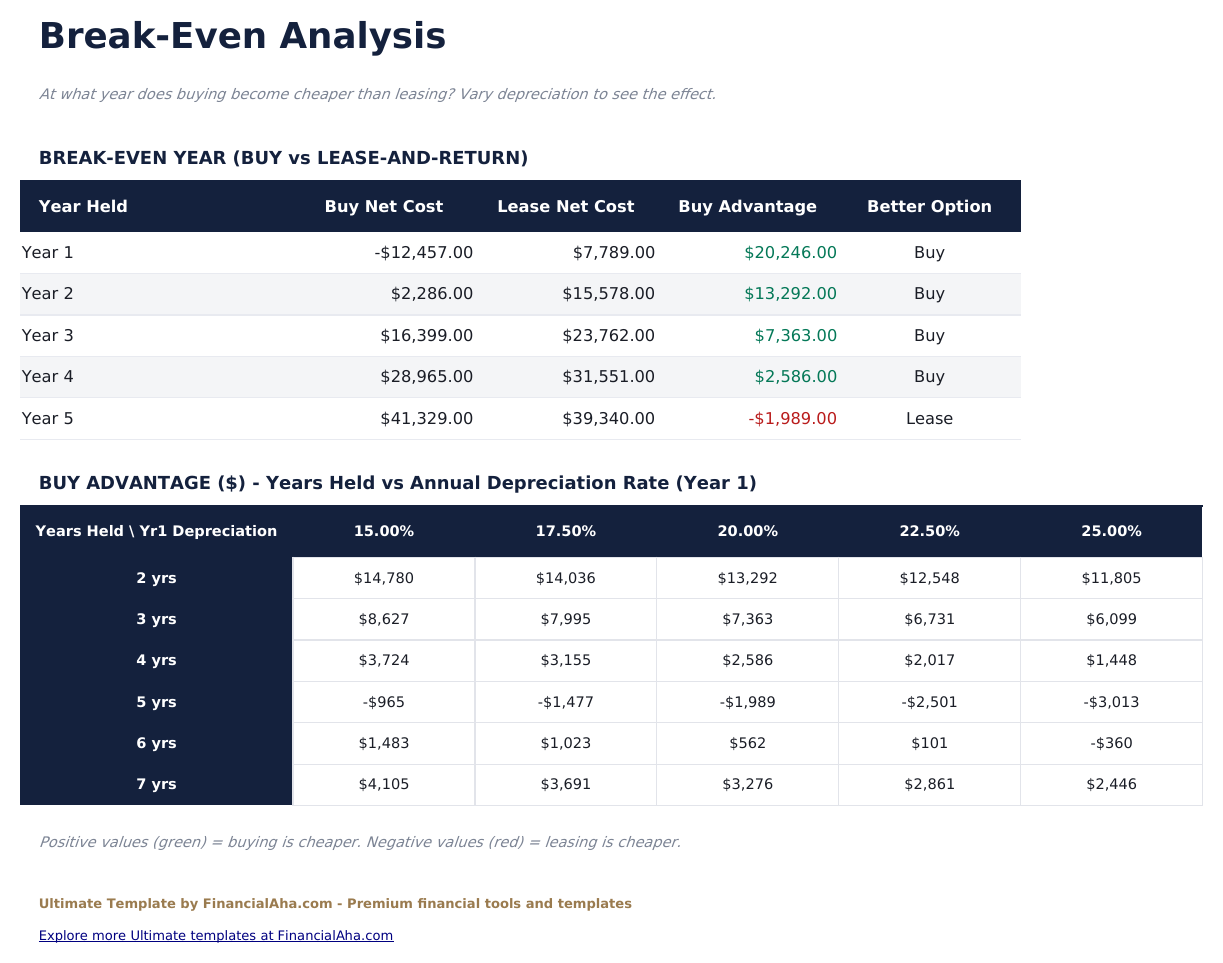
  • Break-Even Analysis with a grid over first-year depreciation and years held
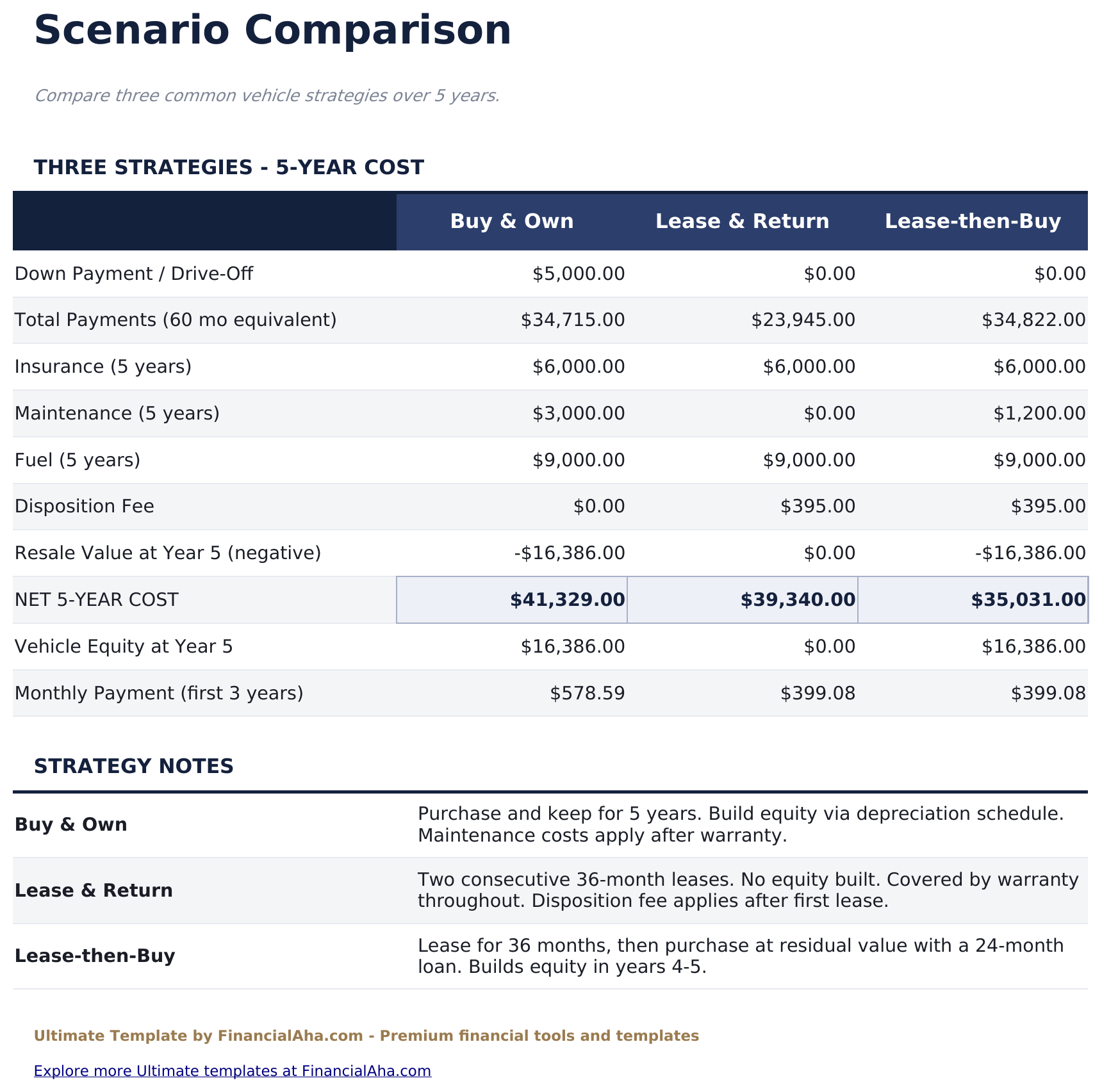
  • Three strategies costed: buy and keep, lease and return twice, or lease then buy at the residual
  • Dashboard carrying the advantage and both monthly payments, with a year-by-year snapshot
  • Works in Microsoft Excel and Google Sheets with no macros required

The FinancialAha Ultimate Lease vs Buy Calculator Spreadsheet Template for Google Sheets and Excel is a six-sheet workbook that answers the question at every holding period rather than one, with a How to Use guide on a seventh tab. It ships as an Ultimate Lease vs Buy Calculator Excel template and an Ultimate Lease vs Buy Calculator Google Sheets template in one file. This Ultimate Lease vs Buy Calculator spreadsheet template puts a depreciation schedule behind the resale figure, carries both sides across five years, and compares three strategies including leasing and then buying. No macros, no VBA.

Inside the workbook

What's inside the FinancialAha Ultimate Lease vs Buy Calculator spreadsheet template

The FinancialAha Ultimate Lease vs Buy Calculator Spreadsheet Template runs on six working sheets - two you type into, four that report back - plus the guide. It works in both Microsoft Excel and Google Sheets and here is what the Ultimate Lease vs Buy Calculator spreadsheet holds.

  1. 01 of 06

    Dashboard

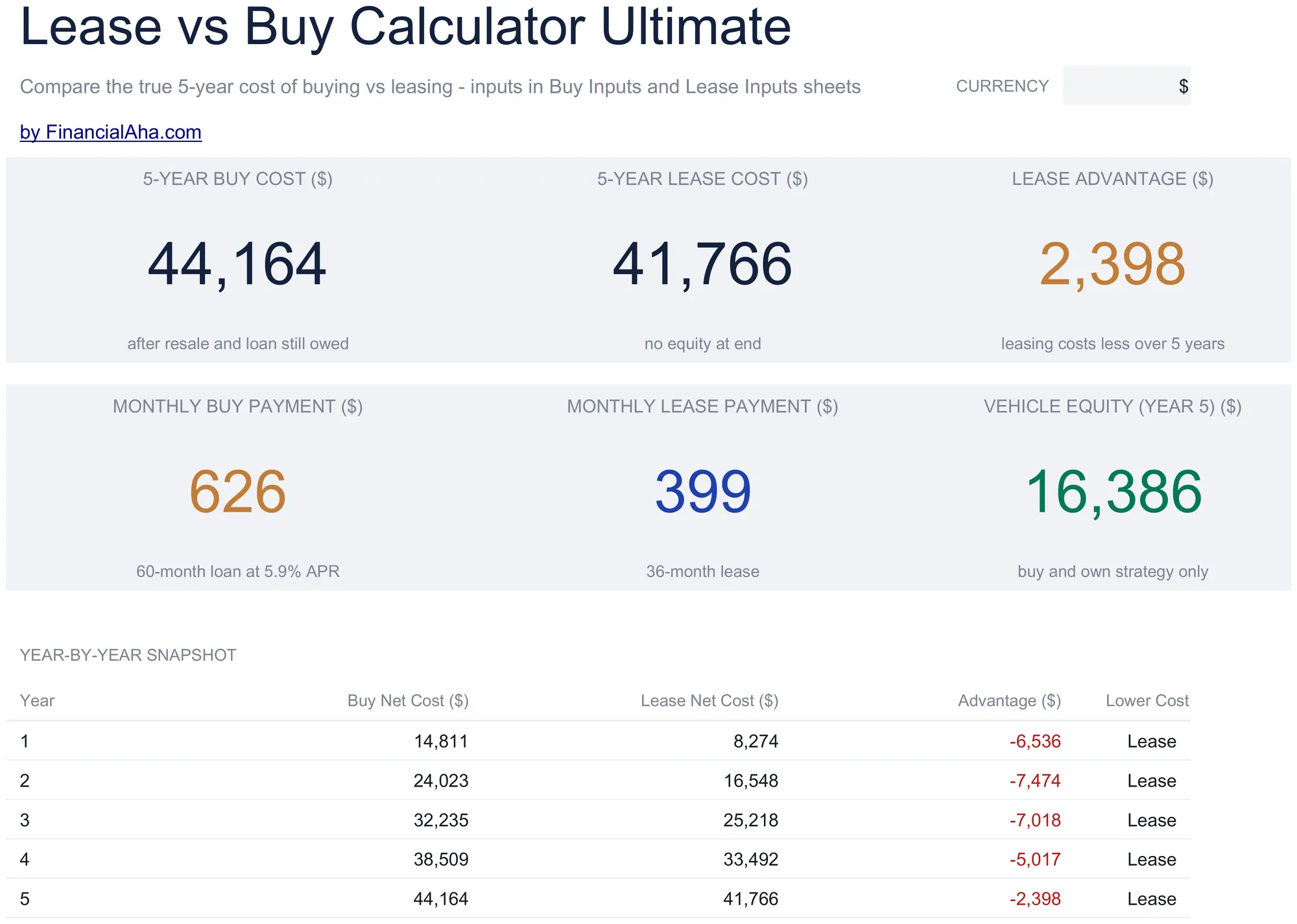
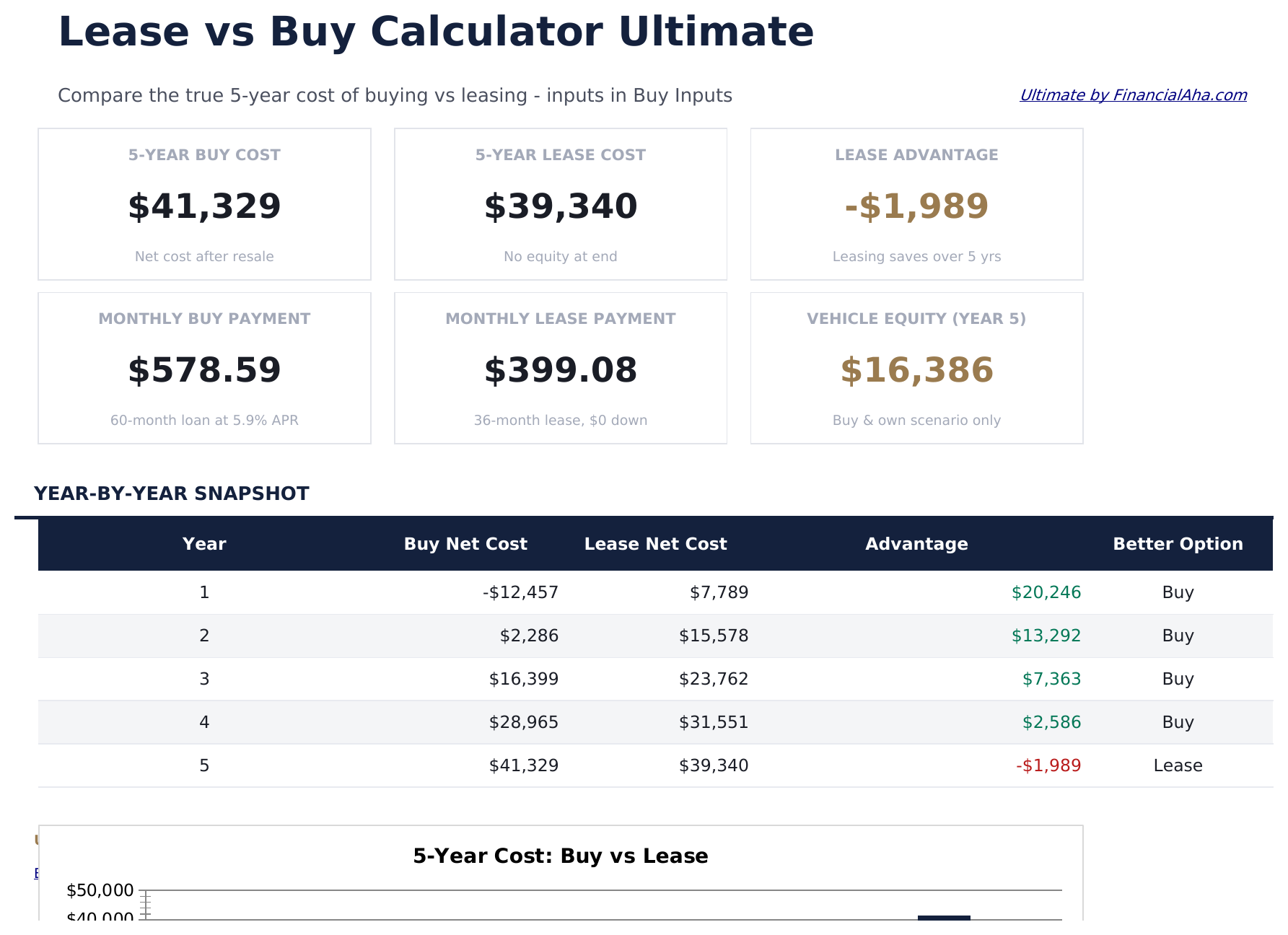
    The comparison in six figures: what each side costs across five years, the advantage one of them holds, what each costs a month, and what the purchase is still worth at the end. A year-by-year snapshot underneath carries the net cost of both sides for each year held, with the better option marked on every row - which is the honest way to present this, because the answer changes depending on how long you keep the thing.

  2. 02 of 06

    Buy Inputs

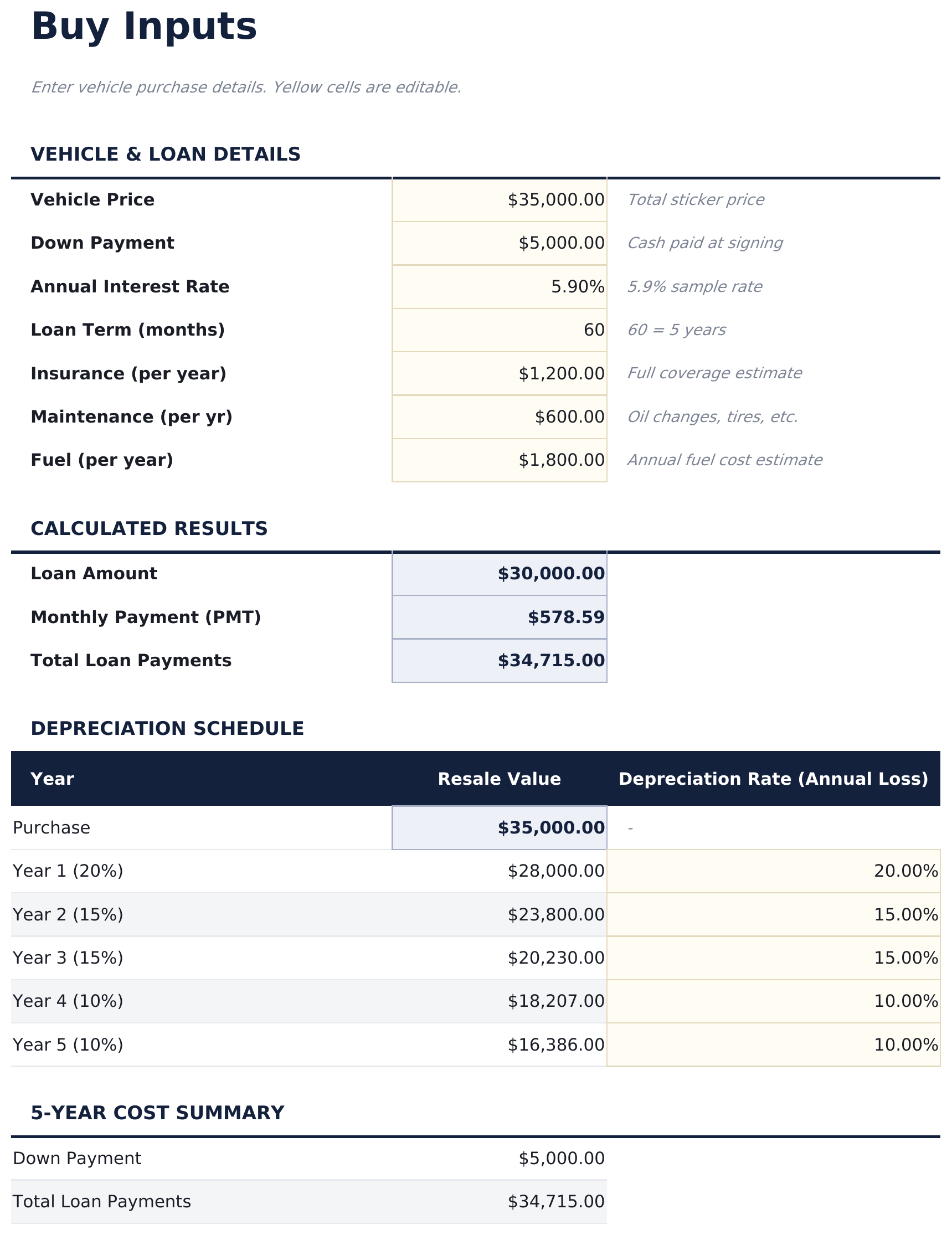
    The purchase side, with the loan worked out from the price, deposit, rate and term. What makes this sheet different from a simple calculator is the depreciation schedule beneath it: rather than one resale figure, the value is stepped down year by year at rates you can edit, so the resale credit reflects a curve rather than a guess. Annual running costs sit alongside.

  3. 03 of 06

    Lease Inputs

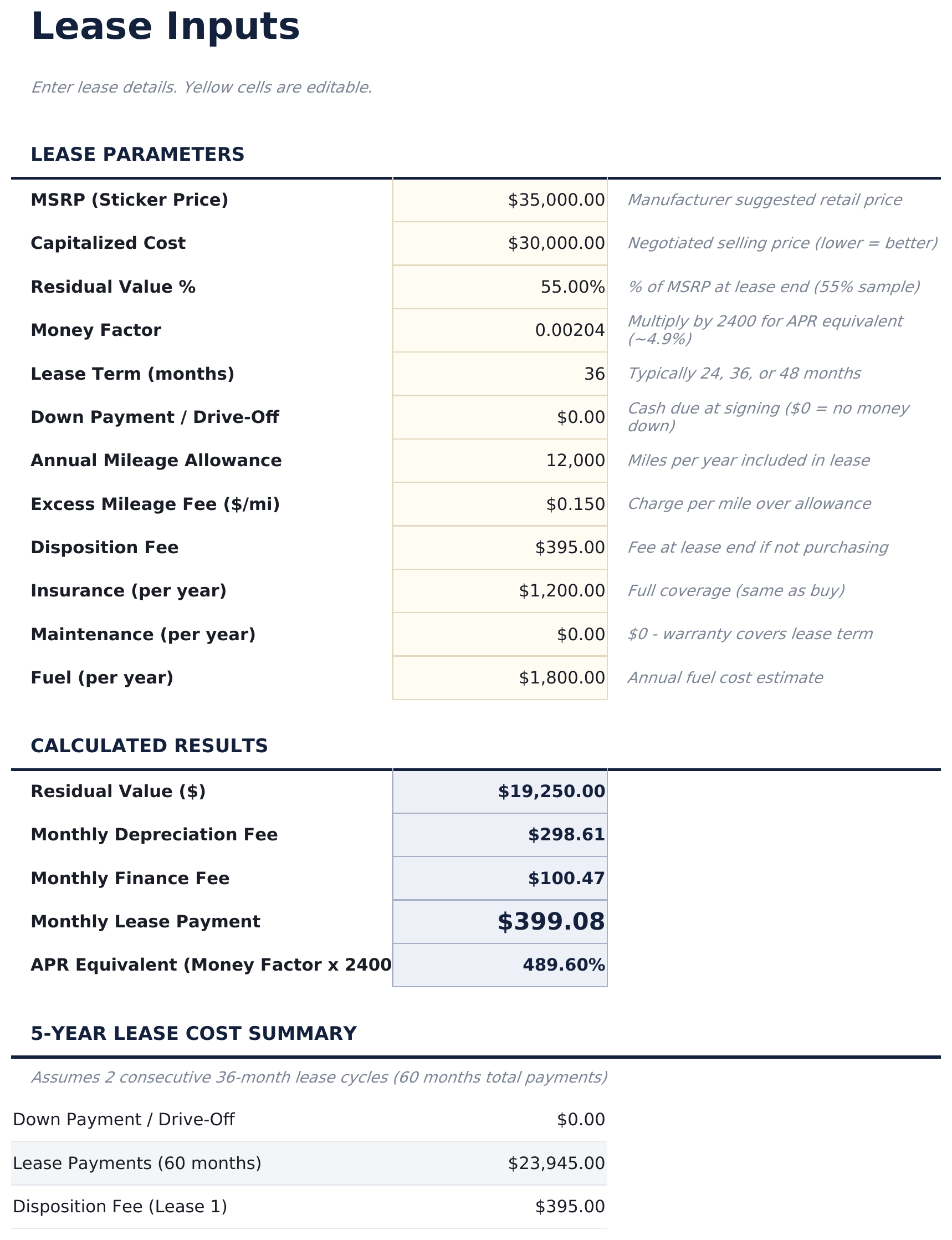
    The lease side, in the terms a lease is actually quoted in - the list price, the negotiated capitalized cost, the residual percentage and the money factor. The monthly payment is built the way a lease payment genuinely works, as a depreciation charge plus a finance charge, which is what lets you check a quote rather than take it as given.

  4. 04 of 06

    5-Year Comparison

    Both sides accumulated year by year: everything the purchase costs, what it is still worth, what the loan still has outstanding against it, what that nets to, and the lease total beside it. The loan column is why the net figure is trustworthy in the early years - a vehicle cannot be sold out from under its finance without settling it first.

  5. 05 of 06

    Scenario Comparison

    Three ways of getting the same vehicle, costed over five years: buying and keeping it, leasing and handing it back twice, and leasing first and then buying at the residual. The third is the one most comparisons leave out, and it is often the reason a decision is less binary than it looks.

  6. 06 of 06

    Break-Even Analysis

    The question asked at every holding period rather than one. A table runs from year one to year seven with both net costs and which side is ahead, and a sensitivity grid varies the first year's depreciation against the number of years held - because those two assumptions move the answer more than anything else on the sheet.

  7. Included guide

    How to Use

    A step-by-step guide on its own tab, covering setup, how the lease payment is built, what the depreciation schedule does, how to read the break-even grid, and what the model leaves out. Because it ships inside the file, the instructions travel with the template wherever it is opened.

Works in both Google Sheets and Excel

Ultimate Lease vs Buy Calculator Spreadsheet template for Google Sheets

Upload the Ultimate Lease vs Buy Calculator Spreadsheet Template to Drive, right-click it, and choose "Open with Google Sheets". This Ultimate Lease vs Buy Calculator Google Sheets template needs no conversion step and the chart survives the trip intact. The cross-sheet references that feed the Dashboard rely on the existing tab names, so those are worth leaving alone.

Ultimate Lease vs Buy Calculator Google Sheets template setup

A shared copy of the Ultimate Lease vs Buy Calculator Google Sheets template suits a household or a business weighing the same purchase, and because the lease terms are entered as quoted, a dealer's offer can be checked line by line rather than argued about. Sheets version history covers a figure typed over.

Sharing the Ultimate Lease vs Buy Calculator Google Sheet

The Ultimate Lease vs Buy Calculator Google Sheet is built for sittings rather than a routine: enter both offers once, then read the break-even table as the question changes from which is cheaper to how long you actually intend to keep it.

Ultimate Lease vs Buy Calculator Spreadsheet template for Excel

The Ultimate Lease vs Buy Calculator spreadsheet Excel download is a plain .xlsx. Excel opens this Ultimate Lease vs Buy Calculator Excel template directly, with no import step and no compatibility prompt, and the chart is a native Excel chart that redraws as the assumptions change. There are no macros and no VBA in the file, so it opens without a security warning.

Ultimate Lease vs Buy Calculator Excel template setup

The same Ultimate Lease vs Buy Calculator Excel template opens in Excel on Windows, Excel on Mac, and Excel for the web. It is also the identical file you would upload to Drive, so there is no separate Ultimate Lease vs Buy Calculator spreadsheet download to choose between.

Ultimate Lease vs Buy Calculator spreadsheet Excel notes

The Ultimate Lease vs Buy Calculator spreadsheet Excel file carries no macros and no VBA, so Excel opens it without a trust prompt. The same Ultimate Lease vs Buy Calculator spreadsheet Excel download also opens in Excel for the web, which matters when you move between a work machine and a personal one.

Opening the Ultimate Lease vs Buy Calculator spreadsheet Excel file

Nothing in the Ultimate Lease vs Buy Calculator Excel template is version-specific, so this Ultimate Lease vs Buy Calculator spreadsheet Excel workbook behaves identically in Excel on Windows, Excel on Mac, and older builds.

Spreadsheet template highlights

What the Ultimate Lease vs Buy Calculator spreadsheet template tracks

You type into the two input sheets, and the rest is derived. These are the columns the Ultimate Lease vs Buy Calculator Spreadsheet Template works from:

Year
each year of the comparison, on every reporting sheet
Resale Value auto
derived, stepped down the depreciation schedule
Annual Loss Rate
the depreciation rate for that year, yours to edit
Buy auto
Total Outflow - derived, everything the purchase has cost by that year
Buy auto
Loan Still Owed - derived, the balance the sale would have to settle that year
Buy auto
Net Cost - derived, that outflow with the resale value credited back net of the loan
Lease auto
Net Cost - derived, the lease side accumulated to the same point
Advantage auto
derived, the gap between the two at that holding period
Better Option auto
derived, which side is ahead that year

Compare builds

FinancialAha Lease vs Buy Calculator spreadsheet template: Free, Essentials, and Ultimate compared

Feature Free View Spreadsheet Template Essentials View Spreadsheet Template Ultimate This page
Working sheets 1 2 6
Both monthly payments Yes Yes Yes
Total cost each side Yes Yes Yes
Names the lower-cost option Yes Yes, per year held
Resale value counted back Yes Yes, on a depreciation schedule
Running costs Insurance and maintenance Insurance, maintenance and fuel
Sales tax Yes, on the purchase Yes, on the purchase and each lease payment
Charts 1 1
Year-by-year comparison Five years, cumulative
Break-even Dedicated sheet, plus a grid
Strategy scenarios 3, including lease-then-buy

The FinancialAha Ultimate Lease vs Buy Calculator Spreadsheet Template covers six working sheets and treats the answer as something that changes with time rather than a single verdict. The Free Lease vs Buy Calculator Spreadsheet Template sizes both sides without a resale credit or running costs. The Essentials Lease vs Buy Calculator Spreadsheet Template for Google Sheets and Excel makes them comparable and names the lower total over one period. This build puts a depreciation schedule behind the resale figure, accumulates both sides across five years, marks which option is ahead at every year held from one to seven, adds a sensitivity grid over depreciation and holding period, and costs three strategies including leasing then buying at the residual. Tax incentives and what a deposit might have earned elsewhere sit outside all three builds.

Good to know

Notes on working in the Ultimate Lease vs Buy Calculator spreadsheet template

  • The better option changes with how long you keep the thing, which is why the break-even table matters more than any single total - it runs from one year held to seven.
  • The depreciation rates behind the resale figure are editable. They move the buy side more than the loan rate does.
  • The lease payment is built as a depreciation charge plus a finance charge, so a quote can be checked against its own terms rather than accepted.
  • The five-year lease path assumes handing back and starting again, with the disposition fee that comes with it.
  • Tax incentives and the opportunity cost of a deposit are not modelled, and the workbook says so.

How to Use This Template

1

Enter the purchase

On Buy Inputs, add the price, deposit, rate and term, the annual running costs, and adjust the depreciation rates.

2

Enter the lease

On Lease Inputs, add the list price, negotiated cost, residual percentage and money factor from the quote.

3

Read the five years

Both sides accumulate year by year, with what the loan still owes shown beside the resale value and the better option marked on each row.

4

Test the assumptions

Break-Even varies depreciation against years held, and Scenario Comparison costs three ways of getting the same vehicle.

Stress-tested with AI.

Every template starts with deep research into how people actually track the topic. We design the layout, build the formulas, and polish the design until it feels like something we would use ourselves. Along the way, we use AI to stress-test the calculations: unusual inputs, edge cases, and formula behavior, checked until the numbers hold.

One-time purchase. No subscription. Works in Excel & Google Sheets.

Frequently Asked Questions

Is the FinancialAha Ultimate Lease vs Buy Calculator Spreadsheet Template a Google Sheets template?

Yes. Upload the file to Drive and choose "Open with Google Sheets". The Ultimate Lease vs Buy Calculator Google Sheets template needs no conversion step and the chart survives the trip intact. The cross-sheet references rely on the existing tab names, so those are worth leaving alone.

Is the FinancialAha Ultimate Lease vs Buy Calculator Spreadsheet Template an Excel template?

Yes. The download is a plain .xlsx, so the Ultimate Lease vs Buy Calculator Excel template opens directly in Excel with no import step. The chart is a native Excel chart, and there are no macros or VBA.

Will the FinancialAha Ultimate Lease vs Buy Calculator spreadsheet Excel file open in older versions of Excel?

Yes. The Ultimate Lease vs Buy Calculator spreadsheet Excel workbook ships as a plain .xlsx, so it opens identically in current Excel and in builds that predate dynamic arrays.

How does the break-even analysis in the Ultimate Lease vs Buy Calculator spreadsheet work?

It asks the question at every holding period rather than one. A table runs from year one to year seven with both net costs and which side is ahead, and a grid varies the first year's depreciation against the number of years held - the two assumptions that move the answer most.

What are the three scenarios in the Ultimate Lease vs Buy Calculator Spreadsheet Template?

Buying and keeping it, leasing and handing it back twice across the period, and leasing first then buying at the residual with a shorter loan. The third is the one most comparisons leave out.

What is the money factor in the Ultimate Lease vs Buy Calculator spreadsheet?

How a lease expresses its financing charge. The workbook builds the monthly payment from it as a depreciation charge plus a finance charge, which is what lets you check a quoted payment against the terms behind it.

How does the Ultimate Lease vs Buy Calculator Spreadsheet Template work out the resale value?

From a depreciation schedule rather than a single guess - the value steps down year by year at rates you can edit, so the resale credit follows a curve. Those rates move the purchase side more than the loan rate does.

What does the Ultimate Lease vs Buy Calculator spreadsheet model leave out?

Tax incentives and any credits are not included, and neither is what a deposit might have earned if it were invested instead. The workbook states both on its How to Use tab.

What do I get after buying the Ultimate Lease vs Buy Calculator spreadsheet template?

You receive the Ultimate Lease vs Buy Calculator spreadsheet template as an Excel file (.xlsx) that works in Microsoft Excel and Google Sheets. Download it immediately after purchase - no signup or account required.

Is there a free Ultimate Lease vs Buy Calculator spreadsheet template?

Yes. A free version of the Ultimate Lease vs Buy Calculator spreadsheet template is available with basic features. The Ultimate version adds advanced analysis, more capacity, and additional sheets.

What if the Ultimate Lease vs Buy Calculator spreadsheet template does not work for me?

Contact us and we will help troubleshoot. The Ultimate Lease vs Buy Calculator spreadsheet template works in Microsoft Excel and Google Sheets with no macros required.

Ultimate

Highlights:

Instant download after purchase
No macros or VBA required
All formulas auto-calculate
No subscription required
Works in
Excel Google Sheets

Looking for more Ultimate templates?

We offer Ultimate versions of our most popular spreadsheet templates with advanced features, more capacity, and deeper analysis.

Private & secure

Your financial data stays on your device. We never see it.

Learn more →

Need help?

Check our guides or reach out with questions.

View FAQ →