Free Balloon Loan Calculator Spreadsheet Template for Google Sheets & Excel
You set the lump sum you want left at the end rather than discovering it later, and the payment is sized to leave exactly that. The Free Balloon Loan Calculator spreadsheet template returns the monthly figure, the total paid across the term with the lump sum included, and the interest above the amount borrowed. Four inputs, three results, one working sheet. Google Sheets or Excel. No macros, no VBA.
The FinancialAha Free Balloon Loan Calculator Spreadsheet Template is a one-sheet workbook for Google Sheets and Excel, with a How to Use guide on a second tab. It works as a Free Balloon Loan Calculator Excel template and a Free Balloon Loan Calculator Google Sheets template from the same download. Four figures go in - what you are borrowing, the rate, the term and the lump sum due at the end - and this Free Balloon Loan Calculator spreadsheet template returns the monthly payment that leaves exactly that lump sum, what the whole arrangement costs, and how much of it is interest. No macros, no VBA.
Inside the workbook
What's inside the FinancialAha Free Balloon Loan Calculator spreadsheet template
The FinancialAha Free Balloon Loan Calculator Spreadsheet Template runs on a single working sheet, with the instructions on a tab of their own. It works in both Microsoft Excel and Google Sheets and here is what the Free Balloon Loan Calculator spreadsheet holds.
01of 01
Balloon Loan
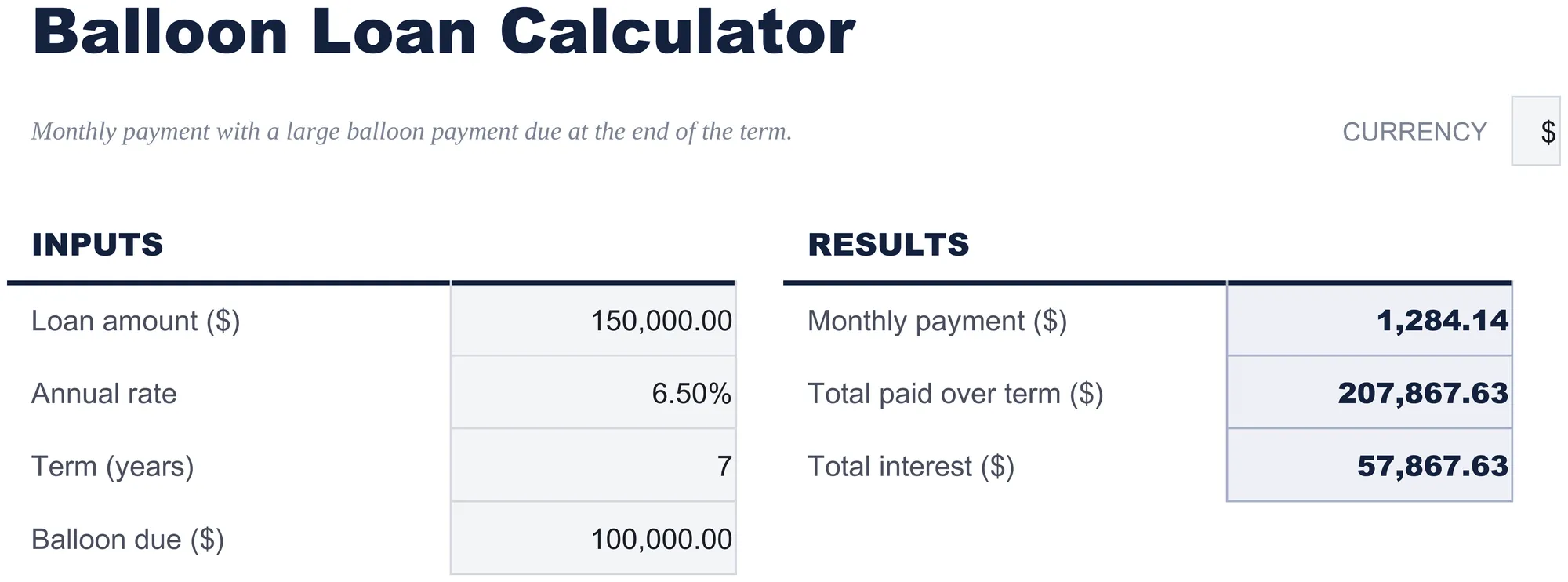
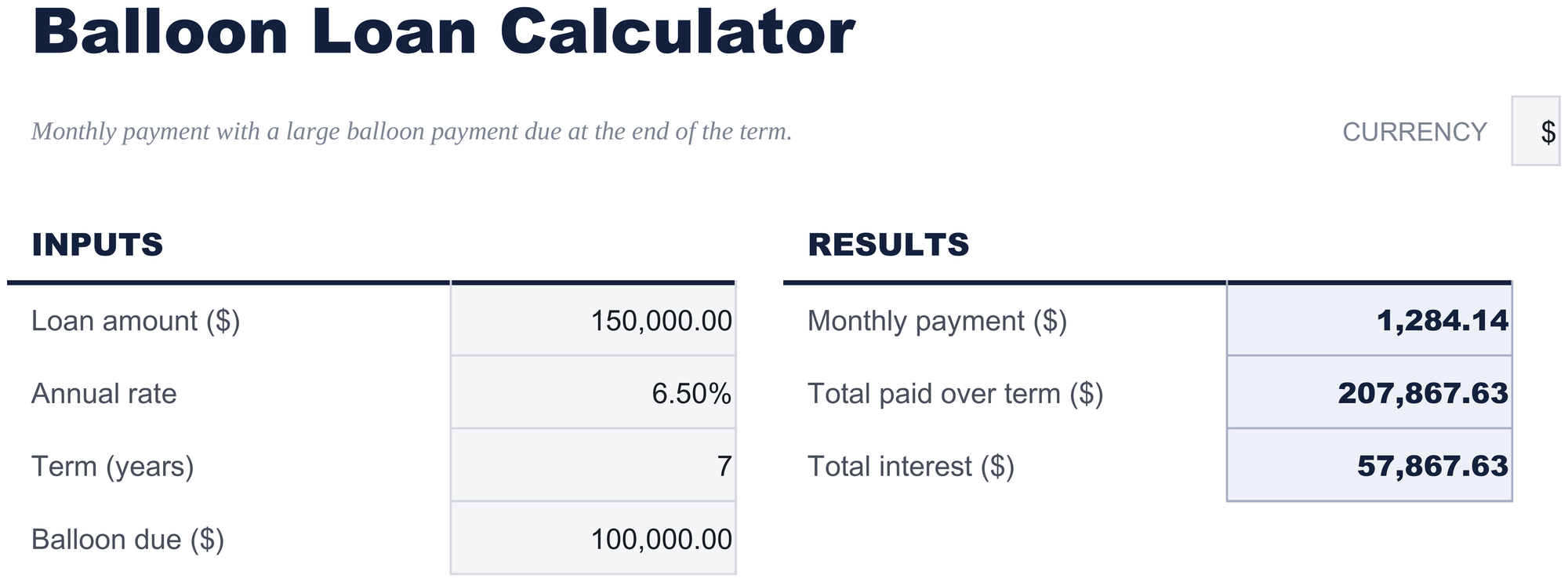
Four inputs on the left, three results on the right. You set the balloon rather than discovering it: enter what you want left owing at the end of the term, and the monthly payment comes back sized to leave exactly that. Underneath it, what the whole arrangement costs across the term including the lump sum, and how much of that total is interest rather than principal.
Working that way round is useful when the balloon is the constraint. A business that knows it can find a hundred thousand in seven years, or a borrower planning to sell or refinance before the term ends, is choosing the lump sum first and asking what the monthly cost of that choice is - which is the question this sheet answers directly.
Two entries that break other calculators are handled here. A rate of zero returns a real answer rather than an error, because promotional and family loans are genuinely written at zero. And a balloon so large that the loan cannot support it - where the lump sum is worth more today than the amount borrowed - says so in words rather than returning a negative payment.
Balloon Loan
Included guide
How to Use
A step-by-step guide on its own tab, covering how to replace the sample values, how the results recalculate, and how to change the currency. Because it ships inside the file, the instructions travel with the template wherever it is opened.
Works in both Google Sheets and Excel
Free Balloon Loan Calculator Spreadsheet template for Google Sheets
Upload the Free Balloon Loan Calculator Spreadsheet Template to Drive, right-click it, and choose "Open with Google Sheets". This Free Balloon Loan Calculator Google Sheets template needs no conversion step and nothing gets rewritten on the way in - the results recalculate exactly as they do in Excel.
Free Balloon Loan Calculator Google Sheets template setup
A shared copy of the Free Balloon Loan Calculator Google Sheets template is useful when a lender has quoted terms and more than one person is weighing them, because changing the balloon and watching the payment move is the whole conversation.
Running the Free Balloon Loan Calculator Google Sheet
The Free Balloon Loan Calculator Google Sheet is a few-minutes-per-quote file. Duplicating the sheet before changing an input keeps the previous structure to compare against.
Free Balloon Loan Calculator Spreadsheet template for Excel
The Free Balloon Loan Calculator spreadsheet Excel download is a plain .xlsx. Excel opens this Free Balloon Loan Calculator Excel template directly, with no import step and no compatibility prompt, and every result updates the moment an input changes. There are no macros and no VBA in the file, so it opens without a security warning.
Free Balloon Loan Calculator Excel template setup
The same Free Balloon Loan Calculator Excel template opens in Excel on Windows, Excel on Mac, and Excel for the web. It is also the identical file you would upload to Drive, so there is no separate Free Balloon Loan Calculator spreadsheet download to choose between.
The Free Balloon Loan Calculator spreadsheet Excel file carries no macros and no VBA, so Excel opens it without a trust prompt.
Opening the Free Balloon Loan Calculator spreadsheet Excel file
Nothing in the Free Balloon Loan Calculator Excel template is version-specific, so this Free Balloon Loan Calculator spreadsheet Excel workbook behaves identically in Excel on Windows, Excel on Mac, and older builds.
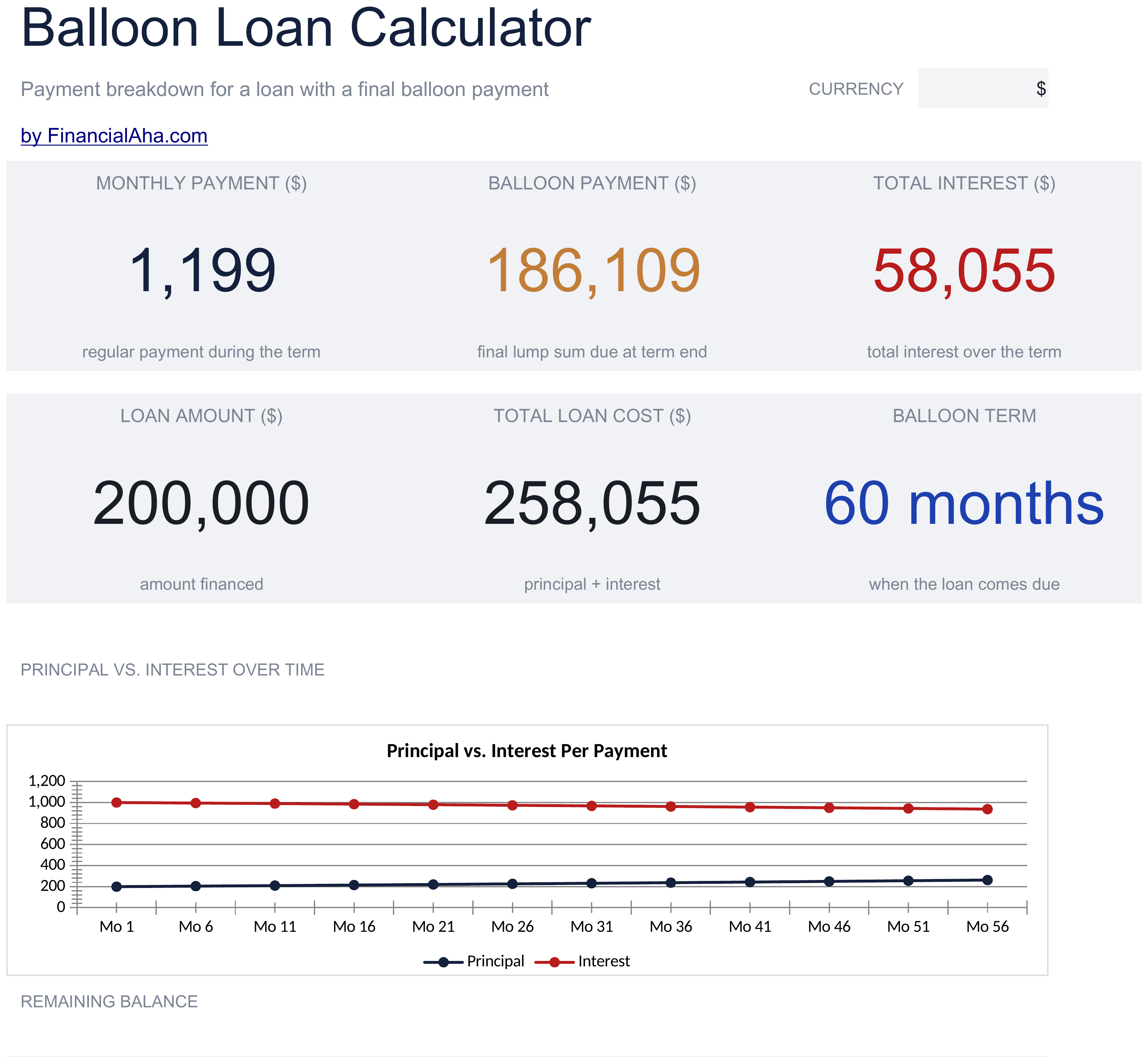
The two builds model a balloon loan from opposite ends. In the FinancialAha Free Balloon Loan Calculator Spreadsheet Template the balloon is an input: you choose the lump sum and the payment is sized around it. The Essentials Balloon Loan Calculator Spreadsheet Template for Google Sheets and Excel works the way most lenders write these: you enter an amortization period and a shorter balloon term, the payment is sized as though the loan ran the full amortization, and the balloon is whatever balance remains when the term ends. It carries a month-by-month schedule splitting each payment into principal and interest with a running interest total, a dashboard and two charts.
Notes on working in the Free Balloon Loan Calculator spreadsheet template
The monthly payment is worked out on the loan less the present value of the balloon, so the lump sum at the end is already inside it.
Total paid adds the balloon to the payments, and total interest is that figure less the amount borrowed.
A rate of zero returns a real answer rather than an error, which matters for promotional and family lending.
Enter a balloon the loan cannot support and all three results say so rather than returning a negative payment.
A month-by-month split of principal and interest is on the Essentials build.
The dropdown beside the title relabels the loan amount, the balloon and the money results. It changes the label and nothing else.
How the Balloon Loan Calculator template works
The Free Balloon Loan Calculator Spreadsheet Template works the balloon from the end you control. You enter what is being borrowed, the rate, how long the monthly payments run and the lump sum you want left owing when the term is up - and it returns the payment sized to leave exactly that, what the whole arrangement costs including the lump sum, and how much of that is interest. Working that way round suits anyone for whom the balloon is the constraint: a business that knows what it can find in seven years, or a borrower planning to sell or refinance before the term ends. Two entries that break other calculators are handled - a rate of zero returns a real answer, and a balloon the loan cannot support says so rather than returning a negative payment.
When this template helps
01
A lender has offered balloon terms and you want the monthly cost of a given lump sum.
02
You plan to sell or refinance before the term ends and are choosing the balloon first.
03
You want to see how much a larger balloon lowers the monthly payment.
04
You want a calculation you can save and revisit, not a one-shot web form.
Tips to get the most out of it
The balloon is yours to set here. Raising it lowers the monthly payment and moves the cost to the end, and both figures move as you change it.
A lender's version of this sum starts from an amortization period rather than a balloon you choose, which is what the Essentials build does.
Because the lump sum sits inside total interest, two arrangements with the same monthly payment can cost quite different amounts.
Common mistakes to avoid
Reading the monthly payment as the cost of the loan. The lump sum at the end is most of it.
Assuming the balloon can be refinanced when the term ends. That depends on conditions years from now, not on this sheet.
Entering a monthly rate where the annual one belongs.
Treating the result as a decision rather than an input. The final call is yours.
How to Use the Free Balloon Loan Calculator Spreadsheet Template
Every template starts with deep research into how people actually track the topic. We design the layout, build the formulas, and polish the design until it feels like something we would use ourselves. Along the way, we use AI to stress-test the calculations: unusual inputs, edge cases, and formula behavior, checked until the numbers hold.
Excel
Sheets
Privacy by default
Your numbers stay in your own file
Formula-driven
All calculations update automatically
Dual compatible
Works in Excel and Google Sheets
Sample data included
See the template in action right away
Frequently Asked Questions
What is the difference between the free and Essentials Free Balloon Loan Calculator spreadsheet template?
Free is a single-sheet starter template with sample data and a How to Use guide. Essentials ($19) is the fuller build, with more worked out for you rather than typed. This template has no Ultimate build. What each tier holds differs by template - the comparison table on every template page lists it exactly.
Which Free Balloon Loan Calculator spreadsheet template should I download?
Essentials is the fuller build of this template for ongoing use, and the comparison table on this page lists exactly what it adds. The Free version is a good fit for one-off planning or trying out the layout.
Can I upgrade the Free Balloon Loan Calculator spreadsheet template later?
Yes. Essentials is a one-time $19 purchase with no subscription. What it adds depends on the template: some builds gain capacity and a dashboard, others richer detail in the same layout. The comparison table on this page lists the differences exactly.
Is the FinancialAha Free Balloon Loan Calculator Spreadsheet Template a Google Sheets template?
Yes. Upload the file to Drive and choose "Open with Google Sheets". Nothing needs rewriting in the Free Balloon Loan Calculator Google Sheets template, and the results recalculate exactly as they do in Excel.
Is the FinancialAha Free Balloon Loan Calculator Spreadsheet Template an Excel template?
Yes. The download is a plain .xlsx, so the Free Balloon Loan Calculator Excel template opens directly in Excel with no import step. There are no macros and no VBA.
Will the FinancialAha Free Balloon Loan Calculator spreadsheet Excel file open in older versions of Excel?
Yes. The Free Balloon Loan Calculator spreadsheet Excel workbook ships as a plain .xlsx, so it opens identically in current Excel and in builds that predate dynamic arrays.
Do I enter the balloon or does it work it out?
You enter it. This build sizes the monthly payment to leave exactly the lump sum you name, which suits anyone for whom the balloon is the constraint. The Essentials build works the other way - the payment is sized on an amortization period and the balloon is whatever balance remains.
What happens at a 0% rate?
It returns a real figure. The amount above the balloon is spread across the months, and total interest reads zero. Promotional and family loans are genuinely written at zero, and a calculator that errors on them is answering the wrong question.
What if the balloon is too large for the loan?
All three results say "Balloon exceeds loan" rather than returning a negative payment. If the lump sum is worth more today than the amount borrowed, there is nothing left to amortize.
Is the file safe to download?
Yes. No macros, no tracking. The file is a plain .xlsx that opens directly in Excel or Google Sheets.
How do I open the Free Balloon Loan Calculator spreadsheet template in Google Sheets?
Upload the .xlsx file to Google Drive, then open it with Google Sheets. All formulas and formatting will be preserved.
Can I use the Free Balloon Loan Calculator spreadsheet template for commercial work?
All free templates are released under CC BY 4.0 (Creative Commons Attribution). You can use, modify, and share them freely - including for commercial purposes - as long as you credit FinancialAha.com. They are provided as-is and do not constitute financial advice.