
We scored 10 personal finance spreadsheet templates for Google Sheets and Excel across six criteria. FinancialAha's Financial Planning and Monthly Budget templates tied at the top (27/30); among free options, Google's built-in template covers the basics and Aspire Budgeting is the most polished. Full scores, a privacy comparison, and how to pick are below.
We tested 10 personal finance spreadsheet templates by entering identical financial data into each one - three months of transactions, a mix of income sources, and a realistic set of assets and liabilities. Then we scored them.
This is not a list of links with one-paragraph summaries. We actually used each template, broke things, tested edge cases, and formed opinions.
The short version: For a complete financial planning dashboard, FinancialAha’s Financial Planning Template covers the most ground in a single spreadsheet. For month-to-month budgeting specifically, the Monthly Budget Template and CompiledSanity’s sheet (~$8) are both strong. For free options, Google’s built-in template handles basics, and Aspire Budgeting is the most polished free option if envelope budgeting fits your style.
How We Scored
Each template was rated 1-5 across six criteria:
- Setup ease - How quickly can you go from opening the file to entering your first transaction?
- Feature depth - Does it handle income tracking, expense categories, savings goals, debt tracking, and net worth?
- Visual design - Are there charts, dashboards, and visual summaries that make the data useful at a glance?
- Customization - Can you add categories, modify formulas, and adapt it to your situation without breaking things?
- Mobile usability - Does it work reasonably well in the Google Sheets or Excel mobile app?
- Value - What do you get relative to what you pay?
Comparison Table
| Template | Price | Platform | Setup | Features | Design | Custom | Mobile | Value | Total |
|---|---|---|---|---|---|---|---|---|---|
| FinancialAha Financial Planning | One-time | Google Sheets | 4 | 5 | 5 | 4 | 4 | 5 | 27/30 |
| FinancialAha Monthly Budget | One-time | Google Sheets | 5 | 4 | 5 | 4 | 4 | 5 | 27/30 |
| CompiledSanity Finance Sheet | ~$8 | Sheets | 3 | 5 | 4 | 3 | 3 | 5 | 23/30 |
| Aspire Budgeting | Free | Sheets | 3 | 3 | 3 | 3 | 4 | 5 | 21/30 |
| FinancialAha Expense Tracker | One-time | Google Sheets | 5 | 3 | 4 | 4 | 5 | 5 | 26/30 |
| Tiller Foundation | $99/yr | Sheets/Excel | 4 | 4 | 3 | 4 | 3 | 2 | 20/30 |
| Google Sheets Built-In | Free | Sheets | 5 | 2 | 2 | 3 | 4 | 4 | 20/30 |
| Vertex42 Budget | Free | Excel/Sheets | 4 | 3 | 2 | 3 | 2 | 4 | 18/30 |
| Measure of a Plan | Free | Sheets | 3 | 3 | 4 | 2 | 3 | 4 | 19/30 |
| Reddit r/personalfinance | Free | Sheets | 2 | 3 | 2 | 3 | 2 | 4 | 16/30 |
Scores are subjective but consistent - we applied the same standards to every template, including our own.
Detailed Reviews
FinancialAha Financial Planning Template - Best Overall
Score: 27/30 | One-time purchase | Google Sheets
This is the template that tries to do everything, and mostly succeeds. Net worth tracking, an asset register that can pull live prices for listed holdings, a debt register with balances, interest rates and minimum payments, monthly cash flow, eight goal targets, and a long-range projection. The Summary dashboard pulls it all together and marks each goal as met or not.
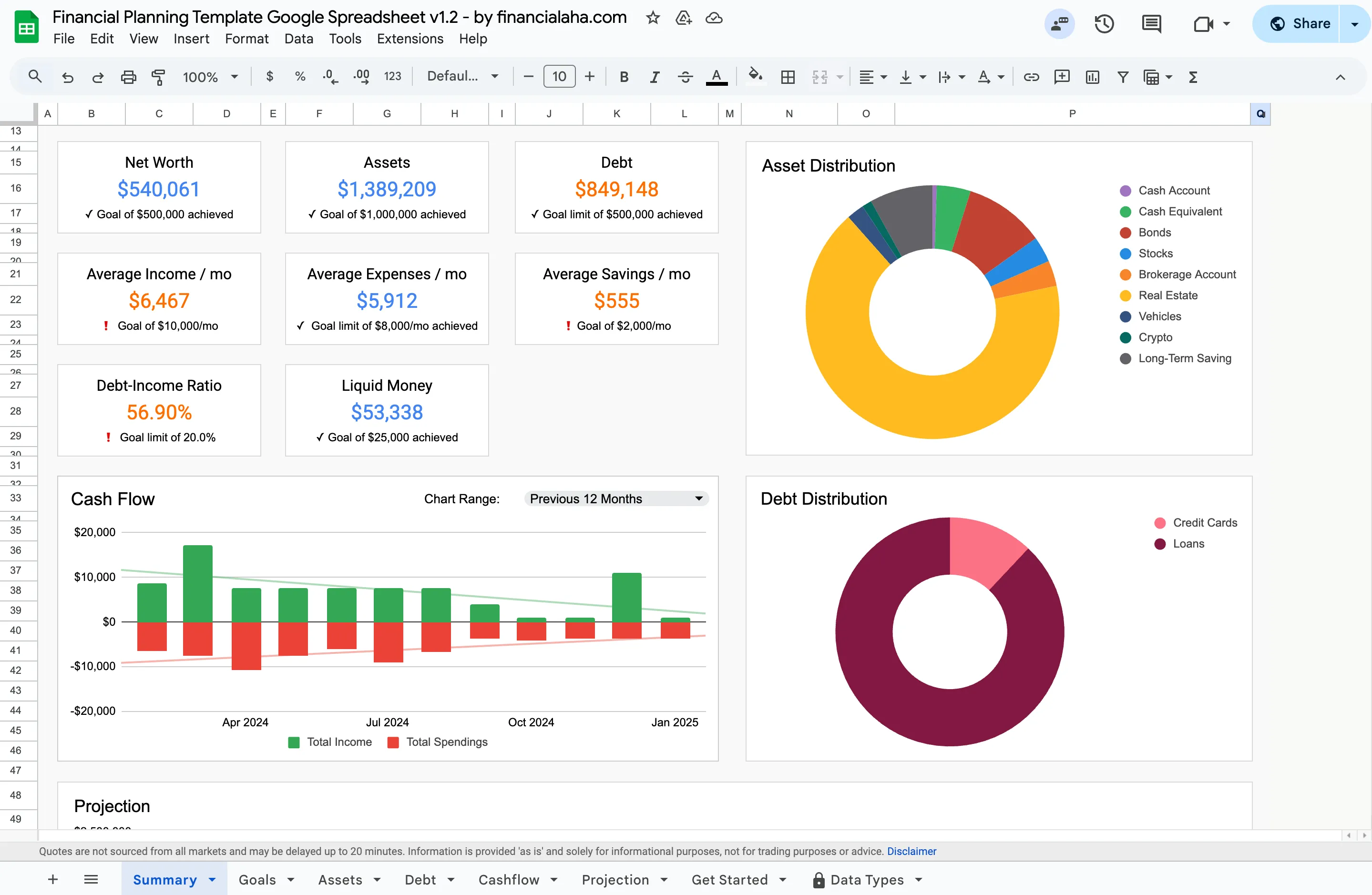
The Financial Planning Template summary dashboard (Premium tier): net worth, cash flow, asset and debt distribution, and goal progress on one tab.
Where it stands out: the depth of what a single spreadsheet covers. Instead of needing separate trackers for net worth, debt, and goals, everything feeds into one view. The Projection tab carries your current asset and debt totals out to an end year you choose, using six assumptions you set for income, expenses, asset growth, asset yield, debt change and inflation.
Where it could be better: with that much functionality, the initial orientation takes longer than a simple tracker. Not complex to use once you understand the layout, but there are more tabs to learn than a basic budget sheet.
Full disclosure: this is our product, so take the rating with that context. We scored it the same way we scored everything else.
FinancialAha Monthly Budget Template - Best for Budgeting
Score: 27/30 | One-time purchase | Google Sheets
Focused specifically on month-to-month budgeting. Set spending targets by category, log transactions, and the dashboard shows where you stand. Categories are customizable, formulas handle the math, and the visual summaries make it easy to spot problems.
The setup is genuinely fast - you can enter your first transaction within two minutes of opening the file. Categories come pre-filled with common ones (housing, food, transport, etc.) but you can rename, add, or remove them.
Works well on mobile through the Google Sheets app, which matters because entering expenses on the go is how most people actually use a budget spreadsheet.
CompiledSanity Personal Finance Sheet - Best Free-ish Alternative
Score: 23/30 | ~$8 on Etsy | Google Sheets
Popular on Reddit, with its own subreddit at r/CSPersonalFinance. Strong on investment tracking - it pulls live stock and ETF prices via Google Finance functions. Net worth, budget tracking, loan amortization, and retirement projections all in one sheet.
The trade-off is complexity. There are a lot of tabs, and the investment tracking features use advanced Sheets functions that can be fragile. Setup takes longer than simpler templates. The design is functional but not as visually polished as commercial templates.
If you’re deep into investment tracking and want live portfolio data alongside budgeting, this is worth the learning curve.
Aspire Budgeting - Best Free Template
Score: 21/30 | Free | Google Sheets
The most polished free option, built around envelope budgeting (similar to YNAB’s approach). Has a companion mobile app (iOS and Android) that makes data entry smoother than using the Sheets app directly.
An active subreddit (r/aspirebudgeting) means you can find answers to setup questions quickly. The template is maintained by its developer community.
Limitations: envelope budgeting is a specific methodology that doesn’t suit everyone. No net worth tracking, no debt management features, no investment tracking. It does one thing well.
FinancialAha Monthly Expense Tracker - Best for Simplicity
Score: 26/30 | One-time purchase | Google Sheets
If “I just want to know where my money goes” describes your need, this is the right starting point. Enter expenses, see category totals and charts. No budget targets, no pressure. Just awareness.
The simplicity is the feature. There’s nothing to configure, no methodology to learn. Start typing expenses and the spreadsheet does the rest.
Tiller Money Foundation Template - Best for Automation
Score: 20/30 | $99/year | Google Sheets + Excel
Tiller is the only option here that automatically imports bank transactions into your spreadsheet. That convenience is real: no manual entry means you actually have complete data.
The subscription cost is the issue. At $99/year, it’s a recurring charge for a product that still requires you to categorize transactions manually in a spreadsheet. The template itself is decent but not exceptional. You’re paying for the bank integration, not the template.
Requires sharing bank credentials with Tiller’s service, which is a dealbreaker for privacy-focused users.
Google Sheets Built-In Budget Template - Best for Getting Started Free
Score: 20/30 | Free | Google Sheets
Available from File > New > Template gallery in Google Sheets. Zero setup friction. Clean layout. Works immediately.
The template is basic - income and expenses by category for one month, with a simple summary. No dashboards, no historical tracking, no visual charts. It’s a starting point that most people outgrow within a few months.
For someone who has never tracked spending before, this removes every barrier to starting. Upgrade to something more capable once the habit is established.
Vertex42 Budget Templates - Established and Reliable
Score: 18/30 | Free | Excel (Sheets conversion available)
Vertex42 has been making spreadsheet templates since the early 2000s. Their budget templates are reliable and well-documented. Formulas are clean and well-structured.
The visual design shows its age. Templates are designed primarily for Excel, and some features don’t translate perfectly to Google Sheets. No dashboards or visual summaries in most templates.
Good choice for people comfortable in Excel who want a no-frills, proven approach.
Measure of a Plan - Best Dashboard Design (Free)
Score: 19/30 | Free | Google Sheets
Created by Reddit user getToTheChopin, this template has a notably clean visual design for a free option. The dashboard view is genuinely well-designed. Planned vs actual spending comparison with historical charts.
The rigidity is the main limitation - the structure is fairly fixed, and customizing categories or adding features requires spreadsheet skills. Not actively maintained.
Reddit r/personalfinance Template - Community Baseline
Score: 16/30 | Free | Google Sheets
The subreddit wiki includes several community-created templates. Quality varies significantly. Some are genuinely useful, others have formula errors or confusing layouts.
Worth browsing if you enjoy tinkering and evaluating options. Not recommended as a starting point if you want something that works out of the box.
Privacy Comparison
This matters more than most people realize. Every time you connect a bank account to a service, you’re sharing your complete transaction history with a third party.
| Template | Bank Connection | Data Location | Privacy Level |
|---|---|---|---|
| FinancialAha (all) | Not required | Your Google Drive | Full - no third party sees your data |
| CompiledSanity | Not required | Your Google Drive | Full |
| Aspire Budgeting | Not required | Your Google Drive | Full |
| Google Built-In | Not required | Your Google Drive | Full |
| Vertex42 | Not required | Your local file | Full |
| Measure of a Plan | Not required | Your Google Drive | Full |
| Reddit templates | Not required | Your Google Drive | Full |
| Tiller | Required | Your Google Drive + Tiller servers | Bank credentials shared |
Every spreadsheet option except Tiller keeps your financial data entirely private. This is one of the main reasons people choose spreadsheets over apps.
How to Choose
Never tracked spending before? Start with Google’s free built-in template or the FinancialAha Expense Tracker. Build the habit before adding complexity.
Want a monthly budget with targets? The FinancialAha Monthly Budget or Aspire Budgeting (free, envelope method) are the strongest options.
Want a complete financial picture? The FinancialAha Financial Planning template covers budgeting, net worth, debt, goals, and projections in one spreadsheet. CompiledSanity (~$8) covers similar ground with more investment focus.
Want automatic bank imports? Tiller ($99/year) is the only spreadsheet option for this. If that’s important, also consider budgeting apps like Monarch Money or YNAB, at $99/year and $109/year respectively.
On a strict budget? Google’s built-in template, Aspire Budgeting, and Measure of a Plan are all free and functional.
Also in This Series
- The Best Personal Finance Spreadsheets (Free & Paid) - Free vs paid options breakdown
- YNAB vs a Spreadsheet for Budgeting - How the envelope method maps to a sheet
- Top 10 Financial Planning Tools and Apps - Apps and software beyond spreadsheets
Related
- Browse All Spreadsheet Templates
- Google Sheets vs Excel for Budgeting
- Budget Spreadsheets vs Apps
- Google Sheets Templates for Financial Advisors - the same templates put to work in client engagements
- The Redesigned Financial Planning Spreadsheet Template - what changed in the flagship planning workbook
- One-Page Financial Plan Template - the whole picture on a single sheet
Frequently asked questions
What is the best personal finance spreadsheet template?
It depends on what you need. For simple expense tracking, Google's built-in template or a basic free tracker works fine. For budgeting with targets and dashboards, FinancialAha's Monthly Budget Template or CompiledSanity's sheet offer the most polish. For comprehensive financial planning, FinancialAha's Financial Planning Template covers budgeting, net worth, goals, and projections in one spreadsheet.
Are free spreadsheet templates good enough?
For basic tracking, yes. Google Sheets built-in templates and community templates from Reddit handle simple expense logging well. The gaps show up in visual design, automated dashboards, error handling, and ongoing maintenance. Paid templates are typically a one-time purchase rather than a yearly subscription.
Google Sheets or Excel for personal finance?
Google Sheets works for most people - it's free, cloud-based, and accessible from any device. Excel has more advanced formula capabilities and works fully offline. Some templates ship for both platforms, though most of the ones in this comparison are Google Sheets only. If you share finances with a partner, Google Sheets' real-time collaboration is a clear advantage.
How do spreadsheet templates compare to budgeting apps?
Spreadsheets give you full data ownership (no bank connections), one-time pricing (no subscriptions), and complete customization. Apps like YNAB ($109/year) and Monarch ($99/year) offer automatic bank syncing and polished mobile experiences. The trade-off is privacy and cost vs convenience.
Can I switch from a budgeting app to a spreadsheet?
Yes. Most apps let you export transaction history as CSV, which imports directly into Google Sheets. The main adjustment is switching from automatic transaction imports to manual entry, which some people find improves their awareness of spending.
Do FinancialAha's templates work in Excel or only Google Sheets?
The FinancialAha templates in this comparison are built for Google Sheets, where the dashboards and auto-updating charts work as shown. The file lives in your Google Drive and opens from any device with the Sheets app. Tiller and Vertex42 are the options here with a native Excel path.
Sources
- YNAB Pricing - YNAB
- Monarch Money Pricing - Monarch
- Tiller Pricing - Tiller
About this article
Competitor subscription prices (YNAB, Monarch, Tiller) were checked against each company's published pricing page. FinancialAha template names, tiers, pricing model and platform were checked against the site's product data on 2026-09-10. Feature claims were checked on 2026-09-10 against the shipped Google Sheets: Financial Planning (Summary, Goals, Assets, Debt, Cashflow, Projection), Monthly Budgeting (Summary, Budget Plan, Transactions, Goals, Categories) and Monthly Expense Tracker (Summary, Transactions, Categories). Last reviewed September 2026.