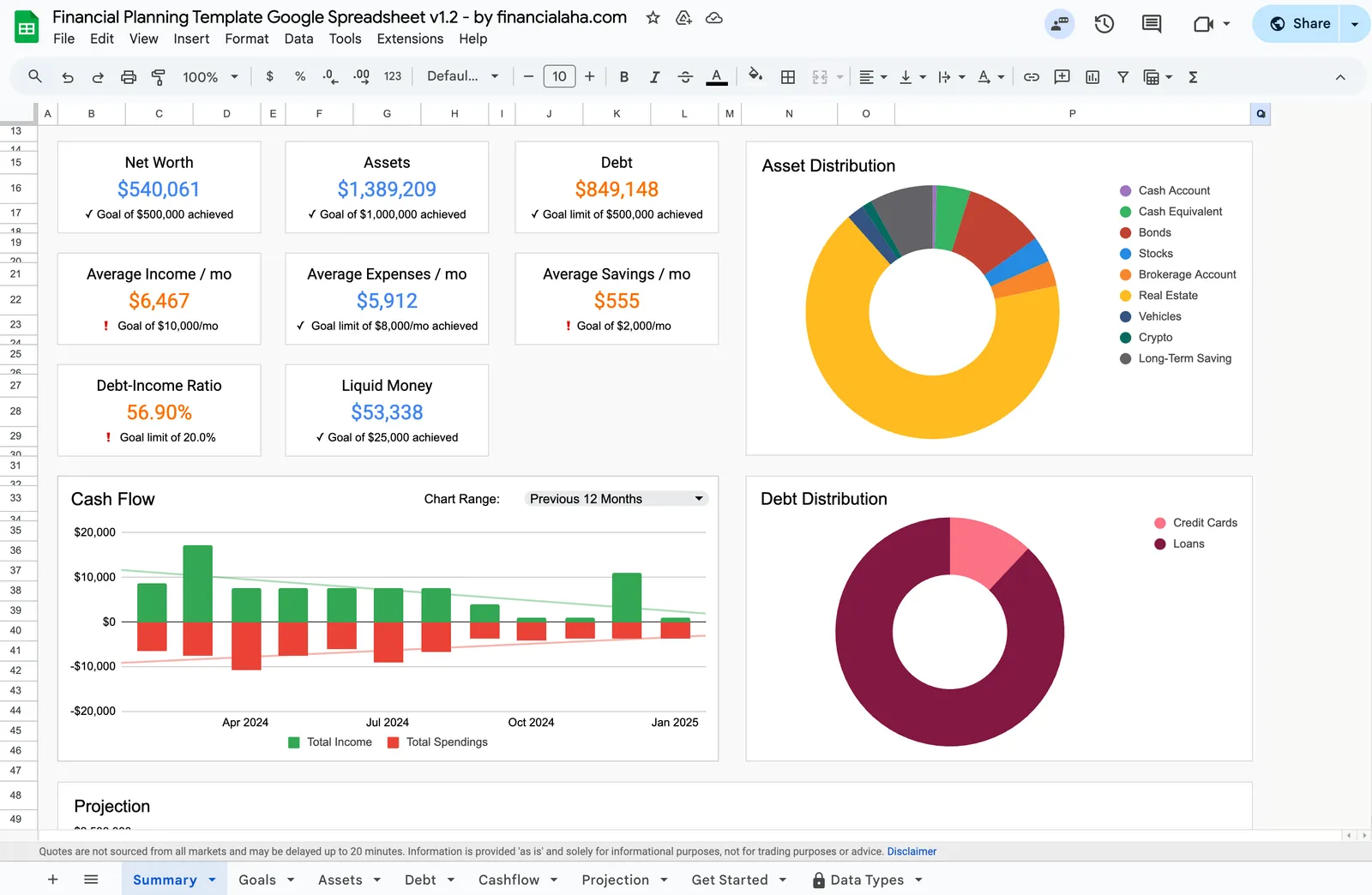
FinancialAha's spreadsheet template got a new design that enhances usability, readability, flexibility, and clarity. Financial planning is now less overwhelming and more engaging.
Managing your finances just got even better! We’re excited to introduce the newly redesigned financial planning spreadsheet. It still has the same powerful formulas to track your net worth, assets, debt, cash flow, savings, and financial goals. You can also project your financial future based on key assumptions. But now, the design is more intuitive, user-friendly, dynamic, and visually appealing, making financial planning easier than ever.
What’s New
The redesign touches every part of the template, from layout and colors to navigation and clarity. Here’s what changed and why it matters for your financial planning workflow.
New Design, Better Usability - The new layout is clean and well-organized, making it easier to navigate and analyze your financial data at a glance. Everything has a logical place, and related information sits together rather than scattered across different sections.
Improved Readability - Better spacing and color-coding help the key numbers stand out. Each Summary tile carries a status line under the figure, so net worth, assets, debt, liquid money, the debt-to-income ratio and the monthly income, expenses and savings averages all show at a glance whether the target from the Goals tab has been met.
Dynamic Functionality - The Cash Flow chart on the Summary tab has a Chart Range selector with three settings, All Time Historical, Previous 12 Months and YTD. The Projection tab takes a Projection End Year, so the forecast horizon is a single cell rather than a rebuild.
Get Started Guide - A dedicated Get Started tab walks through the tabs listed at the bottom of the file, covering Summary, Goals, Assets, Debt, Cashflow and Projections in turn. Whether you’re new to financial planning spreadsheets or just want a refresher, the explanation travels with the file instead of living in a separate document.
Dedicated Goal-Setting Sheet - The Goals tab holds eight targets in one column: net worth, liquid money, assets value, maximum debt, debt-to-income ratio, and average monthly income, expenses and savings. The Summary tiles read from that column, so editing a target changes what the dashboard reports back.
Minimal Distractions, Maximum Clarity - We’ve removed unnecessary clutter while keeping all essential data points accessible. Editable cells are now visually distinct from formula cells, reducing confusion about where to enter your information.
Why You’ll Love the Update
A great financial planning tool shouldn’t just be functional - it can also be a pleasure to use. With this redesign, we’ve focused on making financial management less overwhelming and more engaging. Whether you’re tracking your cashflow, planning long-term investments, or setting savings goals, the improved layout aims to reduce friction at every step.
The visual improvements aren’t just cosmetic. When information is easier to find and understand, you’re more likely to actually use the template regularly. And consistent use is what turns a spreadsheet from a nice idea into a genuinely useful tool.
Same Powerful Formulas, New Presentation
If you’ve used the previous version, you’ll feel right at home with this update. The tabs still carry the calculations rather than asking you to write them. Assets multiplies value by the number of positions and applies each annual yield, Debt holds balances, interest rates and minimum payments, Cashflow nets monthly income against spending, and the Summary pulls all three together into net worth, liquid money and a debt-to-income ratio.
What has changed is how that information is presented. The same data now appears in a cleaner format with better visual hierarchy. You get all the financial tracking power you’ve come to rely on, just in a more polished and easier-to-navigate package.
Upgrading from the Previous Version
Migrating your financial data from the old template to the new one is straightforward, though it does require some attention to detail. The structure has changed in places, so a simple copy-paste won’t always work.
If you’d like guidance on the migration process, drop us a line and we’ll help you through it. We want to make sure your historical data transfers correctly so you can keep tracking your progress without interruption.
See It in Action
The template page opens a live preview of the new design. You can explore the layout and follow how the Assets, Debt and Cashflow tabs feed the Summary and the Projection.
We’d love to hear your feedback. Let us know how the financial spreadsheet template from FinancialAha is working for you - what’s helpful, what could be better, and what you’d like to see in future updates. Get access to the template and see the difference for yourself.
Related Templates
- Financial Planning Template - The comprehensive template featured in this article
- Net Worth Tracker - Focused on assets, liabilities and net worth over time, with its own Milestones tab
- Annual Budget Planner - For those focused primarily on yearly budgeting
- Monthly Budget Template - For month-by-month expense tracking and budget management
About this article
Template tabs, inputs, dropdowns, charts and formulas checked on 2026-09-10 against the shipped Financial Planning Google Sheet (Summary, Goals, Assets, Debt, Cashflow, Projection, Get Started and Data Types tabs). Last reviewed September 2026.