
Ten financial planning tools worth knowing for 2026, spanning spreadsheet templates, budgeting apps, and robo-advisors, each with its current price and where it falls short. Spreadsheet users keep the most control with FinancialAha's Financial Planning Template or Tiller's automated imports; hands-off budgeters lean on YNAB or PocketGuard; and automated investing runs through Wealthfront or Acorns. The right fit comes down to how much automation you want against how much control you keep.
Financial planning is more important than ever as we head into 2026, with economic uncertainties, shifting investment landscapes, and increasing personal financial complexity. Fortunately, a range of financial planning tools can help you manage your money, plan for the future, and stay on top of your financial goals. Whether you’re an individual looking to budget better or a professional seeking to manage client portfolios more effectively, there’s something for everyone.
In this article, we’ll highlight some of the top financial planning tools that will help you optimize your finances in 2026, starting with FinancialAha, which offers an innovative approach to personal finance.
Quick Comparison
Before diving into details, here’s a high-level overview of what each tool offers and where it falls short.
| Tool | Category | Pros | Cons |
|---|---|---|---|
| FinancialAha | Spreadsheet | Customizable templates for personal finance, budgeting, investment tracking, retirement and more. | No automatic sync with bank accounts. |
| Empower (was Personal Capital) | Wealth Management | Detailed investment tracking, net worth analysis, retirement planning, and fee analysis. | Premium features may require a fee. |
| YNAB | Budgeting | Proactive budgeting approach, goal tracking, financial education resources. | Monthly subscription fee. |
| GoodBudget | Budgeting | Digital envelope budgeting system, syncs across devices for shared budgeting. | Limited features compared to other budgeting apps. |
| Tiller Money | Spreadsheet | Automated data entry into Google Sheets or Excel, customizable financial reports. | Requires a subscription fee for advanced features. |
| Robinhood | Investment | Commission-free trading for stocks, ETFs, options, and cryptocurrencies. | Limited customer support and account security concerns. |
| PocketGuard | Budgeting | Expense tracking, bill management, savings goals, and alerts for unusual spending. | Limited investment tracking features. |
| Acorns | Micro-Investing | Automated investing by rounding up purchases, retirement account options. | Fees for premium features and account management. |
| Monarch Money | Budgeting | Budget vs. actual tracking, net worth, investments, and shared access for couples. | Subscription-only at $99.99/year, no free tier. |
| Wealthfront | Automated Planning | Robo-advisor for personalized investment strategies, retirement planning, and education. | Fees for investment management and premium features. |
Each tool has its strengths, and the right choice depends on your specific needs - whether that’s detailed budgeting, investment tracking, retirement planning, or a combination of these.
1. FinancialAha - Spreadsheet Templates for Personal Finance
If you’re someone who prefers using spreadsheets for tracking finances, Financial Aha offers customizable financial planning templates that can help you organize and optimize your personal or business finances. From budgeting and investment tracking to retirement planning and debt repayment schedules, Financial Aha’s templates allow users to take control of their financial data in an easy-to-use format. Their extensive library of spreadsheet templates covers a variety of financial needs, from saving for a vacation to managing household expenses.
The Financial Planning Template is the flagship offering - a comprehensive spreadsheet that tracks net worth, assets, debts, cash flow, and savings while projecting your financial future based on customizable assumptions. For those focused specifically on budgeting, the Annual Budgeting Planner and Monthly Budgeting Template provide focused tools for tracking income and expenses.
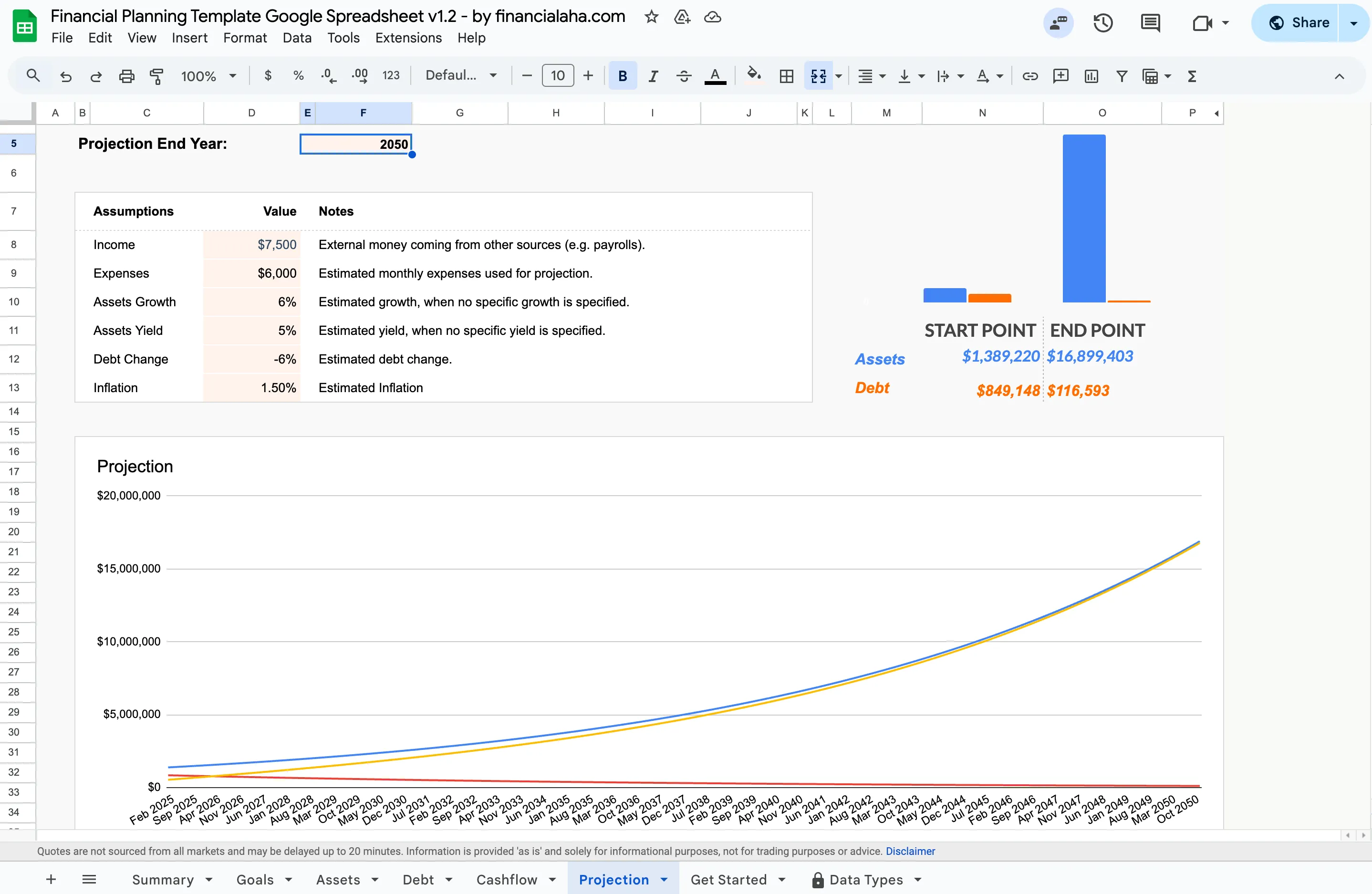
The Projection tab of the Premium Financial Planning Template turns six assumptions into a long-range forecast of assets and debt, running out to an end year you set.
If you want to sketch out individual pieces before committing to a full template, the free net worth calculator and retirement calculator answer those single questions in your browser.
As people continue to look for cost-effective solutions that still provide flexibility, Financial Aha’s templates offer a straightforward and hands-on approach to financial planning. They allow for full customization to fit your specific needs, ensuring you’re well-prepared for whatever the future holds.
2. Empower (formerly Personal Capital) - Wealth Management and Investment Tracking
Empower, previously known as Personal Capital, blends personal finance and wealth management tools to give you a comprehensive overview of your finances: investment tracking, net worth analysis, retirement planning, and spending analysis in one dashboard. You can view portfolio performance, analyze fees with the retirement fee analyzer, and see how different parts of your finances connect.
The free tools provide substantial value on their own. Empower’s business model involves offering wealth management services to users with significant assets, which is where the company makes money, so for people looking for a unified dashboard without the paid advisory services, the free tier delivers considerable functionality.
3. YNAB (You Need A Budget) - Budgeting and Cash Flow Management
YNAB takes a different approach than most budgeting apps. Rather than tracking spending after the fact, it focuses on assigning every dollar a job before you spend it. This proactive methodology appeals to people who want structure in their finances and are willing to put in the upfront work.
The app has a passionate community of users who appreciate its philosophy. YNAB’s educational resources are extensive, covering everything from the basics of budgeting to handling irregular income. The subscription cost, $14.99/month or $109/year, is higher than many alternatives, but users who stick with the method often report meaningful changes in how they relate to money.
4. GoodBudget - Envelope Budgeting System
GoodBudget is a digital version of the traditional envelope budgeting system. You set aside portions of your income for different categories (like groceries, savings, and entertainment) and track your spending against these envelopes. The app allows syncing across devices, so both partners or family members can stay on the same page.
GoodBudget’s simplicity makes it appealing for people who prefer the envelope method but want the convenience of digital tracking. The free version works well for individuals, while the paid Premium plan, $10/month or $80/year, adds bank sync, unlimited envelopes, and debt tracking. For couples or families who want to coordinate spending without sharing bank login credentials, the syncing feature is particularly useful.
5. Tiller Money - Spreadsheet Budgeting
Tiller Money combines the flexibility of spreadsheets with automated transaction importing. It connects to your bank accounts and downloads transactions directly into Google Sheets or Excel, saving the tedious work of manual data entry while preserving the customization that spreadsheet users value.
The $99/year subscription, after a 30-day free trial, covers the data feed and access to the template libraries. For people who love spreadsheets but don’t want to type in every transaction manually, Tiller fills a useful niche. The tradeoff is that bank connections can occasionally break or lag, and you’re sharing account credentials with a third party - something not everyone is comfortable with.
6. Robinhood - Investment and Trading
Robinhood made its name by offering commission-free trading for stocks, ETFs, options, and cryptocurrencies. The platform is designed for accessibility, with a clean interface that doesn’t overwhelm new investors with jargon or complex charts.
The app has matured significantly since its early days, with improved security measures and expanded educational resources. It serves well as an entry point to investing, though more experienced traders sometimes find its features limiting. The business model relies on payment for order flow and premium subscriptions (Robinhood Gold at $5/month), so it’s worth understanding how the company makes money when trades are free.
7. PocketGuard - Budgeting and Expense Tracking
PocketGuard takes a straightforward approach to budgeting: it shows you how much you have “in your pocket” after accounting for bills, goals, and necessities. The app connects to your accounts, categorizes transactions automatically, and alerts you to unusual spending patterns or upcoming bills.
The simplicity is intentional - PocketGuard targets people who want spending visibility without the complexity of zero-based budgeting or envelope systems. The free version covers basic tracking, while PocketGuard Plus ($12.99/month or $74.99/year) adds features like unlimited accounts, a debt payoff plan, and deeper insights. For people who find detailed budgeting overwhelming, this streamlined approach can be more sustainable.
8. Acorns - Micro-Investing
Acorns automates investing by rounding up your everyday purchases and investing the spare change in a diversified portfolio. The core idea is to make investing painless - you don’t have to think about it or make active decisions. The app also offers retirement accounts and banking features, expanding its scope beyond simple round-ups.
The approach works well for people who struggle to set aside money deliberately but can handle small amounts being skimmed off their purchases. Subscription tiers range from $3 to $12 per month depending on features. For small balances, these fees can represent a significant percentage of your portfolio, so the math makes more sense as your balance grows.
9. Wealthfront - Automated Financial Planning
Wealthfront is a leading robo-advisor that manages investments automatically based on your goals, risk tolerance, and time horizon. It handles everything from portfolio construction to rebalancing and tax-loss harvesting, removing the need to make individual investment decisions.
The service charges 0.25% annually on managed assets, which is lower than most human advisors but higher than simply buying index funds yourself. Wealthfront works well for people who want professional-level portfolio management without the complexity of doing it themselves. The platform has expanded over time to include cash accounts, borrowing against your portfolio, and financial planning tools that project different scenarios for your future.
10. Monarch Money - All-in-One Budgeting and Net Worth
Monarch Money has become one of the most recommended Mint successors: a single app covering budgeting, net worth tracking, investment monitoring, and shared access for couples, with each partner getting their own login. The interface focuses on a budget-versus-actual view, and cash flow projections help with month-to-month planning.
Monarch is subscription-only at $99.99 a year or $14.99 a month with no free tier beyond the trial. For households that want one polished app for everything and are comfortable with bank syncing and the recurring cost, it is a strong option; the one-time-purchase spreadsheet route remains the alternative for people who want to own the file instead.
Finding the Right Fit
The tools covered here serve different needs and work in different ways. Some people thrive with YNAB’s disciplined approach, while others prefer the simplicity of PocketGuard or the automation of Wealthfront. Spreadsheet users might gravitate toward the Financial Planning Template or Tiller, depending on whether they want full control over their data or automated imports.
There’s no single correct answer - the right tool is the one that gets used consistently. Trying a few options before committing makes sense, especially for subscription services.
Related
- Personal Finance Spreadsheet Templates Compared: A Hands-On Review - Tested comparison of spreadsheet templates specifically
- Best YNAB Alternatives - Focused comparison for YNAB users
- Budget Spreadsheets vs Apps - The automation vs control tradeoff
- Financial Planning Template - All-in-one spreadsheet for projections and tracking
- The Best Financial Planning Software in 2026 - The software-focused companion to this roundup
- Free Financial Calculator Widgets for Your Site - Where the free calculators fit, and how to embed them
Frequently asked questions
Which of these tools are free to use?
Several have a genuinely useful free tier. Empower's dashboard tracks net worth, spending, and retirement projections at no cost, GoodBudget's free plan covers the envelope basics for one person, and PocketGuard's free version handles core spending tracking. FinancialAha's templates are a one-time purchase rather than a subscription, and the site's financial calculators are free to use in the browser.
What is the difference between a spreadsheet template and a budgeting app here?
Apps like YNAB, PocketGuard, and Empower connect to your bank and categorize transactions automatically, which saves typing but means sharing account access with a third party. A spreadsheet template such as FinancialAha's Financial Planning Template keeps every number on a sheet you own, with no bank connection, so you enter figures yourself and the calculations update on their own. Tiller sits in between, importing bank transactions straight into Google Sheets or Excel.
Are Personal Capital and Empower the same tool?
Yes. Personal Capital was renamed Empower after the Empower Retirement acquisition, so the two names refer to the same net worth and investment dashboard. Older articles and reviews still use the Personal Capital name.
Do the subscription prices include investment or advisory fees?
No. The monthly and yearly figures listed here are for the software subscription only. Investing platforms such as Wealthfront charge a separate management fee (0.25% a year on managed assets), and fund expense ratios apply on top of that. Always check the vendor's current pricing page before subscribing, since these figures change.
Sources
- Monarch Money Pricing - Monarch Money
- YNAB Pricing - YNAB
- Goodbudget Plans and Pricing - Goodbudget
- Tiller Pricing - Tiller
- PocketGuard Pricing - PocketGuard
- Robinhood Gold - Robinhood
- Acorns Pricing - Acorns
- Wealthfront Fees - Wealthfront
About this article
Every subscription price and management fee in this article was checked against each vendor's official pricing page. Template claims checked on 2026-09-10 against the shipped Premium Financial Planning Google Sheet (Summary, Goals, Assets, Debt, Cashflow, Projection tabs) and the Monthly Budgeting and Annual Budgeting Planner product pages. Last reviewed September 2026.