
FinancialAha has 43 free financial calculators you can embed on any site with one snippet of code. No signup, no view limits, and no cost, whether your page gets ten visitors or ten million. Paste the code into WordPress, Squarespace, Wix, or any HTML page and the calculator loads responsively.
Looking for a free calculator widget to add to your site? Most options out there have catches - view limits, forced branding, monthly fees, or require you to create yet another account.
We built 43 financial calculators that you can embed on any website. No signup. No monthly limits. No paid tier that unlocks anything. Just copy one short snippet of HTML and you’re done.
Why We Made These Free
We sell spreadsheet templates for personal finance. The calculators drive traffic to our site - that’s our business model. We’re not going to limit you to 100 views/month or force you to upgrade to remove branding. If your site gets a million visitors using our mortgage calculator, great.
This approach works better for everyone. You get genuinely useful widgets without the usual restrictions or upsells. We get exposure to people interested in personal finance. There’s no catch, no premium tier where the “real” features live, no email signup wall. The calculators work the same whether you’re a solo blogger or a major financial institution.
What’s Available
The library covers the calculations people actually need - mortgages, loans, retirement planning, taxes, and investments. Each calculator handles the math that would otherwise require a spreadsheet formula or an awkward Google search. Here’s a sampling across the main categories:
We’ve got 43 calculators across several categories:
Mortgage & Home
- Mortgage payment calculator (with taxes, insurance, PMI)
- Home affordability calculator
- Rent vs buy calculator
- Refinance break-even calculator
- Down payment savings calculator
- Rent vs sell calculator
Loans & Debt
- Auto loan calculator
- Loan payment calculator
- Debt payoff calculator (payoff time and interest saved from extra payments)
- Credit card payoff calculator
- Student loan calculator (with IDR plan comparison)
Retirement & Savings
- 401(k) calculator (with employer match)
- Retirement savings calculator
- FIRE calculator (plus a Coast FIRE variant)
- Savings calculator
- Emergency fund calculator
- College savings / 529 calculator
- Roth IRA growth calculator
- HSA calculator
- Social Security calculator
Income & Tax
- Paycheck calculator (federal + state)
- Income tax estimator
- Salary converter (hourly, monthly, and annual)
- Self-employment tax calculator
- Capital gains tax calculator
- Side hustle income calculator
Investment Tools
- Compound interest calculator
- Investment returns calculator
- After-tax return calculator
- Inflation calculator
- Net worth calculator
That’s a slice of the full set. The library also includes income and net worth percentile tools, backdoor Roth and Roth conversion calculators, a lease vs buy comparison, and more.
How to Add a Calculator Widget
Every calculator page has an embed section at the bottom:
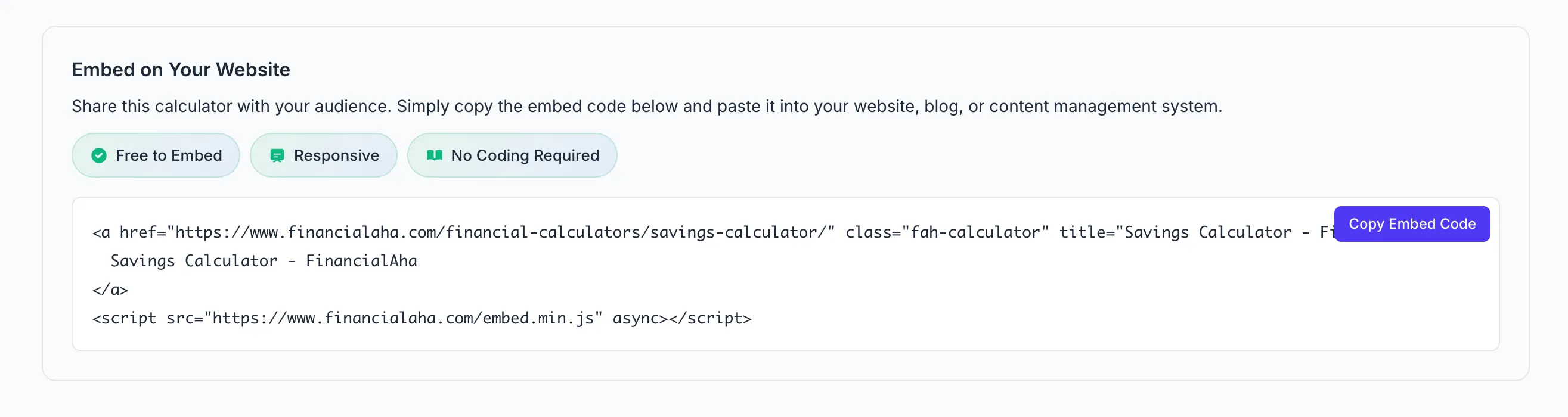
Click “Copy Embed Code” and paste into your site. Done.
The embed is just an anchor tag plus a small script. The script turns the link into the full interactive calculator and adds a one-line “Calculator by FinancialAha” credit underneath it. If JavaScript fails to load, users still get a working link to the calculator, so there is graceful degradation built in. Prefer a plain iframe instead? Every calculator also has an /embed/ URL you can drop straight into an iframe, which carries no credit line, and the embed guide shows that iframe snippet alongside the full list of calculators to swap into it.
Here’s the mortgage payment calculator embedded live, exactly as your visitors would see it on your own page:
Every calculator sits behind the same /embed/ route, so the process is identical no matter which one you pick.
Platform-Specific Instructions
WordPress - Add a Custom HTML block, paste the code. No plugin needed.
Squarespace - Insert a Code Block, paste the embed.
Wix - Use the HTML iframe/embed element.
Webflow - Drop it in an Embed component.
Shopify - Works in page content and blog posts.
Ghost - Use the HTML card in the editor.
Static HTML / React / Vue / Next.js - Just paste it in your markup.
No API keys. No configuration files. No WordPress plugin that breaks every update.
Technical Details
Performance - The embed script is minified (under 2KB) and loads async. Won’t block your page render or tank your Core Web Vitals.
Privacy - No cookies. No tracking pixels. All calculations happen client-side. Nothing gets sent to our servers. GDPR-friendly.
Responsive - Calculators adapt to their container width. Mobile-friendly out of the box.
Accessible - Every input has a label tied to it, and the calculators are built from native form controls, so they work with a keyboard and with screen readers.
Where People Use These
Real estate sites - Mortgage calculator on listings. Home affordability calculator for buyer guides. Rent vs buy for blog posts comparing options.
Finance blogs - Compound interest calculator for “how investing works” posts. Debt payoff calculator for payoff journey content. FIRE calculator for the financial independence community.
Financial advisors - Retirement calculator on services pages. Net worth calculator for wealth management. 401(k) calculator when discussing employer benefits.
HR portals - Paycheck calculator so employees understand their take-home. Salary converter for comparing job offers internally.
Car dealerships - Auto loan calculator on financing pages. Lease vs buy comparison for shoppers on the fence.
Banks & credit unions - Mortgage and savings calculators as member tools. Loan calculators for product pages.
Why Not Build Your Own?
You could build calculators from scratch. But then you’re maintaining calculator logic, handling edge cases, testing across browsers, making it responsive, ensuring accessibility, and updating it when tax brackets change. That’s a lot of ongoing work for something that isn’t your core product.
Financial calculations also have nuances that aren’t immediately obvious. Mortgage amortization needs to handle extra payments correctly. Tax calculators need to stay current with bracket changes. Loan calculators need to account for different compounding frequencies. These details matter, and getting them wrong undermines trust.
By embedding instead of building, you can move on to things that actually differentiate your site. The calculators stay updated automatically - when tax rates change or we add new features, your embedded version gets them too.
vs Other Calculator Widgets
| FinancialAha | Elfsight | Calconic | ConvertCalculator | |
|---|---|---|---|---|
| Free views | Unlimited | 200/mo | 500/mo | 100/mo |
| Signup | No | Yes | Yes | Yes |
| Branding removable | Yes, no fee | Paid only | Paid only | Paid only |
| Pre-built finance calcs | 43 | Build your own | Build your own | Build your own |
| Setup time | 30 sec | 5-10 min | 5-10 min | 5-10 min |
Free-plan limits above come from each vendor’s own pricing page, checked August 2026. Their builders are more flexible if you need a bespoke calculator with custom inputs and styling. If you want a ready-made finance calculator with no view cap and no branding to buy back, that’s the gap these fill.
Get Started
Adding a calculator to your site takes about 30 seconds. Head to our calculator library, find the one that fits your content, scroll down to the embed section, and copy the code. Paste it into your page and you’re done, and the calculator appears wherever you placed the snippet. The embed guide has the iframe snippet and the full list of 43 calculators in one place if you prefer to start there.
There’s nothing to configure, no API keys to manage, no accounts to create. The embed code handles everything. If you run into issues or want to test it first, the calculator pages themselves show you exactly what your visitors will see.
Need a calculator we don’t have? Found something broken? Let us know - we’re actively expanding the library based on what people actually need.
Related resources
- All 43 financial calculators - browse the full library by category
- Embed calculators on your site - the three-step guide, the iframe snippet, and every calculator listed by category
- Mortgage Payment Calculator - covers property taxes, insurance, and PMI alongside principal and interest
- Compound Interest Calculator - a common pick for finance blogs explaining how investing grows
- Top financial planning tools and apps for 2026 - where free calculators fit among the wider toolset
Frequently asked questions
Do my visitors' numbers get sent to FinancialAha?
No. The calculator runs entirely in the visitor's browser. Inputs like income, loan balance, or home price are never sent to our servers, so there is nothing on our side to store.
What happens to an embedded calculator when tax brackets or rates change?
The embedded version loads from the live calculator page, so updates and fixes appear automatically. You do not need to touch the embed code again after pasting it once.
Can I put more than one calculator on the same page?
Yes. Each calculator has its own embed snippet, and you can paste as many as you like on a single page.
Is there a traffic or view limit on the free calculators?
No. There is no view cap and no removable-for-a-fee branding, whether the page gets ten visits a month or ten million.
Sources
- Elfsight Pricing - Elfsight
- Calconic Pricing - Calconic
- ConvertCalculator Pricing - ConvertCalculator
About this article
Competitor free-plan view limits checked against Elfsight, Calconic, and ConvertCalculator's own pricing pages Calculator count, names, embed snippet and attribution checked on 2026-09-10 against src/data/calculators.ts, the calculator page embed generator, src/scripts/embed.js and the /financial-calculators/embed-on-your-site/ guide Last reviewed September 2026.