
Seven financial planning tools compared on price and fit, with every price checked against each vendor's live pricing page. FinancialAha's Google Sheets templates are the one-time, own-your-data pick; YNAB and Monarch lead app-based budgeting, ProjectionLab handles retirement projections, and Tiller automates spreadsheets. Which one fits comes down to whether you want to own the file or rent the software.
There are dozens of financial planning tools available in 2026. Most reviews list features without much context. This one tries to be more useful - covering price, strengths, weaknesses, and who each tool actually serves well.
Quick comparison
| Tool | Type | Price | Primary strength |
|---|---|---|---|
| FinancialAha | Spreadsheet templates | One-time purchase | Privacy + projections |
| YNAB | Budgeting app | $14.99/mo or $109/yr | Budget discipline |
| Monarch Money | Budgeting app | $14.99/mo or $99.99/yr | Family budgeting |
| ProjectionLab | Planning app | Free tier + $129/yr | Scenario modeling |
| Kubera | Wealth tracker | $250/yr | Global asset tracking |
| Vyzer | Asset management | Free tier + paid plans | Portfolio overview |
| Tiller | Spreadsheet + automation | $99/yr | Automated spreadsheets |
1. FinancialAha - Spreadsheet templates
Price: One-time purchase (no subscription) Key strength: Complete data privacy - your data stays in your Google Drive Key weakness: No bank syncing - you enter the figures yourself
FinancialAha offers Google Sheets templates for budgeting, financial planning, net worth tracking, and retirement projections. You buy once, own it, and get free updates.
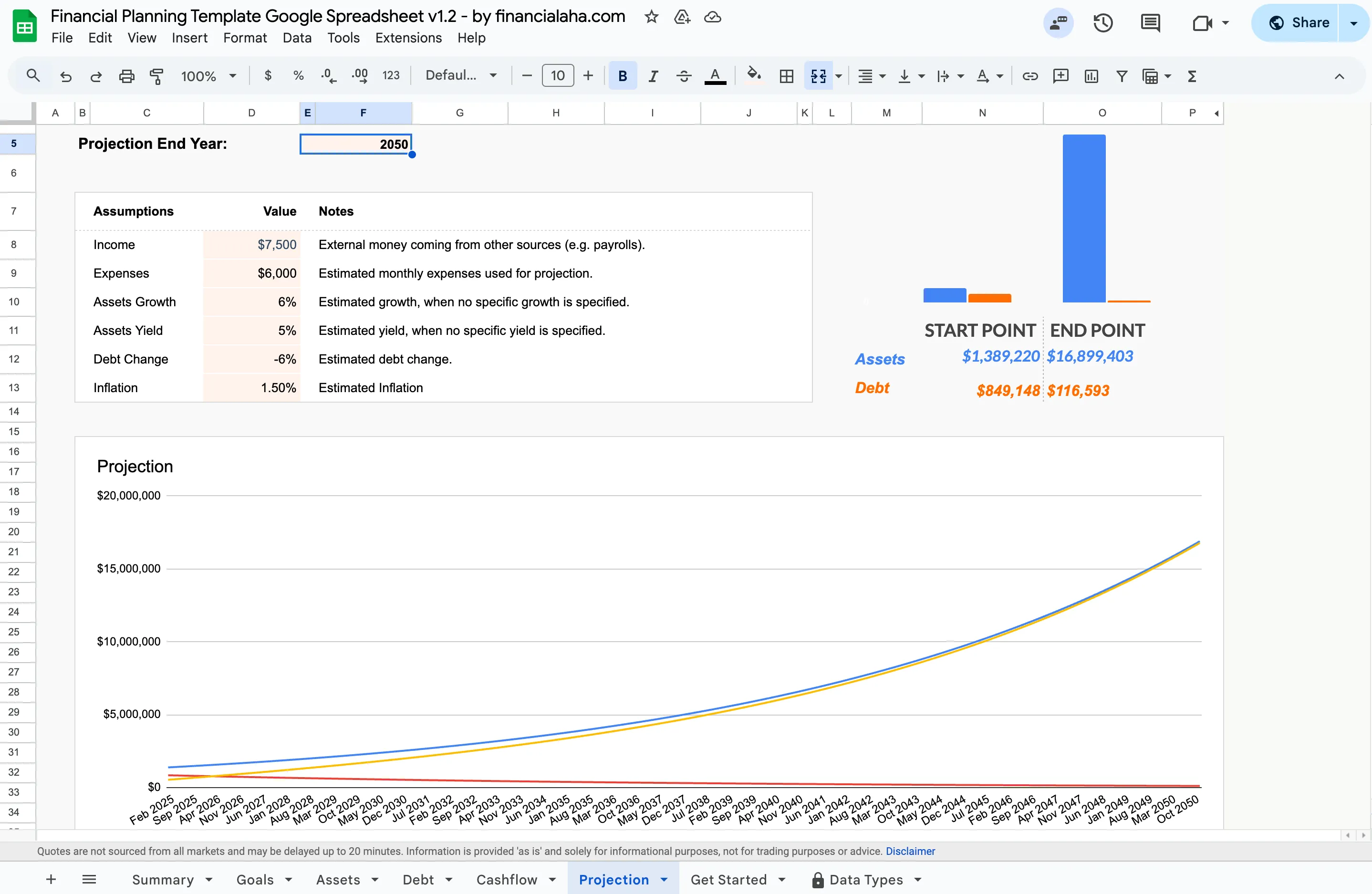
The projection tab above is where the long-range work happens: set your assumptions, income, expenses, growth, yield, inflation, and the sheet charts assets and debt out to your chosen end year.
Honest take: This is for people who want full control and don’t mind manual entry. The Financial Planning Template ($29 once) projects assets and debt from your own figures out to an end year you set, using assumptions you control for income, expenses, growth, yield, debt change and inflation. The trade-off is doing the data entry yourself. If privacy matters to you, there are no bank credentials to hand over and the file sits in your own Google Drive rather than in a finance company’s database. For a deeper look at that trade-off, see Financial Planning Software or Spreadsheet?
Useful for: Privacy-focused planners, spreadsheet enthusiasts, people avoiding subscriptions.
2. YNAB (You Need A Budget)
Price: $14.99/month or $109/year (34-day free trial) Key strength: Zero-based budgeting methodology that builds real spending discipline Key weakness: Steeper learning curve than most budgeting apps
YNAB assigns every dollar a job before you spend it. It syncs with bank accounts and has a strong educational library.
Honest take: YNAB works extremely well for people who commit to the method. The zero-based approach changes how you think about money. But it requires active engagement - this isn’t a “set it and forget it” tool. Some people love the philosophy; others find it rigid.
Useful for: People who want structured budgeting discipline and are willing to learn the system.
3. Monarch Money
Price: $14.99/month or $99.99/year (7-day free trial) Key strength: Clean interface with strong household and family features Key weakness: Projections and planning features are basic compared to dedicated tools
Monarch handles budgeting, net worth tracking, and goal setting with bank syncing and automated categorization. Picked up many users after Mint shut down.
Honest take: Monarch is the most polished all-in-one budgeting app right now. The shared household features are genuinely good for couples. Where it falls short is long-term planning - if projections and scenario modeling matter, you’ll need to supplement with another tool.
Useful for: Couples and families who want collaborative budgeting with a clean interface.
4. ProjectionLab
Price: Free tier available, Premium plan at $129/year Key strength: Detailed scenario planning for retirement and financial independence Key weakness: Not a budgeting tool - focused entirely on projections
ProjectionLab lets you model multiple financial scenarios and see how different decisions play out over decades. Interactive charts and customizable assumptions.
Honest take: ProjectionLab excels at “what if” planning. It’s one of the more thoughtful projection tools available. But it doesn’t help with day-to-day budgeting or expense tracking. Useful as a complement to a budgeting tool, not a replacement.
Useful for: FIRE planners, retirement planners, and anyone who wants detailed scenario analysis.
5. Kubera
Price: $250/year Key strength: Tracks assets globally across currencies, crypto, real estate, and traditional investments Key weakness: Expensive, and not designed for day-to-day budgeting
Kubera provides a consolidated view of wealth across asset classes and countries. Strong security with multi-factor authentication.
Honest take: Kubera fills a specific niche: people with diverse, international assets who want one dashboard. If your finances are primarily domestic bank accounts and a 401(k), this is more tool than you need. At $250/year, it’s priced for people with substantial portfolios.
Useful for: High-net-worth individuals, people with international investments or crypto holdings.
6. Vyzer
Price: Free tier available, paid plans for advanced features Key strength: Clean asset management dashboard with detailed reporting Key weakness: Less useful for people without significant investable assets
Vyzer focuses on asset tracking and portfolio visualization. Collaboration features make it suitable for families or business partners managing joint assets.
Honest take: Vyzer’s interface is genuinely well-designed for seeing the big picture of your portfolio. It’s more of an asset management tool than a financial planning tool. Useful for tracking what you have, less useful for planning what to do next.
Useful for: Investors who want a clear dashboard view of their portfolio.
7. Tiller
Price: $99/year (30-day free trial) Key strength: Automatically pulls bank data into Google Sheets or Excel Key weakness: Still requires spreadsheet skills to customize beyond templates
Tiller bridges the gap between apps and spreadsheets. It automates data import while giving you full spreadsheet flexibility.
Honest take: Tiller is the right choice for people who want spreadsheet control but hate manual data entry. The automation is the selling point. If you’re comfortable building your own sheets but want the data to flow in automatically, Tiller delivers on that promise.
Useful for: Spreadsheet power users who want automation without giving up customization.
How to choose
There’s no single tool that handles everything well. A few common combinations:
- Budgeting + projections: YNAB or Monarch Money paired with ProjectionLab or the Financial Planning Template
- All-in-one spreadsheet approach: FinancialAha templates for budgeting, net worth, and projections in Google Sheets
- Asset tracking + budgeting: Kubera or Vyzer for portfolio view, plus a budgeting tool for daily spending
What matters more than the feature lists is which tool you will actually open week after week. The tools that rent access (YNAB, Monarch, Kubera) keep billing for as long as you use them; the templates you buy once do not. If the own-your-data, no-subscription route is the one that fits, the Financial Planning Template is where the projection tab shown above lives, and Financial Planning Software or Spreadsheet? walks through the trade-off in more detail before you commit either way.
Related
- Financial Planning Template - one-time Google Sheets template for budgeting, net worth, and long-range projections
- Net Worth Tracker Template - track assets and liabilities in one owned spreadsheet
- Financial Planning Software or Spreadsheet? - the app-versus-spreadsheet decision, unpacked
- Browse all FinancialAha templates - budgeting, net worth, and planning sheets you buy once
- Top Financial Planning Tools and Apps for 2026 - the wider toolset, apps and calculators included
Frequently asked questions
Which of these is cheapest over five years?
A one-time template purchase, like FinancialAha's Financial Planning Template at $29, costs the same in year five as in year one. Subscriptions keep billing: YNAB runs $109/year and Monarch $99.99/year, so five years is roughly $545 and $500. The free tiers on ProjectionLab and Vyzer stay free but cap features. The total depends entirely on how long you keep using the tool.
Do any of these work without connecting a bank account?
FinancialAha templates do not connect to bank accounts, so no account linking is involved. YNAB, Monarch, Kubera, Vyzer, and Tiller are built around bank syncing for their core value, though most also allow manual entry at the cost of their automation. ProjectionLab is projection-only and never touches transaction data.
Can one tool replace all the others?
None covers everything well. Budgeting apps are thin on long-term projections, projection tools skip day-to-day tracking, and asset trackers are not budgets. A common pattern is pairing a budgeting tool with a projection tool, or using one spreadsheet that holds budgeting, net worth, and projections in a single file.
Are these prices current?
Each figure here was checked against the vendor's own pricing page in August 2026. Subscription prices move often, and both YNAB and Kubera have raised prices recently, so it is worth confirming on the vendor's site before you buy.
Sources
- YNAB Pricing - YNAB
- Monarch Pricing - Monarch
- ProjectionLab Pricing - ProjectionLab
- Kubera Pricing - Kubera
- Vyzer Pricing - Vyzer
- Tiller Pricing - Tiller
- Financial Planning Template - FinancialAha
About this article
Every competitor price and free-trial length was checked against each vendor's published pricing page. FinancialAha template pricing, tabs and inputs were checked on 2026-09-10 against the shipped Financial Planning Google Sheet (Summary, Goals, Assets, Debt, Cashflow, Projection tabs) and the product catalog. Last reviewed September 2026.