
YNAB costs $109/year; the Monthly Budget Template is a one-time $29. The subscription buys automatic bank syncing and a polished mobile app, but YNAB's real value is its zero-based method, give every dollar a job, which works in any spreadsheet. Over ten years the gap is $1,090 versus $29.
YNAB costs $109/year. The Monthly Budget Template is $29 once. The real question: is automatic bank syncing worth over $1,000 across ten years?
That template carries a zero-based block on its Summary sheet, taking income minus expenses minus savings and flagging whatever is left as unallocated, with no subscription attached. Bank syncing is convenient, but the methodology is what actually changes behavior, and the methodology works in any tool.
Template option: The Budgeting Bundle puts three templates in one purchase: Monthly Budgeting, the Annual Budgeting Planner and the Travel Budget Planner. The monthly and annual sheets each show what is left unallocated once planned expenses and savings come out of income, and none of them carry a subscription.
The Honest Cost Comparison
The math is straightforward. Over time, the subscription adds up to meaningful money.
| Timeline | YNAB Cost | Spreadsheet |
|---|---|---|
| 1 year | $109 | $29 |
| 5 years | $545 | $29 |
| 10 years | $1,090 | $29 |
That’s a vacation fund. Or extra retirement contributions. Or simply money that stays in your pocket. Whether the convenience justifies the cost is a personal calculation.
What YNAB Actually Offers
Understanding what you’re paying for helps evaluate whether the subscription makes sense for your situation.
Automatic bank sync is the headline feature. Connect your accounts and transactions appear without manual entry. It works most of the time, though sync issues are common: banks change their systems, connections break, and manual reconciliation becomes necessary periodically.
The mobile app is genuinely YNAB’s strength. Checking budgets on the go is smooth. The app is purpose-built for mobile use in a way that spreadsheets on phones can’t match. If mobile access matters, this weighs in YNAB’s favor.
Educational content provides value for newcomers. Workshops and resources teach the YNAB methodology in depth. For people new to budgeting, this structured learning can be valuable.
The zero-based structure drives the app’s design. “Give every dollar a job” isn’t just a tagline; it’s baked into how the interface works. This can be helpful if you need guardrails, or limiting if you want to budget differently.
What Spreadsheets Offer
Spreadsheets provide a different set of advantages. The trade-off is more manual work for more control and lower cost.
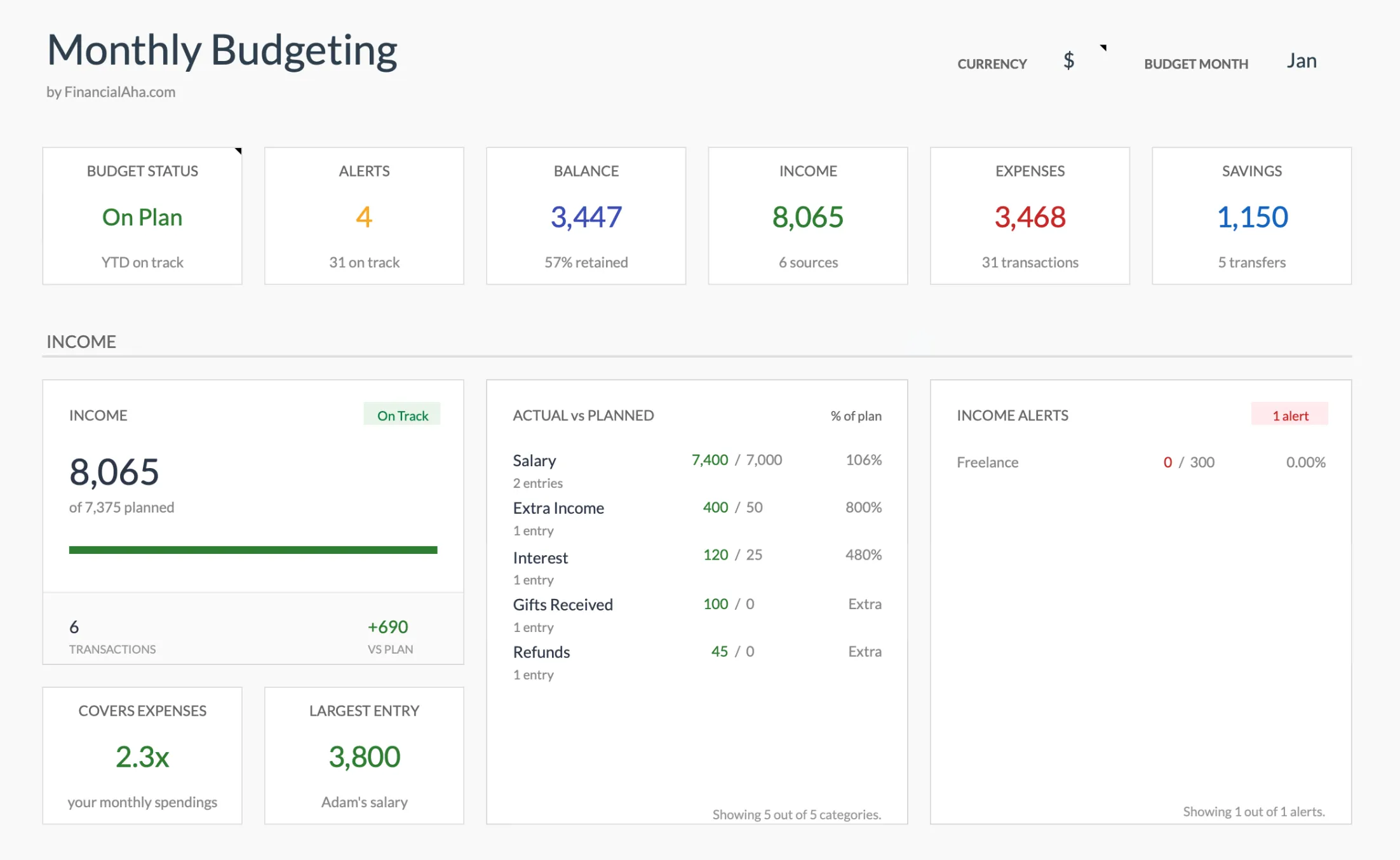
The Monthly Budget Template (Premium tier) sets actual against planned for every income and expense category on one Summary sheet, with a zero-based block further down that subtracts expenses and savings from income.
Complete customization means building exactly what you want. No feature requests, no waiting for updates, no limitations. If you can imagine a way to track or visualize your budget, you can build it.
Data ownership means your budget data stays in files you control. No company shutdown locks you out. No policy changes affect your access. After Mint’s shutdown left users scrambling to export years of data, this matters more than it used to seem.
Privacy improves with spreadsheets. No bank credentials flow through third-party aggregators. Your financial data stays on your own devices or your own cloud storage, not on company servers.
No subscription dependency means your budget works indefinitely. Cancel nothing because there’s nothing to cancel. The system you build continues working as long as you maintain it.
YNAB’s Methodology Without YNAB
Here’s the key insight: YNAB’s value comes from its methodology, not its software. The app implements principles that work regardless of the tool. Understanding those principles matters more than which interface you use.
Give every dollar a job is zero-based budgeting. Each dollar gets assigned to a category before you spend it. This works in spreadsheets by allocating all income to categories until the unassigned total reaches zero.
Embrace your true expenses means budgeting for irregular costs. Car insurance due annually, holiday gifts, and home repairs each get monthly allocations so the money is available when the expense arrives. Spreadsheets handle this with sinking fund columns.
Roll with the punches means adjusting when overspending occurs. Move money between categories rather than calling the budget “failed.” Spreadsheets make this easy: change the numbers and the formulas recalculate.
Age your money means spending last month’s income, not this month’s. Building a buffer so you’re not living paycheck to paycheck. Spreadsheets track this with running balances.
None of these principles require the YNAB app. You can implement every one in a spreadsheet. To see how a take-home income figure splits across spending, saving, and debt before you commit it to categories, the Budget Calculator runs the first pass in seconds:
When YNAB Makes Sense
For some people, the subscription genuinely provides value that exceeds its cost.
YNAB makes sense for those new to budgeting who want structure and education, for people who find bank sync essential because manual entry genuinely won’t happen, for those who need mobile access as a core feature, and for anyone who finds that the financial investment drives engagement, since paying for something sometimes increases commitment to using it.
When Spreadsheets Win
For others, spreadsheets provide a better fit at no ongoing cost.
Spreadsheets win when privacy matters and bank linking feels uncomfortable, when control appeals and you want a system that never changes without your decision, when cost matters and $109/year feels like real money that could go elsewhere, when basic spreadsheet skills already exist, and when long-term reliability matters and you want a budget that works indefinitely without subscription management.
The Hybrid Approach
A middle path exists: use YNAB to learn, then graduate to spreadsheets.
Start with YNAB’s 34-day trial to learn zero-based budgeting with training wheels. The app provides structure and education while you internalize the methodology. Then build a spreadsheet using the learned principles before the trial ends. Cancel the subscription but keep the methodology. You’ve gotten the educational value without the ongoing cost.
This approach works well for people who want the learning resources but don’t want the long-term subscription.
Where This Leaves You
The subscription question comes down to what you are actually paying for: automation and a mobile app, not the method itself. The zero-based approach that makes YNAB work is portable, and it runs just as well in a sheet you own outright. To keep that method without the recurring bill, the Monthly Budget Template sets up planned-versus-actual by category on day one, and the Budgeting Bundle adds the Annual Budgeting Planner for a month-by-month year view along with the Travel Budget Planner. Both are one-time purchases, used by 1,000+ customers across 65+ countries.
More YNAB Comparisons
- Best YNAB Alternatives - Full roundup of alternatives with pricing
- EveryDollar vs YNAB - Dave Ramsey’s tool vs YNAB
- YNAB vs Monarch Money - Feature and pricing comparison
- Tiller vs YNAB - Spreadsheet-based vs app-based
Related
- Monthly Budget Template - Zero-based budgeting in Google Sheets
- Why I Switched From Budgeting Apps to Spreadsheets
- Budget Spreadsheets vs Apps
Frequently asked questions
Is YNAB actually worth the cost?
For some people, yes. The structured approach and educational content help many people budget successfully for the first time. Whether $109/year is worth it depends on your alternatives and how much you value automatic syncing and the mobile app.
Can someone budget like YNAB without YNAB?
Yes. The methodology works in any tool. A spreadsheet implements the same zero-based principles with more initial setup effort but no ongoing cost.
What about Tiller Money?
Tiller is $99/year and pulls transactions automatically into your own Google Sheets. It is a middle ground between full app automation and a plain spreadsheet: you keep spreadsheet control while the imports happen for you.
Does a budget spreadsheet connect to my bank like YNAB does?
No. The Monthly Budget Template uses manual entry, so transactions are typed or pasted in rather than synced automatically. That is the core trade-off, less automation in exchange for full data ownership and no subscription. Tiller sits in between if automatic imports into a spreadsheet matter to you.
Can I move my YNAB budget into a spreadsheet?
YNAB lets you export your budget and transaction data to CSV from account settings, and those files can be pasted into a spreadsheet. In the Monthly Budget Template, category names need to match the lists on the Categories sheet, which can be renamed or added to, because the Budget Plan totals actuals by category name. Planned amounts are typed once into the Budget Plan budget column.
Sources
- Pricing - YNAB
- Our Free 34-Day Trial - YNAB
- Tiller Pricing And Free Trial - Tiller
About this article
YNAB and Tiller prices verified against each company's official pricing page. Template prices reflect FinancialAha's current published catalog. Template sheets, inputs and outputs checked on 2026-09-10 against the shipped Monthly Budgeting Google Sheet (Summary, Budget Plan, Transactions, Goals, Categories) and the Annual Budgeting Planner (Summary, Annual Plan), plus the Budgeting Bundle contents in the product catalog. Last reviewed September 2026.