
EveryDollar and YNAB both run zero-based budgeting. EveryDollar bakes in Dave Ramsey's baby steps and keeps a free manual tier, with bank sync on Premium at $79.99/year. YNAB has no free tier and charges $109/year with bank sync in every plan, trading a steeper learning curve for deeper reporting. To skip the subscription entirely, a one-time $29 Google Sheets budget template runs the same zero-based method.
Both EveryDollar and YNAB will tell you to give every dollar a job. Both practice zero-based budgeting - assigning all income to categories before spending anything. On the surface, they look like two versions of the same idea. Underneath, they are different products built on different worldviews.
EveryDollar comes from the Dave Ramsey universe. YNAB (You Need a Budget) has been building its own philosophy since 2004. Here is where they actually differ and why it matters.
The Ramsey Way vs. the YNAB Way
EveryDollar is an app that lives inside a larger system. Dave Ramsey’s baby steps (pay off debt smallest to largest, build an emergency fund, invest 15% for retirement) are baked into the experience. The app gently steers users along that path. For people who follow Ramsey, the app feels like coming home. For people who do not, the guidance can feel limiting.
YNAB has its own rules (Give Every Dollar a Job, Embrace Your True Expenses, Roll With the Punches, Age Your Money), but they are about how to think about money in general - not about which debt to pay first or how much to invest. YNAB does not care whether you follow Ramsey, the avalanche method, or your own system. It provides a framework without prescribing a specific financial path.
The distinction matters because it affects how the app feels during daily use. EveryDollar assumes you want a guided plan. YNAB assumes you want a flexible toolkit. Both are valid - but one will feel more natural depending on how you approach financial decisions.
How Bank Sync Splits the Pricing
Bank syncing, the automatic import of transactions from your checking, savings, and credit card accounts, is where the two apps’ pricing diverges, and the picture has shifted since EveryDollar’s January 2026 relaunch.
EveryDollar’s free version is manual-only. You type in every transaction by hand. The interface is clean, the process works, and for people who do not mind manual entry, the free tier is genuinely usable at no cost. Bank syncing, along with the newer paycheck-planning and guided-coaching tools, sits behind EveryDollar Premium at $79.99 per year, or $17.99 per month.
YNAB takes the opposite structure. There is no free tier at all, and one plan covers everything: $109 per year, or $14.99 per month, with bank syncing included. There is no separate add-on for it.
So the trade-off is not simply “one is cheaper.” If you want automatic bank sync, EveryDollar Premium ($79.99) undercuts YNAB ($109) by about $30 a year. If you are content with manual entry, EveryDollar’s free tier beats both paid plans outright, while YNAB gives you no unpaid option. The people who leave EveryDollar for YNAB usually do it for the deeper reporting and the method, covered next, rather than the price.
Simplicity vs. Depth
EveryDollar wins on first impressions. A new user can open the app, set up a budget, and start tracking within minutes. The interface is uncluttered, the categories are intuitive, and there is very little to configure. Drag, drop, allocate. Done.
YNAB takes longer to understand, not because the app is poorly designed (it is quite good) but because the methodology requires a mental shift. The concept of “aging your money” or “only budgeting dollars you have right now” takes most people a few weeks to fully internalize. YNAB invests heavily in workshops, tutorials, and community support to bridge this gap.
The payoff for that learning curve is more capability. YNAB offers deeper spending reports, net worth tracking, age-of-money metrics, and category trend analysis over time. EveryDollar’s reporting is more basic - monthly summaries and category breakdowns, but not the analytical depth that data-oriented people want.
Community and Ecosystem
EveryDollar plugs into the Ramsey ecosystem. Financial Peace University, The Ramsey Show, books, courses, and a massive community following the baby steps. If you are already in that world, EveryDollar is the natural budget app. The community provides accountability, shared language, and a specific path to follow.
YNAB has its own community - an active subreddit, free workshops, and a following that can get almost cult-like in its enthusiasm. The community is centered on budgeting techniques rather than a broader financial philosophy. YNAB users tend to be spreadsheet-adjacent people who want control and visibility.
The Price of Switching
Worth considering before committing to either app: switching costs are real. YNAB users build months or years of transaction history, category structures, and budgeting habits around the software. The same is true for EveryDollar. Moving from one to the other means starting that history over (Monarch Money has a YNAB import tool, but EveryDollar and YNAB do not offer cross-import).
This matters because budgeting apps become more useful the longer you use them. Six months of data shows trends. A year reveals seasonal patterns. Two years shows whether your financial trajectory is actually changing. Starting over resets that visibility.
The free trials both apps offer are worth using seriously - not as a casual browse, but as a full week of entering real transactions, setting real budgets, and living with the app’s approach. The one that feels natural during the trial is far more likely to stick long-term.
A Third Path: Zero-Based Budgeting in a Spreadsheet
Zero-based budgeting does not need an app. The core loop, assign every dollar to a category, track what you spend, then adjust when reality differs from plan, translates directly to a spreadsheet. It is the same method both apps run, and the mechanics of building it out are worth understanding whichever tool you land on.
The Monthly Budget Template ($29 once) works in Google Sheets and supports category-based budgeting with automatic calculations. No subscription and no bank connections, and the Categories sheet holds the expense, income and savings lists, so renaming a category, adding one at the end of a list, or removing one you do not use carries through the rest of the workbook. For someone who wants zero-based budgeting without committing to either app, it is a practical starting point.
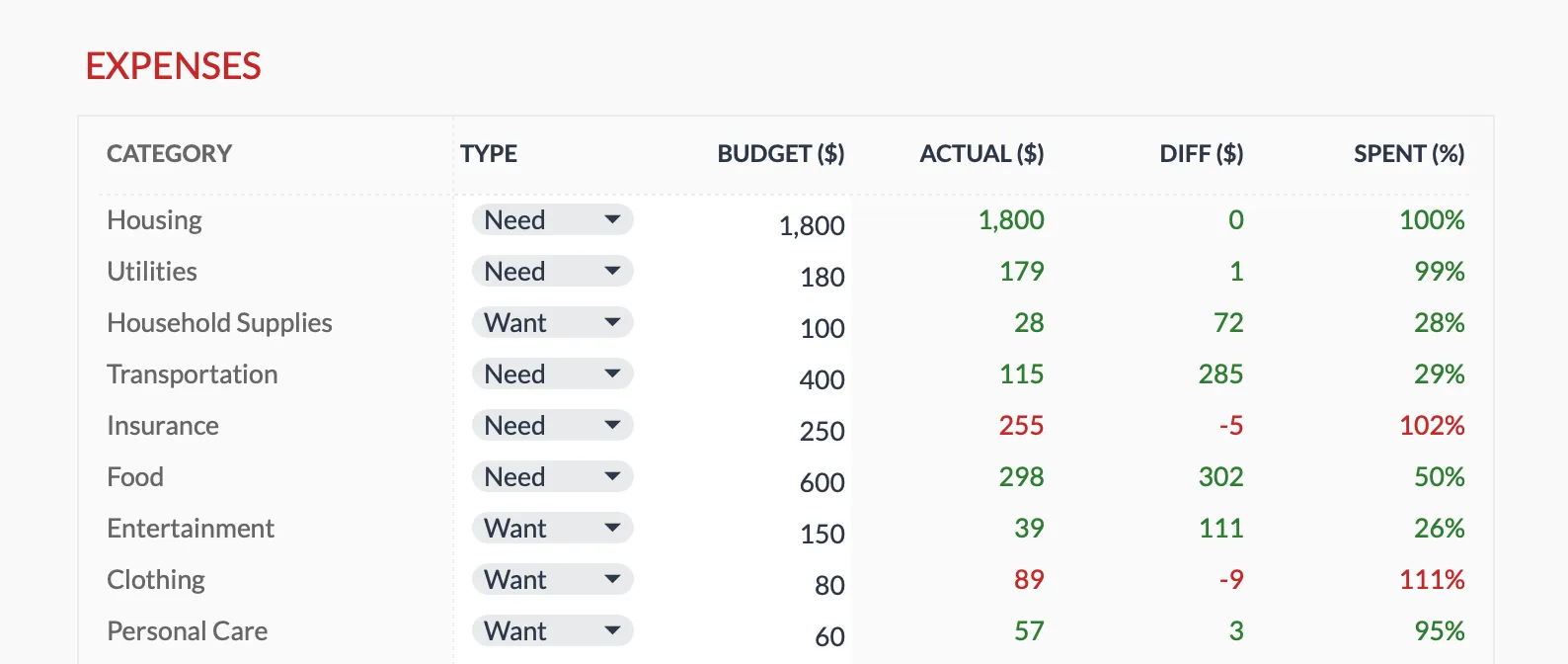
Every category gets an allocation and a planned-vs-actual readout in the Monthly Budget Template (Premium tier), the same give-every-dollar-a-job structure EveryDollar and YNAB build their apps around.
A spreadsheet also eliminates the pricing question entirely. One-time cost, no annual renewal, and no risk of the price increasing, which both YNAB and EveryDollar have done over the years. The trade-off is that you give up automatic bank syncing and mobile app convenience. For people comfortable with manual entry, or budgeting without linking a bank account at all, that trade-off works out well. It is a move plenty of people make after a stretch with the apps.
Related
- Monthly Budget Template - Zero-based budgeting in Google Sheets, one-time $29
- Zero-Based Budgeting Template Tutorial - Build the give-every-dollar-a-job method step by step
- Budgeting Without Linking a Bank Account - The manual-entry approach both apps’ free paths lean on
- Why People Switched From Apps to Spreadsheets - What changes when the subscription goes away
Frequently asked questions
Which is cheaper, EveryDollar or YNAB?
At list price EveryDollar Premium is $79.99/year, below YNAB's $109/year. But EveryDollar also has a free manual tier, and YNAB has none, so if you do not need automatic bank sync, EveryDollar's free version is the cheapest of the two by a wide margin.
Is EveryDollar or YNAB better for beginners?
EveryDollar is simpler to get started with. The interface is clean and the process is straightforward. YNAB has a steeper learning curve but offers more features once you are comfortable. For someone brand new to budgeting, EveryDollar's simplicity can be an advantage.
Do both apps include bank syncing?
YNAB includes bank syncing in its single $109/year plan; there is no separate tier for it. EveryDollar's free version is manual entry only, and bank syncing requires EveryDollar Premium at $79.99/year (or $17.99/month).
Can I follow the Dave Ramsey baby steps in YNAB?
Yes. YNAB is flexible enough to follow any budgeting methodology, including Ramsey's baby steps. You would just set up your own categories and goals to match the framework. EveryDollar has this built in.
Can either app be used without connecting a bank account?
Yes. EveryDollar's free tier is manual entry by design, and YNAB supports file-based import instead of direct connection. Some people prefer manual entry for privacy or awareness; a spreadsheet takes that approach the furthest, since nothing ever leaves your own file.
What if I do not want to pay for either app?
EveryDollar has a free version with manual entry. Beyond that, a spreadsheet is a zero-subscription alternative for zero-based budgeting. A monthly budget template in Google Sheets can replicate the core planned-vs-actual experience with more flexibility over categories.
Sources
- YNAB Pricing - YNAB
- EveryDollar Premium Subscription Cost - Ramsey Solutions
About this article
Pricing for YNAB and EveryDollar Premium was checked against each company's official pages. Monthly Budget Template price, Google Sheets compatibility and sheet contents checked on 2026-09-10 against the shipped Monthly Budgeting workbook (Summary, Budget Plan, Transactions, Goals and Categories sheets). Last reviewed September 2026.