
Zero-based budgeting gives every dollar a job, so income minus expenses lands at exactly zero: you assign everything, including savings, rather than spending it all. This guide walks through the setup, a worked $4,800 monthly example that balances to zero, the one formula that keeps the sheet honest, and three ways to handle variable income.
Zero-based budgeting means every dollar gets a job. Income minus expenses equals exactly zero - not because you spend everything, but because you assign everything, including savings. Nothing slips through unaccounted.
The Monthly Budget Template carries a zero-based block on its Summary tab: income, minus expenses, minus savings, with anything left over flagged as unallocated. The category amounts behind it are set on the Budget Plan sheet.
The Core Idea
The formula is simple: Income minus Expenses equals Zero. But “expenses” in this context includes everything - bills, savings, fun money, future expenses. When the math equals zero, you know exactly where every dollar goes.
YNAB popularized this as give every dollar a job, the first of its four budgeting rules. Whether that job is “pay rent” or “sit in emergency savings” or “buy concert tickets,” the dollar has a purpose before it’s spent. The key insight is that unassigned money tends to disappear. Zero-based budgeting eliminates the mysterious gaps.
Setting Up Your Budget
Start with your total income at the top - salary (after tax), side income, any regular money coming in. This is the pool you’re working with. Everything flows from this number.
Below income, list all your categories grouped by type. Fixed expenses are the predictable ones: rent, car payment, insurance, phone, subscriptions. Variable expenses change month to month: groceries, gas, utilities, dining out, entertainment. Savings and debt covers future security: emergency fund, retirement, extra debt payments. Irregular expenses are the sneaky ones: car maintenance, medical, gifts. Divide annual costs by 12 and save monthly so these don’t surprise you.
At the bottom, your formula is Total Income minus Total Budgeted equals Remaining. In a spreadsheet, if income sits in cell B2 and your category amounts run down B3:B14, the balancing cell is =B2-SUM(B3:B14). Adjust categories until that cell reads exactly zero. If it’s positive, you have unassigned money that needs a job. If it’s negative, you’ve over-assigned and need to trim somewhere. Finally, add an “Actual” column next to “Budgeted” to track what really happens; the step-by-step monthly budget build covers the sheet mechanics in more detail.
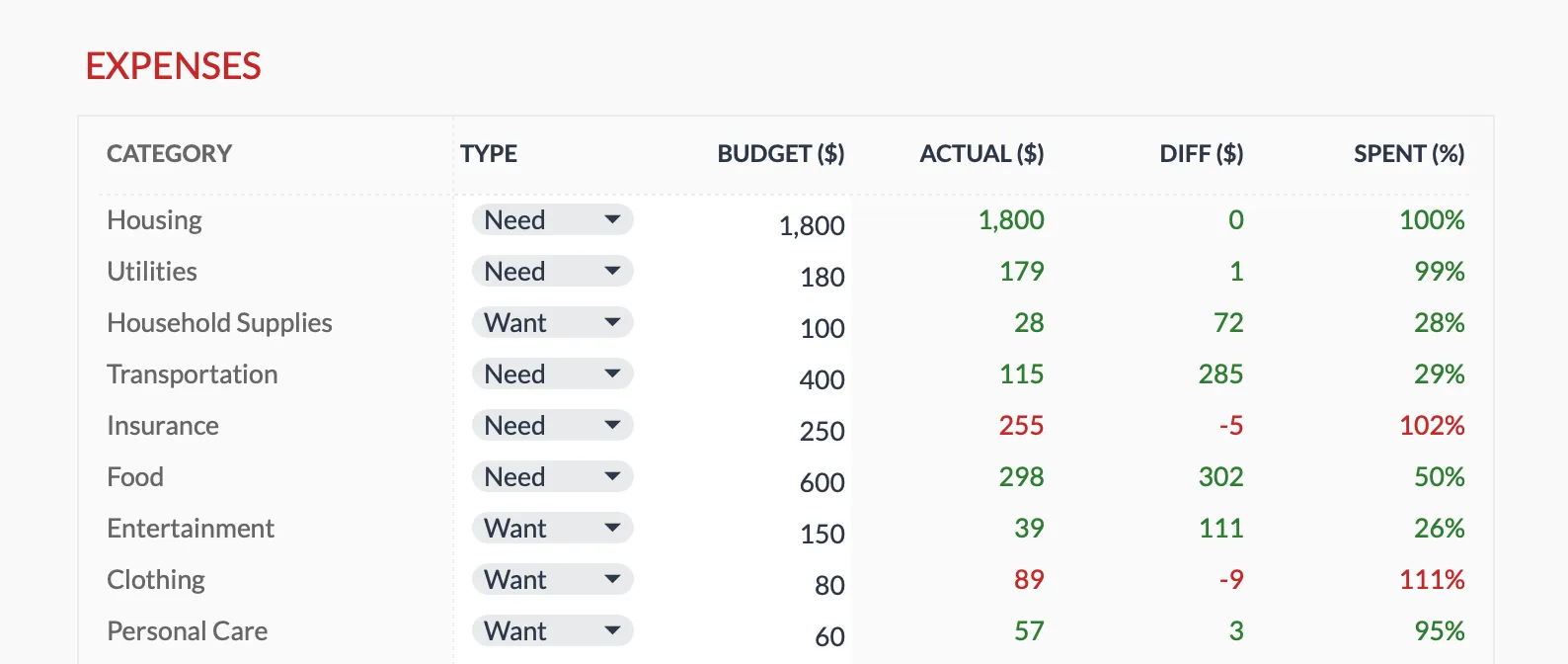 The Monthly Budget Template (Premium tier) places a Budget and an Actual column side by side. You enter the Budget figure, Actual is summed from the Transactions sheet, and the difference and percent spent update on their own.
Example Budget
Here’s what a complete zero-based budget looks like with $4,800 monthly income:
| Category | Amount |
|---|---|
| Rent | $1,400 |
| Utilities | $150 |
| Groceries | $500 |
| Transportation | $450 |
| Insurance | $200 |
| Phone/Internet | $150 |
| Dining Out | $150 |
| Entertainment | $100 |
| Emergency Fund | $500 |
| Retirement | $600 |
| Sinking Funds | $500 |
| Buffer | $100 |
| Total | $4,800 |
$4,800 income minus $4,800 assigned equals zero. Every dollar has a job. Nothing is left floating around hoping to be useful.
During the Month
The budget isn’t rigid - that’s a common misconception about zero-based budgeting. When groceries run over, move money from entertainment or dining out. The total stays at zero, money just moves between jobs. Life doesn’t follow a spreadsheet perfectly, and that’s fine.
Including a small “buffer” category ($50-100) helps absorb minor unexpected needs without disrupting the whole system. Think of it as a miscellaneous fund for the small stuff that doesn’t fit neatly into other categories.
Variable Income
Variable income makes zero-based budgeting trickier, but three approaches work well. Budget last month’s income is the cleanest - use money earned last month to fund this month. You’re always budgeting money you actually have, not money you hope to receive.
Budget your lowest month works if income varies widely. Use your minimum typical income as baseline. When more arrives, the surplus goes to savings or debt. Priority allocation takes a different approach - create a prioritized list and fund categories in order until money runs out. Essential expenses come first, nice-to-haves last.
Zero-Based vs. 50/30/20
Both approaches work. They just operate at different levels of detail. Zero-based specifies every category, giving maximum control but requiring more time. The 50/30/20 method uses three broad buckets, offering a simpler framework with less granularity. The 50/30/20 vs zero-based comparison walks through which method fits which situation.
Some people combine them - using percentages as targets while applying zero-based principles within each percentage. There’s no rule saying you pick one forever. The goal is a system that works for how you actually think about money.
Related
- Monthly Budget Template - a Budget and Actual column per category, plus a zero-based block on the Summary
- Annual Budget Template - twelve months of plan and actual columns, with an Unallocated figure for what income leaves after expenses and savings
- 50/30/20 vs Zero-Based Budget - how to decide between the two methods
- 50/30/20 Budgeting Guide - the simpler percentage framework in a spreadsheet
Frequently asked questions
What if I have money left at month end?
Assign the leftovers in next month's budget toward savings or irregular expenses.
How do I handle unexpected expenses?
Move money from other categories. If nothing can flex, use the buffer or emergency fund.
How long until it feels natural?
Usually 2-3 months. The first month is mostly experimental.
Does a zero balance mean my bank account has to be empty?
No. Zero refers to unassigned money, not your account balance. Dollars sitting in an emergency fund or a sinking fund are still assigned a job, so the plan reads zero while the cash stays put.
How is zero-based budgeting different from just tracking expenses?
Tracking records where money went after the fact. Zero-based budgeting assigns every dollar a job before it is spent, so the plan is set in advance and the month is measured against it.
Sources
- The Four Rules - YNAB
About this article
The worked example balances twelve categories to a $4,800 monthly income. Method definitions and the give-every-dollar-a-job rule are checked against YNAB's published four rules. Template claims checked on 2026-09-10 against the shipped Monthly Budgeting Google Sheet (Summary zero-based block, Budget Plan, Instructions) and the Annual Budgeting Planner (Summary Allocation block, Annual Plan). Last reviewed September 2026.