
You can budget without ever linking a bank account by entering transactions yourself, either in a spreadsheet or a manual-entry app like Goodbudget, EveryDollar, or Fudget. It costs roughly 5-10 minutes a day and keeps your bank login out of an aggregator's hands. The trade-off is giving up automatic import, categorization, and real-time balances.
You don’t have to give a third-party app access to your bank accounts. Plenty of people budget manually - entering transactions themselves, keeping financial data private, and still tracking every dollar.
It takes more effort, but for some people, that effort is worth it.
Looking for a private option? The Monthly Budget Template is a Google Sheet that sits in your own Google Drive. You type transactions in yourself, formulas on the Summary and Budget Plan tabs handle the calculations, and nothing connects to your bank. No credentials handed over, no aggregator in the middle.
Why Skip Bank Linking
Security: Bank credentials are valuable targets, and aggregation services have been breached before. Storing those credentials with a third party concentrates risk.
Privacy: Financial data reveals where you shop, what you earn, and your spending habits. Some people prefer keeping that information off third-party servers entirely.
Awareness: Manual entry forces you to see every transaction. That friction can actually help - you process spending consciously instead of letting automated systems handle it invisibly.
Reliability: Bank connections break when security protocols change, syncing fails, or transactions disappear. Manual entry, by contrast, is predictably reliable.
These concerns aren’t universal - plenty of people use bank-linked apps without issues. But for those who prioritize control over convenience, manual methods remain a solid alternative.
Spreadsheets
Spreadsheets keep the data in a file you own, with no account credentials handed to an aggregator. The file sits on your device or in your own cloud storage account, so who else can open it comes down to who you share it with. A Google Sheet still lives on Google servers, which makes this control over access rather than total isolation.
The workflow is straightforward:
- Create a sheet with income and expense categories
- Enter transactions (daily, weekly, whenever)
- Formulas calculate totals automatically
- Charts show patterns over time
The time cost runs about 5-10 minutes daily, or 20-30 minutes if you prefer to batch entries weekly.
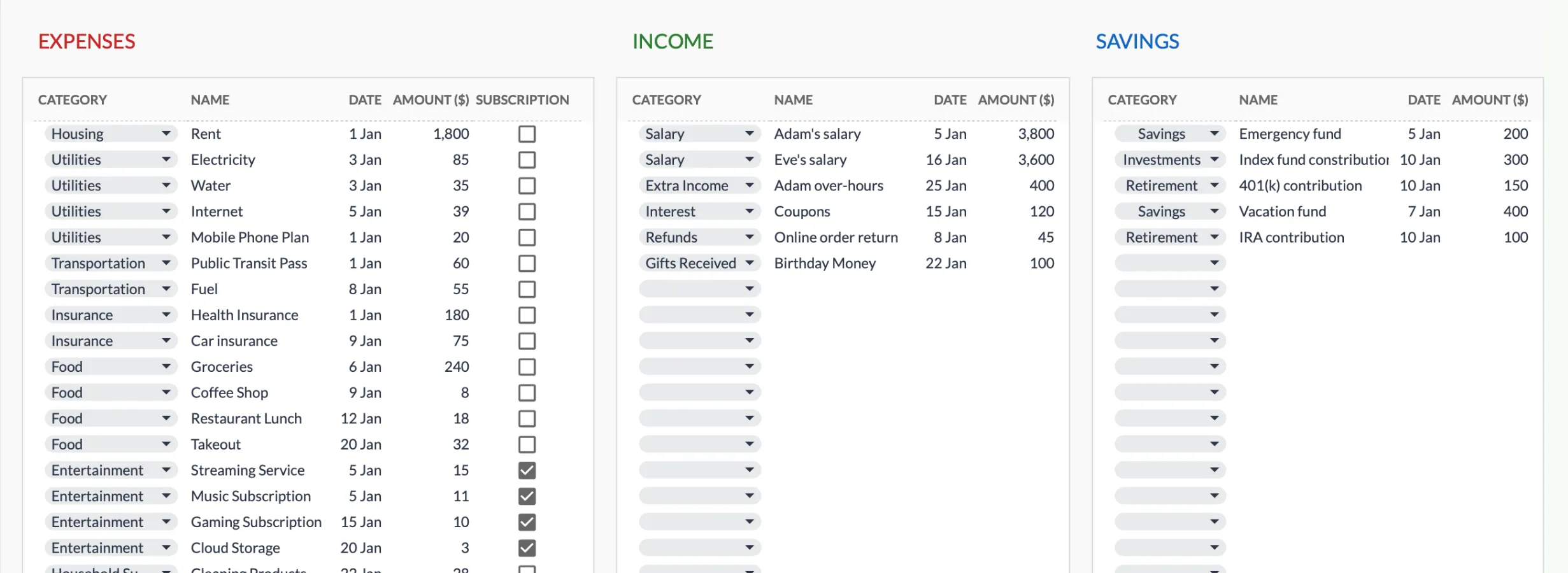
Manual entry in practice: the Monthly Budget Template’s transactions sheet, where you pick a category and type the name, date, and amount. Formulas on the summary tabs total everything automatically.
Pre-built templates eliminate the setup work, with formulas configured and categories ready to use. If you’d rather build your own from scratch, our step-by-step Google Sheets guide walks through it cell by cell.
This approach works well for people who want customization, don’t mind typing in cells, and care about long-term data ownership.
Manual-Entry Apps
Some budget apps work without bank connections.
Goodbudget uses envelope budgeting - you create spending categories, manually enter transactions, and see what’s left in each envelope. The free tier handles the basics: 20 envelopes, one account, and two devices.
EveryDollar follows zero-based budgeting, where every dollar is assigned before you spend it. The free version is manual-only, while bank linking requires EveryDollar Premium at $79.99/year.
Fudget is extremely minimal - income at the top, expenses below, running balance. It works well if other apps feel overwhelming.
These apps give you the convenience of a mobile interface without sharing bank credentials. The trade-off is that your budget data still lives on their servers, just not your bank access.
Making Manual Work Sustainable
The challenge isn’t getting started - it’s consistency.
Pick a routine that fits your life - either daily entry (5 minutes each evening) or weekly batching (30 minutes catching up). Consistency matters more than frequency.
Simplify capture by keeping receipts in one spot and using your phone’s notes app for quick entries when you’re out. Photos of receipts work well for reference later.
Accept imperfection because missing a small transaction won’t ruin anything. Focus on capturing most of your spending, especially larger expenses.
Round to dollars since exact cents rarely matter for budget insights. It saves time without sacrificing accuracy.
The people who make manual tracking work long-term tend to have one thing in common: they found a routine that fit their life rather than trying to force a routine that didn’t.
What You Give Up
Automation isn’t purely marketing - there are real conveniences you give up:
- Automatic categorization (you do it yourself)
- Real-time balance visibility (check accounts separately)
- Effortless history (only goes back as far as your manual entry)
- Less work (let’s be honest - auto-import is easier)
If you’d abandon budgeting without automation, linked apps might be the better choice. A budget that actually gets used beats a private one that sits empty. For a fuller look at where each path fits, see why a spreadsheet often beats a personal finance app.
Related
- Monthly Budget Template - manual entry, no bank linking
- Annual Budget Template - year-long budget view
- Net Worth Tracker - assets and liabilities, updated month by month
- Why a spreadsheet beats a personal finance app
- How to create a monthly budget in Google Sheets
Frequently asked questions
Can I import transactions without linking my bank?
Some manual-entry apps accept a CSV file exported from your bank, so you can bulk-add transactions without granting live access. Goodbudget's free plan takes a CSV upload and asks you to map the columns. A spreadsheet template has no importer of its own, but Google Sheets can pull a CSV into a tab, and from there you can paste the rows into the category, name, date and amount columns. Either way, nothing stays connected to your account.
What about cash?
Cash is actually easier to track manually than with apps. Bank-linked apps can't see cash transactions at all, so you'd be entering those manually anyway.
Can I switch to bank linking later?
Yes - you can start with manual entry and decide later if automation is worth the trade-off. Most apps let you add bank connections anytime.
Is manual really more secure?
It eliminates one specific risk: credentials stored on third-party servers. That said, spreadsheets in cloud storage have their own security considerations. No method is completely risk-free.
Sources
- EveryDollar Pricing and Features - Ramsey Solutions
- Goodbudget Plans and Pricing - Goodbudget
- Fudget - Simple Budget Planner - Fudget
About this article
Competitor pricing (EveryDollar Premium at $79.99 a year, Goodbudget free plan limits) checked on 2026-09-10 against Ramsey Solutions' EveryDollar page and Goodbudget's own plan listing. Template sheets, inputs and outputs checked on 2026-09-10 against the shipped Monthly Budgeting Google Sheet (Summary, Budget Plan, Transactions, Goals, Categories, Setup tabs) and the Transactions screenshot used in this article. Last reviewed September 2026.