
Independent advisors build client work in Google Sheets because the templates flex to each engagement instead of forcing a fixed software workflow. A practical toolkit spans six areas: financial planning, net worth tracking, monthly budgeting, retirement projections, expense tracking, and tax planning. FinancialAha's Financial Advisor Complete Bundle packages all eight templates under one license for unlimited client use, with every formula visible and each client's copy staying in their own Google Drive.
A surprising number of independent financial advisors run their client work on Google Sheets. Not because they can’t afford specialized software, but because spreadsheets adapt to how each advisor actually works.
For advisory practices: The Financial Advisor Complete Bundle includes all 8 templates with an unlimited client use license - financial planning, net worth tracking, budgeting, retirement projections, and more.
The challenge is building good templates from scratch. Getting the formulas right, making layouts client-friendly, keeping everything consistent across engagements - it takes time that could be spent with clients instead.
What Makes Google Sheets Work for Advisors
Clients can collaborate directly. Share a Sheet with a client and they update their own balances, expenses, and income. No separate portal, no credentials to manage. This is especially valuable during onboarding - clients fill in their numbers on their own time rather than reading them off statements during a meeting.
You control sharing and access. Create a template in your Drive, customize it for the client, then share view or edit access as needed. The client works in a familiar environment (Google Sheets), and you decide exactly what they can see and change.
Full control over the structure. Every practice has a different approach. Some advisors focus heavily on cash flow, others lead with net worth, others center retirement projections. Spreadsheets let you emphasize what matters for each client rather than working around a fixed software workflow.
What a Solid Advisor Toolkit Covers
A complete template set for client work spans six areas. Here’s how each one fits into advisory work - and where it earns its place.
Financial Planning
The template you’ll reach for first. It brings together a client’s full financial picture: assets by type, debts with balances and interest rates, month-by-month cash flow, eight goal targets, and a long-range projection.
Where it shines is in meetings. Change an assumption on the projection tab, such as monthly expenses or the assets growth rate, and the chart and end-point figures recalculate instantly. Clients understand trade-offs much better when they see the numbers move in real time rather than hearing about them abstractly.
A well-built version includes separate tabs for current snapshot, goals, and projections, all cross-linked so changing one number ripples through automatically.
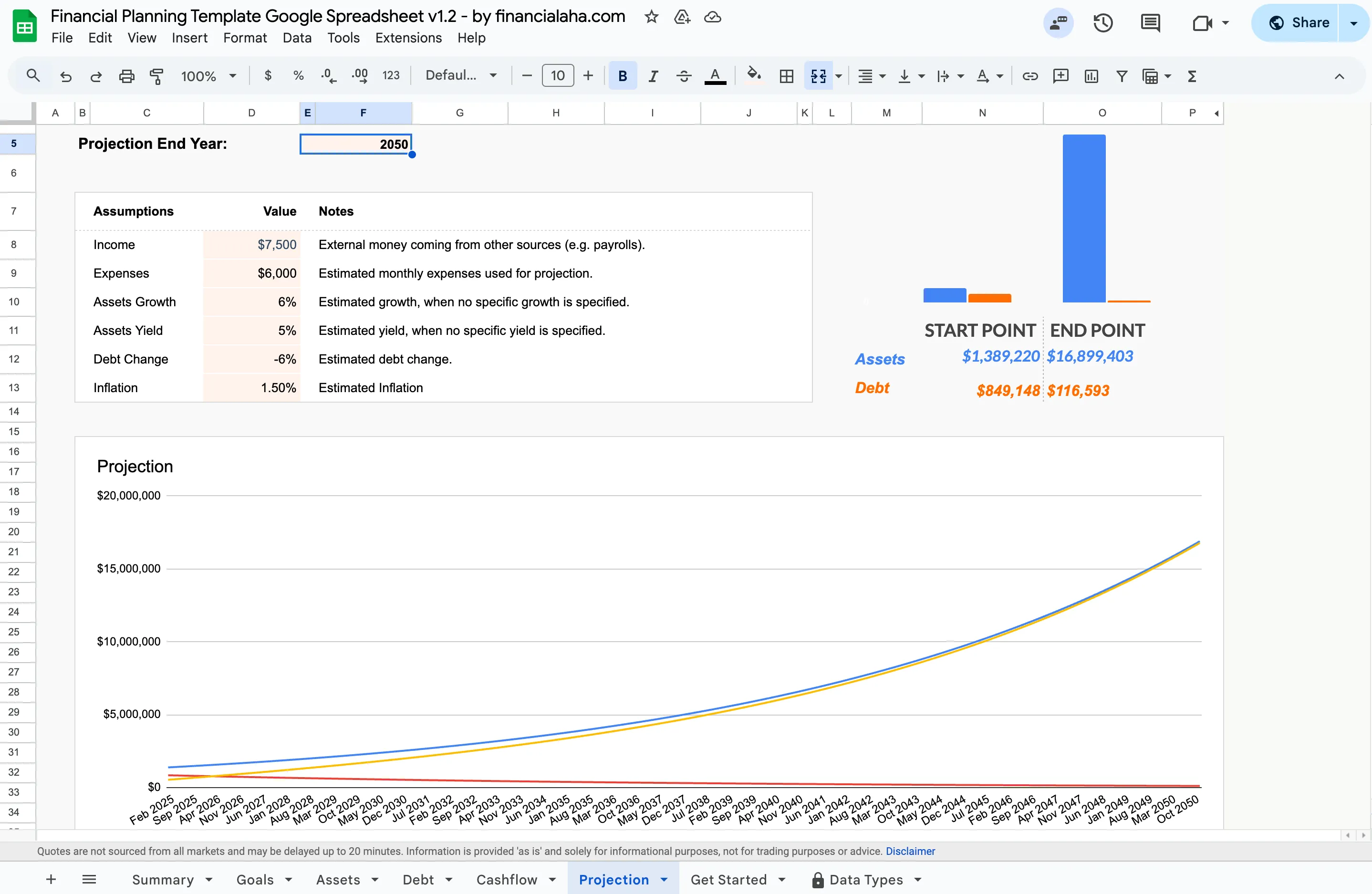 The projection tab of the Financial Planning Template. Adjust an assumption and the chart and end-point figures recalculate on the spot, which is what makes it useful to walk through live in a client meeting.
View the Financial Planning Template to see the full layout and preview. If a client is weighing a spreadsheet against dedicated software, our breakdown of a financial planning app versus a spreadsheet lays out the trade-offs.
Net Worth Tracking
Tracking net worth over time gives clients a clear signal of progress. It’s also low-maintenance - update account balances at each review, and the formulas handle totals, changes, and trends.
The historical view is where this pays off. During quarterly reviews, pulling up a chart that shows consistent growth over 12-18 months reframes the conversation from “am I doing enough?” to “this is working.”
The asset breakdown groups holdings by type and shows the share of the total each one holds, which can lead naturally into an allocation discussion.
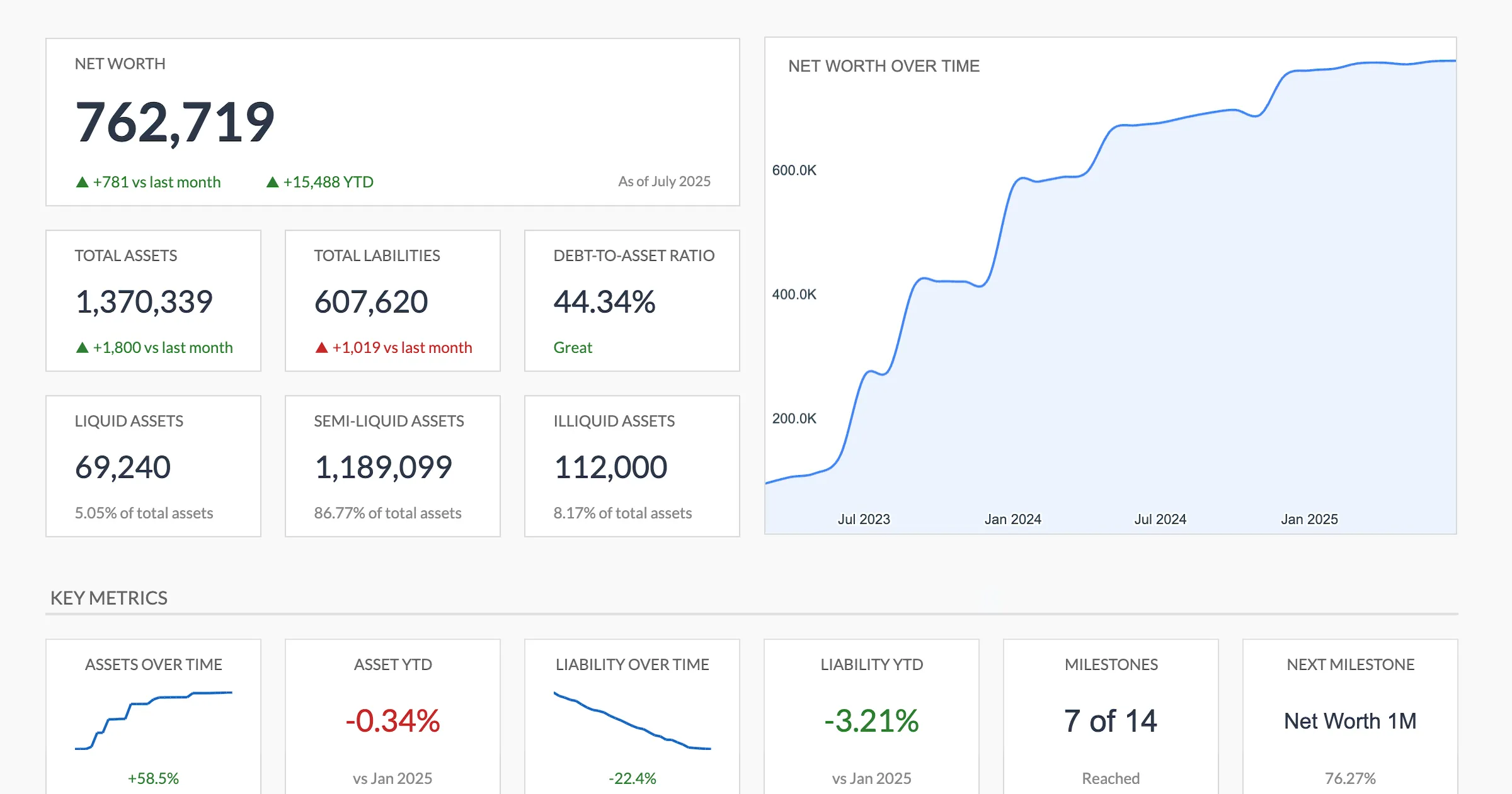 The Net Worth Tracker summary. The over-time chart and key metrics are the view most advisors pull up at a quarterly review.
View the Net Worth Tracker to see the month-over-month layout and trend charts. For a sense of what free versions leave out, see our roundup of free net worth tracker spreadsheets.
Monthly Budgeting
Not every client needs a budget template. But for those in debt paydown mode, going through divorce, or adjusting to a new income level, detailed budgeting for a defined period is often more useful than general planning.
The key feature for advisory use is the actuals-vs-targets view. Set spending targets collaboratively in one meeting, then review actual spending in the next. The gap between plan and reality is where productive conversations happen.
One approach: use the budget template intensively for 3-6 months during a transition, then shift to lighter-touch net worth tracking once spending habits stabilize.
Retirement Projections
Clients asking “can I retire at 60?” need to see numbers, not opinions. A retirement template that models different scenarios, adjusting annual savings, return assumptions, retirement ages, and inflation, turns that question into a concrete comparison.
The Retirement Financial Planning Template includes year-by-year projections and scenario modeling. Preview the layout to see how the tabs are structured. For how a spreadsheet stacks up against subscription retirement tools, see our review of the best retirement planning software and tools.
Expense Tracking
For clients who aren’t sure where their money goes, detailed expense tracking for a few months provides the baseline data that makes budgeting conversations productive. Without it, targets are guesses.
Tax Planning
A tax planning template that runs year-round catches what a last-minute review misses. Ours logs income by type against a rate you set, deductions by category including charitable giving and retirement contributions, quarterly estimated payments with their due dates, and a checklist of documents still to collect. Update it each quarter and year-end becomes a review rather than a scramble.
What Separates Professional Templates from Free Downloads
Free spreadsheet templates work for personal use. For client-facing work, the bar is higher.
Formulas need to be bulletproof. When a client types a number in the wrong format or leaves a cell blank, the template shouldn’t break. Error handling matters when someone else is editing the sheet.
Layouts need to be readable by non-experts. Clients need to find their numbers quickly, understand what they’re looking at, and update values without accidentally breaking a formula. Good templates guide entry with clear labels, logical grouping, and a visible split between the cells a client fills in and the cells that calculate, so a stray keystroke does not land in a formula.
Consistency across templates matters. If your financial plan uses one visual style and your budget tracker uses another, it feels cobbled together. A matched set reduces the learning curve when you introduce a new tool to a client.
The structure should guide, not constrain. Pre-built categories and formulas save setup time, but you need room to add a row for a client’s side business or rename categories to match how they think about their money.
How This Looks in Practice
Here’s a typical advisory workflow using templates:
Client onboarding. Copy the financial planning template to your Drive. Pre-fill what you have from the intake questionnaire, then share a link with the client. Ask them to verify income, expenses, and account balances before the first meeting. By the time you sit down together, the numbers are already in place.
First meeting. Walk through the financial plan on screen. When the client asks “what if we saved more?” or “what if I retire two years earlier?” - adjust the number and show the impact live. The conversation stays grounded in their actual data, not hypotheticals.
Quarterly reviews. Update the net worth tracker with current balances. Compare to the previous quarter. If the client is working on spending targets, review budget adherence. Flag anything unusual, such as a new liability or a drop in savings, and discuss.
Year-end. Review the tax planning template. Check the deductions logged so far, the quarterly payments made against what was estimated, and the document checklist, before December 31.
Each step uses Google Sheets. Clients access their own files from any device. You maintain your templates in one place and copy them per engagement.
Licensing for Client Use
Individual templates are designed for personal financial tracking. For advisory practices that use templates across multiple client engagements, a professional license covers unlimited client use.
The Financial Advisor Complete Bundle includes all 8 templates with an unlimited client use license. One purchase, lifetime updates, no per-client fees. Preview each template on its product page before buying.
Related
- Financial Planning Template - Financial overview with projections
- Net Worth Tracker - Monthly asset and liability tracking
- Retirement Financial Planning - Scenario modeling and milestone tracking
- Financial Advisor Complete Bundle - All eight templates with an unlimited client license
- Financial Planning Software or Spreadsheet - Weighing an app against a spreadsheet
- Best Retirement Planning Software and Tools - How spreadsheets compare on retirement projections
- Free Financial Calculator Widgets for Your Site - Embeddable calculators for a practice website, no signup or branding
- Our Business Spreadsheet Library, Built Out - The wider catalog the advisor bundle draws from
- Personal Finance Spreadsheet Templates Compared - A hands-on look at the templates you would put in front of clients
Frequently asked questions
Can clients edit the templates without breaking formulas?
The templates mark input cells and formula cells apart, and each sheet carries a note saying not to edit the calculated ones. Clients enter their numbers in the labeled input areas, and you control who has view or edit access through Google Sheets sharing.
Do clients need a paid Google account to use the templates?
No. Any free Google account can open, copy, and edit a Google Sheet. Each client works with their own copy in their own Google Drive at no extra cost, and the file stays under their control.
Which templates come in the Financial Advisor Complete Bundle?
Eight: financial planning, net worth tracking, monthly budgeting, annual budgeting, expense tracking, travel budget planning, annual tax planning, and retirement projections. One purchase licenses all of them for unlimited client use.
How do advisors typically introduce templates to clients?
One common approach is pre-filling known information before the first meeting, then sharing the sheet and asking the client to verify and complete the rest.
Do I need a separate license for each client?
Individual templates are licensed for personal use. The Financial Advisor Complete Bundle includes an unlimited client use license - one purchase covers your entire practice.
How much can I customize the templates?
The advisor license covers customizing data and inputs for client needs, and each client copy is independent, so a change in one does not affect another. It does not cover reselling the templates, redistributing them to other advisors, or offering them as a standalone product.
How do these compare to dedicated financial planning software?
Spreadsheets offer more flexibility and lower cost with no per-client subscription fees. Dedicated software typically provides more automation, compliance features, and integrations.
Sources
- Share files from Google Drive - Google
About this article
Template sheets, inputs and outputs checked on 2026-09-10 against the shipped Financial Planning (Summary, Goals, Assets, Debt, Cashflow, Projection), Net Worth Tracker (Summary, Assets, Liabilities, Milestones) and Retirement Planning (Summary, Inputs, Projections) Google Sheets Bundle contents and advisor license terms checked on 2026-09-10 against the FinancialAha product catalog and the advisor bundle page Google Sheets sharing and collaboration behavior checked against Google's official documentation Last reviewed September 2026.