
The strongest one-time option is FinancialAha's Retirement Financial Planning Projections template ($39, Google Sheets), an accumulation and withdrawal model running from your current age to your life expectancy, with conservative, base, and optimistic scenarios, 12 what-if tests, and automatic safety checks. If you would rather pay a subscription for Monte Carlo simulation and account aggregation, Boldin ($144/year, with a free Basic tier) and ProjectionLab ($129/year, with a free tier) are the two to compare. This guide lines up all four on price, model, and what each does best.
Retirement tools split into two camps: subscription web apps that automate the modeling for you, and spreadsheets you own outright and edit yourself. Both can produce a solid plan. Below are four worth knowing, starting with FinancialAha’s own retirement template, then how it compares to Boldin and ProjectionLab.
1. FinancialAha
The Retirement Financial Planning Projections template ($39, one-time) is FinancialAha’s retirement tool. It is a Google Sheets workbook rather than an app or a subscription, and its focus is projections: you enter your current savings, how much you add each year, expected returns before and after retirement, and planned retirement expenses, and it models the years to and through retirement.
-
Three scenarios side by side: Every projection runs as conservative, base, and optimistic at once, so you see a range instead of a single number that markets will never actually deliver.
-
What-if analysis: Twelve built-in cards stress-test the plan, covering one more year of work, retiring now, stopping saving, an extra $500 a month saved, an extra $500 a month of other income, expenses 10 percent higher or lower, no pension, a 50 percent pension cut, a 20 percent market crash, the extra inflation the plan can absorb, and the minimum return it needs. Most report the age the portfolio would run out, or that it never runs out.
-
Withdrawal and milestone views: A table on the Projections tab tracks portfolio value, income, expenses, the amount drawn from the portfolio, and the withdrawal rate at key ages from retirement through life expectancy. Automatic safety checks flag a withdrawal rate creeping too high or a portfolio projected to run dry before life expectancy, and milestone markers show progress toward the common 10x, 25x, 30x, and 33x annual-expense benchmarks.
-
Data privacy: The workbook runs entirely in your own Google account. Your figures stay with you, and there is no recurring fee.
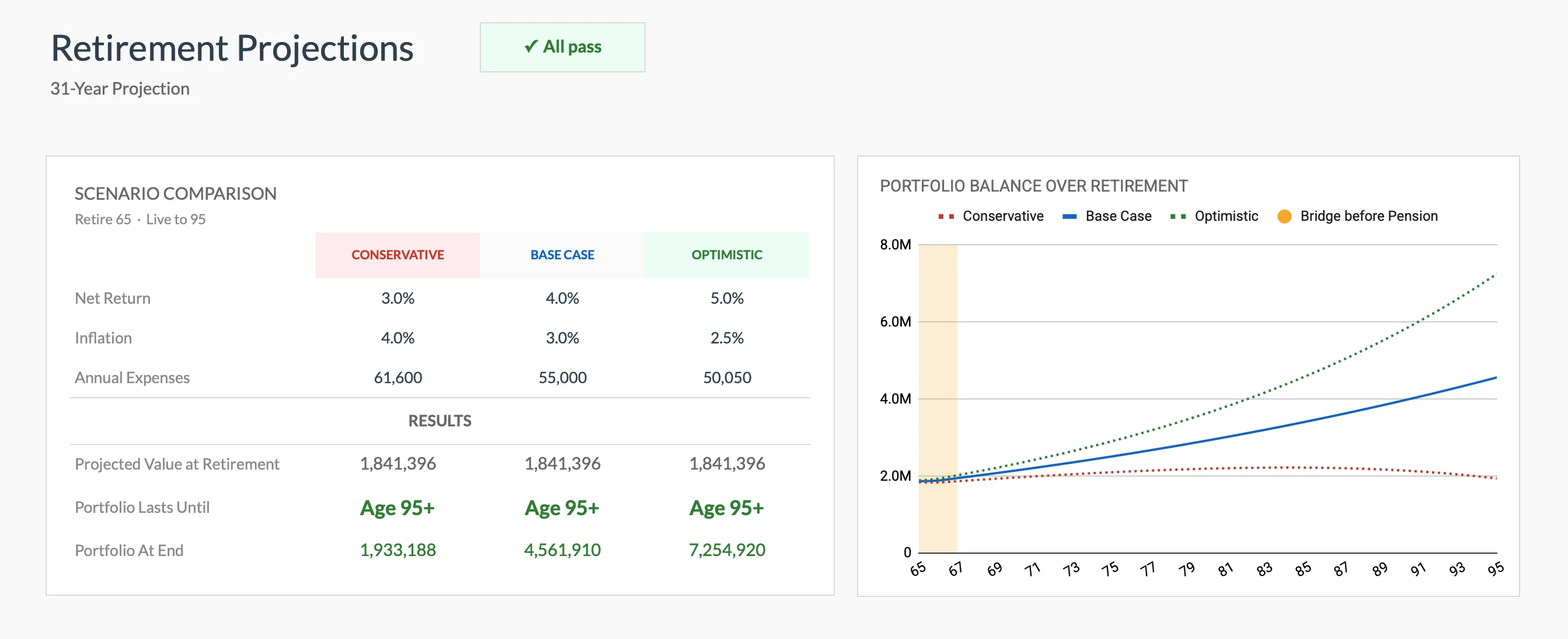 The scenario comparison in the Retirement Financial Planning Projections template (Premium tier, Google Sheets) runs conservative, base, and optimistic side by side.
If you want a rough number before buying anything, the free retirement calculator below estimates the same core question, how long a portfolio lasts, in a few inputs:
2. Boldin (Formerly NewRetirement)
Boldin, formerly known as NewRetirement, is a subscription retirement planning app that caters to a wide range of financial situations. It offers a free Basic tier, and the paid PlannerPlus plan is $144 per year after a 14-day trial.
-
Comprehensive Financial Planning: Boldin allows users to input extensive data, including income, expenses, assets, liabilities, and even anticipated healthcare costs. This data-driven approach provides a detailed overview of a user’s financial situation.
-
Interactive Scenario Planning: One of Boldin’s standout features is its interactive scenario planning. Users can experiment with different retirement ages, spending levels, and savings strategies to see how each decision affects their long-term financial health.
-
Social Security Optimization: The software provides insights on how to optimize Social Security benefits, offering users guidance on when to start taking benefits for maximum payout. This feature is particularly valuable, as Social Security plays a crucial role in many retirees’ income streams.
-
Personalized Retirement Roadmap: Boldin creates a personalized retirement roadmap based on user inputs. This roadmap serves as a dynamic guide, helping users stay on track to meet their retirement goals while adapting to any changes in their financial situation.
3. ProjectionLab
ProjectionLab stands out for its powerful financial modeling capabilities, offering users a detailed look at various retirement scenarios. It has a free Basic tier and a $129 per year Premium plan.
-
Dynamic Financial Projections: ProjectionLab enables users to create robust financial models that take into account a variety of changing variables. This allows users to forecast how different savings strategies, investment returns, and spending habits will affect their retirement funding.
-
Scenario Analysis: Users can run multiple scenarios to see how factors like market fluctuations or changes in income might impact their retirement plans. This feature is particularly useful for those who want to prepare for economic uncertainties.
-
Visualization Tools: ProjectionLab offers advanced visualization tools that help users better understand complex financial data. Graphs and charts illustrate potential outcomes, making it easier to comprehend how different strategies may play out over time.
-
Investment Focus: The platform places a strong emphasis on investment strategies, allowing users to simulate various investment portfolios. This helps users assess the risks and potential returns associated with different asset allocations.
4. Financial Aha Template
For those who want a broader picture than retirement alone, the Financial Planning Template ($29, one-time) is a wider all-in-one Google Sheets workbook covering income, expenses, assets, and debt, with a projection tab that carries assets, debt, and net worth forward to an end year you set. It is not a retirement model, so it answers a different question than the template above.
-
Comprehensive Structure: The Financial Planning Template provides a structured format to help users assess their financial health. Separate tabs hold assets across 15 types, debts with balances, rates, and minimum payments, and a monthly cashflow log, and the Summary rolls them into net worth, a debt-to-income ratio, and average income, expenses, and savings per month.
-
DIY Approach: This spreadsheet-based tool works well for individuals who enjoy diving into the numbers. Users can manipulate the data and edit the projection assumptions for income, expenses, asset growth, yield, debt change, and inflation to see how the long-range numbers move.
-
Goal Tracking: The template allows users to set specific financial goals and track their progress toward achieving them. This feature encourages accountability and helps users stay focused on their long-term objectives.
-
One-Time Cost: Being a downloadable template, this option is a single $29 purchase rather than the yearly subscription that Boldin and ProjectionLab charge. You own the file and keep using it without a renewal.
How the four compare
| Tool | Price | Model | Best for |
|---|---|---|---|
| FinancialAha Retirement Projections | $39 once | Google Sheets template | Owning the math and editing every assumption |
| FinancialAha Financial Planning | $29 once | Google Sheets template | A broader all-in-one financial overview |
| Boldin (formerly NewRetirement) | Free tier; $144/yr | Web app | Account aggregation and Social Security timing |
| ProjectionLab | Free tier; $129/yr | Web app | Visual scenario modeling with a privacy focus |
Boldin and ProjectionLab win when you want account syncing, Monte Carlo simulation, and a maintained web interface, and the yearly subscription is worth that to you. The spreadsheet wins when you want to own the file, see every formula, and pay once.
Where to start
If a one-time, fully editable projection is what you are after, the Retirement Financial Planning Projections template is the first stop: three scenarios, 12 what-if tests, and safety checks already wired into a Google Sheets file. To pair it with a net-worth tracker and a tax planner at a lower combined price, the Retirement Planning Bundle covers all three. Still deciding between an app and a spreadsheet? The walkthrough in Financial Planning Software or Spreadsheet lays out the trade-offs side by side.
Related
Frequently asked questions
Is a spreadsheet enough, or do I need dedicated retirement software?
It depends on what you want in front of you. A Google Sheets template puts every assumption in a cell you can click and edit, with no recurring fee. Web apps like Boldin and ProjectionLab automate more of the modeling and connect to accounts, in exchange for a yearly subscription.
What is the difference between Boldin and ProjectionLab?
Both are subscription web apps with a free tier. Boldin (formerly NewRetirement) leans toward account aggregation, Social Security timing, and tax modeling. ProjectionLab leans toward visual scenario modeling and keeping your data private. Trying both free tiers is one way to see which interface fits.
Do these tools connect to my bank accounts?
Boldin's paid PlannerPlus plan offers account aggregation. ProjectionLab and the FinancialAha spreadsheet templates are manual entry, so the numbers you type stay in your own account rather than syncing from a bank.
Is the FinancialAha retirement template a subscription?
No. The Retirement Financial Planning Projections template is a one-time $39 purchase for the Google Sheets file, with lifetime access and updates included. There is no recurring fee.
Sources
- Boldin Pricing - Boldin
- ProjectionLab Pricing - ProjectionLab
About this article
Boldin and ProjectionLab pricing checked against each company's published pricing page. FinancialAha template features checked on 2026-09-10 against the shipped Retirement Financial Planning Projections Google Sheet (Summary, Inputs, Projections, Helpers, Instructions tabs) and the shipped Financial Planning Google Sheet (Summary, Goals, Assets, Debt, Cashflow, Projection tabs). Last reviewed September 2026.