
Run the same numbers through seven free retirement calculators and you get seven different answers, because each one bakes in different assumptions. We tested all seven. FinancialAha's calculator and NerdWallet are best for a fast baseline, Empower for Monte Carlo probabilities, and cFIREsim for historical backtesting, while Vanguard and SmartAsset handle narrower jobs. Here is how their methods, strengths, and blind spots compare.
Run the same retirement numbers through seven different calculators and you’ll get seven different answers. That’s not a bug, it’s a feature of how these tools work. Each one bakes in different assumptions about inflation, market returns, Social Security, and withdrawal strategies. The disagreements between them are actually more informative than any single result.
We tested all seven. Here’s what we found.
The Quick-and-Simple Tools
Three of the seven calculators are designed for speed over depth: FinancialAha, Fidelity, and NerdWallet. They each take a few minutes, require no account creation, and give you a number you can react to. But they work quite differently under the hood.
FinancialAha’s Retirement Calculator is the most stripped-down of the three. You enter your current age and retirement age, what you have saved, your monthly contribution, an expected return, an inflation rate, the annual income you want, and the monthly Social Security you expect. It returns your projected savings at retirement, the same balance restated in today’s dollars, and the annual income gap left once the 4% rule and Social Security are counted. There’s no Monte Carlo simulation and no estimate of your Social Security benefit, just a clean calculation based on the inputs you provide. That transparency is actually useful. When a calculator tells you a number, it helps to understand exactly what went into it. The downside is that the simplicity means you’re responsible for choosing realistic assumptions. If you plug in 10% returns and 2% inflation, you’ll get an optimistic result. For a plain-language walkthrough of what each input does to the projection, the retirement calculator guide breaks the math down. For a longer projection you keep and re-run, the Retirement Financial Planning Template runs the same kind of math year by year from your retirement age to your life expectancy, under three sets of assumptions at once.
You can try the calculator here without leaving the page:
Fidelity takes a different approach entirely. Instead of giving you a dollar figure, it produces a “Retirement Score” from 0 to 150+ based on a short questionnaire about your age, income, and savings. The score is easy to understand, with green meaning on track and red meaning not, but it obscures the underlying math. You can’t easily adjust assumptions or understand why your score is what it is. It’s a gut check, not a planning tool.
NerdWallet sits between the two. It accounts for employer matches and Social Security, shows the gap between your projected and needed savings, and wraps the whole thing in educational content that explains the concepts. For someone early in their career who’s trying to figure out what “enough” looks like, the context around the numbers is as valuable as the numbers themselves. The trade-off: results include links to NerdWallet’s partner financial products, so the experience has a marketing layer.
The Deep Dive: Empower and cFIREsim
If the quick tools are thermometers, Empower and cFIREsim are full diagnostic panels. They take longer to set up, produce more nuanced results, and reward the time investment with genuinely useful insights.
Empower’s retirement planner connects to your actual financial accounts and runs Monte Carlo simulations, thousands of randomized market scenarios, to estimate the probability of your plan succeeding. Instead of “you’ll have $1.2 million,” it says “there’s a 78% chance your money lasts through age 92.” That probability framing is a fundamentally different way of thinking about retirement readiness. It accounts for Social Security, lets you model scenarios like earlier retirement or part-time work, and uses your real account data rather than estimates.
The catch: you need to link your financial accounts to Empower’s platform, which also markets wealth advisory services. The tool itself is genuinely useful, but it exists within an ecosystem designed to convert free users into paying advisory clients. Whether that bothers you depends on how you feel about the trade-off between a powerful free tool and the marketing that funds it.
cFIREsim comes from the opposite direction. Built by the financial independence community, it has no marketing, no account linking, and no polish. The interface looks like it was designed by an engineer in 2012, because it was. What it lacks in aesthetics, it makes up for in power. cFIREsim tests your retirement plan against every historical market period going back to 1871. Rather than simulating random scenarios, it asks: “How would your plan have performed if you retired in 1929? In 1966? In 2000?” It supports advanced withdrawal strategies like Guyton-Klinger rules, lets you customize asset allocation and Social Security timing, and shows success rates across all historical periods.
The learning curve is steep. First-time users will likely spend thirty minutes figuring out the interface before getting a meaningful result. But for anyone pursuing early retirement or financial independence, cFIREsim is the most powerful free tool available. The historical backtesting approach also provides a useful counterpoint to Monte Carlo simulations, since it’s grounded in what actually happened rather than statistical models of what might happen.
The Specialists: Vanguard and SmartAsset
Vanguard’s Retirement Nest Egg Calculator does one thing well: it tests whether a specific portfolio will survive a specific withdrawal rate over a specific time horizon. It only models the spending phase of retirement, not the accumulation phase, so it’s useless if you’re thirty years from retiring. But for someone approaching retirement or already in it, the ability to stress-test a withdrawal strategy against historical return data is exactly what’s needed. The methodology is transparent, the inputs are clear, and the visualization of success versus failure scenarios is easy to interpret.
SmartAsset fills a niche the other calculators mostly ignore: pensions and state-level tax differences. If you have a pension (government workers, some corporate employees), most calculators either ignore it or handle it poorly. SmartAsset accounts for pension income alongside Social Security and investments, and factors in how your state’s tax structure affects retirement income. The calculator walks you through a step-by-step interface that’s more guided than most. It’s less flexible for tweaking assumptions, and the results page promotes financial advisor matches, but for someone with a pension wondering how all the pieces fit together, it’s worth the five minutes.
Using These Tools Together
The most useful thing about having seven calculators is that you can triangulate. Run your numbers through two or three of them and compare results. If they all say you’re roughly on track, that’s a stronger signal than any individual result. If they disagree significantly, the disagreement itself is informative: look at what assumptions differ.
A practical approach: start with something quick like NerdWallet or the FinancialAha calculator to get a baseline sense of where you stand. Then go deeper with Empower (for probability-based projections) or cFIREsim (for historical backtesting). The different methodologies complement each other. Monte Carlo tells you about statistical likelihood. Historical backtesting tells you about real-world survivability. Fixed-return calculators tell you about mathematical relationships between savings, returns, and spending. None of them predicts the future, but together they sketch the boundaries of what’s plausible.
When Calculators Aren’t Enough
Free calculators handle straightforward situations well: a single income, standard retirement accounts, a typical retirement age. They become less reliable when your situation involves multiple income sources with different tax treatment, early retirement with Roth conversion strategies, rental property income, business ownership, or complex estate planning. For those situations, a more detailed planning tool or professional advice becomes more valuable.
The Retirement Financial Planning Template takes the assumptions themselves as inputs: inflation, net pre-retirement and post-retirement returns, current savings, annual savings, pension income and its start age, and annual expenses. From those it builds a year-by-year table running from your retirement age to your life expectancy, showing the portfolio, income, expenses, the amount drawn from the portfolio, and the resulting withdrawal rate against an under-4% check. It does not model taxes, Roth conversions, or separate accounts, so the situations above still sit outside it. It is a one-time purchase, built for Google Sheets, and sits in the same retirement library that 1,000+ customers across 65+ countries already use.
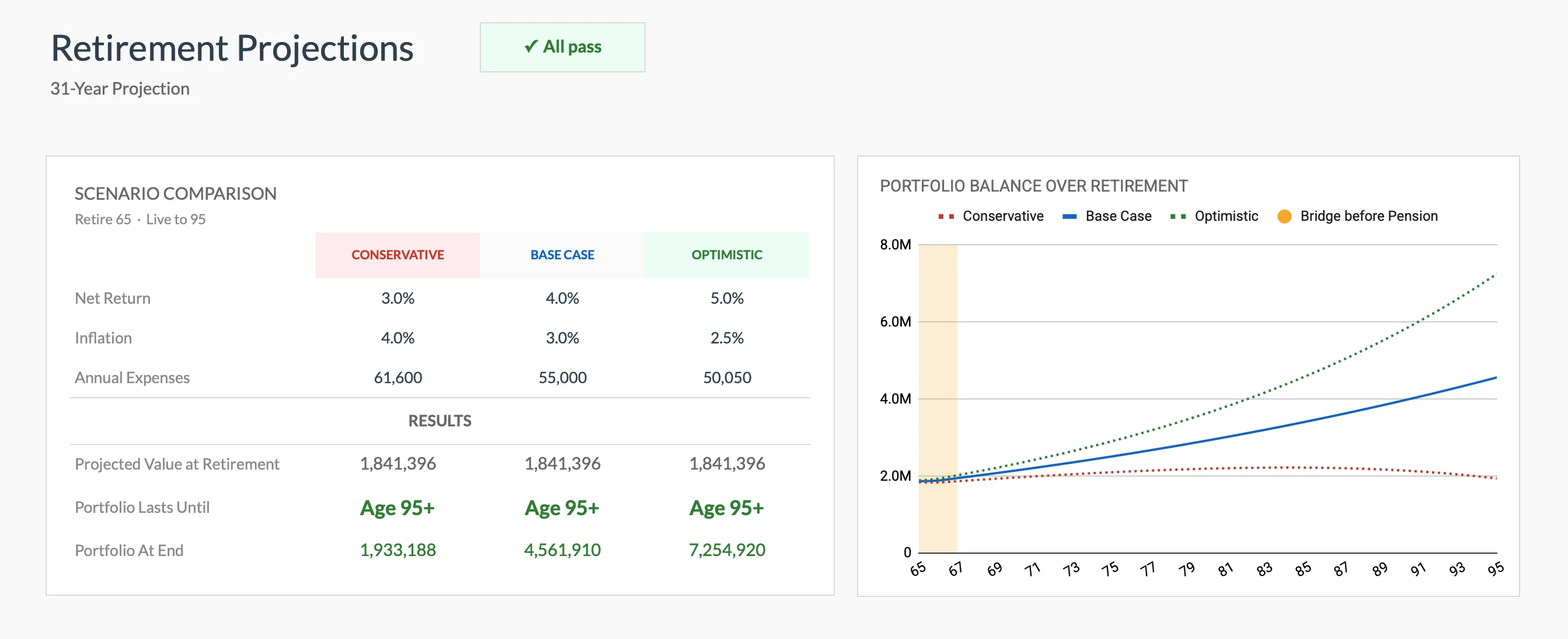
The Retirement Financial Planning Projections template (Premium) runs three assumption sets at once, so you see the same spread of outcomes the standalone calculators only show one at a time.
If you are weighing the free calculator against the paid workbook, the guide on when a calculator is enough and when a template fits better walks through where each one stops being useful.
Related
- Retirement Financial Planning Template - Year-by-year retirement projections you own outright in Google Sheets
- Retirement Calculator - Free, no-signup projection of your savings at retirement and the income gap that is left
- Retirement template vs retirement calculator - Which of the two fits your situation
- Best FIRE calculators and spreadsheets - Deeper tools for early retirement and financial independence
- Free Financial Calculator Widgets for Your Site - Embed the same free calculators, including retirement, on any page
Frequently asked questions
Why do different retirement calculators give different results?
Each calculator uses different assumptions for inflation, investment returns, Social Security estimates, tax treatment, and withdrawal strategies. Some use Monte Carlo simulations (thousands of random scenarios), while others use fixed return assumptions. Small differences in these assumptions compound over decades and produce meaningfully different projections.
Which retirement calculator is the most accurate?
No calculator can predict the future accurately. The most useful calculators are the ones that let you adjust assumptions and run multiple scenarios. Accuracy matters less than understanding the range of possible outcomes and how sensitive your plan is to different variables.
Should I rely on a single retirement calculator?
Running your numbers through two or three different calculators is a useful exercise. If they all suggest you are on track, that is a stronger signal than any single result. If they disagree significantly, look at what assumptions differ.
Are free retirement calculators good enough, or do I need to pay for planning software?
Free calculators handle the fundamentals well for most people. Paid tools or working with a financial planner becomes more valuable when your situation is complex, with multiple income sources, rental properties, business ownership, early retirement strategies, or Roth conversion optimization.
Which retirement calculator works without linking my bank accounts?
FinancialAha, Fidelity, NerdWallet, Vanguard, SmartAsset, and cFIREsim all run on figures you type in, so no account linking is required. Empower is the outlier here: its retirement planner connects to your real accounts to pull live balances, which is why its projections are more personalized but also why it sits inside a platform that markets advisory services.
Do free retirement calculators account for Social Security and pensions?
It varies by tool. NerdWallet, Empower, and SmartAsset factor in Social Security estimates, and SmartAsset is one of the few that also models pension income and state tax differences. The FinancialAha calculator has a field for expected monthly Social Security, but it does not estimate that figure for you, so the number comes off your own statement. It has no separate pension field, and the projection runs from the savings, contribution, return, and inflation figures you type in.
Sources
- Empower Retirement Planner - Empower
- cFIREsim - Crowdsourced FIRE Simulator - cFIREsim
About this article
Competitor calculator methods and features checked against Empower's and cFIREsim's live tool pages. FinancialAha calculator inputs and outputs checked on 2026-09-10 against the shipped Retirement Calculator component; template sheets, inputs and outputs checked the same day against the shipped Retirement Financial Planning Projections Google Sheet (Summary, Inputs, Projections, Helpers, Instructions tabs). Last reviewed September 2026.