
A one-page financial plan fits seven sections on a single screen: your top three goals, a net worth snapshot, a cash flow summary, your savings rate, a debt summary, insurance coverage, and one focus for the quarter. Each section is a single number plus a line of context, nothing more. This walkthrough covers what belongs in each and the math behind the figures, and shows which four of the seven our Financial Planning Spreadsheet builds from your detail sheets.
The financial plans most people abandon are the 30-page documents from advisors that try to anticipate every contingency. The financial plans people actually use are one page, looked at quarterly, and updated annually. This post walks through the seven sections of a one-page plan, what to put in each, and the math behind the numbers. Our Financial Planning Spreadsheet has a Summary tab that builds four of these sections for you, but you can put every section together in any spreadsheet by hand.
Why one page
Three reasons.
You’ll actually look at it. A 30-page document gets read once, filed, never opened again. A one-page summary lives on a tab you check during quarterly reviews. The format determines whether it gets used.
Forces priority. When you have one page, you can’t fit everything. The exercise of choosing what makes the page is the planning work. The sections that get cut don’t matter as much as the ones that survive.
Easy to update. Numbers change. A one-page plan can be re-run in 20 minutes; a 30-page plan can’t.
The trade-off: nuance gets stripped. If your situation has unusual elements (multiple business interests, complex inherited trusts, expat tax issues), the one-pager won’t capture it. For 80 percent of people, the one-pager covers what matters.
The seven sections
Section 1: top 3 goals (and target dates)
The first section establishes what the plan is for. Three goals, dated.
Bad example: “Save for retirement, pay off debt, buy a house, take a trip, build an emergency fund.”
Good example:
- Pay off student loans by December 2027.
- Reach $50,000 emergency fund by June 2026.
- Down payment on a house ($75,000) by 2029.
Three is the right number because four turns into a list and lists get ignored. Pick the three you’d defend if forced to drop everything else.
Section 2: net worth snapshot
Single number. Updated monthly or quarterly.
Net worth = Total assets - Total liabilitiesPlus the year-ago number for context. Plus the change.
Example:
- Today: $245,000
- One year ago: $192,000
- Change: +$53,000 (+27 percent)
That’s the entire section. The detail sits wherever you list assets and debts, whether that is a pair of tabs in your own file or a standalone Net Worth Tracker; the one-pager just shows the headline. If the number itself is new to you, how to calculate your net worth walks through the assets-minus-liabilities math.
Section 3: cash flow summary
Three numbers: monthly income, monthly expenses, monthly surplus or deficit.
Example:
- Income: $9,200/month average (after tax)
- Expenses: $7,400/month average
- Surplus: $1,800/month
Plus the year-ago surplus for trend.
Where the surplus is going (savings, debt payoff, both) gets covered in Sections 4 and 5.
Section 4: savings rate
Savings as a percentage of gross income.
Savings rate = (Total annual savings + Retirement contributions) / Gross annual incomeThis includes 401(k), IRA, brokerage taxable, employer match, and explicit savings into emergency or goal funds. It excludes principal payments on a mortgage (that’s an asset transfer, not savings) and excludes spending money on lifestyle assets like cars.
Example:
- Annual savings: $32,000
- Gross income: $145,000
- Savings rate: 22 percent
A 20 percent savings rate is a common benchmark, and it sits well above the national average: the U.S. personal saving rate was 2.7 percent in June 2026. Higher means faster progress toward goals; lower is workable when circumstances call for it. What the one-pager gives you is the number itself, tracked over time, rather than a rule to hit.
Section 5: debt summary
Total debt by type, with interest rates. Single line per debt.
| Debt | Balance | APR | Min payment |
|---|---|---|---|
| Mortgage | $187,000 | 6.25 | $1,420 |
| Student loan | $32,400 | 5.5 | $310 |
| Auto loan | $12,800 | 4.8 | $295 |
| Credit cards | $0 | n/a | n/a |
| Total | $232,200 | $2,025 |
Plus a one-line note on payoff strategy: “Focus on student loan, then auto loan; mortgage stays on schedule.”
Section 6: insurance coverage
Five rows. Yes/no/amount.
| Coverage | Status |
|---|---|
| Health insurance | Family plan via employer |
| Auto insurance | $300K liability, full |
| Homeowners insurance | $400K dwelling, $300K liability |
| Term life insurance | $750K each spouse, expires 2042 |
| Disability insurance | 60 percent of income via employer |
Plus a one-line note on gaps: “Disability is employer-only; consider a private supplement when self-employed.”
Section 7: this quarter’s focus
The most important section. One thing.
Examples:
- “Q2 2026: Increase 401(k) contribution from 12 percent to 15 percent (effective May paycheck).”
- “Q2 2026: Pay off auto loan ($12,800 remaining) by end of June using bonus and tax refund.”
- “Q2 2026: Get term life insurance quotes from three providers.”
Single focus. Specific. Time-bounded. Done by end of quarter.
The reason most financial plans don’t drive behavior is that they don’t say what to do next. This section fixes that.
The full one-pager
Putting it together as a single visual:
[Top of page]

GOALS
- Pay off student loans by December 2027
- Reach $50,000 emergency fund by June 2026
- Down payment ($75,000) by 2029

NET WORTH                CASH FLOW              SAVINGS RATE
Today: $245,000          Income: $9,200/mo      22 percent
1 yr ago: $192,000       Expenses: $7,400/mo    Target: 25 percent
Change: +$53,000         Surplus: $1,800/mo     by end of 2026

DEBT                                            INSURANCE
Mortgage  $187K  6.25 percent  $1,420/mo        Health: family employer
Student   $32K   5.5 percent   $310/mo          Auto: $300K liability
Auto      $13K   4.8 percent   $295/mo          Home: $400K/$300K
Credit    $0                                    Life: $750K each
Total     $232K                                 Disability: 60 percent employer

THIS QUARTER (Q2 2026)
Increase 401(k) from 12 to 15 percent. Effective May 1.
Fits on one screen. Everything you need to make a quarterly check-in productive.
What the spreadsheet does
The Financial Planning Spreadsheet has a Summary tab that reads from the detail sheets and rebuilds the one-pager whenever the underlying numbers change:
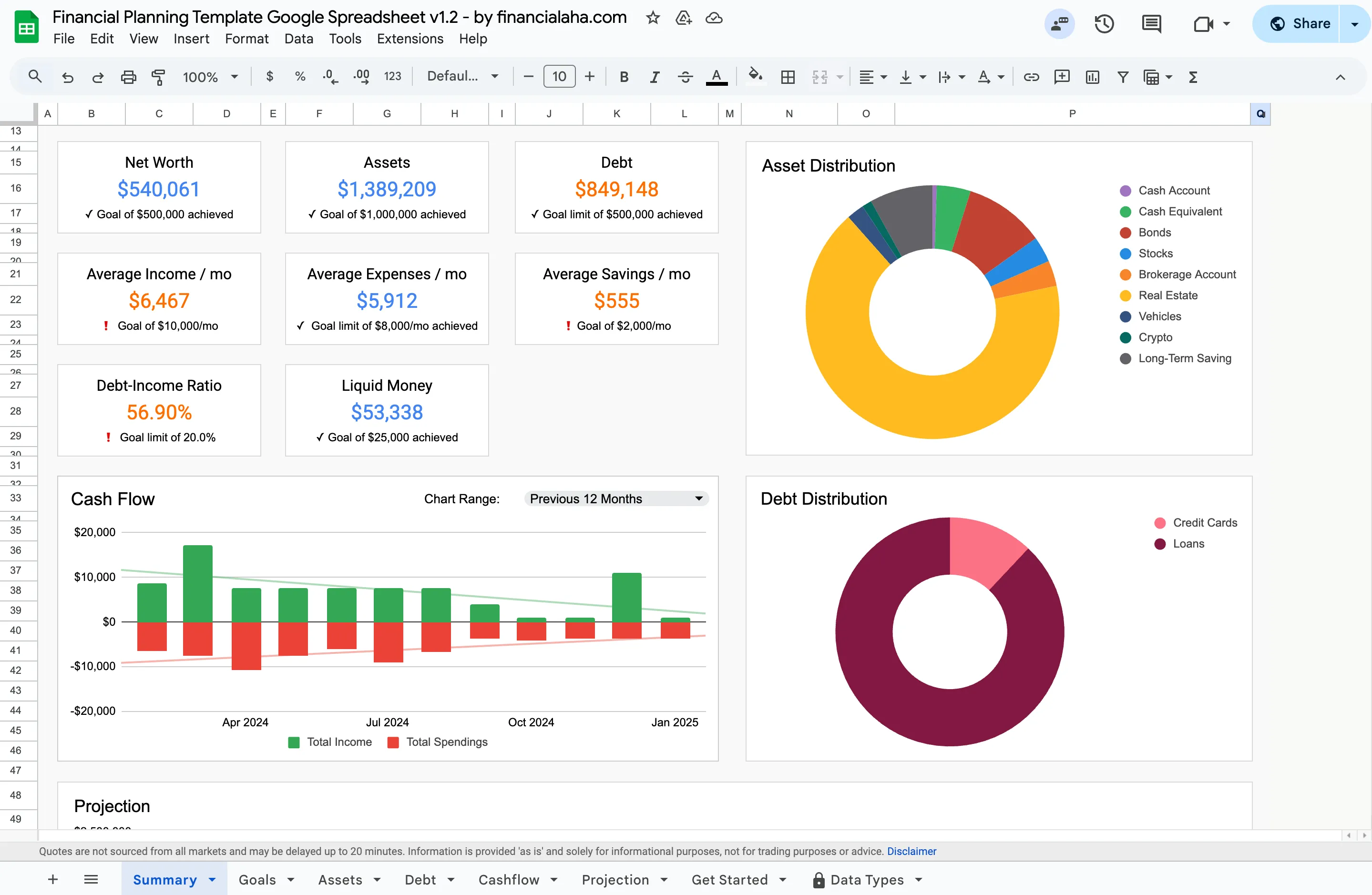
The Summary tab of the Premium Financial Planning Spreadsheet builds four of the seven sections from the detail sheets.
- Goals are eight numeric targets you type into the Goals sheet: net worth, liquid money, assets value, maximum debt, debt-to-income ratio, and average income, expenses and savings per month. The Summary marks each one achieved or not yet, so dated goals like a house deposit stay a note you keep yourself.
- Net worth rolls up from the Assets and Debt sheets, the same assets-minus-debt math a standalone Net Worth Tracker runs, with donut charts splitting assets and debt by type.
- Cash flow reads from the Cashflow sheet, which holds one row per month rather than individual transactions. A chart-range dropdown on the Summary switches the chart between the previous 12 months, year to date, and all time historical.
- Savings shows as an average per month in currency rather than as a rate against gross income, next to a debt-to-income ratio and a liquid-money figure.
- Debt rolls up from the Debt sheet, split by type in its own donut chart.
Two of the seven sections aren’t in the workbook at all: insurance coverage and this quarter’s focus. Those stay short notes you keep next to the summary. A Projection section further down the tab extends the same numbers to an end year you set on the Projection tab, which also holds the growth, yield, debt-change and inflation assumptions behind the forecast.
The Summary updates automatically as you fill in each month’s figures and refresh your balances. You don’t rebuild it; you just check it.
If you’d rather build the whole thing by hand, every section above is a couple of cells in any spreadsheet. Rough time to assemble from scratch: about 90 minutes.
How often to look at it
Quarterly is the right cadence for most people. Annual is too sparse; monthly is too noisy.
The ritual:
- Open the one-pager at the start of each quarter.
- Verify the numbers (run the rest of the workbook to make sure they’re current).
- Review whether last quarter’s focus actually got done.
- Set this quarter’s focus.
- Close the file. Don’t open again until next quarter.
That’s the routine. Total time per quarter: about 30 minutes including running the underlying numbers.
What the one-pager doesn’t replace
A few things still need their own deeper analysis:
- Estate planning. Wills, beneficiaries, healthcare directives. The one-pager can have a row noting “Estate plan reviewed in March 2026”; the actual plan lives elsewhere.
- Tax planning. The detail sits in the Annual Tax Planner, which logs income by type with a rate for each, deductions by category, quarterly payments and a documents checklist, then totals a net tax liability. The one-pager just notes the action.
- Investment policy. Asset allocation targets, rebalancing rules. These are once-a-year decisions; the one-pager can note the policy (“70/30 stocks/bonds, rebalance threshold 5 percent”) but the underlying allocation is tracked separately.
Where to go next
The fastest way to see the one-pager is the full one-pager layout above: copy those seven blocks into any sheet and fill in your own numbers. If you’d rather the Summary tab keep itself current as you fill in each month, two options cover it:
- Financial Planning Spreadsheet ($29) - a Google Sheet with Summary, Goals, Assets, Debt, Cashflow and Projection tabs, projecting out to an end year you set.
- Personal Finance Bundle ($59) - Financial Planning plus Net Worth plus Annual Tax Planner, at a bundled price.
Related
- How to Calculate Your Net Worth - the math behind the net worth line on your one-pager.
- Net Worth by Age: What the Numbers Say - context for reading your snapshot against peers.
- Creating a Financial Plan for Major Life Changes - what to revisit when the goals section shifts.
- Tiller Alternative: Google Sheets Without the Subscription - the spreadsheet-over-app case, no monthly fee.
- Google Sheets Templates for Financial Advisors - how advisors put a one-page plan in front of clients.
Frequently asked questions
Is one page enough for a serious financial plan?
For most situations, yes. The one-pager surfaces the numbers that drive decisions; the deeper analysis lives on supporting sheets. If your situation requires more (complex estate, multiple businesses, international tax issues), you'll need supplementary documents but the summary is still useful.
Should I share my one-pager with an advisor?
Yes, if you work with one. It gives them the relevant context in 30 seconds instead of an hour-long discovery call. Many advisors will start a relationship there.
How is this different from a budget?
A budget is a monthly cash flow plan. A one-pager is a quarterly summary of your overall financial picture. Same person uses both. The one-pager pulls a single line from the budget (monthly surplus); the budget covers the detail.
What if my goals change mid-year?
Update the goals section. The one-pager is a living document, not a contract. Goals shifting is normal; the structure of the document handles it.
Does the one-pager work for couples with separate finances?
With a small modification. Either run two one-pagers (one each) and a household summary, or run a single household one-pager and note which spouse owns each item. Both approaches work; pick what matches how you actually make decisions.
Does the Financial Planning Spreadsheet auto-fill all seven sections?
Four of them. The Summary tab builds net worth, cash flow, savings and debt from the Assets, Debt and Cashflow sheets, though savings appears as an average per month rather than as a rate against gross income. The Goals sheet holds eight numeric targets you enter yourself, and the Summary marks each one achieved or not yet. Insurance coverage and this quarter's focus are not in the workbook, so those two stay short notes you keep alongside the summary.
Sources
- Personal Saving Rate - U.S. Bureau of Economic Analysis
About this article
Template tabs, tiles and charts checked on 2026-09-10 against the shipped FinancialAha Financial Planning Google Sheet (Summary, Goals, Assets, Debt, Cashflow, Projection tabs). Savings-rate context checked against the U.S. Bureau of Economic Analysis personal saving rate. Last reviewed September 2026.