Best Value Complete Financial Planning Bundle
✓ Financial Planning✓ Net Worth Tracker✓ Monthly Budgeting✓ Travel Budget Planner✓ Annual Budgeting Planner✓ Monthly Expense Tracker✓ Annual Tax Planner✓ Retirement Planning
View Bundle →

Instant digital delivery · Terms & Conditions apply

Ultimate Template - Excel & Google Sheets

Ultimate Event Budget Spreadsheet Template for Google Sheets & Excel

Thirty vendors tracked on quote, deposit, balance and due date, thirty budget categories carrying variance, share used and a status, and thirty lines of revenue set against the cost. The Ultimate Event Budget spreadsheet template opens on an Event Setup sheet recording the occasion's own details, then works the cost out per attendee so the size of the event connects to the size of the budget. Six working sheets and two charts, Google Sheets and Excel. No macros, no VBA.

See Preview

Instant digital delivery · Terms & Conditions apply

Event Budget Spreadsheet Template - Ultimate version for Google Sheets and Excel

What's Included

  • Event Setup recording the event's own details, so the file documents a specific occasion
  • A Budget Breakdown with variance, share used and a status on every category
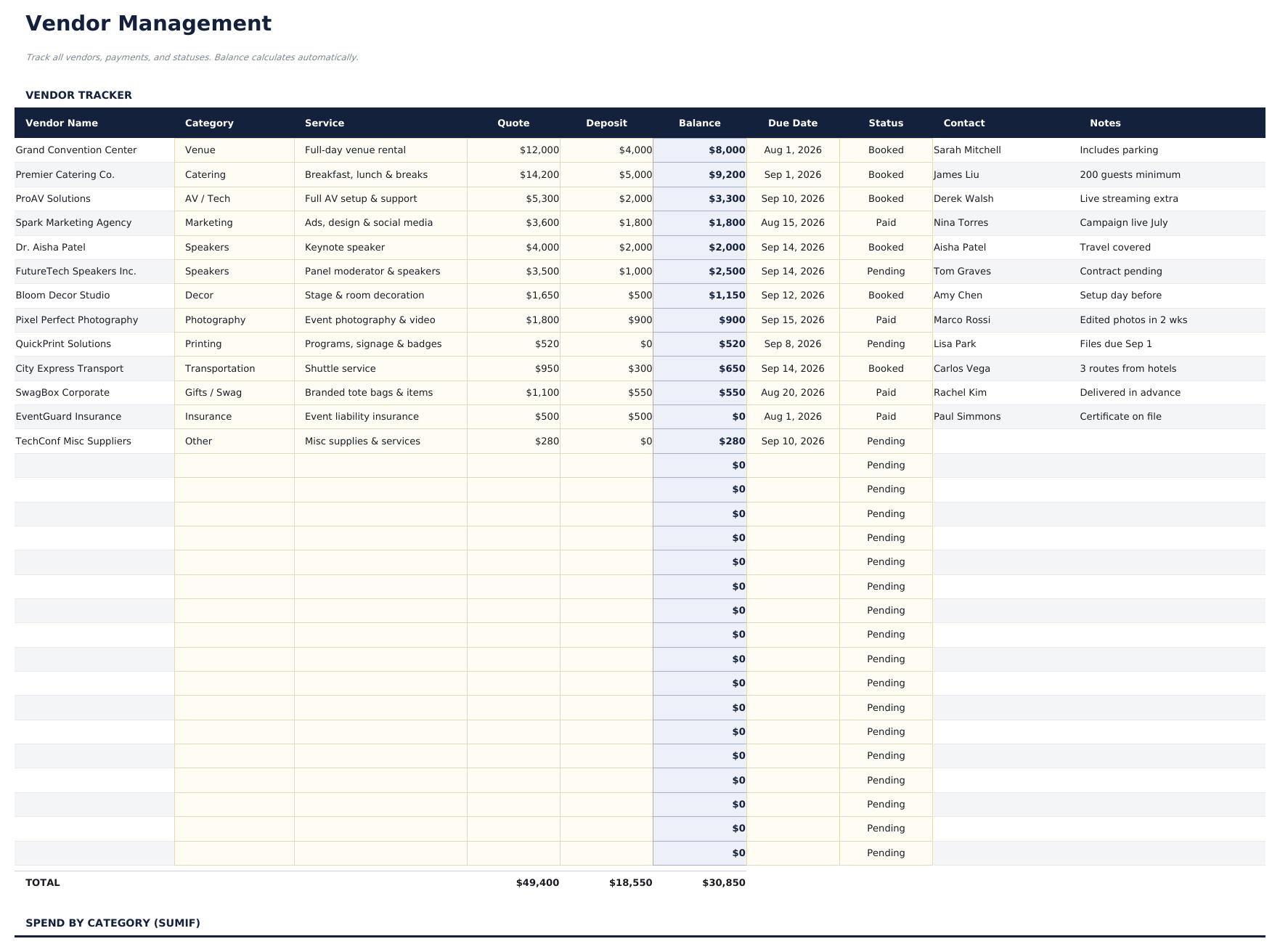
  • Vendor Management for thirty suppliers with quote, deposit and balance
  • A due date on every vendor balance, so a final payment does not slip
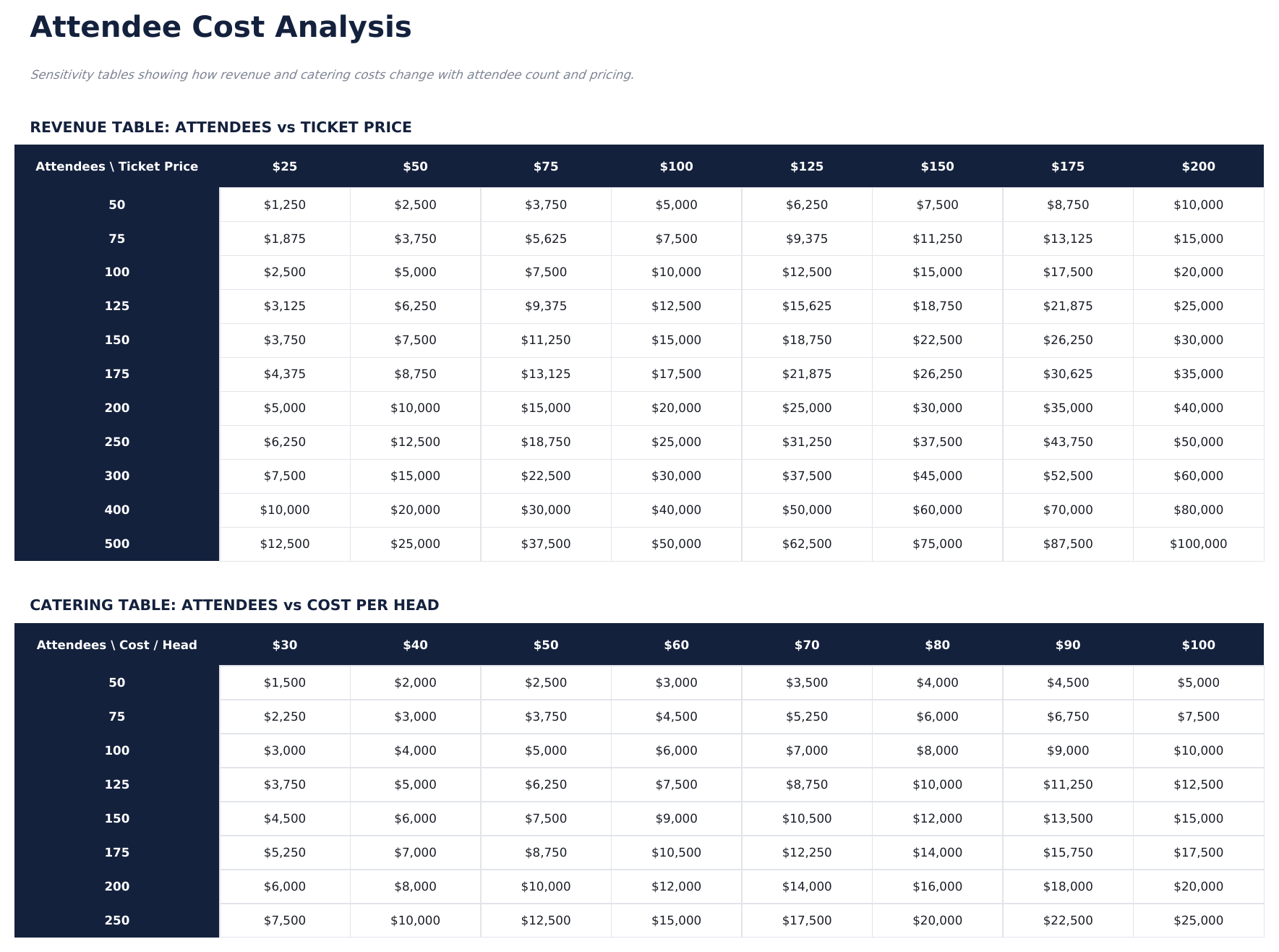
  • Attendee Analysis connecting the size of the event to the size of the budget
  • Cost per attendee on the dashboard
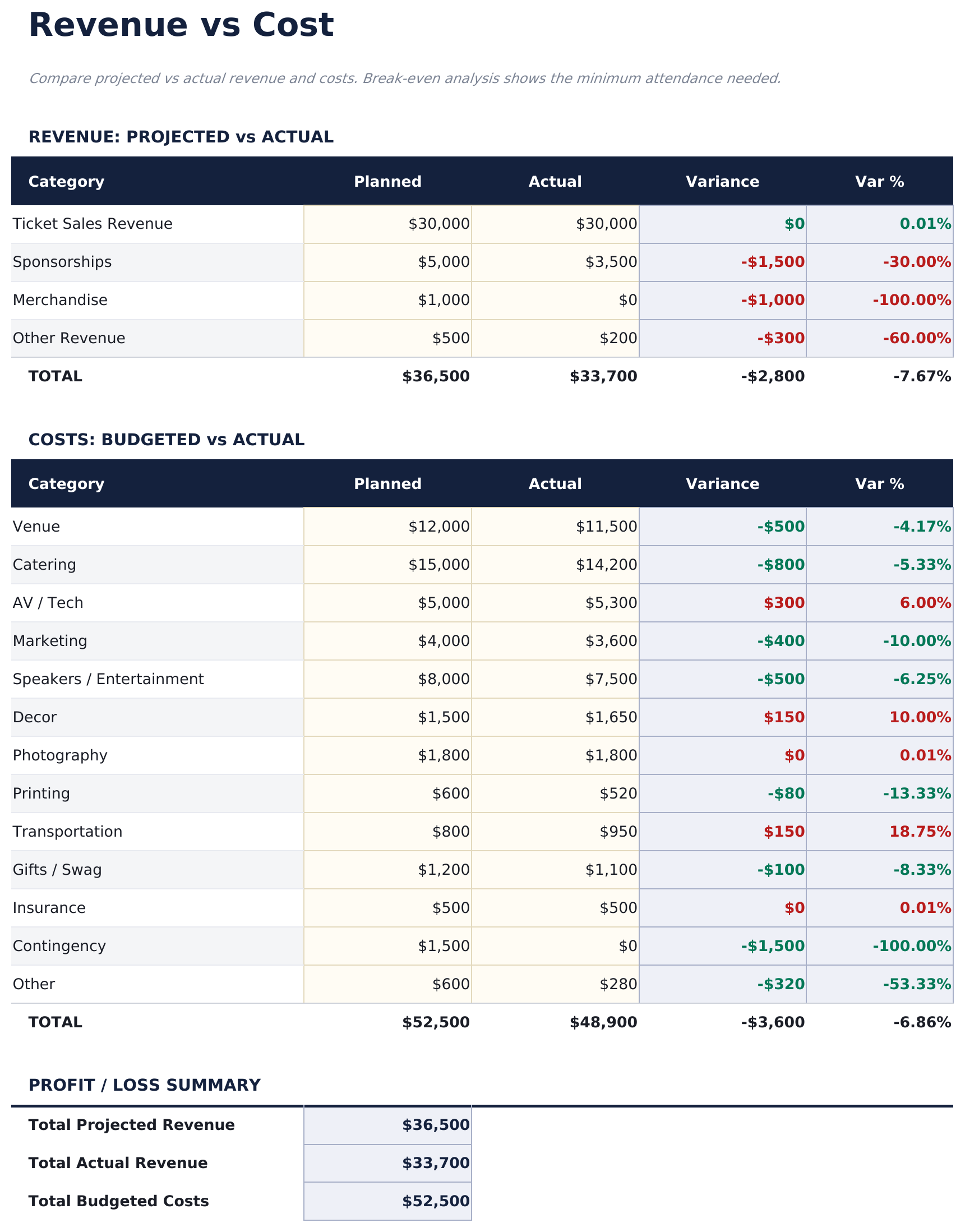
  • Revenue vs Cost setting income against outlay, planned and actual
  • Two charts on the dashboard
  • Works in Microsoft Excel and Google Sheets with no macros required

The FinancialAha Ultimate Event Budget Spreadsheet Template for Google Sheets and Excel is a six-sheet workbook for an event with vendors, deposits and a revenue side, with a How to Use guide on a seventh tab. It ships as an Ultimate Event Budget Excel template and an Ultimate Event Budget Google Sheets template in one file. This Ultimate Event Budget spreadsheet template records the event's own details, itemises the budget by category, tracks vendors with what is quoted, paid and still due, works out what each attendee costs, and sets the income against the outlay. No macros, no VBA.

Inside the workbook

What's inside the FinancialAha Ultimate Event Budget spreadsheet template

The FinancialAha Ultimate Event Budget Spreadsheet Template runs on six working sheets - four you type into, two that report back - plus the guide. It works in both Microsoft Excel and Google Sheets and here is what the Ultimate Event Budget spreadsheet holds.

  1. 01 of 06

    Dashboard

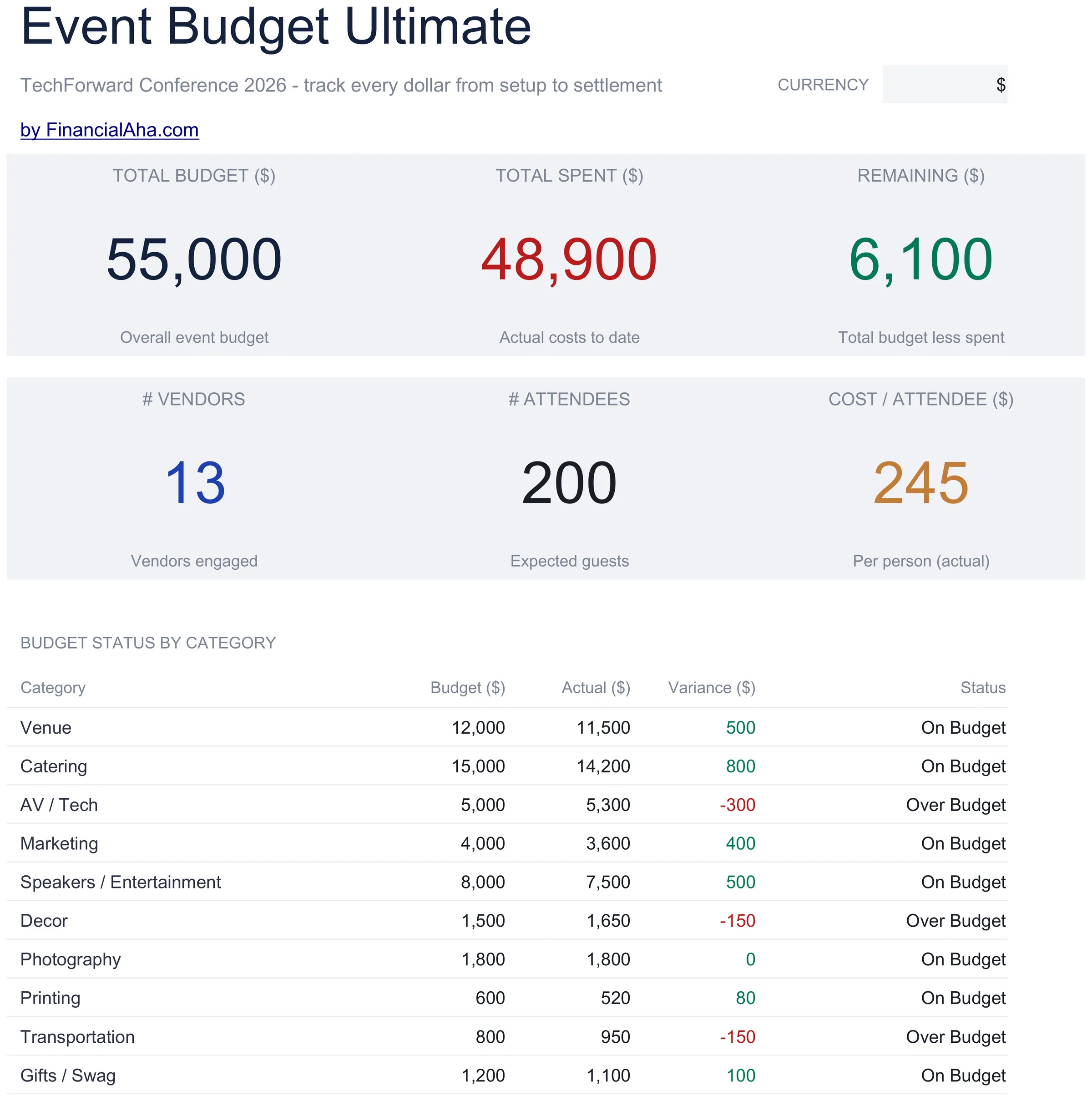
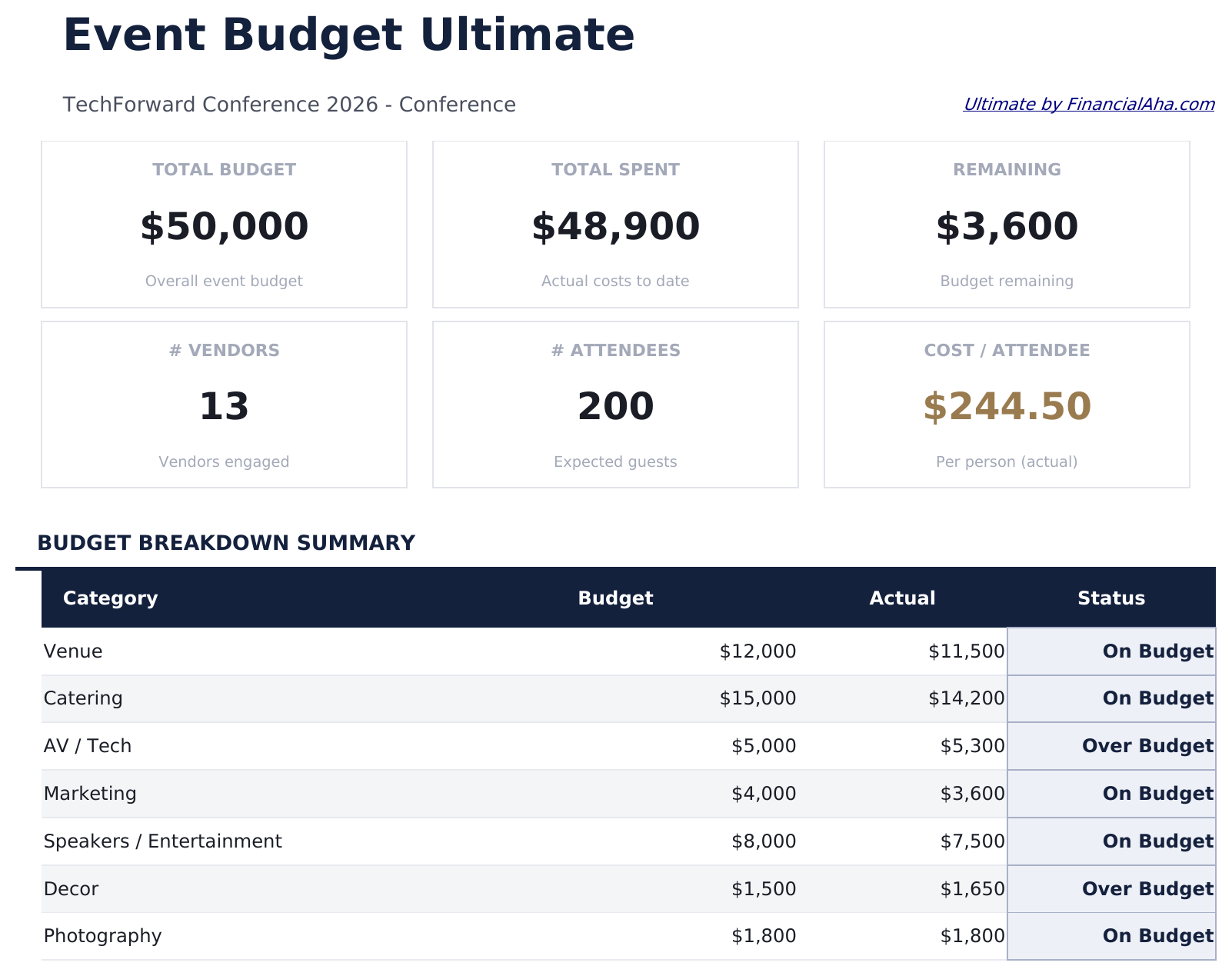
    The event at the top level: what has been budgeted, what has gone out, what is left, how many vendors are engaged, how many guests are expected, and what the whole thing works out to per attendee. That last figure is the one that makes an event comparable with the last one you ran, or with what a ticket needs to cover. A status table underneath carries every category with its budget, actual, variance and where it stands.

  2. 02 of 06

    Event Setup

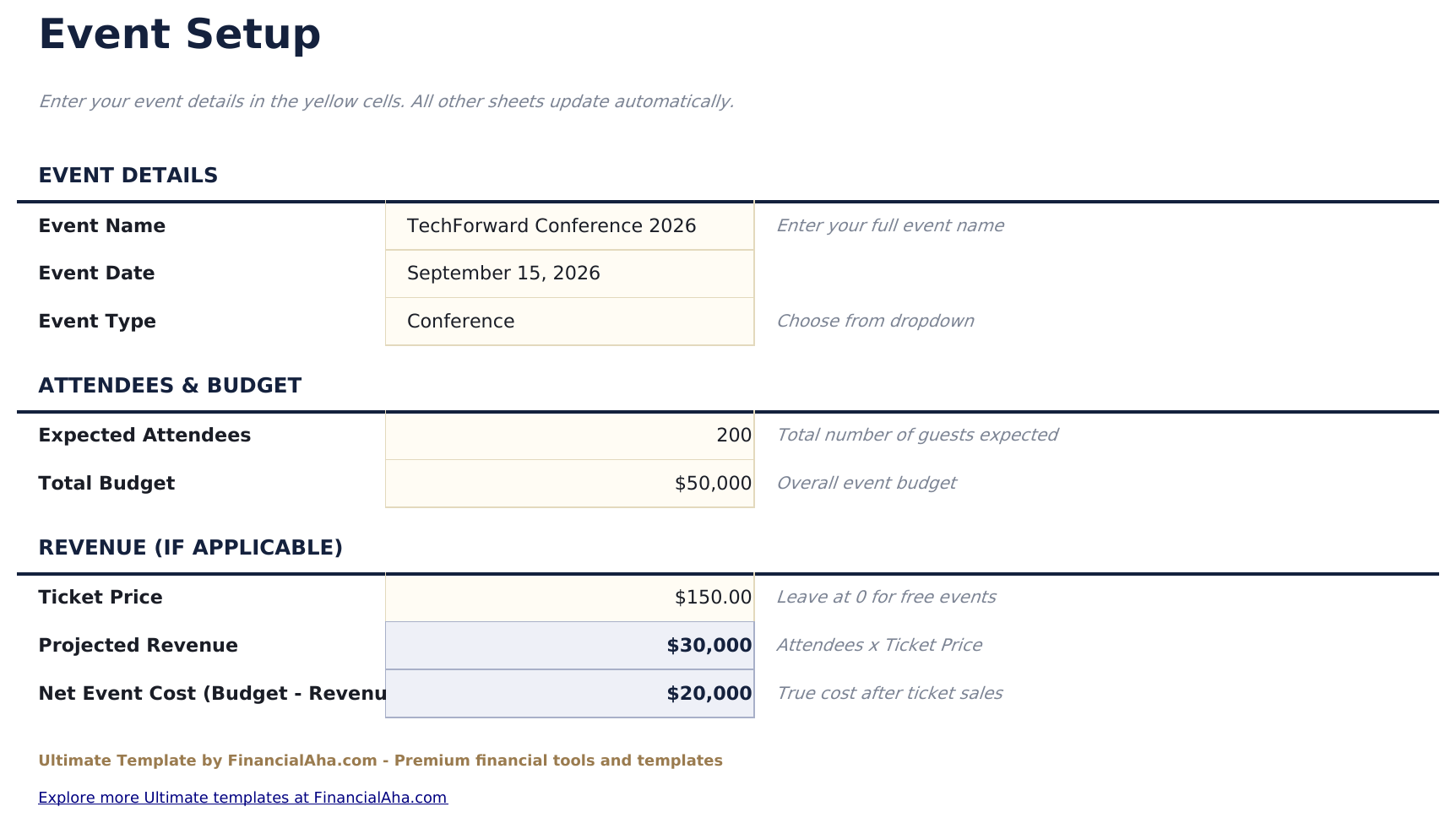
    The event's own details, recorded once - what it is, when, and the particulars everything else is measured against. It is the sheet that turns a budget into a record of a specific event rather than a generic file, which matters when you come back to it while planning the next one.

  3. 03 of 06

    Budget Breakdown

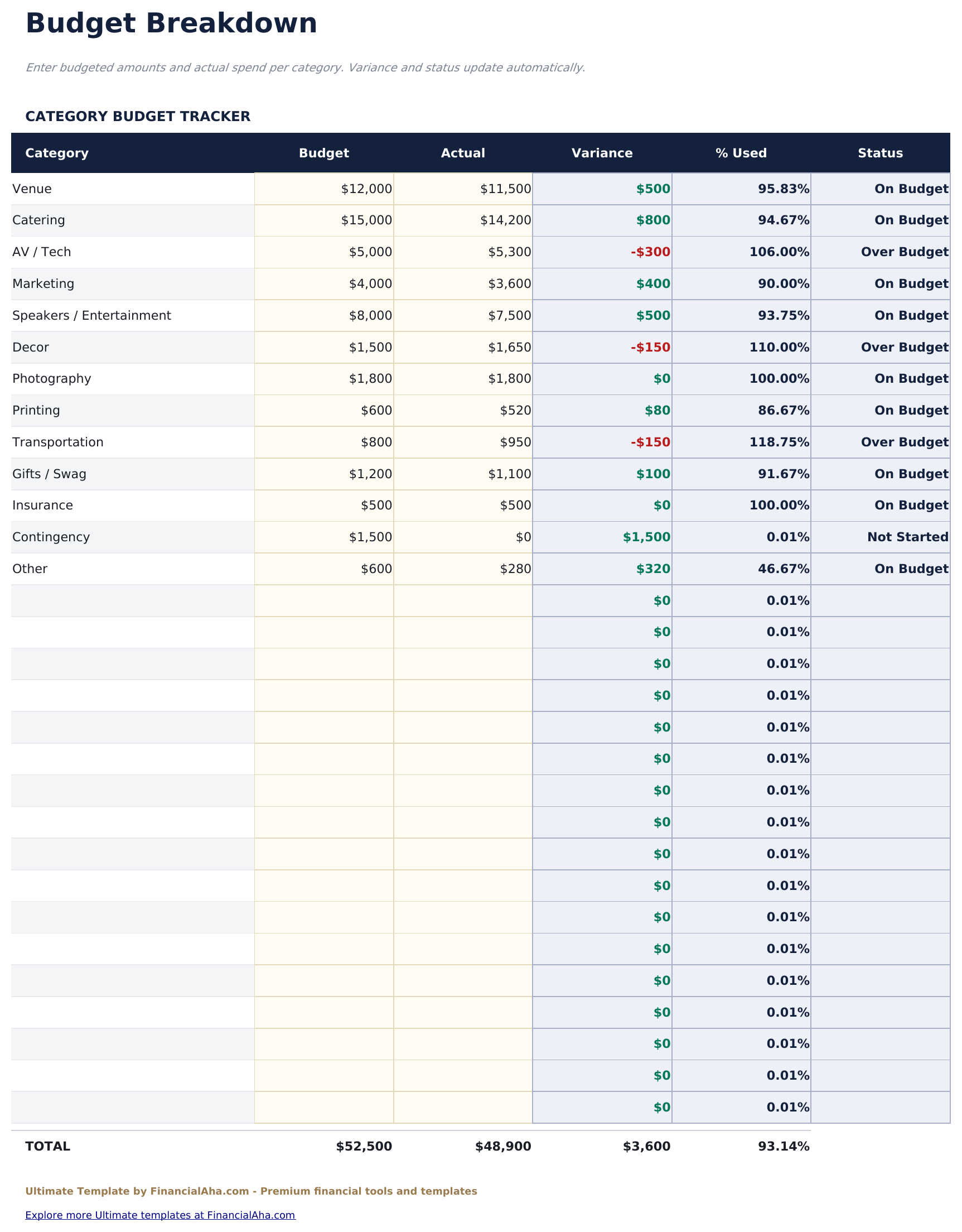
    A row per category, each with what it was given, what it has used, the variance, the share of its budget spent and a status. The share-used column is the one that reads best mid-planning: a category can be well within budget in money terms and almost exhausted as a proportion, and those are different situations.

  4. 04 of 06

    Vendor Management

    Every supplier on the event, thirty of them, with what they quoted, what deposit has gone to them, what balance remains and when it falls due. Events run on deposits and final payments, and the due date column is the part that keeps a supplier from being paid late - which a budget sheet alone would never surface.

  5. 05 of 06

    Attendee Analysis

    The guest side of the event, which is what turns costs into per-head figures. It is the sheet that connects the size of the event to the size of the budget rather than treating them as separate questions.

  6. 06 of 06

    Revenue vs Cost

    The income set against the outlay - tickets, sponsorship or whatever the event brings in, planned against actual, alongside what it costs. For an event meant to break even or return a surplus, this is the sheet that answers whether it did, which no budget-only view can.

  7. Included guide

    How to Use

    A step-by-step guide on its own tab, covering setup, what each sheet records, and how the vendor and revenue views tie back to the budget. Because it ships inside the file, the instructions travel with the template wherever it is opened.

Works in both Google Sheets and Excel

Ultimate Event Budget Spreadsheet template for Google Sheets

Upload the Ultimate Event Budget Spreadsheet Template to Drive, right-click it, and choose "Open with Google Sheets". This Ultimate Event Budget Google Sheets template needs no conversion step and both charts survive the trip intact. The cross-sheet references that feed the Dashboard rely on the existing tab names, so those are worth leaving alone.

Ultimate Event Budget Google Sheets template setup

A shared copy of the Ultimate Event Budget Google Sheets template suits a committee where different people own different categories, and the vendor sheet in particular benefits from being visible to everyone - a deposit paid twice is a real risk when several people are booking. Sheets version history covers exactly that.

Sharing the Ultimate Event Budget Google Sheet

Day to day the Ultimate Event Budget Google Sheet is a line updated as a quote firms up, a deposit goes out, or a payment falls due. The dashboard, the category statuses and the revenue view all follow from those entries.

Ultimate Event Budget Spreadsheet template for Excel

The Ultimate Event Budget spreadsheet Excel download is a plain .xlsx. Excel opens this Ultimate Event Budget Excel template directly, with no import step and no compatibility prompt, and both charts are native Excel charts that redraw as entries go in. There are no macros and no VBA in the file, so it opens without a security warning.

Ultimate Event Budget Excel template setup

The same Ultimate Event Budget Excel template opens in Excel on Windows, Excel on Mac, and Excel for the web. It is also the identical file you would upload to Drive, so there is no separate Ultimate Event Budget spreadsheet download to choose between.

Ultimate Event Budget spreadsheet Excel notes

The Ultimate Event Budget spreadsheet Excel file carries no macros and no VBA, so Excel opens it without a trust prompt. The same Ultimate Event Budget spreadsheet Excel download also opens in Excel for the web, which matters when you move between a work machine and a personal one.

Opening the Ultimate Event Budget spreadsheet Excel file

Nothing in the Ultimate Event Budget Excel template is version-specific, so this Ultimate Event Budget spreadsheet Excel workbook behaves identically in Excel on Windows, Excel on Mac, and older builds.

Spreadsheet template highlights

What the Ultimate Event Budget spreadsheet template tracks

The budget breakdown and the vendor list are the sheets that do most of the work. These are the columns the Ultimate Event Budget Spreadsheet Template carries:

Category
the part of the event the line covers
Budget
what it has been given
Actual
what it has used
Variance auto
derived, budget against actual
% Used auto
derived, the share of the category's budget spent
Status
where the category stands
Vendor Name
the supplier the row covers
Quote
what they quoted for the work
Deposit
what has already gone to them
Balance auto
derived, what is still owed
Due Date
when that balance falls due

Compare builds

FinancialAha Event Budget spreadsheet template: Free, Essentials, and Ultimate compared

Feature Free View Spreadsheet Template Essentials View Spreadsheet Template Ultimate This page
Working sheets 1 2 6
Structure Flat list, 14 lines 8 categories with line items 30 categories, itemised
Estimated vs actual Yes Yes, per line and per category Yes, with share used
Notes per line Yes Yes
Charts 2 2
Vendor tracking In notes 30 vendors with quote, deposit and balance
Payment due dates Per vendor
Cost per attendee Yes
Revenue side Set against cost
Event details recorded Dedicated sheet

The FinancialAha Ultimate Event Budget Spreadsheet Template covers six working sheets and treats the event as a project with suppliers and an income side. The Free Event Budget Spreadsheet Template holds one ungrouped list. The Essentials Event Budget Spreadsheet Template for Google Sheets and Excel groups named categories with line items, subtotals and notes. This build records the event's own details, gives every category its share of budget used and a status, gives vendors a sheet with quotes, deposits, balances and due dates, works out what the event costs per attendee, and sets the revenue against the cost - which is the only way to answer whether an event that was meant to break even actually did.

Good to know

Notes on working in the Ultimate Event Budget spreadsheet template

  • Share of budget used reads better than variance mid-planning: a category can be fine in money terms and nearly exhausted as a proportion.
  • The due date on a vendor balance is the field that prevents a late payment, and no budget-only view carries it.
  • Cost per attendee is what makes one event comparable with the last, and with what a ticket has to cover.
  • The revenue sheet is what separates an event that broke even from one that merely stayed inside its budget.
  • The currency dropdown sits on the Dashboard and relabels money columns across the whole Ultimate Event Budget spreadsheet. It changes the label only and does not convert the numbers.

How to Use This Template

1

Record the event

Event Setup captures what the event is and the details everything else is measured against.

2

Build the budget

Budget Breakdown takes a line per category with what each is given and what it uses.

3

Track your suppliers

Vendor Management holds quotes, deposits, balances and the dates those balances fall due.

4

Close the loop

Attendee Analysis gives the per-head figures, and Revenue vs Cost sets income against outlay.

Stress-tested with AI.

Every template starts with deep research into how people actually track the topic. We design the layout, build the formulas, and polish the design until it feels like something we would use ourselves. Along the way, we use AI to stress-test the calculations: unusual inputs, edge cases, and formula behavior, checked until the numbers hold.

One-time purchase. No subscription. Works in Excel & Google Sheets.

Frequently Asked Questions

Is the FinancialAha Ultimate Event Budget Spreadsheet Template a Google Sheets template?

Yes. Upload the file to Drive and choose "Open with Google Sheets". The Ultimate Event Budget Google Sheets template needs no conversion step and both charts survive the trip intact. The cross-sheet references rely on the existing tab names, so those are worth leaving alone.

Is the FinancialAha Ultimate Event Budget Spreadsheet Template an Excel template?

Yes. The download is a plain .xlsx, so the Ultimate Event Budget Excel template opens directly in Excel with no import step. Both charts are native Excel charts, and there are no macros or VBA.

Will the FinancialAha Ultimate Event Budget spreadsheet Excel file open in older versions of Excel?

Yes. The Ultimate Event Budget spreadsheet Excel workbook ships as a plain .xlsx, so it opens identically in current Excel and in builds that predate dynamic arrays.

How does the Ultimate Event Budget spreadsheet template handle vendors?

On a sheet of their own: thirty suppliers, each with what they quoted, what deposit has gone out, the balance still owed and when it falls due. Events run on deposits and final payments, and the due date is the part a budget sheet alone never surfaces.

What is cost per attendee for in the Ultimate Event Budget spreadsheet?

It makes one event comparable with the last, and with what a ticket price has to cover. A total alone says nothing about whether the event was expensive for its size.

Does the Ultimate Event Budget spreadsheet track income as well as costs?

Yes. Revenue vs Cost sets tickets, sponsorship or whatever the event brings in against the outlay, planned and actual - which is the only way to answer whether an event meant to break even actually did.

How many categories does the Ultimate Event Budget spreadsheet hold?

Thirty, each with its variance, the share of its budget used and a status.

Why does share of budget used matter in the Ultimate Event Budget spreadsheet?

Because a category can be well within budget in money terms and almost exhausted as a proportion. Mid-planning those are different situations, and the percentage is what tells them apart.

What do I get after buying the Ultimate Event Budget spreadsheet template?

You receive the Ultimate Event Budget spreadsheet template as an Excel file (.xlsx) that works in Microsoft Excel and Google Sheets. Download it immediately after purchase - no signup or account required.

Is there a free Ultimate Event Budget spreadsheet template?

Yes. A free version of the Ultimate Event Budget spreadsheet template is available with basic features. The Ultimate version adds advanced analysis, more capacity, and additional sheets.

What if the Ultimate Event Budget spreadsheet template does not work for me?

Contact us and we will help troubleshoot. The Ultimate Event Budget spreadsheet template works in Microsoft Excel and Google Sheets with no macros required.

Ultimate

Highlights:

Instant download after purchase
No macros or VBA required
All formulas auto-calculate
No subscription required
Works in
Excel Google Sheets

Looking for more Ultimate templates?

We offer Ultimate versions of our most popular spreadsheet templates with advanced features, more capacity, and deeper analysis.

Private & secure

Your financial data stays on your device. We never see it.

Learn more →

Need help?

Check our guides or reach out with questions.

View FAQ →