Lifetime Deal Complete Personal Financial Planning Bundle
✓ Financial Planning✓ Net Worth Tracker✓ Monthly Budgeting✓ Travel Budget Planner✓ Annual Budgeting Planner✓ Monthly Expense Tracker✓ Annual Tax Planner✓ Retirement Planning
View Bundle →

Instant digital delivery · Terms & Conditions apply

Ultimate Template - Excel & Google Sheets

Ultimate Rent vs Buy Calculator Spreadsheet Template for Google Sheets & Excel

Every assumption sits on a sheet of its own - price, deposit, rate, term, tax, insurance, dues, maintenance, closing costs, appreciation. The Ultimate Rent vs Buy Calculator spreadsheet template counts what the deposit and closing costs would have earned if invested instead, breaks out every cost line on both sides year by year, and isolates the crossover on a Break-Even sheet with the crossing row picked out. Six working sheets. Google Sheets and Excel, one file.

See Preview

Instant digital delivery · Terms & Conditions apply

Rent vs Buy Calculator Spreadsheet Template - Ultimate version for Google Sheets and Excel

What's Included

  • Assumptions gathered on a sheet of their own - price, deposit, rate, term, tax, insurance, dues, maintenance, closing costs, appreciation, rent and rent increase
  • Opportunity cost modelled: the return the deposit and closing costs would earn if invested rather than spent on a purchase
  • Year-by-Year breakdown showing every cost line on both sides rather than a rolled-up total
  • Net figures stated as wealth - ownership counts equity and appreciation back, renting counts the investment returns
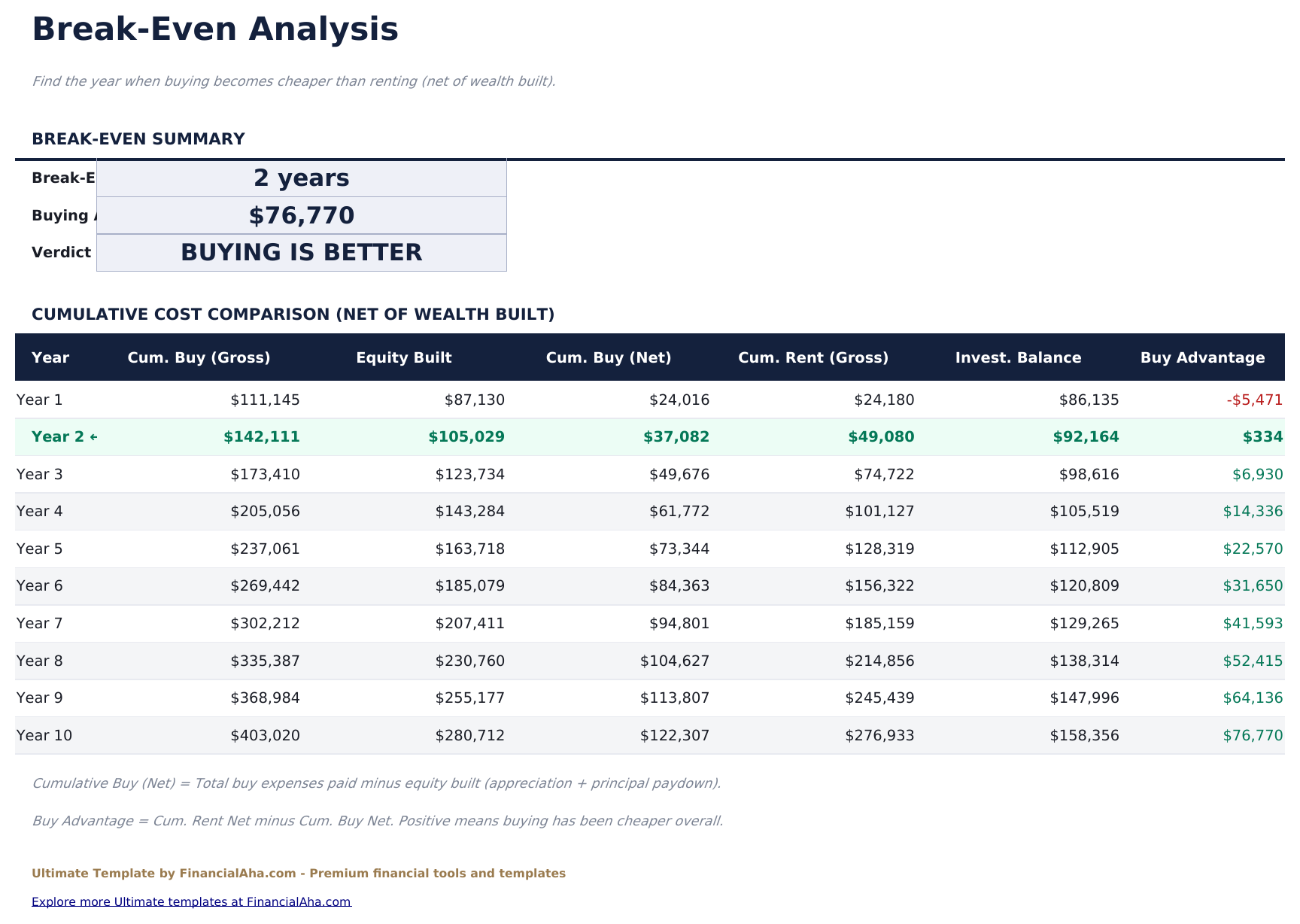
  • Break-Even sheet isolating the crossover, with the crossing row picked out
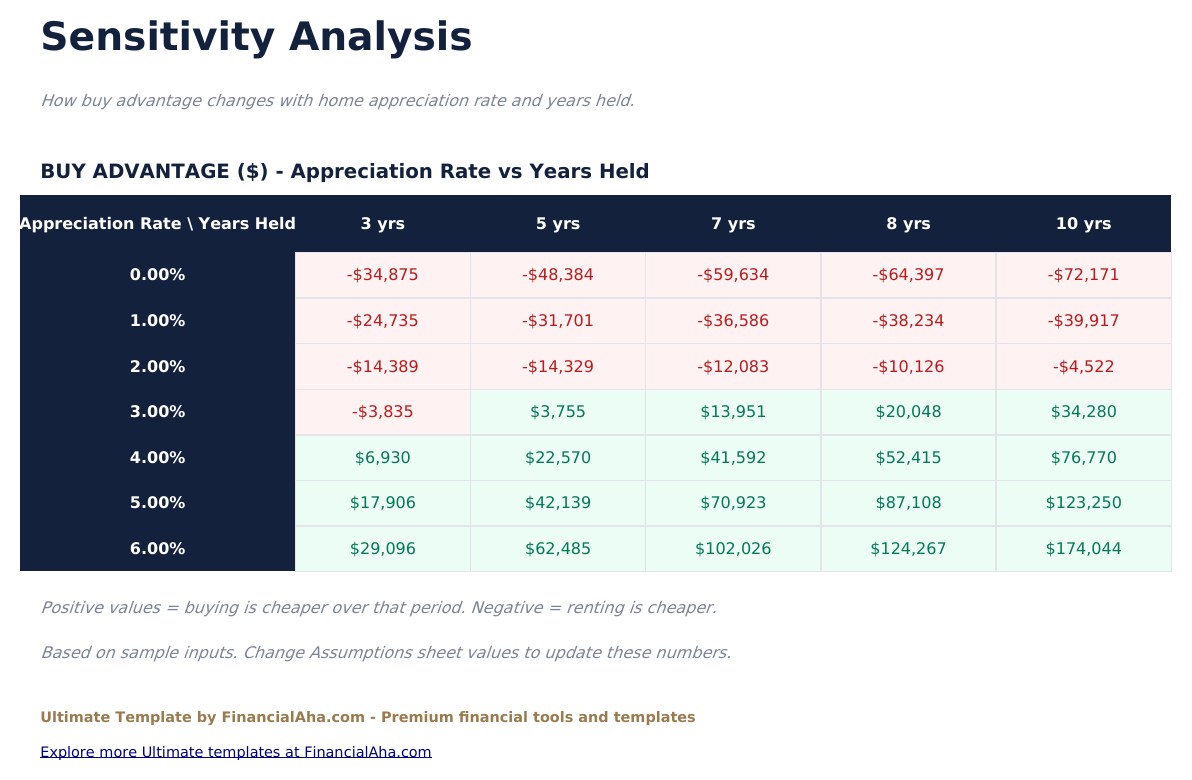
  • Sensitivity grid recalculating the outcome across appreciation rates and holding periods, shaded at the boundary
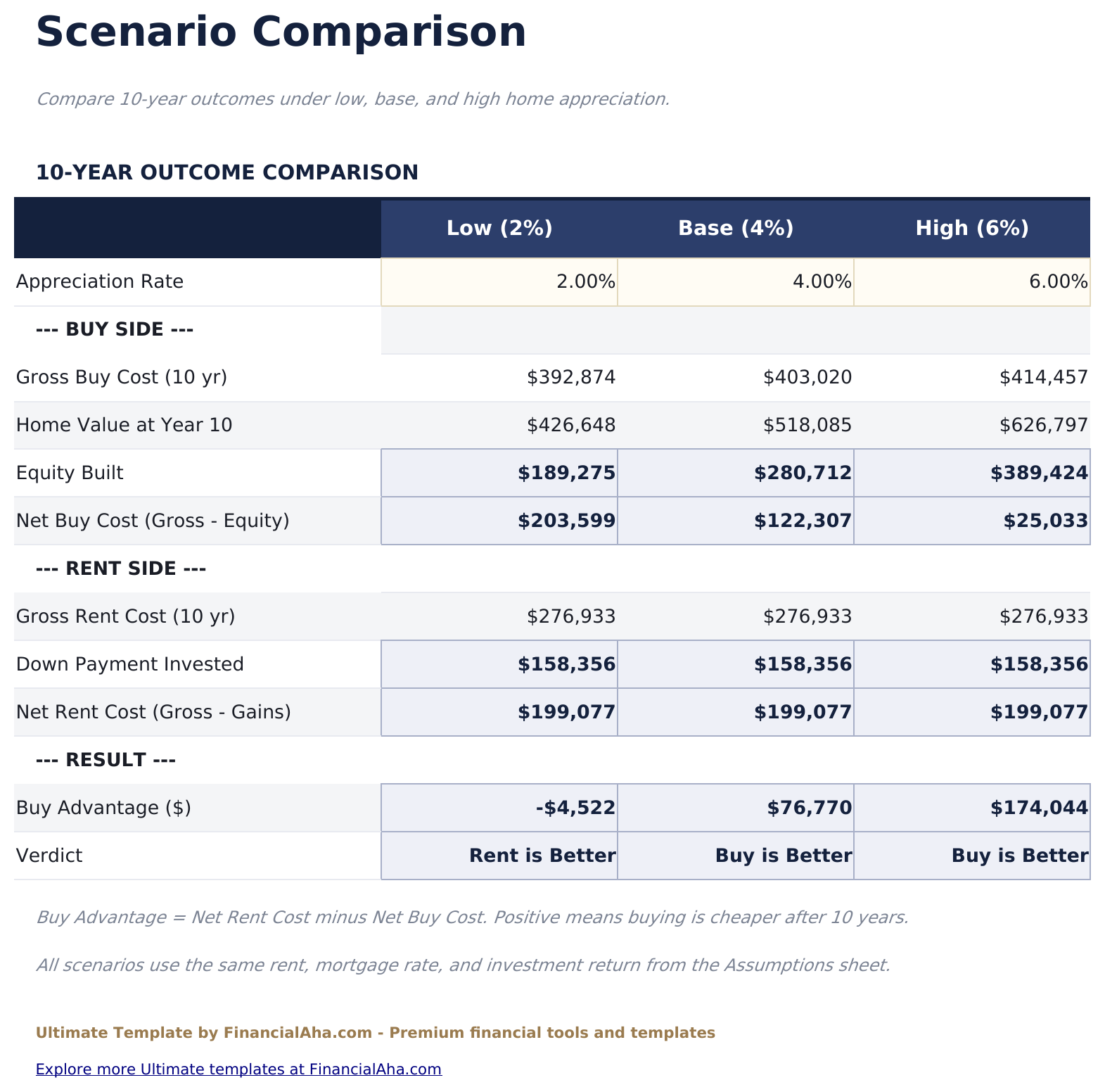
  • Three appreciation scenarios - low, base and high - run side by side, each closing with which side finishes ahead
  • An estimated tax benefit against mortgage interest, included in the annual breakdown
  • A currency dropdown on the Dashboard that relabels money columns across all six sheets at once
  • Works in Microsoft Excel and Google Sheets with no macros required

The FinancialAha Ultimate Rent vs Buy Calculator Spreadsheet Template for Google Sheets and Excel is a six-sheet workbook that compares renting and owning on what each actually costs you in wealth, with a How to Use guide on a seventh tab. It ships as an Ultimate Rent vs Buy Calculator Excel template and an Ultimate Rent vs Buy Calculator Google Sheets template in one file. This Ultimate Rent vs Buy Calculator spreadsheet template holds every assumption on a sheet of its own, counts what the deposit would have earned had it been invested instead, and tests the answer across a grid of appreciation rates and holding periods and three scenarios side by side. No macros, no VBA.

Inside the workbook

What's inside the FinancialAha Ultimate Rent vs Buy Calculator spreadsheet template

The FinancialAha Ultimate Rent vs Buy Calculator Spreadsheet Template runs on six working sheets - three take entries from you, three report back - plus the guide. It works in both Microsoft Excel and Google Sheets and here is what the Ultimate Rent vs Buy Calculator spreadsheet holds.

  1. 01 of 06

    Dashboard

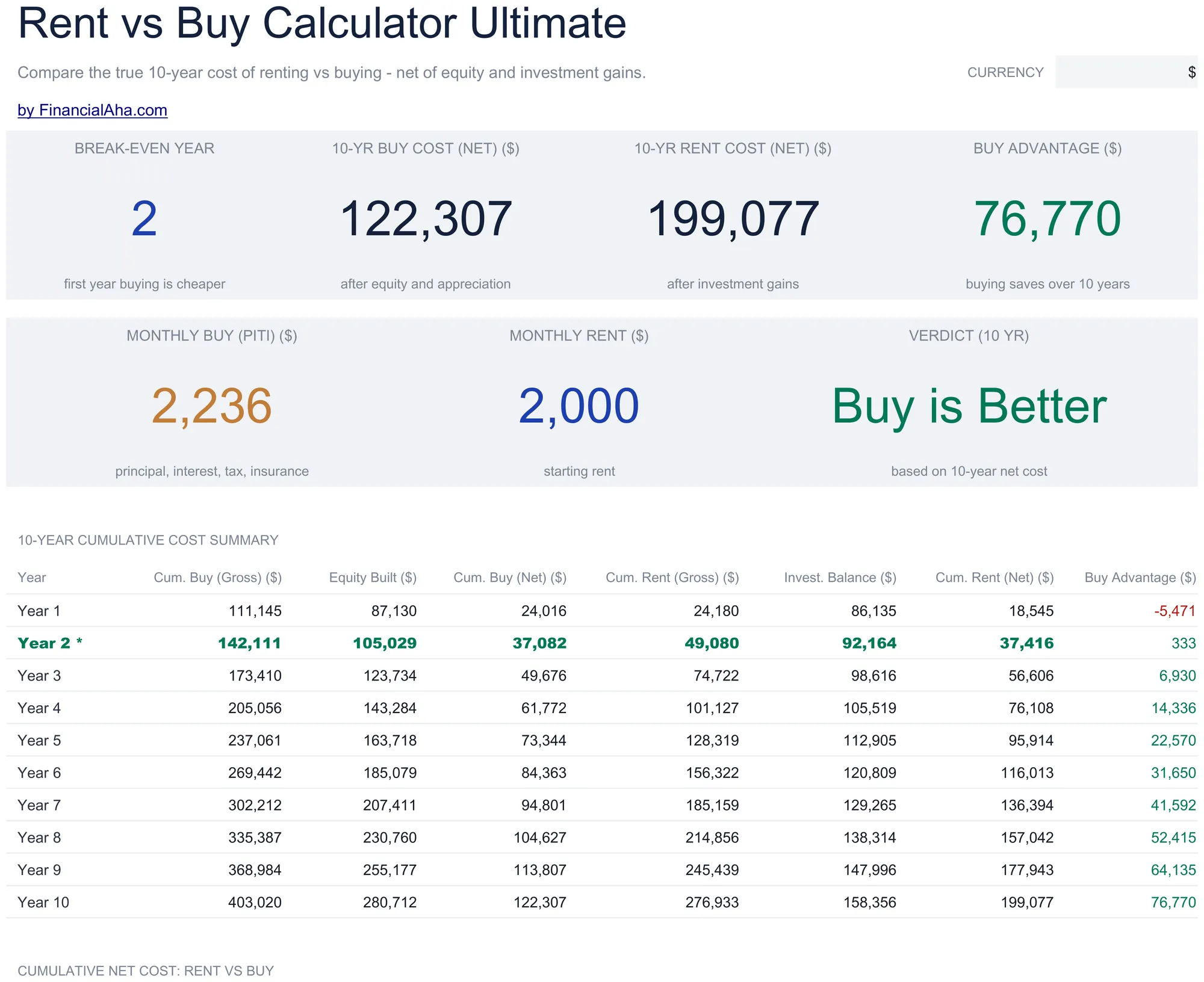
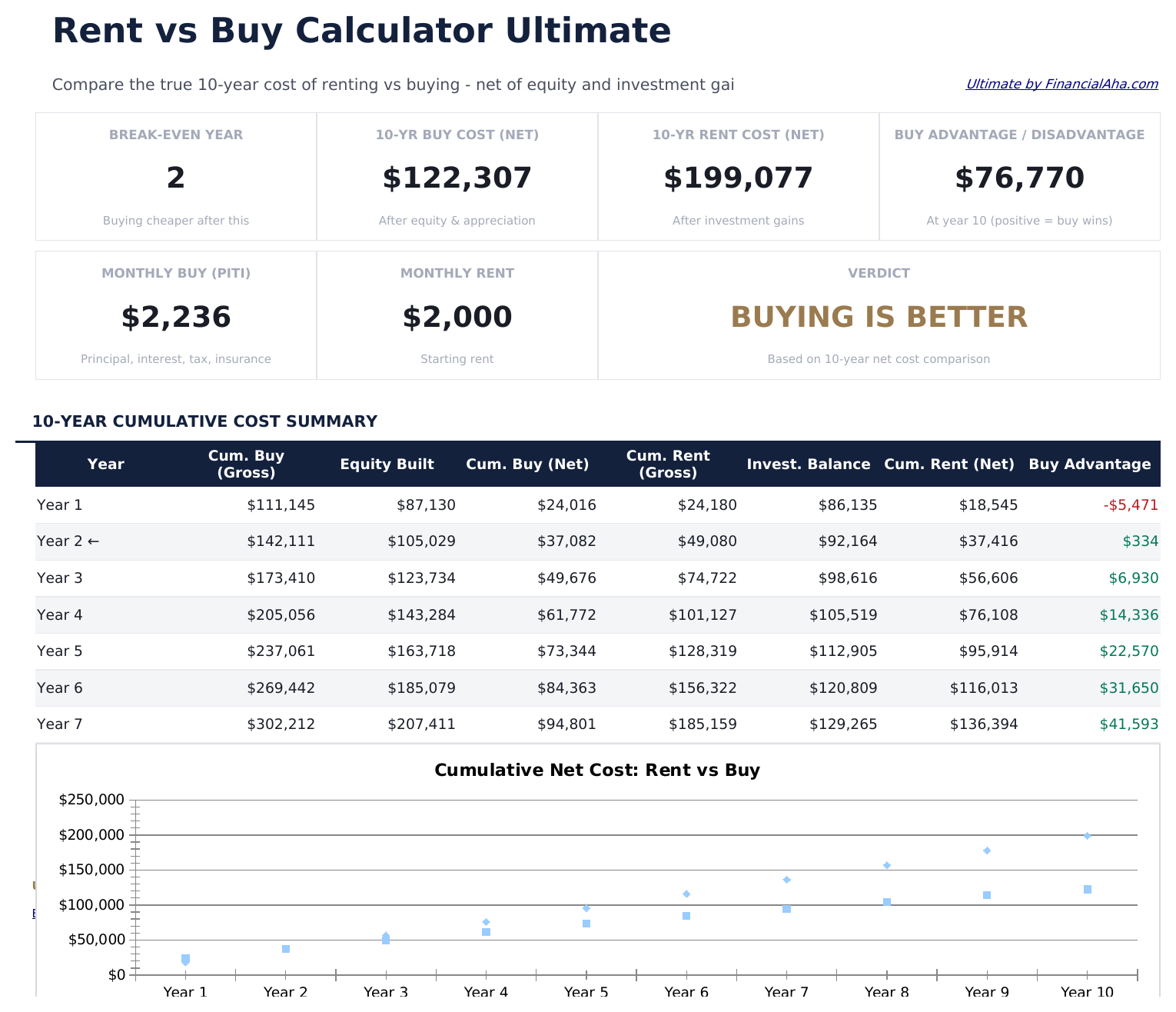
    The comparison in seven figures: the year the two sides cross, what buying and renting each net out to over ten years, the size of the advantage between them, the monthly cost on each side today, and a verdict for the ten-year horizon. Beneath them the cumulative picture runs out year by year - gross and net on both sides, the equity ownership builds, and the balance the invested deposit reaches - with a chart carrying the same crossover visually.

  2. 02 of 06

    Assumptions

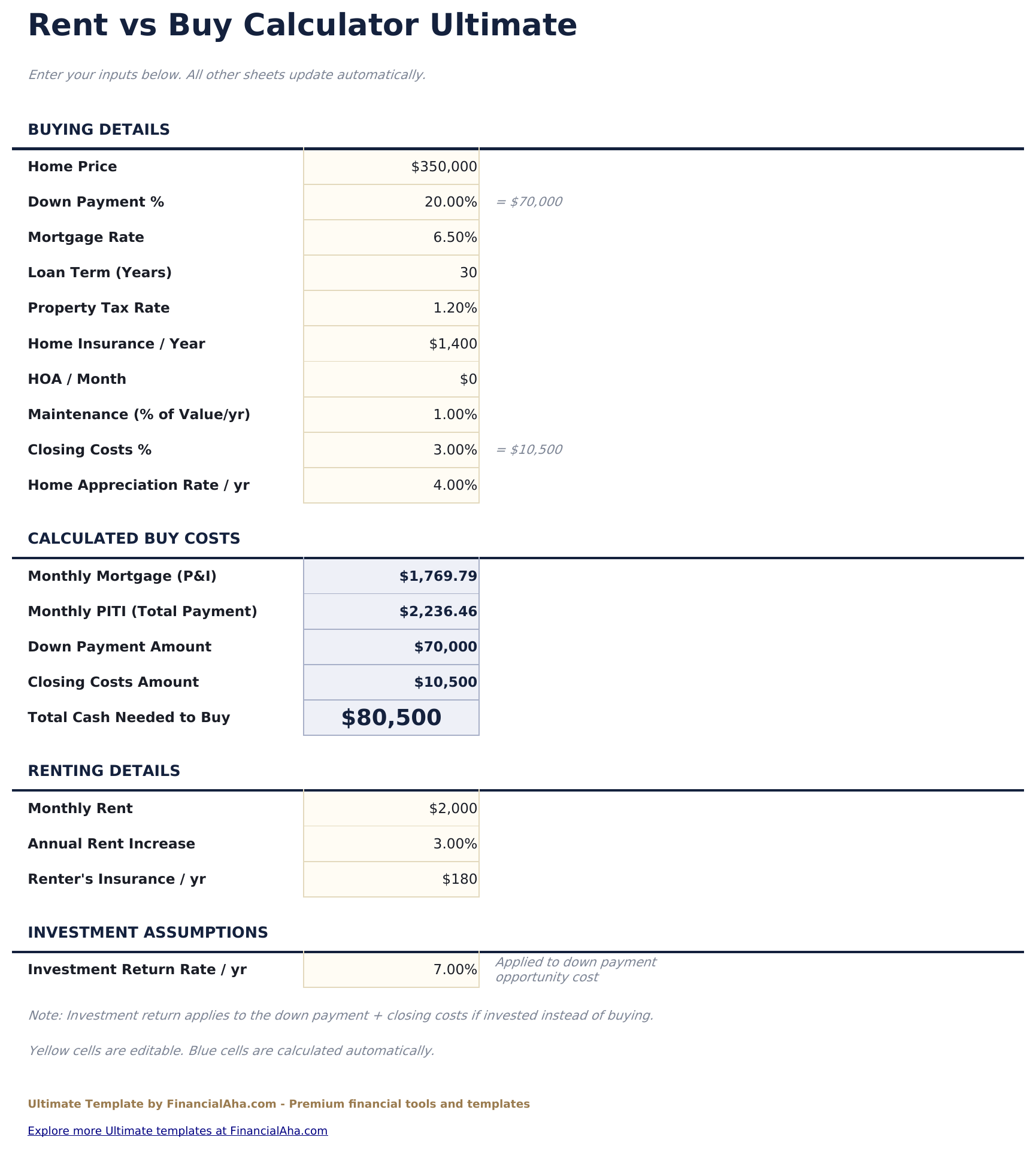
    Every input the workbook uses, gathered in a single place instead of scattered across the model. The buying side covers price, deposit, rate, term, property tax, insurance, dues, maintenance, closing costs and appreciation; the renting side covers the rent, the increase you expect, and renters insurance. One further figure sits across both - the return the deposit and closing costs would earn if they were invested rather than spent on a purchase - and it is what makes the rest of the workbook a wealth comparison rather than a cash one.

  3. 03 of 06

    Year-by-Year

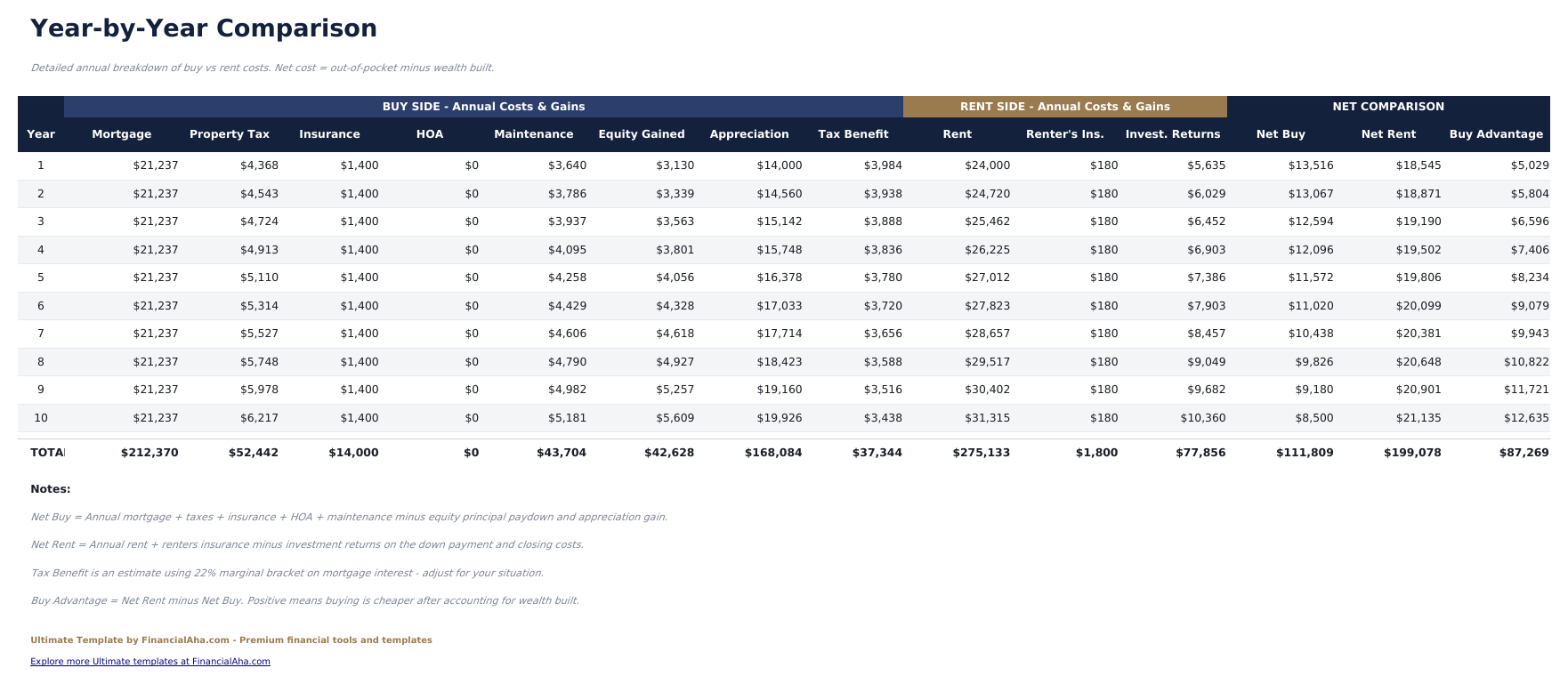
    The full annual breakdown, a row per year, with every cost line on both sides visible rather than rolled into a total: mortgage, property tax, insurance, dues and maintenance against rent and renters insurance, alongside the equity gained, the appreciation, the estimated tax benefit on mortgage interest, and what the invested deposit returned. Each year closes with a net figure for both sides and the difference between them.

  4. 04 of 06

    Break-Even

    The crossover isolated on its own sheet. Cumulative net cost for both sides is carried out across the ten years with the crossing row picked out, so the question of when ownership catches up is answered by looking rather than by scanning a wider table. Where the two do not cross inside the horizon, that is equally visible.

  5. 05 of 06

    Sensitivity

    A grid rather than a single answer. The advantage to buying is recalculated across a range of appreciation rates and a range of holding periods, and shaded so the boundary between the two outcomes is the thing you actually see. Both axes are yours to retune - the rates down the side and the years across the top are typed values, not fixed labels. It is the sheet that shows how much of the result rests on the appreciation rate being right.

  6. 06 of 06

    Scenarios

    Three appreciation cases - low, base and high - run side by side rather than one at a time. The three rates themselves are typed values you can change; everything else on the sheet, including each column's caption and verdict, follows from them. Each carries its own gross costs, equity, invested balance and net costs, and each closes with which side finishes ahead at the end of the horizon under that assumption.

  7. Included guide

    How to Use

    A step-by-step guide on its own tab, covering setup, what each sheet does, how the net figures are arrived at, and what the model deliberately leaves out. Because it ships inside the file, the instructions travel with the template wherever it is opened.

Works in both Google Sheets and Excel

Ultimate Rent vs Buy Calculator Spreadsheet template for Google Sheets

Upload the Ultimate Rent vs Buy Calculator Spreadsheet Template to Drive, right-click it, and choose "Open with Google Sheets". This Ultimate Rent vs Buy Calculator Google Sheets template needs no conversion step and the chart survives the trip intact. The cross-sheet references that feed the Dashboard rely on the existing tab names, so the one thing worth leaving alone is the tab labels.

Ultimate Rent vs Buy Calculator Google Sheets template setup

A shared copy of the Ultimate Rent vs Buy Calculator Google Sheets template suits two people working a decision together, and because the inputs are gathered in one place, changing an assumption in a shared file is a single visible edit rather than a hunt. Sheets version history covers a figure typed over by mistake.

Sharing the Ultimate Rent vs Buy Calculator Google Sheet

The Ultimate Rent vs Buy Calculator Google Sheet is built for sittings rather than a routine: set the assumptions once, then read the Break-Even and Sensitivity sheets as the numbers on a property change. Because every input lives in one place, testing a different rate or a different holding period does not mean touching the model itself.

Ultimate Rent vs Buy Calculator Spreadsheet template for Excel

The Ultimate Rent vs Buy Calculator spreadsheet Excel download is a plain .xlsx. Excel opens this Ultimate Rent vs Buy Calculator Excel template directly, with no import step and no compatibility prompt, and the chart is a native Excel chart that redraws as the assumptions change. There are no macros and no VBA in the file, so it opens without a security warning.

Ultimate Rent vs Buy Calculator Excel template setup

The same Ultimate Rent vs Buy Calculator Excel template opens in Excel on Windows, Excel on Mac, and Excel for the web. It is also the identical file you would upload to Drive, so there is no separate Ultimate Rent vs Buy Calculator spreadsheet download to choose between.

Ultimate Rent vs Buy Calculator spreadsheet Excel notes

The Ultimate Rent vs Buy Calculator spreadsheet Excel file carries no macros and no VBA, so Excel opens it without a trust prompt. The same Ultimate Rent vs Buy Calculator spreadsheet Excel download also opens in Excel for the web, which matters when you move between a work machine and a personal one.

Opening the Ultimate Rent vs Buy Calculator spreadsheet Excel file

Nothing in the Ultimate Rent vs Buy Calculator Excel template is version-specific, so this Ultimate Rent vs Buy Calculator spreadsheet Excel workbook behaves identically in Excel on Windows, Excel on Mac, and older builds.

Spreadsheet template highlights

What the Ultimate Rent vs Buy Calculator spreadsheet template tracks

Assumptions is where most of the entry happens, though the Sensitivity grid's axes and the Scenarios sheet's three rates are yours to set too. These are the columns the Ultimate Rent vs Buy Calculator Spreadsheet Template builds from Assumptions, year by year:

Year
each of the ten years the comparison runs across
Mortgage auto
derived, the principal and interest for that year
Property Tax auto
derived, scaling with the home value as it grows
Insurance auto
derived, the ownership cover for that year
HOA auto
derived from the monthly dues you set, zero if there are none
Maintenance auto
derived, taken as a share of the home value
Equity Gained auto
derived, the principal repaid that year
Appreciation auto
derived, what the home gained in value
Tax Benefit auto
derived, an estimate against the mortgage interest
Rent auto
derived, the rent for that year once increases are applied
Renter's Ins. auto
derived, the renting side's cover
Invest. Returns auto
derived, what the deposit earned by being invested instead
Net Buy auto
derived, ownership costs less equity and appreciation
Net Rent auto
derived, rent costs less the investment returns
Buy Advantage auto
derived, the difference between the two net figures

Compare builds

FinancialAha Rent vs Buy Calculator spreadsheet template: Free, Essentials, and Ultimate compared

Feature Free View Spreadsheet Template Essentials View Spreadsheet Template Ultimate This page
Working sheets 1 2 6
Sizes the purchase Yes Yes Yes
Year-by-year comparison Rent vs buy, with equity Every cost line, both sides
Break-even year Yes Dedicated sheet
Charts 1 1
Assumptions on their own sheet Yes
Deposit invested instead Yes
Sensitivity grid Appreciation x years held
Scenario comparison 3 appreciation cases

The FinancialAha Ultimate Rent vs Buy Calculator Spreadsheet Template covers six working sheets and treats the question as a wealth comparison rather than a cash one. The Free Rent vs Buy Calculator Spreadsheet Template sizes the purchase without adding the sides up. The Essentials Rent vs Buy Calculator Spreadsheet Template for Google Sheets and Excel accumulates both sides over ten years, tracks equity, and names the lower-cost side with a break-even year - but leaves out what the deposit would have earned elsewhere. This build counts that, gathers every assumption on one sheet, gives the crossover a sheet of its own, and then stops relying on a single set of inputs: a sensitivity grid recalculates the outcome across appreciation rates and holding periods, and three appreciation scenarios run side by side. Selling costs and capital gains sit outside all three builds.

Good to know

Notes on working in the Ultimate Rent vs Buy Calculator spreadsheet template

  • Every input lives on the Assumptions sheet, so testing a different rate or holding period never means editing the model.
  • Net figures are wealth rather than cash - ownership counts equity and appreciation back, renting counts what the invested deposit returned.
  • The Sensitivity sheet exists because the answer moves with the appreciation rate. A result that flips across neighbouring cells is worth knowing about before leaning on it.
  • Selling costs and capital gains on a sale are not part of the model, and the workbook is explicit about that.
  • The currency dropdown sits on the Dashboard and relabels money columns across the whole Ultimate Rent vs Buy Calculator spreadsheet. It changes the label only and does not convert the numbers.

How to Use This Template

1

Set your assumptions

Open Assumptions and fill the input cells - the buying side, the renting side, and the return you would earn on the deposit if it were invested instead.

2

Read the year-by-year

Year-by-Year lays out every cost line on both sides, with the net figure for each year and the difference between them.

3

Find the crossover

Break-Even carries cumulative net cost for both sides with the crossing row picked out, or shows that the two do not cross inside the horizon.

4

Test the answer

Sensitivity recalculates the outcome across appreciation rates and holding periods, and Scenarios runs three appreciation cases side by side.

Stress-tested with AI.

Every template starts with deep research into how people actually track the topic. We design the layout, build the formulas, and polish the design until it feels like something we would use ourselves. Along the way, we use AI to stress-test the calculations: unusual inputs, edge cases, and formula behavior, checked until the numbers hold.

One-time purchase. No subscription. Works in Excel & Google Sheets.

Frequently Asked Questions

Is the FinancialAha Ultimate Rent vs Buy Calculator Spreadsheet Template a Google Sheets template?

Yes. Upload the file to Drive and choose "Open with Google Sheets". The Ultimate Rent vs Buy Calculator Google Sheets template needs no conversion step and the chart survives the trip intact. The cross-sheet references rely on the existing tab names, so those are worth leaving alone.

Is the FinancialAha Ultimate Rent vs Buy Calculator Spreadsheet Template an Excel template?

Yes. The download is a plain .xlsx, so the Ultimate Rent vs Buy Calculator Excel template opens directly in Excel with no import step. The chart is a native Excel chart, and there are no macros or VBA.

Will the FinancialAha Ultimate Rent vs Buy Calculator spreadsheet Excel file open in older versions of Excel?

Yes. The Ultimate Rent vs Buy Calculator spreadsheet Excel workbook ships as a plain .xlsx, so it opens identically in current Excel and in builds that predate dynamic arrays.

What does the Ultimate Rent vs Buy Calculator spreadsheet template add over Essentials?

Three things. It counts what the deposit and closing costs would have earned if invested instead, which turns the comparison from a cash one into a wealth one. It gathers every assumption onto one sheet. And it stops relying on a single set of inputs, adding a sensitivity grid across appreciation rates and holding periods and three appreciation scenarios run side by side.

How does the break-even analysis work in the Ultimate Rent vs Buy Calculator Excel template?

Cumulative net cost is carried out for both sides across the ten years on a sheet of its own, with the crossing row picked out. Where the two never cross inside the horizon, that is visible rather than hidden.

What does the sensitivity analysis in the Ultimate Rent vs Buy Calculator spreadsheet show?

The advantage to buying recalculated across a range of appreciation rates and a range of holding periods, shaded so the boundary between the two outcomes stands out. It shows how much of the result rests on the appreciation rate being right.

What are the three scenarios in the Ultimate Rent vs Buy Calculator Excel template?

Low, base and high appreciation, run side by side. Each carries its own gross costs, equity, invested balance and net costs, and each closes with which side finishes ahead at the end of the horizon under that assumption.

What does the Ultimate Rent vs Buy Calculator spreadsheet leave out?

Selling costs such as agent fees, and capital gains on a sale, are not part of the ten-year figures. The tax benefit on mortgage interest is an estimate rather than a calculation for your circumstances. The workbook states these limits on its How to Use tab.

What do I get after buying the Ultimate Rent vs Buy Calculator spreadsheet template?

You receive the Ultimate Rent vs Buy Calculator spreadsheet template as an Excel file (.xlsx) that works in Microsoft Excel and Google Sheets. Download it immediately after purchase - no signup or account required.

Is there a free Ultimate Rent vs Buy Calculator spreadsheet template?

Yes. A free version of the Ultimate Rent vs Buy Calculator spreadsheet template is available with basic features. The Ultimate version adds advanced analysis, more capacity, and additional sheets.

What if the Ultimate Rent vs Buy Calculator spreadsheet template does not work for me?

Contact us and we will help troubleshoot. The Ultimate Rent vs Buy Calculator spreadsheet template works in Microsoft Excel and Google Sheets with no macros required.

Ultimate

Highlights:

Instant download after purchase
No macros or VBA required
All formulas auto-calculate
No subscription required
Works in
Excel Google Sheets

Looking for more Ultimate templates?

We offer Ultimate versions of our most popular spreadsheet templates with advanced features, more capacity, and deeper analysis.

Private & secure

Your financial data stays on your device. We never see it.

Learn more →

Need help?

Check our guides or reach out with questions.

View FAQ →