Best Value Complete Financial Planning Bundle
✓ Financial Planning✓ Net Worth Tracker✓ Monthly Budgeting✓ Travel Budget Planner✓ Annual Budgeting Planner✓ Monthly Expense Tracker✓ Annual Tax Planner✓ Retirement Planning
View Bundle →

Instant digital delivery · Terms & Conditions apply

Ultimate Template - Excel & Google Sheets

Ultimate Student Loan Payoff Spreadsheet Template for Google Sheets & Excel

Eight loans, each with its own balance, rate, type and servicer, and the minimum payment sitting beside what you actually pay. The Ultimate Student Loan Payoff spreadsheet template works out the monthly interest per loan, runs a 240-month payoff schedule with cumulative interest, and adds sheets for repayment comparison, refinance analysis and income-to-debt tracking as the loans clear. Seven sheets, Google Sheets and Excel. No macros, no VBA.

See Preview

Instant digital delivery · Terms & Conditions apply

Student Loan Payoff Spreadsheet Template - Ultimate version for Google Sheets and Excel

What's Included

  • Up to eight loans, each with its own balance and rate
  • Loan type and servicer recorded on every loan
  • Minimum payment alongside what you actually pay
  • Monthly interest per loan
  • A payoff schedule with cumulative interest
  • Debt-to-income now, and at each payoff milestone
  • A worked comparison of three repayment strategies
  • A worked refinance comparison with a break-even block
  • Notes naming what the sheet does not model
  • Works in Microsoft Excel and Google Sheets with no setup required

The FinancialAha Ultimate Student Loan Payoff Spreadsheet Template is a six-sheet workbook for Google Sheets and Excel, with a How to Use guide on a seventh tab. It works as an Ultimate Student Loan Payoff Excel template and an Ultimate Student Loan Payoff Google Sheets template from the same download. Up to eight loans with their own rates, types and servicers, a payoff schedule, debt-to-income tracked as loans clear, and worked comparisons of repayment strategies and a refinance. No macros, no VBA.

Inside the workbook

What's inside the FinancialAha Ultimate Student Loan Payoff spreadsheet template

The FinancialAha Ultimate Student Loan Payoff Spreadsheet Template runs on six working sheets, with the instructions on a tab of their own. It works in both Microsoft Excel and Google Sheets and here is what the Ultimate Student Loan Payoff spreadsheet holds.

  1. 01 of 06

    Loan Setup

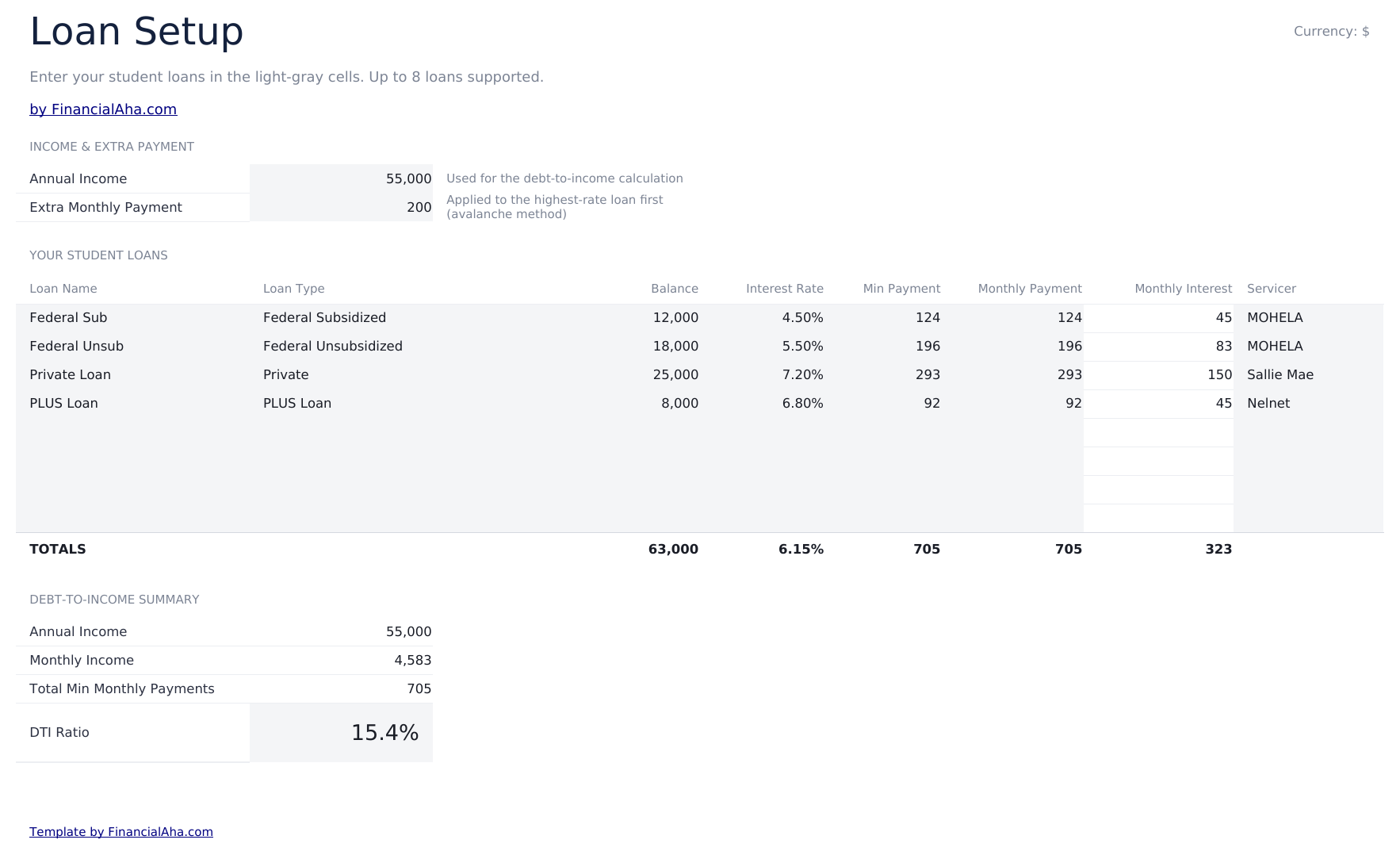
    Up to eight loans, each with its own name, type, balance, rate, minimum payment, actual payment and servicer, plus your income and any extra you are putting in. Eight separate loans is the realistic shape of student debt, and the reason a single-balance calculation misleads. Loans at different rates are not interchangeable: money directed at the highest rate does more than the same money spread evenly, and averaging them into one figure hides the difference entirely. The servicer column is the unglamorous one that earns its place. Loans get sold, payments go to the wrong place, and a record of who holds what is the thing nobody has when they need it.

  2. 02 of 06

    Income-to-Debt Tracker

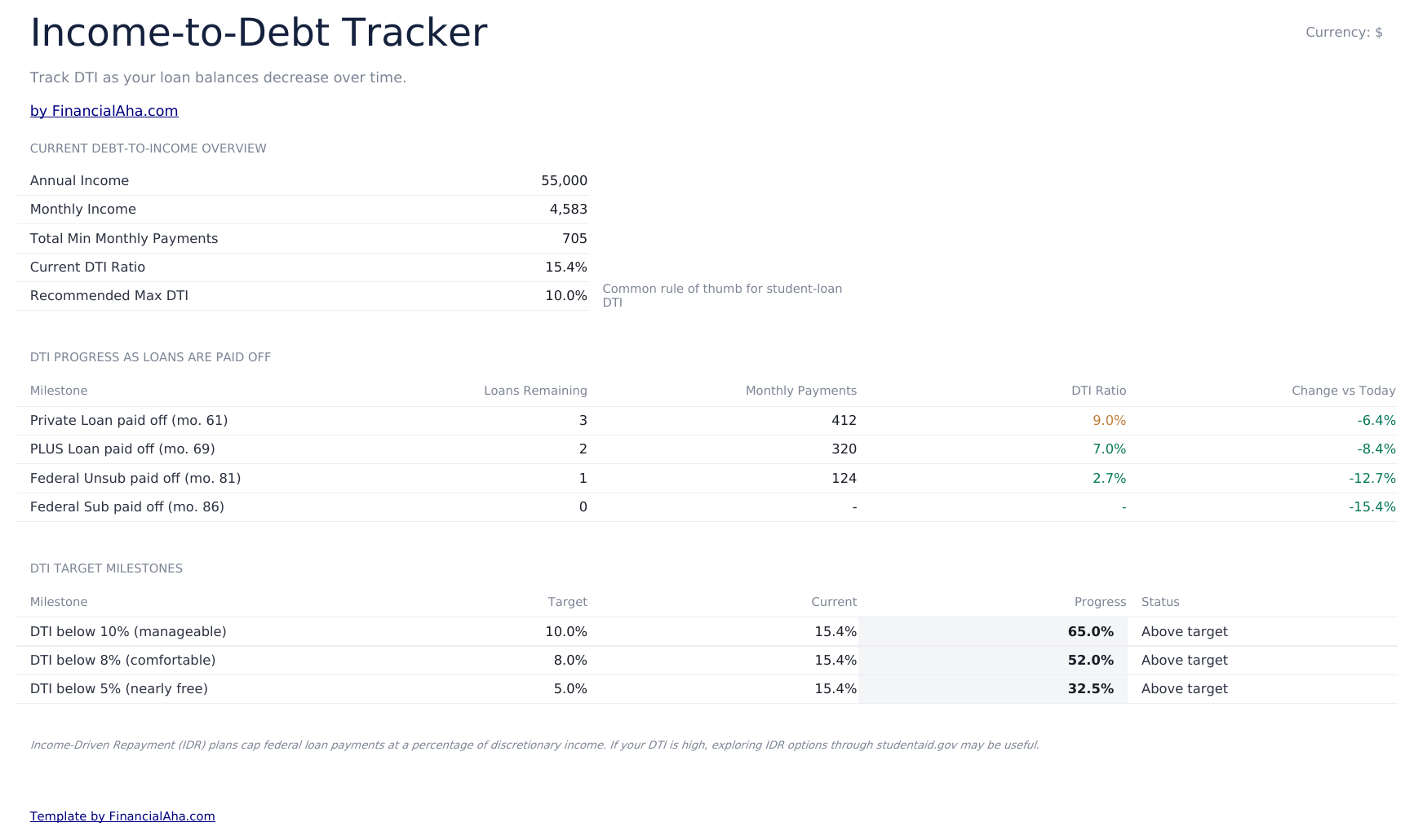
    Your debt-to-income ratio now, and what it becomes as each loan clears - a row per milestone showing the loans remaining, the payments still committed and the ratio at that point. It answers a question a payoff schedule does not: not when the debt ends, but when it stops being an obstacle. A mortgage application or a change of job turns on the ratio rather than the balance, and the milestone where it drops below a threshold you care about is often years before the last loan is cleared.

  3. 03 of 06

    Payoff Schedule

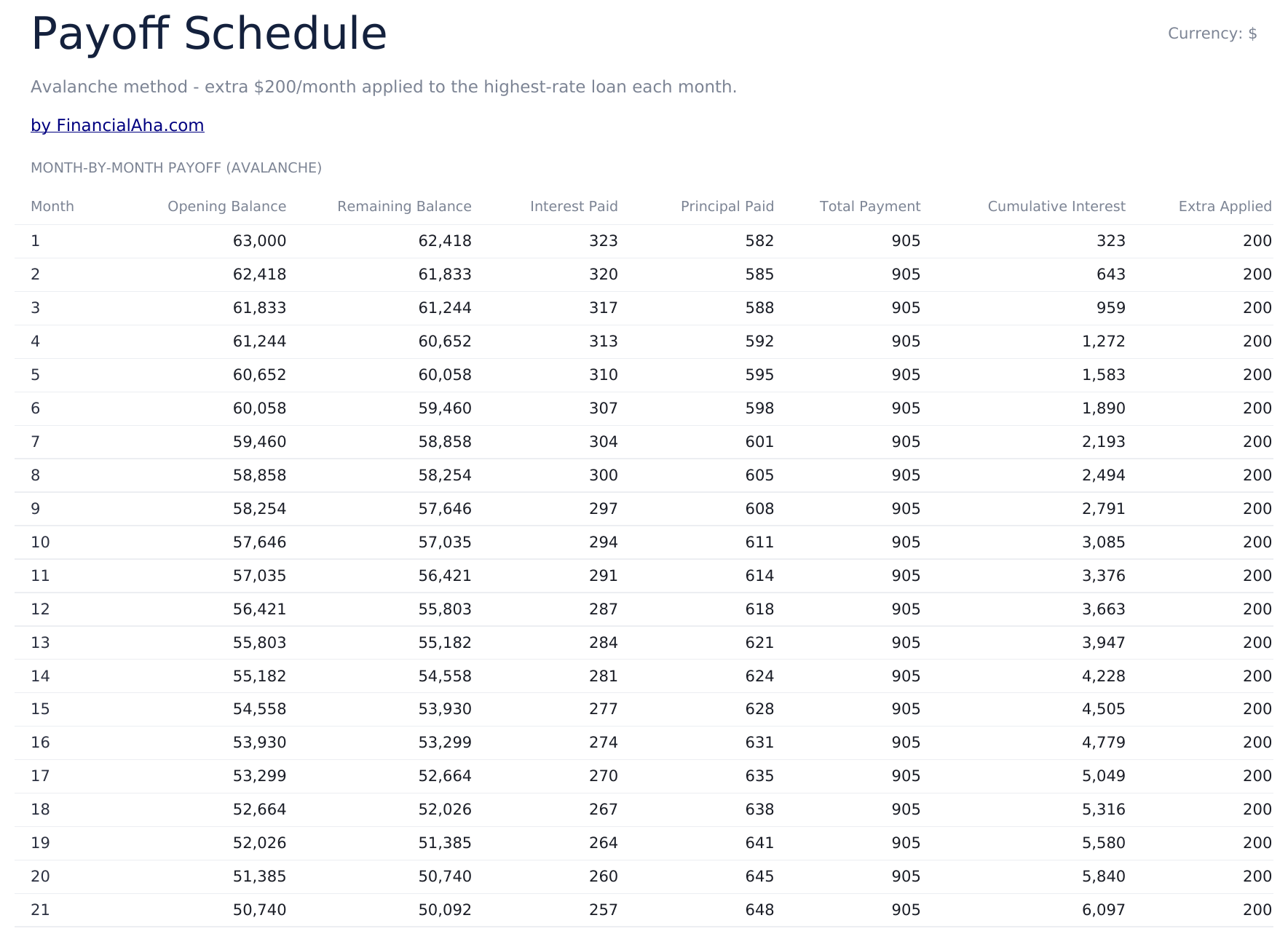
    A month-by-month view carrying the opening balance, the remaining balance, the interest and principal paid, the total payment, cumulative interest and any extra applied. The cumulative interest column is the one to watch across years rather than months. It is the running answer to what the borrowing has actually cost so far, which is a different question from what is left to pay.

  4. 04 of 06

    Repayment Comparison

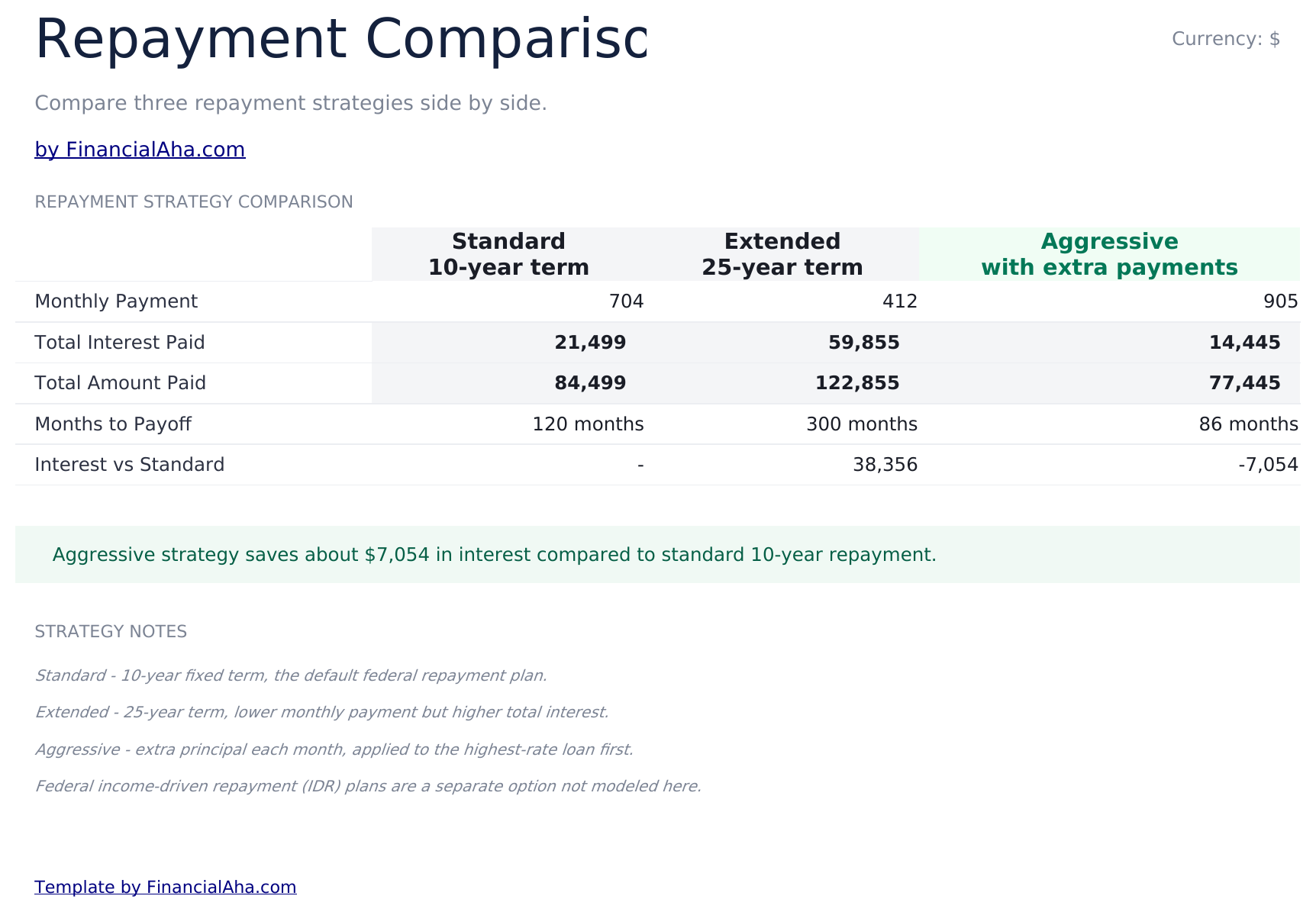
    Three strategies set side by side - a standard ten-year term, an extended twenty-five-year one and an aggressive approach with extra payments - with the monthly payment, months to payoff, total paid and total interest for each. Every figure solves against your own balance, blended rate and extra payment on Loan Setup, so changing any of them re-answers the whole sheet. The line beneath reads the same columns rather than a fixed number, so the saving it reports is yours. What the shape shows is worth knowing anyway: the extended term lowers the monthly payment substantially and raises the total interest by more than the monthly relief suggests.

  5. 05 of 06

    Refinance Analysis

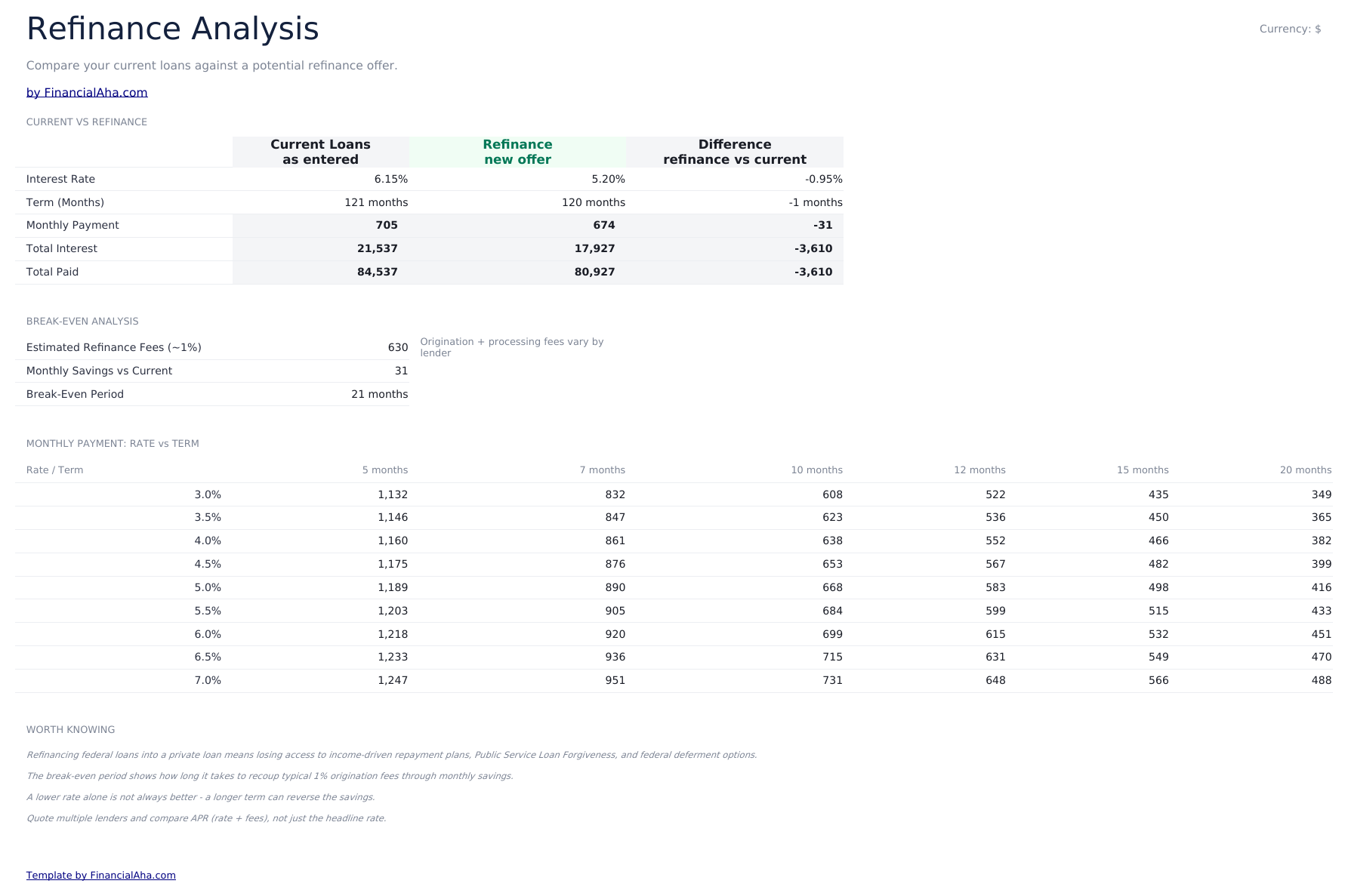
    Three cells for the offer you are considering - the rate, the term and the origination fee - and a current-versus-refinance comparison that reads them: rate, term, monthly payment, total paid and total interest, with the difference in its own column. Beneath that, a break-even block: the fee on your balance, the monthly saving, and how many months it takes to recoup one from the other. Where the offer costs more per month it shows a dash rather than a zero, because an offer that never breaks even is not one that breaks even immediately. Read alongside the strategy notes, its real value is as a reminder of what refinancing costs beyond the rate - fees on one side, and on federal loans, protections that do not come back.

  6. 06 of 06

    Dashboard

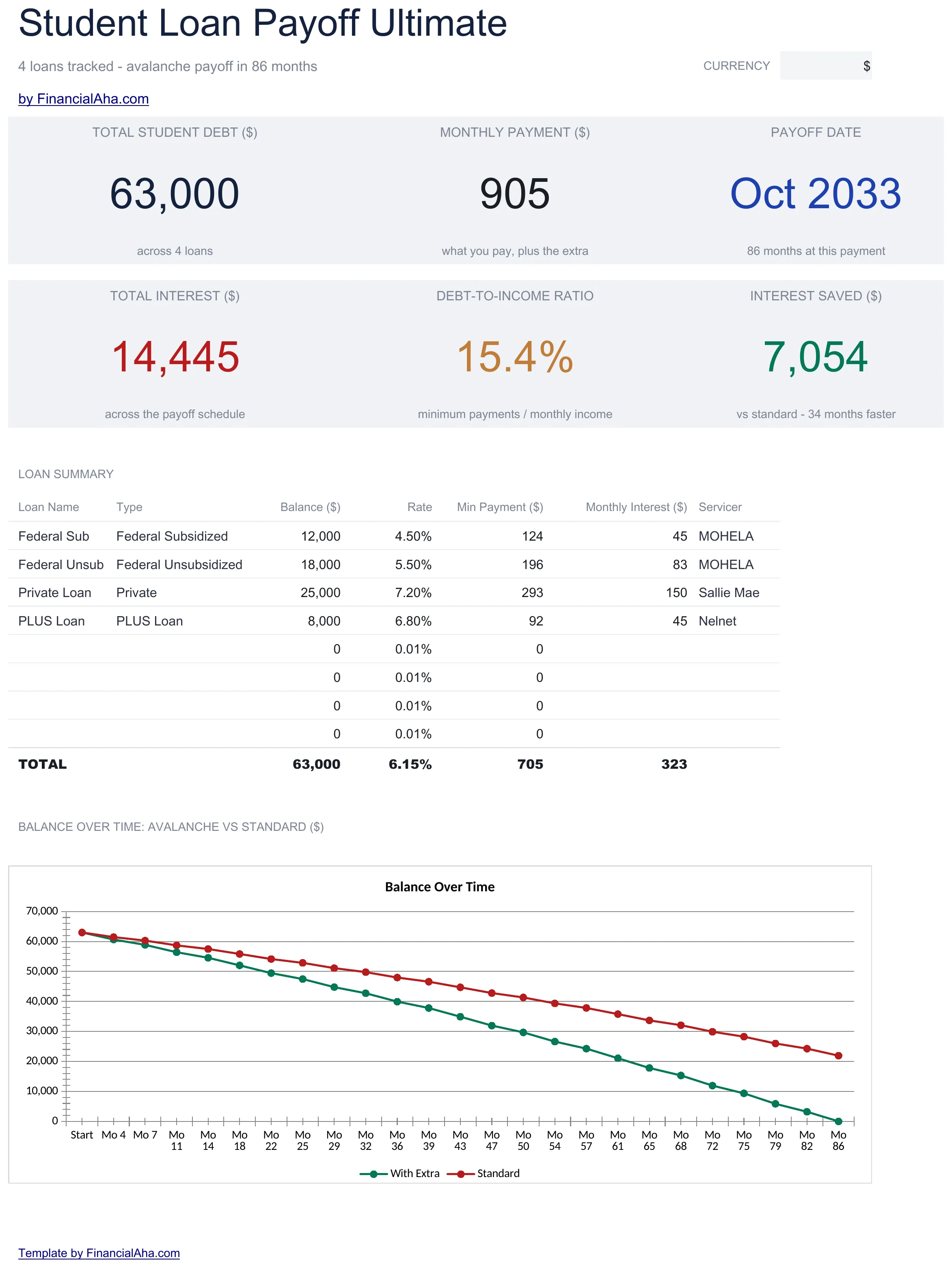
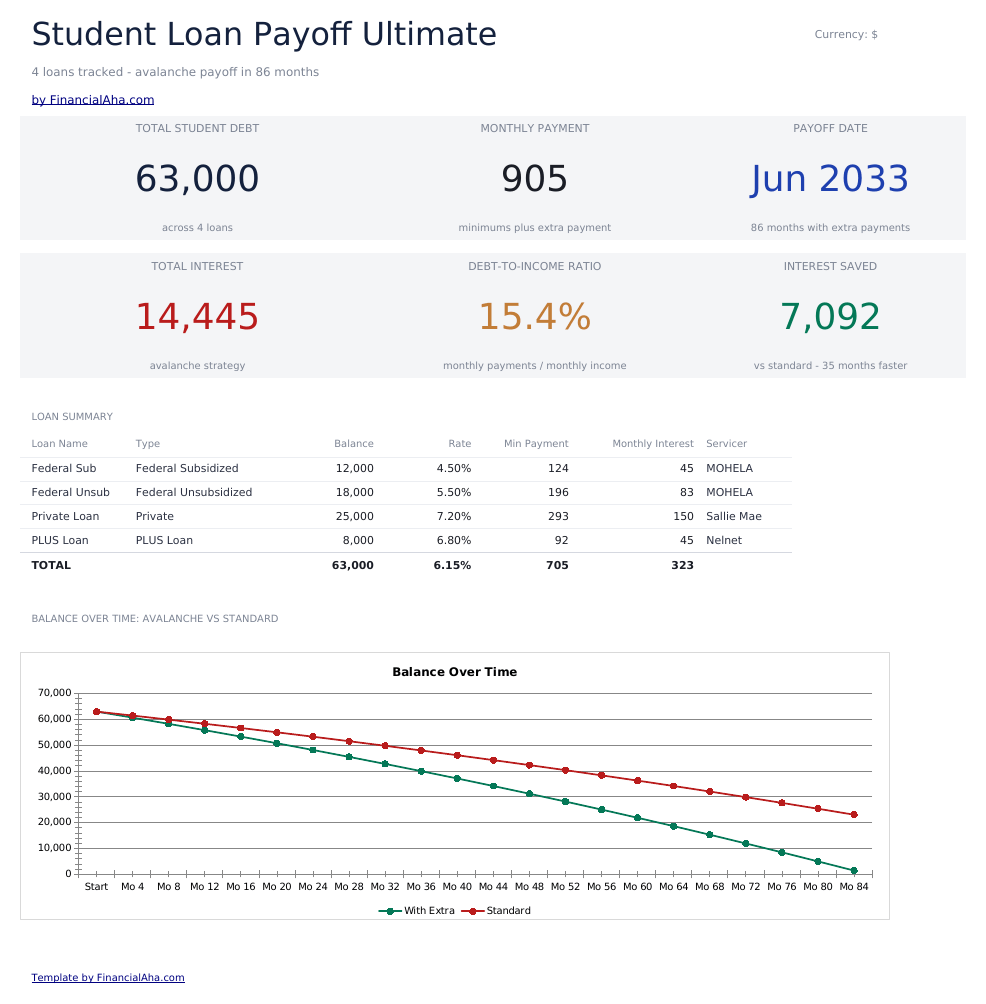
    Six figures: total student debt, the monthly payment, the projected payoff date, total interest across the schedule, the interest saved against paying the standard minimum, and the debt-to-income ratio - with a summary table listing every loan and a chart. Having the ratio on the same screen as the balance is the pairing that matters. The balance says how much is owed; the ratio says how much room it is taking up, and those two figures move at different speeds. The payoff date and the interest figures read from the repayment comparison and the schedule, so they move with your own loans and extra payment rather than sitting fixed.

  7. Included guide

    How to Use

    A step-by-step guide on its own tab, covering which sheets read from Loan Setup and which are worked examples, what each column expects, and how to change the currency. Because it ships inside the file, the instructions travel with the template wherever it is opened.

Works in both Google Sheets and Excel

Ultimate Student Loan Payoff Spreadsheet template for Google Sheets

Upload the Ultimate Student Loan Payoff Spreadsheet Template to Drive, right-click it, and choose "Open with Google Sheets". This Ultimate Student Loan Payoff Google Sheets template needs no conversion step, the chart comes across, and the dashboard figures recalculate from Loan Setup exactly as they do in Excel.

Ultimate Student Loan Payoff Google Sheets template setup

A shared copy of the Ultimate Student Loan Payoff Google Sheets template suits a household carrying several loans between them, where the servicer and rate details are worth having in one place.

Running the Ultimate Student Loan Payoff Google Sheet

The Ultimate Student Loan Payoff Google Sheet is updated when a balance changes or a loan clears. The debt-to-income milestones follow from the loan list.

Ultimate Student Loan Payoff Spreadsheet template for Excel

The Ultimate Student Loan Payoff spreadsheet Excel download is a plain .xlsx. Excel opens this Ultimate Student Loan Payoff Excel template directly, with no import step, and the chart is a native Excel chart rather than a picture. There are no macros and no VBA in the file.

Ultimate Student Loan Payoff Excel template setup

The same Ultimate Student Loan Payoff Excel template opens in Excel on Windows, Excel on Mac, and Excel for the web. It is also the identical file you would upload to Drive, so there is no separate Ultimate Student Loan Payoff spreadsheet download to choose between.

Ultimate Student Loan Payoff spreadsheet Excel notes

The Ultimate Student Loan Payoff spreadsheet Excel file carries no macros and no VBA, so Excel opens it without a trust prompt.

Opening the Ultimate Student Loan Payoff spreadsheet Excel file

Nothing in the Ultimate Student Loan Payoff Excel template is version-specific, so this Ultimate Student Loan Payoff spreadsheet Excel workbook behaves identically in Excel on Windows, Excel on Mac, and older builds.

Spreadsheet template highlights

What the Ultimate Student Loan Payoff spreadsheet template tracks

A row per loan. This is what the Ultimate Student Loan Payoff Spreadsheet Template records for each:

Loan Name
which loan it is
Loan Type
federal or private, which decides what protections apply
Balance
what is outstanding on it
Interest Rate
its own rate, which is why loans are not interchangeable
Min Payment
the minimum the servicer requires
Monthly Payment
what you actually pay against it
Monthly Interest auto
derived, what that loan costs before any principal moves
Servicer
who holds it, which is the record nobody has when they need it

Compare builds

FinancialAha Student Loan Payoff spreadsheet template: Free, Essentials, and Ultimate compared

Feature Free View Spreadsheet Template Essentials View Spreadsheet Template Ultimate This page
Working sheets 1 3 6
Loans One One Up to eight
Months to payoff Yes From the schedule Yes
Total interest Yes Yes Yes
Extra monthly payment Yes Yes
With-extra against without Side by side in the schedule
Month-by-month schedule 180 months 240 months
Loan type and servicer On every loan
Debt-to-income tracking Yes, as loans clear
Repayment strategies compared A worked example
Refinance analysis A worked example
Charts 1 1

The Free Student Loan Payoff Spreadsheet Template answers one loan at one payment, and the Essentials build adds an extra payment with both futures in one table. The FinancialAha Ultimate Student Loan Payoff Spreadsheet Template takes the realistic shape of student debt - up to eight loans with their own rates, types and servicers - and tracks debt-to-income as they clear, alongside a payoff schedule and worked comparisons of repayment strategies and a refinance.

Good to know

Notes on working in the Ultimate Student Loan Payoff spreadsheet template

  • Loans at different rates are not interchangeable, which is why averaging them into one balance misleads.
  • The servicer column is the record nobody has when a loan is sold or a payment goes astray.
  • Debt-to-income answers when the debt stops being an obstacle, which can be years before the last loan clears.
  • The strategy and refinance sheets solve against your own balance and blended rate from Loan Setup - only the standard and extended plan lengths are held at their standard ten and twenty-five years.
  • The strategy notes name income-driven repayment as an option the sheet does not model, which is worth reading before treating three strategies as the whole field.
  • The currency dropdown relabels the money columns across every sheet. It changes the label only and does not convert the numbers.
  • The comparison and the refinance sheet both solve against your own Loan Setup figures, so changing a balance or a rate re-answers them.
  • The refinance offer is three cells you fill in from a quote rather than a fixed example.
  • A dash in the break-even row means the offer costs more per month, so it never recoups the fee.
  • The payoff date, the total interest and the interest saved on the dashboard all read live from the repayment comparison and the schedule, so they move when your loans or your extra payment do.

How to Use This Template

1

List the loans

Balance, rate, type and servicer for each.

2

Add income

Which drives the debt-to-income figures.

3

Set any extra

What you are putting in beyond the minimums.

4

Read the milestones

How the ratio moves as loans clear.

Stress-tested with AI.

Every template starts with deep research into how people actually track the topic. We design the layout, build the formulas, and polish the design until it feels like something we would use ourselves. Along the way, we use AI to stress-test the calculations: unusual inputs, edge cases, and formula behavior, checked until the numbers hold.

One-time purchase. No subscription. Works in Excel & Google Sheets.

Frequently Asked Questions

Is the FinancialAha Ultimate Student Loan Payoff Spreadsheet Template a Google Sheets template?

Yes. Upload the file to Drive and choose "Open with Google Sheets". The chart comes across in the Ultimate Student Loan Payoff Google Sheets template, and the dashboard figures recalculate from Loan Setup exactly as they do in Excel.

Is the FinancialAha Ultimate Student Loan Payoff Spreadsheet Template an Excel template?

Yes. The download is a plain .xlsx, so the Ultimate Student Loan Payoff Excel template opens directly in Excel with no import step. The chart is a native Excel chart rather than a picture, and there are no macros or VBA.

Will the FinancialAha Ultimate Student Loan Payoff spreadsheet Excel file open in older versions of Excel?

Yes. The Ultimate Student Loan Payoff spreadsheet Excel workbook ships as a plain .xlsx, so it opens identically in current Excel and in builds that predate dynamic arrays.

Why does the Ultimate Student Loan Payoff spreadsheet record each loan separately?

Because loans at different rates are not interchangeable. Money directed at the highest rate does more than the same money spread evenly, and averaging everything into one balance hides that difference entirely.

What does the debt-to-income tracker in the Ultimate Student Loan Payoff spreadsheet show?

The ratio now and at each payoff milestone. It answers when the debt stops being an obstacle rather than when it ends - a mortgage application turns on the ratio, and that threshold is often crossed years before the last loan clears.

Are the strategy and refinance sheets in the Ultimate Student Loan Payoff spreadsheet based on my loans?

Yes. Both solve against your own balance and blended rate from Loan Setup, so changing either re-answers the sheet. The standard and extended strategies hold their terms at the standard ten and twenty-five years those plans are defined by; the payment and interest each one produces are calculated from your figures, not assumed.

Does the Ultimate Student Loan Payoff spreadsheet model income-driven repayment or forgiveness?

No, and the workbook says so in its strategy notes. Federal income-driven plans are a separate option the sheet does not model, which is worth knowing before treating the three strategies shown as the whole field.

What do I get after buying the Ultimate Student Loan Payoff spreadsheet template?

You receive the Ultimate Student Loan Payoff spreadsheet template as an Excel file (.xlsx) that works in Microsoft Excel and Google Sheets. Download it immediately after purchase - no signup or account required.

Is there a free Ultimate Student Loan Payoff spreadsheet template?

Yes. A free version of the Ultimate Student Loan Payoff spreadsheet template is available with basic features. The Ultimate version adds advanced analysis, more capacity, and additional sheets.

What if the Ultimate Student Loan Payoff spreadsheet template does not work for me?

Contact us and we will help troubleshoot. The Ultimate Student Loan Payoff spreadsheet template works in Microsoft Excel and Google Sheets with no macros required.

Ultimate

Highlights:

Instant download after purchase
No macros or VBA required
All formulas auto-calculate
No subscription required
Works in
Excel Google Sheets

Looking for more Ultimate templates?

We offer Ultimate versions of our most popular spreadsheet templates with advanced features, more capacity, and deeper analysis.

Private & secure

Your financial data stays on your device. We never see it.

Learn more →

Need help?

Check our guides or reach out with questions.

View FAQ →