Beste waarde All-in-One Financieel Planningspakket
✓ Financiële Planning✓ Vermogenstracker✓ Maandelijks Budgetteren✓ Reisbudget Planner✓ Jaarlijkse Budgetplanner✓ Maandelijkse Uitgaventracker✓ Jaarlijkse Belastingplanner✓ Pensioenplanning
Bekijk bundel →
Ultimate Ultimate-versie beschikbaar - Factureeroverzicht Ultimate
Essentials-sjabloon - Excel & Google Sheets

Billing Statement Essentials-sjabloon

Generate recurring billing statements for clients. Show previous balance, payments received, new charges, and amount due.

Bekijk de Ultimate-versie →
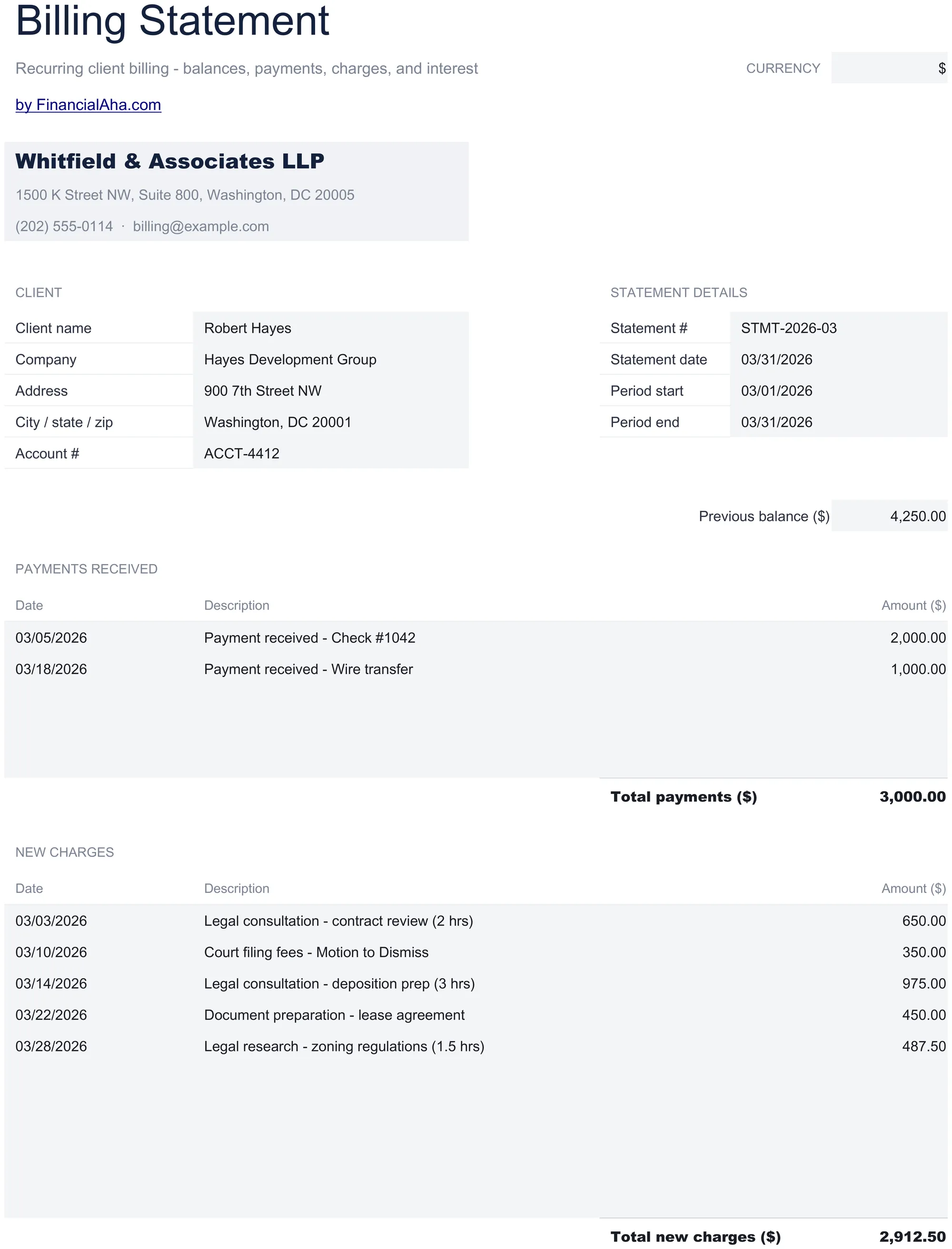
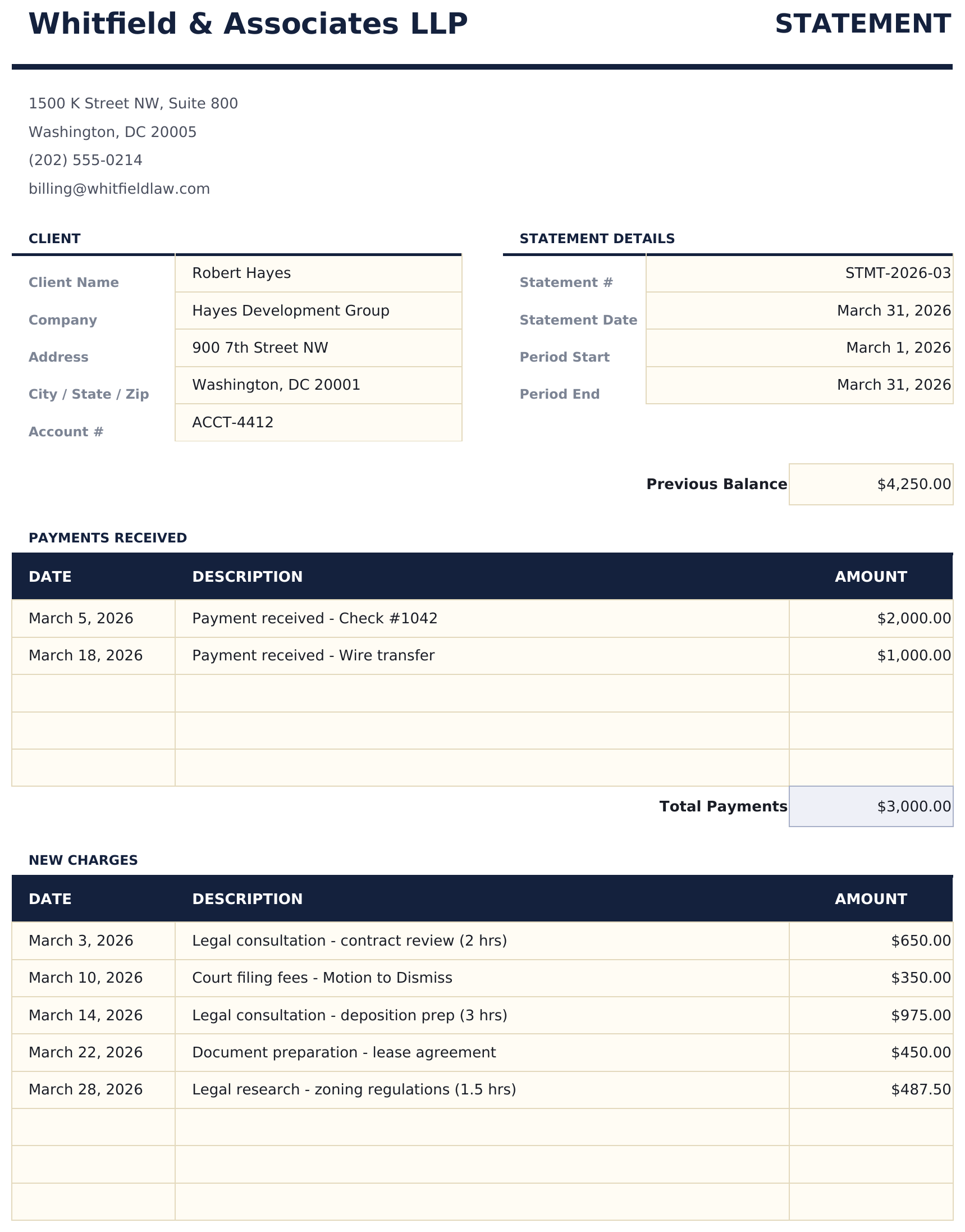
Billing Statement preview

Wat zit erin

  • Professional billing statement layout with client account number, statement period, and due date fields
  • Previous balance and payment tracking showing opening balance, payments received, and credits applied
  • New charges section with date, description, and amount columns for all activity during the statement period
  • Running balance calculation that automatically computes the current amount due from all statement entries
  • Statement period and due date fields with print-ready formatting and color-coded input areas for entry
  • Works in Microsoft Excel, Google Sheets, and LibreOffice Calc with no setup required
Ultimate Version Available

Need more from this template?

The Essentials version covers everyday tracking. Ultimate goes further with multi-entity support, scenario analysis, and ultimate-grade reporting.

Essentials - $12
  • Professional billing statement layout with client account number, statement period, and due date fields
  • Previous balance and payment tracking showing opening balance, payments received, and credits applied
  • New charges section with date, description, and amount columns for all activity during the statement period
  • Running balance calculation that automatically computes the current amount due from all statement entries
Ultimate - $19
  • Werkblad klantinstellingen voor tot 20 klanten met naam, contactpersoon, factuuradres, betalingsvoorwaarden en kredietlimiet
  • Factureringslogboek met tot 150 invoeren voor kosten, tegoeden en betalingen met datum, klant, omschrijving, type en bedrag
  • Dashboard met 6 KPI-kaarten: totaal gefactureerd, totaal geïnd, totaal uitstaand, aantal klanten, gemiddeld saldo en grootste uitstaande rekening
  • Werkblad klantsaldi met totale kosten, totale betalingen, huidig saldo, kredietlimiet en beschikbaar krediet per klant
  • Werkblad maandelijkse facturering met overzicht van kosten, tegoeden, betalingen en nettoverandering per klant over 12 maanden
See what's in the Ultimate version One-time purchase. No subscription.

Hoe gebruik je dit Billing Statement sjabloon

1

Enter account details

Fill in the client account number, statement period dates, and client contact information at the top.

2

Add previous balance

Enter the previous period ending balance. Then record any payments received and credits applied during this period.

3

List new charges

Add each new charge with the date, description, and amount. The running balance updates as you add entries.

4

Review amount due

The statement calculates the current amount due from the previous balance plus new charges minus payments and credits.

Gebouwd door Claude AI. Verfijnd door ons.

We gebruiken Claude AI om elk sjabloon te ontwerpen, na uitgebreid onderzoek. Daarna neemt ons team het over. We verfijnen de indeling, testen elke formule grondig, lossen randgevallen op en polijsten het ontwerp totdat het iets is dat we zelf ook echt zouden gebruiken. De AI brengt ons 80% van de weg. De laatste 20% is puur menselijk oordeel.

Bekijk de Ultimate-versie →

Veelgestelde vragen

How is the balance calculated?

Current balance equals previous balance plus new charges minus payments and credits received during the statement period.

Can I include credits and adjustments?

Yes. Enter credits and adjustments as negative amounts or in a dedicated credits section. They reduce the current balance due.

Is this the same as an invoice?

No. A billing statement summarizes account activity over a period - including previous balances and payments. An invoice bills for specific goods or services.

Can I generate monthly statements?

Yes. Create a new statement for each period. Carry the ending balance forward as the next period opening balance.

Hoe open ik dit in Google Sheets?

Upload het .xlsx-bestand naar Google Drive en open het vervolgens met Google Sheets. Alle formules en opmaak blijven behouden.

Meer Essentials-sjablonen voor Invoicing & Billing

Op zoek naar premium spreadsheet-sjablonen?

Onze betaalde sjablonen bevatten geavanceerde dashboards met meerdere werkbladen, ingebouwde Excel-grafieken en doorlopende updates.

Privé & veilig

Uw financiële gegevens blijven op uw apparaat. Wij zien ze nooit.

Meer informatie →

Hulp nodig?

Bekijk onze handleidingen of neem contact op met vragen.

Bekijk FAQ →