Meilleur rapport qualité-prix Pack Complet de Planification Financière
✓ Planification Financière✓ Suivi du Patrimoine Net✓ Budget Mensuel✓ Planificateur de Budget Voyage✓ Planificateur de Budget Annuel✓ Suivi des Dépenses Mensuelles✓ Planificateur Fiscal Annuel✓ Planification de Retraite
Voir le pack →
Modèle Ultimate - Excel et Google Sheets

College Savings Calculator Ultimate

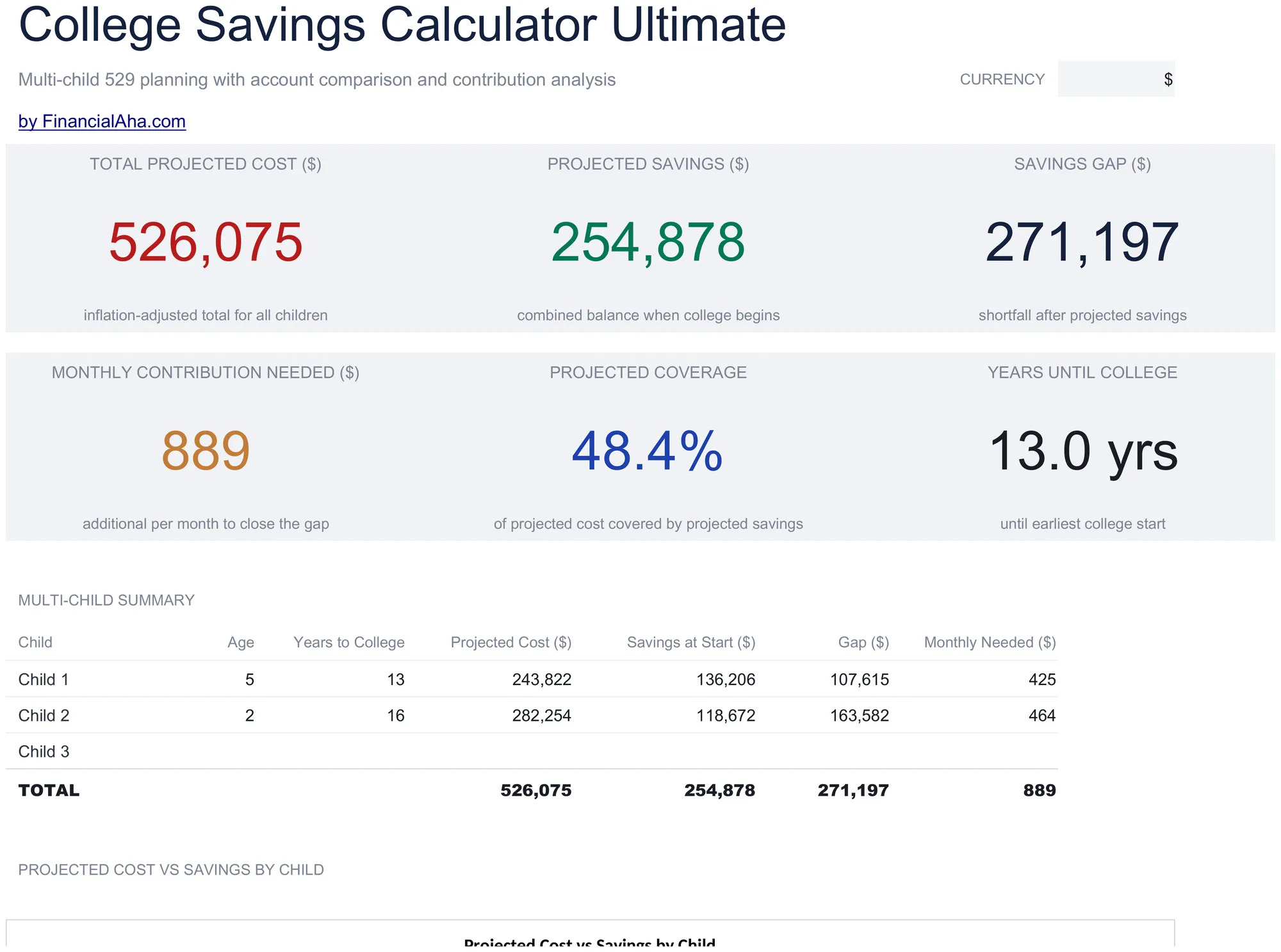
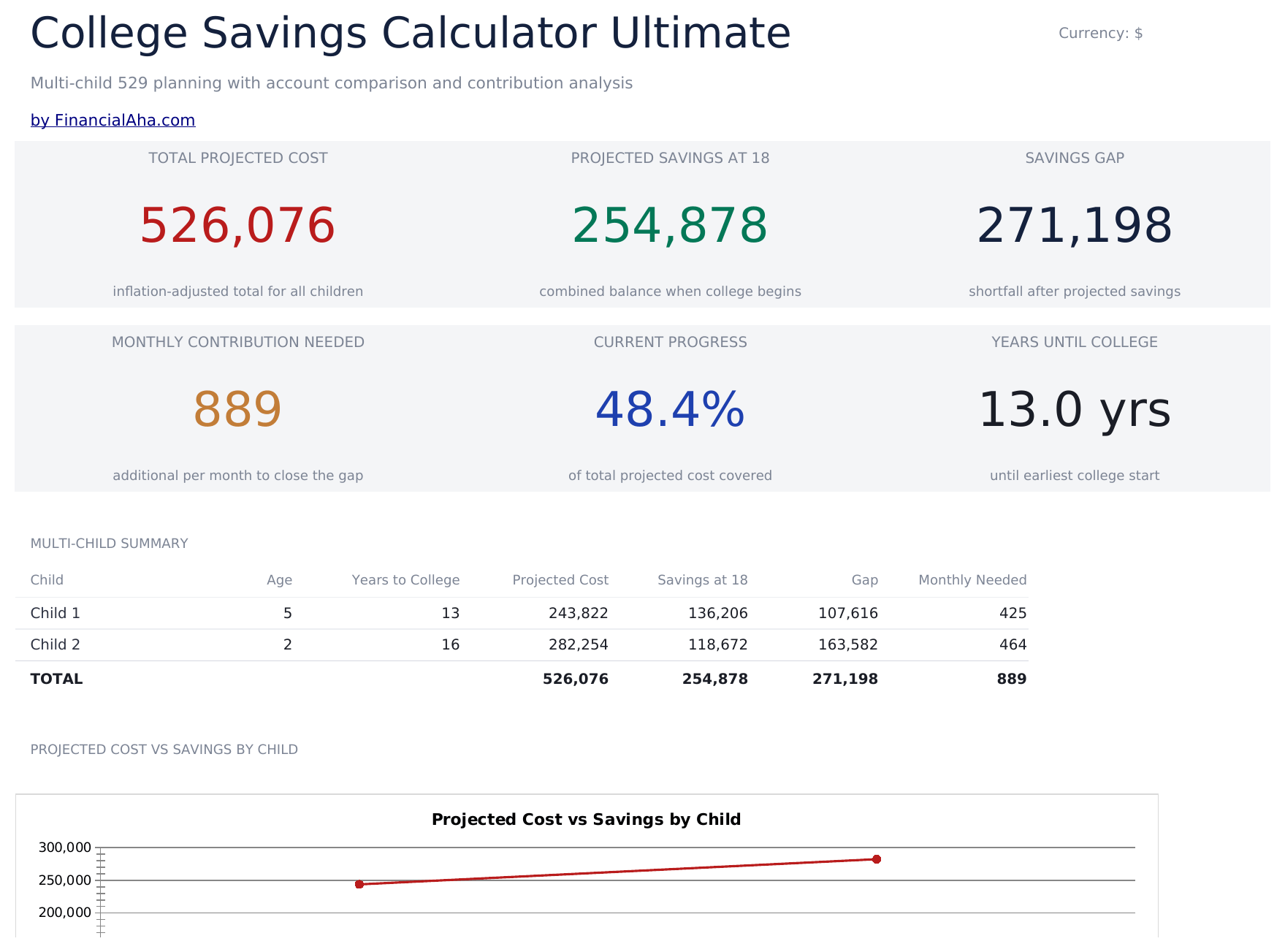
Multi-child education savings planning with tuition inflation projections, 529 vs taxable account comparison, year-by-year cost and savings projections, and contribution sensitivity grids.

College Savings Calculator Ultimate preview

Ce qui est inclus

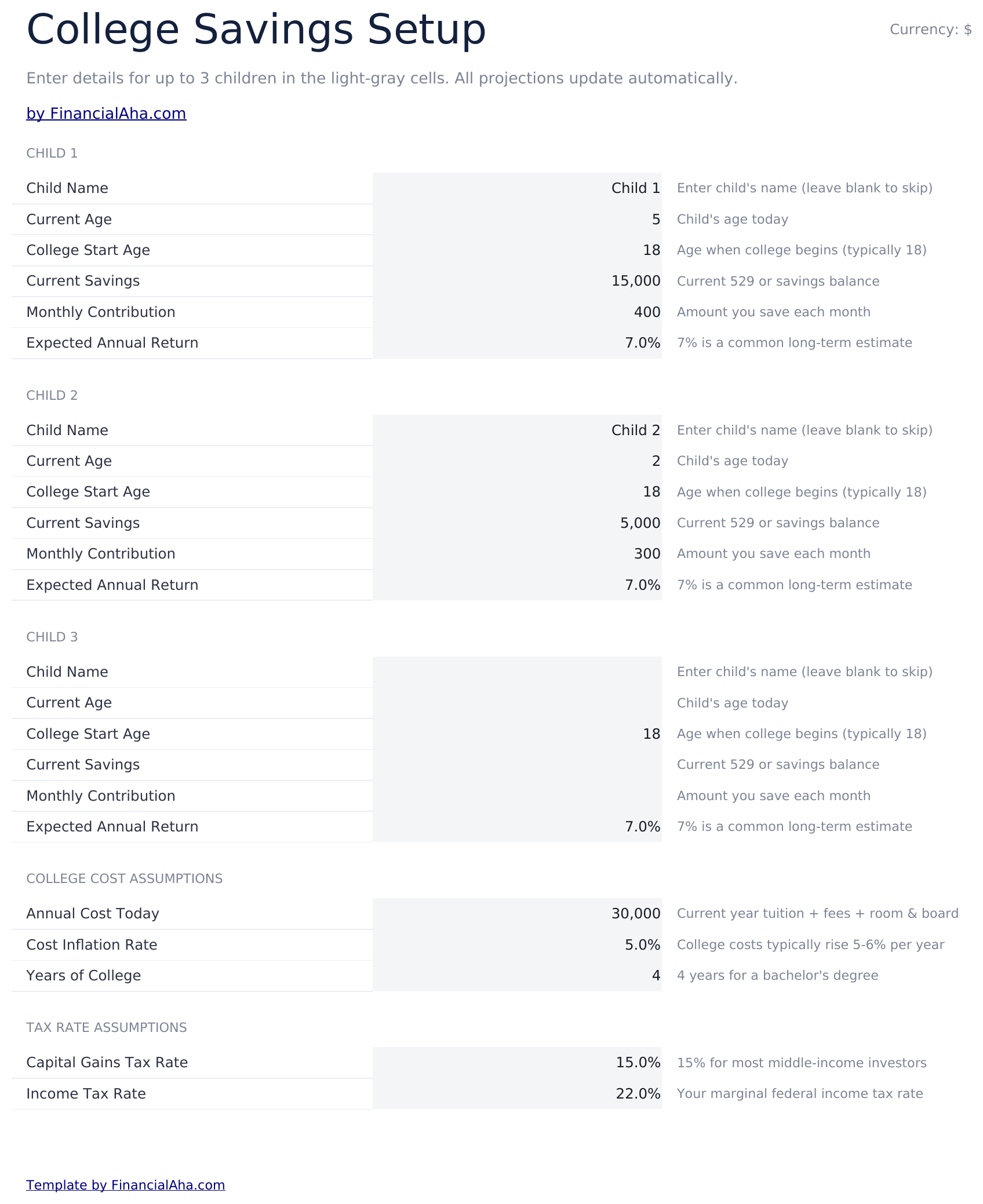
  • Setup sheet for multiple children with current age, expected enrollment year, tuition cost, and savings target inputs
  • Dashboard with 6 KPIs covering total target, current savings, monthly contribution needed, projected shortfall, years to enrollment, and progress percent
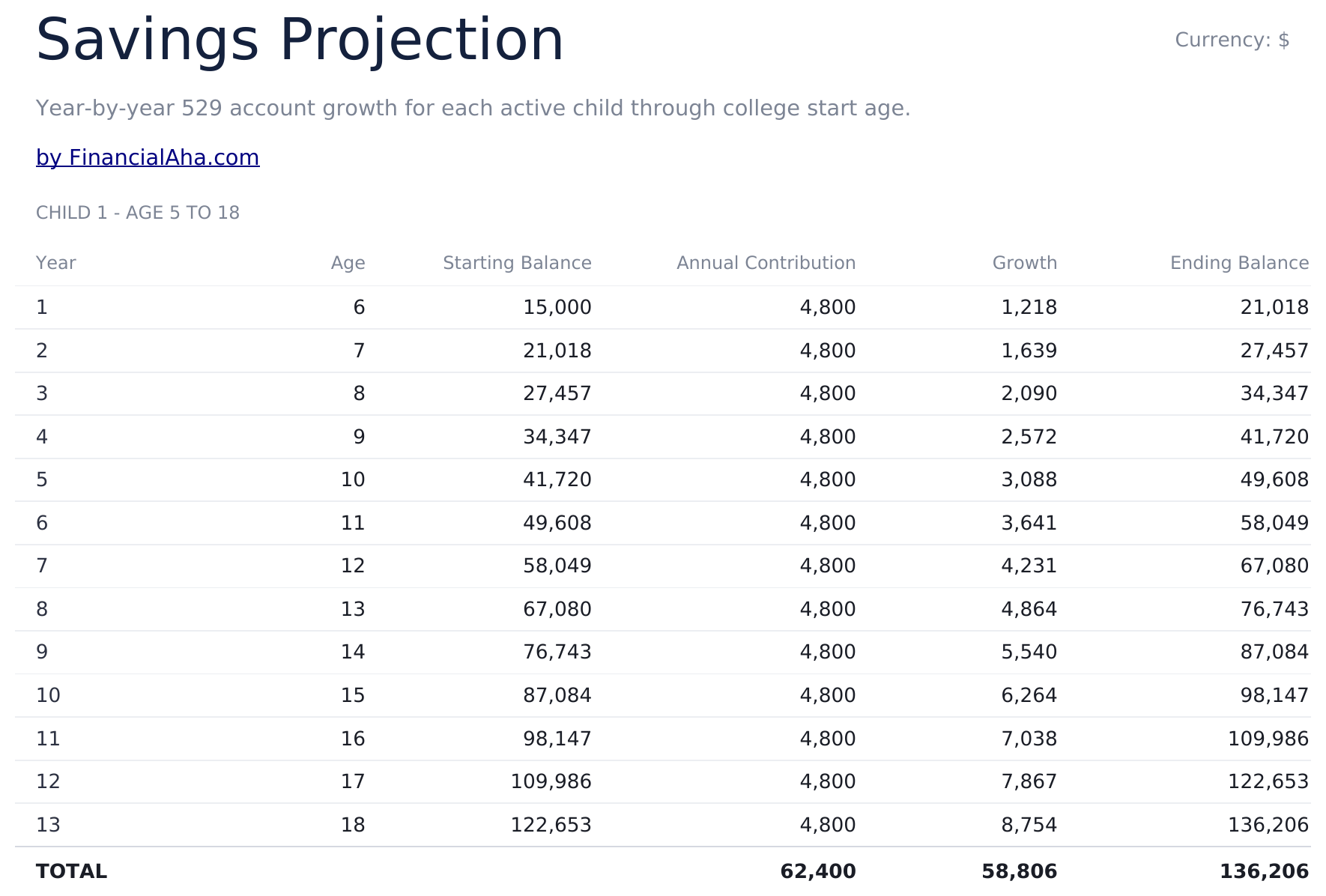
  • Savings Projection sheet showing year-by-year balance growth with contributions and investment returns
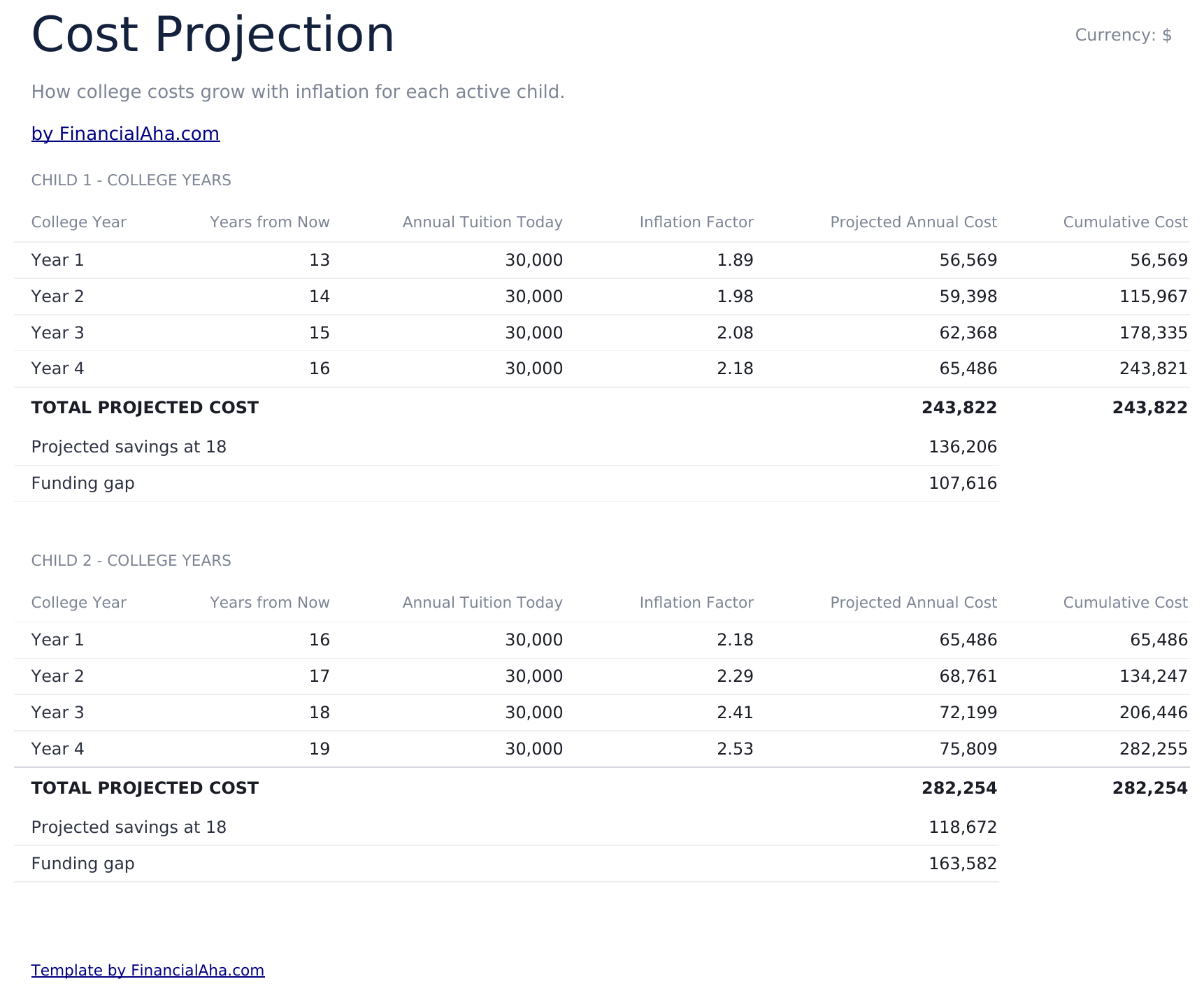
  • Cost Projection sheet adjusting future tuition cost by a customizable inflation rate over the years to enrollment
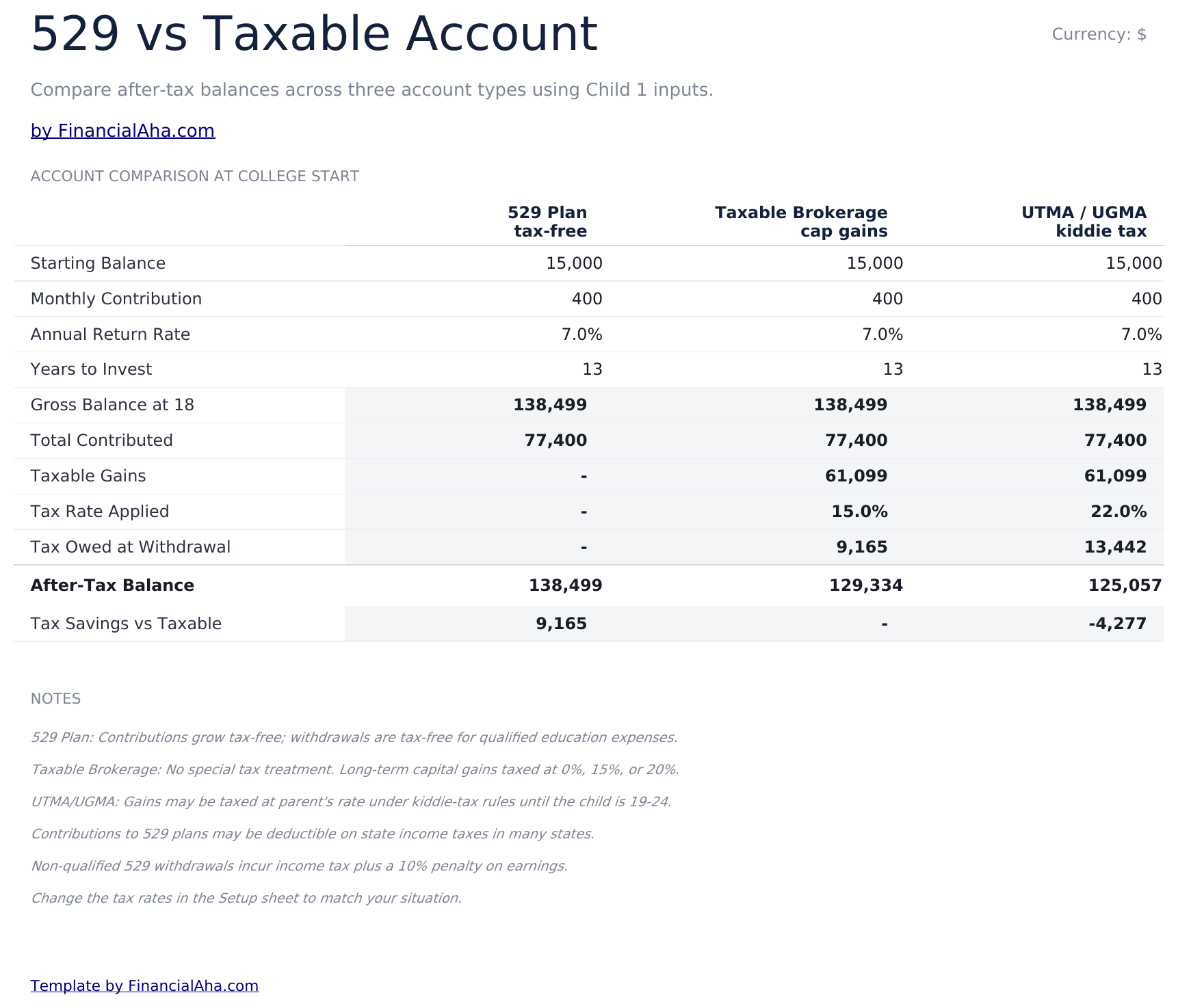
  • 529 vs Taxable comparison contrasting tax-advantaged growth, withdrawal rules, and after-tax balances side by side
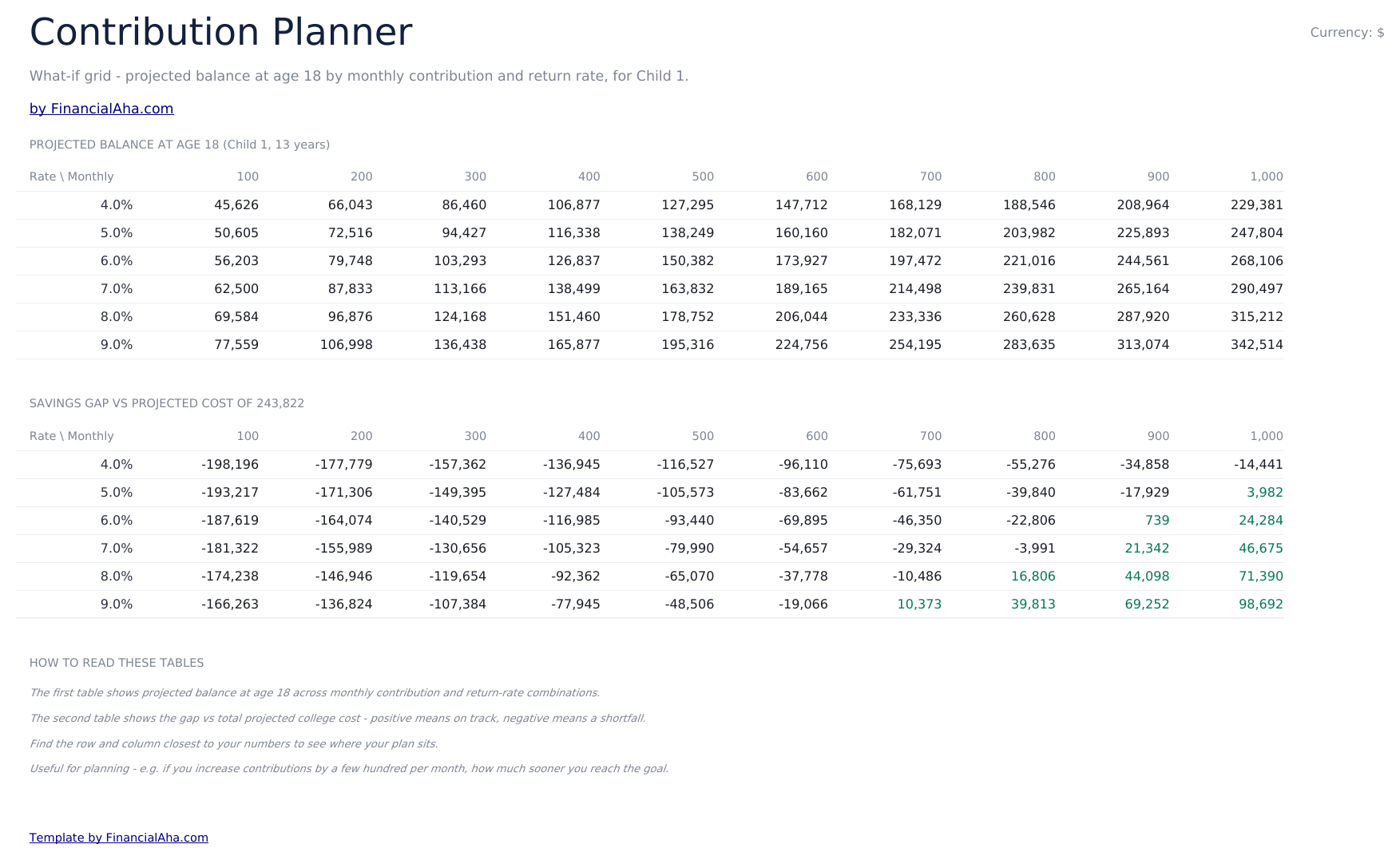
  • Contribution Planner sensitivity grid showing how monthly contribution and return rate combinations change the final balance
  • Conditional formatting highlights on-track vs behind-schedule savings progress across the dashboard
  • Works in Microsoft Excel, Google Sheets, and LibreOffice Calc with no macros required

Comment utiliser ce modèle

1

Enter child and goal details

In the Setup sheet, add the child name, current age, expected enrollment year, current tuition cost, and your savings target.

2

Adjust assumptions

Set the tuition inflation rate, expected investment return, and monthly contribution. The dashboard updates automatically.

3

Compare 529 vs taxable

Review the 529 vs Taxable sheet to see how tax treatment changes the balance available at enrollment.

4

Tune contributions

Use the Contribution Planner sensitivity grid to find a combination of monthly contribution and return rate that hits your target.

Customer Reviews

What Our Customers Say

"If I get half as good at handling my finances as you are at customer service, this'll be the best $26 I've spent lately."

J Jenny Verified Buyer

"Great tool! Simplifies financial planning without the hassle of complex spreadsheets."

F Fazia Search Marketing Manager

"I recently purchased your super convenient spreadsheet, it really helps me!"

J John Verified Buyer

"They're great and super intuitive. Thank you!"

M Mira Verified Buyer

Créés par Claude AI. Perfectionnés par nos soins.

Nous utilisons Claude AI pour rédiger chaque modèle, après une recherche approfondie. Puis notre équipe prend le relais. Nous affinons la mise en page, testons chaque formule en conditions réelles, corrigeons les cas limites et peaufinons le design jusqu'à obtenir un résultat que nous utiliserions nous-mêmes. L'IA nous amène à 80 %. Les 20 % restants, c'est du jugement humain.

Achat unique. Sans abonnement. Compatible Excel et Google Sheets.

Questions fréquentes

How many children can I track?

The Ultimate template supports planning for multiple children. Use one row per child in the Setup sheet and the projections update for each.

What tuition inflation rate should I use?

College costs have historically risen 5% to 8% per year, faster than general inflation. Adjust the inflation input based on whether you are targeting in-state, out-of-state, or private institutions.

What does the 529 vs Taxable sheet compare?

It models the same contribution growing in a tax-advantaged 529 plan versus a taxable brokerage account, accounting for ongoing tax drag and the eventual after-tax balance available for tuition.

How does the contribution planner help?

The sensitivity grid shows the projected final balance across a matrix of monthly contributions and expected return rates, so you can see how a small change to either side moves the outcome.

Can I plan for graduate school?

Yes - extend the enrollment year and target cost to cover graduate years, or duplicate the file to model undergrad and graduate plans separately.

Que reçois-je après l'achat ?

Vous recevez un fichier Excel (.xlsx) compatible avec Microsoft Excel, Google Sheets et LibreOffice Calc. Téléchargez-le immédiatement après l'achat - aucune inscription ni compte requis.

Existe-t-il une version gratuite ?

Oui. La version gratuite de ce modèle est disponible avec des fonctionnalités de base. La version Ultimate ajoute une analyse avancée, plus de capacité et des feuilles supplémentaires.

Et si cela ne fonctionne pas pour moi ?

Contactez-nous et nous vous aiderons à résoudre le problème. Le modèle fonctionne dans Microsoft Excel, Google Sheets et LibreOffice Calc sans aucune macro nécessaire.

Ultimate 34% off
$29 $19
Aperçu

Achat unique

Obtenir le tableur

Points Clés :

Téléchargement instantané après achat
Compatible Excel et Google Sheets
Aucune macro ou VBA nécessaire
Toutes les formules se calculent automatiquement
Sans abonnement

Vous cherchez d'autres modèles Ultimate ?

Nous proposons des versions Ultimate de nos modèles de tableurs les plus populaires avec des fonctionnalités avancées, plus de capacité et une analyse approfondie.

Privé et sécurisé

Vos données financières restent sur votre appareil. Nous ne les voyons jamais.

En savoir plus →

Besoin d'aide?

Consultez nos guides ou contactez-nous pour toute question.

Voir FAQ →