Beste waarde Compleet Financieel Planningspakket
✓ Financiële Planning✓ Vermogenstracker✓ Maandelijks Budgetteren✓ Reisbudget Planner✓ Jaarlijkse Budgetplanner✓ Maandelijkse Uitgaventracker✓ Jaarlijkse Belastingplanner✓ Pensioenplanning
Bekijk bundel →
Ultimate-sjabloon - Excel & Google Sheets

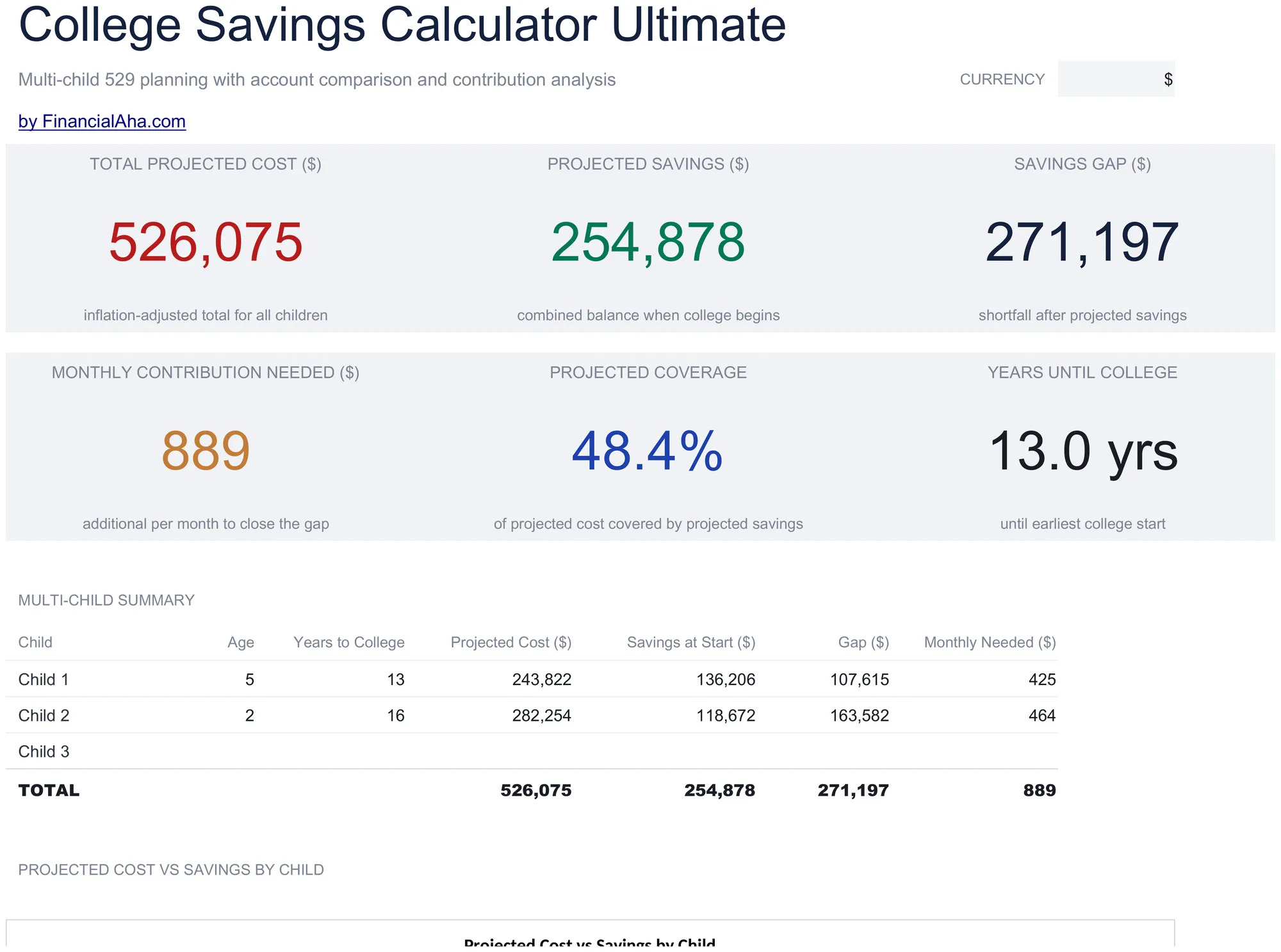
College Savings Calculator Ultimate

Multi-child education savings planning with tuition inflation projections, 529 vs taxable account comparison, year-by-year cost and savings projections, and contribution sensitivity grids.

College Savings Calculator Ultimate preview

Wat is inbegrepen

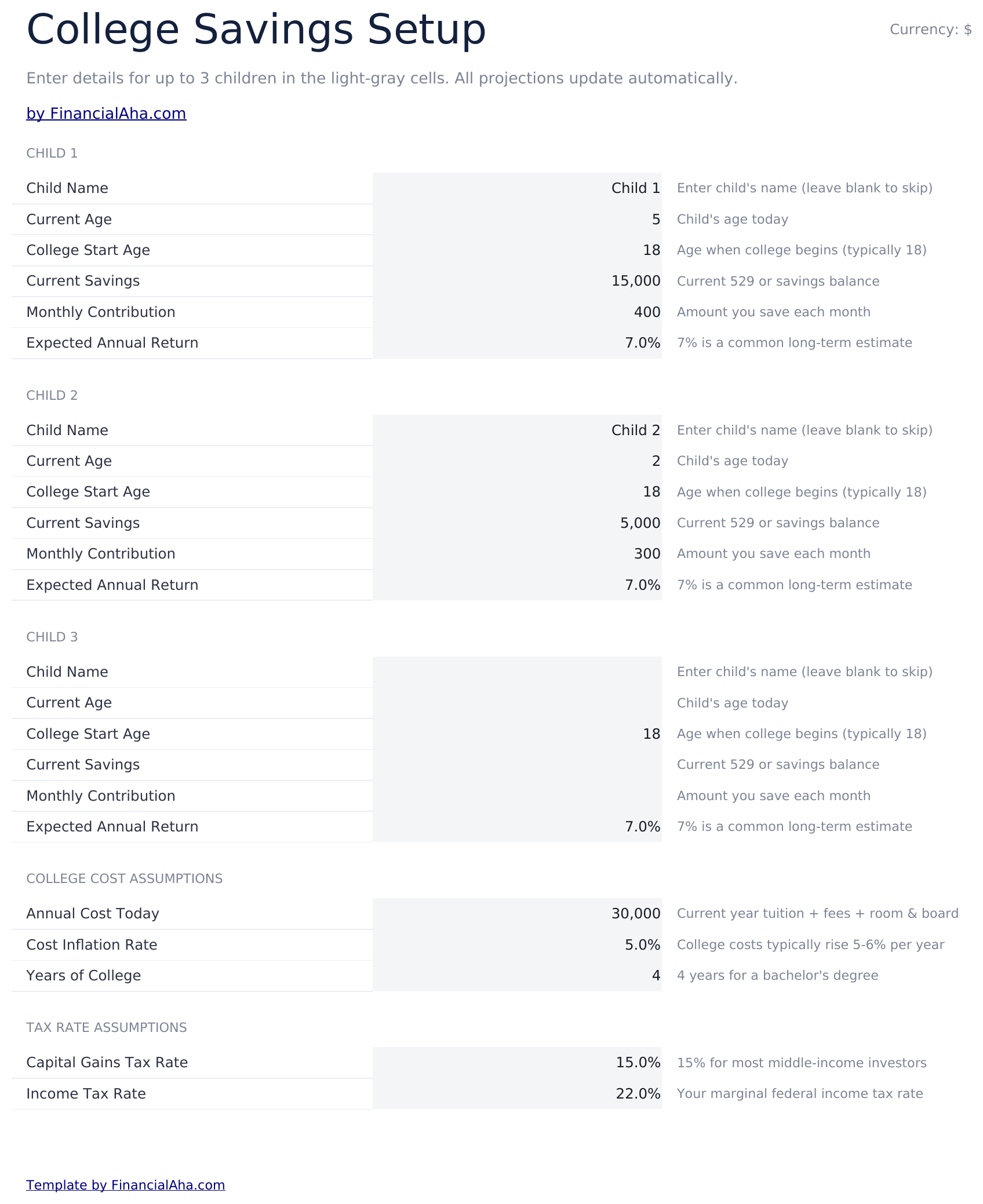
  • Setup sheet for multiple children with current age, expected enrollment year, tuition cost, and savings target inputs
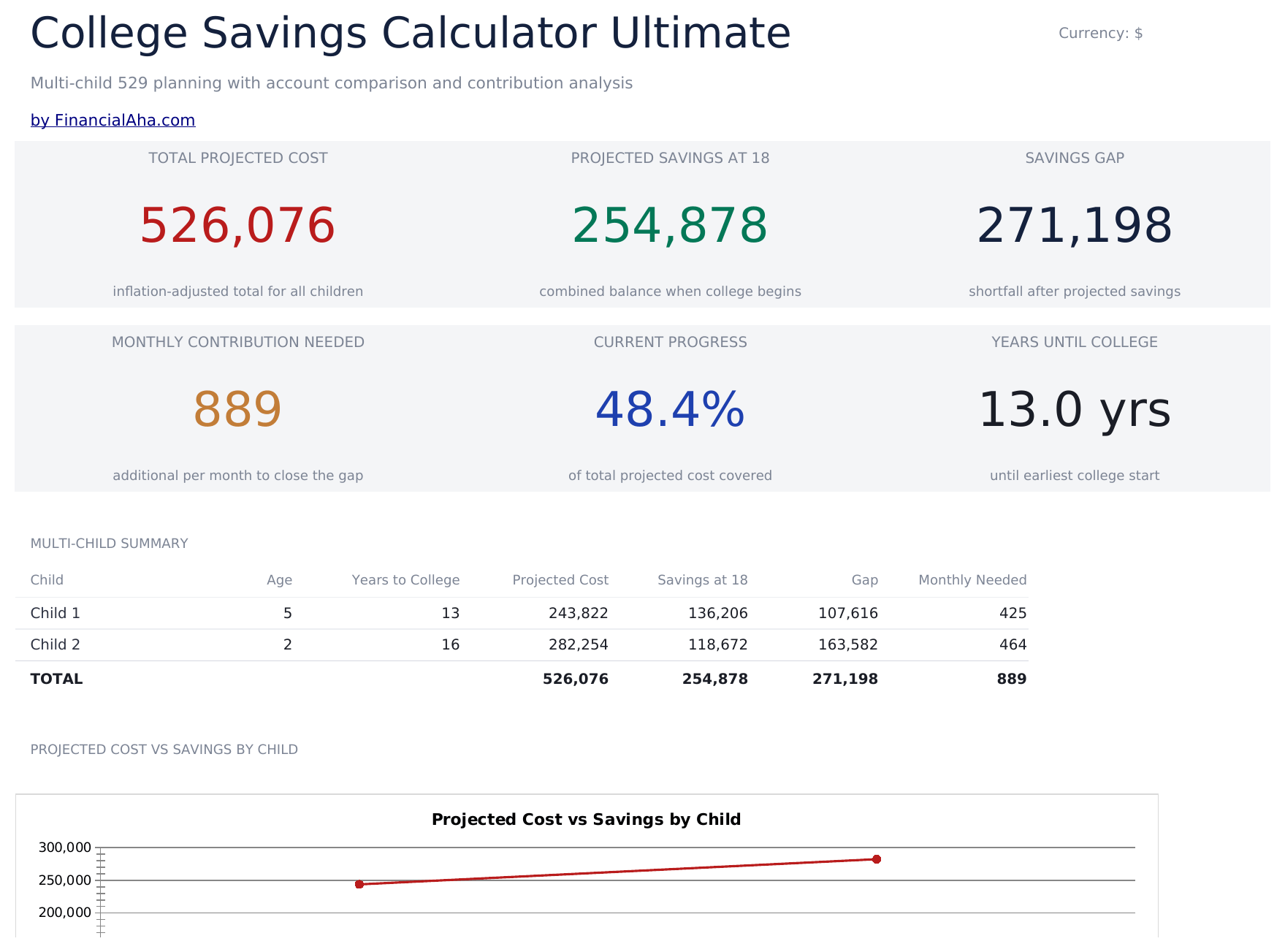
  • Dashboard with 6 KPIs covering total target, current savings, monthly contribution needed, projected shortfall, years to enrollment, and progress percent
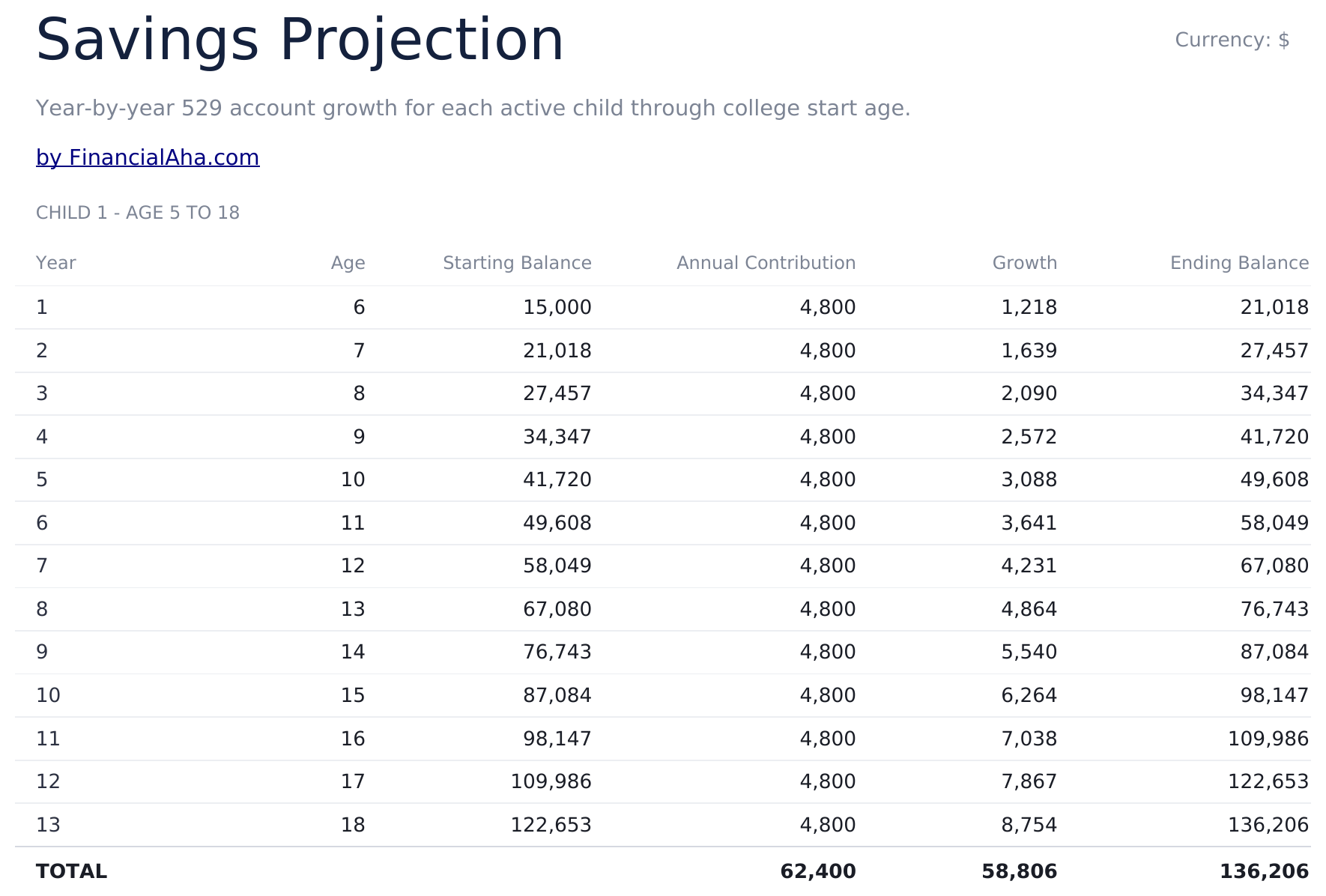
  • Savings Projection sheet showing year-by-year balance growth with contributions and investment returns
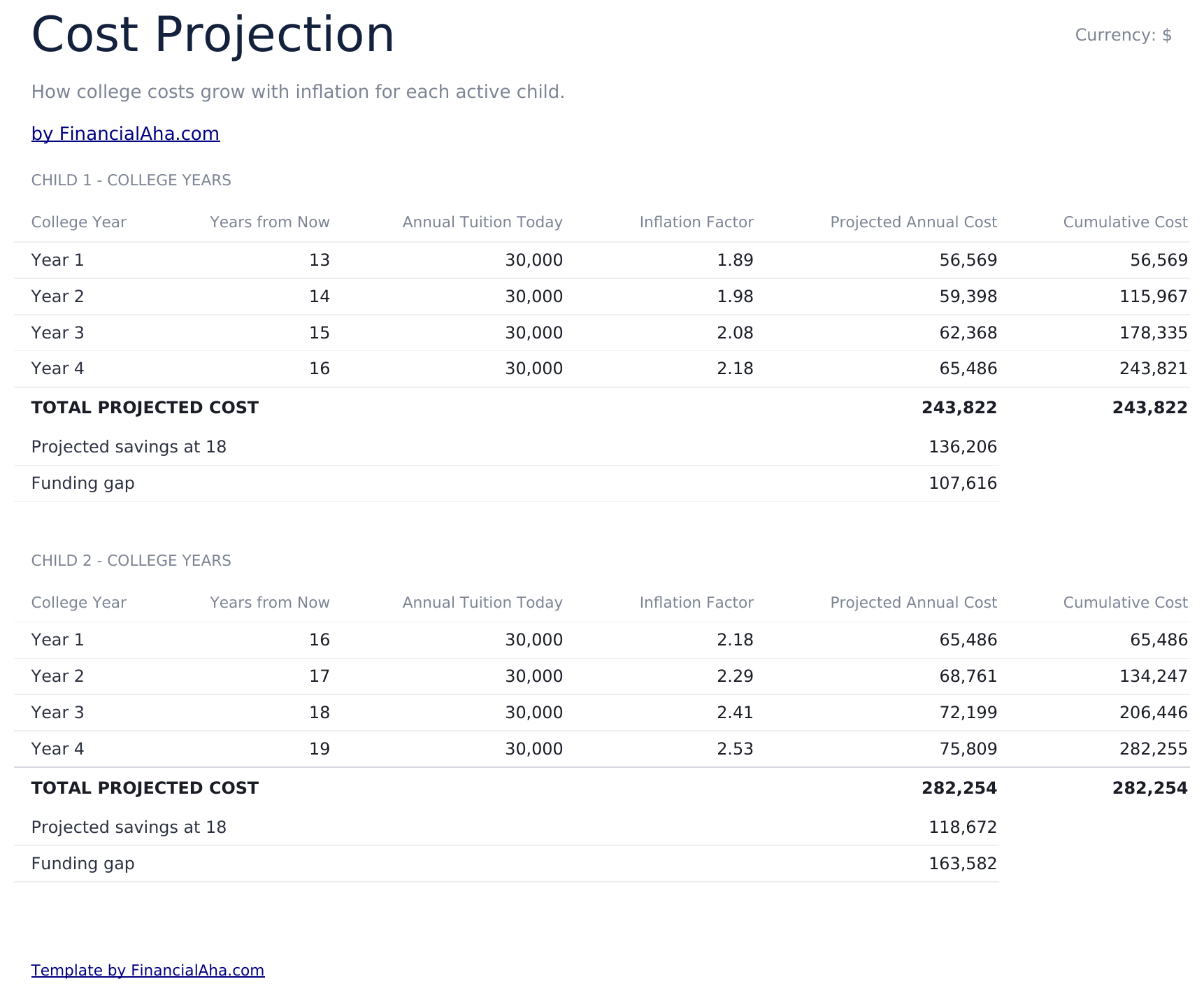
  • Cost Projection sheet adjusting future tuition cost by a customizable inflation rate over the years to enrollment
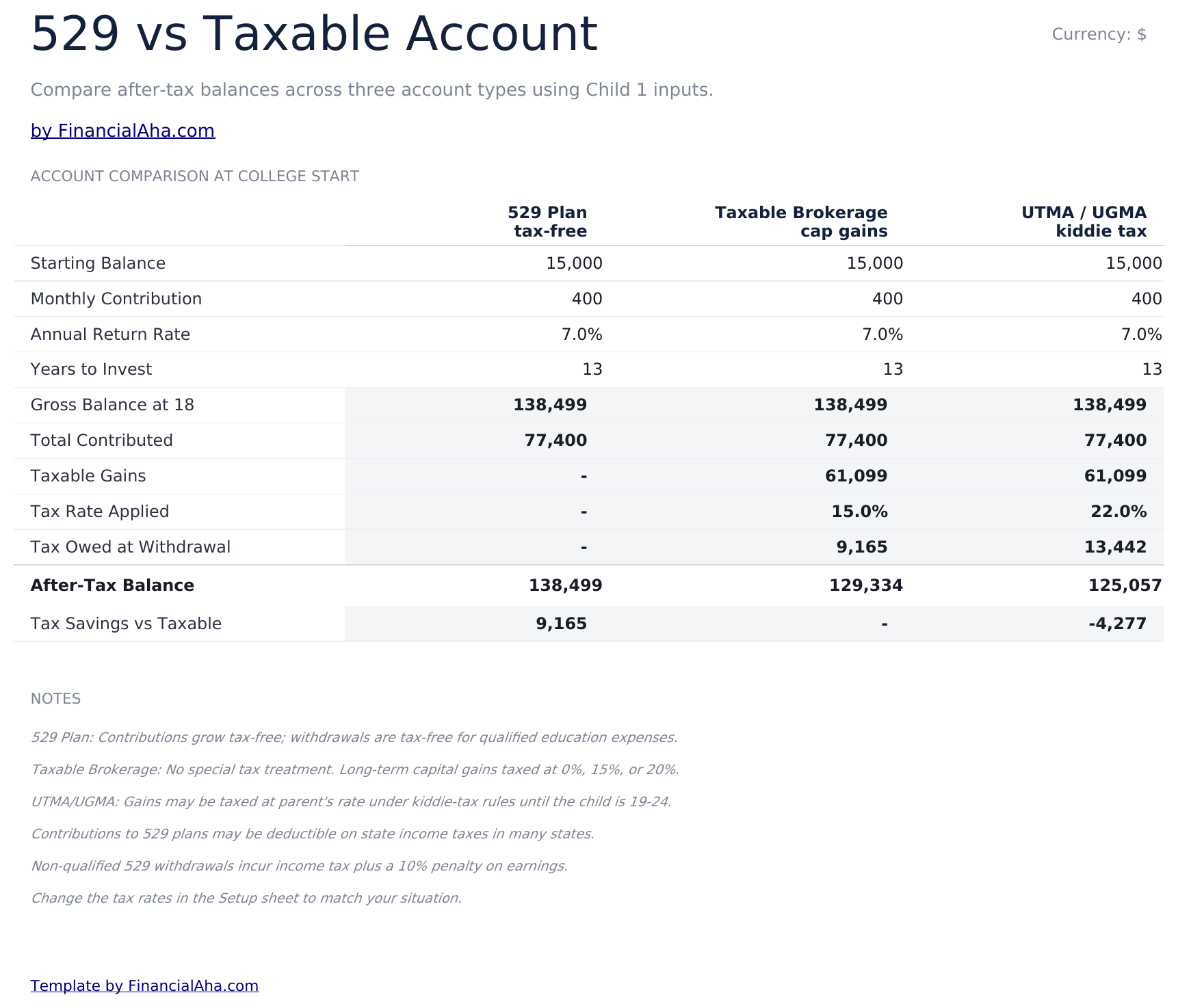
  • 529 vs Taxable comparison contrasting tax-advantaged growth, withdrawal rules, and after-tax balances side by side
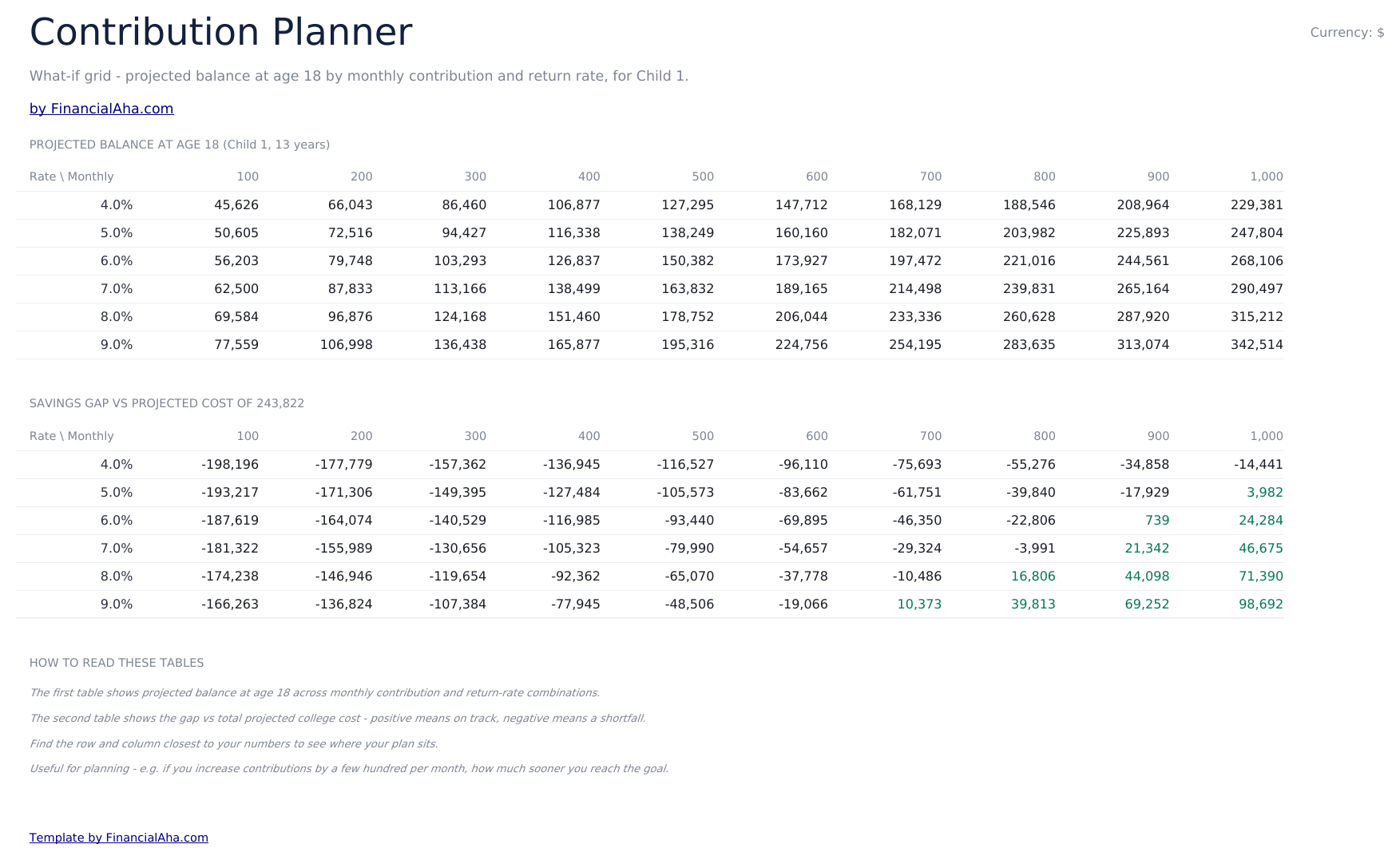
  • Contribution Planner sensitivity grid showing how monthly contribution and return rate combinations change the final balance
  • Conditional formatting highlights on-track vs behind-schedule savings progress across the dashboard
  • Works in Microsoft Excel, Google Sheets, and LibreOffice Calc with no macros required

Hoe gebruik je dit sjabloon

1

Enter child and goal details

In the Setup sheet, add the child name, current age, expected enrollment year, current tuition cost, and your savings target.

2

Adjust assumptions

Set the tuition inflation rate, expected investment return, and monthly contribution. The dashboard updates automatically.

3

Compare 529 vs taxable

Review the 529 vs Taxable sheet to see how tax treatment changes the balance available at enrollment.

4

Tune contributions

Use the Contribution Planner sensitivity grid to find a combination of monthly contribution and return rate that hits your target.

Customer Reviews

What Our Customers Say

"If I get half as good at handling my finances as you are at customer service, this'll be the best $26 I've spent lately."

J Jenny Verified Buyer

"Great tool! Simplifies financial planning without the hassle of complex spreadsheets."

F Fazia Search Marketing Manager

"I recently purchased your super convenient spreadsheet, it really helps me!"

J John Verified Buyer

"They're great and super intuitive. Thank you!"

M Mira Verified Buyer

Gebouwd door Claude AI. Verfijnd door ons.

We gebruiken Claude AI om elk sjabloon te ontwerpen, na uitgebreid onderzoek. Daarna neemt ons team het over. We verfijnen de indeling, testen elke formule grondig, lossen randgevallen op en polijsten het ontwerp totdat het iets is dat we zelf ook echt zouden gebruiken. De AI brengt ons 80% van de weg. De laatste 20% is puur menselijk oordeel.

Eenmalige aankoop. Geen abonnement. Werkt in Excel & Google Sheets.

Veelgestelde vragen

How many children can I track?

The Ultimate template supports planning for multiple children. Use one row per child in the Setup sheet and the projections update for each.

What tuition inflation rate should I use?

College costs have historically risen 5% to 8% per year, faster than general inflation. Adjust the inflation input based on whether you are targeting in-state, out-of-state, or private institutions.

What does the 529 vs Taxable sheet compare?

It models the same contribution growing in a tax-advantaged 529 plan versus a taxable brokerage account, accounting for ongoing tax drag and the eventual after-tax balance available for tuition.

How does the contribution planner help?

The sensitivity grid shows the projected final balance across a matrix of monthly contributions and expected return rates, so you can see how a small change to either side moves the outcome.

Can I plan for graduate school?

Yes - extend the enrollment year and target cost to cover graduate years, or duplicate the file to model undergrad and graduate plans separately.

Wat ontvang ik na aankoop?

Je ontvangt een Excel-bestand (.xlsx) dat werkt in Microsoft Excel, Google Sheets en LibreOffice Calc. Download het direct na aankoop - geen registratie of account nodig.

Is er een gratis versie?

Ja. De gratis versie van dit sjabloon is beschikbaar met basisfuncties. De Ultimate-versie voegt geavanceerde analyses, meer capaciteit en extra werkbladen toe.

Wat als het niet werkt voor mij?

Neem contact met ons op en we helpen je verder. Het sjabloon werkt in Microsoft Excel, Google Sheets en LibreOffice Calc zonder macro's.

Ultimate 34% off
$29 $19
Voorbeeld

Eenmalige aankoop

Download de Spreadsheet

Hoogtepunten:

Direct downloaden na aankoop
Werkt in Excel & Google Sheets
Geen macro's of VBA nodig
Alle formules berekenen automatisch
Geen abonnement nodig

Op zoek naar meer Ultimate-sjablonen?

We bieden Ultimate-versies van onze populairste spreadsheet-sjablonen met geavanceerde functies, meer capaciteit en diepere analyse.

Privé & veilig

Uw financiële gegevens blijven op uw apparaat. Wij zien ze nooit.

Meer informatie →

Hulp nodig?

Bekijk onze handleidingen of neem contact op met vragen.

Bekijk FAQ →