Mejor valor Paquete Completo de Planificación Financiera
✓ Planificación Financiera✓ Rastreador de Patrimonio Neto✓ Presupuesto Mensual✓ Planificador de Presupuesto de Viaje✓ Planificador de Presupuesto Anual✓ Rastreador de Gastos Mensuales✓ Planificador de Impuestos Anual✓ Planificación de Jubilación
Ver paquete →
Plantilla Ultimate - Excel y Google Sheets

College Savings Calculator Ultimate

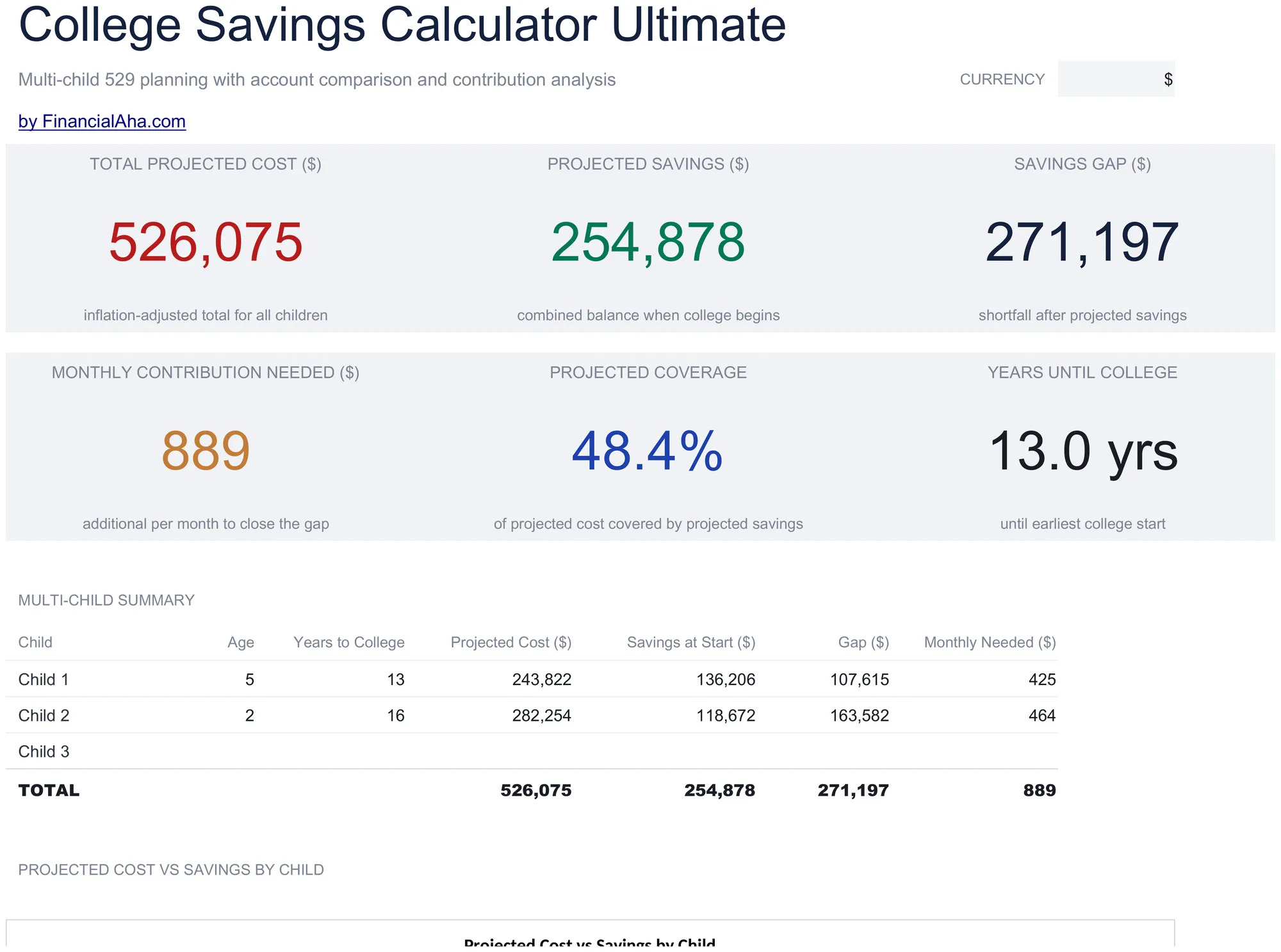
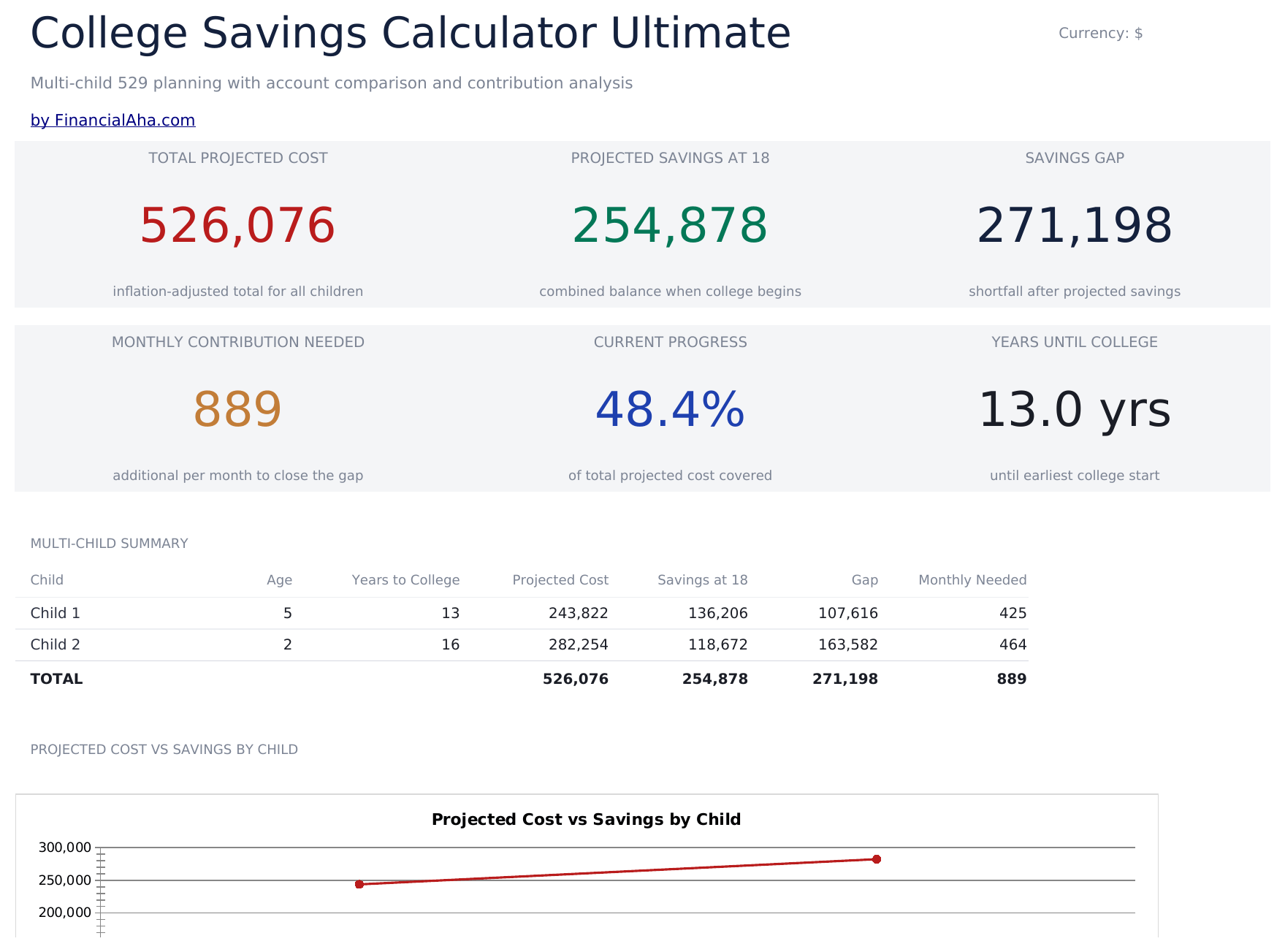
Multi-child education savings planning with tuition inflation projections, 529 vs taxable account comparison, year-by-year cost and savings projections, and contribution sensitivity grids.

College Savings Calculator Ultimate preview

Qué incluye

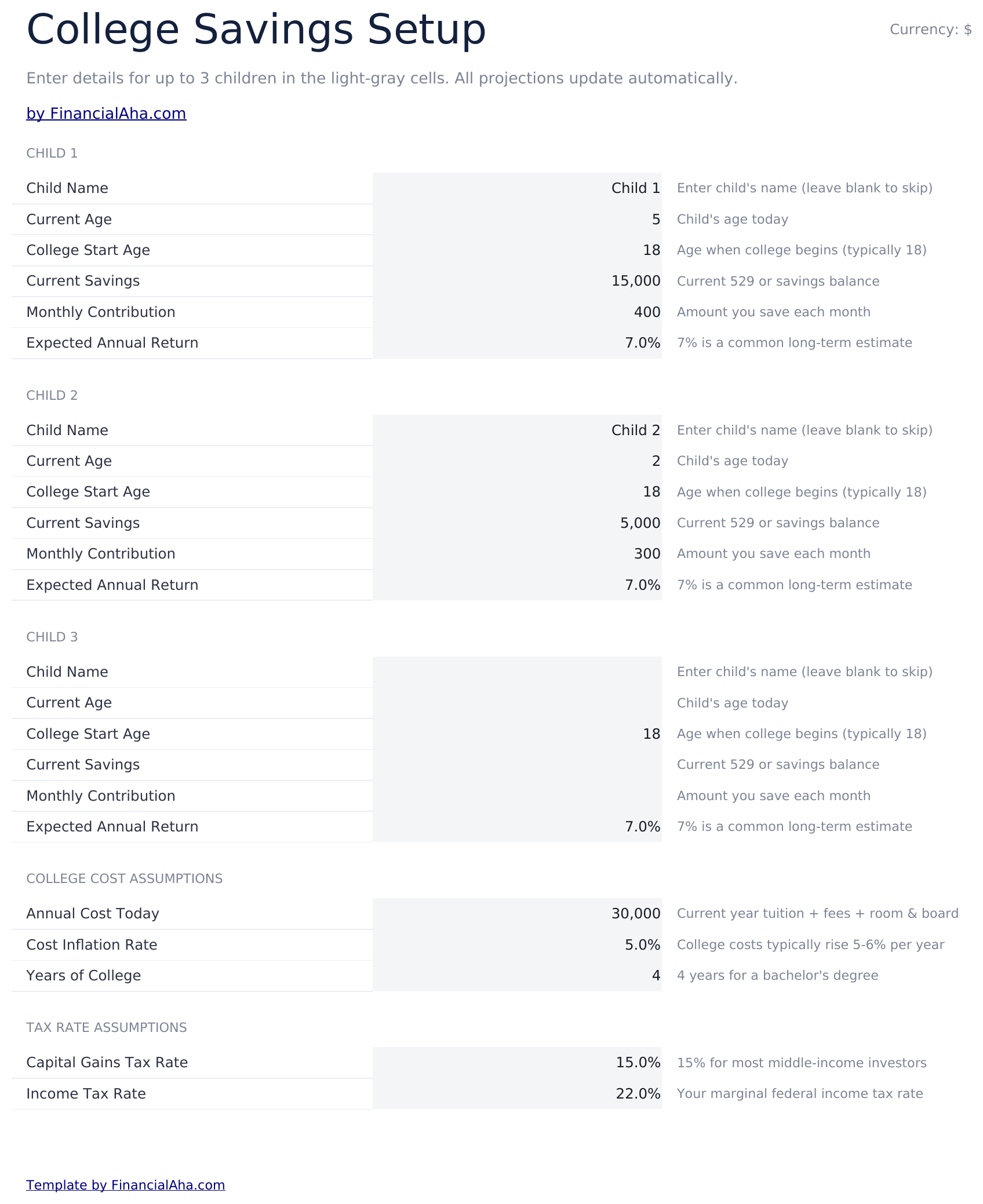
  • Setup sheet for multiple children with current age, expected enrollment year, tuition cost, and savings target inputs
  • Dashboard with 6 KPIs covering total target, current savings, monthly contribution needed, projected shortfall, years to enrollment, and progress percent
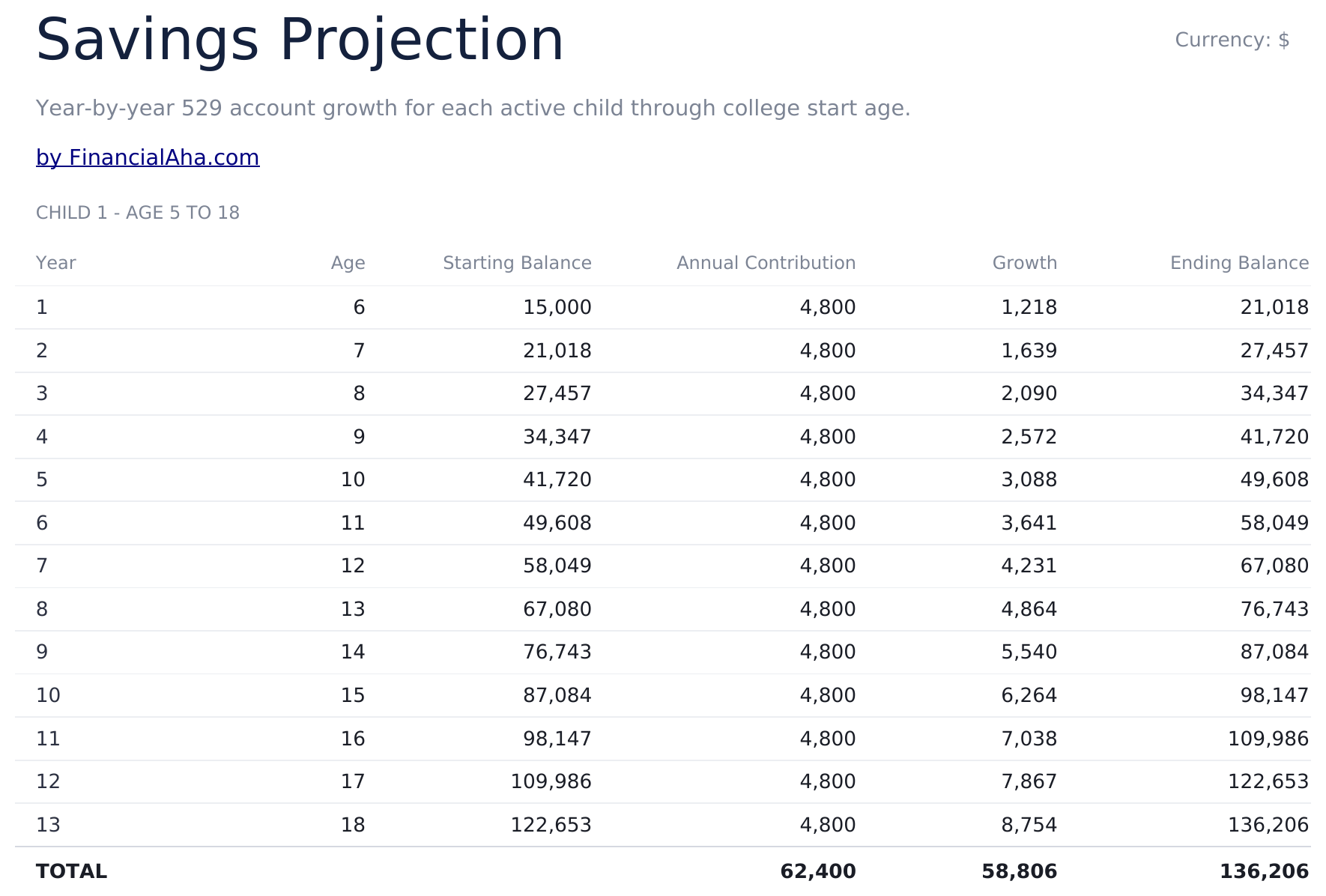
  • Savings Projection sheet showing year-by-year balance growth with contributions and investment returns
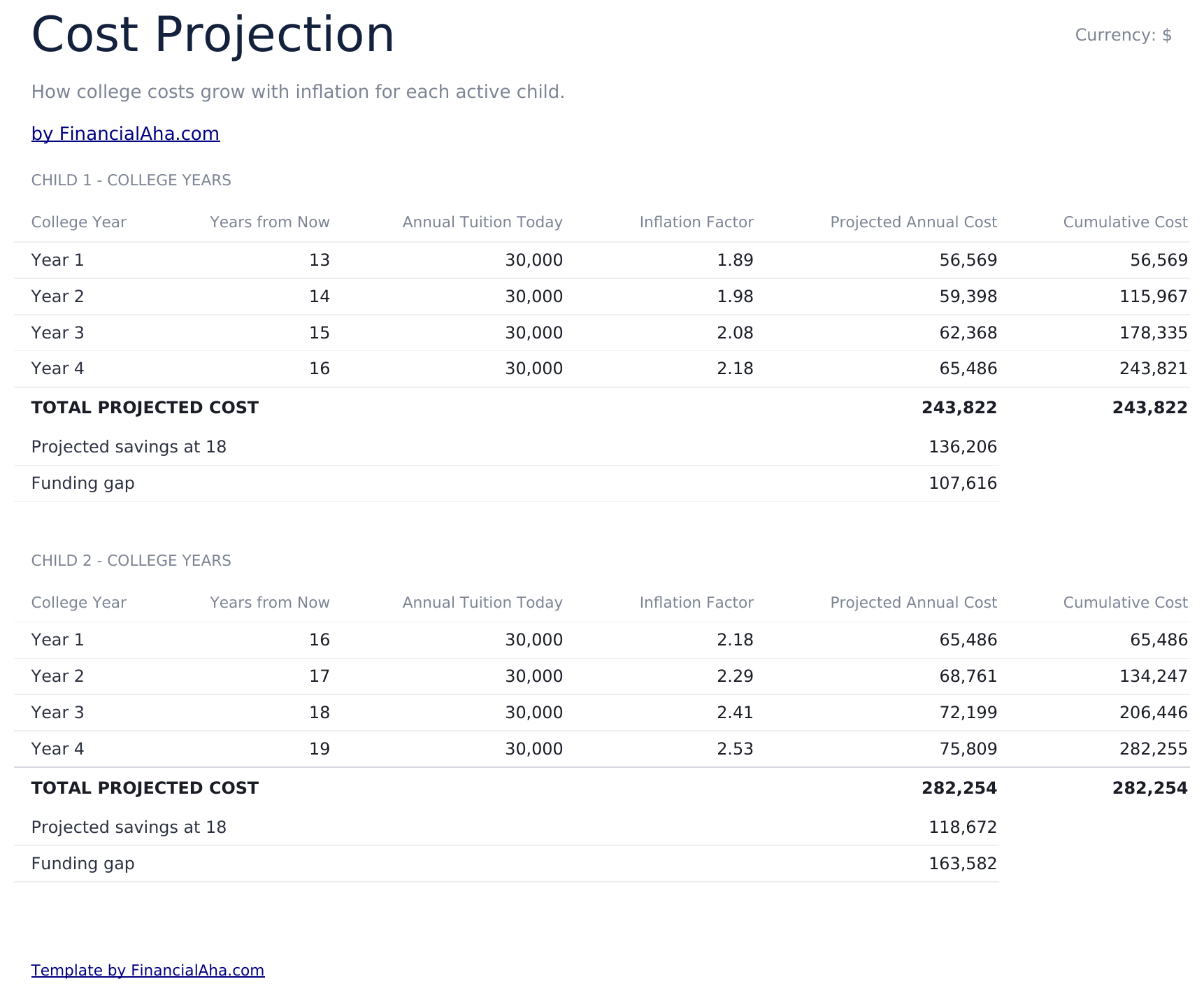
  • Cost Projection sheet adjusting future tuition cost by a customizable inflation rate over the years to enrollment
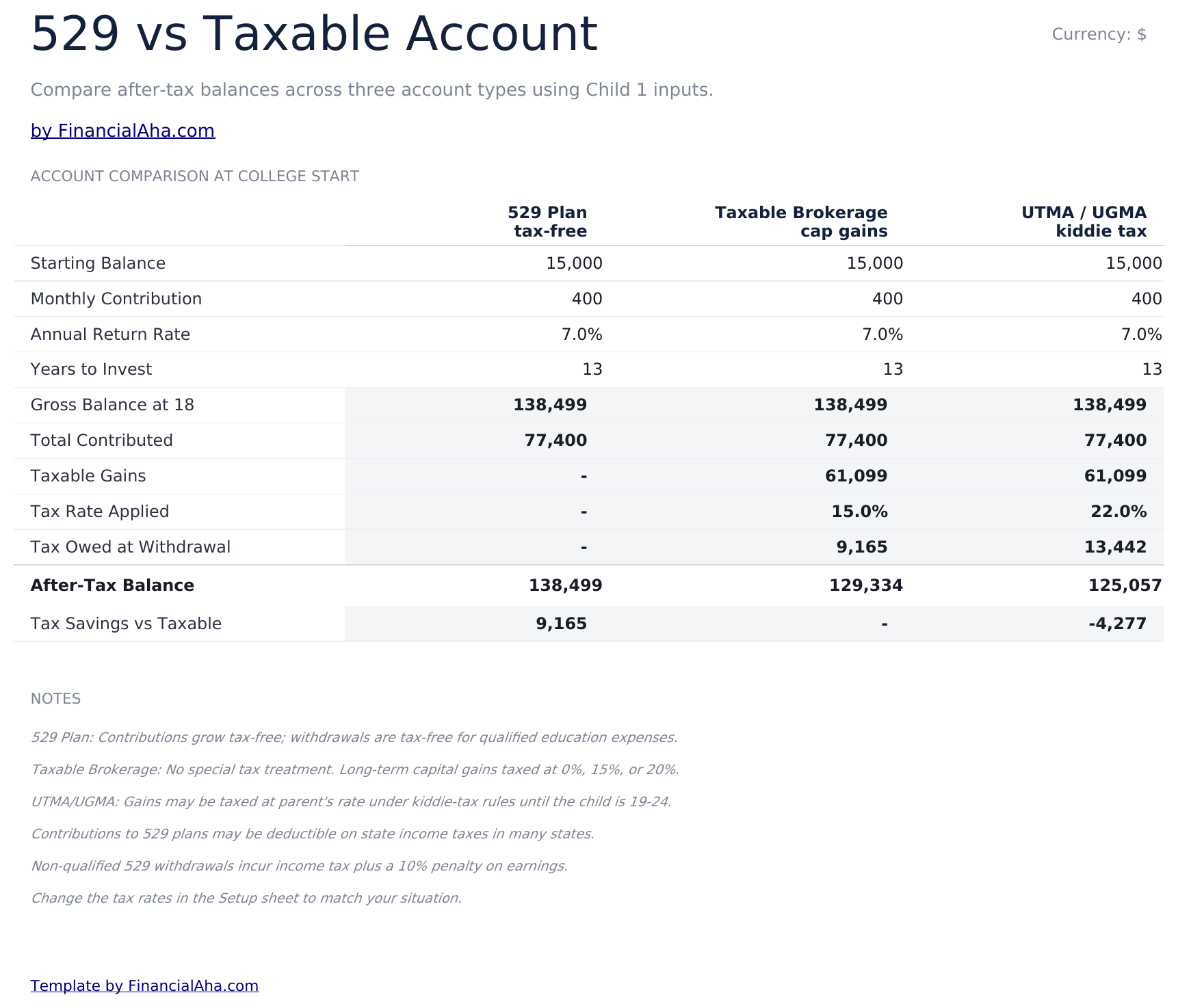
  • 529 vs Taxable comparison contrasting tax-advantaged growth, withdrawal rules, and after-tax balances side by side
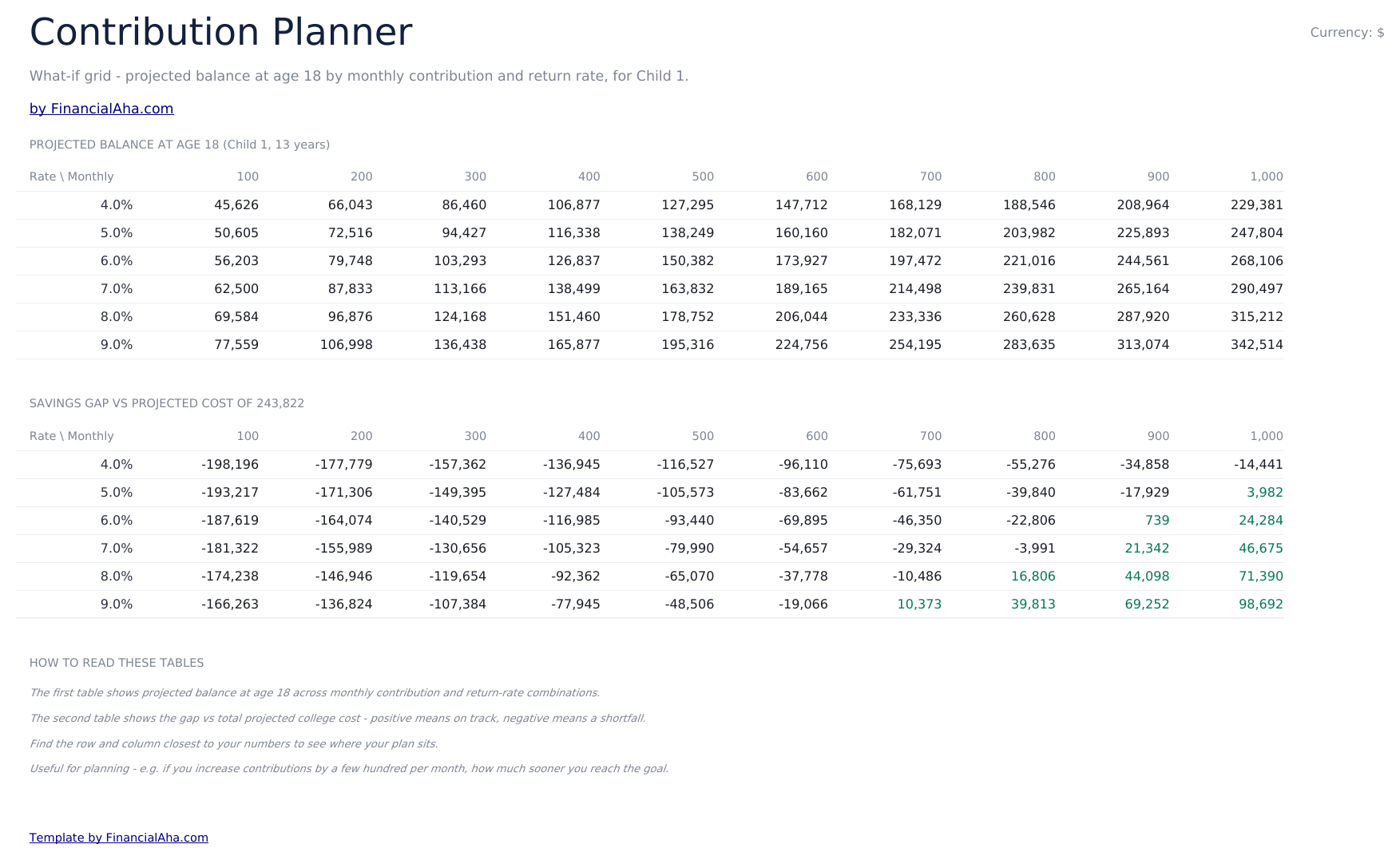
  • Contribution Planner sensitivity grid showing how monthly contribution and return rate combinations change the final balance
  • Conditional formatting highlights on-track vs behind-schedule savings progress across the dashboard
  • Works in Microsoft Excel, Google Sheets, and LibreOffice Calc with no macros required

Cómo usar esta plantilla

1

Enter child and goal details

In the Setup sheet, add the child name, current age, expected enrollment year, current tuition cost, and your savings target.

2

Adjust assumptions

Set the tuition inflation rate, expected investment return, and monthly contribution. The dashboard updates automatically.

3

Compare 529 vs taxable

Review the 529 vs Taxable sheet to see how tax treatment changes the balance available at enrollment.

4

Tune contributions

Use the Contribution Planner sensitivity grid to find a combination of monthly contribution and return rate that hits your target.

Customer Reviews

What Our Customers Say

"If I get half as good at handling my finances as you are at customer service, this'll be the best $26 I've spent lately."

J Jenny Verified Buyer

"Great tool! Simplifies financial planning without the hassle of complex spreadsheets."

F Fazia Search Marketing Manager

"I recently purchased your super convenient spreadsheet, it really helps me!"

J John Verified Buyer

"They're great and super intuitive. Thank you!"

M Mira Verified Buyer

Creadas por Claude AI. Perfeccionadas por nosotros.

Usamos Claude AI para crear el borrador de cada plantilla, después de una investigación profunda. Luego nuestro equipo interviene. Refinamos el diseño, probamos cada fórmula a fondo, corregimos casos especiales y pulimos el diseño hasta que se siente como algo que realmente usaríamos nosotros mismos. La IA nos lleva al 80%. El último 20% es criterio humano.

Compra única. Sin suscripción. Funciona en Excel y Google Sheets.

Preguntas frecuentes

How many children can I track?

The Ultimate template supports planning for multiple children. Use one row per child in the Setup sheet and the projections update for each.

What tuition inflation rate should I use?

College costs have historically risen 5% to 8% per year, faster than general inflation. Adjust the inflation input based on whether you are targeting in-state, out-of-state, or private institutions.

What does the 529 vs Taxable sheet compare?

It models the same contribution growing in a tax-advantaged 529 plan versus a taxable brokerage account, accounting for ongoing tax drag and the eventual after-tax balance available for tuition.

How does the contribution planner help?

The sensitivity grid shows the projected final balance across a matrix of monthly contributions and expected return rates, so you can see how a small change to either side moves the outcome.

Can I plan for graduate school?

Yes - extend the enrollment year and target cost to cover graduate years, or duplicate the file to model undergrad and graduate plans separately.

¿Qué recibo después de la compra?

Recibes un archivo Excel (.xlsx) que funciona en Microsoft Excel, Google Sheets y LibreOffice Calc. Descárgalo de inmediato después de la compra - sin registro ni cuenta requerida.

¿Hay una versión gratuita?

Sí. La versión gratuita de esta plantilla está disponible con funciones básicas. La versión Ultimate agrega análisis avanzado, mayor capacidad y hojas adicionales.

¿Qué pasa si no me funciona?

Contáctanos y te ayudaremos a resolverlo. La plantilla funciona en Microsoft Excel, Google Sheets y LibreOffice Calc sin necesidad de macros.

Ultimate 34% off

Destacados:

Descarga instantánea después de la compra
Funciona en Excel y Google Sheets
No requiere macros ni VBA
Todas las fórmulas se calculan automáticamente
Sin suscripción

¿Buscas más plantillas Ultimate?

Ofrecemos versiones Ultimate de nuestras plantillas más populares con funciones avanzadas, mayor capacidad y análisis más detallado.

Privado y seguro

Sus datos financieros permanecen en su dispositivo. Nunca los vemos.

Saber más →

¿Necesita ayuda?

Consulte nuestras guías o contáctenos con preguntas.

Ver FAQ →