Miglior valore Pacchetto Completo di Pianificazione Finanziaria
✓ Pianificazione Finanziaria✓ Tracker Patrimonio Netto✓ Budget Mensile✓ Pianificatore Budget Viaggio✓ Pianificatore Budget Annuale✓ Tracker Spese Mensili✓ Pianificatore Fiscale Annuale✓ Pianificazione Pensione
Vedi pacchetto →
Modello Ultimate - Excel e Google Sheets

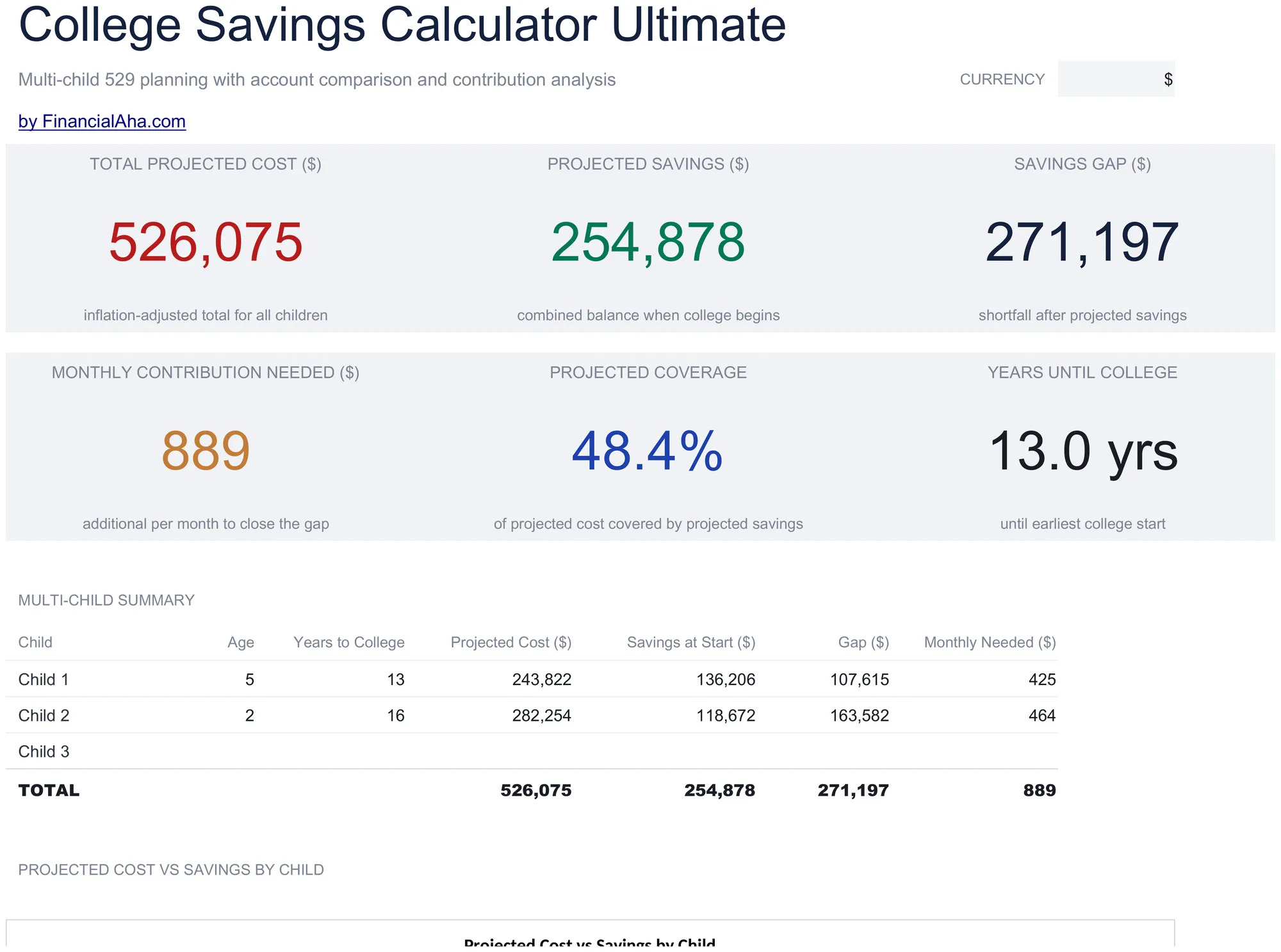
College Savings Calculator Ultimate

Multi-child education savings planning with tuition inflation projections, 529 vs taxable account comparison, year-by-year cost and savings projections, and contribution sensitivity grids.

College Savings Calculator Ultimate preview

Cosa include

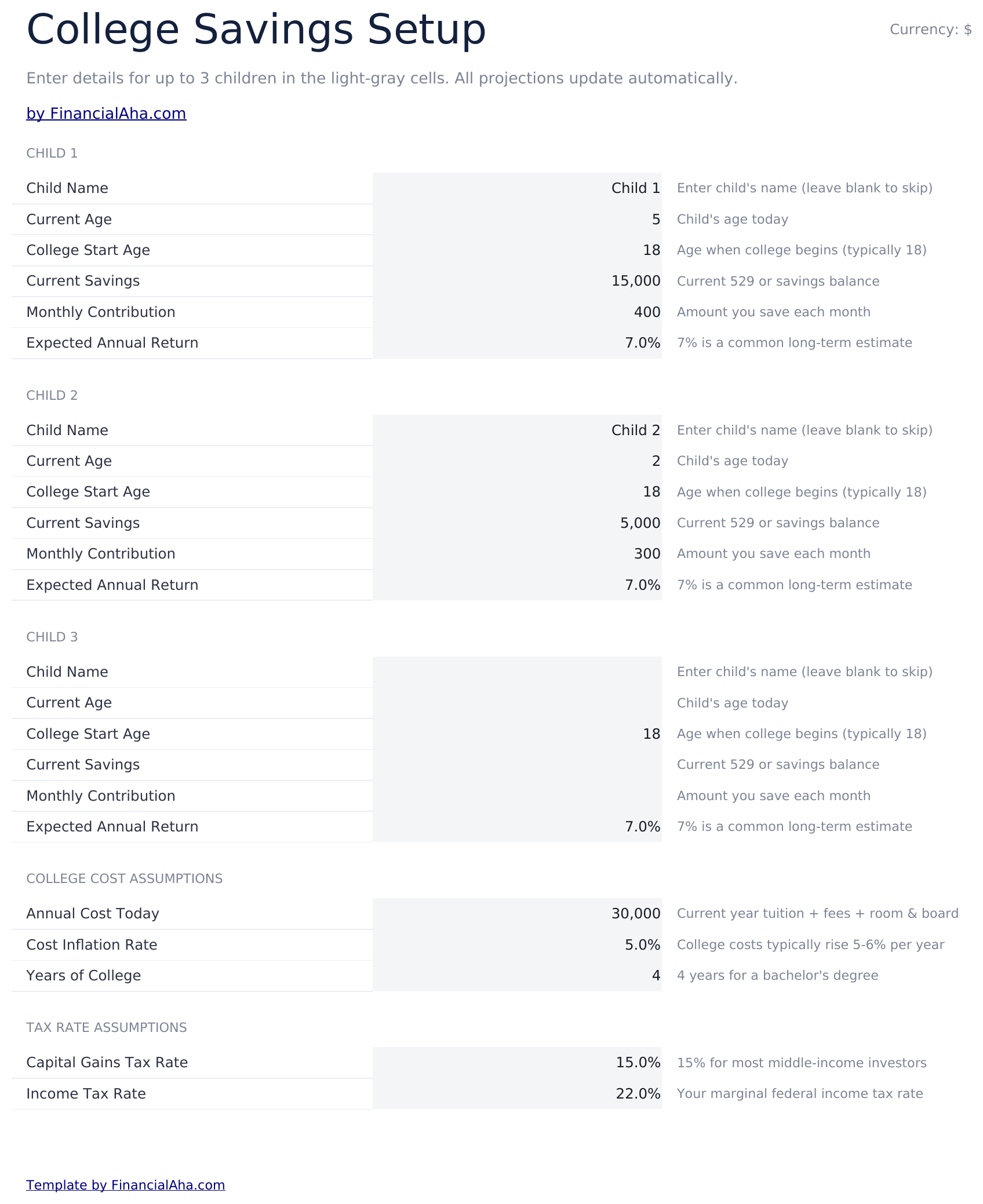
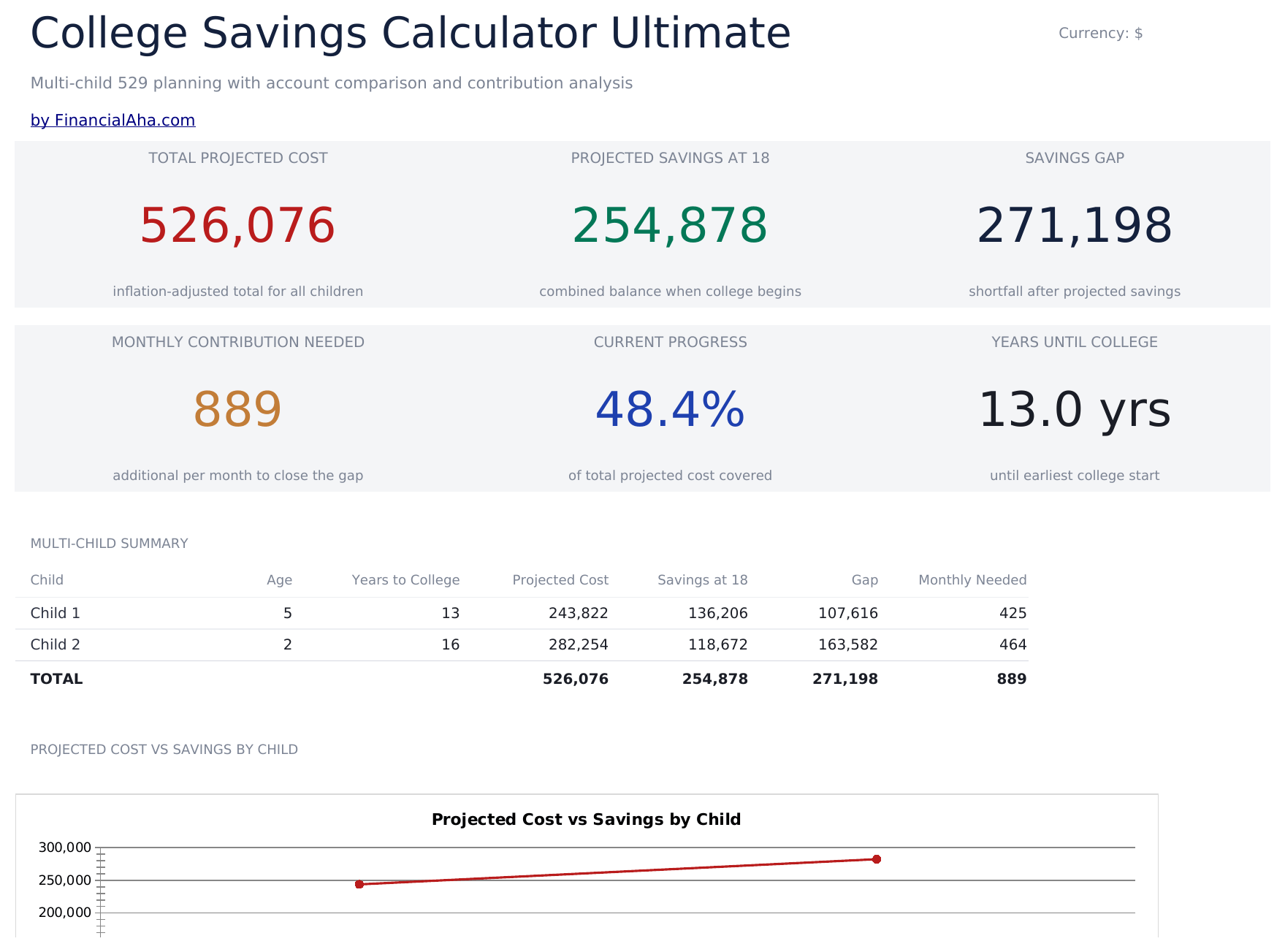
  • Setup sheet for multiple children with current age, expected enrollment year, tuition cost, and savings target inputs
  • Dashboard with 6 KPIs covering total target, current savings, monthly contribution needed, projected shortfall, years to enrollment, and progress percent
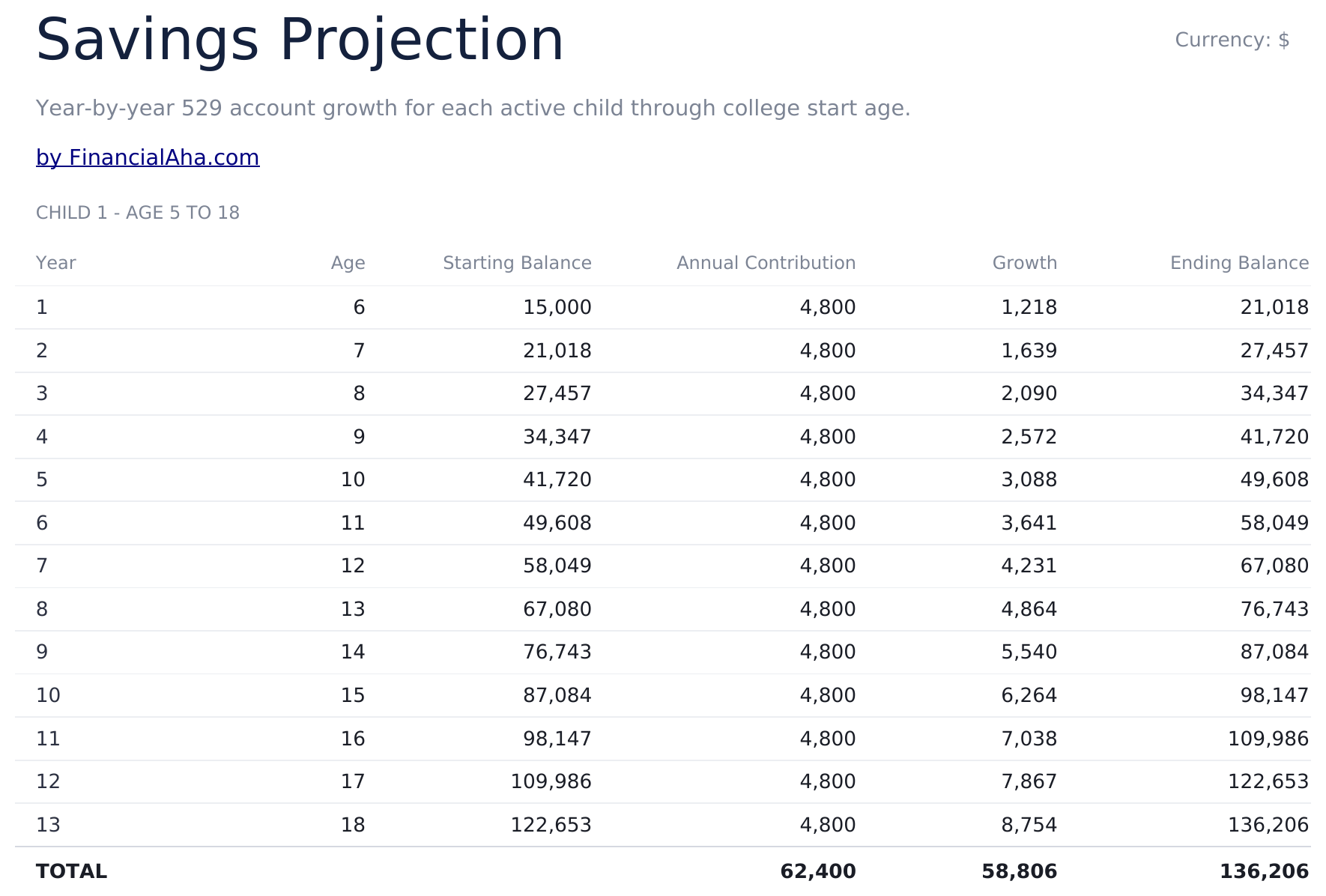
  • Savings Projection sheet showing year-by-year balance growth with contributions and investment returns
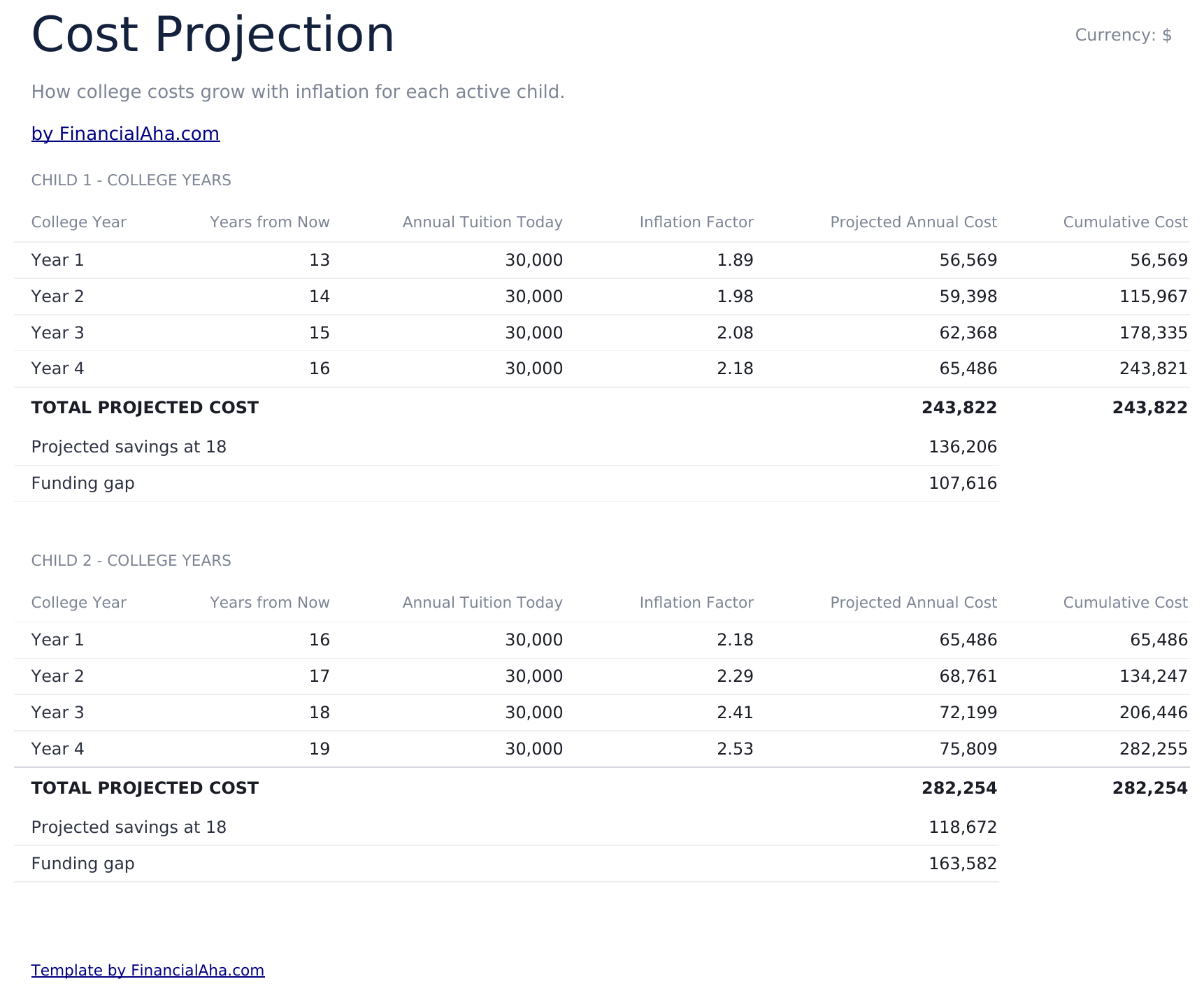
  • Cost Projection sheet adjusting future tuition cost by a customizable inflation rate over the years to enrollment
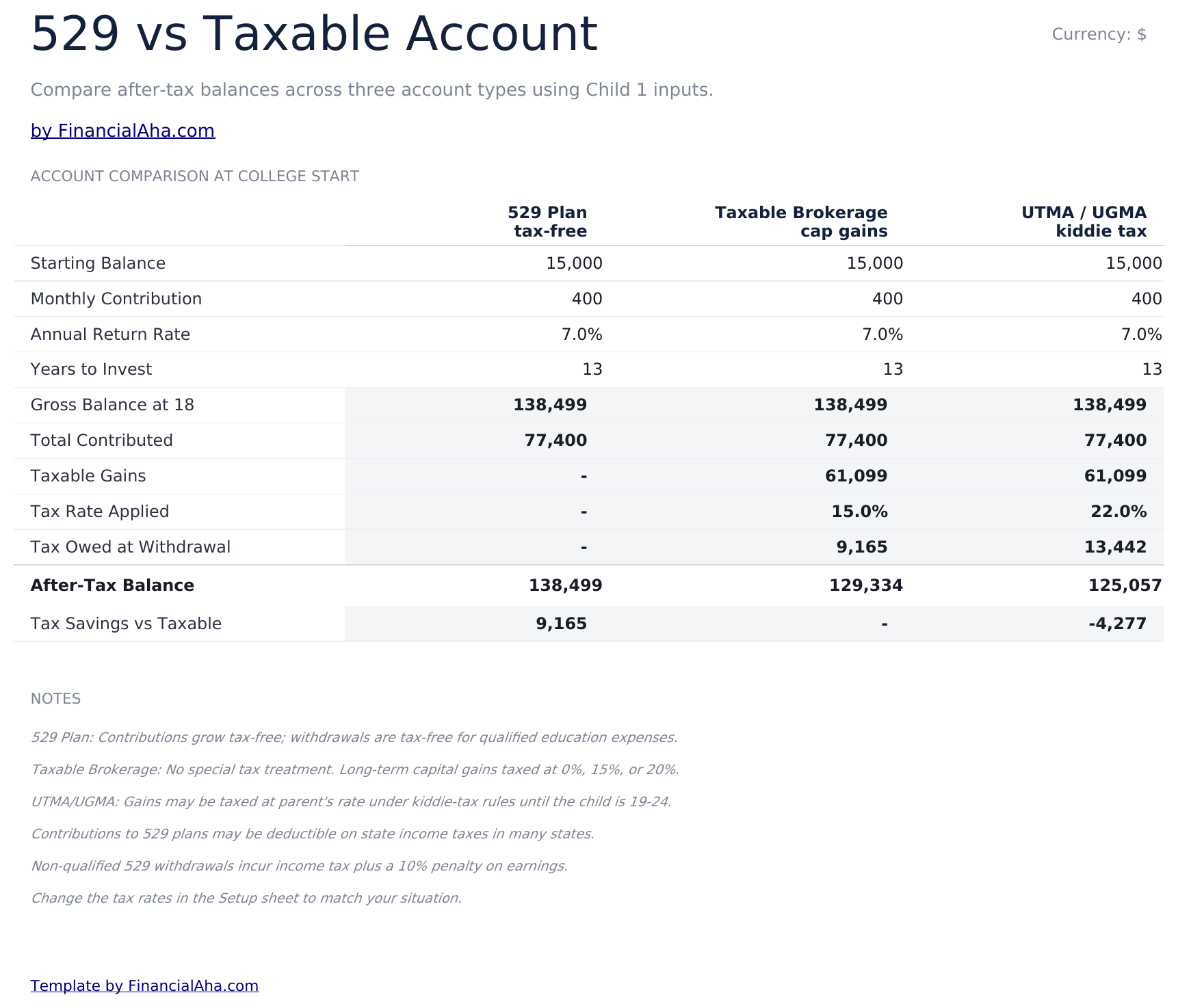
  • 529 vs Taxable comparison contrasting tax-advantaged growth, withdrawal rules, and after-tax balances side by side
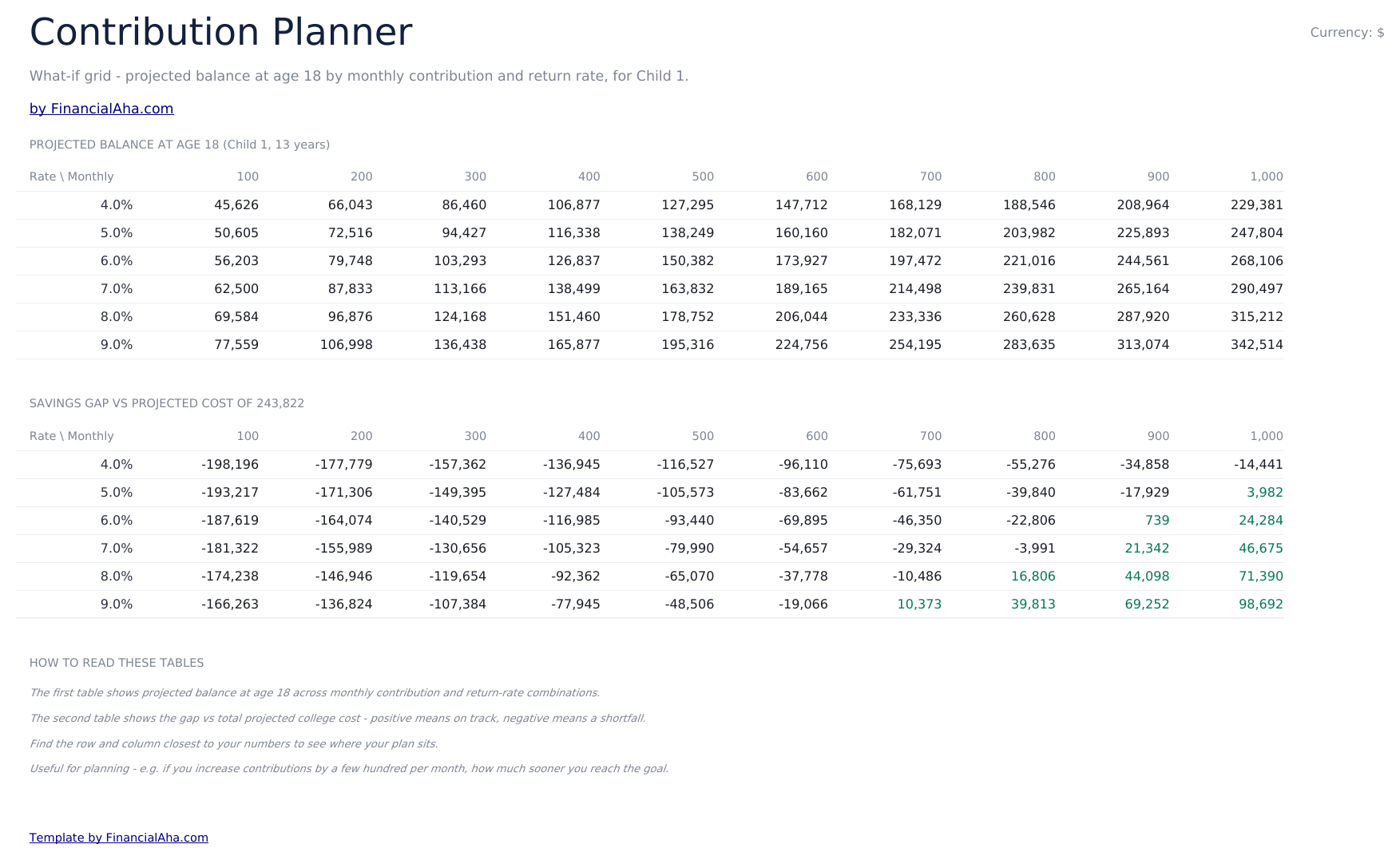
  • Contribution Planner sensitivity grid showing how monthly contribution and return rate combinations change the final balance
  • Conditional formatting highlights on-track vs behind-schedule savings progress across the dashboard
  • Works in Microsoft Excel, Google Sheets, and LibreOffice Calc with no macros required

Come usare questo modello

1

Enter child and goal details

In the Setup sheet, add the child name, current age, expected enrollment year, current tuition cost, and your savings target.

2

Adjust assumptions

Set the tuition inflation rate, expected investment return, and monthly contribution. The dashboard updates automatically.

3

Compare 529 vs taxable

Review the 529 vs Taxable sheet to see how tax treatment changes the balance available at enrollment.

4

Tune contributions

Use the Contribution Planner sensitivity grid to find a combination of monthly contribution and return rate that hits your target.

Customer Reviews

What Our Customers Say

"If I get half as good at handling my finances as you are at customer service, this'll be the best $26 I've spent lately."

J Jenny Verified Buyer

"Great tool! Simplifies financial planning without the hassle of complex spreadsheets."

F Fazia Search Marketing Manager

"I recently purchased your super convenient spreadsheet, it really helps me!"

J John Verified Buyer

"They're great and super intuitive. Thank you!"

M Mira Verified Buyer

Creati da Claude AI. Perfezionati da noi.

Utilizziamo Claude AI per creare ogni modello, dopo una ricerca approfondita. Poi interviene il nostro team. Miglioriamo il layout, testiamo ogni formula, correggiamo i casi limite e rifiniamo il design fino a ottenere qualcosa che useremmo noi stessi. L'AI ci porta all'80%. L'ultimo 20% è tutto giudizio umano.

Acquisto una tantum. Nessun abbonamento. Funziona in Excel e Google Sheets.

Domande frequenti

How many children can I track?

The Ultimate template supports planning for multiple children. Use one row per child in the Setup sheet and the projections update for each.

What tuition inflation rate should I use?

College costs have historically risen 5% to 8% per year, faster than general inflation. Adjust the inflation input based on whether you are targeting in-state, out-of-state, or private institutions.

What does the 529 vs Taxable sheet compare?

It models the same contribution growing in a tax-advantaged 529 plan versus a taxable brokerage account, accounting for ongoing tax drag and the eventual after-tax balance available for tuition.

How does the contribution planner help?

The sensitivity grid shows the projected final balance across a matrix of monthly contributions and expected return rates, so you can see how a small change to either side moves the outcome.

Can I plan for graduate school?

Yes - extend the enrollment year and target cost to cover graduate years, or duplicate the file to model undergrad and graduate plans separately.

Cosa ricevo dopo l'acquisto?

Ricevi un file Excel (.xlsx) che funziona in Microsoft Excel, Google Sheets e LibreOffice Calc. Scaricalo subito dopo l'acquisto - nessuna registrazione o account richiesti.

Esiste una versione gratuita?

Sì. La versione gratuita di questo modello è disponibile con funzionalità base. La versione Ultimate aggiunge analisi avanzate, maggiore capacità e fogli aggiuntivi.

Cosa succede se non funziona per me?

Contattaci e ti aiuteremo a risolvere il problema. Il modello funziona in Microsoft Excel, Google Sheets e LibreOffice Calc senza macro.

Ultimate 34% off

Punti Chiave:

Download immediato dopo l'acquisto
Funziona in Excel e Google Sheets
Nessuna macro o VBA richiesti
Tutte le formule si calcolano automaticamente
Nessun abbonamento richiesto

Cerchi altri modelli Ultimate?

Offriamo versioni Ultimate dei nostri modelli più popolari con funzionalità avanzate, maggiore capacità e analisi approfondite.

Privato e sicuro

I tuoi dati finanziari restano sul tuo dispositivo. Non li vediamo mai.

Scopri di piu →

Hai bisogno di aiuto?

Consulta le nostre guide o contattaci per domande.

Vedi FAQ →