Best Value Complete Financial Planning Bundle
✓ Financial Planning✓ Net Worth Tracker✓ Monthly Budgeting✓ Travel Budget Planner✓ Annual Budgeting Planner✓ Monthly Expense Tracker✓ Annual Tax Planner✓ Retirement Planning
View Bundle →

Instant digital delivery · Terms & Conditions apply

Essentials Template - Excel & Google Sheets

Essentials Balance Sheet Spreadsheet Template for Google Sheets & Excel

A proper statement, with a company name and a reporting date at the top. The Essentials Balance Sheet spreadsheet template classifies assets as current, fixed or other and subtotals each, shows gross fixed assets against accumulated depreciation and the net of the two, splits liabilities by when they fall due, and breaks equity into capital, paid-in, retained earnings, the current result and draws. Three working sheets. Google Sheets and Excel. No macros, no VBA.

Instant digital delivery · Terms & Conditions apply

Essentials Balance Sheet spreadsheet template - Google Sheets and Excel preview

What's Included

  • A company name and reporting date at the top of the statement
  • Assets split into current, fixed and other, each subtotalled
  • Gross fixed assets, accumulated depreciation and net shown separately
  • Liabilities split between current and long-term
  • Equity broken into capital, paid-in, retained earnings, current result and draws
  • A prior period beside every line, with the change and percentage change
  • A notes column for the detail a figure alone does not convey
  • A balance check for both periods
  • Current ratio, debt-to-equity and working capital on a dashboard
  • Two charts, and it prints cleanly for handing over

The FinancialAha Essentials Balance Sheet Spreadsheet Template for Google Sheets and Excel is a two-sheet workbook laid out as a proper statement, with a How to Use guide on a third tab. It works as an Essentials Balance Sheet Excel template and an Essentials Balance Sheet Google Sheets template from the same download. This Essentials Balance Sheet spreadsheet template classifies assets and liabilities the way an accountant expects them, and sets every line against the prior period. No macros, no VBA.

Inside the workbook

What's inside the FinancialAha Essentials Balance Sheet spreadsheet template

The FinancialAha Essentials Balance Sheet Spreadsheet Template runs on two working sheets - one you fill in, one that reports back - plus the guide. It works in both Microsoft Excel and Google Sheets and here is what the Essentials Balance Sheet spreadsheet holds.

  1. 01 of 02

    Balance Sheet

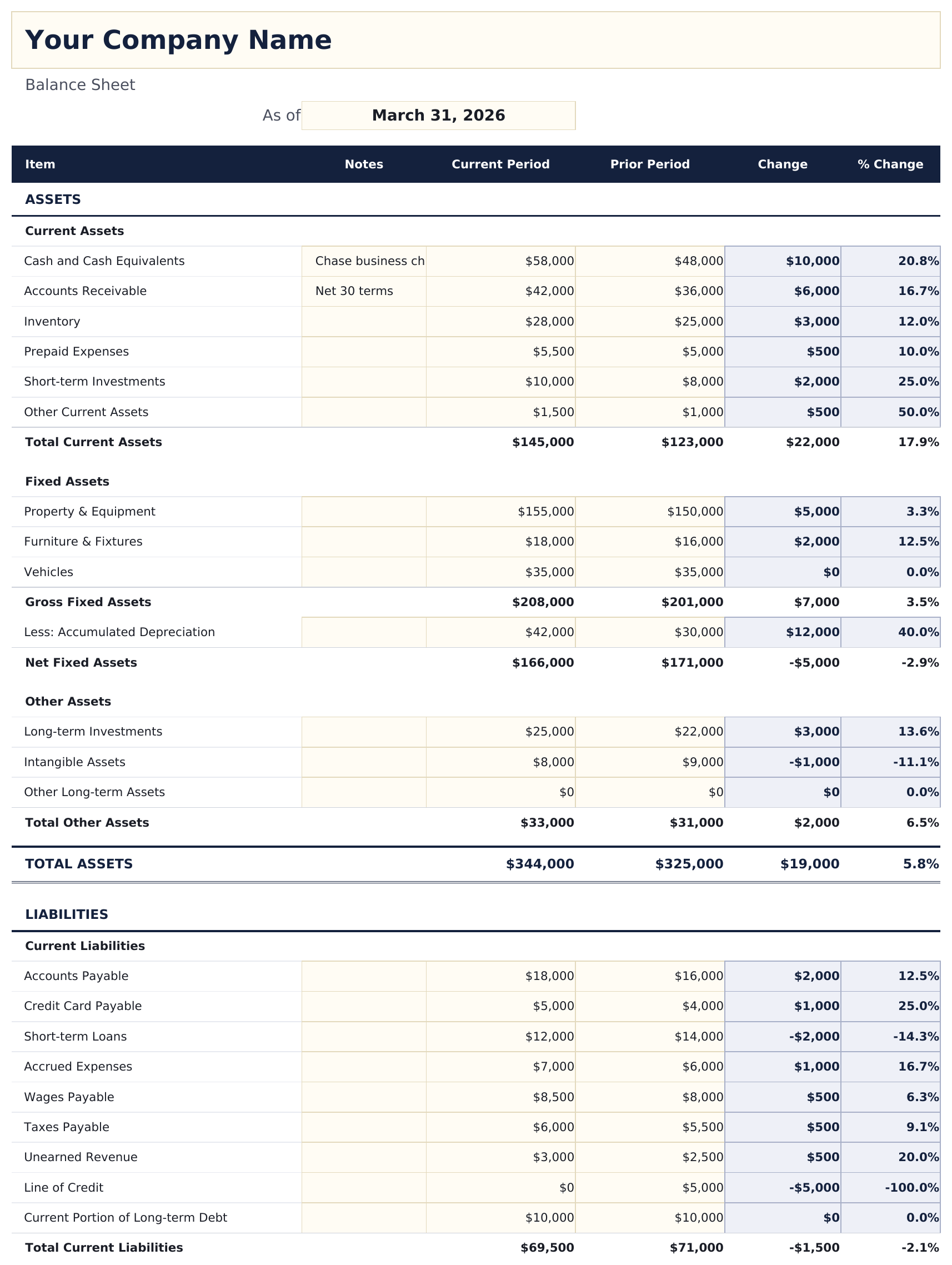
    A company name and a reporting date at the top, then the statement in the conventional order. Assets come first, split into current, fixed and other, each subtotalled - and the fixed block shows the gross figure, the accumulated depreciation, and the net separately rather than collapsing them, which is what anyone reading it will want to see. Liabilities follow, split between what falls due within the year and what does not; that division is the one that carries most of the meaning, because two businesses owing the same amount are in very different positions depending on when it is owed. Equity closes the statement, with owner investment, paid-in capital, retained earnings, the current year's result and any draws each on their own line - draws being the single line the sheet expects as a negative figure. Every line carries a prior period beside the current one, with the change in money and as a percentage, and a notes column for the detail a figure alone does not convey. A balance check runs at the foot for both periods, so an error in either is caught rather than assumed away.

  2. 02 of 02

    Dashboard

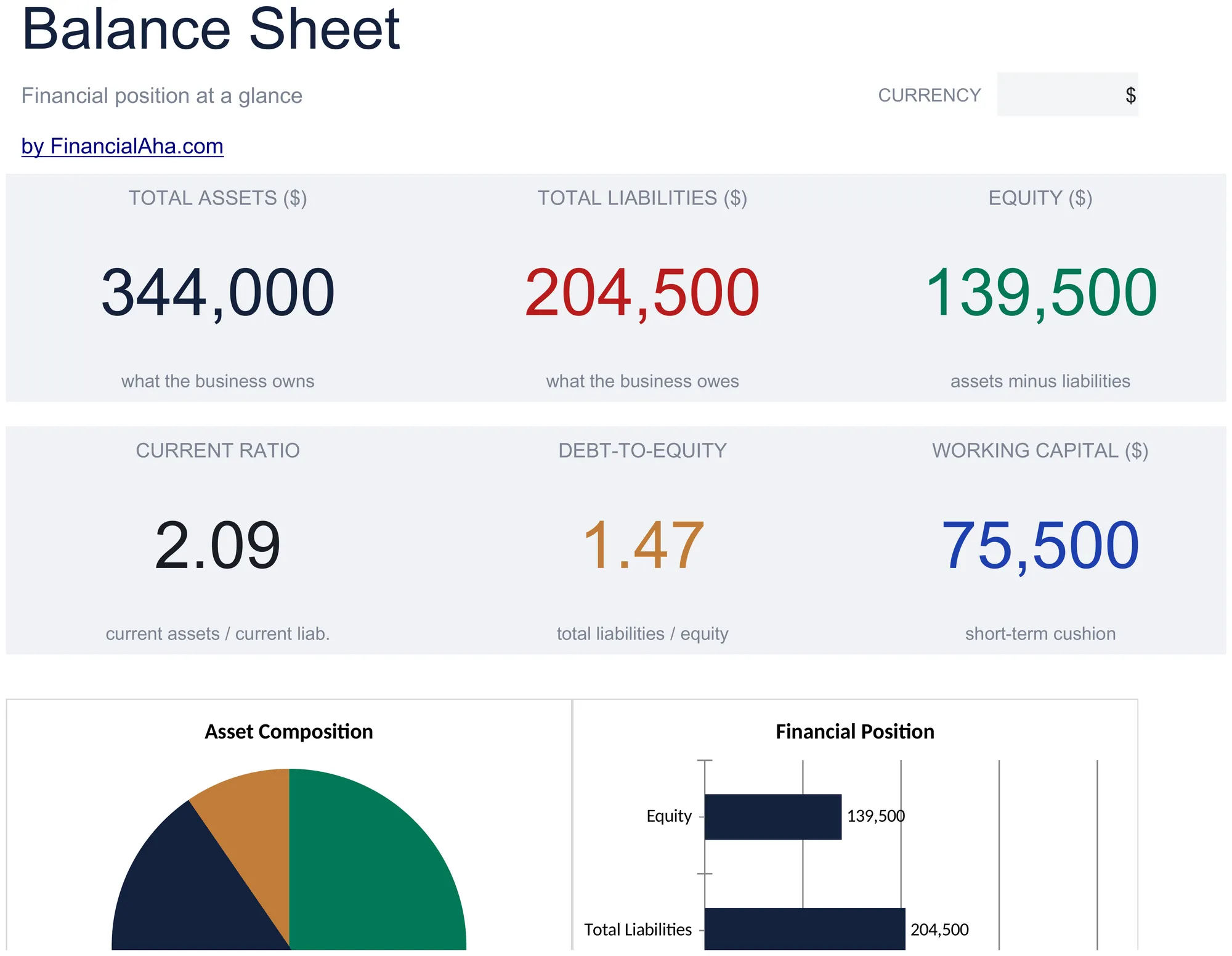
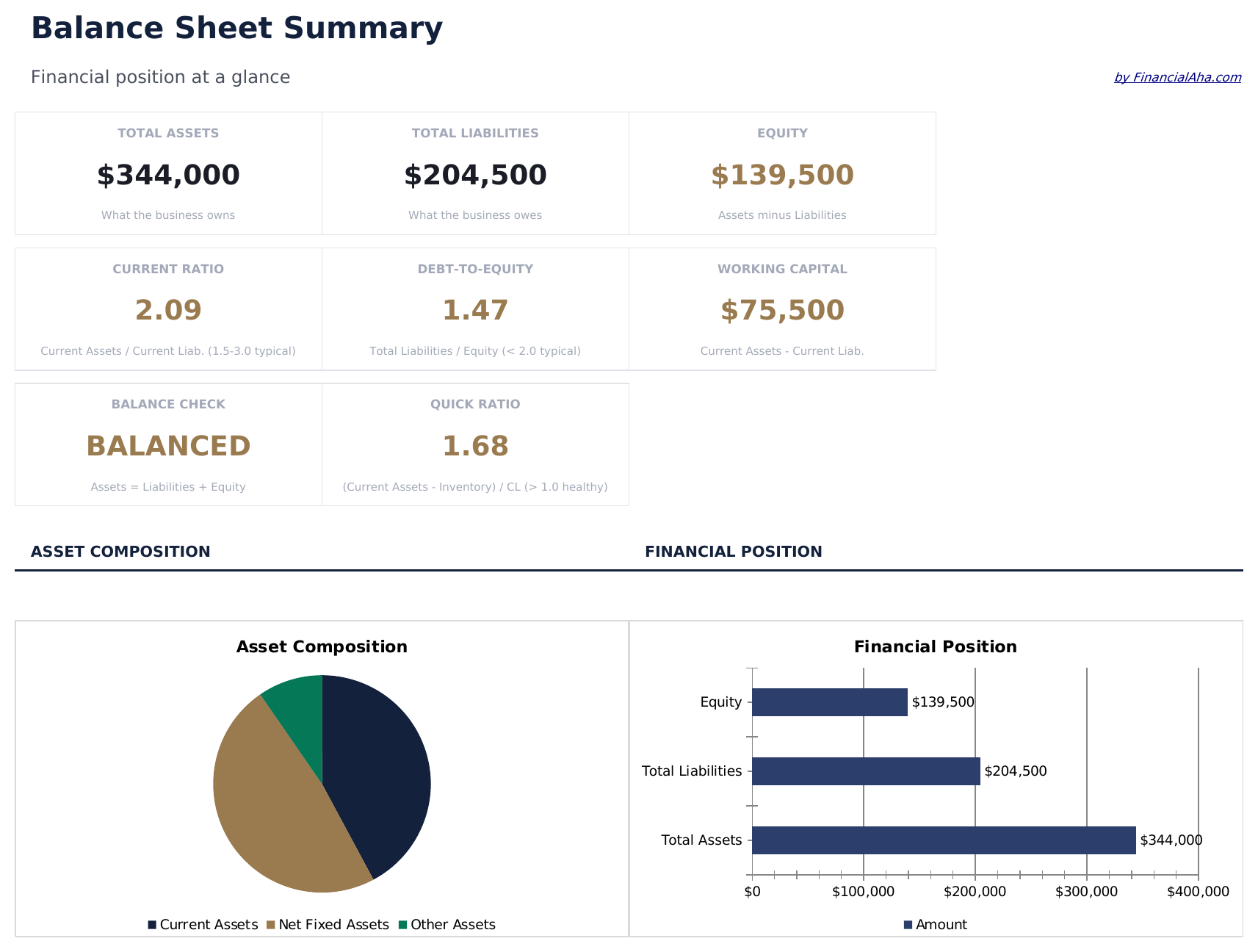
    The position in six figures: total assets, total liabilities, equity, the current ratio, debt-to-equity, and working capital. The ratios are the two an outside reader calculates from a balance sheet anyway - one comparing what is due within the year against what can cover it, the other comparing what is owed against what is owned outright. Having them worked out means they are the same figures a lender or an accountant will arrive at. Two charts sit alongside, one showing what the assets are made of and one the overall position.

  3. Included guide

    How to Use

    A step-by-step guide on its own tab, covering what belongs in each section, how the prior period comparison works, and what the balance check is telling you. Because it ships inside the file, the instructions travel with the template wherever it is opened.

Works in both Google Sheets and Excel

Essentials Balance Sheet Spreadsheet template for Google Sheets

Upload the Essentials Balance Sheet Spreadsheet Template to Drive, right-click it, and choose "Open with Google Sheets". This Essentials Balance Sheet Google Sheets template needs no conversion step and both charts survive the trip intact - every subtotal and ratio recalculates exactly as it does in Excel. The currency dropdown on the Dashboard relabels the money columns on both sheets at once.

Essentials Balance Sheet Google Sheets template setup

A shared copy of the Essentials Balance Sheet Google Sheets template suits a business and its accountant working the same period, since the notes column carries the explanation a figure needs and the balance check tells both parties immediately whether anything is missing. Sheets version history covers a figure typed over.

Sharing the Essentials Balance Sheet Google Sheet

This is not a daily sheet. The Essentials Balance Sheet Google Sheet is prepared at the end of a period, and because it holds the prior period alongside, each new one starts from a document that already shows where the business came from.

Essentials Balance Sheet Spreadsheet template for Excel

The Essentials Balance Sheet spreadsheet Excel download is a plain .xlsx. Excel opens this Essentials Balance Sheet Excel template directly, with no import step and no compatibility prompt, and it prints cleanly - which matters for a statement that often has to be handed over. Both charts are native Excel charts, and there are no macros or VBA.

Essentials Balance Sheet Excel template setup

The same Essentials Balance Sheet Excel template opens in Excel on Windows, Excel on Mac, and Excel for the web. It is also the identical file you would upload to Drive, so there is no separate Essentials Balance Sheet spreadsheet download to choose between.

Essentials Balance Sheet spreadsheet Excel notes

The Essentials Balance Sheet spreadsheet Excel file carries no macros and no VBA, so Excel opens it without a trust prompt - which matters when a statement is being emailed to a lender or an accountant whose system blocks macro-enabled attachments.

Opening the Essentials Balance Sheet spreadsheet Excel file

Nothing in the Essentials Balance Sheet Excel template is version-specific, so this Essentials Balance Sheet spreadsheet Excel workbook behaves identically in Excel on Windows, Excel on Mac, and older builds.

Spreadsheet template highlights

What the Essentials Balance Sheet spreadsheet template tracks

The statement is filled in from the top down, with a prior period beside it. These are the columns the Essentials Balance Sheet Spreadsheet Template carries:

Item
each line, inside the section it belongs to
Notes
the account, the terms, or the detail a figure alone does not convey
Current Period
the figure as at your reporting date
Prior Period
the same line last time, for comparison
Change auto
derived, the movement between the two
% Change auto
derived, that movement in proportional terms

Compare builds

FinancialAha Balance Sheet spreadsheet template: Free and Essentials compared

Feature Free View Spreadsheet Template Essentials This page
Working sheets 1 2
Line items 13 Grouped by class
Current against non-current split Yes
Subtotals per section Yes
Accumulated depreciation Shown separately
Company name and as-of date Yes
Prior period comparison With change and % change
Balance check Yes Yes, both periods
Ratios Current, debt-to-equity, working capital
Charts 2

The FinancialAha Essentials Balance Sheet Spreadsheet Template covers two working sheets and is laid out as a statement rather than a list. Against the Free Balance Sheet Spreadsheet Template, which lists assets, liabilities and equity with a balance check, this build classifies assets into current, fixed and other with subtotals, shows accumulated depreciation separately from the gross figure, splits liabilities by when they fall due, breaks equity into its components, and sets every line against the prior period with the change and percentage change. Its dashboard adds the current ratio, debt-to-equity and working capital across two charts.

Good to know

Notes on working in the Essentials Balance Sheet spreadsheet template

  • The split between current and long-term liabilities carries most of the meaning - two businesses owing the same amount differ entirely on when it is owed.
  • Fixed assets show gross, accumulated depreciation and net separately rather than collapsing them, which is what a reader will want.
  • The prior period columns are what turn a snapshot into a direction, and they cost nothing to fill once the last statement exists.
  • The balance check runs for both periods, so an error in the comparison is caught as readily as one in the current figures.
  • Owner's draws are the one line entered as a negative. Everything else on the statement, liabilities and equity included, goes in positive and the classification does the work - so a draw typed as a positive figure adds to equity and the balance check will say so.
  • The Free build takes liabilities and equity as negatives so its column sums to zero. This build does not work that way, which is worth knowing if you are moving figures across from it.
  • The currency dropdown sits on the Dashboard and relabels money columns across the whole Essentials Balance Sheet spreadsheet. It changes the label only and does not convert the numbers.

How to Use the Essentials Balance Sheet Spreadsheet Template

1

Name and date it

Company name and the reporting date the statement describes.

2

Enter the assets

Current, fixed and other. Each section subtotals itself.

3

Enter liabilities and equity

Split by when debts fall due, with equity broken into its parts.

4

Add the prior period

The change and percentage change follow, and both periods are balance-checked.

Stress-tested with AI.

Every template starts with deep research into how people actually track the topic. We design the layout, build the formulas, and polish the design until it feels like something we would use ourselves. Along the way, we use AI to stress-test the calculations: unusual inputs, edge cases, and formula behavior, checked until the numbers hold.

Instant digital delivery · Terms & Conditions apply

Frequently Asked Questions

Is the FinancialAha Essentials Balance Sheet Spreadsheet Template a Google Sheets template?

Yes. Upload the file to Drive and choose "Open with Google Sheets". The Essentials Balance Sheet Google Sheets template needs no conversion step and both charts survive the trip intact.

Is the FinancialAha Essentials Balance Sheet Spreadsheet Template an Excel template?

Yes. The download is a plain .xlsx, so the Essentials Balance Sheet Excel template opens directly in Excel with no import step. Both charts are native Excel charts, and there are no macros or VBA - which matters when a statement goes to a lender.

Will the FinancialAha Essentials Balance Sheet spreadsheet Excel file open in older versions of Excel?

Yes. The Essentials Balance Sheet spreadsheet Excel workbook ships as a plain .xlsx, so it opens identically in current Excel and in builds that predate dynamic arrays.

Why does the Essentials Balance Sheet spreadsheet split liabilities by when they fall due?

Because that division carries most of the meaning. Two businesses owing the same amount are in very different positions depending on whether it is due this year or in five.

Why show accumulated depreciation separately?

So a reader can see what the fixed assets cost and what has been written off them, rather than only the net figure. Collapsing the two hides the age of the asset base.

What do the ratios on the dashboard measure?

The current ratio compares what is due within the year against the assets that could cover it. Debt-to-equity compares what is owed against what is owned outright. Both are calculations an outside reader would perform anyway.

What is the prior period column for?

Turning a snapshot into a direction. Every line carries the change in money and as a percentage, and the balance check runs for both periods so an error in either is caught.

Does it hold more than two periods?

No - the current one and the one before it. Keeping a dated copy per period gives a longer series without crowding the statement.

How do I open the Essentials Balance Sheet spreadsheet template in Google Sheets?

Upload the .xlsx file to Google Drive, then open it with Google Sheets. All formulas and formatting will be preserved.

More Essentials Business Finance Templates

Essentials

Highlights:

Dashboard with charts and KPIs
Pre-filled categories and sample data
No sign-up, no subscription
Lifetime free updates
Works in
Excel Google Sheets

Looking for premium spreadsheet templates?

Our paid templates include advanced multi-sheet dashboards, native Excel charts, and ongoing updates.

Private & secure

Your financial data stays on your device. We never see it.

Learn more →

Need help?

Check our guides or reach out with questions.

View FAQ →