
A financial reset is a short annual review, not an overhaul. Spend about 20 minutes on last year's income, spending, savings rate, and whether debt moved, then pick one budgeting method, automate your savings transfers, and set a small first emergency-fund target. Three habits kept past February beat a January transformation that quits.
Every January, people decide they’re going to completely transform their relationship with money. By February, most have quietly moved on.
Start here: The Financial Planning Template provides a single place to review goals, projections, and yearly progress.
The people who actually improve their finances aren’t doing dramatic overhauls. They look at last year, make a few changes, and stick with those changes past February. That’s what this is - not a transformation, just a look at where you are and a few adjustments.
What Happened Last Year?
Before planning anything, it’s worth spending 20 minutes reviewing 2025.
Your bank app has a year-end spending summary buried somewhere. (Every major bank has this now - Mint dying actually pushed them to build better tools.) If you’ve been tracking in a spreadsheet or using a net worth tracker, even easier.
You’re looking for:
- What came in (salary, side gigs, whatever)
- What went out (rough total is fine)
- What you saved
- Whether debt moved up or down
That last one’s easy to miss. Pull up your oldest credit card statement from 2025 and compare to now. Did the balance actually shrink? Or did things quietly drift the wrong direction while you weren’t looking?
Plenty of people avoid their numbers for years because they’re scared of what they’ll find. When they finally look, it usually isn’t as bad as they’d imagined. And even when it is bad, knowing beats the anxiety of not knowing.
While reviewing, calculate your savings rate: (Income - Spending) / Income × 100. Everyone says 20% is the target. Sure, as an aspiration. But if you’re at 3%, that’s data. Negative? Also data. Measuring is where change starts.
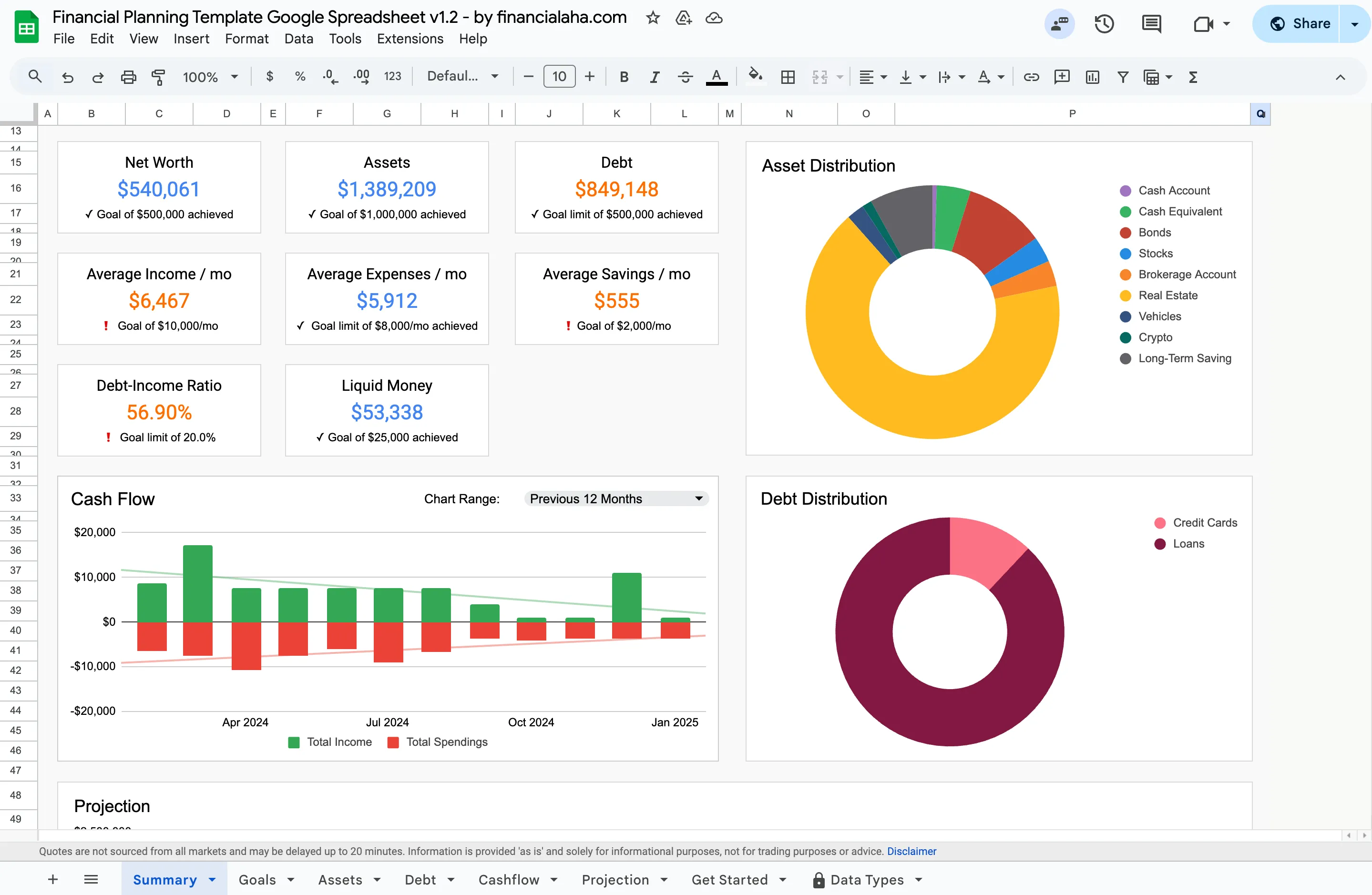
The summary tab of the Financial Planning Template (Premium tier) pulls the same figures a year-end review is looking for into one view: net worth, average monthly savings, debt, and a twelve-month cash-flow chart.
The Budget Thing
I’m not going to tell you which method is best. People get weirdly religious about budgeting, and the differences matter way less than whether you actually stick with whatever you pick.
The pattern that shows up over and over: someone tries detailed tracking, categorizing every transaction, and burns out within a few months. Then they switch to something simpler, automating savings on payday and spending what’s left, and their savings rate actually goes up. Less friction beats more detail.
Three approaches that work:
50/30/20 - Half to needs, 30% to wants, 20% to savings. No tracking individual purchases. Just check monthly that the big buckets are roughly right. (Works well with a simple annual view to see the full year.)
Zero-based - Every dollar assigned before you spend it. Great if you like control and detail. Some people love it; others find it exhausting.
Pay yourself first - Automate savings, spend the rest guilt-free. Often works best for people who’ve burned out on detailed tracking.
If last year’s approach didn’t survive spring, trying something else makes sense. The Monthly Budget Template works with all of these. For longer-term planning, such as projections out to an end year you set, financial goals, and net worth targets, the Financial Planning Template provides a more comprehensive view.
The Actual Secret
Everything else in personal finance is a distant second to automation.
One approach that works: transfers set up for the day after payday. Money moves to savings before you see it in checking. Bills pay themselves. Most people adjust to what’s left within a few weeks.
Setting it up is usually a five-minute job inside online banking. Open the transfers screen, create a recurring transfer from checking to savings dated a day or two after payday, and set the amount. The CFPB notes that splitting a direct-deposit paycheck between checking and savings does the same thing at the source, before the money ever lands somewhere it can be spent.
The “I’ll transfer whatever’s left at the end of the month” approach rarely works. There’s never anything left. But automate that same transfer, and six months later many people have more saved than the previous three years combined. No willpower required - the money just disappears before they can spend it. A savings calculator shows what consistent transfers add up to, and small changes compound into real money once a few years pass.
The best financial decision is one you only make once.
On Debt
You’ve heard avalanche vs snowball a million times:
Avalanche - Extra money toward highest interest rate. Mathematically optimal.
Snowball - Extra money toward smallest balance. Feels good faster.
Here’s what gets lost: people obsess over which saves more when the real question is which one you’ll actually do.
Typical debt load - $8,000 across credit cards, $25,000 student loans. Difference between strategies? Maybe $300-500 total over a few years. Not nothing, but not life-changing.
What matters more: picking one and doing it for 18 months. That beats switching strategies or quitting. The Debt Payoff Calculator takes a balance, its interest rate, and what you pay each month, then shows the payoff date, the total interest, and how much an extra monthly payment changes both.
Emergency Funds
Standard advice: 3-6 months of expenses. For most people, $12,000-25,000 sitting in savings earning nothing.
If you’re starting from zero, that number is paralyzing. You do the math (or use an emergency fund calculator), realize you’d need years, and just don’t start.
For context on why even a small buffer matters: the Federal Reserve found that in 2024 only about 63% of adults would cover a $400 emergency expense entirely with cash or its equivalent. A little over a third would have to reach for a credit card or something else.
A less paralyzing way to stage it:
$1,000 - Covers most actual emergencies. Car repair, medical copay, laptop dies. Keeps you off credit cards for the medium stuff. First milestone.
One month of expenses - Breathing room. Bad thing happens, you have time to figure it out without panic. The CFPB points to roughly a month of income as the level where households are least likely to fall behind on debt.
3+ months - Real security. Long-term project.
The shift from “nothing saved” to “$1,000 saved” is bigger than the math suggests. Having a buffer changes how money feels. Unexpected expenses become annoying instead of catastrophic.
The January Checklist
This week:
- [ ] 20 minutes with 2025 spending
- [ ] Calculate savings rate
- [ ] Check debt year-over-year
Before February:
- [ ] Pick budgeting approach
- [ ] Automate savings transfers
- [ ] Cancel forgotten subscriptions
Ongoing:
- [ ] 30 min monthly with the numbers
- [ ] Net worth quarterly
Short list. On purpose. People who get good with money aren’t doing twelve things. Three things, consistently, for a long time.
What Works
After watching a lot of people try to get better with money:
Automation beats motivation. Every time. $200 auto-transfer beats “I’ll save when I can.”
Attention beats precision. Don’t need to track every coffee. Just looking at spending monthly, actually looking, changes behavior.
Consistent beats intense. $150/month for five years is $9,000+. $2,000 saved once in a burst of motivation, then nothing for three years, is $2,000.
Tools help. But they’re not the point. Paying attention is the point.
The three-line checklist above is the whole system. If you want one place to run last year’s review and set this year’s targets, the Financial Planning Template holds that summary dashboard, the projection tab, and the asset and debt breakdowns behind your net worth in a single Google Sheet you own outright. If you’d rather start with the review itself, Year-End Financial Review: 10 Questions to Ask Yourself walks the numbers step by step.
Related
- Year-End Financial Review: 10 Questions to Ask Yourself - the review half of the reset, in more detail.
- Why 2026 Is the Year to Finally Master Your Finances - why a ready template beats a from-scratch January rebuild.
- Spring Cleaning Your Finances: Annual Tasks to Complete - the maintenance pass to run a few months after the reset.
- 5 Financial Goals Worth Considering in 2026 - turning the reset into targets for the year.
- How to Budget Your Money: Monthly and Annual Approach - picking a budgeting method that survives spring.
- Financial Planning Template - projections, net worth, and cash flow in one owned spreadsheet.
- Debt Payoff Calculator - payoff date, total interest, and what an extra monthly payment changes.
Frequently asked questions
How long does a financial reset take?
The core review takes about 20 minutes. Setting up automation and picking a budgeting approach might take another hour or two. The whole process can happen in a single afternoon.
What if last year's numbers look bad?
That's more common than people think. The point of reviewing isn't to feel good about the past - it's to have a starting point. Knowing your actual savings rate gives you a baseline to measure progress from.
Is it too late to start if January is already over?
Not at all. A financial reset works any time of year. Starting in March with a clear plan beats starting in January and quitting by February.
What savings rate should I aim for?
20% is the number people quote most often, but it's an aspiration, not a rule. The more useful figure is your own current rate: (Income - Spending) / Income. Whether it's 3%, zero, or negative, it becomes the baseline you measure the year against.
Avalanche or snowball - which one is better?
For a typical debt load, the total-cost difference between them tends to be a few hundred dollars over a few years, so the bigger factor is which method you'll stick with. The Debt Payoff Calculator doesn't rank the two, but it does show the payoff date and total interest for a balance at its rate, and what an extra monthly payment changes.
Sources
- Report on the Economic Well-Being of U.S. Households in 2024: Savings and Investments - Federal Reserve
- An essential guide to building an emergency fund - Consumer Financial Protection Bureau
About this article
Emergency-savings figures checked against the Federal Reserve's 2024 Survey of Household Economics and Decisionmaking and the CFPB's emergency-fund guide. Template and calculator claims checked on 2026-09-10 against the shipped Financial Planning Google Sheet (Summary, Goals, Assets, Debt, Cashflow, Projection tabs), the Annual Budgeting Planner and Monthly Budgeting sheets, and the site's savings, debt payoff, and emergency fund calculators. Last reviewed September 2026.