
Roughly 9% of people keep their New Year's resolutions, and the research points more to friction than willpower. Most budgets die in month one during setup, before any tracking begins. A ready-to-use spreadsheet template skips the configuration, so you can start entering numbers the same day motivation is high, while the fresh-start window is still open.
“This year, I’ll finally get my finances in order.”
Most people have said this at least once. Many have said it every January for years - download an app, use it for a few weeks, forget about it by spring. Next year, try again with something different. Same result.
Only 9% of people complete their New Year’s resolutions. For a long time, the assumption was that this is about willpower. But research suggests it’s more about the tools - specifically, whether they’re ready to use when motivation strikes. The state of personal finance in mid-2026 fills in the backdrop: a personal saving rate near 3.6% and only about 63% of adults able to cover a $400 expense from cash.
Why Most Budgets Fail in the First Month
The typical approach is to decide you need a budget, then spend the first few weeks figuring out the tool. Setting up categories. Customizing settings. Watching tutorials. By the time everything is configured, the motivation has faded.
That’s like assembling furniture while someone’s waiting to sit on it.
People who stick with their budgets long-term tend to start with tools that work immediately - where the categories already exist, the calculations happen automatically, and tracking can begin the same day. The less friction between “I want to do this” and actually doing it, the better the odds of it lasting.
The Fresh Start Effect
Wharton researchers call it the “fresh start effect” - the motivation spike people feel at the start of a new year, a new month, even a Monday. Their studies found that gym visits, diet searches, and goal commitments all rise after these temporal landmarks. The spike is real and measurable, and it tends to be short-lived.
If those two weeks get spent configuring software instead of tracking spending, the motivation window closes before any real progress happens.
This is why spreadsheet templates often work better than apps for budgeting. A well-designed budget spreadsheet is ready to use immediately - open it, start entering numbers, see results. No account creation, no learning curve, no subscription that auto-renews whether you use it or not.
Monthly vs. Annual: Different Tools for Different Needs
There’s an ongoing debate about whether monthly or annual budgeting works better. The honest answer is that they solve different problems.
Monthly tracking answers the question: Where is my money actually going? It’s the foundation - recording what comes in and what goes out, seeing patterns you might not have noticed, catching subscriptions and small leaks before they add up. A Monthly Expense Tracker makes this visible in a way that bank statements alone never do.
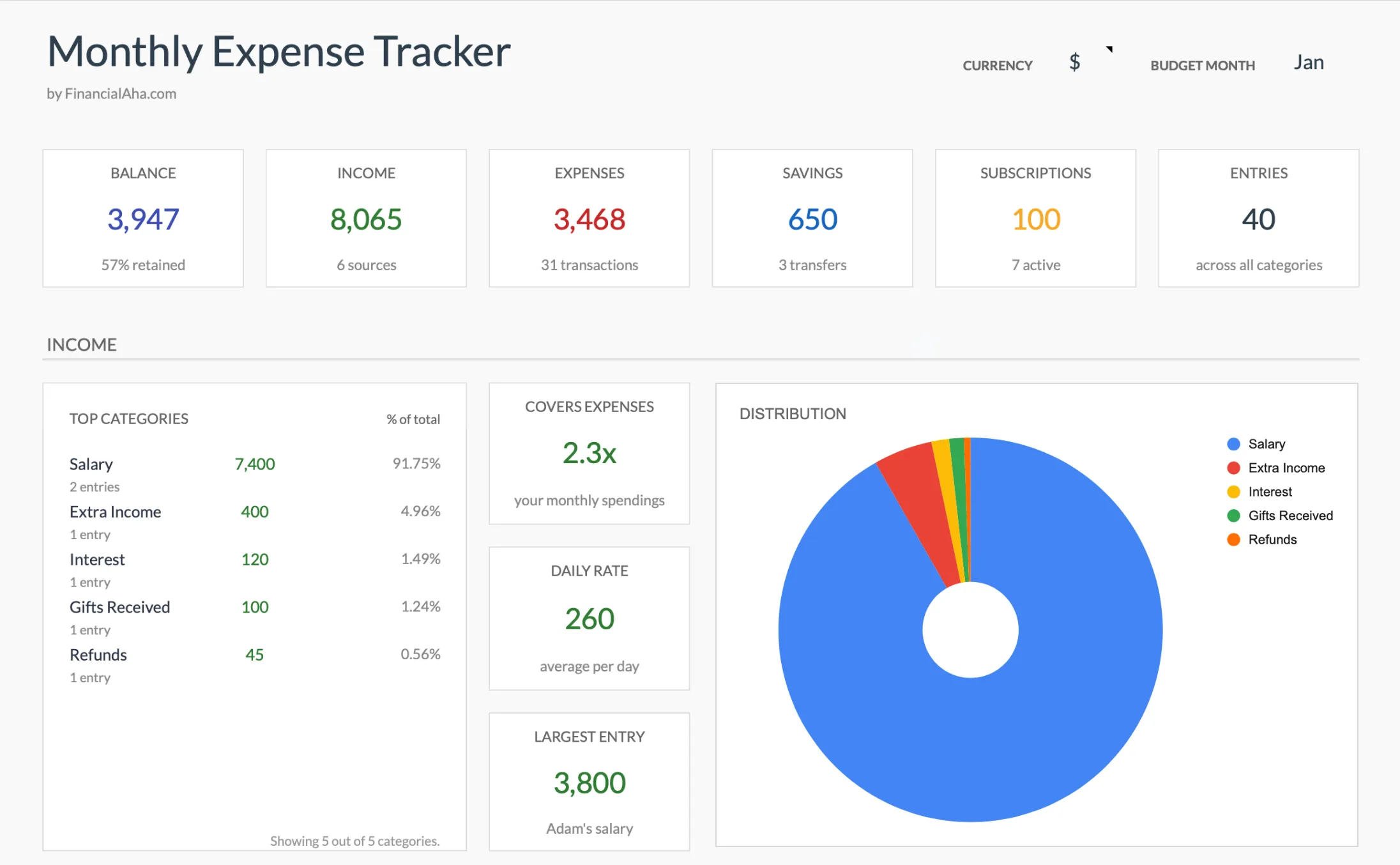 The Monthly Expense Tracker (Premium tier) rolls each entry into a live summary, including active subscriptions, the kind of leak that is easy to miss on a statement.
Annual planning answers a different question: What’s coming, and am I ready for it? Life doesn’t happen on a monthly schedule. Car insurance comes due every six months. Subscriptions renew on random dates throughout the year. Holiday spending arrives whether you planned for it or not. Tax season takes a chunk out of April.
Without an annual view, each of these can feel like an emergency - something you didn’t see coming. An Annual Budget Planner puts all 12 months on one screen, so that $1,400 insurance bill isn’t a crisis because you’ve seen it on the calendar for months.
 The Annual Budgeting template (Premium tier) lays all 12 months side by side, so irregular bills show up long before they arrive.
Many people are living paycheck to paycheck, and often it isn’t that they are bad with money. They just don’t have visibility into what’s coming next.
The most effective approach often combines both: monthly tracking for awareness, annual planning for preparation.
Loud Budgeting
There’s a trend now where people say “I can’t go, I’m saving for a house” instead of making up excuses. Being upfront about financial limits instead of pretending everything’s fine. Social media has given this a name, loud budgeting, and it’s catching on because it replaces awkward excuses with straightforward honesty.
The honesty is refreshing, but it only works if you actually know what your limits are. Saying “I’m on a budget” is one thing. Knowing that you have $150 left for discretionary spending this month, and that skipping dinner out means hitting your savings goal - that’s different. That specificity comes from tracking. A budget spreadsheet that you actually use is what makes that kind of clarity possible. Without it, “loud budgeting” is just noise. With it, the boundaries you set are grounded in real numbers.
The Cost of Not Knowing
That visibility, or lack of it, has real consequences. The Federal Reserve found that 37% of adults couldn’t cover a $400 emergency expense with cash alone. That’s often framed as a savings problem, but it’s frequently a visibility problem first. People who can see exactly where their money goes tend to find opportunities to redirect some of it. If you want to put a target on that cushion, the Emergency Fund Calculator works out how many months of expenses to aim for.
Without tracking, people typically lose $1,500-3,000 a year to forgotten subscriptions, late fees, and purchases that seemed small at the time. The money doesn’t disappear dramatically - it leaks out slowly, in ways that are hard to notice until you add them up.
A budget template that catches even a portion of that pays for itself quickly.
Start Wherever You Are
January 1st gets all the attention, but there’s nothing magical about it. The best time to start tracking your finances is whenever you’re ready - and with the right spreadsheet template, “ready” can mean today.
No setup required. The categories are already there. The calculations update automatically. You open the template, start entering your numbers, and the picture of your finances starts forming immediately.
“I don’t know where my money goes.” Start with a Monthly Expense Tracker. Record what comes in, what goes out, and let the patterns reveal themselves. This is the foundation everything else builds on.
“I can see where my money goes, but not where it should go.” A Monthly Budget Template adds planning to tracking - set targets by category, see how reality compares, adjust as you learn.
“I want to see the full year, not just month to month.” The Annual Budget Template gives you all 12 months on one screen. Plan ahead for irregular expenses, track progress toward yearly goals, and stop being surprised by things you could have seen coming.
You don’t need all three. Pick the one that matches where you are right now. They use the same categories, so moving between them later is easy.
A year from now, you’ll know exactly where you stand. That clarity is worth more than most people expect.
Related
- Why a Financial Planning Spreadsheet Beats Personal Finance Apps - The case for spreadsheets over subscription apps
- The Best Personal Finance Spreadsheets for 2026 (Free & Paid) - A roundup to find the template that fits
- Financial Planning Software or Spreadsheet? - How the two approaches compare
- Budget Calculator - Split your take-home pay across categories in seconds
Frequently asked questions
Is a spreadsheet really better than a budgeting app?
It depends on what stalls you. Apps automate imports but usually need account linking, category cleanup, and a subscription before they are useful. A ready-made spreadsheet opens with categories and formulas already in place, so the gap between deciding to budget and actually tracking is much shorter. Some people prefer the automation of an app; others find that the manual entry in a spreadsheet is what keeps them paying attention.
What if I start in the middle of the year instead of January?
The calendar date carries no special power. The research on temporal landmarks shows the start of any week, month, or personal milestone can create the same motivation spike, so mid-May works as well as January 1st. Monthly and annual templates let you begin in any month and fill in the rest as it happens.
How is a template different from a blank spreadsheet I could build myself?
A blank sheet still needs categories, formulas, and layout before it does anything, which is the same setup friction that ends most budgets. A finished template arrives with the categories, automatic totals, and summaries already built, so the first thing you do is enter a number rather than design a system.
Do I have to keep updating formulas as I add entries?
No. The calculations in these templates recalculate automatically as you type. In the monthly templates you log income and expenses on the Transactions sheet; in the annual one you fill in each month's plan and actual columns. Either way, the summary figures, category totals, and charts update on their own without you editing any formulas.
Sources
- Report on the Economic Well-Being of U.S. Households in 2024 - Savings and Investments - Board of Governors of the Federal Reserve System
- Need a Fresh Start? Here's How to Begin - Knowledge at Wharton, University of Pennsylvania
About this article
Emergency-expense figures checked against the Federal Reserve's Survey of Household Economics and Decision-Making (SHED). The fresh-start effect is drawn from the Wharton School study by Dai, Milkman, and Riis. Template sheets, inputs and outputs checked on 2026-09-10 against the shipped Monthly Expense Tracker (Summary, Transactions, Categories), Monthly Budgeting (Summary, Budget Plan, Transactions, Goals, Categories) and Annual Budgeting (Summary, Annual Plan, Annual Financial Goals, Categories) Google Sheets. Last reviewed September 2026.