
One formula sets your monthly payment: P x [r(1+r)^n] / [(1+r)^n - 1], and in a spreadsheet =PMT(rate/12, months, -amount) returns it directly. Early payments are mostly interest because interest is charged on the balance still owed; as that balance falls, more of each fixed payment goes to principal. A $25,000 loan at 8% over 5 years runs $507 a month.
There’s a moment early in any loan where the statement arrives and you notice something discouraging: most of your payment went to interest, not principal. You paid $507, but only $340 went toward actually reducing what you owe. The other $167 was just the cost of borrowing.
This is normal. It’s how every fixed-rate loan works, and understanding the mechanics behind it changes how you think about extra payments, loan terms, and which offer is actually cheaper.
The Loan Payment Calculator turns a loan amount, rate, and term into a monthly payment, a total payment, total interest, and a payoff date, with a chart splitting the total into principal and interest. No signup required. Enter your own figures below:
What’s Actually Happening Inside Each Payment
Every monthly loan payment has two parts: interest and principal. Interest is calculated on whatever balance remains. Principal is whatever’s left from the payment after interest is covered.
Early in a loan, the balance is high, so interest takes a big bite. As you pay down principal over time, interest shrinks and more of each payment goes toward the actual debt.
Here’s how that plays out on a $25,000 personal loan at 8% over 5 years ($507/month):
| Month | Interest | Principal | Balance |
|---|---|---|---|
| 1 | $167 | $340 | $24,660 |
| 12 | $141 | $366 | $20,764 |
| 24 | $110 | $396 | $16,176 |
| 36 | $78 | $429 | $11,208 |
| 48 | $42 | $465 | $5,827 |
| 60 | $3 | $504 | $0 |
The payment never changes. But in month 1, interest is 33% of the payment. By month 48, it’s 8%. By the final payment, it’s practically nothing.
This is amortization - the gradual shift from interest-heavy payments to principal-heavy payments over the life of the loan.
The Formula (If You’re Curious)
Monthly payment = P x [r(1+r)^n] / [(1+r)^n - 1]
Where P is the loan amount, r is the monthly interest rate (annual rate / 12), and n is the total number of payments.
It’s not the kind of thing you’d work out by hand, but it’s useful to know that there is a single clean formula behind every loan. Change one input, whether the rate, the term, or the amount, and the whole schedule shifts. The same math drives how savings grow with compound interest, just running in your favor instead of the lender’s.
In a spreadsheet: =PMT(0.08/12, 60, -25000) returns $506.91.
Why Loan Term Matters More Than People Think
The monthly payment gets most of the attention when choosing a loan. That’s understandable - it’s the number that has to fit into a monthly budget. But total cost tells a different story.
Same $25,000 loan at 8%:
| Term | Monthly Payment | Total Interest | Total Cost |
|---|---|---|---|
| 3 years | $783 | $3,203 | $28,203 |
| 5 years | $507 | $5,415 | $30,415 |
| 7 years | $390 | $7,731 | $32,731 |
The 7-year loan costs $4,528 more in interest than the 3-year loan. That’s an 18% premium on the original loan amount, paid entirely for the privilege of a lower monthly payment.
Whether that tradeoff makes sense depends on the rest of someone’s financial picture. A lower monthly payment might free up cash for higher-priority needs. A higher payment might be worth it to get out of debt faster and pay less overall. Both are valid - the important thing is seeing both numbers clearly.
What Extra Payments Actually Do
Here’s where the amortization structure works in your favor. Extra payments go directly to principal, which reduces the balance that interest is calculated on. That creates a cascade: less principal means less interest next month, which means more of the next regular payment goes to principal, and so on.
On the $25,000 loan at 8% for 5 years:
- No extra payments: 60 months, $5,415 interest
- $50 extra/month: 54 months, $4,808 interest (saves $607 and 6 months)
- $100 extra/month: 49 months, $4,325 interest (saves $1,089 and 11 months)
That extra $100/month adds up to $4,900 over the shortened life of the loan. But it saves $1,089 in interest and returns 11 months of $507 payments that no longer need to be made. The math is heavily tilted in favor of extra payments when there’s room in the budget.
Comparing Loan Offers: Monthly Payment Can Be Misleading
Two car loan offers for $20,000:
Offer A: 5.5% APR, 48 months - $465/month, $2,326 total interest
Offer B: 4.9% APR, 60 months - $377/month, $2,591 total interest
Both offers are quoted as APR, which, per the Consumer Financial Protection Bureau, already folds lender fees into the rate, so the two are directly comparable. Offer B has the lower monthly payment and the lower APR. It looks better at first glance. But it costs $264 more over the life of the loan because the longer term gives interest more time to accumulate.
This is exactly the kind of comparison where a calculator earns its keep. Looking at monthly payment alone, Offer B wins. Looking at total cost, Offer A wins. Which one matters more depends on cash flow needs.
A Quick Note on Loan Types
Everything above applies to standard fixed-rate amortizing loans - the most common type for personal loans, auto loans, and fixed-rate mortgages.
Variable-rate loans start with the same math, but the rate can change over time, which recalculates the payment. Running a calculator at the current rate gives a baseline, and bumping the rate up 1-2% shows what happens if rates rise.
Interest-only loans are a different animal entirely. During the interest-only period, no principal gets paid down. When that period ends, payments jump because the full principal must be repaid in fewer remaining years.
The Spreadsheet Approach
For anyone who wants to build their own amortization table:
The PMT function handles the monthly payment: =PMT(annual_rate/12, total_months, -loan_amount)
Then each row of the schedule follows three simple calculations:
- Interest this month = remaining balance x monthly rate
- Principal this month = payment - interest
- New balance = old balance - principal
It’s repetitive but straightforward. And once built, it’s easy to add a column for extra payments to see how they change the timeline.
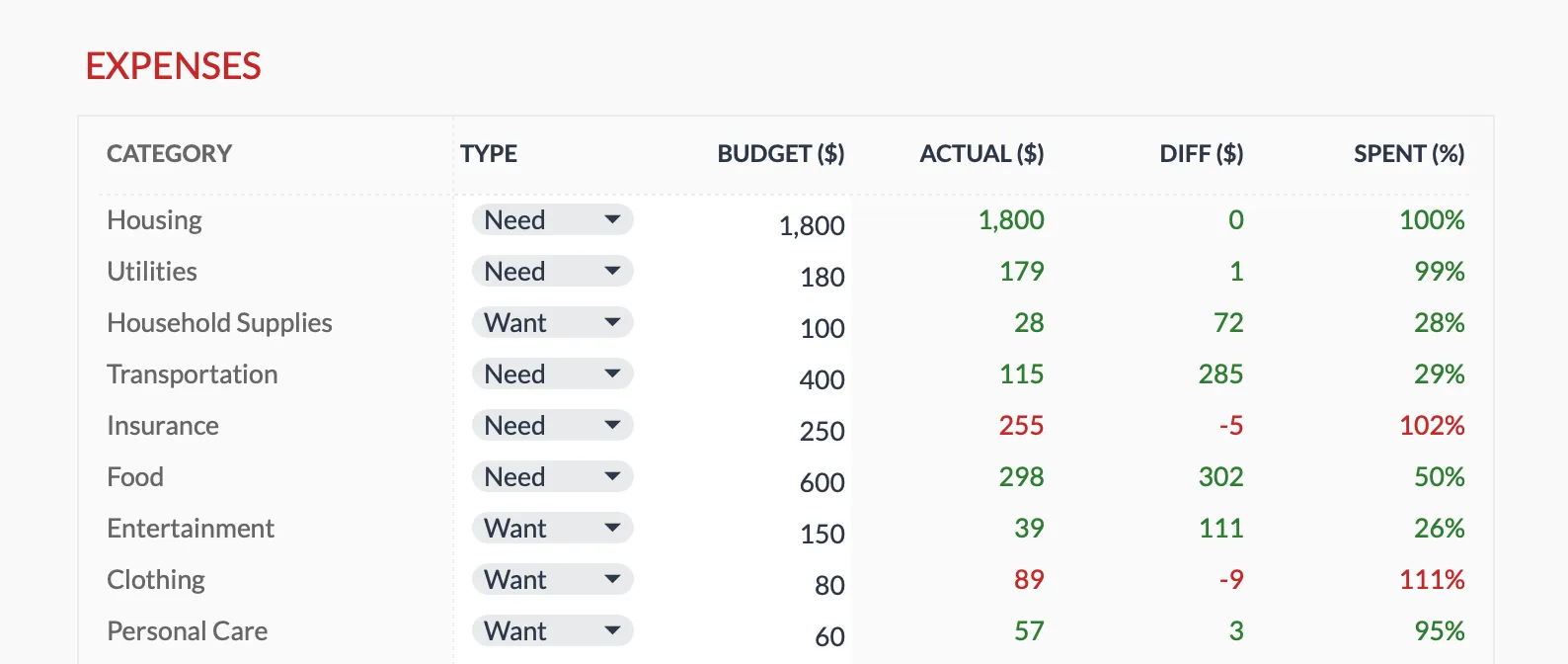
The Monthly Budget Template helps fit loan payments into the broader picture of monthly cash flow, where a fixed payment sits alongside every other category.
More on Debt & Payoff Strategies
- Debt Payoff Calculator: Snowball vs. Avalanche - Compare strategies for paying off multiple debts
- Credit Card Payoff Calculator: See Your Debt-Free Date - How the same interest-on-balance math plays out on revolving debt
- Auto Loan Payoff Calculator - The same amortization on a car loan, and what extra payments save
- Student Loan Payoff Calculator - How the front-loaded interest plays out over a 10-year repayment
Related
Frequently asked questions
Why does most of my early payment go to interest?
Because interest is calculated on the remaining balance. When the balance is highest (early in the loan), the interest portion is largest. As the balance decreases, more of each payment goes to principal.
Does a shorter loan term always save money?
Yes on total interest, but the monthly payment is higher. A 15-year mortgage has roughly 1.5x the monthly payment of a 30-year mortgage, but typically saves 50%+ in total interest.
What's the difference between APR and interest rate?
Interest rate is the cost of borrowing the principal. APR includes the interest rate plus other loan costs (origination fees, points) expressed as an annual rate. APR gives a more complete picture of total cost.
Can I calculate loan payments in a spreadsheet?
Yes. In Google Sheets or Excel, use =PMT(rate/12, term_months, -loan_amount). For example: =PMT(0.06/12, 360, -300000) for a $300,000 loan at 6% over 30 years.
If I make extra payments, does my monthly payment go down?
No. On a standard fixed-rate loan the monthly payment stays the same. Extra money goes to principal, so the loan finishes early rather than the payment shrinking. Some lenders let you 're-amortize' (recast) after a large lump sum, which does lower the payment, but that is a separate request, not automatic.
Why does my calculator's total interest differ from my lender's figure?
Small gaps usually come from rounding, the day-count method (some loans accrue daily rather than monthly), or fees rolled into the balance. A calculator using the standard monthly formula gives a close estimate; the loan agreement's amortization schedule is the exact record.
Sources
- What is the difference between a loan interest rate and the APR? - Consumer Financial Protection Bureau
About this article
Payment, interest, and amortization figures recomputed on 2026-09-10 with the standard amortization formula and the spreadsheet PMT function. Calculator inputs and outputs checked on 2026-09-10 against the shipped Loan Payment Calculator component (loan amount, annual rate and term in years; monthly payment, total payment, total interest, payoff date, and a principal versus interest chart). Monthly Budget Template claims checked on 2026-09-10 against the shipped Monthly Budgeting Google Sheet (Budget Plan tab). The distinction between interest rate and APR is checked against the Consumer Financial Protection Bureau. Last reviewed September 2026.